Page 20 of 465

The Vehicle Security Alarm is designed to protect your
vehicle; however, you can create conditions where the
Vehicle Security Alarm will give you a false alarm. If one
of the previously-described arming sequences has oc-
curred, the Vehicle Security Alarm will arm regardless of
whether you are in the vehicle or not. If you remain in the
vehicle and open a door, the alarm will sound. If this
occurs, disarm the Vehicle Security Alarm.
If the Vehicle Security Alarm is armed and the battery
becomes disconnected the Vehicle Security Alarm will
remain armed when the battery is reconnected. The
exterior lights will flash, the horn will sound, and the
ignition will not start the vehicle. If this occurs, disarm
the Vehicle Security Alarm.
Vehicles Equipped with Keyless Go
Either press the UNLOCK button on the RKE transmitter
or grasp the Passive Entry Unlock Door Handle (refer to
“Door Locks” in “Things To Know Before Starting” forfurther information), press the Keyless Go Start/Stop
button (requires at least one valid Key Fob in the vehicle),
or insert a valid Key Fob into the ignition switch (if the
Start/Stop button is removed) and rotate it to the RUN
position.
Tamper Alert
If something has triggered the Vehicle Security Alarm in
your absence, the horn will sound three times when you
disarm the Vehicle Security Alarm. Check the vehicle for
tampering.
ILLUMINATED ENTRY — IF EQUIPPED
The courtesy lights will turn on when you use the
Remote Keyless Entry (RKE) transmitter or unlock any
door.
The lights will fade to off after approximately 30 seconds
or they will immediately fade to off once the ignition
switch is turned ON from the LOCK position.
2
THINGS TO KNOW BEFORE STARTING YOUR VEHICLE 19
Page 21 of 465
NOTE:None of the courtesy lights will operate if the
dimmer control is in the “defeat” position (extreme
downward position), unless the overhead map/reading
lights are turned on manually.
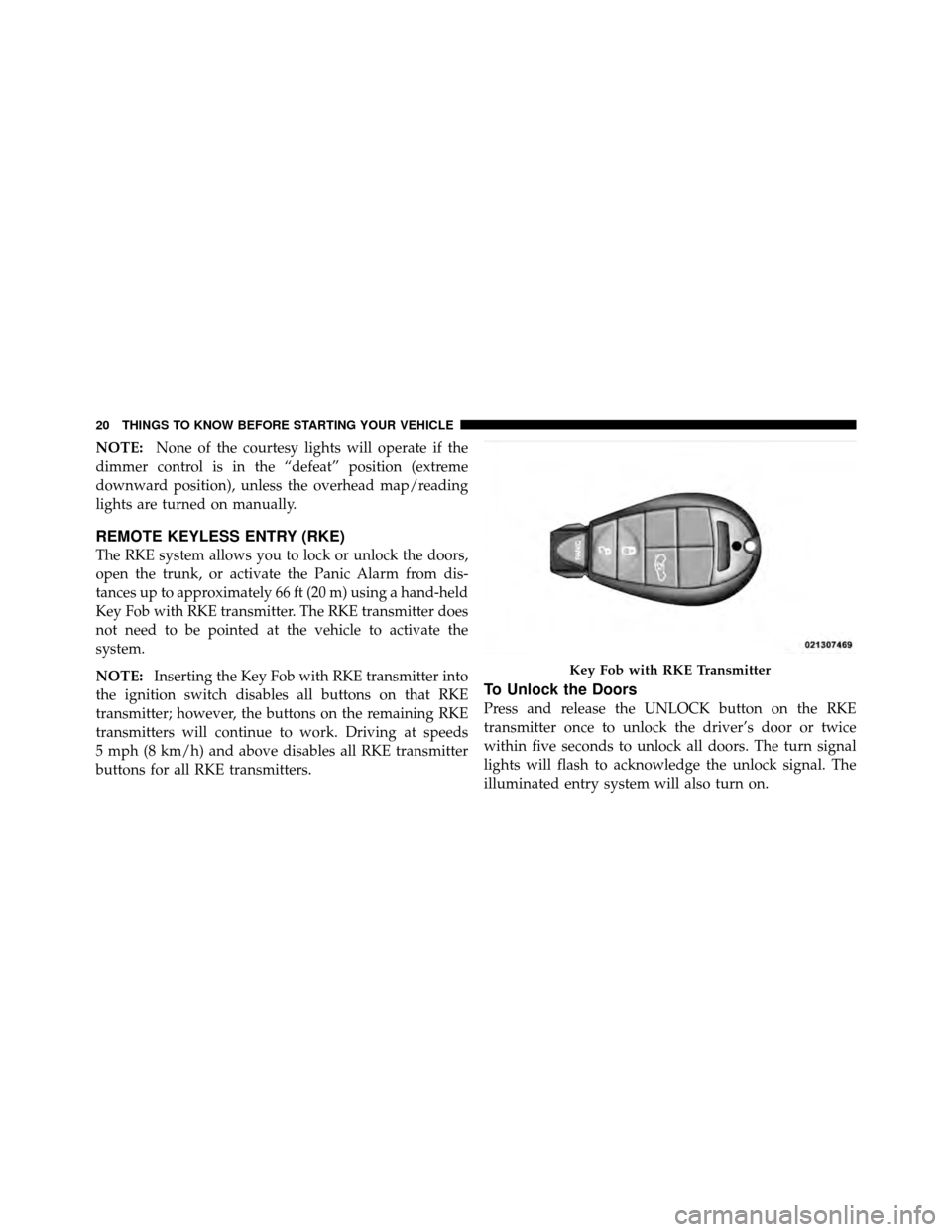
REMOTE KEYLESS ENTRY (RKE)
The RKE system allows you to lock or unlock the doors,
open the trunk, or activate the Panic Alarm from dis-
tances up to approximately 66 ft (20 m) using a hand-held
Key Fob with RKE transmitter. The RKE transmitter does
not need to be pointed at the vehicle to activate the
system.
NOTE: Inserting the Key Fob with RKE transmitter into
the ignition switch disables all buttons on that RKE
transmitter; however, the buttons on the remaining RKE
transmitters will continue to work. Driving at speeds
5 mph (8 km/h) and above disables all RKE transmitter
buttons for all RKE transmitters.
To Unlock the Doors
Press and release the UNLOCK button on the RKE
transmitter once to unlock the driver’s door or twice
within five seconds to unlock all doors. The turn signal
lights will flash to acknowledge the unlock signal. The
illuminated entry system will also turn on.
Key Fob with RKE Transmitter
20 THINGS TO KNOW BEFORE STARTING YOUR VEHICLE
Page 25 of 465

2. Remove and replace the battery. Avoid touching the
new battery with your fingers. Skin oils may cause
battery deterioration. If you touch a battery, clean it with
rubbing alcohol.
3. Reposition the access door panel over the battery
opening and snap into place.
General Information
This device complies with Part 15 of the FCC rules and
RSS 210 of Industry Canada. Operation is subject to the
following conditions:
•This device may not cause harmful interference.
•This device must accept any interference received,
including interference that may cause undesired
operation.
NOTE: Changes or modifications not expressly ap-
proved by the party responsible for compliance could
void the user’s authority to operate the equipment. If your RKE transmitter fails to operate from a normal
distance, check for these two conditions:
1. A weak battery in the transmitter. The expected life of
the battery is a minimum of three years.
2. Closeness to a radio transmitter such as a radio station
tower, airport transmitter, and some mobile or CB radios.
REMOTE STARTING SYSTEM — IF EQUIPPED
This system uses the Key Fob Remote Keyless
Entry (RKE) transmitter to start the engine
conveniently from outside the vehicle while
still maintaining security. The system has a
range of approximately 300 ft (91 m).
NOTE:
•The vehicle must be equipped with an automatic
transmission to be equipped with Remote Start.
•Obstructions between the vehicle and the Key Fob
may reduce this range.
24 THINGS TO KNOW BEFORE STARTING YOUR VEHICLE
Page 26 of 465
How to Use Remote Start
All of the following conditions must be met before the
engine will remote start:
•Shift lever in PARK
•Doors closed
•Hood closed
•Trunk closed
•Hazard switch off
•Brake switch inactive (brake pedal not pressed)
•Ignition key removed from ignition switch
•Battery at an acceptable charge level
•RKE PANIC button not pressedNOTE:
With Keyless Go, the remote start feature will
operate with the Start/Stop button installed in the igni-
tion switch.
WARNING!
•Do not start or run an engine in a closed garage or
confined area. Exhaust gas contains Carbon Mon-
oxide (CO) which is odorless and colorless. Car-
bon Monoxide is poisonous and can cause serious
injury or death when inhaled.
•Keep Remote Keyless Entry (RKE) transmitters
away from children. Operation of the Remote Start
System, windows, door locks or other controls
could cause serious injury or death.
2
THINGS TO KNOW BEFORE STARTING YOUR VEHICLE 25
Page 28 of 465

With Passive Entry
Use the Passive Entry feature to unlock the vehicle, press
the Start/Stop button one time if the Keyless Go Start/
Stop button is installed in the ignition switch, otherwise,
insert the Key Fob into the ignition switch and turn to the
RUN position. Refer to the “Passive Entry System” under
“Door Locks” for more information.
NOTE:
•For vehicles not equipped with Keyless Go feature, the
ignition switch must be in the ON position in order to
drive the vehicle.
•For vehicles not equipped with Keyless Go feature, the
message “Insert Key/Turn To On” will display in the
EVIC until you insert the Key Fob. Once inserted, the
message “Turn To On” will display in the EVIC until
you turn the Key Fob to ON.
•For vehicles equipped with Keyless Go feature, the
message “Push Button/Insert Key” will display in the
EVIC until you push the START button.
DOOR LOCKS
Manual Door Locks
To lock each door, push the door lock plunger on each
door trim panel downward. To unlock each door, pull the
door lock plunger on each door trim panel upward.
Door Lock Plunger
2
THINGS TO KNOW BEFORE STARTING YOUR VEHICLE 27
Page 29 of 465

If the door lock plunger is down when you shut the door,
the door will lock. Make sure the key is not inside the
vehicle before closing the door.
WARNING!
•For personal security and safety in the event of an
accident, lock the vehicle doors before you drive as
well as when you park and leave the vehicle.
•When leaving the vehicle, always remove the key
from the ignition and lock your vehicle. Unsuper-
vised use of vehicle equipment may cause severe
personal injuries and death.(Continued)
WARNING! (Continued)
•Never leave children alone in a vehicle. Leaving
unattended children in a vehicle is dangerous for a
number of reasons. A child or others could be
seriously or fatally injured. Don’t leave the key in
the ignition or leave a vehicle with Keyless Go in
the ACC or RUN position. A child could operate
power windows, other controls, or move the
vehicle.
Power Door Locks
A power door lock switch is on each front door trim
panel. Use this switch to lock or unlock the doors.
28 THINGS TO KNOW BEFORE STARTING YOUR VEHICLE
Page 30 of 465

If you press the power door lock switch while the Key
Fob is in the ignition, ACC or RUN position and any front
door is open, the power locks will not operate. This
prevents you from accidentally locking the Key Fob in
the vehicle. Removing the Key Fob, returning the ignition
mode to the OFF position, or closing the door will allowthe locks to operate. If a door is open, the Key Fob is in
the ignition OFF or ACC position, a chime will sound as
a reminder to remove the Key Fob.
If your vehicle is equipped with Keyless Go, opening the
driver’s door when the vehicle’s ignition switch is placed
in ACC or RUN (engine stopped) will cause the reminder
chime to sound. Refer to “Starting Procedures” in “Start-
ing And Operating” for further details.
Automatic Door Locks
The doors will lock automatically on vehicles with power
door locks if all of the following conditions are met:
1. The Automatic Door Locks feature is enabled.
2. The transmission is in gear.
3. All doors are closed.
4. The throttle is pressed.
5. The vehicle speed is above 15 mph (24 km/h).
Power Door Lock Switch
2
THINGS TO KNOW BEFORE STARTING YOUR VEHICLE 29
Page 31 of 465
6. The doors were not previously locked using the power
door lock switch or Remote Keyless Entry (RKE)
transmitter.
Automatic Door Locks Programming
The Automatic Door Locks feature can be enabled or
disabled as follows:
•For vehicles equipped with the Electronic Vehicle
Information Center (EVIC), refer to “Electronic Vehicle
Information Center (EVIC)/Personal Settings
(Customer-Programmable Features)” in “Understand-
ing Your Instrument Panel” for further information.
•For vehicles not equipped with the EVIC, perform the
following procedure:
1. Close all doors and place the Key Fob in the ignition
switch. 2. Cycle the ignition switch between OFF and RUN and
then back to OFF four times ending up in the OFF
position (do not start engine).
3. Press the power door LOCK switch to lock the doors.
4. A single chime will indicate the completion of the
programming.
5. Cycle the ignition after performing steps one to four
for the feature to be enabled or disabled.
6. Repeat these steps if you want to return this feature to
its previous setting.
NOTE:
Use the Automatic Door Locks feature in accor-
dance with local laws.
Automatic Unlock Doors on Exit
The doors will unlock automatically on vehicles with
power door locks if:
30 THINGS TO KNOW BEFORE STARTING YOUR VEHICLE
