2010 CHEVROLET IMPALA fuel
[x] Cancel search: fuelPage 187 of 432
Driver Information Center (DIC)Your vehicle has a Driver Information Center (DIC).
All messages will appear in the DIC display located
below the speedometer in the instrument panel cluster.
The DIC buttons are located on the instrument panel,
to the right of the instrument panel cluster.
The DIC comes on when the ignition is on. After a short
delay, the DIC will display the information that was
last displayed before the engine was turned off.
The DIC displays trip, fuel, and vehicle system
information, and warning messages if a system problem
is detected. The bottom line of the DIC shows the shift
lever position indicator. SeeAutomatic Transmission
Operation on page 3-24for more information.
If your vehicle has these features, the DIC also displays
the compass direction and the outside air temperature
when viewing the trip and fuel information. The compass
direction appears on the top right corner of the DIC
display. The outside air temperature automatically
appears in the bottom right corner of the DIC display.
If there is a problem with the system that controls the
temperature display, the numbers will be replaced with
dashes. If this occurs, have the vehicle serviced by your
dealer/retailer.
The DIC also allows some features to be customized.
SeeDIC Vehicle Customization on page 4-51for
more information.
DIC Operation and DisplaysThe DIC has different displays which can be accessed
by pressing the DIC buttons located on the instrument
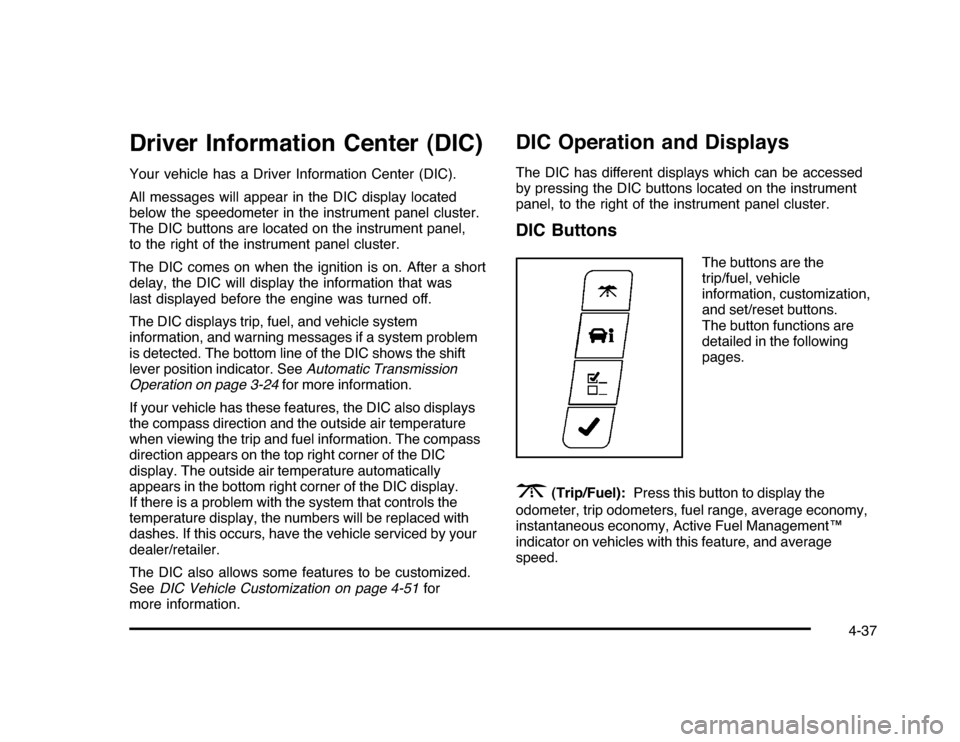
panel, to the right of the instrument panel cluster.DIC Buttons
The buttons are the
trip/fuel, vehicle
information, customization,
and set/reset buttons.
The button functions are
detailed in the following
pages.
3
(Trip/Fuel):Press this button to display the
odometer, trip odometers, fuel range, average economy,
instantaneous economy, Active Fuel Management™
indicator on vehicles with this feature, and average
speed.
4-37
Page 188 of 432

T
(Vehicle Information):Press this button to display
the oil life, units, tire pressure readings, compass
zone and compass calibration on vehicles with this
feature, and Remote Keyless Entry (RKE) transmitter
programming.
U
(Customization):Press this button to customize
the feature settings on your vehicle. SeeDIC Vehicle
Customization on page 4-51for more information.
V
(Set/Reset):Press this button to set or reset certain
functions and to turn off or acknowledge messages
on the DIC.
Trip/Fuel Menu Items
3
(Trip/Fuel):Press this button to scroll through the
following menu items:
OdometerPress the trip/fuel button until ODOMETER displays.
This display shows the distance the vehicle has
been driven in either miles (mi) or kilometers (km).
Trip A and Trip BPress the trip/fuel button until TRIP A or TRIP B
displays. This display shows the current distance
traveled in either miles (mi) or kilometers (km) since the
last reset for each trip odometer. Both trip odometers
can be used at the same time.
Each trip odometer can be reset to zero separately
by pressing the set/reset button while the desired trip
odometer is displayed.
The trip odometer has a feature called the retro-active
reset. This can be used to set the trip odometer to the
number of miles (kilometers) driven since the ignition was
last turned on. This can be used if the trip odometer is not
reset at the beginning of the trip.
To use the retro-active reset feature, press and hold
the set/reset button for at least four seconds. The trip
odometer will display the number of miles (mi) or
kilometers (km) driven since the ignition was last turned
on and the vehicle was moving. Once the vehicle begins
moving, the trip odometer will accumulate mileage.
For example, if the vehicle was driven 5 miles (8 km)
before it is started again, and then the retro-active reset
feature is activated, the display will show 5 miles (8 km).
As the vehicle begins moving, the display will then
increase to 5.1 miles (8.2 km), 5.2 miles (8.4 km), etc.
4-38
Page 189 of 432

If the retro-active reset feature is activated after the
vehicle is started, but before it begins moving, the display
will show the number of miles (mi) or kilometers (km) that
were driven during the last ignition cycle.Fuel RangePress the trip/fuel button until FUEL RANGE displays.
This display shows the approximate number of remaining
miles (mi) or kilometers (km) the vehicle can be driven
without refueling.
The fuel range estimate is based on an average of the
vehicle’s fuel economy over recent driving history and the
amount of fuel remaining in the fuel tank. This estimate
will change if driving conditions change. For example, if
driving in traffic and making frequent stops, this display
may read one number, but if the vehicle is driven on a
freeway, the number may change even though the same
amount of fuel is in the fuel tank. This is because different
driving conditions produce different fuel economies.
Generally, freeway driving produces better fuel economy
than city driving.
If your vehicle is low on fuel, the FUEL LEVEL LOW
message displays. See “FUEL LEVEL LOW” underDIC
Warnings and Messages on page 4-44for more
information.
Average EconomyPress the trip/fuel button until AVG ECONOMY displays.
This display shows the approximate average miles
per gallon (mpg) or liters per 100 kilometers (L/100 km).
This number is calculated based on the number of
mpg (L/100 km) recorded since the last time this menu
item was reset. To reset this display to zero, press
and hold the set/reset button.Instantaneous EconomyPress the trip/fuel button until INST ECONOMY displays.
This display shows the current fuel economy at a
particular moment and will change frequently as driving
conditions change. This display shows the instantaneous
fuel economy in miles per gallon (mpg) or liters per
100 kilometers (L/100 km). Unlike average economy,
this screen cannot be reset.Average SpeedPress the trip/fuel button until AVERAGE SPEED
displays. This display shows the average speed of the
vehicle in miles per hour (mph) or kilometers per hour
(km/h). This average is calculated based on the various
vehicle speeds recorded since the last reset of this value.
To reset the value, press and hold the set/reset button.
The display will return to zero.Blank DisplayThis display shows no information.
4-39
Page 192 of 432
DIC CompassYour vehicle may have a compass in the Driver
Information Center (DIC).Compass ZoneYour dealer/retailer will set the correct zone for your
location.
Under certain circumstances, such as during a long
distance cross-country trip or moving to a new state
or province, it will be necessary to compensate for
compass variance by resetting the zone through the
DIC if the zone is not set correctly.
Compass variance is the difference between the earth’s
magnetic north and true geographic north. If the compass
is not set to the zone where you live, the compass may
give false readings. The compass must be set to the
variance zone in which the vehicle is traveling.
To adjust for compass variance, use the following
procedure:Compass Variance (Zone) Procedure1. Do not set the compass zone when the vehicle is
moving. Only set it when the vehicle is in P (Park).
Press the vehicle information button until
PRESS
V
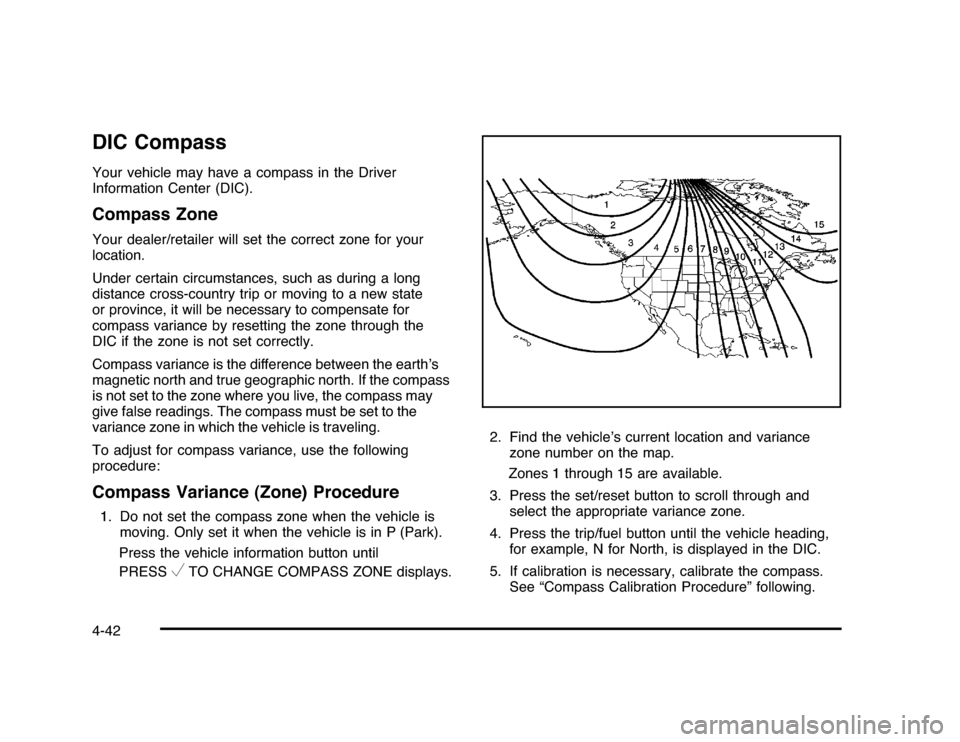
TO CHANGE COMPASS ZONE displays.2. Find the vehicle’s current location and variance
zone number on the map.
Zones 1 through 15 are available.
3. Press the set/reset button to scroll through and
select the appropriate variance zone.
4. Press the trip/fuel button until the vehicle heading,
for example, N for North, is displayed in the DIC.
5. If calibration is necessary, calibrate the compass.
See “Compass Calibration Procedure” following.
4-42
Page 196 of 432
ERRORThis message displays while viewing the odometer or
trip odometers if there is a problem with the instrument
panel cluster. See your dealer/retailer for service.FUEL LEVEL LOWThis message displays when your vehicle is low on
fuel. Refill the fuel tank as soon as possible. SeeFuel
Gage on page 4-36andFilling the Tank on page 6-10
for more information.HOOD OPENIf your vehicle has the remote start feature, this
message displays when the hood is not closed
properly. Make sure that the hood is closed completely.
SeeHood Release on page 6-13.ICE POSSIBLE DRIVE WITH CAREThis message displays when the outside air temperature
is cold enough to create icy road conditions. Adjust
your driving accordingly.LEFT REAR DOOR OPENThis message displays when the driver side rear door is
not closed properly. Make sure that the door is closed
completely.
OIL PRESSURE LOW STOP ENGINENotice:If you drive your vehicle while the engine
oil pressure is low, severe engine damage may
occur. If a low oil pressure warning appears on the
Driver Information Center (DIC), stop the vehicle
as soon as possible. Do not drive the vehicle until
the cause of the low oil pressure is corrected.
SeeEngine Oil on page 6-15for more information.
This message displays when the vehicle’s engine
oil pressure is low. The oil pressure light also appears
on the instrument panel cluster. SeeOil Pressure
Light on page 4-34.
Stop the vehicle immediately, as engine damage can
result from driving a vehicle with low oil pressure.
Have the vehicle serviced by your dealer/retailer as
soon as possible when this message is displayed.PASSENGER DOOR OPENThis message displays when the front passenger door
is not closed properly. Make sure that the door is closed
completely.
4-46
Page 207 of 432
Exiting the Feature Settings MenuThe feature settings menu will be exited when any of
the following occurs:•
The vehicle is shifted out of P (Park).
•
The vehicle is no longer in ON/RUN.
•
The trip/fuel or vehicle information DIC buttons are
pressed.
•
The end of the feature settings menu is reached
and exited.
•
A 40 second time period has elapsed with no
selection made.
Audio System(s)Determine which radio the vehicle has and read the
following pages to become familiar with its features.
{
WARNING:
Taking your eyes off the road for extended periods
could cause a crash resulting in injury or death to
you or others. Do not give extended attention to
entertainment tasks while driving.This system provides access to many audio and non
audio listings.
To minimize taking your eyes off the road while driving,
do the following while the vehicle is parked:
•
Become familiar with the operation and controls of
the audio system.
•
Set up the tone, speaker adjustments, and preset
radio stations.
For more information, seeDefensive Driving on
page 5-2.
Notice:Contact your dealer/retailer before adding
any equipment.
Adding audio or communication equipment could
interfere with the operation of the vehicle’s engine,
radio, or other systems, and could damage them.
Follow federal rules covering mobile radio and
telephone equipment.
The vehicle has Retained Accessory Power (RAP).
With RAP, the audio system can be played even after
the ignition is turned off. SeeRetained Accessory Power
(RAP) on page 3-21for more information.
4-57
Page 251 of 432
Before Leaving on a Long TripTo prepare your vehicle for a long trip, consider having
it serviced by your dealer/retailer before departing.
Things to check on your own include:•
Windshield Washer Fluid:Reservoir full? Windows
clean — inside and outside?
•
Wiper Blades:In good shape?
•
Fuel, Engine Oil, Other Fluids:All levels checked?
•
Lamps:Do they all work and are lenses clean?
•
Tires:Are treads good? Are tires inflated to
recommended pressure?
•
Weather and Maps:Safe to travel? Have
up-to-date maps?
Highway HypnosisAlways be alert and pay attention to your surroundings
while driving. If you become tired or sleepy, find a
safe place to park your vehicle and rest.
Other driving tips include:•
Keep the vehicle well ventilated.
•
Keep interior temperature cool.
•
Keep your eyes moving — scan the road ahead
and to the sides.
•
Check the rearview mirror and vehicle instruments
often.
5-15
Page 254 of 432
Blizzard ConditionsBeing stuck in snow can be in a serious situation. Stay
with the vehicle unless there is help nearby. If possible,
use theRoadside Assistance Program on page 8-7.To
get help and keep everyone in the vehicle safe:•
Turn on theHazard Warning Flashers on page 4-3.
•
Tie a red cloth to an outside mirror.{
WARNING:
Snow can trap engine exhaust under the vehicle.
This may cause exhaust gases to get inside.
Engine exhaust contains carbon monoxide (CO)
which cannot be seen or smelled. It can cause
unconsciousness and even death.
If the vehicle is stuck in the snow:
•
Clear away snow from around the base of
your vehicle, especially any that is blocking
the exhaust pipe.
•
Check again from time to time to be sure
snow does not collect there.
WARNING: (Continued)
WARNING: (Continued)
•
Open a window about 5 cm (two inches) on
the side of the vehicle that is away from the
wind to bring in fresh air.
•
Fully open the air outlets on or under the
instrument panel.
•
Adjust the Climate Control system to a setting
that circulates the air inside the vehicle and
set the fan speed to the highest setting. See
Climate Control System in the Index.
For more information about carbon monoxide, see
Engine Exhaust on page 3-31.
Snow can trap exhaust gases under your vehicle.
This can cause deadly CO (carbon monoxide) gas
to get inside. CO could overcome you and kill you.
You cannot see it or smell it, so you might not
know it is in your vehicle. Clear away snow from
around the base of your vehicle, especially any
that is blocking the exhaust.
Run the engine for short periods only as needed to
keep warm, but be careful.
To save fuel, run the engine for only short periods as
needed to warm the vehicle and then shut the engine off
and close the window most of the way to save heat.
5-18