2010 CHEVROLET CORVETTE audio
[x] Cancel search: audioPage 260 of 472
Connect a 3.5 mm (1/8 in.) cable to the radio’s front
auxiliary input jack to use a portable audio player.
The radio displays AUX INPUT DEVICE when a device
is connected and begins playing audio from that device.
Top Knob (Power/Volume) : Turn to increase or
decrease the volume of the portable player. Additional
volume adjustments can be made from the portable
device.
BAND : Press to listen to the radio while a portable
audio device is playing. The portable audio device
continues playing.
CD/AUX (CD/Auxiliary) : Press to play a CD while a
portable audio device is playing. Press again and the
system begins playing audio from the connected
portable audio player. If a portable audio player is
connected, AUX INPUT DEVICE displays. If a portable
audio player is not connected, AUX INPUT DEVICE
does not display.Using an MP3
MP3 Format
Radios with the MP3 feature can only play CD-R discs.
Do not mix standard audio and MP3 files on the
same disc.
Supported File Structure
Radios with the MP3 feature support up to:
.50 folders.
.11 folders in depth.
.50 playlists.
.255 files.
.10 sessions.
Root Directory:
The root directory is treated as a folder. Files are stored
in the root directory when the disc or storage device
does not contain folders. Files accessed from the root
directory display as F1 ROOT.
Empty Folder:
Folders that do not contain files are skipped, and the
player advances to the next folder that contains files.
4-92
Page 261 of 472
Supported Bit Rates
The following bit rates are supported: 32 kbps,
40 kbps, 56 kbps, 64 kbps, 80 kbps, 96 kbps, 112 kbps,
128 kbps, 160 kbps, 192 kbps, 224 kbps, 256 kbps,
and 320 kbps or a variable bit rate.
File Naming
ID3v1 and ID3v2 tags are supported. The track name
contained in the ID3 tag is shown on the display. The
display only shows up to 32 characters for track and file
names.
If the track name is not contained in the ID3 tag, the
display shows the file name without the file extension.
Playlists
Playlists that do not have a .m3u or .wpl extension may
not work.
Preprogrammed playlists created by WinAmp™,
MusicMatch™, or Real Jukebox™ software are
supported and they cannot be edited using the radio.
Playing an MP3
Insert a CD partway into the slot, label side up.
The player pulls it in, and READING displays. The CD
should begin playing and the CD symbol displays.
If the ignition or radio is turned off with a CD-R in the
player, it stays in the player. When the ignition or radio
is turned on, the CD-R starts to play where it stopped,
if it was the last selected audio source.
As each new track starts to play, the track number
displays.
Order of Play
Tracks are played sequentially in the following order:
1. Playlists.
2. Files contained in the root directory.
3. Files contained in folders.
O/e(Tune): Turn to go to the next or previous track.
{(Previous Folder): Press to go to the first track in
the previous folder. Press and hold to reverse through
the current track.
4-93
Page 263 of 472
XM Radio Messages
XL (Explicit Language Channels) :These
channels, or any others, can be blocked by calling
1-800-852-XMXM (9696).
Updating : The encryption code in the receiver is being
updated, and no action is required. This process should
take no longer than 30 seconds.
No Signal : The system is functioning correctly, but the
vehicle is in a location that is blocking the XM signal.
When the vehicle is moved into an open area, the
signal should return.
Loading XM : The audio system is acquiring and
processing audio and text data. No action is needed.
This message should disappear shortly.
CH Off Air : This channel is not currently in service.
Tune in to another channel.
CH Unauth : This channel is blocked or cannot be
received with your XM Subscription package.
CH Unavail : This previously assigned channel is no
longer assigned. Tune to another station. If this station
was one of the presets, choose another station for that
preset button. No Info :
No artist, song title, category, or text
information is available at this time on this channel.
The system is working properly.
Not Found : There are no channels available for the
selected category. The system is working properly.
XM Locked : The XM receiver in the vehicle may
have previously been in another vehicle. For security
purposes, XM receivers cannot be swapped between
vehicles. If this message is received after having the
vehicle serviced, check with your dealer/retailer.
Radio ID : If tuned to channel 0, this message will
alternate with the XM Radio 8 digit radio ID label.
This label is needed to activate the service.
Unknown : If this message is received when tuned to
channel 0, there may be a receiver fault. Consult with
your dealer/retailer.
Chk XMRcvr : If this message does not clear within a
short period of time, the receiver may have a fault.
Consult with your dealer/retailer.
4-95
Page 264 of 472
Navigation/Radio System
For vehicles with a navigation radio system, see the
separate Navigation System manual.
Bluetooth®
Vehicles with a Bluetooth system can use a Bluetooth
capable cell phone with a Hands Free Profile to make
and receive phone calls. The system can be used while
the key is in ON/RUN or ACC/ACCESSORY position.
The range of the Bluetooth system can be up to
9.1 m (30 ft). Not all phones support all functions,
and not all phones are guaranteed to work with
the in-vehicle Bluetooth system. See www.gm.com/
bluetooth for more information on compatible phones.
Voice Recognition
The Bluetooth system uses voice recognition to
interpret voice commands to dial phone numbers and
name tags.
Noise : Keep interior noise levels to a minimum.
The system may not recognize voice commands
if there is too much background noise.
When to Speak : A short tone sounds after the system
responds indicating when it is waiting for a voice
command. Wait until the tone and then speak.
How to Speak : Speak clearly in a calm and natural
voice.
Audio System
When using the in‐vehicle Bluetooth system, sound
comes through the vehicle's front audio system
speakers and over‐rides the audio system. Use the
audio system volume knob, during a call, to change
the volume level. The adjusted volume level remains
in memory for later calls. To prevent missed calls, a
minimum volume level is used if the volume is turned
down too low.
Bluetooth Controls
Use the buttons located on the steering wheel to
operate the in‐vehicle Bluetooth system. See Audio
Steering Wheel Controls
on page 4‑107for more
information.
b g(Push To Talk) : Press to answer incoming calls,
to confirm system information, and to start speech
recognition.
c(Phone On Hook): Press to end a call, reject a
call, or to cancel an operation.
4-96
Page 270 of 472
Using the Digit Dial Command
1. Press and holdbgfor two seconds. The system
responds with “Ready”followed by a tone.
2. Say “Digit Dial”. The system responds with “Digit
dial using
to dial” followed by a tone.
3. Say the digit to be dialed one at a time. Following each digit, the system will repeat back the digit it
heard followed by a tone.
4. Continue entering digits until the number to be dialed is complete. After the whole number has
been entered, say “Dial”. The system responds
with “OK, Dialing” and dials the number.
.If an unwanted number is recognized by the
system, say “Clear”at any time to clear the last
number.
.To hear all of the numbers recognized by the
system, say “Verify”at any time and the system
will repeat them.
Using the Call Command
1. Press and holdb gfor two seconds. The system
responds with “Ready”followed by a tone.
2. Say “Call”. The system responds with “Call using
by a tone.
3. Say the name tag of the person to call.
.If the system clearly recognizes the name tag it
responds with “OK, calling,
dials the number.
.If the system is unsure it recognizes the right
name tag, it confirms the name tag followed by
a tone. If the name tag is correct, say “Yes”.
The system responds with “OK, calling,
not correct, say “No”. The system will ask for
the name tag to be re‐entered.
Once connected, the person called will be heard
through the audio speakers.
4-102
Page 271 of 472
Using the Re‐dial Command
1. Press and holdbgfor two seconds. The system
responds with “Ready”followed by a tone.
2. After the tone, say “Re‐dial”. The system responds
with “Re‐dial using
last number called from the connected Bluetooth
phone.
Once connected, the person called will be heard
through the audio speakers.
Receiving a Call
When an incoming call is received, the audio system
mutes and a ring tone is heard in the vehicle.
.Pressb gand begin speaking to answer the call.
.Presscto ignore a call.
Call Waiting
Call waiting must be supported on the Bluetooth phone
and enabled by the wireless service carrier to work.
.Pressb gto answer an incoming call when
another call is active. The original call is placed
on hold.
.Pressb gagain to return to the original call.
.To ignore the incoming call, continue with the
original call with no action.
.Presscto disconnect the current call and switch
to the call on hold.
Three‐Way Calling
Three‐Way Calling must be supported on the Bluetooth
phone and enabled by the wireless service carrier
to work.
1. While on a call press
b g. The system responds
with “Ready” followed by a tone.
2. Say “Three‐way call”. The system responds with
“Three‐way call, please say dial or call”.
3. Use the dial or call command to dial the number of the third party to be called.
4. Once the call is connected, press
b gto link all
the callers together.
4-103
Page 272 of 472
Ending a Call
Presscto end a call.
Muting a Call
During a call, all sounds from inside the vehicle can be
muted so that the person on the other end of the call
cannot hear them.
To Mute a call
1. Pressb g. The system responds with “Ready”
followed by a tone.
2. Say “Mute Call”. The system responds with
“Call muted”.
To Cancel Mute
1. Pressb g. The system responds with “Ready”
followed by a tone.
2. After the tone, say “Mute Call”. The system
responds with “Resuming call”.
Transferring a Call
Audio can be transferred between the in‐vehicle
Bluetooth system and the cell phone.
To Transfer Audio to the Cell Phone
During a call with the audio in the vehicle:
1. Press
b g. The system responds with “Ready”
followed by a tone.
2. Say “Transfer Call.” The system responds with
“Transferring call” and the audio will switch from
the vehicle to the cell phone.
To Transfer Audio to the In-Vehicle
Bluetooth System
The cellular phone must be paired and connected with
the Bluetooth system before a call can be transferred.
The connection process can take up to two minutes
after the key is turned to the ON/RUN or ACC/
ACCESSORY position.
During a call with the audio on the cell phone,
press
b gfor more than two seconds. The audio
switches from the cell phone to the vehicle.
4-104
Page 275 of 472
Audio Steering Wheel Controls
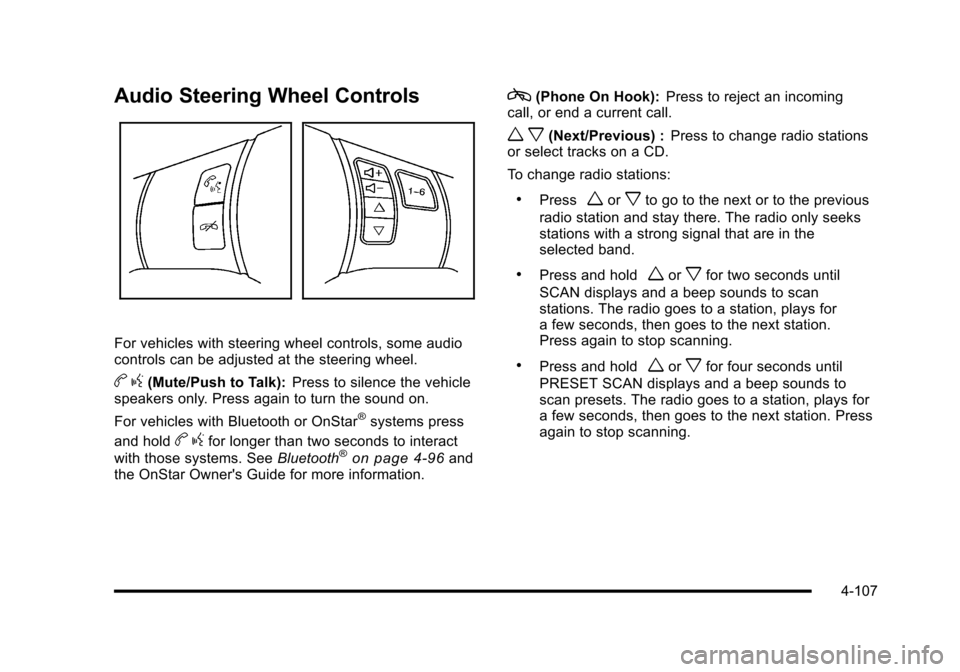
For vehicles with steering wheel controls, some audio
controls can be adjusted at the steering wheel.
b g(Mute/Push to Talk): Press to silence the vehicle
speakers only. Press again to turn the sound on.
For vehicles with Bluetooth or OnStar
®systems press
and hold
b gfor longer than two seconds to interact
with those systems. See Bluetooth®on page 4‑96and
the OnStar Owner's Guide for more information.
c(Phone On Hook): Press to reject an incoming
call, or end a current call.
w x(Next/Previous) : Press to change radio stations
or select tracks on a CD.
To change radio stations:
.Pressworxto go to the next or to the previous
radio station and stay there. The radio only seeks
stations with a strong signal that are in the
selected band.
.Press and holdworxfor two seconds until
SCAN displays and a beep sounds to scan
stations. The radio goes to a station, plays for
a few seconds, then goes to the next station.
Press again to stop scanning.
.Press and holdworxfor four seconds until
PRESET SCAN displays and a beep sounds to
scan presets. The radio goes to a station, plays for
a few seconds, then goes to the next station. Press
again to stop scanning.
4-107