2010 CADILLAC ESCALADE radio controls
[x] Cancel search: radio controlsPage 297 of 616

PROG (Program) :Press this button to go to the nextpreset radio station or channel set on the main radio.This function is inactive, with some radios, if the frontseat passengers are listening to the radio.
When a CD or DVD audio disc is playing, press thisbutton to go to the beginning of the CD or DVD audio.This function is inactive, with some radios, if the frontseat passengers are listening to the disc.
When a disc is playing in the CD or DVD changer, pressthis button to select the next disc, if multiple discs areloaded. This function is inactive, with some radios, if thefront seat passengers are listening to the disc.
When a DVD video menu is being displayed, press thePROG button to perform the menu function, enter.
Theft-Deterrent Feature
THEFTLOCK®is designed to discourage theft of thevehicle's radio by learning a portion of the VehicleIdentification Number (VIN). The radio does not operateif it is stolen or moved to a different vehicle.
Audio Steering Wheel Controls
Vehicles with audiosteering wheel controlscould differ depending onthe vehicle's options.Some audio controls canbe adjusted at thesteering wheel.
w/x(Next / Previous):Press to select preset orfavorite radio stations, select tracks/chapters on aCD/DVD, or to navigate an iPod®or USB device.
To select tracks on an iPod or USB device, see“Navigating an iPod or USB Device”later in this section.
4-105
Page 298 of 616

Radio
To select preset or favorite radio stations:
Press and releaseworxto go to the next or previous
radio station stored as a preset or favorite.
CD/DVD
To select tracks/chapters on a CD/DVD:
Press and releaseworxto go to the next or previous
track/chapter.
bg(Mute/Push to Talk):Press to silence the vehiclespeakers only. Press again to turn the sound on.
For vehicles with Bluetooth or OnStar®systems, pressand hold for longer than two seconds to interact withthose systems. SeeBluetooth®on page 4!67and theOnStar Owner's Guide for more information.
c(End):Press to reject an incoming call, or end acurrent call.
SRCE (Source/Voice Recognition) :Press to switchbetween the radio, CD, DVD, and rear auxiliary,if equipped.
Press and hold this button for longer than one secondto initiate voice recognition. SeeVoice Recognitiononpage 5!86for more information.
¨(Seek):Press to go to the next radio station while inAM, FM, or XM™.
To scan available radio stations:
1. Press and hold¨until a beep is heard, to place
the radio into SCAN mode, a station will play forfive seconds before moving to the next station.
2. To stop the SCAN function, press¨again.
While listening to a CD press and release¨to select
the next disc.
+e!e(Volume):Press to increase or to decrease
the volume.
Navigating an iPod or USB Device
Audio steering wheel controls can be used to navigatean iPod or USB device while on the main audio screenor the music navigator screen.
Main Audio Screen
Press and releaseworxto select the next or
previous track.
Press and holdworxto select the next or previous
category/folder, if available.
Press and release¨to enter the music
navigator menu.
4-106
Page 312 of 616

Features and Controls
Using the Navigation System
This section presents basic information needed tooperate the navigation system.
Use the hard keys located on the navigation systemalong with the available touch-sensitive screen buttonson the navigation screen to operate the system. SeeNavigation System Overviewo n p a g e 5!2for moreinformation.
Once the vehicle is moving, various functions aredisabled to reduce driver distractions.
Hard Keys
The following hard keys are located on the navigationsystem:
O/n(Power/Volume):Press to turn the systemon and off. Turn to increase or decrease the volume tothe audio system.
Press and hold for more than two seconds to turn offthe navigation system, the Rear Seat Entertainment(RSE), and Rear Seat Audio (RSA). If the vehicle hasnot been tuned off, the RSE and the RSA can be turnedback on by pressing this knob and continues play of thelast active source.
w(Tune):Turn to go to the next or previous radiostation or disc track or chapter. SeeNavigation AudioSystemon page 5!60,CD Playeron page 5!68,orDVD Playeron page 5!75for more information.
Z(DVD Map Disc Eject):Press to eject the DVDmap disc. This button is located next to the upper discslot. SeeMapson page 5!14for more information.
M(Load):Press to load CDs or audio/video DVDs. SeeCD Playeron page 5!68orDVD Playeron page 5!75for more information.
Z(CD/DVD Eject):Press to eject CDs or audio/videoDVDs. This button is located under the load button. SeeCD Playeron page 5!68orDVD Playeron page 5!75for more information.
M(Disc Up/Down):Press the up or down arrows to goto the next or previous disc.
AUDIO :Press access the full Audio screen to changeAM, FM, XM™Satellite Radio Service (if equipped),CD/DVD, and auxiliary input. See“Audio”underNavigation Audio Systemon page 5!60for moreinformation.
FAV (Favorite) :Press to access the preset stations.See“Storing Radio Station Presets”underNavigationAudio Systemon page 5!60for more information.
5-12
Page 382 of 616
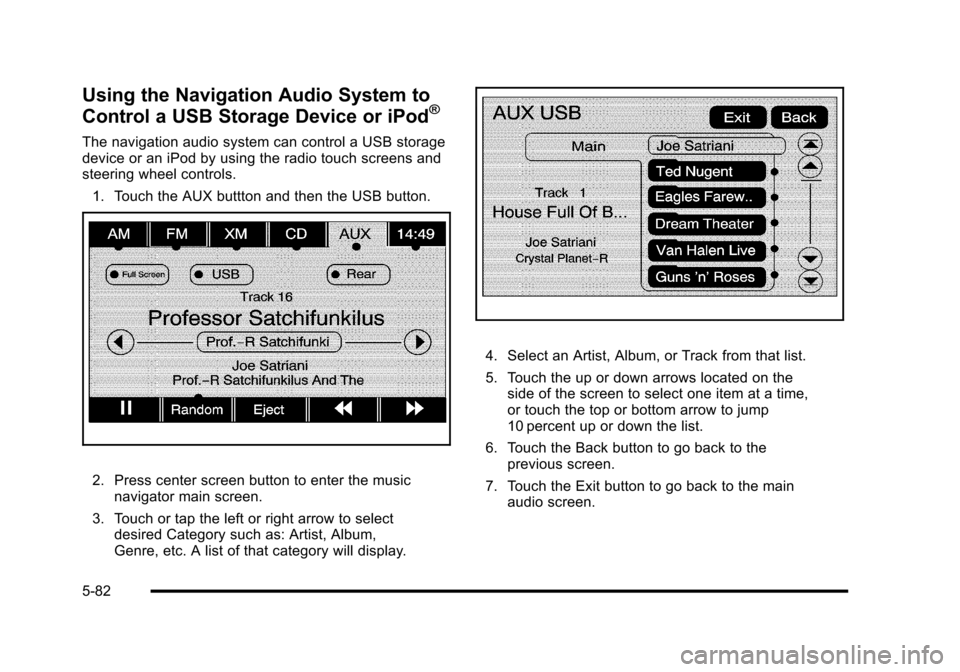
Using the Navigation Audio System to
Control a USB Storage Device or iPod®
The navigation audio system can control a USB storagedevice or an iPod by using the radio touch screens andsteering wheel controls.
1. Touch the AUX buttton and then the USB button.
2. Press center screen button to enter the musicnavigator main screen.
3. Touch or tap the left or right arrow to selectdesired Category such as: Artist, Album,Genre, etc. A list of that category will display.
4. Select an Artist, Album, or Track from that list.
5. Touch the up or down arrows located on theside of the screen to select one item at a time,or touch the top or bottom arrow to jump10 percent up or down the list.
6. Touch the Back button to go back to theprevious screen.
7. Touch the Exit button to go back to the mainaudio screen.
5-82
Page 600 of 616

Appearance Care (cont.)
Underbody Maintenance . . . . . . . . . . . . . . . . . . . . . . . . .7-106
Washing Your Vehicle . . . . . . . . . . . . . . . . . . . . . . . . . . .7-102
Weatherstrips . . . . . . . . . . . . . . . . . . . . . . . . . . . . . . . . . . . .7-102
Windshield, Backglass, and Wiper Blades . . . . . . .7-104
Wood Panels . . . . . . . . . . . . . . . . . . . . . . . . . . . . . . . . . . . .7-101
Ashtray . . . . . . . . . . . . . . . . . . . . . . . . . . . . . . . . . . . . . . . . . . . . 4-20
Assist Handles . . . . . . . . . . . . . . . . . . . . . . . . . . . . . . . . . . . . 3-64
Audio System . . . . . . . . . . . . . . . . . . . . . . . . . . . . . . . . . . . . . . 4-67
Audio Steering Wheel Controls . . . . . . . . . . . . . . . . . .4-105
Radio . . . . . . . . . . . . . . . . . . . . . . . . . . . . . . . . . . . . . . . . . . . . . 5-60
Radio Reception . . . . . . . . . . . . . . . . . . . . . . . . . . . . . . . . .4-107
Rear Seat (RSA) . . . . . . . . . . . . . . . . . . . . . . . . . . . . . . . .4-103
Theft-Deterrent Feature . . . . . . . . . . . . . . . . . . . . . . . . . .4-105
XM™Satellite Radio Antenna System . . . . . . . . . . .4-108
Automatic Headlamp System . . . . . . . . . . . . . . . . . . . . . . 4-15
Automatic Transmission
Fluid . . . . . . . . . . . . . . . . . . . . . . . . . . . . . . . . . . . . . . . . . . . . . . 7-24
Operation . . . . . . . . . . . . . . . . . . . . . . . . . . . . . . . . . . . . . . . . . 3-32
Autoride®. . . . . . . . . . . . . . . . . . . . . . . . . . . . . . . . . . . . . . . . . . 6-42
Axle, Rear . . . . . . . . . . . . . . . . . . . . . . . . . . . . . . . . . . . . . . . . . 7-50
B
Back-Up Lamps - Ambulance Body
Bulb Replacement . . . . . . . . . . . . . . . . . . . . . . . . . . . . . . . . 7-55
Battery . . . . . . . . . . . . . . . . . . . . . . . . . . . . . . . . . . . . . . . . . . . . 7-43
Electric Power Management . . . . . . . . . . . . . . . . . . . . . . 4-18
Run-Down Protection . . . . . . . . . . . . . . . . . . . . . . . . . . . . . 4-18
Belt Routing, Engine . . . . . . . . . . . . . . . . . . . . . . . . . . . . . . . 8-13
Bench Seat, Split (60/40) . . . . . . . . . . . . . . . . . . . . . . . . . . 2-10
Bluetooth®. . . . . . . . . . . . . . . . . . . . . . . . . . . . . . . . . . . . . . . . . 4-67
Brake
Emergencies . . . . . . . . . . . . . . . . . . . . . . . . . . . . . . . . . . . . . . 6-6
Pedal and Adjustable Throttle . . . . . . . . . . . . . . . . . . . . 3-30
Brakes . . . . . . . . . . . . . . . . . . . . . . . . . . . . . . . . . . . . . . . . . . . . . 7-40
Antilock . . . . . . . . . . . . . . . . . . . . . . . . . . . . . . . . . . . . . . . . . . . . 6-5
Parking . . . . . . . . . . . . . . . . . . . . . . . . . . . . . . . . . . . . . . . . . . . 3-38
System Warning Light . . . . . . . . . . . . . . . . . . . . . . . . . . . . 4-33
Braking . . . . . . . . . . . . . . . . . . . . . . . . . . . . . . . . . . . . . . . . . . . . . .6-4
Braking in Emergencies . . . . . . . . . . . . . . . . . . . . . . . . . . . . .6-6
Break-In, New Vehicle . . . . . . . . . . . . . . . . . . . . . . . . . . . . . 3-26
Bucket Seats, Rear . . . . . . . . . . . . . . . . . . . . . . . . . . . . . . . . 2-15
Bulb Replacement . . . . . . . . . . . . . . . . . . . . . . . . . . . . . . . . . 7-56
Back-Up Lamps - Ambulance Body . . . . . . . . . . . . . . . 7-55
Fog Lamps . . . . . . . . . . . . . . . . . . . . . . . . . . . . . . . . . . . . . . . 4-16
Headlamp Aiming . . . . . . . . . . . . . . . . . . . . . . . . . . . . . . . . . 7-52
i - 2
Page 609 of 616

Passing . . . . . . . . . . . . . . . . . . . . . . . . . . . . . . . . . . . . . . . . . . . . 6-12
Perchlorate Materials Requirements, California . . . . . .7-5
Phone
Bluetooth®. . . . . . . . . . . . . . . . . . . . . . . . . . . . . . . . . . . . . . . . 4-67
Power
Door Locks . . . . . . . . . . . . . . . . . . . . . . . . . . . . . . . . . . . . . . . 3-10
Electrical System . . . . . . . . . . . . . . . . . . . . . . . . . . . . . . . .7-108
Liftgate . . . . . . . . . . . . . . . . . . . . . . . . . . . . . . . . . . . . . . . . . . . 3-14
Lumbar Controls . . . . . . . . . . . . . . . . . . . . . . . . . . . . . . . . . . . 2-5
Reclining Seatbacks . . . . . . . . . . . . . . . . . . . . . . . . . . . . . . . 2-8
Retained Accessory (RAP) . . . . . . . . . . . . . . . . . . . . . . . 3-28
Seat . . . . . . . . . . . . . . . . . . . . . . . . . . . . . . . . . . . . . . . . . . . . . . . 2-4
Steering Fluid . . . . . . . . . . . . . . . . . . . . . . . . . . . . . . . . . . . . . 7-38
Windows . . . . . . . . . . . . . . . . . . . . . . . . . . . . . . . . . . . . . . . . . 3-19
Power Assist Steps . . . . . . . . . . . . . . . . . . . . . . . . . . . . . . . . 3-17
Pregnancy, Using Safety Belts . . . . . . . . . . . . . . . . . . . . . 2-47
Privacy . . . . . . . . . . . . . . . . . . . . . . . . . . . . . . . . . . . . . . . . . . . . 9-18
Navigation System . . . . . . . . . . . . . . . . . . . . . . . . . . . . . . . . 9-20
OnStar . . . . . . . . . . . . . . . . . . . . . . . . . . . . . . . . . . . . . . . . . . . 9-20
Radio Frequency Identification (RFID) . . . . . . . . . . . . 9-20
Problems with Route Guidance . . . . . . . . . . . . . . . . . . . . 5-58
Program
Courtesy Transportation . . . . . . . . . . . . . . . . . . . . . . . . . . 9-11
Programmable Automatic Door Locks . . . . . . . . . . . . . 3-11
Proposition 65 Warning, California . . . . . . . . . . . . . . . . . . .7-5
R
Radio Frequency
Identification (RFID) . . . . . . . . . . . . . . . . . . . . . . . . . . . . . . 9-20
Statement . . . . . . . . . . . . . . . . . . . . . . . . . . . . . . . . . . . . . . . . 9-20
Radios
Reception . . . . . . . . . . . . . . . . . . . . . . . . . . . . . . . . . . . . . . .4-107
Theft-Deterrent . . . . . . . . . . . . . . . . . . . . . . . . . . . . . . . . . .4-105
Reading Lamps . . . . . . . . . . . . . . . . . . . . . . . . . . . . . . . . . . . . 4-17
Rear Air Conditioning and Heating System and
Electronic Climate Controls . . . . . . . . . . . . . . . . . . . . . . 4-26
Rear Axle . . . . . . . . . . . . . . . . . . . . . . . . . . . . . . . . . . . . . . . . . . 7-50
Locking . . . . . . . . . . . . . . . . . . . . . . . . . . . . . . . . . . . . . . . . . . . . 6-9
Rear Door Security Locks . . . . . . . . . . . . . . . . . . . . . . . . . 3-11
Rear Heated Seats . . . . . . . . . . . . . . . . . . . . . . . . . . . . . . . . 2-10
Rear Seat Armrest . . . . . . . . . . . . . . . . . . . . . . . . . . . . . . . . . 3-66
Rear Seat Audio (RSA) System . . . . . . . . . . . . . . . . . . 4-103
Rear Seat Entertainment System . . . . . . . . . . . . 4-77, 4-86
Rear Seat Audio (RSA) . . . . . . . . . . . . . . . . . . . . . . . . . .4-103
Rear Side Window Antenna . . . . . . . . . . . . . . . . . . . . . . 4-108
Rear Storage . . . . . . . . . . . . . . . . . . . . . . . . . . . . . . . . . . . . . . 3-66
Rear Vision Camera (RVC) . . . . . . . . . . . . . . . . . . . . . . . . 3-51
Rear Window Washer/Wiper . . . . . . . . . . . . . . . . . . . . . . . . .4-7
Rearview Mirrors . . . . . . . . . . . . . . . . . . . . . . . . . . . . . . . . . . 3-43
Automatic Dimming . . . . . . . . . . . . . . . . . . . . . . . . . . . . . . . 3-43
i - 11