2009 VOLVO XC60 change time
[x] Cancel search: change timePage 112 of 297

03 Your driving environmentTransmission 03
110 the right to M (or to S on models equipped
with Sport mode).
\b To return to the D position from M or S,
move the gear selector to the left.
NOTE On models equipped with Sport mode, the
transmission will not switch to manual shift-
ing mode until the gear selector is moved
forward or rearward. The selected gear will
then be shown in the information display
(see page 73).
While driving
\b
If you select the M position while driving,
the gear that was being used in the Drive
position will also initially be selected in the
M position.
\b Move the gear selector forward (toward
"+") to shift to a higher gear or rearward
(toward "–") to shift to a lower gear.
\b If you hold the gear selector toward "–", the
transmission will downshift one gear at a
time and will utilize the braking power of
the engine. If the current speed is too high
for using a lower gear, the downshift will
not occur until the speed has decreased
enough to allow the lower gear to be used. \b
If you slow to a very low speed, the trans-
mission will automatically shift down.
Shiftlock – Neutral (N)If the gear selector is in the
N position and the
vehicle has been stationary for at least 3 sec-
onds (irrespective of whether the engine is run-
ning) then the gear selector is locked.
To be able to move the gear selector from N to
another gear position, the brake pedal must be
depressed and the ignition must be in posi-
tion II, see page 79.
Geartronic–starting on slippery surfacesSelecting 3rd gear in Geartronic’s manual shift-
ing mode can help provide better traction when
starting off on slippery surfaces. To do so:
1. Depress the brake pedal and move the
gear selector to the right from the D posi-
tion to M. The text in the instrument panel
display will change from D to 1.
2. Press the gear selector forward and release it (this selects 2nd gear). Press the
selector forward again and release it to
select 3rd gear.
3. Release the brake pedal and press gently on the accelerator pedal.
Shiftlock override If the vehicle cannot be driven, for example
because of a dead battery, the gear selector
must be moved from the P position so that the
vehicle can be moved
3
. Lift away the rubber mat on the floor of the
storage compartment behind the center
console and open the hatch.
Insert the key blade into the opening as far
as possible. Press the key blade down and
keep it held down. Move the gear selector
from the P position. For information on the
key blade, see page 55.
Move the gear selector from the
P position.3
If the battery is dead, the optional electric parking brake cannot be ap\
plied or released. Connect an auxiliary battery if the battery voltage i\
s too low, see page 107. G031390
Page 129 of 297

04 Comfort and driving pleasure
Climate system04
}}
127
your Warranty and Service Records Informa-
tion booklet, or consult a trained and qualified
Volvo service technician for these intervals.
The filter should be replaced more often when
driving under dirty and dusty conditions. The
filter cannot be cleaned and therefore should
always be replaced with a new one.
NOTE
There are different types of cabin air filters.
Ensure that the correct type is installed.
Interior Air Quality System (IAQS)A multifilter helps reduce gases and particles
in the incoming air, thereby reducing the levels
of odors and contaminants entering the vehi-
cle. The air quality sensor detects increased
levels of contaminants in the outside air. When
the air quality sensor detects contaminated
outside air, the air intake closes and the air
inside the passenger compartment is recircu-
lated, i.e. no outside air enters the vehicle. The
filter also cleans recirculated passenger com-
partment air.
NOTE
Contact your Volvo retailer for IAQS air filter
replacement intervals.
Menu settingsThe default settings for three of the climate
system\fs functions can be changed in the
menu system, see page 122:
\b
Blower speed in automatic mode.
\b Recirculation timer for passenger com-
partment air.
\b Automatic rear window defrosting.
The functions can also be returned to factory
settings in the menu system.
Air distribution The incoming air is distributed from 20 different
vents in the passenger compartment.
Air distribution is fully automatic in
AUTO
mode. If desired, air distribution can be controlled
manually, see page 128.
Air vents in the dashboard
Open
Closed
Horizontal airflow
Vertical airflow
Direct the outer air vents toward the side win-
dows to defrost. G032070 G031437
Page 145 of 297

04 Comfort and driving pleasure
Audio system04
}}
143
If a new song is selected when the memory is
full, you will be prompted to press
ENTER to
delete the last song on the list.
NOTE The remaining songs in the list will move
down one position, and the newly added
song will be placed at the top of the list.
Song seekWhen a satellite radio channel plays one of the
songs stored in the song memory, the listener
will be alerted by a text message and an audi-
ble signal.
Press ENTER to listen to the song or
EXIT to
cancel.
To activate/deactivate the song seek function:
1. Press MENU
2. Scroll to Song seek
3. Press ENTER to activate or deactivate the
function.
NOTE When the song has ended, the radio will
remain tuned to the channel on which the
song was played.
Radio textThe text that is displayed about the song that
is currently playing can be changed. Use the
AUTO button or the menu to display the Artist,
Title, Composer, or switch radio text off.
Advanced settings
This menu function enables you to make set-
tings on certain Sirius satellite radio functions.
To access this menu:
1.
Press MENU.
2. Scroll to the Sirius menu.
3. Select Advanced Sirius settings.
WARNING Settings should be made when the vehicle
is at a standstill.
The following settings can be made in the Sir-
ius menu:
\b
The list of saved songs can be displayed
\b Channel skip settings can be made
\b Channel lock settings can be made
\b The channel access code can be displayed
or changed
\b Your Sirius ID can be displayed
Skip optionsThis function is used to remove a channel from
the list of available channels.
Skipping a channel1.
Select CHANNEL SKIP LIST and press
ENTER.
2. Select a category in the list and press ENTER.
3. Skip channels in the list presented by pressing ENTER or right arrow key.
Unskip all channelsThis permanently removes all channels from
the skip list and makes them available for
selection.
Temp. unskip all ch.This function will temporarily unskip all chan-
nels and make them available for selection. The
channels remain on the skip list and will again
be skipped the next time the ignition is
switched on.
Channel lockAccess to specific channels can be restricted
(locked). A locked channel will not provide
audio, song titles, or artist information.
NOTE All channels are initially unlocked.
Page 146 of 297

04 Comfort and driving pleasureAudio system 04
144
Locking a channel:1.
Select Sirius ID in the menu and select
LOCK OPTIONS and press ENTER.
2. Select CHANNEL LOCK LIST and press
ENTER
3. Enter the channel access code 8
and press
ENTER.
4. Select a category in the list and press ENTER.
5. Lock channels in the list presented by pressing ENTER or right arrow.
The channel is now locked and a checked box
will be displayed to indicate this. It will be nec-
essary to enter the channel access code 8
in
order to listen to a locked channel.
Unlocking a channel
A channel\fs access code 8
is required to unlock
a channel.
Unlock all channelsThis permanently removes all channels from
the locked list and makes them available for
selection.
Temp. unlock all ch.This function will temporarily unlock all chan-
nels and make them available for selection. The channels remain on the locked list and will
again be locked the next time the ignition is
switched on.
CHANGE CODEThis function makes it possible to change the
channel access code. The default code is
0000.
To change the code:
1.
Select CHANGE CODE and press
ENTER.
2. Enter the current code and press ENTER.
3. Enter the new code and press ENTER.
4. Confirm the new code and press ENTER.
If an incorrect code is entered, the text
WRONG CODE! is displayed.
If you have forgotten the access code:1. Select SIRIUS ID in the Sirius settings
menu and press ENTER.
2. Press and hold the ENTER button for
2 seconds.
3. The current code will be displayed.
Your Volvo retailer can also provide you with
assistance.
SIRIUS IDThis function displays the 12-digit Sirius acti-
vation ID.
CD functions Center console, controls for CD functions
CD eject
CD slot
Fast back/forward and change CD track
Button for changing CD tracks
Scan CD
Select disc (optional CD changer only)
8
The default code is 0000. If you have changed the code and forgotten it,\
see the section "If you have forgotten the access code." G031443
Page 147 of 297

04 Comfort and driving pleasure
Audio system04
}}
145
Playing a CD (CD player
9
)If a music CD is in the player when CD is
pressed, it will be played automatically. Other-
wise, insert a disc and press CD.
Playing a CD (CD changer)If a CD position with a music CD is already
selected when CD is pressed, it will be played
automatically. Otherwise select a disc with the
number buttons 1 – 6 or / on the naviga-
tion button.
Insert a CD (CD changer)1. Select an empty position with the number
buttons 1 – 6 or / on the navigation
button.
> An empty position is marked on the dis-
play. The text Insert disc shows that a
new disc can be inserted. The CD
changer can hold up to six CDs.
2. Insert a CD in the CD changer slot.
Disc ejectFor reasons of traffic safety, an ejected CD
must be removed within 12 seconds or it will
be automatically drawn back into the slot and
the CD player will enter pause mode. Press the
CD button to restart the disc. Eject individual discs by pressing the eject but-
ton.
Eject all discs with a long press on the eject
button. The entire magazine is emptied disc by
disc.
NOTE
The Eject all function can only be used while
the vehicle is at a standstill and will be can-
celled if the vehicle begins to move.
PauseWhen the audio system volume is turned off
completely, the CD player will pause and will
resume playing when the volume is turned up
again.
Sound filesIn addition to playing normal music CDs, the
CD player/changer can also play discs con-
taining files in mp3 or wma format.
NOTE
Some copy protected sound files may not
be read by the player.
When a CD containing sound files is inserted
into the player the disc\fs folder structure isscanned before the CD begins playing. The
length of time that this takes depends on the
quality of the disc.
Navigating the disc and playing tracksIf a disc containing sound files is inside the CD
player, press ENTER to display the disc\fs
directory structure. The directory structure is
navigated in the same way as the audio sys-
tem\fs menu structure. Sound files have the
symbol and directories have the
symbol. Press ENTER to play a selected folder
or a file.
When the music file has been played, the
player will continue to play the rest of the files
in the current folder. When all of the files in the
folder have been played, the player will auto-
matically go to the next folder and play the files
in it.
Fast-forward/change CD tracks and
sound files
Short presses / on the navigation button
are used to scroll between CD tracks/sound
files. Long presses are used to search within
CD tracks/sound files. TUNING (or the steering
wheel keypad) can also be used for this pur-
pose.
9 Certain markets only.
Page 152 of 297
04 Comfort and driving pleasureBluetooth® hands-free connection 04
150
Ringing volume
Go to Phone settings Sounds and volume
Ring volume and adjust the volume with
the / keys on the center console.
Ringing tonesThe hands-free system’s integrated ringing
tones can be selected in Phone settings
Sounds and volume Ring signal Ring
signal 1,2,3....
NOTE The connected cell phone’s ring tone is not
switched off when one of the hands-free
system\fs ringing tones is used.
If you prefer to use the connected cell phone’s
ring tone
1
, go to Phone settings Sounds
and volume Ring signal Use mobile
phone signal More information about registering
and connecting cell phones
A maximum of 5 cell phones can be registered
in the hands-free system. Registration only
needs to be done once for each phone. After
registration, the cell phone no longer needs to
be in sight or searchable. Only one cell phone
can be connected to hands-free at a time.
Phones can be unregistered in
Bluetooth Remove telephoneAutomatic connectionWhen the hands-free system is active and the
most recently connected cell phone is within
range, it is detected automatically. When the
audio system searches for the most recently
connected phone, this phone’s name appears
in the display. To manually connect a different
cell phone, press EXIT.
Manual connectionTo connect a phone other than the one that
was most recently connected or to switch
between cell phones that are already regis-
tered in the hands-free system:
1. Put the audio system in telephone mode.
2.
Press PHONE in the center console and
select one of the phones on the list. A connection can also be established in the
menu system under Bluetooth Connect
phone or Change phone.
Phone book
In order to use the hands-free system’s phone
book (list of contacts), TELEPHONE must be
displayed at the top of the center console dis-
play and the symbol must be visible.
The audio system stores a copy of the phone
book of each registered cell phone. The phone
book is automatically copied each time a
phone is connected. This function can be acti-
vated in Phone settings Synchronise
phone book. Searches for contacts are only
made in the phone book of the currently con-
nected cell phone.
NOTE If a particular cell phone does not support
copying of the phone book,
List is empty
will be displayed when copying has been
completed. If the phone book contains information about
someone who is trying to call you, this infor-
mation will be shown in the display.
1
Not supported by all cell phones.
Page 153 of 297

04 Comfort and driving pleasure
Bluetooth® hands-free connection04
}}
151
Searching for contactsThe easiest way to search for a contact in the
phone book is to press and hold any of the
buttons 2–9 (see the illustration on page 147).
This starts a search based on the first letter on
the button that has been pressed.
The phone book can also be accessed by
pressing the navigation buttons / on the
center console or by pressing / on the
steering wheel keypad. A search can also be
made in the phone book’s search menu in
Phone book Search:
1.
Enter the first letter of the contact’s name and press ENTER or simply press ENTER.
2. Select the desired contact and press ENTER to make a call to that person.
Voice controlIf the cell phone that is currently connected
allows calls to be made via voice commands,
this function can be used by pressing and hold-
ing ENTER.
Voice mail numberThe phone number to your voice mail can be
changed in the menu Phone settings Call
options Voice mail number. If no number
has been stored, this menu can be accessed
by a prolonged press on button 1. Once a phone number has been stored, press and hold
1 to dial this number.
Call listsLists of calls in a particular cell phone are cop-
ied to the hands-free system each time that
phone is connected. These lists are then upda-
ted while the phone is connected. Press
ENTER to show the most recently dialed num-
bers. Other call lists can be found under Call
register.
NOTE
Certain cell phones display the list of the
most recently dialed numbers in reverse
order.
Entering textText is entered by using the number buttons in
the center console. Press a button once to
enter the first letter on the button, twice to enter
the second letter, etc. Continue to press the
button to display other characters.
–
Press EXIT briefly to erase a character.
– Press and hold EXIT to erase all of the
characters that have been entered.
Use the / buttons on the center console
to navigate among the characters. Button Function
Space .1-? ! , : " \f ( )
A B C 2 \b Å À Æ Ç
D E F 3 È É
G H I 4 Ì
J K L 5
M N O 6 Ñ Ö Ò Ø
P Q R S 7 ß
T U V 8 Ü Ù
W X Y Z 9
Press briefly if two characters are
to be entered in succession from
the same button.
+ 0 @ * # & $ £ / %
Shift between uppercase and
lowercase letters
Page 159 of 297
04 Comfort and driving pleasure
Active chassis system–Four C04
* Option/accessory, for more information, see Introduction. 157
Active chassis (Four C)*
Active chassis, Four-C (Continuously Con-
trolled Chassis Concept), regulates the cha-
racteristics of the shock absorbers so that the
car\fs driving characteristics can be adjusted.
There are three settings: Comfort, Sport and
Advanced.
ComfortComfort mode offers a somewhat softer ride
and the transmission shifts gears at lower rpm.
This mode is particularly suitable for long-dis-
tance highway driving. The indicator light in the
button will be on when this mode is selected.
SportIn this mode, the vehicle\fs body sway is
reduced during cornering and steering
response is more immediate. The transmission
shifts up at higher rpm for sportier driving. The
indicator light in the button will be on to indi-
cate that Sport mode has been selected.
AdvancedIn this mode, body sway in curves is minimal
and steering response is very direct. Gear shift-
ing is done at high rpm in each gear for
dynamic and active driving.
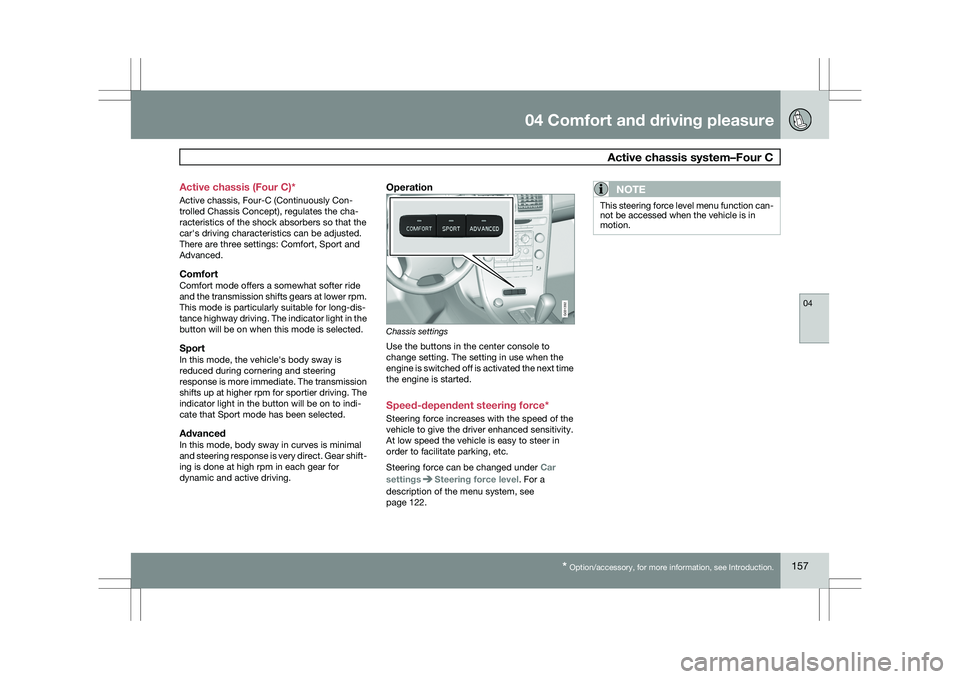
Operation
Chassis settings
Use the buttons in the center console to
change setting. The setting in use when the
engine is switched off is activated the next time
the engine is started.
Speed-dependent steering force*
Steering force increases with the speed of the
vehicle to give the driver enhanced sensitivity.
At low speed the vehicle is easy to steer in
order to facilitate parking, etc.
Steering force can be changed under
Car
settings Steering force level. For a
description of the menu system, see
page 122.NOTE This steering force level menu function can-
not be accessed when the vehicle is in
motion. G031392