2009 TOYOTA SIENNA Auto
[x] Cancel search: AutoPage 2 of 592

TABLE OF CONTENTSIndex
2
1-1. Key information .................. 26Keys ..................................... 26
1-2. Opening, closing and
locking the doors ............. 27
Wireless remote control ....... 27
Front doors ........................... 33
Sliding doors ........................ 37
Back door ............................. 47
1-3. Adjustable components
(seats, mirrors,
steering wheel) ................. 56
Front seats ........................... 56
Second seats ....................... 59
Third seats ........................... 61
Seating configurations.......... 63
Driving position memory....... 80
Head restraints ..................... 82
Seat belts ............................. 84
Steering wheel ..................... 93
Anti-glare inside rear view mirror .................................. 94
Outside rear view mirrors ..... 96
1-4. Opening a nd closing the
window s ............................ 99
Power windows .................... 99
Quarter windows ................ 101
Moon roof ........................... 103
1-5. Refueling ........................... 106 Opening the fuel tank cap ................................... 106 1-6. Theft deterrent system ..... 110
Engine immobilizer system .............................. 110
Alarm .................................. 112
Theft prevention labels (for U.S.A.) ....................... 114
1-7. Safety information ............ 115 Correct driving posture ....... 115
SRS airbags ....................... 117
Front passenger occupant classification system ......... 129
Child restraint systems ....... 135
Installing child restraints ..... 139
2-1. Driving procedures........... 158 Driving the vehicle .............. 158
Engine (ignition) switch....... 167
Automatic transmission ...... 170
Turn signal lever ................. 172
Parking brake ..................... 173
2-2. Instrument cl uster and
information display ........ 174
Gauges and meters ............ 174
Indicators and warning lights ................................. 177
Trip information display ...... 181
2-3. Operating the li ghts and
wipers .............................. 185
Headlight switch ................. 185
Fog light switch ................... 190
1Before driving
2When driving
Page 3 of 592

1
2
3
4
5
6
7
3
Windshield wipers and washer .............................. 191
Rear window wiper and washer .............................. 193
2-4. Using other driving systems ........................... 194
Cruise control ...................... 194
Dynamic laser cruise control ............................... 197
Intuitive parking assist......... 209
Driving assist systems ........ 215
2-5. Driving information ........... 219 Cargo and luggage ............. 219
Vehicle load limits ............... 225
Winter driving tips ............... 226
Trailer towing ...................... 229
Dinghy towing ..................... 237
3-1. Using the air conditioning system and defogger...... 240
Front manual air conditioning system .......... 240
Front automatic air conditioning system .......... 246
Rear manual air conditioning system .......... 253
Rear automatic air conditioning system .......... 256
Rear window and outside rear view mirror defoggers,
and windshield wiper
de-icer ............................... 260 3-2. Using the audio system ... 262
Audio system types ............ 262
Using the radio ................... 265
Using the CD player ........... 271
Playing back MP3 and WMA discs ....................... 279
Optimal use of the audio system .............................. 287
Using the AUX adapter....... 291
Using the steering wheel audio switches.................. 292
3-3. Using the rear audio system ............................. 296
Rear seat entertainment system features ................ 296
Using the DVD player (DVD video)...................... 303
Using the DVD player (video CD) ........................ 312
Using the DVD player (audio CD/CD text) ........... 315
Using the DVD player (MP3 discs) ...................... 316
Using the video mode......... 318
Changing the initial setting............................... 320
3-4. Using the hands-free phone system
(for cellular phone)......... 327
Hands-free phone system (for cellular phone)
features ............................ 327
Using the hands-free phone system
(for cellular phone) ........... 331
Making a phone call ........... 339
Setting a cellular phone ...... 345
3Interior features
Page 29 of 592
29
1-2. Opening, closing and locking the doors
1
Before driving
■
Operation signals
Doors: A buzzer sounds and the emergency flashers flash to indicate that
the doors have been locked/unlocked. (Locked: Once; Unlocked:
Twice)
Back door (type B only): A buzzer sounds and the emergency flashers flash twice to indicate that the back door has been
opened/closed.
■ Door lock buzzer
If a door is not fully closed, a buzzer sounds continuously for 10 seconds if
an attempt to lock the door is made. Fully close the door to stop the buzzer,
and lock the vehicle once more.
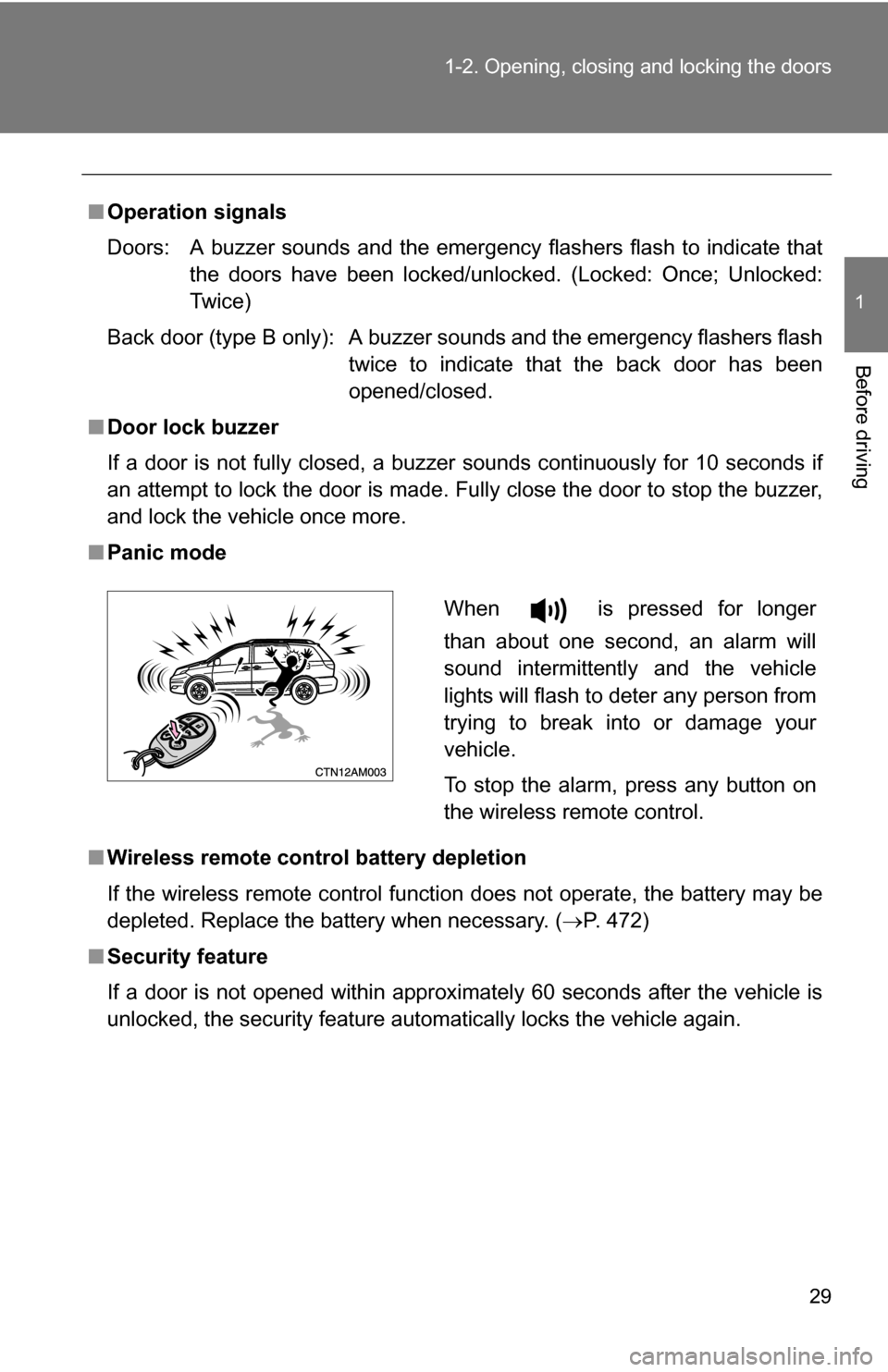
■ Panic mode
■ Wireless remote control battery depletion
If the wireless remote control function does not operate, the battery may be
depleted. Replace the battery when necessary. ( P. 472)
■ Security feature
If a door is not opened within approximately 60 seconds after the vehicle is
unlocked, the security feature automatically locks the vehicle again.
When is pressed for longer
than about one second, an alarm will
sound intermittently and the vehicle
lights will flash to deter any person from
trying to break into or damage your
vehicle.
To stop the alarm, press any button on
the wireless remote control.
Page 34 of 592

34 1-2. Opening, closing and locking the doors
Locking the front doors from the outside without the wireless
remote control or keyMove the inside door lock button to the lock position.
Close the door.
The doors cannot be locked when the key is in the engine switch and
either of the front door is open.
Automatic door locking and unlocking systems
The following functions can be set or cancelled:
The shift position linked door locking function works when all doors
are closed.
FunctionOperation
Shift position linked
door locking function Shifting the shift lever out of P locks all
doors.
Shift position linked
door unlocking function Shifting the shift lever to P unlocks all doors.
Speed linked door lock-
ing function
All doors are locked when the vehicle speed is
approximately 12 mph (20 km/h) or higher.
Driver's door linked door
unlocking function All doors are unlocked when the driver's door
is opened within 10 seconds after turning the
engine switch to “ACC” or “LOCK”.
STEP1
STEP2
Page 37 of 592
37
1
1-2. Opening, closing and locking the doors
Before driving
Sliding doors
Vehicles without power sliding doors
The sliding doors can be opened and closed using the sliding door
handle. The sliding door can be locked and unlocked using the
inside lock knob or wireless remote control.
Vehicles with power sliding doors
The power sliding doors can be opened and closed using the sliding
door handle, power sliding door switches or wireless remote control.
The power sliding doors can be locked and unlocked using the
inside lock knob or wireless remote control.
■ Wireless remote control
P. 2 7
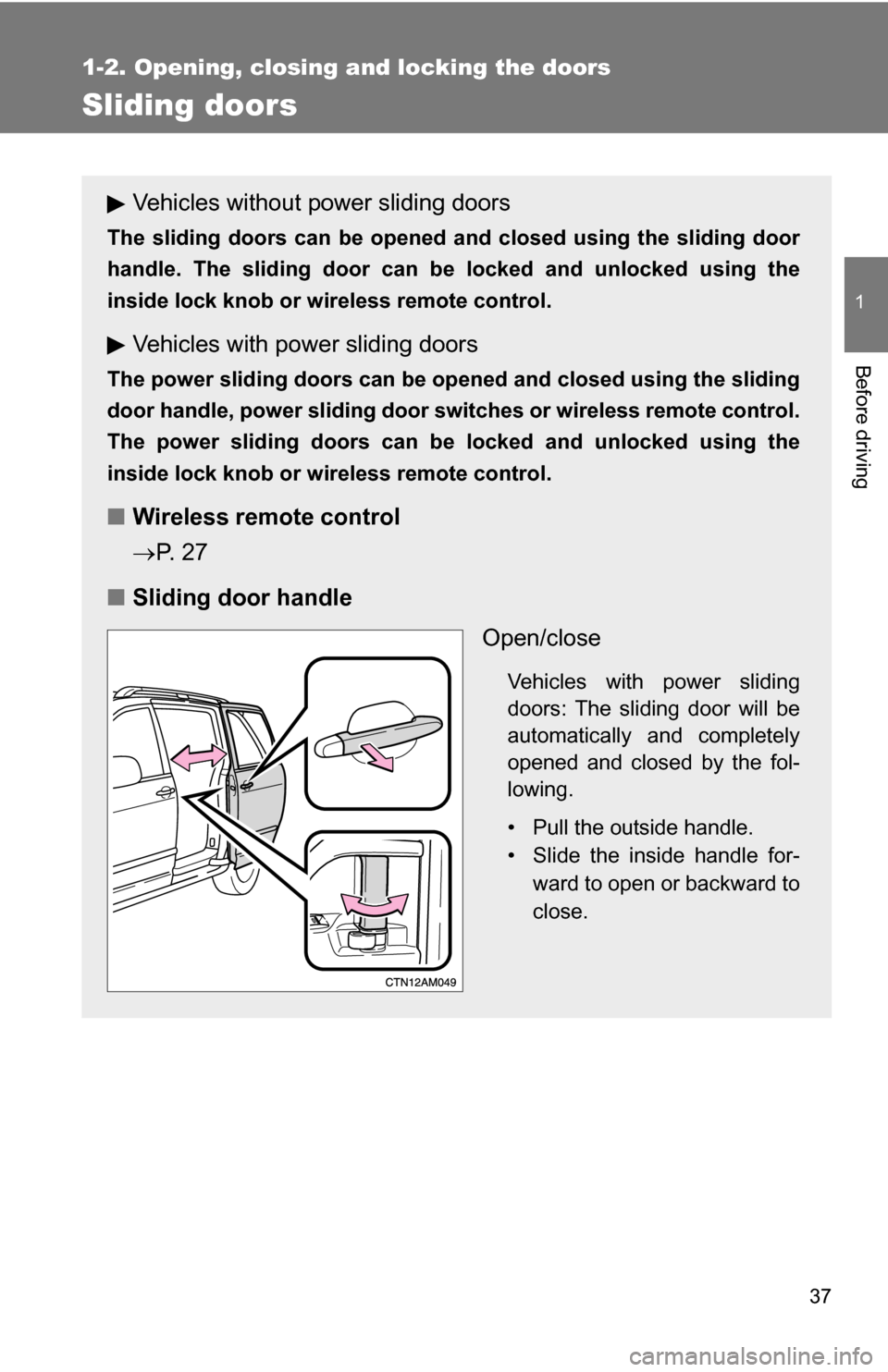
■ Sliding door handle
Open/close
Vehicles with power sliding
doors: The sliding door will be
automatically and completely
opened and closed by the fol-
lowing.
• Pull the outside handle.
• Slide the inside handle for-ward to open or backward to
close.
Page 41 of 592
41
1-2. Opening, closing and locking the doors
1
Before driving
■
When the power sliding door system is on (vehicles with power sliding
doors)
A buzzer sounds if you put the shift lever out of P with the engine switch in
the “ON” position and the sliding door not completely closed.
■ Jam protection function (vehicles with power sliding doors)
●If anything obstructs the power sliding door while it is closing or opening,
the power sliding door will automatically operate in the opposite direction.
● If the jam protection function operates during two consecutive closing
operations, the power sliding door will be stopped at that position and the
power sliding door system will be canceled.
■ Sliding door closer (if equipped)
In the event that the sliding door is left slightly open, the sliding door closer
will automatically close it to the fully closed position.
■ When the battery is disconnected (vehicles with powe r sliding doors)
The power sliding door system must be initialized in order to ensure proper
operation. To initialize it, close the sliding doors completely by hand.
■ Customization that can be co nfigured at Toyota dealer
Settings (e.g. opening and closing operation) can be changed.
(Customizable features P. 565)
Page 44 of 592
44 1-2. Opening, closing and locking the doors
CAUTION
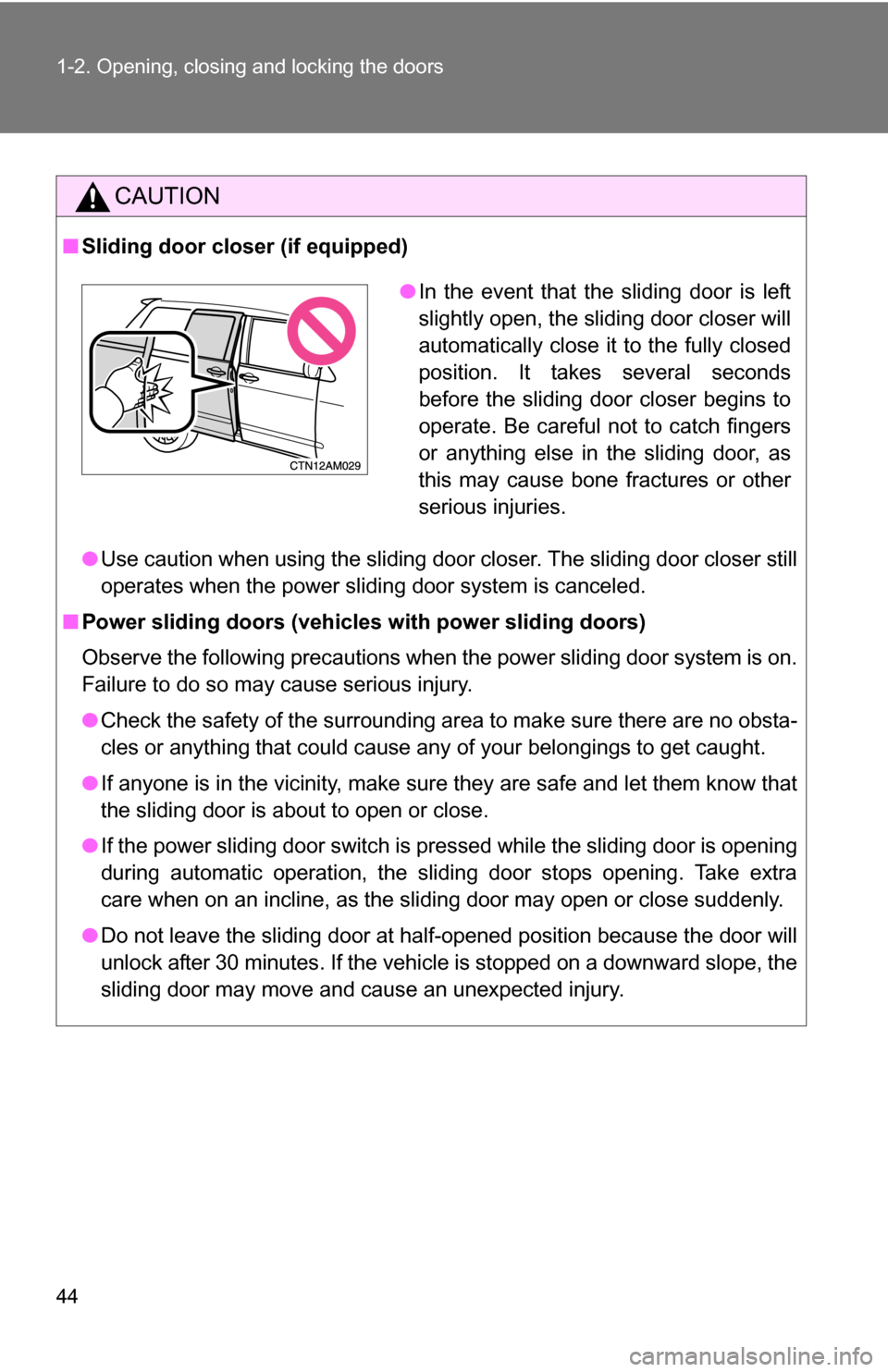
■Sliding door closer (if equipped)
●Use caution when using the sliding door closer. The sliding door closer still
operates when the power sliding door system is canceled.
■ Power sliding doors (vehicles with power sliding doors)
Observe the following precautions when the power sliding door system is on.
Failure to do so may cause serious injury.
●Check the safety of the surrounding area to make sure there are no obsta-
cles or anything that could cause any of your belongings to get caught.
● If anyone is in the vicinity, make sure they are safe and let them know that
the sliding door is about to open or close.
● If the power sliding door switch is pressed while the sliding door is opening
during automatic operation, the sliding door stops opening. Take extra
care when on an incline, as the sliding door may open or close suddenly.
● Do not leave the sliding door at half-opened position because the door will
unlock after 30 minutes. If the vehicle is stopped on a downward slope, the
sliding door may move and cause an unexpected injury.
●In the event that the sliding door is left
slightly open, the sliding door closer will
automatically close it to the fully closed
position. It takes several seconds
before the sliding door closer begins to
operate. Be careful not to catch fingers
or anything else in the sliding door, as
this may cause bone fractures or other
serious injuries.
Page 45 of 592
45
1-2. Opening, closing and locking the doors
1
Before driving
CAUTION
●
In the following situations, the power sliding door may detect an abnormal-
ity and automatic operation may be stopped. In this case, the sliding door
has to be operated manually. Take extra care in this situation, as the
stopped sliding door may suddenly close, causing an accident.
• When the sliding door contacts an obstacle
• When the battery voltage suddenly drops, such as when the engine
switch is turned to the “ON” position or the engine is started during
automatic operation
● Do not attach any accessories other than genuine Toyota parts to the
power sliding door. The power sliding door may not operate, causing itself
to malfunction, or the power sliding door may close again after it is
opened.
● In cases such as when replacing tires, make sure to turn off the power slid-
ing door main switch. Failure to do so may cause the sliding door to oper-
ate unintentionally if the power sliding door switch is accidentally touched,
resulting in hands and fingers being caught and injured.
● When the child-protector locks are set, make sure to turn off the power
sliding door system with the main switch in order to totally disable the sys-
tem.
■ Jam protection function (vehicles with power sliding doors)
Observe the following precautions.
Failure to do so may cause serious injury.
●Never use any part of your body to intentionally activate the jam protection
function.
● The jam protection function may not work if something gets caught just
before the power sliding door fully closes. Be careful not to catch fingers or
anything else.