2009 TOYOTA SIENNA phone
[x] Cancel search: phonePage 3 of 592

1
2
3
4
5
6
7
3
Windshield wipers and washer .............................. 191
Rear window wiper and washer .............................. 193
2-4. Using other driving systems ........................... 194
Cruise control ...................... 194
Dynamic laser cruise control ............................... 197
Intuitive parking assist......... 209
Driving assist systems ........ 215
2-5. Driving information ........... 219 Cargo and luggage ............. 219
Vehicle load limits ............... 225
Winter driving tips ............... 226
Trailer towing ...................... 229
Dinghy towing ..................... 237
3-1. Using the air conditioning system and defogger...... 240
Front manual air conditioning system .......... 240
Front automatic air conditioning system .......... 246
Rear manual air conditioning system .......... 253
Rear automatic air conditioning system .......... 256
Rear window and outside rear view mirror defoggers,
and windshield wiper
de-icer ............................... 260 3-2. Using the audio system ... 262
Audio system types ............ 262
Using the radio ................... 265
Using the CD player ........... 271
Playing back MP3 and WMA discs ....................... 279
Optimal use of the audio system .............................. 287
Using the AUX adapter....... 291
Using the steering wheel audio switches.................. 292
3-3. Using the rear audio system ............................. 296
Rear seat entertainment system features ................ 296
Using the DVD player (DVD video)...................... 303
Using the DVD player (video CD) ........................ 312
Using the DVD player (audio CD/CD text) ........... 315
Using the DVD player (MP3 discs) ...................... 316
Using the video mode......... 318
Changing the initial setting............................... 320
3-4. Using the hands-free phone system
(for cellular phone)......... 327
Hands-free phone system (for cellular phone)
features ............................ 327
Using the hands-free phone system
(for cellular phone) ........... 331
Making a phone call ........... 339
Setting a cellular phone ...... 345
3Interior features
Page 4 of 592

TABLE OF CONTENTSIndex
4
Security and system setup ................................ 350
Using the phone book ........ 353
3-5. Using the interior lights ... 361 Interior lights list ................. 361
• Personal/interior light main switch ...................... 362
• Personal/interior lights...... 362
• Luggage compartment light .................................. 363
3-6. Using the storage features ........................... 364
List of storage features....... 364
• Glove box ......................... 365
• Console box ..................... 365
• Coin holder ....................... 369
• Cup holders ...................... 370
• Bottle holders ................... 374
• Auxiliary boxes ................. 375
• Trays ................................ 380
• Note pad holder ............... 381
3-7. Other interior features ..... 383 Sun visors .......................... 383
Vanity mirrors ..................... 384
Clock .................................. 385
Conversation mirror............ 386
Power outlets ..................... 387
Seat heaters ....................... 390
Armrests ............................. 392
Rear side sunshades ......... 393
Grocery bag hooks ............. 394
Coat hooks ......................... 396
Seatback tables.................. 397
Front seat side table........... 399
Floor mat ............................ 401 Luggage compartment
features ............................ 402
Garage door opener ........... 405
Garage door opener box .... 410
Compass ............................ 413
4-1. Maintenance and care ...... 418 Cleaning and protecting the vehicle exterior ........... 418
Cleaning and protecting the vehicle interior ............ 421
4-2. Maintenance ...................... 424 Maintenance requirements .................... 424
General maintenance ......... 426
Emission inspection and maintenance (I/M)
programs .......................... 429
4-3. Do-it-yourself maintenance ................... 430
Do-it-yourself service precautions ....................... 430
Hood ................................... 434
Positioning a floor jack........ 436
Engine compartment .......... 438
Tires.................................... 454
Tire inflation pressure ......... 463
Wheels................................ 467
Air conditioning filter ........... 469
Wireless remote control battery .............................. 472
Checking and replacing fuses ................................. 474
4Maintenance and care
Page 16 of 592
16
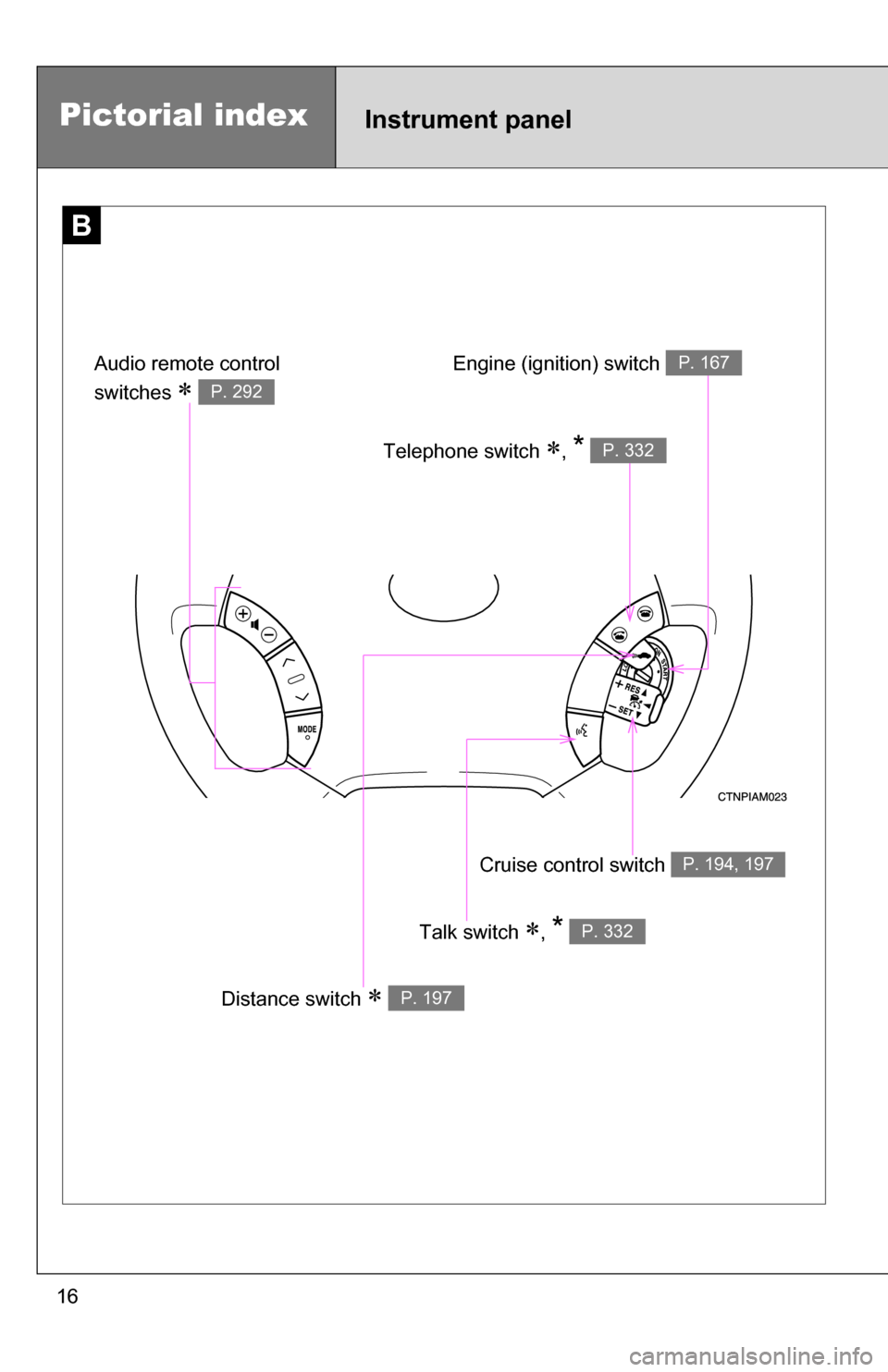
Pictorial indexInstrument panel
B
Cruise control switch P. 194, 197
Talk switch , * P. 332
Distance switch P. 197
Engine (ignition) switch P. 167
Telephone switch , * P. 332
Audio remote control
switches
P. 292
Page 22 of 592
22
CAUTION
■General precautions while driving
Driving under the influence: Never drive your vehicle when under the influ-
ence of alcohol or drugs that have impaired your ability to operate your vehi-
cle. Alcohol and certain drugs delay reaction time, impair judgment and
reduce coordination, which could lead to an accident that will hurt or kill you,
your occupants or others.
Defensive driving: Always drive defensively. Anticipate mistakes that other
drivers or pedestrians might make and be ready to avoid accidents.
Driver distraction: Always give your full attention to driving. Anything that dis-
tracts the driver, such as adjusting controls, talking on a cellular phone or
reading can result in a collision with resulting death or serious injury to you,
your occupants or others.
■ General precaution regarding children’s safety
Never leave children unattended in the vehicle, and never allow children to
have or use the key.
Children may be able to start the vehicle or shift the vehicle into neutral.
There is also a danger that children may injure themselves by playing with
the cigarette lighter, the windows, or other features of the vehicle. In addi-
tion, heat build-up or extremely cold temperatures inside the vehicle can be
fatal to children.
Page 30 of 592
30 1-2. Opening, closing and locking the doors
■Conditions affecting operation
The wireless remote control function may not operate normally in the follow-
ing situations.
●Near a TV tower, radio station, electr ic power plant, airport or other facil-
ity that generates strong radio waves
● When carrying a portable radio, cell ular phone or other wireless commu-
nication devices
● When multiple wireless remote control are in the vicinity
● When the wireless remote control is in contact with, or is covered by, a
metallic object
● When a wireless remote control (that emits radio waves) is being used
nearby
● When the wireless remote control has been left near an electrical appli-
ance such as a personal computer
● If window tint with a metallic content or metallic objects is attached to the
rear window
■ Customization that can be co nfigured at Toyota dealer
Settings (e.g. operation signal) can be changed.
(Customizable features P. 565)
Page 238 of 592
238
3-1. Using the air conditioning system
and defogger ................ 240
Front manual air conditioning system ....... 240
Front automatic air conditioning system ....... 246
Rear manual air conditioning system ....... 253
Rear automatic air conditioning system ....... 256
Rear window and outside rear view mirror defoggers,
and windshield wiper
de-icer ............................ 260
3-2. Using the audio system .......................... 262
Audio system types .......... 262
Using the radio ................. 265
Using the CD player ......... 271
Playing back MP3 and WMA discs ..................... 279
Optimal use of the audio system ........................... 287
Using the AUX adapter .... 291
Using the steering wheel audio switches ............... 292 3-3. Using the rear audio
system .......................... 296
Rear seat entertainment system features ............. 296
Using the DVD player (DVD video) ................... 303
Using the DVD player (video CD)...................... 312
Using the DVD player (audio CD/CD text) ........ 315
Using the DVD player (MP3 discs) .................... 316
Using the video mode ...... 318
Changing the initial setting ............................ 320
3-4. Using the hands-free phone system
(for cellular phone) ...... 327
Hands-free phone system (for cellular phone)
features .......................... 327
Using the hands-free phone system
(for cellular phone) ......... 331
Making a phone call ......... 339
Setting a cellular phone ... 345
Security and system setup .............................. 350
Interior features3
Page 239 of 592

Interior features3
239
Using the phone book ...... 353
3-5. Using the interior lights ............................. 361
Interior lights list ............... 361
• Personal/interior light main switch .................... 362
• Personal/interior lights ... 362
• Luggage compartment
light ................................ 363
3-6. Using the storage features ......................... 364
List of storage features .... 364
• Glove box....................... 365
• Console box ................... 365
• Coin holder .................... 369
• Cup holders ................... 370
• Bottle holders ................. 374
• Auxiliary boxes............... 375
• Trays .............................. 380
• Note pad holder ............. 381 3-7. Other interior features ... 383
Sun visors ........................ 383
Vanity mirrors ................... 384
Clock ................................ 385
Conversation mirror ......... 386
Power outlets ................... 387
Seat heaters..................... 390
Armrests........................... 392
Rear side sunshades ....... 393
Grocery bag hooks........... 394
Coat hooks ....................... 396
Seatback tables ............... 397
Front seat side table ........ 399
Floor mat .......................... 401
Luggage compartment features .......................... 402
Garage door opener......... 405
Garage door opener box ................................. 410
Compass .......................... 413
Page 263 of 592
263
3-2. Using the audio system
3
Interior features
■
Using cellular phones
Interference may be heard through the audio system's speakers if a cellular
phone is being used inside or close to the vehicle while the audio syste\
m is
operating.
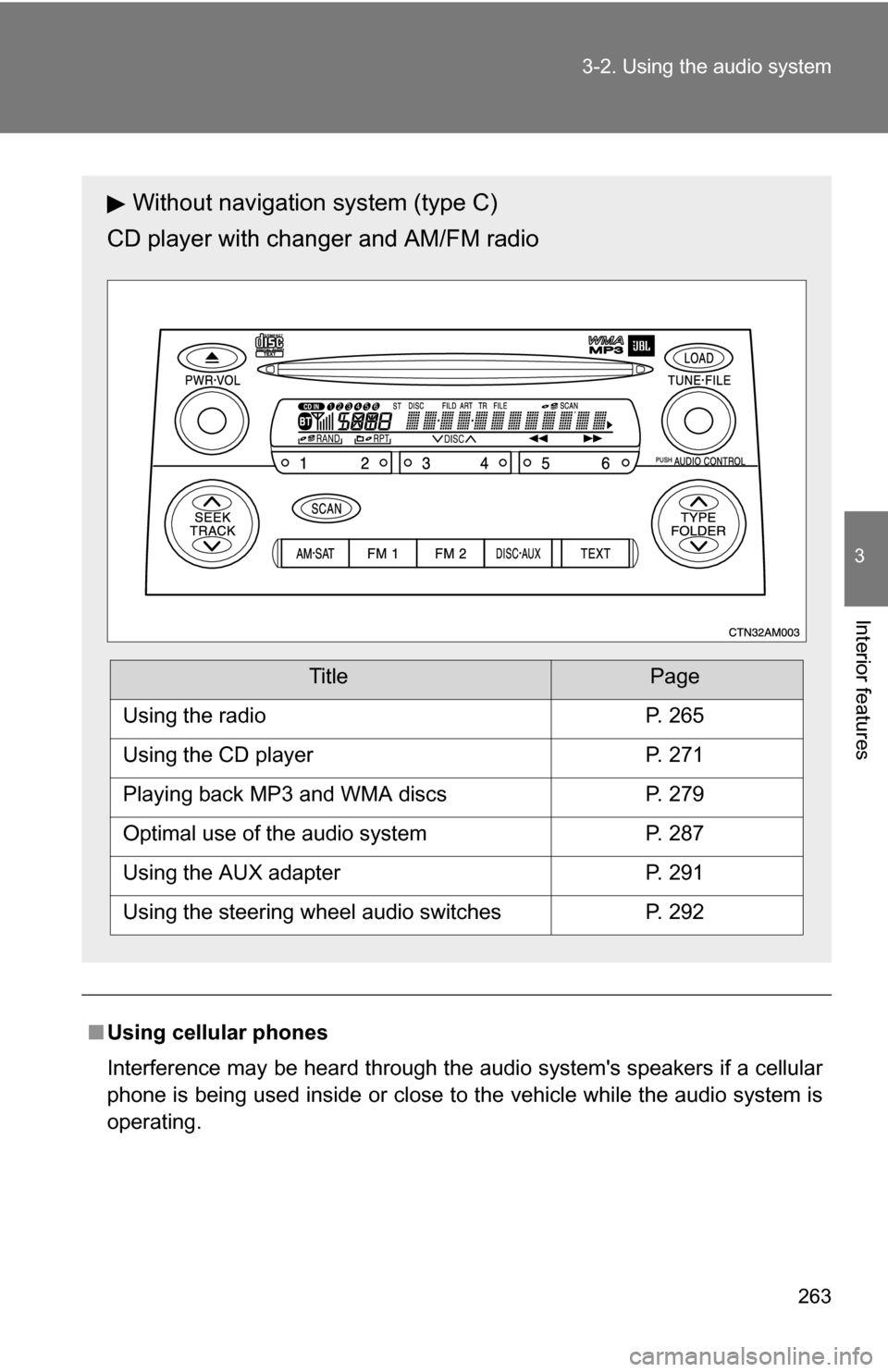
Without navigation system (type C)
CD player with changer and AM/FM radio
TitlePage
Using the radioP. 265
Using the CD playerP. 271
Playing back MP3 and WMA discsP. 279
Optimal use of the audio systemP. 287
Using the AUX adapterP. 291
Using the steering wheel audio switchesP. 292