Page 207 of 592
207
2-4. Using other
driving systems
2
When driving
CAUTION
■Before using dynamic laser cruise control
Do not overly rely on vehicle-to-vehicle distance control.
Be aware of the set vehicle speed. If automatic deceleration/acceleration is
not appropriate, adjust the vehicle speed, as well as the distance between
your vehicle and vehicles ahead by applying the brakes, etc.
■ To avoid inadvertent cruise control activation
Keep the “ON-OFF” button off when not in use.
■ Situations unsuitable for dynamic laser cruise control
Do not use dynamic laser cruise control in any of the following situations.
Doing so may result in inappropriate control of speed and could cause seri-
ous or fatal accident.
●In heavy traffic
● On roads with sharp bends
● On winding roads
● On slippery roads, such as those covered with rain, ice or snow
● Where there are sudden changes between sharp up and down gradients
● At entrances to expressways
● When weather conditions are bad enough that they may prevent the sen-
sors from functioning correctly (fog, snow, sandstorm, etc.)
● Where buzzer can be heard often
Page 215 of 592
215
2-4. Using other driving systems
2
When driving
Driving assist systems
When VSC and TRAC are operating
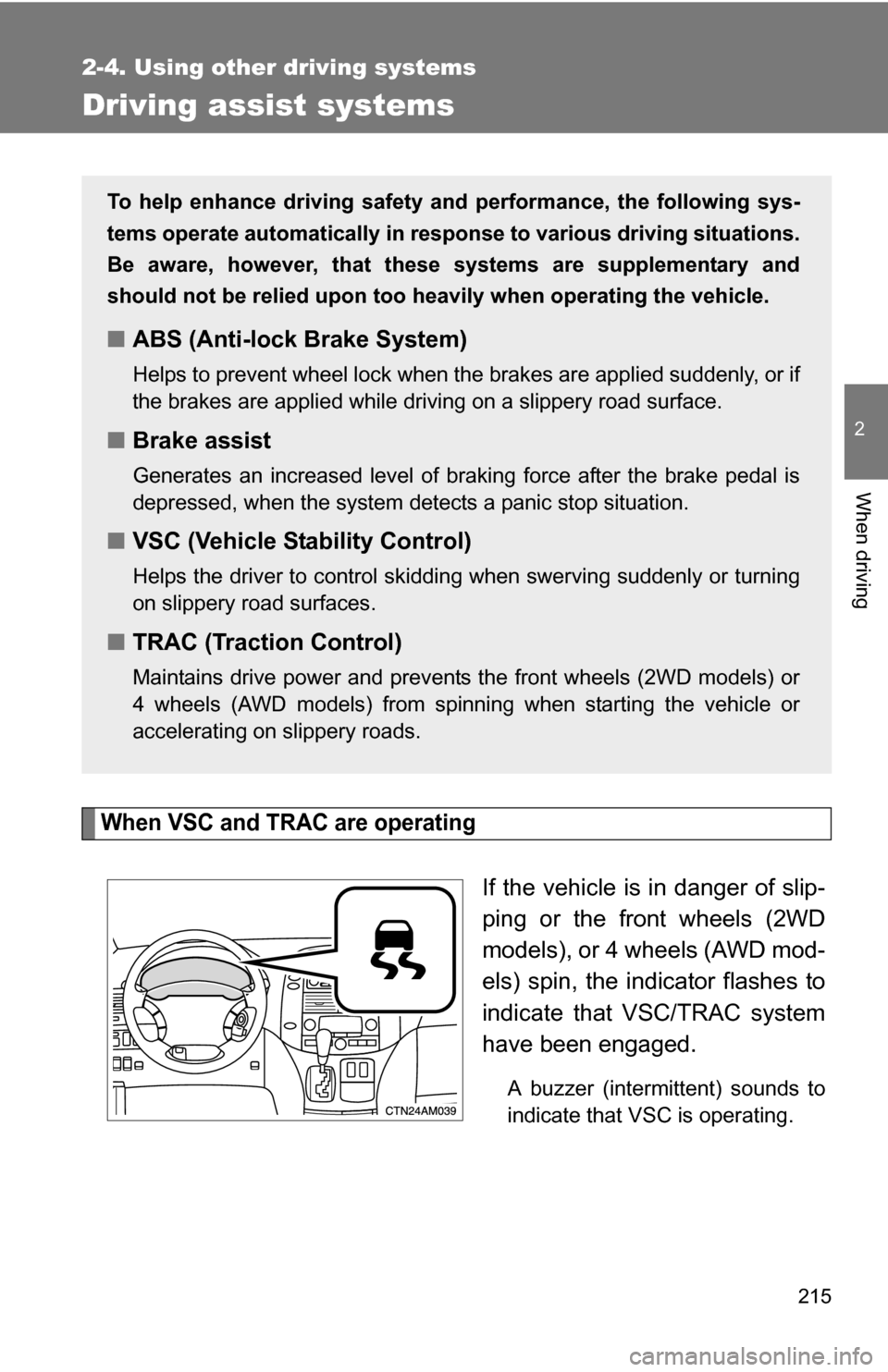
If the vehicle is in danger of slip-
ping or the front wheels (2WD
models), or 4 wheels (AWD mod-
els) spin, the indicator flashes to
indicate that VSC/TRAC system
have been engaged.
A buzzer (intermittent) sounds to
indicate that VSC is operating.
To help enhance driving safety and performance, the following sys-
tems operate automatically in res ponse to various driving situations.
Be aware, however, that these systems are supplementary and
should not be relied upon too heavi ly when operating the vehicle.
■ABS (Anti-lock Brake System)
Helps to prevent wheel lock when the brakes are applied suddenly, or if
the brakes are applied while driving on a slippery road surface.
■Brake assist
Generates an increased level of braking force after the brake pedal is
depressed, when the system detects a panic stop situation.
■VSC (Vehicle Stability Control)
Helps the driver to control skidding when swerving suddenly or turning
on slippery road surfaces.
■TRAC (Traction Control)
Maintains drive power and prevents the front wheels (2WD models) or
4 wheels (AWD models) from spinning when starting the vehicle or
accelerating on slippery roads.
Page 216 of 592
216 2-4. Using other driving systems
To disable TRAC (2WD models only)If the vehicle gets stuck in fresh snow or mud, TRAC may reduce
power from the engine to the wheels. You may need to turn the sys-
tem off to enable you to rock the vehicle in order to free it.
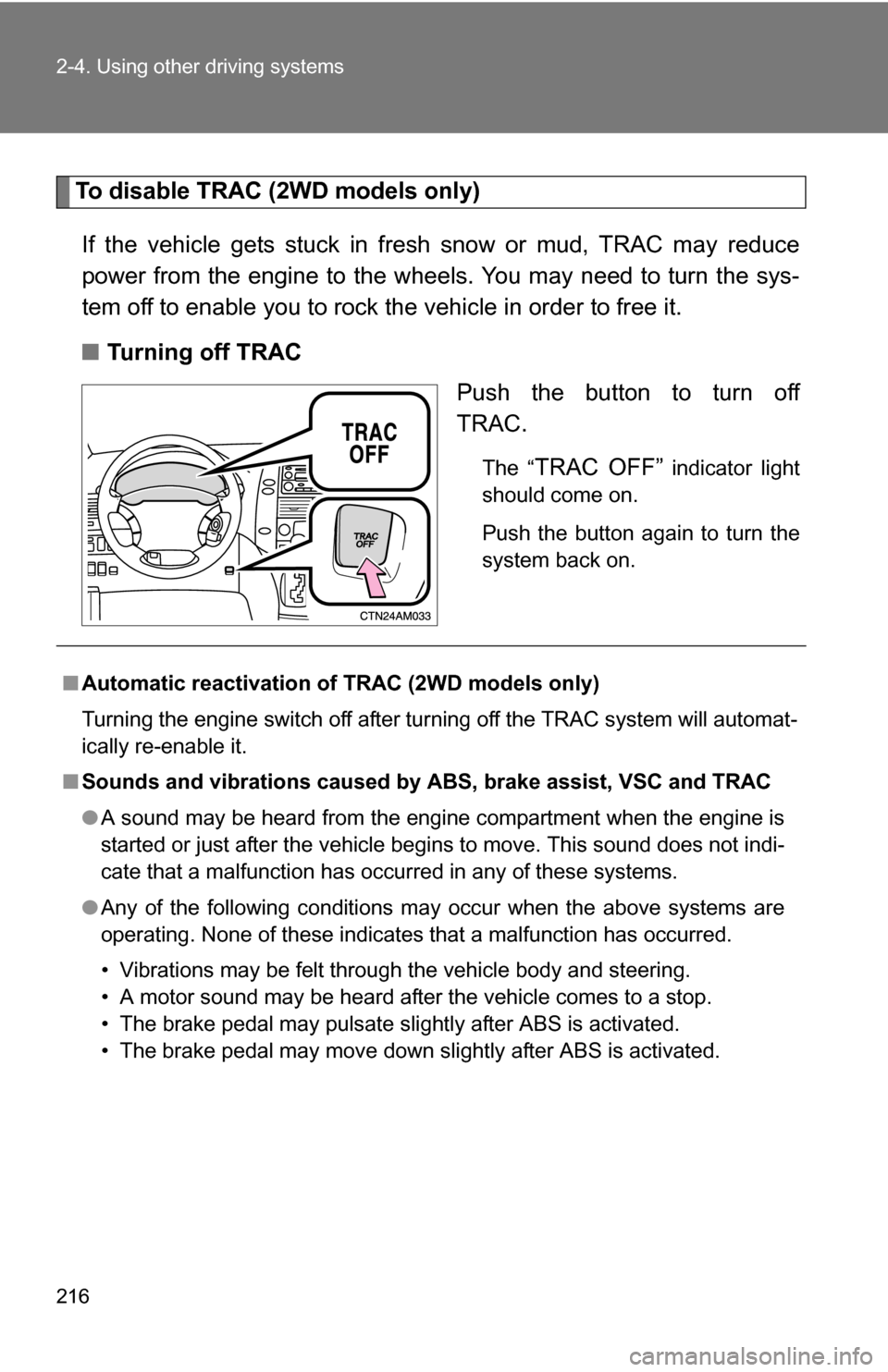
■ Turning off TRAC
Push the button to turn off
TRAC.
The “TRAC OFF” indicator light
should come on.
Push the button again to turn the
system back on.
■ Automatic reactivation of TRAC (2WD models only)
Turning the engine switch off after turning off the TRAC system will automat-
ically re-enable it.
■ Sounds and vibrations caused by ABS, brake assist, VSC and TRAC
●A sound may be heard from the engine compartment when the engine is
started or just after the vehicle begins to move. This sound does not indi-
cate that a malfunction has occurred in any of these systems.
● Any of the following conditions may occur when the above systems are
operating. None of these indicates that a malfunction has occurred.
• Vibrations may be felt through the vehicle body and steering.
• A motor sound may be heard after the vehicle comes to a stop.
• The brake pedal may pulsate slightly after ABS is activated.
• The brake pedal may move down slightly after ABS is activated.
Page 238 of 592
238
3-1. Using the air conditioning system
and defogger ................ 240
Front manual air conditioning system ....... 240
Front automatic air conditioning system ....... 246
Rear manual air conditioning system ....... 253
Rear automatic air conditioning system ....... 256
Rear window and outside rear view mirror defoggers,
and windshield wiper
de-icer ............................ 260
3-2. Using the audio system .......................... 262
Audio system types .......... 262
Using the radio ................. 265
Using the CD player ......... 271
Playing back MP3 and WMA discs ..................... 279
Optimal use of the audio system ........................... 287
Using the AUX adapter .... 291
Using the steering wheel audio switches ............... 292 3-3. Using the rear audio
system .......................... 296
Rear seat entertainment system features ............. 296
Using the DVD player (DVD video) ................... 303
Using the DVD player (video CD)...................... 312
Using the DVD player (audio CD/CD text) ........ 315
Using the DVD player (MP3 discs) .................... 316
Using the video mode ...... 318
Changing the initial setting ............................ 320
3-4. Using the hands-free phone system
(for cellular phone) ...... 327
Hands-free phone system (for cellular phone)
features .......................... 327
Using the hands-free phone system
(for cellular phone) ......... 331
Making a phone call ......... 339
Setting a cellular phone ... 345
Security and system setup .............................. 350
Interior features3
Page 240 of 592
240
3-1. Using the air conditioning system and defogger
Front manual air conditioning system (if equipped)
Adjusting the settings
■ Adjusting the temperature setting
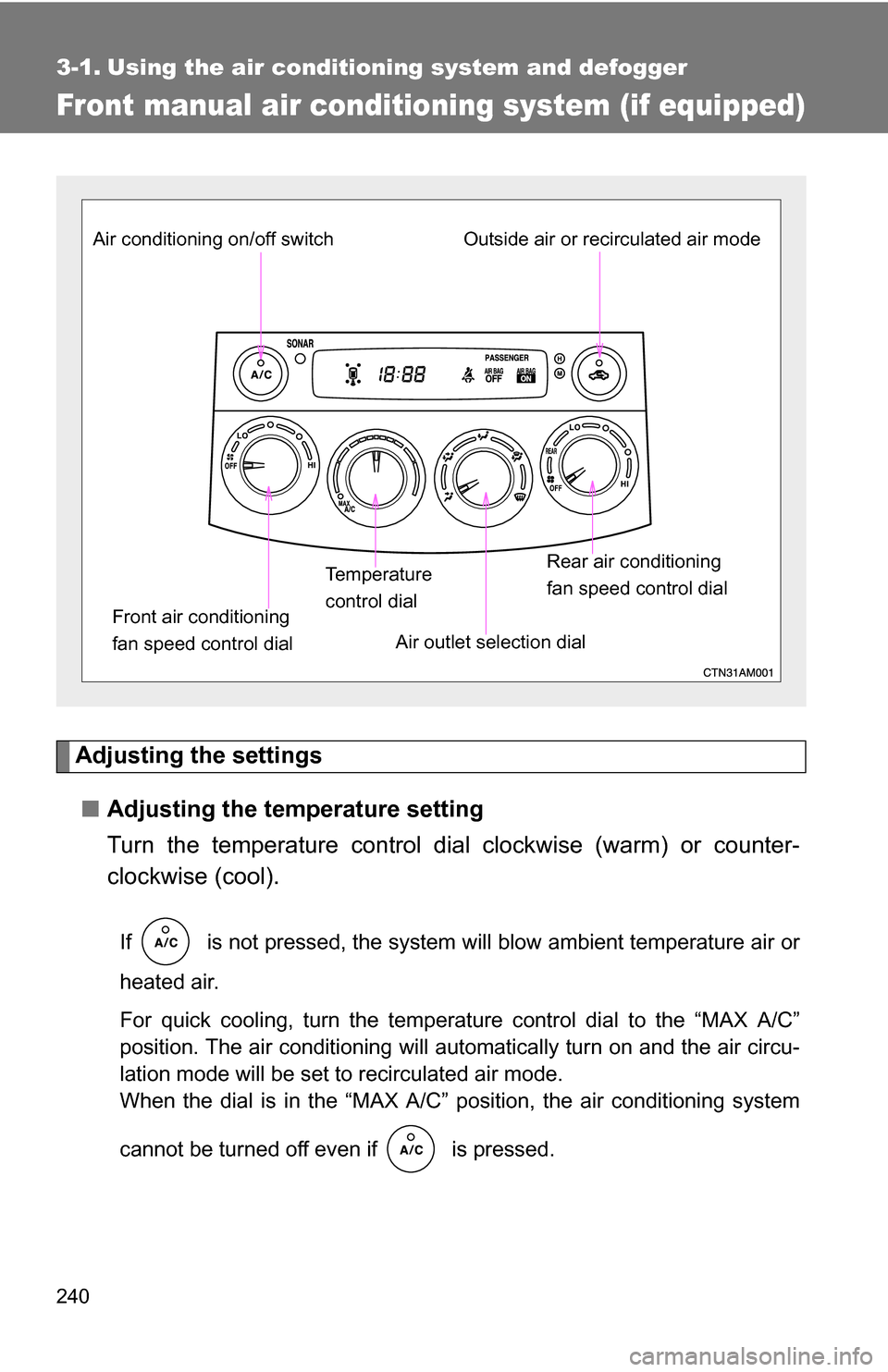
Turn the temperature control dial clockwise (warm) or counter-
clockwise (cool).
If is not pressed, the system will blow ambient temperature air or
heated air.
For quick cooling, turn the temperature control dial to the “MAX A/C”
position. The air conditioning will automatically turn on and the air circu-
lation mode will be set to recirculated air mode.
When the dial is in the “MAX A/C” position, the air conditioning system
cannot be turned off even if is pressed.
Front air conditioning
fan speed control dial Air outlet selection dial
Air conditioning on/off switch
Temperature
control dialOutside air or recirculated air mode
Rear air conditioning
fan speed control dial
Page 242 of 592
242 3-1. Using the air conditioning system and defogger
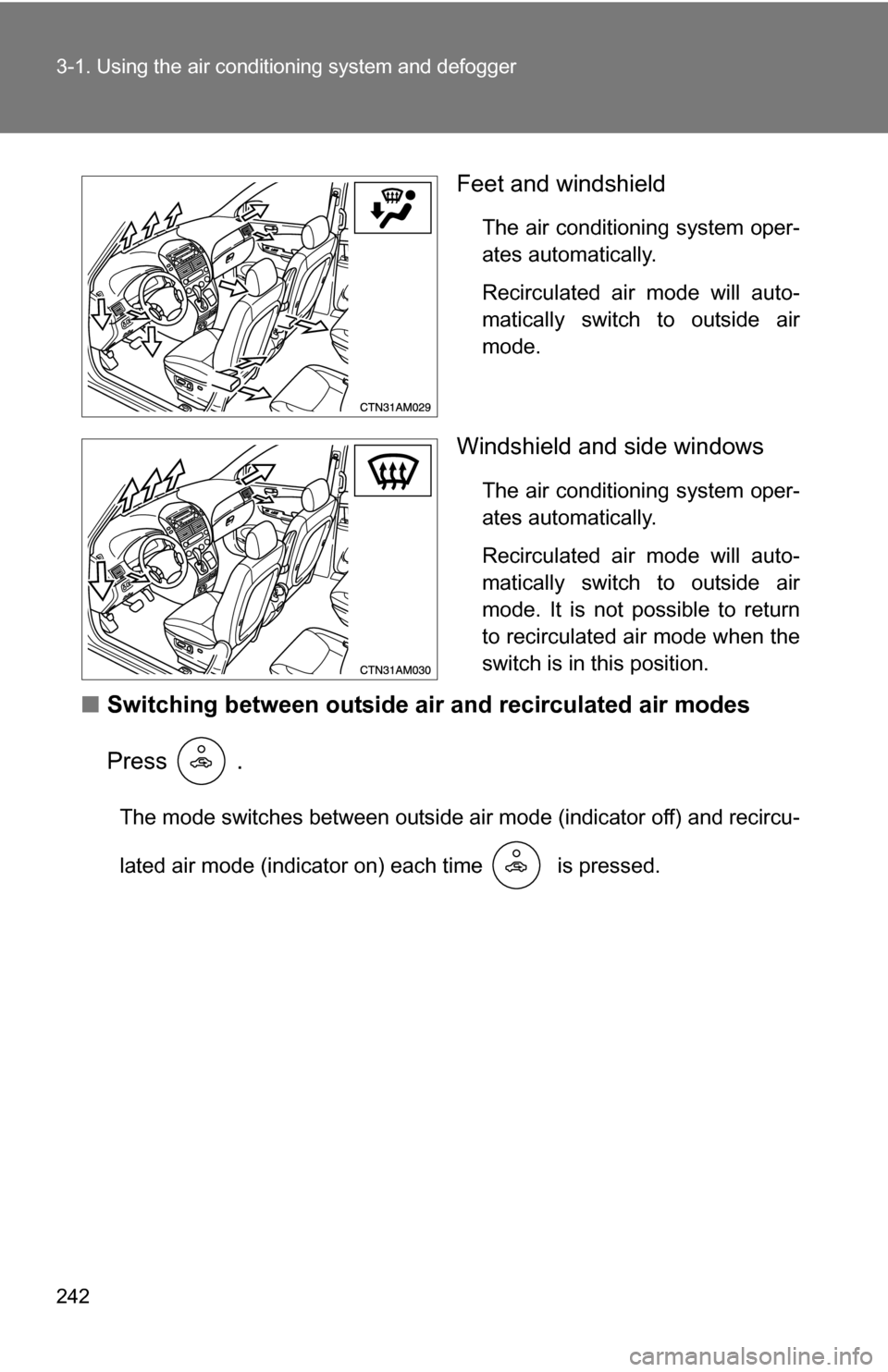
Feet and windshield
The air conditioning system oper-
ates automatically.
Recirculated air mode will auto-
matically switch to outside air
mode.
Windshield and side windows
The air conditioning system oper-
ates automatically.
Recirculated air mode will auto-
matically switch to outside air
mode. It is not possible to return
to recirculated air mode when the
switch is in this position.
■Switching between outside air and recirculated air modes
Press .
The mode switches between outside air mode (indicator off) and recircu-
lated air mode (indicator on) each time is pressed.
Page 244 of 592
244 3-1. Using the air conditioning system and defogger
■Using the system in recirculated air mode
The windows will fog up more easily if the recirculated air mode is used for
an extended period.
■ Window defogger feature
In order to prevent the windows from fogging up, recirculated air mode may
automatically switch to outside air mode if the ambient temperature drops.
This feature can be cancelled by pushing and holding the air circulation
mode switch for longer than 2 seconds. The feature will be reactivated when
the engine switch is turned to the “ACC” or “LOCK” position.
■ When outside air temperat ure approaches 32°F (0°C)
The air conditioning system may not operate even when is pressed.
■ When
is selected for the air outlets used
For your driving comfort, air flowing to the feet may be warmer than air flow-
ing to the upper body depending on the temperature setting.
■ When the indicator light on
flashes
Press
and turn off the air conditioning system before turning it on
once more. There may be a problem in the air conditioning system if the indi-
cator light continues to flash. Turn the air conditioning system off and have it
inspected by your Toyota dealer.
Page 246 of 592
246
3-1. Using the air conditioning system and defogger
Front automatic air conditioning system (if equipped)
Using the automatic modePress .
The air conditioning system begins to operate. Air outlets and fan
speed are automatically adjusted according to the temperature set-
ting.
Press “” on to increase the temperature and “ ” to
decrease the temperature.
Air outlets and fan speed for the driver and passenger seats may be
set separately depending on the temperature setting.
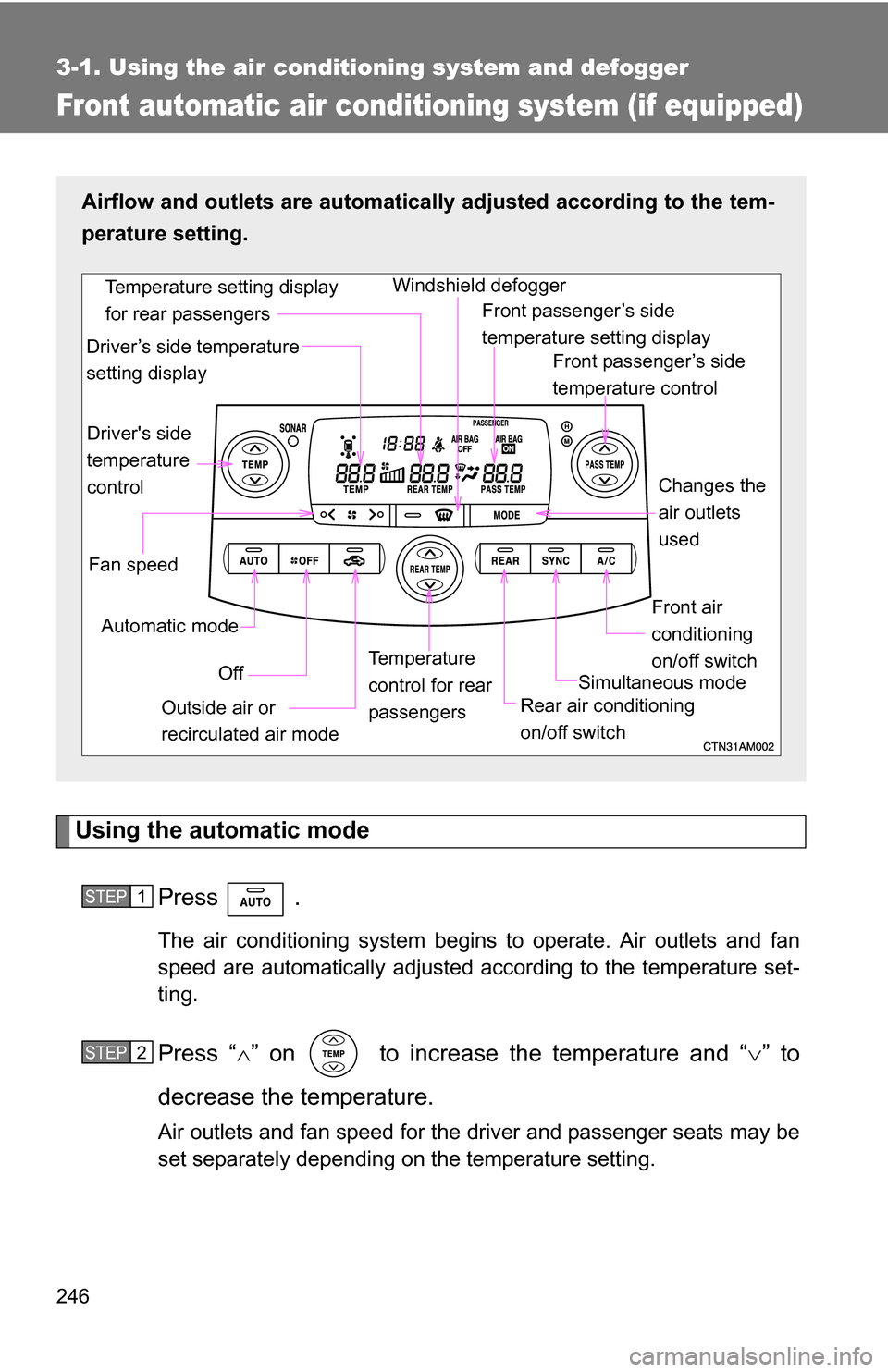
Airflow and outlets are automatica lly adjusted according to the tem-
perature setting.
Fan speed Front passenger’s side
temperature control
Front air
conditioning
on/off switch
Simultaneous mode
Rear air conditioning
on/off switch
Temperature
control for rear
passengers Changes the
air outlets
used
Off
Driver's side
temperature
control
Automatic mode Windshield defogger
Outside air or
recirculated air mode
Driver’s side temperature
setting display
Temperature setting display
for rear passengers
Front passenger’s side
temperature setting display
STEP1
STEP2