Page 385 of 592
385
3-7. Other interior features
3
Interior features
Clock
■The clock is displayed when
The engine switch is in the “ACC” or “ON” position.
■ When disconnecting and reco nnecting battery terminals
The time display will automatically be set to 1:00.
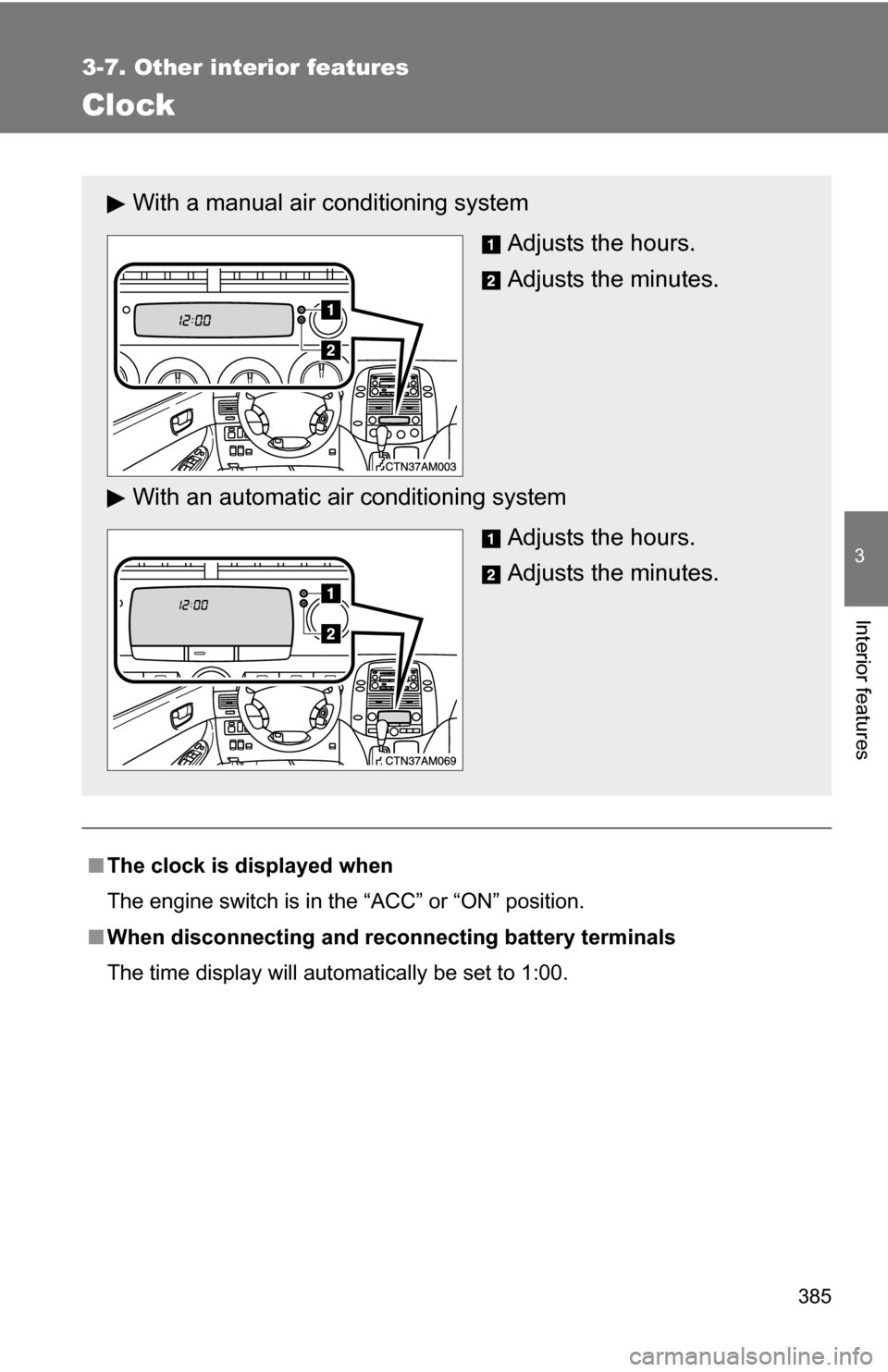
With a manual air conditioning system
Adjusts the hours.
Adjusts the minutes.
With an automatic ai r conditioning system
Adjusts the hours.
Adjusts the minutes.
Page 413 of 592
413
3-7. Other interior features
3
Interior features
Compass (if equipped)
The compass on the trip information display indicates the direction
in which the vehicle is heading.
■Operation
Direction display
“E/M” button
“MODE” button
■ Displays and directions
DisplayDirection
NNorth
NE Northeast
EEast
SE Southeast S South
SW Southwest WWest
NW Northwest
Page 414 of 592
414 3-7. Other interior features
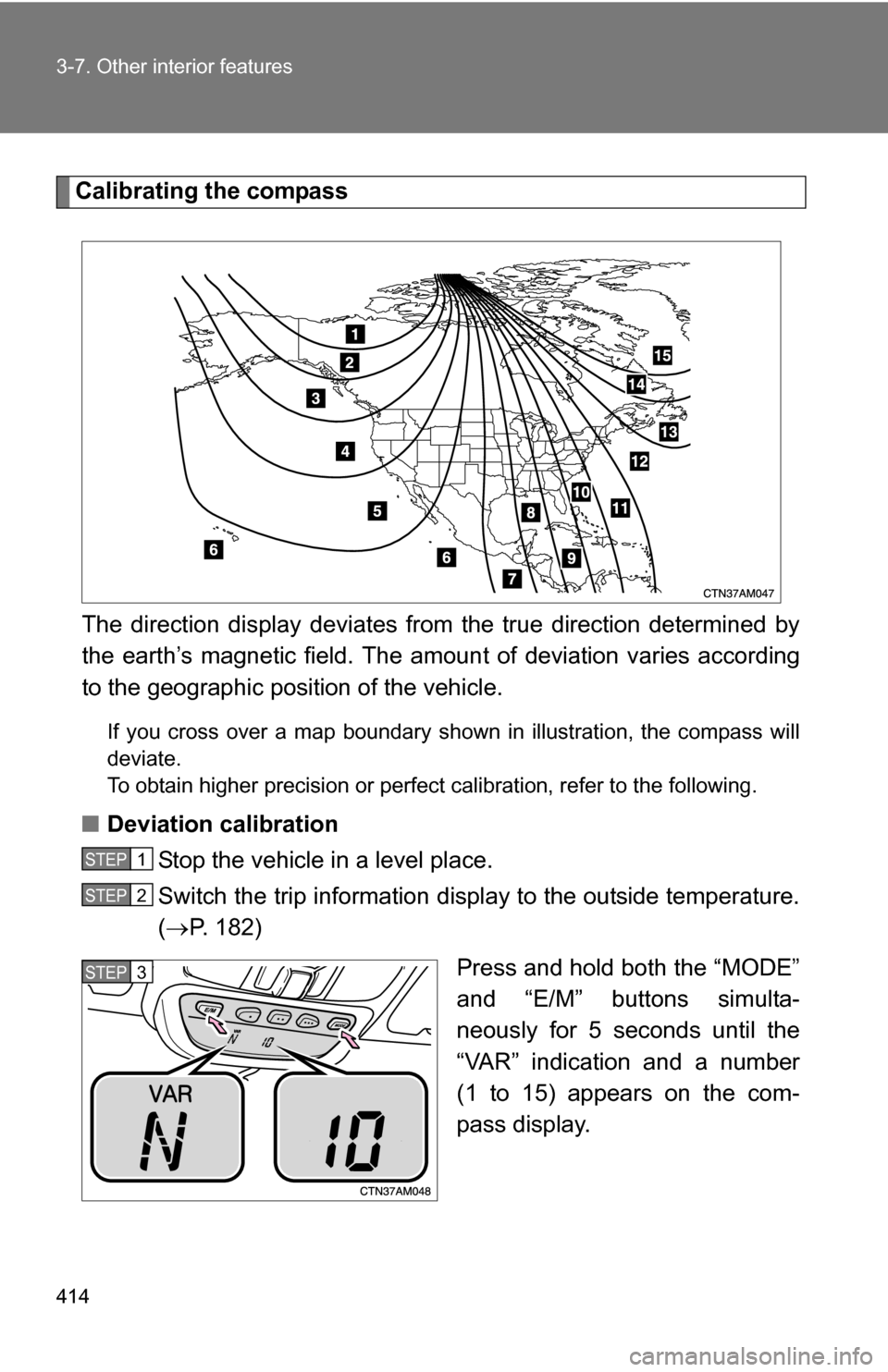
Calibrating the compassThe direction display deviates fr om the true direction determined by
the earth’s magnetic field. The amoun t of deviation varies according
to the geographic position of the vehicle.
If you cross over a map boundary shown in illustration, the compass will
deviate.
To obtain higher precision or perfect calibration, refer to the following.
■Deviation calibration
Stop the vehicle in a level place.
Switch the trip information display to the outside temperature.
( P. 182)
Press and hold both the “MODE”
and “E/M” buttons simulta-
neously for 5 seconds until the
“VAR” indication and a number
(1 to 15) appears on the com-
pass display.
STEP1
STEP2
STEP3
Page 415 of 592
415
3-7. Other interior features
3
Interior features
Press the “E/M” button, and referring to the map above, select
the number of the zone where you are.
If the direction is displayed several seconds after adjustment, the
calibration is complete.
■
Circling calibration
When the direction display may not change after a turn, the com-
pass needs to be calibrated.
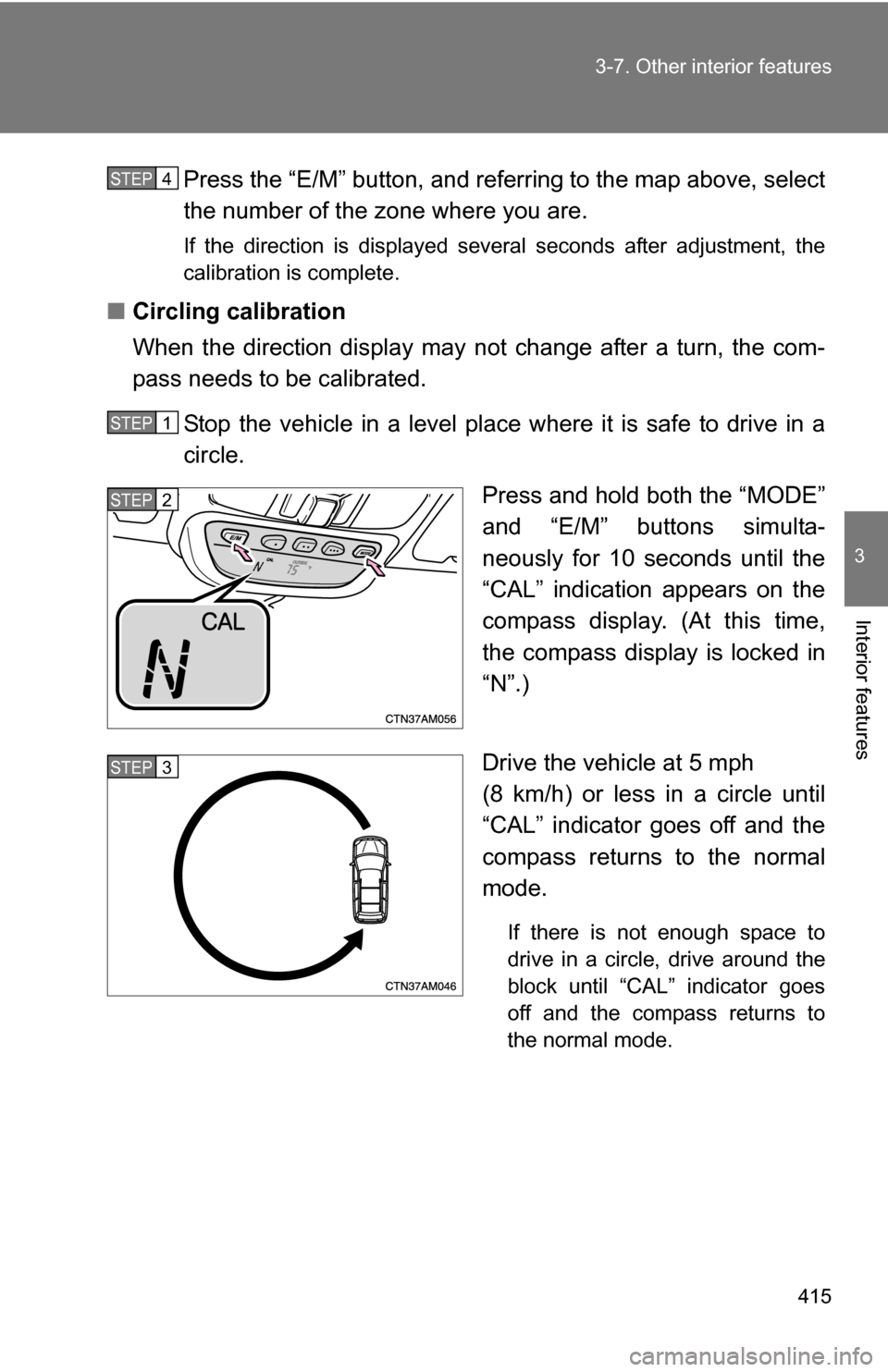
Stop the vehicle in a level place where it is safe to drive in a
circle. Press and hold both the “MODE”
and “E/M” buttons simulta-
neously for 10 seconds until the
“CAL” indication appears on the
compass display. (At this time,
the compass display is locked in
“N”.)
Drive the vehicle at 5 mph
(8 km/h) or less in a circle until
“CAL” indicator goes off and the
compass returns to the normal
mode.
If there is not enough space to
drive in a circle, drive around the
block until “CAL” indicator goes
off and the compass returns to
the normal mode.
STEP4
STEP1
STEP2
STEP3
Page 416 of 592
416 3-7. Other interior features
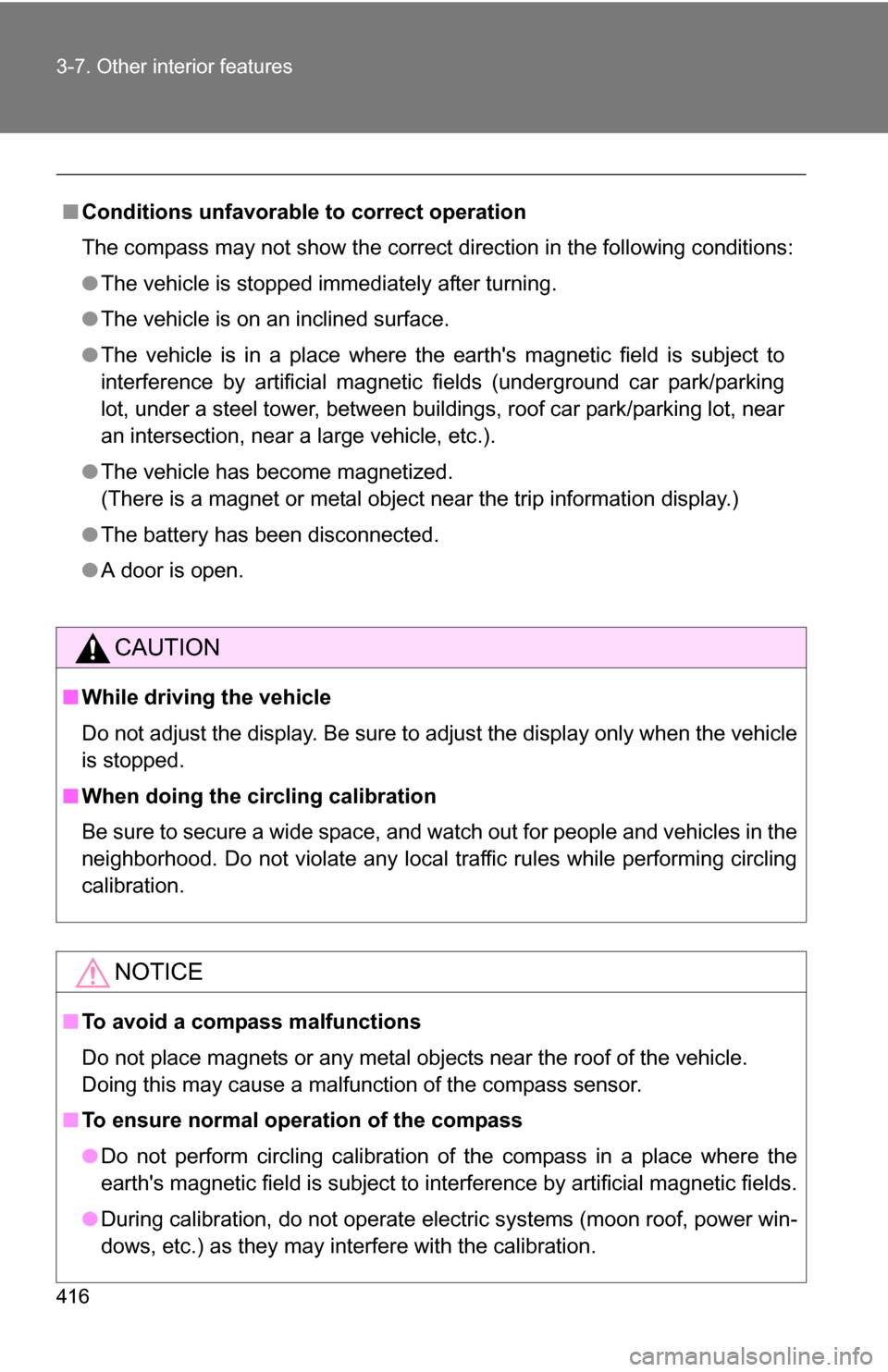
■Conditions unfavorable to correct operation
The compass may not show the correct direction in the following conditions:
●The vehicle is stopped immediately after turning.
● The vehicle is on an inclined surface.
● The vehicle is in a place where the earth's magnetic field is subject to
interference by artificial magnetic fields (underground car park/parking
lot, under a steel tower, between buildings, roof car park/parking lot, near
an intersection, near a large vehicle, etc.).
● The vehicle has become magnetized.
(There is a magnet or metal object near the trip information display.)
● The battery has been disconnected.
● A door is open.
CAUTION
■While driving the vehicle
Do not adjust the display. Be sure to adjust the display only when the vehicle
is stopped.
■ When doing the circling calibration
Be sure to secure a wide space, and watch out for people and vehicles in the
neighborhood. Do not violate any local traffic rules while performing circling
calibration.
NOTICE
■To avoid a compass malfunctions
Do not place magnets or any metal objects near the roof of the vehicle.
Doing this may cause a malfunction of the compass sensor.
■ To ensure normal operation of the compass
●Do not perform circling calibration of the compass in a place where the
earth's magnetic field is subject to interference by artificial magnetic fields.
● During calibration, do not operate electric systems (moon roof, power win-
dows, etc.) as they may interfere with the calibration.
Page 442 of 592
442 4-3. Do-it-yourself maintenance
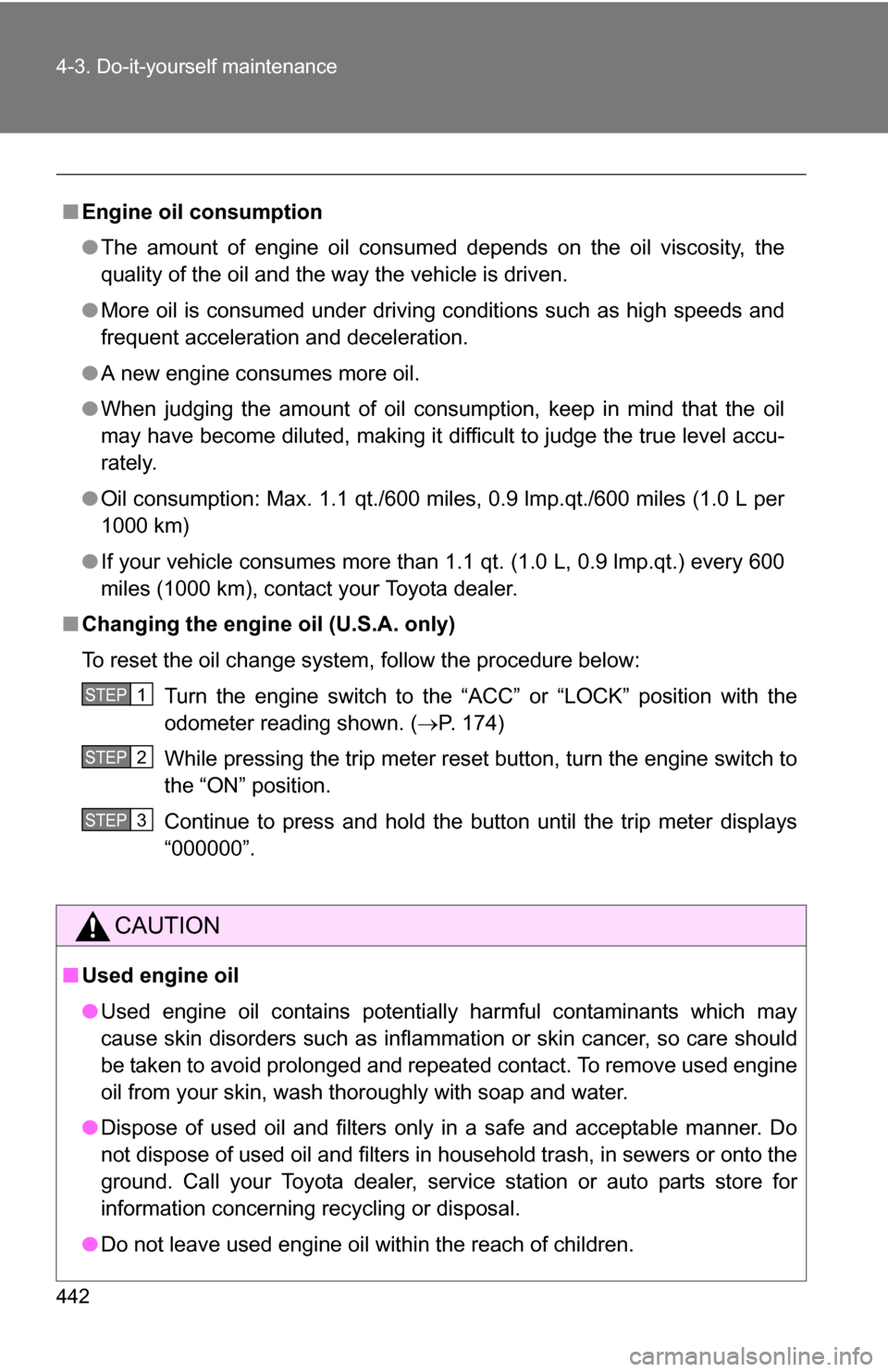
■Engine oil consumption
●The amount of engine oil consumed depends on the oil viscosity, the
quality of the oil and the way the vehicle is driven.
● More oil is consumed under driving conditions such as high speeds and
frequent acceleration and deceleration.
● A new engine consumes more oil.
● When judging the amount of oil consumption, keep in mind that the oil
may have become diluted, making it difficult to judge the true level accu-
rately.
● Oil consumption: Max. 1.1 qt./600 miles, 0.9 lmp.qt./600 miles (1.0 L per
1000 km)
● If your vehicle consumes more than 1.1 qt. (1.0 L, 0.9 lmp.qt.) every 600
miles (1000 km), contact your Toyota dealer.
■ Changing the engine oil (U.S.A. only)
To reset the oil change system, follow the procedure below:
Turn the engine switch to the “ACC” or “LOCK” position with the
odometer reading shown. ( P. 174)
While pressing the trip meter reset button, turn the engine switch to
the “ON” position.
Continue to press and hold the button until the trip meter displays
“000000”.
CAUTION
■ Used engine oil
●Used engine oil contains potentially harmful contaminants which may
cause skin disorders such as inflammation or skin cancer, so care should
be taken to avoid prolonged and repeated contact. To remove used engine
oil from your skin, wash thoroughly with soap and water.
● Dispose of used oil and filters only in a safe and acceptable manner. Do
not dispose of used oil and filters in household trash, in sewers or onto the
ground. Call your Toyota dealer, service station or auto parts store for
information concerning recycling or disposal.
● Do not leave used engine oil within the reach of children.
STEP1
STEP2
STEP3
Page 478 of 592
478 4-3. Do-it-yourself maintenance
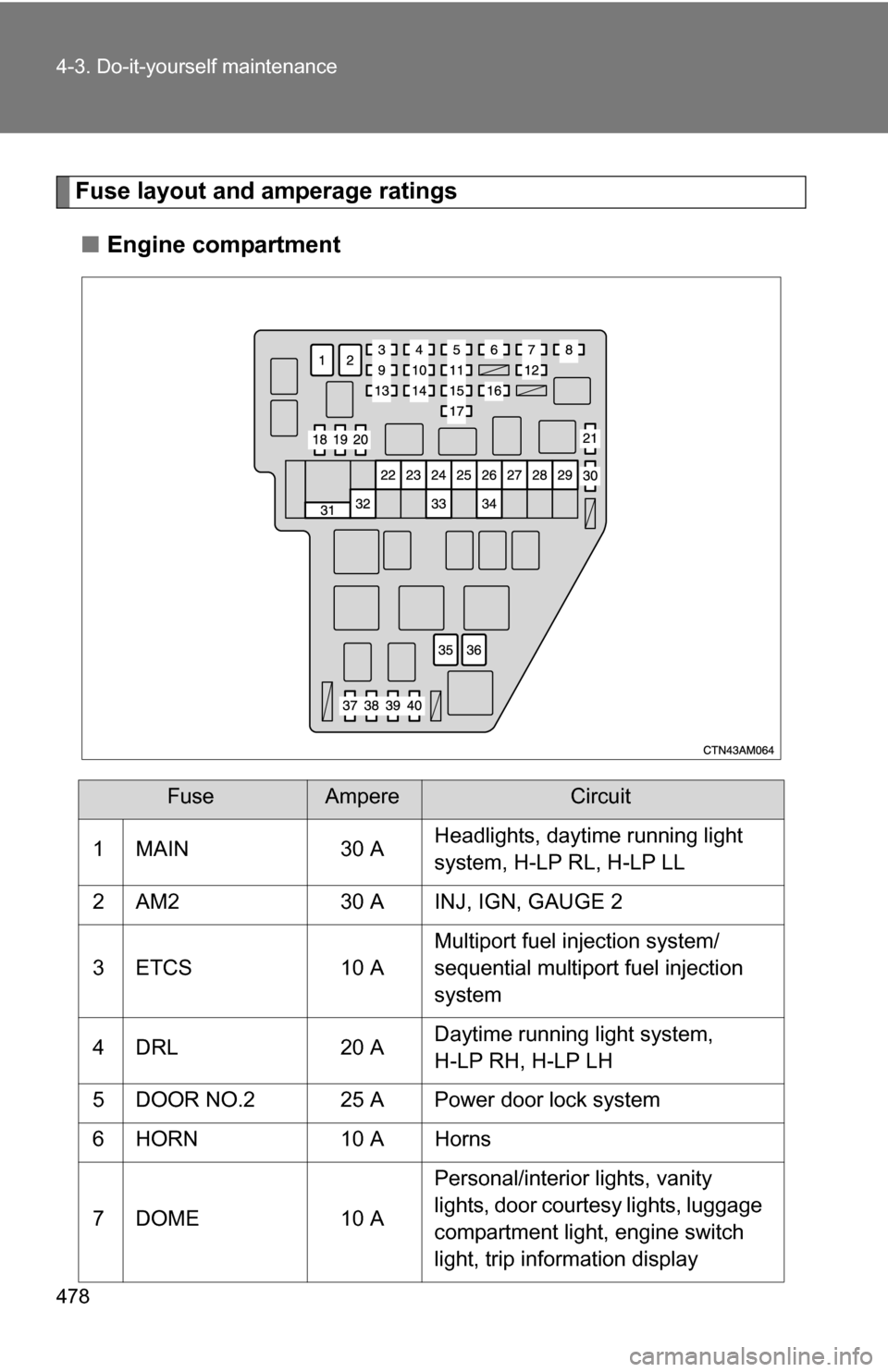
Fuse layout and amperage ratings■ Engine compartment
FuseAmpereCircuit
1 MAIN 30 A Headlights, daytime running light
system, H-LP RL, H-LP LL
2 AM2 30 A INJ, IGN, GAUGE 2
3 ETCS 10 A Multiport fuel injection system/
sequential multiport fuel injection
system
4 DRL 20 A Daytime running light system,
H-LP RH, H-LP LH
5 DOOR NO.2 25 A Power door lock system
6 HORN 10 A Horns
7 DOME 10 A Personal/interior lights, vanity
lights, door courtesy lights, luggage
compartment light, engine switch
light, trip information display
Page 482 of 592
482 4-3. Do-it-yourself maintenance
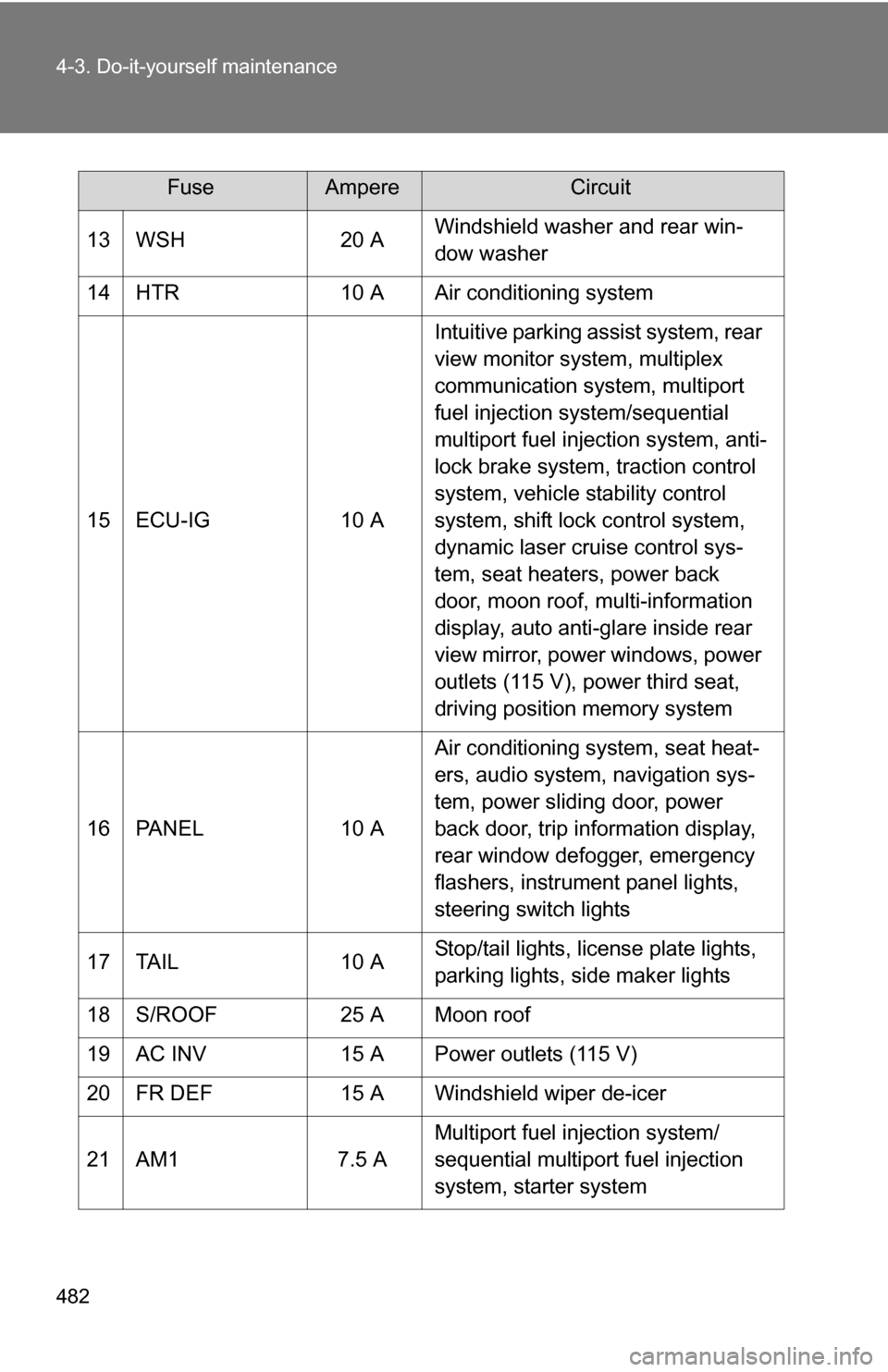
13 WSH20 AWindshield washer and rear win-
dow washer
14 HTR 10 A Air conditioning system
15 ECU-IG 10 AIntuitive parking assist system, rear
view monitor system, multiplex
communication system, multiport
fuel injection system/sequential
multiport fuel injection system, anti-
lock brake system, traction control
system, vehicle stability control
system, shift lock control system,
dynamic laser cruise control sys-
tem, seat heaters, power back
door, moon roof, multi-information
display, auto anti-glare inside rear
view mirror, power windows, power
outlets (115 V), power third seat,
driving position memory system
16 PANEL 10 AAir conditioning system, seat heat-
ers, audio system, navigation sys-
tem, power sliding door, power
back door, trip information display,
rear window defogger, emergency
flashers, instrument panel lights,
steering switch lights
17 TAIL 10 AStop/tail lights, license plate lights,
parking lights, side maker lights
18 S/ROOF 25 A Moon roof
19 AC INV 15 A Power outlets (115 V)
20 FR DEF 15 A Windshield wiper de-icer
21 AM1 7.5 AMultiport fuel injection system/
sequential multiport fuel injection
system, starter system
FuseAmpereCircuit