2009 TOYOTA LAND CRUISER ECO mode
[x] Cancel search: ECO modePage 33 of 556
33
1-2. Opening, closing and locking the doors
1
Before driving
L/C200_U (OM60D97U)
■
Note for the smart key system
● Even when the electronic key is within the effective range (detection
areas), the system may not operate properly in the following cases.
• The electronic key is too close to the window or outside door handle,
near the ground, or in a high place when the doors are locked or
unlocked.
• The electronic key is near the ground or in a high place, or too close to the rear bumper center when the back door is locked or unlocked.
• The electronic key is on the instrument panel, floor or in the glove box when the engine is started or “ENGINE START STOP” switch modes
are changed.
● As long as the electronic key is within the effective range, the doors may
be locked or unlocked by anyone.
● Even if the electronic key is not inside the vehicle, it may be possible to
start the engine if the electronic key is near the window.
● The doors may unlock if a large amount of water splashes on the door
handle, such as in the rain or in a car wash. (The doors will automatically
be locked after approximately 60 seconds if the doors are not opened
and closed.)
● Gripping the door handle when wearing a glove may not unlock the door.
● If the wireless remote control is used to lock the doors when the elec-
tronic key is near the vehicle, there is a possibility that the door may not
be unlocked by the smart key system. (Use the wireless remote control to
unlock the doors.)
● A sudden approach to the effective range or door handle operation may
prevent the doors from being unlocked. In this case, return the door han-
dle to the original position and check that the doors unlock before pulling
the door handle.
■ When the vehicle is not dr iven for extended periods
To prevent theft of the vehicle, do not leave the electronic key within 6 ft. (2
m) of the vehicle.
■ Security feature
If a door is not opened within approximately 60 seconds after the vehicle is
unlocked, the security feature automatically locks the vehicle again.
Page 34 of 556
34 1-2. Opening, closing and locking the doors
L/C200_U (OM60D97U)
■Alarms and warning indicators
A combination of exterior and interior alarms as well as warnings displayed
on the multi-information display are used to prevent theft of the vehicle and
unforeseeable accidents resulting from erroneous operation. Perform the
appropriate correction procedure de scribed in the following table.
AlarmSituationCorrection procedure
Exterior alarm
sounds once for
2 seconds An attempt was made to
lock the doors using the
entry function while the
electronic key was still
inside the passenger com-
partment Retrieve the elec-
tronic key from the
passenger compart-
ment and lock the
doors again
Exterior alarm
sounds once for
60 seconds An attempt was made to
exit the vehicle and lock
the doors without first turn-
ing the “ENGINE START
STOP” switch OFF Turn the “ENGINE
START STOP” switch
OFF and lock the
doors again
Exterior alarm
sounds once for
10 seconds An attempt was made to
lock the vehicle while a
door is open Close all of the doors
and lock the doors
again
Interior alarm
pings continu-
ously
*1
The “ENGINE START
STOP” switch was turned
to ACCESSORY mode
while the driver’s door was
open (or the driver’s door
was opened while the
“ENGINE START STOP”
switch was in ACCES-
SORY mode) Turn the “ENGINE
START STOP” switch
OFF and close the
driver’s door
The “ENGINE START
STOP” switch was turned
OFF while the driver’s door
was open Close the driver’s
door
Page 45 of 556
45
1-2. Opening, closing and locking the doors
1
Before driving
L/C200_U (OM60D97U)
Automatic door locking and unlocking systems
The following functions can be set or canceled:
■ Setting and canceling the functions
To switch between setting and canceling, follow the procedure
below:
Close all the doors and switch the “ENGINE START STOP”
switch IGNITION ON mode. (Perform step 2 within 20 sec-
onds.)
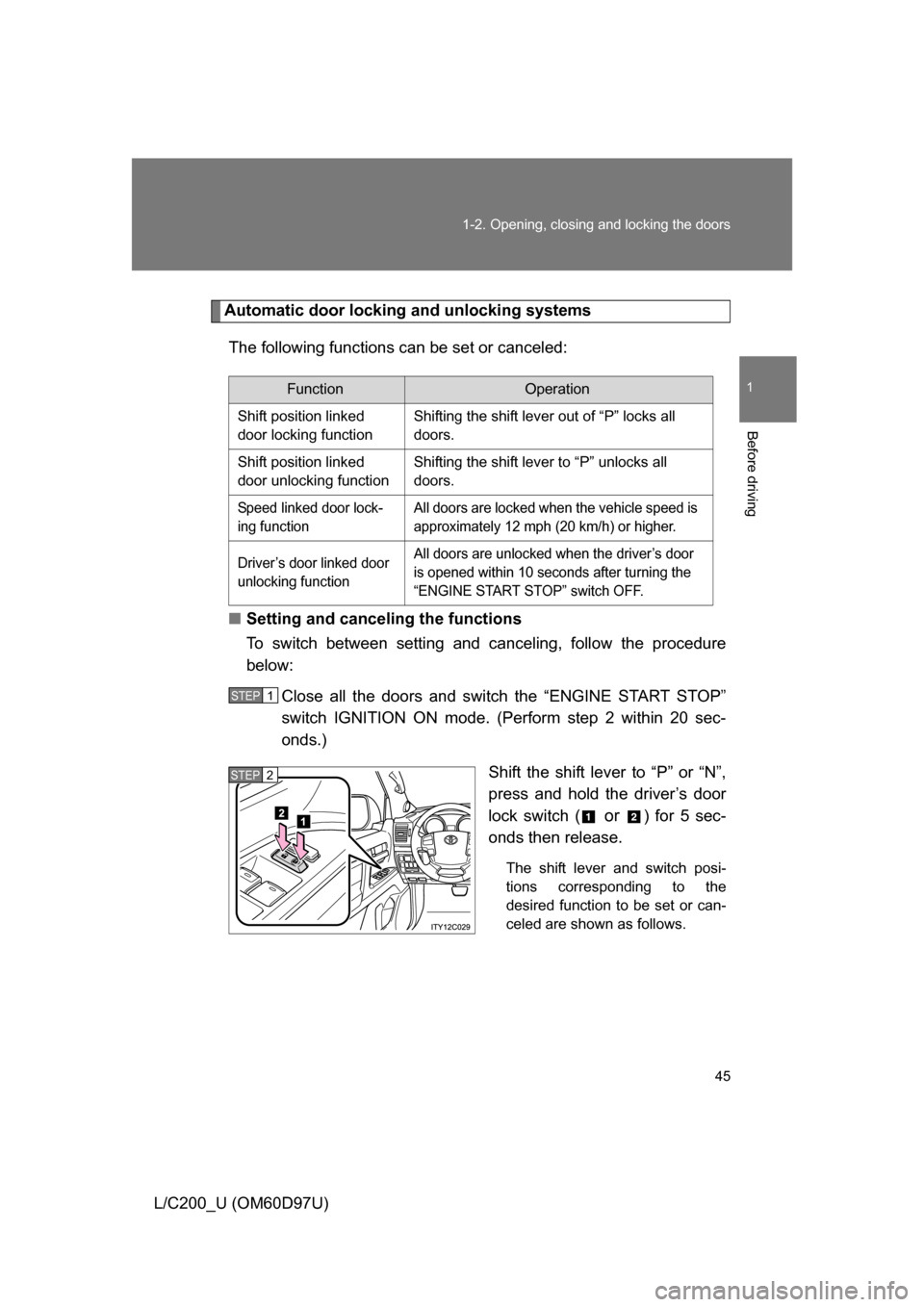
Shift the shift lever to “P” or “N”,
press and hold the driver’s door
lock switch (
or ) for 5 sec-
onds then release.
The shift lever and switch posi-
tions corresponding to the
desired function to be set or can-
celed are shown as follows.
FunctionOperation
Shift position linked
door locking function Shifting the shift lever out of “P” locks all
doors.
Shift position linked
door unlocking function Shifting the shift lever to “P” unlocks all
doors.
Speed linked door lock-
ing function All doors are locked when the vehicle speed is
approximately 12 mph (20 km/h) or higher.
Driver’s door linked door
unlocking function All doors are unlocked when the driver’s door
is opened within 10 seconds after turning the
“ENGINE START STOP” switch OFF.
STEP1
STEP2
Page 62 of 556
62
1-3. Adjustable components (seats, mirrors, steering wheel)
L/C200_U (OM60D97U)
Driving position memor y system
Your preferred driving position (the position of the driver’s seat,
steering wheel and outside rear view mirrors) can be entered into the
computer’s memory and recalled with the touch of a button. It is also
possible to set this function to activate automatically when the
doors are unlocked.
Three different driving positions can be entered into memory.
■ Entering a position to memory
Check that the shift lever is set in “P”.
Turn the “ENGINE START STOP” switch to IGNITION ON
mode.
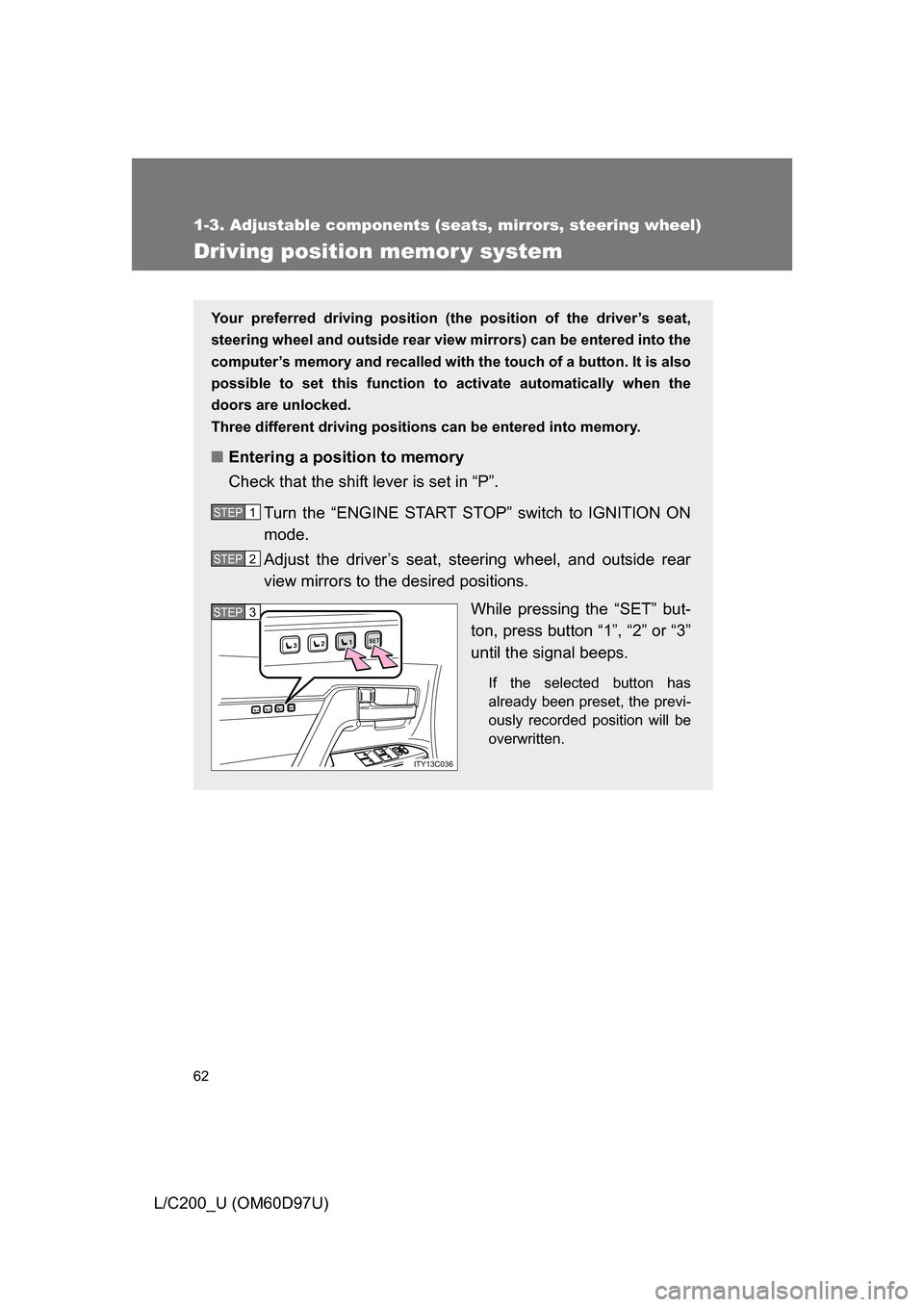
Adjust the driver’s seat, steering wheel, and outside rear
view mirrors to the desired positions. While pressing the “SET” but-
ton, press button “1”, “2” or “3”
until the signal beeps.
If the selected button has
already been preset, the previ-
ously recorded position will be
overwritten.
STEP1
STEP2
1SET23
1SET23
ITY13C036
STEP3STEP3
Page 63 of 556
63
1-3. Adjustable components (s
eats, mirrors, steering wheel)
1
Before driving
L/C200_U (OM60D97U)
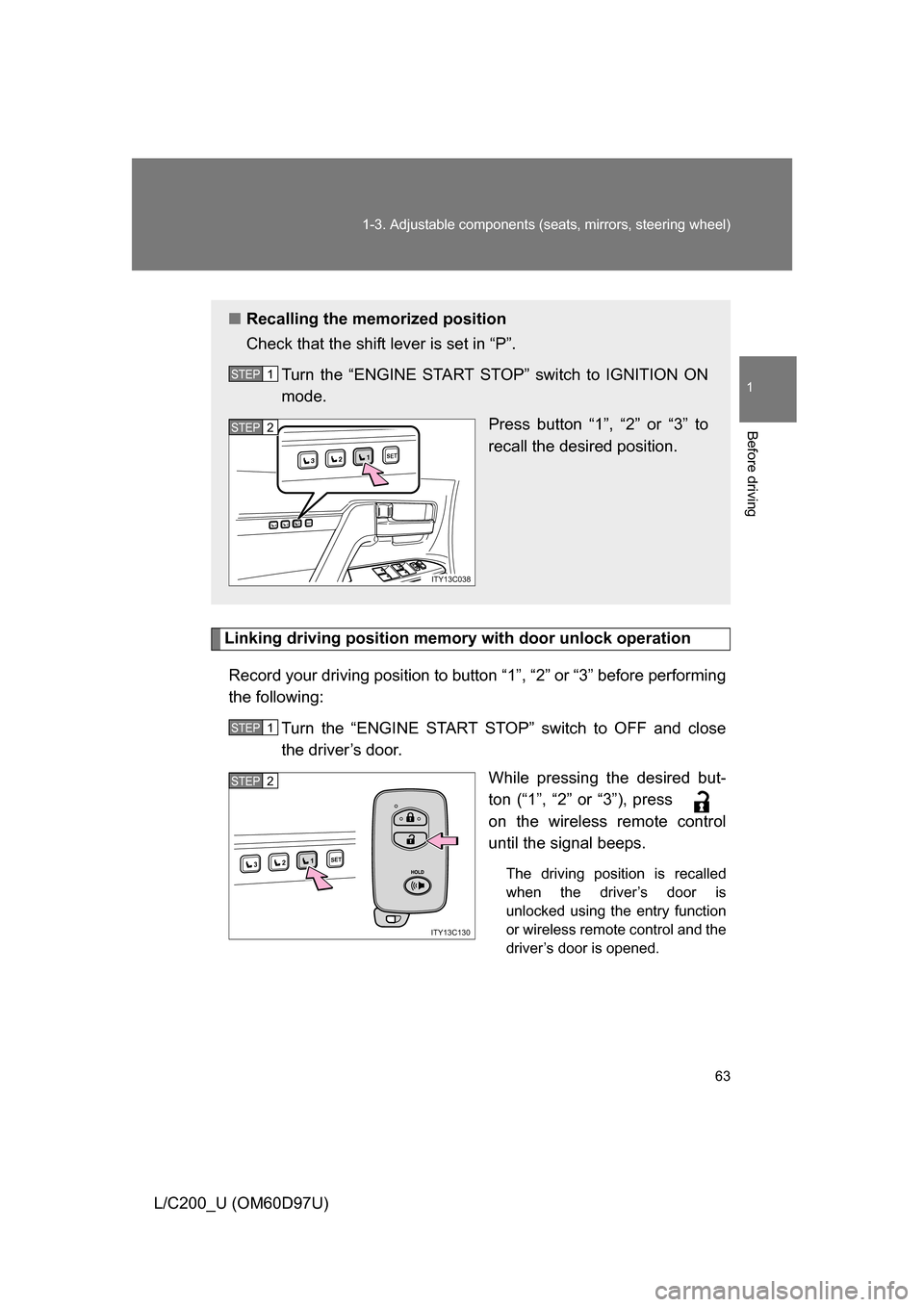
Linking driving position memory with door unlock operation
Record your driving position to button “1”, “2” or “3” before performing
the following: Turn the “ENGINE START STOP” switch to OFF and close
the driver’s door. While pressing the desired but-
ton (“1”, “2” or “3”), press
on the wireless remote control
until the signal beeps.
The driving position is recalled
when the driver’s door is
unlocked using the entry function
or wireless remote control and the
driver’s door is opened.
■Recalling the memorized position
Check that the shift lever is set in “P”.
Turn the “ENGINE START STOP” switch to IGNITION ON
mode. Press button “1”, “2” or “3” to
recall the desired position.
STEP1
1SET23
1SET23
ITY13C038
STEP2
STEP1
1SET23
ITY13C130
STEP2
Page 83 of 556
83
1-3. Adjustable components (s
eats, mirrors, steering wheel)
1
Before driving
L/C200_U (OM60D97U)
■When the mirrors are fogged up
Turn on the outside rear view mirror defoggers to defog the mirrors.
(P. 268)
■ Auto anti-glare function
When the anti-glare inside rear view mirror is set to auto mode, the outside
rear view mirrors will activate in conjunction with the anti-glare inside rear
view mirror to reduce reflected light. ( P. 81)
■ Linked mirror function when reversing
The outside rear view mirrors will automatically angle downwards when the
vehicle is reversing in order to give a better view of the ground. However,
this function will not operate when the mirror select switch is in the n\
eutral
position (between “L” and “R”).
■ One-touch adjustment of the mirror angle
A desired mirror face angle can be entered to memory and adjusted with the
touch of a button. ( P. 62)
CAUTION
■While driving
Observe the following precautions.
Failing to do so may result in losing control of the vehicle and cause an acci-
dent, resulting in death or serious injury.
● Do not adjust the mirrors.
● Do not drive with the mirrors folded back.
● Before driving, be sure to extend mirrors and make an adjustment prop-
erly.
■ When the mirror defoggers are operating
Do not touch the mirror surface as the mirror surface becomes hot.
Page 86 of 556
86 1-4. Opening and closing the windows and moon roof
L/C200_U (OM60D97U)
■The power windows can be operated when
The “ENGINE START STOP” switch is in IGNITION ON mode.
■ Linked door lock window operation
● The power windows can be opened and closed using the mechanical
key. ( P. 43)
● The power windows can be opened using the wireless remote control.
(P. 4 0 )
● The power windows can be closed using the smart key system. ( P. 27)
■ Operating the power windows after turning the “ENGINE START STOP”
switch OFF
The power windows can be operated for approximately 45 seconds even
after the “ENGINE START STOP” switch is turned ACCESSORY mode or
turned OFF. They cannot, however, be operated once the driver’s or front
passenger’s door is opened.
■ Jam protection function
If an object becomes caught between the window and the window frame,
window travel is stopped and the window is opened slightly.
■ Customization that can be co nfigured at Toyota dealer
Settings (e.g. linked door lock operation) can be changed. (Customizable
features P. 533)
Page 89 of 556
89
1-4. Opening and closing the windows and moon roof
1
Before driving
L/C200_U (OM60D97U)
■
The moon roof can be operated when
The “ENGINE START STOP” switch is in IGNITION ON mode.
■ Linked door lock moon roof operation
● The moon roof can be opened and closed using the mechanical key.
(P. 4 3 )
● The moon roof can be opened using the wireless remote control.
(P. 4 0 )
● The moon roof can be closed using the smart key system. ( P. 27)
■ Operating the moon roof after tu rning the “ENGINE START STOP”
switch OFF
The moon roof can be operated for approximately 45 seconds even after the
“ENGINE START STOP” switch is turned to ACCESSORY mode or turned
OFF. It cannot, however, be operated once the driver’s or front passenger’s
door is opened.
■ Jam protection function
If an object is detected between the moon roof and the frame while closing
or tilting down, travel is stopped and the moon roof opens slightly.
■ If the moon roof cannot be closed automatically
Keep the switch depressed.
■ To reduce moon roof wind noise
Drive with the moon roof opened automatically (just before fully opened
position).
■ Sunshade
The sunshade can be opened and closed manually. However, the sunshade
will open automatically when the moon roof is opened.