274 3-2. Using the audio system
L/C200_U (OM60D97U)
RDS (Radio Data System)This feature allows your radio to receive station identification informa-
tion and program information (classic al, jazz, etc.) from radio stations
which broadcast this information.
■ Receiving RDS broadcasts
Press “ ” or “ ” on the during FM reception.
The type of program changes each time the button is pressed.
● ROCK
● EASYLIS (Easy listening)
● CLS/JAZZ (Classical music and Jazz)
● R & B (Rhythm and Blues)
● INFORM (Information)
● RELIGION
● MISC (Miscellaneous)
● ALERT (Emergency messages)
If the system receives no RDS stations, “NO PTY” appears on the display.
Press , or “ ” or “ ” on .
The radio seeks scans the station by the relevant program type.
If no radio station of that type is found, “NOTHING” appears on the
display.
■Displaying radio station names
Press .
STEP1
STEP2
402 4-3. Do-it-yourself maintenance
L/C200_U (OM60D97U)■
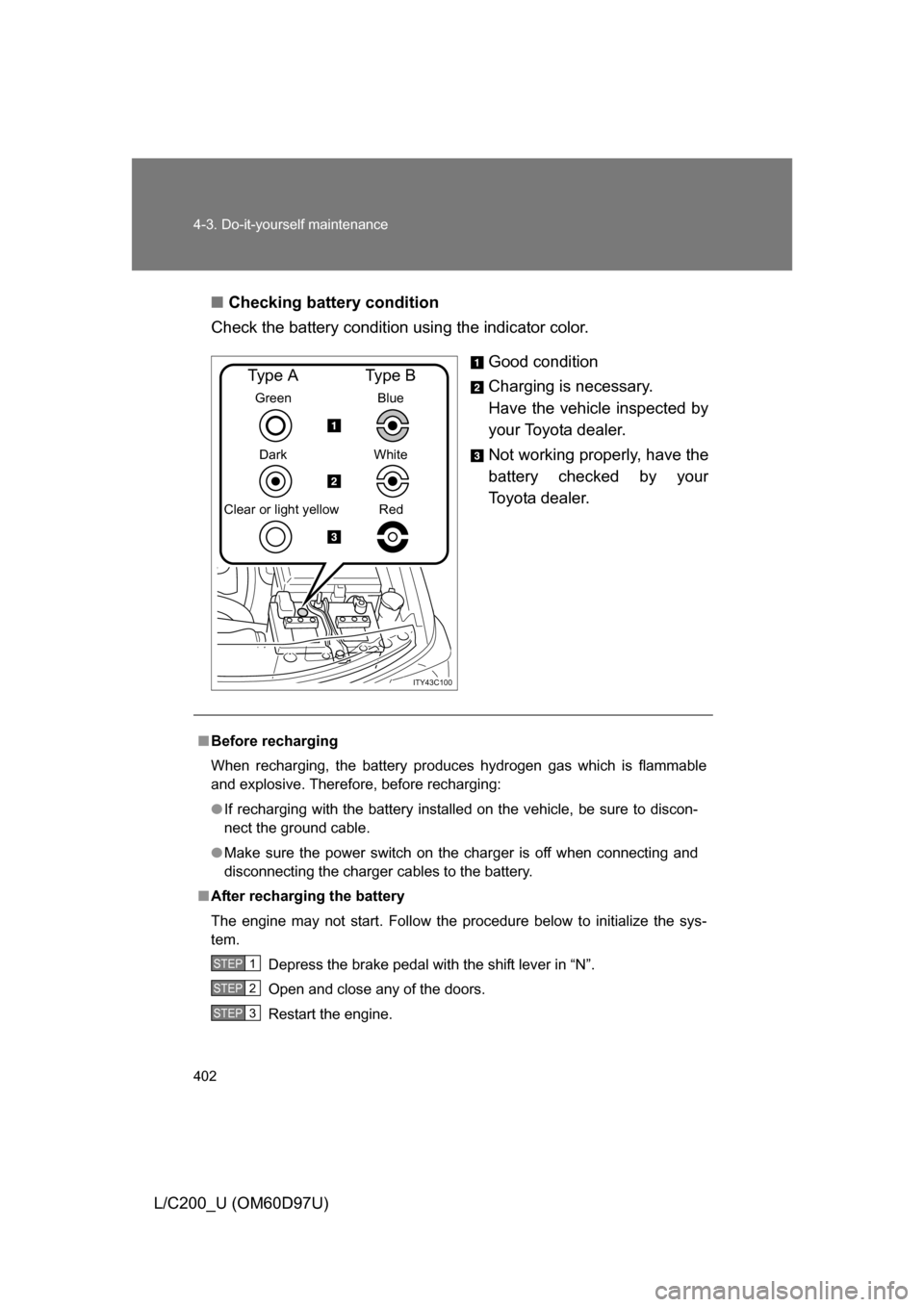
Checking battery condition
Check the battery condition using the indicator color.
Good condition
Charging is necessary.
Have the vehicle inspected by
your Toyota dealer.
Not working properly, have the
battery checked by your
Toyota dealer.
ITY43C100
Green
Dark
Clear or light yellow
Type A
Blue
White Red
Type B
■ Before recharging
When recharging, the battery produces hydrogen gas which is flammable
and explosive. Therefore, before recharging:
● If recharging with the battery installed on the vehicle, be sure to discon-
nect the ground cable.
● Make sure the power switch on the charger is off when connecting and
disconnecting the charger cables to the battery.
■ After recharging the battery
The engine may not start. Follow the procedure below to initialize the sys-
tem.
Depress the brake pedal with the shift lever in “N”.
Open and close any of the doors.
Restart the engine.
STEP1
STEP2
STEP3