2009 SUBARU TRIBECA oil type
[x] Cancel search: oil typePage 813 of 2453

DI-29
Rear Differential (VA–type)
DIFFERENTIALS
3) Set the gauge inside of the companion flange,
and measure the runout.
Limit of runout:
0.08 mm (0.003 in)
4) If either runout exceeds the limit, move the
phase of companion flange and drive pinion 90°
each, and find the point where the runout will be
within the limit.
5) If the runout exceeds the limit when changing
the phase, replace the companion flange and re-
check the runout.
6) If the runout exceeds the limit after replacing the
companion flange, the drive pinion may be assem-
bled incorrectly or bearing is faulty.
4. REAR DIFFERENTIAL OIL TEMPERA-
TURE SWITCH
Inspect the continuity of the rear differential oil tem-
perature switch.
F: ADJUSTMENT
1. HYPOID DRIVEN GEAR BACKLASH
Adjust hypoid driven gear backlash.
2. TOOTH CONTACT BETWEEN HYPOID
DRIVEN GEAR AND DRIVE PINION
Adjust the tooth contact between hypoid driven
gear and drive pinion gear.
Specified resistance Criteria
Less than 1 ΩNormal
1 MΩ or more Replacement
DI-00361
DI-00479
Page 816 of 2453

DI-32
Rear Differential Side Oil Seal
DIFFERENTIALS
6. Rear Differential Side Oil Seal
A: INSPECTION
Make sure that there is no leakage from side oil
seal. If there is any leakage, replace the oil seal.
B: REPLACEMENT
1) Remove the rear differential.
2) Remove the rear differential side oil seal using a
screwdriver wrapped with vinyl tape to prevent the
side retainer from scratches.
3) Using the ST, install the oil seal to the side re-
tainer.
ST 398437700 DRIFT
4) Install the rear differential.
ST
DI-00209
Page 827 of 2453

DS-10
Propeller Shaft
DRIVE SHAFT SYSTEM
2. Propeller Shaft
A: REMOVAL
NOTE:
•Before removing propeller shaft, wrap metal
parts with a cloth or rubber material.
•In case of EDJ type, wrap the metal parts at the
rubber boot at the center EDJ with a cloth or rubber
material before removing propeller shaft, as shown
in the figure. The rubber boot may be damaged due
to interference with adjacent metal parts while
bending the EDJ during removal.
1) Disconnect the ground cable from the battery.
2) Shift the select lever or gear shift lever to neutral.
3) Release the parking brake.
4) Lift-up the vehicle.
5) Remove the center exhaust pipe.
6) Remove the rear exhaust pipe and muffler.
7) Remove the heat shield cover.
8) Make matching marks on the flange yoke and
rear differential before removal.
9) Remove the three bolts holding the propeller
shaft to the rear differential.
10) Remove the remaining bolt.
11) Remove the two bolts which hold center bear-
ing to vehicle body.
12) Remove the propeller shaft from transmission.
CAUTION:
•Be careful not to damage oil seals and fric-
tional surface of the sleeve yoke.
•Cover the center exhaust pipe with a cloth to
keep off any ATF or oil spilled from transmis-
sion when removing propeller shaft.
NOTE:
Use a container to catch ATF or oil flowing from
propeller shaft.(A) Heat shield cover
DS-00239
DS-00355(A)
(A) Alignment mark
DS-00028
(A)
DS-00141
DS-00030
Page 845 of 2453

DS-28
Rear Drive Shaft
DRIVE SHAFT SYSTEM
8. Rear Drive Shaft
A: REMOVAL
1) Disconnect the ground cable from the battery.
2) Lift-up the vehicle, and then remove the rear
wheels.
3) Lift the crimped section of axle nut.
4) While applying the parking brake, remove the
axle nut using a socket wrench.
CAUTION:
Remove the wheel before loosening the axle
nut. Failure to follow this rule may damage the
wheel bearings.
5) Remove the rear differential assembly.
VA-type
6) Remove the axle nut and rear drive shaft. If it is
hard to remove, use ST1 and ST2.
ST1 926470000 AXLE SHAFT PULLER
ST2 28099PA110 AXLE SHAFT PULLER
PLATE
CAUTION:
•Do not hammer drive shaft when removing.
•Do not damage the oil seal and magnetic en-
coder.
B: INSTALLATION
1) Insert the EBJ into hub splines.
CAUTION:
•Be careful not to damage the magnetic en-
coder.
•Do not get closer the tool which charged
magnetism to magnetic encoder.
2) Draw the rear drive shaft into specified position.
CAUTION:
Do not hammer drive shaft when installing it.
3) Tighten the axle nut temporarily.
4) Install the rear differential assembly.
VA-type
5) While applying the parking brake and depress-
ing the brake pedal, tighten a new axle nut (olive
color) to the specified torque and lock it securely.
Tightening torque:
240 N·m (24.5 kgf-m, 177 ft-lb)
CAUTION:
•Install the wheel after installation of axle nut.
Failure to follow this rule may damage the
wheel bearing.
•Be sure to tighten the axle nut to specified
torque. Do not overtighten it as this may dam-
age the wheel bearing.
6) Lock the axle nut securely.
DS-00038
DS-00122
ST2ST1
(1) Magnetic encoder
(2) Rear hub unit bearing
DS-00251
(2)
(1)
DS-00048
Page 1188 of 2453
![SUBARU TRIBECA 2009 1.G Service Workshop Manual EN(H6DO)(diag)-27
Subaru Select Monitor
ENGINE (DIAGNOSTICS)
4. READ CURRENT DATA FOR ENGINE (NORMAL MODE)
1) On the «Main Menu» display screen, select the {Each System Check} and press the [YES] ke](/manual-img/17/7322/w960_7322-1187.png "SUBARU TRIBECA 2009 1.G Service Workshop Manual EN(H6DO)(diag)-27
Subaru Select Monitor
ENGINE (DIAGNOSTICS)
4. READ CURRENT DATA FOR ENGINE (NORMAL MODE)
1) On the «Main Menu» display screen, select the {Each System Check} and press the [YES] ke")
EN(H6DO)(diag)-27
Subaru Select Monitor
ENGINE (DIAGNOSTICS)
4. READ CURRENT DATA FOR ENGINE (NORMAL MODE)
1) On the «Main Menu» display screen, select the {Each System Check} and press the [YES] key.
2) On the «System Selection Menu» display screen, select the {Engine} and press the [YES] key.
3) Press the [YES] key after the information of engine type has been displayed.
4) On the «Engine Diagnosis» display screen, select the {Current Data Display/Save}, and then press the
[YES] key.
5) On the «Data Display Menu» screen, select the {Data Display} and press the [YES] key.
6) Using the scroll key, scroll the display screen up or down until the desired data is shown.
•A list of the support data is shown in the following table.
Description Display Unit of measure Note (at idling)
Engine load Engine load % 3.5%
Engine coolant temperature signal Coolant Temp. °C or °F≥ 75°C or 167°F (After
engine is warmed-up.)
A/F compensation 1 A/F Compensation 1 % 3.1%
A/F learning 1 A/F learning 1 % 0.0%
A/F compensation 2 A/F Compensation 2 % 4.7%
A/F learning 2 A/F learning 2 % 0.0%
Intake manifold absolute pressure Mani. Absolute PressuremmHg, kPa,
inHg or psig
200 — 300 mmHg, 26.7 —
40 kPa, 7.8 — 11.8 inHg or
3.8 — 5.8 psig
Engine speed signal Engine speed rpm 600 — 800 rpm
Meter vehicle speed signal Meter vehicle speed km/h or MPH 0 km/h or 0 MPH
Ignition timing signal Ignition timing deg 13 — 15 deg
Intake air temperature signal Intake air temperature °C or °F (Ambient air temperature)
Amount of intake air Mass Air Flow g/s or lb/m 3.8 g/s or 0.5 lb/m
Throttle opening angle signal Throttle valve angle % 1.2 — 1.6%
Fr o nt ox yg e n se n so r vo lt a g e val ue 1Fr o n t oxy ge n s en s or vol t ag e
value 1V0.035 V
Fr o nt ox yg e n se n so r vo lt a g e val ue 2Fr o n t oxy ge n s en s or vol t ag e
value 2V0.020 V
Battery voltage Battery Voltage V 12 — 14 V
Mass air flow voltage Mass air flow voltage V 1.1 — 1.2 V
Injection 1 pulse width Injection 1 pulse width ms 2.82 ms
Injection 2 pulse width Injection 2 pulse width ms 2.82 ms
Knock sensor compensation Knock correction deg 0 deg
Atmospheric pressure signal Atmospheric pressuremmHg, kPa,
inHg or psig(Atmospheric pressure)
Intake manifold relative pressureIntake manifold relative pres-
sure
mmHg, kPa,
inHg or psig
(Intake manifold absolute
pressure — atmospheric
pressure)
Acceleration opening angle signal Acceleration opening angle % 0%
Radiator fan output Radiator fan output % 0%
Purge control solenoid valve duty ratio CPC Duty % 0 — 3%
Generator duty ALT duty % 0%
Fuel pump duty Fuel pump duty % 33%
Va r i a b l e va l v e t i m i n g a d v a n c e a n g l e a m o u n t R V V T a d va n c e a n g l e a m o u n t R d e g 0 d e g
Va r i a b l e va l v e t i m i n g a d v a n c e a n g l e a m o u n t L V V T a d va n c e a n g l e a m o u n t L d e g 0 d e g
Oil flow control solenoid valve duty R OCV duty R % 9.4%
Oil flow control solenoid valve duty L OCV duty L % 9.4%
Oil flow control solenoid valve current R OCV current R mA 64 mA
Oil flow control solenoid valve current L OCV current L mA 64 mA
Fr o nt ox yg e n ( A / F) s en so r cu r r en t va l ue 1 A / F s en s or cu r r e nt va l ue 1 mA 0 . 0 m A
Fr o nt ox yg e n ( A / F) s en so r cu r r en t va l ue 2 A / F s en s or cu r r e nt va l ue 2 mA 0 . 0 m A
Fr o nt ox yg e n ( A / F) s en so r r es is t an ce val ue 1 A / F s en s or r e si st a nc e val u e 1Ω31 Ω
Page 1190 of 2453
![SUBARU TRIBECA 2009 1.G Service Workshop Manual EN(H6DO)(diag)-29
Subaru Select Monitor
ENGINE (DIAGNOSTICS)
5. READ CURRENT DATA FOR ENGINE (OBD MODE)
1) On the «Main Menu» display screen, select the {Each System Check} and press the [YES] key.](/manual-img/17/7322/w960_7322-1189.png "SUBARU TRIBECA 2009 1.G Service Workshop Manual EN(H6DO)(diag)-29
Subaru Select Monitor
ENGINE (DIAGNOSTICS)
5. READ CURRENT DATA FOR ENGINE (OBD MODE)
1) On the «Main Menu» display screen, select the {Each System Check} and press the [YES] key.")
EN(H6DO)(diag)-29
Subaru Select Monitor
ENGINE (DIAGNOSTICS)
5. READ CURRENT DATA FOR ENGINE (OBD MODE)
1) On the «Main Menu» display screen, select the {Each System Check} and press the [YES] key.
2) On the «System Selection Menu» display screen, select the {Engine} and press the [YES] key.
3) Press the [YES] key after the information of engine type has been displayed.
4) On the «Engine Diagnosis» display screen, select the {OBD System} and press the [YES] key.
5) On the «OBD Menu» display screen, select the {Current Data Display/Save}, and then press the [YES]
key.
6) On the «Data Display Menu» screen, select the {Data Display} and press the [YES] key.
7) Using the scroll key, scroll the display screen up or down until the desired data is shown.
•A list of the support data is shown in the following table.
AT c o o r d i n a t e f u e l c u t d e m a n d s i g n a l AT c o o r d i n a t e f u e l c u t d e m a n d — O F F
Ve h i c l e d y n a m i c s c o n t r o l ( V D C ) t o r q u e d o w n
prohibition outputBan of Torque Down — Permission
Ve h i c l e d y n a m i c s c o n t r o l ( V D C ) t o r q u e d o w n
demandVDC torque down demand — OFF
AT c o o r d i n a t e p e r m i s s i o n s i g n a l AT c o o r d i n a t e p e r m i s s i o n s i g n a l — P e r m i s s i o n
Electronic throttle control motor relay signal ETC motor relay — ON
Stop light switch signal Stop Light Switch — OFF
SET/COAST switch signal SET/COAST SW — OFF
RESUME/ACCEL switch signal RESUME/ACCEL SW — OFF
Brake switch signal Brake SW — OFF
Main switch signal Main SW — OFF
Body integrated unit data reception Body Int. Unit Data — Yes
Body integlated unit counter update Body Int. Unit Count — Yes
Cruise control cancel switch signal CC Cancel SW — OFF
Va r i a b l e v a l v e l i f t d i a g n o s i s o i l p r e s s u r e sw i t c h
signal 1Oil Temperature SW1 — ON
Va r i a b l e v a l v e l i f t d i a g n o s i s o i l p r e s s u r e sw i t c h
signal 2Oil Temperature SW2 — ON
Description Display Unit of measure
Number of diagnosis code Number of Diag. Codes: 0
Condition of malfunction indicator light MI (MIL) ON or OFF
Monitoring test of misfire Misfire monitoring Finish
Monitoring test of fuel system Fuel system monitoring Finish
Monitoring test of comprehensive component Component monitoring Finish
Te s t o f c a t a l y s t C a t a l y s t D i a g n o s i s F i n i s h o r i n c o m p l e t e
Te s t o f h e a t i n g - t y p e c a t a l y s t H e a t e d c a t a l y s t N o
Te s t o f e v a p o r a t i v e e m i s s i o n p u r g e c o n t r o l s y s t e m E v a p o r a t i v e p u r g e s y s t e m F i n i s h o r i n c o m p l e t e
Te s t o f s e c o n d a r y a i r s y s t e m S e c o n d a r y a i r s y s t e m N o
Te s t o f a i r c o n d i t i o n i n g s y s t e m r e f r i g e r a n t A / C s y s t e m r e f r i g e r a n t N o
Te s t o f o x y g e n s e n s o r O x y g e n s e n o r F i n i s h o r i n c o m p l e t e
Te s t o f o x y g e n s e n s o r h e a t e r O x y g e n s e n s o r h e a t e r F i n i s h
Te s t o f E G R s y s t e m E G R s y s t e m N o s u p p o r t
A/F control #1 Fuel system for Bank 1 OPEN early period
A/F control #2 Fuel system for Bank 2 OPEN early period
Calculated load valve Calculated load valve %
Engine coolant temperature Coolant Temp. °C
A/F compensation #1 Short term fuel trim B1 %
A/F learning #1 Long term fuel trim B1 %
A/F compensation #2 Short term fuel trim #2 %
A/F learning #2 Long term fuel trim B2 %
Description Display Unit of measure Note (at idling)
Page 1193 of 2453
![SUBARU TRIBECA 2009 1.G Service Workshop Manual EN(H6DO)(diag)-32
Subaru Select Monitor
ENGINE (DIAGNOSTICS)
7. LED OPERATION MODE FOR ENGINE
1) On the «Main Menu» display screen, select the {Each System Check} and press the [YES] key.
2) On the](/manual-img/17/7322/w960_7322-1192.png "SUBARU TRIBECA 2009 1.G Service Workshop Manual EN(H6DO)(diag)-32
Subaru Select Monitor
ENGINE (DIAGNOSTICS)
7. LED OPERATION MODE FOR ENGINE
1) On the «Main Menu» display screen, select the {Each System Check} and press the [YES] key.
2) On the")
EN(H6DO)(diag)-32
Subaru Select Monitor
ENGINE (DIAGNOSTICS)
7. LED OPERATION MODE FOR ENGINE
1) On the «Main Menu» display screen, select the {Each System Check} and press the [YES] key.
2) On the «System Selection Menu» display screen, select the {Engine} and press the [YES] key.
3) Press the [YES] key after the information of engine type has been displayed.
4) On the «Engine Diagnosis» display screen, select the {Current Data Display/Save}, and then press the
[YES] key.
5) On the «Data Display» screen, select the {Data LED Display} and press the [YES] key.
6) Using the scroll key, scroll the display screen up or down until the desired data is shown.
•A list of the support data is shown in the following table.
NOTE:
For detailed operation procedure, refer to the “SUBARU SELECT MONITOR OPERATION MANUAL”.
Description Display Message When LED “ON” required
Te s t m o d e s i g n a l Te s t m o d e t e r m i n a l D c h e c k / U c h e c k D c h e c k
Neutral position switch signal Neutral SW Neutral/Other than neutral Neutral
Idle switch signal Soft idle SW Idle/Other than idle In idle
Ignition switch signal Ignition SW ON Input/OFF Input ON input
Pow er s te e r in g sw it c h s ig n al Pow er s te e r in g S W ON I np u t/ O FF I np u t ON i np ut
Air conditioning switch signal A/C SW ON Input/OFF Input ON input
Starter switch signal Starter SW ON Input/OFF Input ON input
Fr o nt ox yg e n mo n it o r 1 Ft O 2 mo n it o r 1 Le a n/ Ri ch Ric h
Fr o nt ox yg e n mo n it o r 2 Ft O 2 mo n it o r 2 Le a n/ Ri ch Ric h
Knocking signal Knock signal Yes/No Yes
Crankshaft position sensor signal Crankshaft angle signal Yes/No Yes
Camshaft position sensor signal Camshaft angle signal Yes/No Yes
Rear defogger switch signal Rear defogger SW ON Input/OFF Input ON input
Blower fan switch signal Blower fan SW ON Input/OFF Input ON input
Light switch signal Light SW ON Input/OFF Input ON input
Wiper switch signal Wiper SW ON Input/OFF Input ON input
A/C middle pressure switch signal A/C middle pressure SW ON Input/OFF Input ON input
Air conditioner compressor relay sig-
nalCompressor relay ON output/OFF output ON output
Drain valve signal Vent. Solenoid Valve ON or OFF When drain valve is ON.
AT r e t a r d a n g l e d e m a n d s i g n a l AT r e t a r d a n g l e d e m a n d Ye s / N o Ye s
AT f u e l c u t s i g n a l AT f u e l c u t Ye s / N o Ye s
VDC torque down prohibition output Torque down output ON/OFF Prohibition
VDC torque down demand Torque down demand Yes/No Yes
AT c o o r d i n a t e p e r m i s s i o n s i g n a lAT c o o r d i n a t e p e r m i s s i o n
signalON/OFF Permission
Electronic throttle control motor relay
signalETC motor relay ON/OFF ON
Stop light switch signal Stop SW ON Input/OFF Input ON input
SET/COAST switch signal SET/CST SW ON Input/OFF Input ON input
RESUME/ACCEL switch signal RES/ACC SW ON Input/OFF Input ON input
Brake switch signal Brake SW ON Input/OFF Input ON input
Main switch signal Main SW ON Input/OFF Input ON input
Body integrated unit data reception Body Int. Unit Data Yes/No Yes
Body integrated unit counter update Body Int. Unit Count Yes/No Yes
Cruise control cancel switch signal CC Cancel SW ON Input/OFF Input ON input
Va r i a b l e va l v e l i f t d i a g n o s i s o i l p r e s -
sure switch signal 1Oil Temperature SW1 ON/OFF ON
Va r i a b l e va l v e l i f t d i a g n o s i s o i l p r e s -
sure switch signal 2Oil Temperature SW2 ON/OFF ON
Page 1621 of 2453
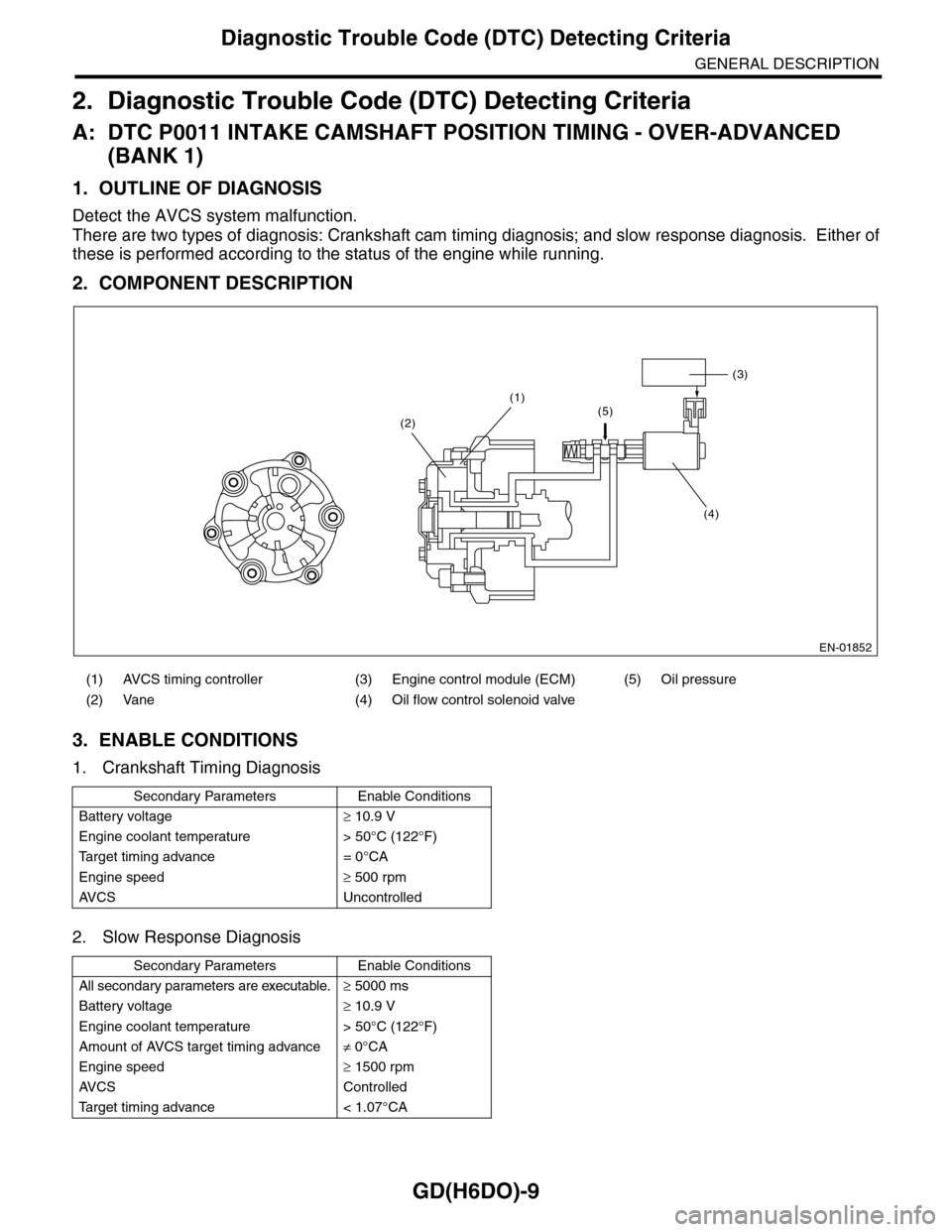
GD(H6DO)-9
Diagnostic Trouble Code (DTC) Detecting Criteria
GENERAL DESCRIPTION
2. Diagnostic Trouble Code (DTC) Detecting Criteria
A: DTC P0011 INTAKE CAMSHAFT POSITION TIMING - OVER-ADVANCED
(BANK 1)
1. OUTLINE OF DIAGNOSIS
Detect the AVCS system malfunction.
There are two types of diagnosis: Crankshaft cam timing diagnosis; and slow response diagnosis. Either of
these is performed according to the status of the engine while running.
2. COMPONENT DESCRIPTION
3. ENABLE CONDITIONS
1. Crankshaft Timing Diagnosis
2. Slow Response Diagnosis
(1) AVCS timing controller (3) Engine control module (ECM) (5) Oil pressure
(2) Vane (4) Oil flow control solenoid valve
Secondary Parameters Enable Conditions
Battery voltage≥ 10.9 V
Engine coolant temperature > 50°C (122°F)
Ta r g e t t i m i n g a d v a n c e = 0 ° C A
Engine speed≥ 500 rpm
AV C S U n c o n t r o l l e d
Secondary Parameters Enable Conditions
All secondary parameters are executable.≥ 5000 ms
Battery voltage≥ 10.9 V
Engine coolant temperature > 50°C (122°F)
Amount of AVCS target timing advance≠ 0°CA
Engine speed≥ 1500 rpm
AV C S C o n t r o l l e d
Ta r g e t t i m i n g a d v a n c e < 1 . 0 7 ° C A
EN-01852
(3)
(4)
(1)(5)(2)