2009 PORSCHE PANAMERA display
[x] Cancel search: displayPage 31 of 343
Opening and Locking
29
Close the tailgate automatically and lock
with Porsche Entry & Drive.
fPress the button B in the trim panel on the
tailgate.
The tailgate is closed and the vehicle is locked.
In order to close and then lock the tailgate on the
vehicle automatically, the key must be located:
– in the rear area and
– outside the vehicle.
A warning message appears on the multi-function
display in the instrument panel if these conditions
have not been met.
For information on warning messages on
the multi-function display:
f Please see the chapter “OVERVIEW OF
WARNING MESSAGES” on page 152.
Warning!
Risk of being locked out of vehicles with
Porsche Entry & Drive.
f Do not leave the key in the vehicle.
If locking button B is pressed after the tailgate
has closed, the vehicle is locked automatically.
If the key is left in th e vehicle, the emergency
flasher flashes once and a horn signal sounds.
Within approximately 30 seconds, the tailgate
can be opened again.
After 30 seconds have elapsed, the
vehicle can be unlocked again only with the second key. Interrupting the opening/closing operation in
the event of danger
The opening or closing op
eration is interrupted
immediately after:
f Pressing button on the key
or
Releasing button in the driver’s door
or
Briefly pressing button A or B in the trim panel
on the tailgate
or
Briefly pressing the release button on the
tailgate.
Automatic operation can be continued again at
any time. To do this, press the corresponding
button.
Caution!
Risk of damage to the tailgate caused by
striking garage roofs or roof transport
systems. If the luggage compartment cover
is not attached to the tailgate, the tailgate
continues to move slowly upwards beyond
the automatic stop.
f Only use the powerlift tailgate with the luggage compartment cover attached. Detection of obstacles during opening
The tailgate will stop movi
ng if opening is blocked
by an obstacle. A warning signal then sounds.
The opening operation can continue once the
obstacle is removed and after:
f Pressing button on the key
or
Pressing button in the driver’s door
or
Pressing the release button on the tailgate.
Page 33 of 343
Opening and Locking
31
Opening and Locking From InsideThe factory settings of the vehicle are described
in this section.
In the multi-function display in the instrument
panel, you can change the settings and store
them on the respective key for vehicles with
comfort memory.
For information on modifying the opening and
locking settings:
fPlease see the chapter “LOCKING SETTINGS”
on page 145.
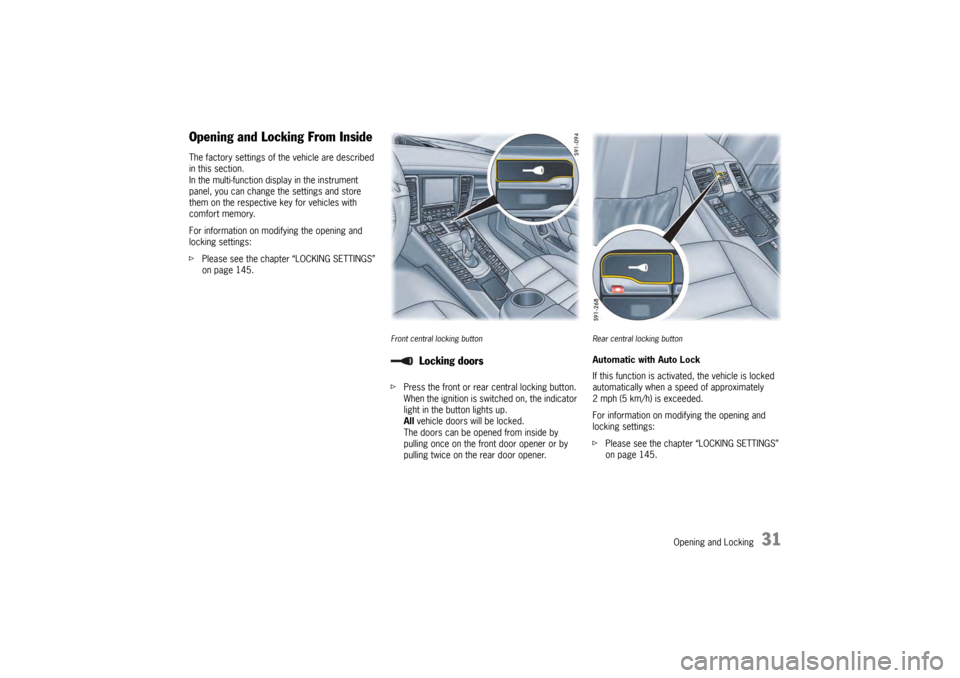
Front central locking buttonfPress the front or rear central locking button.
When the ignition is switched on, the indicator
light in the button lights up.
All vehicle doors will be locked.
The doors can be opened from inside by
pulling once on the front door opener or by
pulling twice on the rear door opener.
Rear central locking buttonAutomatic with Auto Lock
If this function is activate d, the vehicle is locked
automatically when a speed of approximately
2 mph (5 km/h) is exceeded.
For information on modifying the opening and
locking settings:
f Please see the chapter “LOCKING SETTINGS”
on page 145.
Locking doors
Page 36 of 343

34
Opening and Locking
1. Open the driver’s door.
2. Pull the release lever (
arrow).
The engine compartment lid is now unlocked. 3. Pull the unlocking handle (
arrow).
4. Open the engine compartment fully.
Closing1. Lower lid and let it fa ll into the lock. If
necessary, push the lid closed with the palm
of your hand in the area of the lock.
2. Check that the lid is en gaged correctly in the
lock and that the release lever is back in its
initial position.
When the vehicle is in motion, a message will
appear on the multi-function display in the
instrument panel if the lid is not closed properly.
Page 42 of 343

40
Seats, Mirrors and Steering Wheel
Driver's door memory buttons (driver memory or comfort
memory)Storing Vehicle SettingsDriver memoryThe current seat, exterior-mirror and steering
wheel settings are stored automatically on the car
key when the vehicle is locked.
Personal position settings for the driver’s seat,
exterior mirrors and the steering wheel can also
be stored in the person buttons and in the
driver’s door and retrieved at any time by pressing
the buttons.
Passenger's door memory buttons (comfort memory)Comfort memoryOn vehicles with the comfort memory package,
different vehicle settings, such as the multi-
function display, are stored on the car key and the
person buttons and in the driver’s door in
addition to the driver memory settings.
Personal position settings for the passenger seat
can be stored on the person buttons and in
the passenger’s door.
The passenger seat settings are not stored on the
car key.
Warning!
Risk of crushing due to uncontrolled
activation of settings.
f Do not activate the comfort memory button if
there is any risk of the seat crushing the
occupant.
f Cancel automatic adjustment by pressing any
of the seat adjustment buttons.
f Do not leave children in the vehicle unattended,
since they may depress the comfort setting
button and crush themselves or another occupant.
Page 44 of 343
42
Seats, Mirrors and Steering Wheel
Easy Entry FunctionThe Easy Entry function makes it easier for you to
get in and out of the vehicle.
Warning!
Risk of crushing if persons are behind the
driver’s seat when settings are retrieved.
Risk of damage if the rear seat bench is
folded forward when settings are retrieved.
f Switch off the Easy Entry function if there are
persons behind the driver’s seat or if the rear seat bench is folded forward.
Prerequisite
– Function must be activated on the multi- function display.
For information on swit ching the Easy Entry
function on and off:
f Please see the chapter “SWITCHING
COMFORT ENTRY ON AND OFF” on page 145. Entering the vehicle
When the driver’s door is opened, the steering
wheel and passenger seat
move upwards or to the
rear depending on the position of the seat and
steering wheel when the driver left the vehicle.
Once the driver’s door is closed and the ignition
key is inserted or, in the case of vehicles with
Porsche Entry & Drive, the ignition is switched on,
the seat and steering wheel move to the stored
position.
Exiting the vehicle
The steering wheel moves upwards:
– After the ignition key is removed or
– After the ignition is switched off and the
driver’s door is opened on vehicles with
Porsche Entry & Drive.
The driver’s seat moves to the rear:
– After the driver’s door is opened.
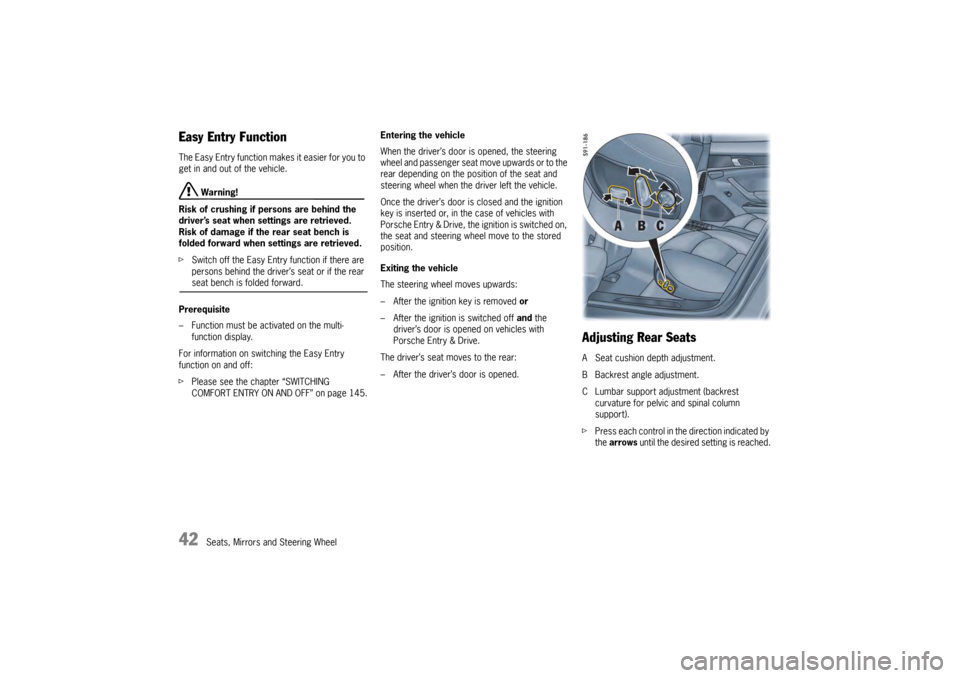
Adjusting Rear SeatsA Seat cushion depth adjustment.
B Backrest angle adjustment.
C Lumbar support adjustment (backrest curvature for pelvic and spinal column
support).
f Press each control in the direction indicated by
the arrows until the desired setting is reached.
Page 47 of 343
Seats, Mirrors and Steering Wheel
45
fDo not wear belts over rigid or breakable
objects in or on your clothing, such as eye
glasses, pens, keys, etc. as these may cause
injury.
f Several layers of heavy clothing may interfere
with proper positioning of belts.
f Belts must not rub against sharp objects or
damage may occur to the belt.
f Two occupants should never share the same
belt at the same time.
Care and maintenance
f Keep belt buckles free of any obstruction that
may prevent a secure locking.
f Belts that have been subjected to excessive
stretch forces in an accident must be
inspected or replaced to ensure their
continued effectiveness in restraining you.
The same applies to belt tensioner systems
which have been triggered. In addition, the
anchor points of the belts should be checked.
f If safety belts do not work properly, see your
authorized Porsche dealer immediately.
f If the belts show damage to webbing, bindings,
buckles or retractors, they should be replaced
to ensure safe operation.
f Do not modify or disassemble the safety belts
in your vehicle. f
The belts must be kept clean or the retractors
may not work properly.
Please see the chapter “CAR CARE
INSTRUCTIONS” on page 269.
f Never bleach or dye safety belts.
f Do not allow safety belts to retract until they
are completely dry after cleaning or this may
cause damage to the belt.
Belt tensionerDepending on the force of a collision, fastened
seat belts are automatically tightened in an
accident.
The belt tensioners are triggered in:
– Front and rear impacts of sufficient severity
– Side impacts
– In cases of vehicle rollover
Maintenance notes
The belt tensioner system can be triggered only
once; the system must be replaced afterwards.
If there is a fault in the belt tensioner system, the
air bag warning light lights up.
Work may be performed on the belt tensioner
system only by an authorized Porsche dealer.
Smoke is released when the belt tensioners are
triggered.
This does not indicate a fire in the vehicle. An audio-visual warning
system is
interconnected with the driver’s safety belt.
Every time the ignition is turned on, the gong will
sound for about 6 seconds to remind driver and
passenger to buckle up.
In addition, the gong will sound for approximately
90 seconds if vehicle speed exceeds 15 mph
(24 km/h).
The safety belt warning lights in the instrument
panel and multi-function display will go off as soon
as the driver has buckled up.
Safety Belt Warning System
Page 63 of 343

Seats, Mirrors and Steering Wheel
61
Steering WheelPDK shift buttonsPorsche Doppelkupplung (PDK) is a seven-speed
transmission with an “automatic” and a “manual”
selection mode.
You can change temporarily to manual mode or
shift gear in manual mode with the shift buttons A
on the steering wheel. For more information on shifting with the
Porsche Doppelkupplung (PDK):
f
Please see the chapter “PORSCHE
DOPPELKUPPLUNG (PDK)” on page 193.
Horn fPress button B to operate the horn.Air bag unitThe air bag unit C is located behind the padded
steering wheel boss.
In conjunction with the seat belts, the air bag is
a safety system designed to provide the driver
with maximum protection from injury in an
accident.
For information on the air bag system:
f Please see the chapter “AIR BAG SYSTEMS” on
page 47.
Heated steering wheelThe steering wheel heatin g can be switched on
and off with the button on the rear of the steering
wheel when the ignition is switched on.Switching steering wheel heating on/offf Press button.
The message “Steering wheel heating
switched on” or “Steering wheel heating
switched off” appears on the multi-function
display for 2 seconds.
Page 65 of 343

Seats, Mirrors and Steering Wheel
63
Multi-Function Steering Wheel
Warning!
There is a risk of accident if you set or
operate the multi-funct ion display, radio,
navigation system, telephone or other
equipment while driving.
Operating these devices while driving could
distract you from traffic and cause you to
lose control of the vehicle.
f Operate the equipment while driving only if the
traffic situation allows you to do so safely.
f Carry out any complicated operating or setting procedures only when the vehicle is stationary.
Depending on the equipment in your vehicle, you
can use the function keys of the multi-function
steering wheel to operate the following Porsche
communication systems:
– Telephone
–PCM
– Multi-function display in the instrument panel
Readiness for operation of the
multi-function steering wheel– With ignition switched on
f Please observe the operating instructions
supplied for the Porsche communication
systems before operating the function keys.
Note on operation
The Porsche communication systems cannot be
switched on and off using the multi-function
steering wheel.
Function buttons on the multi-function
steering wheelThe rotary buttons at the top left and right of the
steering wheel can also be pressed.
Turn volume control
Upwards – increase volume
Downwards – decrease volume
Press volume control
Switch volume/mute on and off.
Turn rotary knob
Select/highlight the main menu or menu
item on the multi-function display by
turning the rotary knob upward or
downward.
Press rotary knob
Go to submenu or activate selected
function.
Press MFS button
Call up the stored function.
The button can be assigned the desired
function in the multi-fu nction display on the
instrument panel.
Press Back button
Return to the menu.
Press Handset Pickup button
Accept a telephone call.
Press Handset Hangup button
End or refuse a telephone call.