Page 97 of 343

Lights, Turn Signals and Windshield Wipers
95
Automatic Coming Home lights
(Welcome Home function/Entry function)Switching on Automatic Coming Home lights
fSet light switch to .
The following lights remain switched on for
a certain period to allow you to get in and out of
your vehicle safely and with improved visibility in
darkness:
– Daytime driving lights,
– Courtesy lights in the exterior mirrors (on vehicles with comfort memory),
– Front and rear side marker lights,
– Licence plate lights.
Welcome Home function (off delay)
When the vehicle is locked, the lights remain
switched on for the duration of the off delay preset
on the multi-function display.
For information on adjusting the off delay of the
external lights on the multi-function display:
f Please see the chapter “ADJUSTING EXTERIOR
LIGHTS” on page 142. Entry function
When the vehicle is unlocked, the area around the
vehicle is illuminated for the duration of the off
delay preset on the multi-function display.
The lights are switched off when the ignition is
switched on or the light sw
itch is set to a position
other than .
For information on adjusting the off delay of the
external lights on the multi-function display:
f Please see the chapter “ADJUSTING EXTERIOR
LIGHTS” on page 142.
Instrument lightingThe lighting is automatically adjusted to the
ambient brightness by the light sensor B.
In addition, when the vehicle lighting is switched
on, the instrument and switch brightness can be
adjusted manually.
f Turn adjustment button A in the appropriate
direction and hold until the desired brightness
has been reached.
Page 98 of 343
96
Lights, Turn Signals and Windshield Wipers Warning!
Risk of accident when adjusting brightness
while driving. You may lose control of the
vehicle.
f Do not reach through the steering-wheel spokes when driving.
Turn Signal/High Beam/Headlight
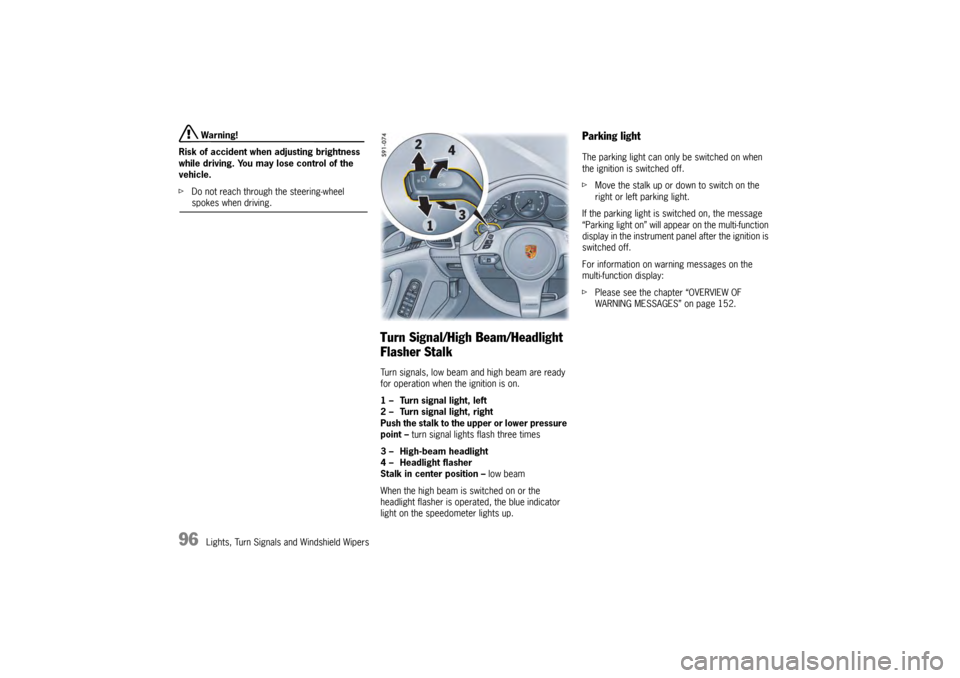
Flasher StalkTurn signals, low beam and high beam are ready
for operation when the ignition is on.
1 – Turn signal light, left
2 – Turn signal light, right
Push the stalk to the upper or lower pressure
point – turn signal lights flash three times
3 – High-beam headlight
4 – Headlight flasher
Stalk in center position – low beam
When the high beam is switched on or the
headlight flasher is operated, the blue indicator
light on the speedometer lights up.
Parking lightThe parking light can only be switched on when
the ignition is switched off.
f Move the stalk up or do wn to switch on the
right or left parking light.
If the parking light is switched on, the message
“Parking light on” will appear on the multi-function
display in the instrument panel after the ignition is
switched off.
For information on warning messages on the
multi-function display:
f Please see the chapter “OVERVIEW OF
WARNING MESSAGES” on page 152.
Page 101 of 343
Lights, Turn Signals and Windshield Wipers
99
Switching automatic interior lighting on
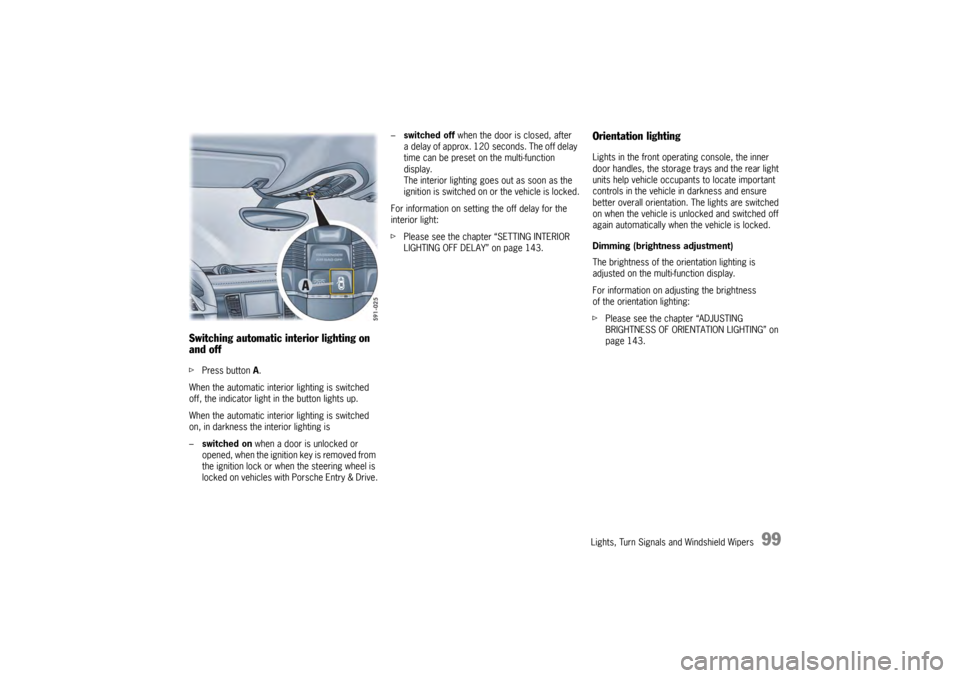
and off fPress button A.
When the automatic interior lighting is switched
off, the indicator light in the button lights up.
When the automatic interior lighting is switched
on, in darkness the interior lighting is
– switched on when a door is unlocked or
opened, when the ignition key is removed from
the ignition lock or when the steering wheel is
locked on vehicles with Porsche Entry & Drive. –
switched off when the door is closed, after
a delay of approx. 120 seconds. The off delay
time can be preset on the multi-function
display.
The interior lighting goes out as soon as the
ignition is switched on or the vehicle is locked.
For information on setting the off delay for the
interior light:
f Please see the chapter “SETTING INTERIOR
LIGHTING OFF DELAY” on page 143.
Orientation lightingLights in the front operating console, the inner
door handles, the storage trays and the rear light
units help vehicle occupa nts to locate important
controls in the vehicle in darkness and ensure
better overall orientation. The lights are switched
on when the vehicle is unlocked and switched off
again automatically when the vehicle is locked.
Dimming (brightness adjustment)
The brightness of the orientation lighting is
adjusted on the multi-function display.
For information on adjusting the brightness
of the orientation lighting:
f Please see the chapter “ADJUSTING
BRIGHTNESS OF ORIENTATION LIGHTING” on
page 143.
Page 105 of 343

Lights, Turn Signals and Windshield Wipers
103
Rain sensor operation, front windshield
wipers
In rain sensor mode, the amount of rain on the
windshield is measured. Wiper speed is
automatically adjusted accordingly.
At a speed of less than approx. 2 mph (4 km/h),
rain sensor operation is automatically activated if
the windshield wiper is switched on. If you exceed
a speed of approx. 5 mph (8 km/h), the system
changes to the preselected wiper speed.
The rain sensor remains switched off if the wiper
stalk is already in position 1 when the ignition is
switched on. To switch the rain sensor on again:
f
Move wiper stalk to position 0 and then to
position 1
Switch-on is confirmed by one wipe of the
windshield.
or
Operate windshield washer system 5.
Switch-on is confirmed by three wipes
of the windshield.
or
Change the sensitivity of the rain sensor
using switch A .
Note on operation
In the multi-function display on the instrument
panel, you can configur e the rain sensor to
activate automatically when the ignition is
switched on and the wiper stalk is set to
position 1.
For information on adjusting rain sensor activation
when the ignition is switched on:
f Please see the chapter “SETTING RAIN
SENSOR ACTIVATION” on page 143.
Adjusting the rain sensor sensitivity
f Move switch A upwards –
high sensitivity.
The setting is confirmed by one wipe of
the windshield.
f Move switch A downwards –
low sensitivity. Headlight washer system
The washer sprays only while low beam or
high beam is activated.
f
Press button B under the wiper stalk.
After every 10 wipes on the windshield, the
headlights are cleaned automatically as well.
The wipe count starts from zero again when the
low beam is switched off.
Page 106 of 343

104
Lights, Turn Signals and Windshield Wipers
Rear window wiperSwitching on intermittent operation of rear
window wiper
fPush switch C upwards to detent position INT .
Switching off intermittent operation of rear
window wiper
f Push switch C downwards to detent
position OFF. Manual wiping
f
Push switch C on the wiper stalk all the way
down from detent position OFF or all the way
up from detent position INT.
The washer system wipes as long as the
switch is pressed down.
Switching on the rear window wiper when
reverse gear is engaged
In the multi-function display, you can configure the
rear wiper to automatically perform a series of
wipes when it rains or when the windshield wipers
are used while reverse gear is engaged.
For information on configuring the automatic
function for activating the rear wiper when reverse
gear is engaged:
f Please see the chapter “SETTING ACTIVATION
OF THE REAR WIPER WHEN REVERSE GEAR IS
ENGAGED” on page 143. Maintenance note
f
Clean the wiper blades with window cleaner at
regular intervals, especi ally after washing the
vehicle in a car wash.
We recommend Porsche window cleaner. If the
wiper blades are very dirty (e. g. soiled with
insect remains), they can be cleaned with
a sponge or cloth.
If the wiper blades rub or squeak, this may be due
to the following:
– If the vehicle is washed in an automatic car
wash, wax residues may adhere to the
windshield. These wax residues can be
removed only by using window cleaner
concentrate.
f Please see the chapter “WASHER FLUID” on
page 259.
Contact your authorized Porsche dealer for more
information.
– The wiper blades may be damaged or worn.
f Replace damaged wiper blades immediately.
Page 107 of 343

Instrument Panel and Multi-Function Display
105
Instrument Panel and Multi-Function Display
Instrument Panel USA
Models...................... 107
Instrument Panel Canada Models ................. 109
Tachometer ................. .............................. 110
Speedometer ............... .............................. 110
Multi-Function Displa y ................................. 110
Engine Oil Temperatur e Gauge .................... 110
Coolant Temperature Gauge ....................... 110
Engine Oil Pressure Gauge.......................... 111
Fuel Gauge .................. .............................. 111
Digital Speedometer ................................... 112
Upshift Prompt Indica tor ............................. 112
Odometer .................... .............................. 112
Reset Button for Trip Counter Display/
Brightness Setting for Instrument Lighting ... 112
PDK Display for Selector-Lever Position/
Engaged Gear.............. .............................. 112
Battery/Alternator ... ................................... 113
Check Engine (Emission Control) ................. 114
Acoustic Signals ..... ................................... 114
Operating the Multi-Function Display in the
Instrument Panel .......... .............................. 115
Vehicle Settings on the Multi-Function
Display ............................................ .......... 138
Overview of Warning Messages ................... 152
Page 108 of 343
106
Instrument Panel and Multi-Function Display
Page 109 of 343
Instrument Panel and Multi-Function Display
107
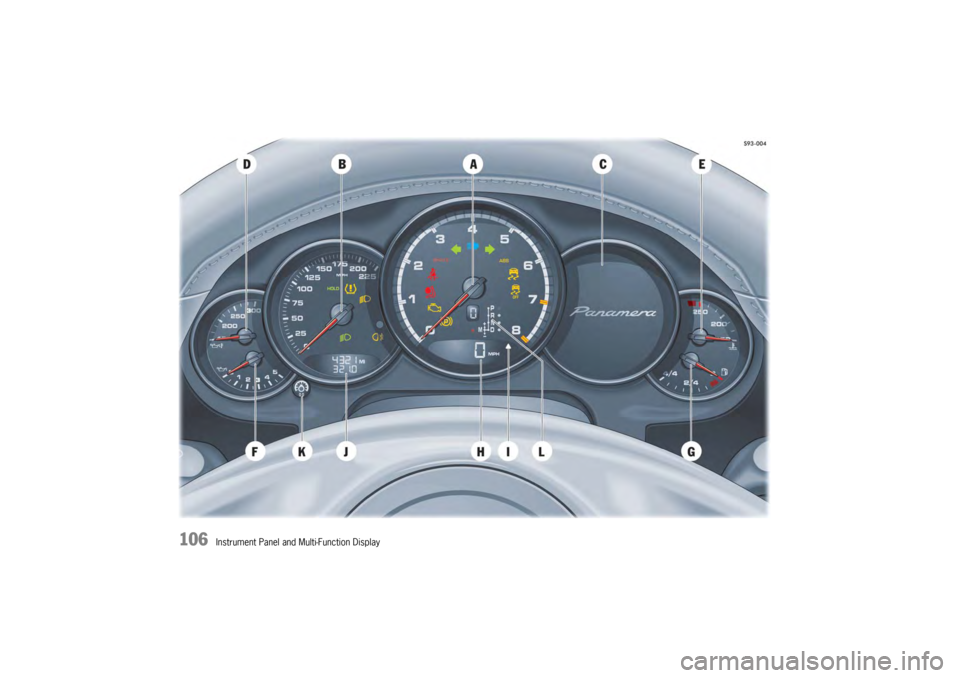
ATa c h o m e t e r
B Speedometer
C Multi-function display
D Engine oil temperature gauge
E Coolant temperature gauge
F Engine oil pressure gauge
G Fuel gauge
H Digital speedometer
I Upshift prompt indicator
J Odometer
K Reset button for trip counter display/
Brightness setting for instrument panel
L PDK indicator for selector-lever position/
engaged gear
Instrument Panel USA ModelsWarning and indicator lights on the
tachometer Warning and indicator lights on the
speedometer
Emission control warning light
(Check Engine)
Air bag warning light
Seat belt warning light
PSM warning light
PSM OFF warning light
ABS warning light
Turn signal, left
Turn signal, right
Brake warning light
High beam indicator light
Electric parking brake warning light
Rear fog light indicator light
HOLD function indicator light
Low beam indicator light
Adaptive light system warning light
Tire pressure warning light