2009 MITSUBISHI ASX turn signal
[x] Cancel search: turn signalPage 95 of 368

Instruments...................................................................................
3-02
Multi-information display .............................................................3-03
Indication lamp, warning lamp, and information screen display list.................................................................................3-25
Indication lamps ........................................................................... 3-40
Warning lamps .............................................................................. 3-41
Information screen display ........................................................... 3-42
Combination headlamps and dipper switch ..................................3-44
Headlamp levelling ....................................................................... 3-48
Turn-signal lever...........................................................................3-49
Hazard warning flasher switch ..................................................... 3-50
Fog lamp switch............................................................................3-50
Wiper and washer switch .............................................................. 3-51
Headlamp washer switch* ............................................................ 3-56
Rear window demister switch.......................................................3-57
Horn switch...................................................................................3-57 Instruments and controls
3
Page 112 of 368

4. Select the item to change on the menu screen
and change to the desired setting. Refer to
the following items for further details on the
operation methods.
Refer to “Changing the reset mode for aver-
age fuel consumption and average speed” on
page 3-18.
Refer to “Changing the fuel consumption dis-
play unit” on page 3-19.
Refer to “Changing the temperature unit” on
page 3-20.
Refer to “Changing the display language” on
page 3-20.
Refer to “Changing the language cooperative
control” on page 3-21.
Refer to “Operation sound setting” on page
3-21.
Refer to “Changing the time until “REST RE-
MINDER” is displayed” on page 3-22.
Refer to “Changing the turn-signal sound”
on page 3-23.
Refer to “Changing the momentary fuel con-
sumption display” on page 3-23.
Refer to “Returning to the factory settings”
on page 3-23.
Changing the reset mode for average fuel con-
sumption and average speed E00522900601
The mode conditions for the average fuel consump-
tion
and average speed display can be switched be-
tween “Auto reset” and “Manual reset”. 1. Press
and hold the multi-information meter
switch for about 2 seconds or more to switch
from the setting mode screen to the menu
screen.
Refer to “Changing the function settings
(when the ignition switch or the operation
mode is ON)” on page 3-17.
2. Lightly press the multi-information meter switch to select “AVG” (average fuel con-
sumption and average speed setting).
Type 1
Type 2 3. Press
and hold the multi-information meter
switch for about 2 seconds or more to switch
in sequence from A (Auto reset mode) → M
(Manual reset mode) → A (Auto reset mode).
The setting is changed to the selected mode
condition. Manual reset mode
• When
the average fuel consumption and
average speed are being displayed, if you
hold down the multi-information meter
switch, the average fuel consumption and
average speed displayed at that time are
reset.
• When the following operation is per- formed, the mode setting is automatically
switched from manual to auto.
[Except for vehicles equipped with key-
less operation system]
Turn the ignition switch from the “ACC”
or “LOCK” position to the “ON” position.
[For vehicles equipped with the keyless
operation system] Change the operation
mode from ACC or OFF to ON.
Switching to auto occurs automatically.
If switching to manual mode is done, how-
ever, the data from the last reset is dis-
played.
Auto reset mode l When the average fuel consumption and aver-
age speed are being displayed, if you hold
down the multi-information meter switch,
the average fuel consumption and average
speed displayed at that time are reset. Instruments and controls
3-18
3
Page 117 of 368
4. Lightly press the multi-information meter
switch to select the time until the display.
5. Press and hold the multi-information meter switch for about 2 seconds or more, the set-
ting is changed to the selected time.
NOTE l If the battery is disconnected, the unit setting
is erased from memory and is automatically
set to OFF.
l The drive time is reset when the ignition
switch is turned off or the operation mode is
put in OFF.
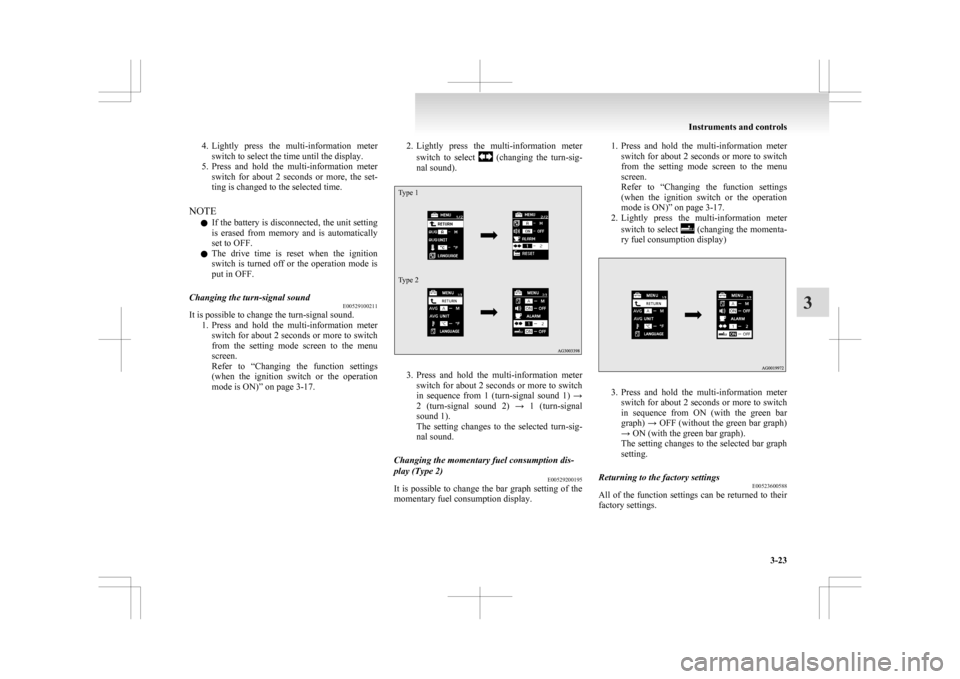
Changing the turn-signal sound E00529100211
It is possible to change the turn-signal sound.
1. Press
and hold the multi-information meter
switch for about 2 seconds or more to switch
from the setting mode screen to the menu
screen.
Refer to “Changing the function settings
(when the ignition switch or the operation
mode is ON)” on page 3-17. 2. Lightly
press the multi-information meter
switch to select (changing the turn-sig-
nal sound).
Type 1
Type 2 3. Press
and hold the multi-information meter
switch for about 2 seconds or more to switch
in sequence from 1 (turn-signal sound 1) →
2 (turn-signal sound 2) → 1 (turn-signal
sound 1).
The setting changes to the selected turn-sig-
nal sound.
Changing the momentary fuel consumption dis-
play (Type 2) E00529200195
It is possible to change the bar graph setting of the
momentary fuel consumption display. 1. Press
and hold the multi-information meter
switch for about 2 seconds or more to switch
from the setting mode screen to the menu
screen.
Refer to “Changing the function settings
(when the ignition switch or the operation
mode is ON)” on page 3-17.
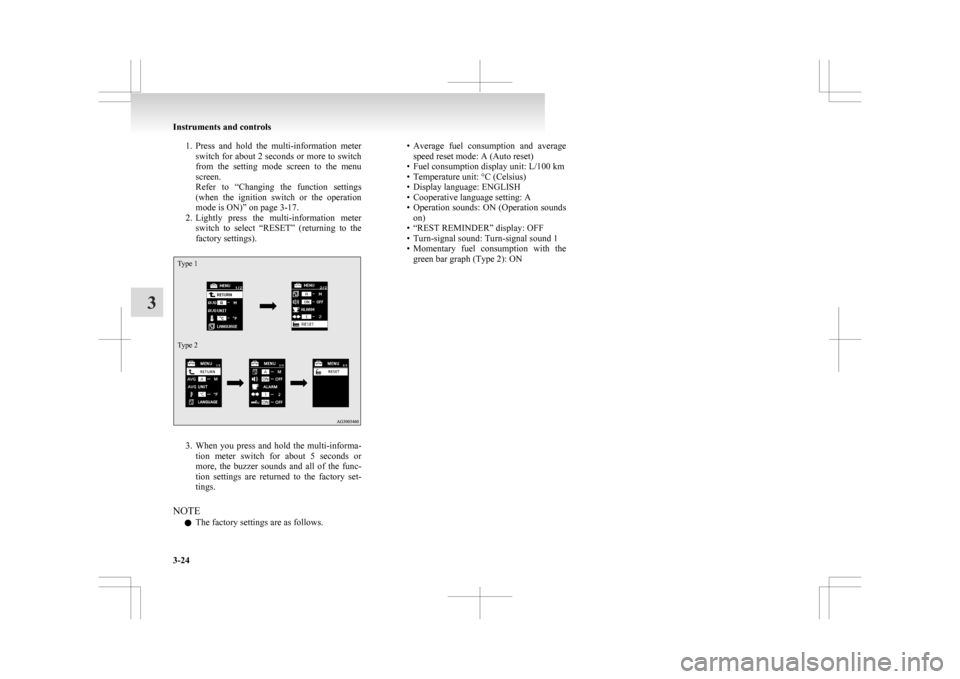
2. Lightly press the multi-information meter
switch to select (changing the momenta-
ry fuel consumption display) 3. Press
and hold the multi-information meter
switch for about 2 seconds or more to switch
in sequence from ON (with the green bar
graph) → OFF (without the green bar graph)
→ ON (with the green bar graph).
The setting changes to the selected bar graph
setting.
Returning to the factory settings E00523600588
All of the function settings can be returned to their
factory settings. Instruments and controls
3-23 3
Page 118 of 368
1. Press and hold the multi-information meter
switch for about 2 seconds or more to switch
from the setting mode screen to the menu
screen.
Refer to “Changing the function settings
(when the ignition switch or the operation
mode is ON)” on page 3-17.
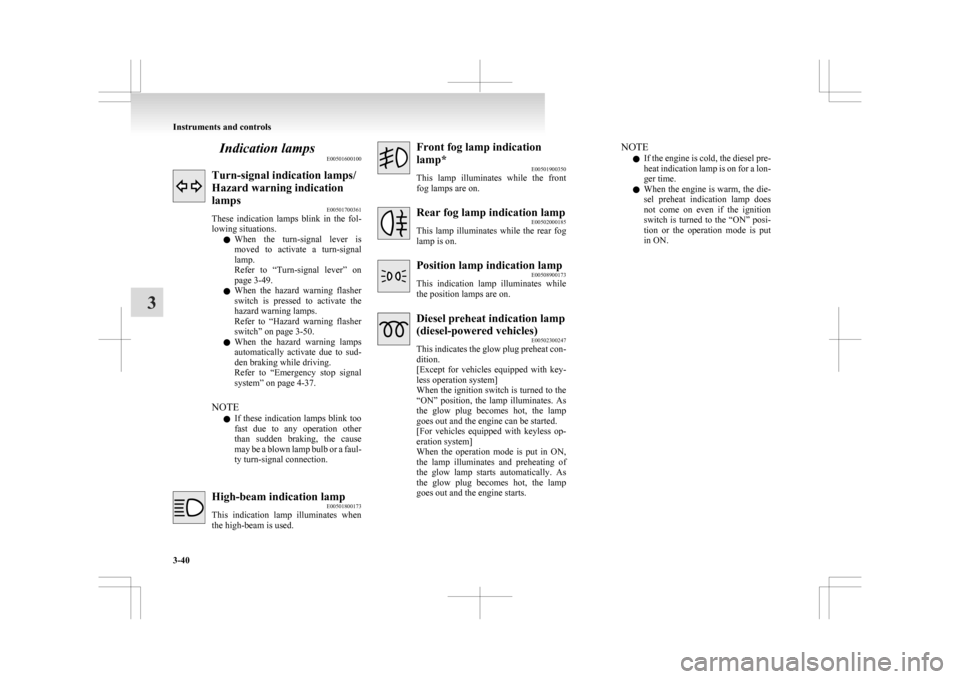
2. Lightly press the multi-information meter switch to select “RESET” (returning to the
factory settings).
Type 1
Type 2 3. When
you press and hold the multi-informa-
tion meter switch for about 5 seconds or
more, the buzzer sounds and all of the func-
tion settings are returned to the factory set-
tings.
NOTE l The factory settings are as follows. • Average
fuel consumption and average
speed reset mode: A (Auto reset)
• Fuel consumption display unit: L/100 km
• Temperature unit: °C (Celsius)
• Display language: ENGLISH
• Cooperative language setting: A
• Operation sounds: ON (Operation sounds on)
• “REST REMINDER” display: OFF
• Turn-signal sound: Turn-signal sound 1
• Momentary fuel consumption with the green bar graph (Type 2): ON Instruments and controls
3-24
3
Page 119 of 368

Indication lamp, warning lamp, and information screen display list
E00523700013
Indication and warning lamp list E005238006101-
Position lamp indication lamp ® p. 3-40
2- High-beam indication lamp ® p. 3-40
3- Charge warning lamp ® p. 3-42
4- Turn-signal indication lamps/Hazard warning indication lamps ® p. 3-40
5- Front fog lamp indication lamp* ® p. 3-40
6- Rear fog lamp indication lamp ® p. 3-40
7- Anti-lock brake system (ABS) warning lamp ® p. 4-38
8- Brake warning lamp ® p. 3-41
9- Cruise control indication lamp* ® p. 4-43 10-
Seat belt warning lamp ® p. 2-11
11- Supplement Restraint System (SRS) warning lamp ® p. 2-34
12- Check engine warning lamp ® p. 3-41
13- Active Stability Control (ASC) OFF indicator* ® p. 4-41
14- Active Stability Control (ASC) indicator* ® p. 4-41
15- Auto Stop & Go (AS&G) OFF indication lamp* ® p. 4-20
16- Auto Stop & Go (AS&G) indication lamp* ® p. 4-17
17- Diesel preheat indication lamp (diesel-powered vehicles) ® p. 3-40
18- Information screen display list ® p. 3-26 Instruments and controls
3-25 3
Page 134 of 368
Indication lamps
E00501600100Turn-signal indication lamps/
Hazard warning indication
lamps
E00501700361
These
indication lamps blink in the fol-
lowing situations.
l When the turn-signal lever is
moved to activate a turn-signal
lamp.
Refer to “Turn-signal lever” on
page 3-49.
l When the hazard warning flasher
switch is pressed to activate the
hazard warning lamps.
Refer to “Hazard warning flasher
switch” on page 3-50.
l When the hazard warning lamps
automatically activate due to sud-
den braking while driving.
Refer to “Emergency stop signal
system” on page 4-37.
NOTE l If these indication lamps blink too
fast due to any operation other
than sudden braking, the cause
may be a blown lamp bulb or a faul-
ty turn-signal connection. High-beam indication lamp
E00501800173
This
indication lamp illuminates when
the high-beam is used. Front fog lamp indication
lamp*
E00501900350
This
lamp illuminates while the front
fog lamps are on. Rear fog lamp indication lamp
E00502000185
This
lamp illuminates while the rear fog
lamp is on. Position lamp indication lamp
E00508900173
This
indication lamp illuminates while
the position lamps are on. Diesel preheat indication lamp
(diesel-powered vehicles)
E00502300247
This
indicates the glow plug preheat con-
dition.
[Except for vehicles equipped with key-
less operation system]
When the ignition switch is turned to the
“ON” position, the lamp illuminates. As
the glow plug becomes hot, the lamp
goes out and the engine can be started.
[For vehicles equipped with keyless op-
eration system]
When the operation mode is put in ON,
the lamp illuminates and preheating of
the glow lamp starts automatically. As
the glow plug becomes hot, the lamp
goes out and the engine starts. NOTE
l If
the engine is cold, the diesel pre-
heat indication lamp is on for a lon-
ger time.
l When the engine is warm, the die-
sel preheat indication lamp does
not come on even if the ignition
switch is turned to the “ON” posi-
tion or the operation mode is put
in ON. Instruments and controls
3-40
3
Page 142 of 368

1. Turn the combination headlamps and dipper
switch to the “OFF” or “AUTO” position
(for vehicles equipped with the automatic
lamp control).
2. Turn the ignition switch to the “LOCK” posi- tion or put the operation mode in OFF. Also,
if a key was used to start the engine, remove
the key from the ignition switch.
3. Within 60 seconds of turning the ignition switch to the “OFF” position or putting the
operation mode in OFF, pull the turn signal
lever towards you. 4. The
headlamps will come on in the low
beam setting for about 30 seconds. After the
headlamps go off, the headlamps can be
turned on again in the low beam setting for
about 30 seconds by pulling the turn signal
lever towards you within 60 seconds of turn-
ing the ignition switch to the “OFF” position
or putting the operation mode in OFF.
To turn on the headlamps again after 60 sec-
onds of turning the ignition switch to the
“OFF” position or putting the operation
mode in OFF, repeat the process from step 1. NOTE
l While
the coming home light function is op-
erating, perform one of the following opera-
tions to cancel the function. • Pull the lever towards you.
• Turn the combination headlamps and dip-
per switch to the “ ” or “ ” position.
• Turn
the ignition switch to the “ON” po-
sition or put the operation mode in ON.
l It is possible to modify functions as follows:
• The time that the headlamps remain oncan be changed.
• The coming home light function can be deactivated.
For further information, please contact your
MITSUBISHI MOTORS Authorized Service
Point.
On vehicles equipped with MITSUBISHI
Multi-Communication System (MMCS),
screen operations can be used to make the ad-
justment. Refer to the separate owner’s man-
ual for details. Headlamp levelling
E00517400031
Headlamp levelling switch (except for
vehicles with discharge headlamps) E00517500465
The angle of the headlamp beam varies depending
on the load carried by the vehicle.
The
headlamp levelling switch can be used to ad-
just the headlamp illumination distance (when the
lower beam is illuminated) so that the headlamps’
glare does not distract other drivers.
Set the switch according to the following table. CAUTION
l
Always
perform adjustments before driv-
ing.
Do not attempt to adjust while driving, as
it could cause an accident. Instruments and controls
3-48
3
Page 143 of 368

Vehi-
cle
condi- tion Switch
posi-tion “0” “0” “1” “2” “3” ●:1 person
:Full luggage loading
Switch position 0- Driver only/Driver + 1 front passenger
Switch position 1- 5 passengers (including driv- er)
Switch position 2- 5 passengers (including driv- er) + Full luggage loading
Switch position 3- Driver + Full luggage loading
Automatic headlamp levelling (vehi-
cles with discharge headlamps) E00517600453
This mechanism automatically adjusts the direction
of
the headlamps (beam position) depending on
changes in the condition of the vehicle, such as the
number of occupants or luggage weight. When the
headlamps are illuminated with the ignition switch
or the operation mode in ON, the beam position of
the headlamps is automatically adjusted when the
vehicle is stopped. Headlamp automatic levelling system warning dis-
play
Type 1 Type 2
If there is a fault in the automatic headlamp level-
ling
system, the warning display is displayed on
the information screen in the multi-information dis-
play. CAUTION
l
If
a warning is displayed, the system may
be malfunctioning, so we recommend you
to have your vehicle inspected. Turn-signal lever
E00506501231 1- Turn-signals
When
making a normal turn, use position
(1). The lever will return automatically when
cornering is completed.
2- Lane-change signals When moving the lever to (2) slightly to
change a lane, the turn-signal lamps and indi-
cation lamp in the instrument cluster will on-
ly flash while the lever is operated.
Also, when you move the lever to (2) slight-
ly then release it, the turn-signal lamps and in-
dication lamp in the instrument cluster will
flash 3 times.
NOTE l If the lamp flashes unusually quickly, the
bulb in a turn-signal lamp may have burned
out. We recommend you to have the vehicle
inspected.
l It is possible to activate the following func-
tions. Instruments and controls
3-49 3