2009 MERCEDES-BENZ E-CLASS COUPE warning light
[x] Cancel search: warning lightPage 58 of 313
ESP
®
trailer stabilisation If your trailer begin
stolurch, you can only
stabilise th evehicle/trailer combinatio nby
depressing th ebrak efirmly.
In this situation, ESP ®
assists you and can
detect when th etrailer begin stolurch.
ESP ®
slows th evehicle down by braking and
limiting th eengineo utput until th evehicle/
trailer combinatio nhas stabilised.
Traile rstabilisation is active above speeds of
about 65 km/h. G
Ris
kofa ccident
If road and weather condition sare poor,
trailer stabilisation will no tbeable to prevent
th et railer from swervin gand will thus be
unabl etoreducethe risk of an accident. Trail-
ers with ahigh centr eofgravity can tip over
before ESP ®
can detect this.
Traile rstabilisation does no twork if ESP ®
is
deactivate dordisable dbecause of amal-
function.
ETS (Electronic Traction Support) Tractio
ncontrol is part of ESP ®
.
Tractio ncontrol brakes th edrivew heels indi-
vidually if they spin .This enables you to pull
away and accelerate on slippery surfaces ,for
example, if th eroad surface is slippery on one
side.
Tractio ncontrol remains active when you
deactivate ESP ®
. G
Ris
kofa ccident
Tractio ncontrol canno treduc ethe risk of an
acciden tifyou driv etoo fast .Tractio ncontrol
canno toverride th elaws of physics.
Activating/deactivatin gESP® ESP
®
is activated automatically when the
engin eisrunning. It may be best to deactivate ESP
®
in th efol-
lowin gsituations:
R when usin gsnowc hains
R in deep snow
R on san dorgravel G
Ris
kofa ccident
Activate ESP ®
as soon as th esituations
describe dabov enol onger apply. ESP ®
will
otherwise no tbeable to stabilise th evehicle
if th evehicle start stoskidoraw heel starts
to spin.
If you deactivate ESP ®
:
R ESP ®
no longer improve sdriving stability.
R engin etorque is no tlimited and th edrive
wheels are able to spin .The spinning
wheels produce acuttin geffect for better
traction.
R traction control is still activated.
R ESP ®
still provide ssupport when you
brake.
i If ESP ®
is deactivate dand on eorm ore
wheels start to spin ,the 00C6 warning lamp
in th einstrumen tcluste rflashes. In such
situations ,ESP ®
will no tstabilise th evehi-
cle. X
To deactivate: pressbutton 0046.
The 00C7 warning lamp in th einstrument
cluste rlight sup. Driving safety systems
55Safety
207_AKB;2;3,en-GB
mkalafa, Version:2.11.8.1
2009-07-23T10:23:49+02:00
-Seite 55 Z
Page 59 of 313
G
Risk of accident
If the 00C7 warning lamp in the instrument
cluster lights up whe nthe engine is running,
ESP ®
is deactivated or is unavailabl edueto a
malfunction. The ris kthat your vehicle may
star ttos kid then increase sincertain situa-
tions.
Alway sadapt your driving styl etothe prevail-
ing roa dand weathe rconditions.
X To activate: press button 0046.
The 00C7 warning lamp in the instrument
cluster goe sout. EBV (electroni
cbrake forc edistribu-
tion)
EBV monitors and control sthe brake pres-
sure on the rea rwheel stoi mprove driving
stability whe nbraking. G
Risk of accident
If EBV is malfunctioning ,the brake system is
stil lavailable with ful lbrake boosting effect.
However, the rea rwheel scan stil llock, e.g.
under ful lbraking. Thi scould cause yo uto
los econtrol of your vehicle and cause an acci-
dent. You shoul dtherefore adap tyou rd riving
styl etot he different handling characteristics. ADAPTIVE BRAKE
ADAPTIVE BRAKE enhances braking safety
and offers increased braking comfort. In addi-
tion to the braking function, ADAPTIVE BRAKE
also ha sthe HOLD function (Y page 135) and
hil lstar tassist( Ypage 100). For further
information, see Driving tips (Y page 191).PRE-SAFE
®
Brake (vehicle swithD IS-
TRONIC PLUS)*
PRE-SAFE ®
Brake can hel pyou to minimise
the ris kofafrontalcollision with avehicle ahea
dorr educe the effects of such acolli-
sion.
Thi sfunction will issue awarning at speeds of
around 30 km/h or more if:
R for aperiod of several seconds, the dis-
tance to the vehicle in front is too short for
the speed at which yo uare travelling. The
00BA distance warning lamp in the instru-
ment cluster lights up.
R yo ua re approaching the vehicle in front too
rapidly .Anintermittent warning tone
sounds and the 00BAdistance warning
lamp lights up in the instrument cluster.
Due to the nature of the system, particularly
complicated driving conditions may cause the
system to display an unnecessary warning. G
Risk of accident
Pa yp articula rattention to the traffi ccondi-
tions if the 00BAdistance warning lamp in the
instrument cluster lights up or an intermittent
warning tone sounds. If necessary, brake or
manoeuvre to avoid an obstacle.
If the driver and passengers have fastened
thei rseatb elts, PRE-SAFE ®
Brake can also
can also perform the following at speeds of
above approximately 30 km/h:
R brake the vehicle automaticall yfrom a
speed of up to approximately 200 km/h
R trigger preventative passenger protection
measures (PRE-SAFE ®
) G
Risk of accident
PRE-SAFE ®
Brake is only an ai dtoassist you
whe ndriving .You are responsibl efor main-
taining asafed istance from othe rvehicles,
the vehicle's speed and for braking in good
time .Alway spayattention to the traffi ccon-
ditions .Otherwise, yo umay recognise dan-
gers too late, cause an accident and injure
yoursel fand others.
With the hel pofthe radar senso rsystem,
PRE-SAFE ®
Brake can detect obstacles that
are in front of your vehicle for an extended 56
Drivin
gsafety systemsSafety
*optional
207_AKB
;2;3,en-GB
mkalafa ,V ersion: 2.11.8.1
2009-07-23T10:23:49+02:00
-Seite 56
Page 60 of 313
period of time. If you approach an obstacle
and PRE-SAFE ®
Brak edetects arisk of acol-
lision, the system will initially alert you both
visually and acoustically. If you do not brake
or steer ,the vehicle will at first automatically
brake slightly. In the event of an increased
risk of acollision, PRE-SAFE ®
is activated
(Y page 40). If the risk of collision persist sand
you do not brake, manoeuvr eoraccelerate
significantly yourself, an automatic full brake
application may be carried out. G
Risk of accident
Only clearly detected obstacles will trigger a
warning and initiat ebrakin gassistance by
PRE-SAFE ®
Brake.
In particular, the detection of obstacles can
be impaired if ther eis:
R dirt on the sensors or the sensors are cov-
ered
R snow or heavy rain
R interferenc ebyother radar sources
R the possibility of strong radar reflections,
for example in multi-storey car parks
PRE-SAFE ®
Brak edoes not react to persons,
animals, oncoming vehicles, crossing traffic
or when cornering.
PRE-SAFE ®
Brak emay not detec tnarrow
vehicles such as motorcycles and vehicles
drivin gonad ifferentline. G
Risk of accident
Depending on the curren tspeed, PRE-SAFE ®
Brak edecelerates your vehicle by up to
4m /s2
before performing possible emer-
genc ybraking. This is equivalent to approx-
imately 40 %ofthe maximum brakin gpower
of the vehicle. You must additionally apply the
brakes yourself in order to preven tacollision
or minimis eanimpact .Automatic emergency
brakin gisnot performed until immediately
prior to an acciden tinthe event that you are
unable to avoid one by, for instance, taking
evasive action. In order to maintain the appropriate distance
to the vehicle in fron
tand thus preven ta
crash, you must apply the brakes yourself.
At speeds up to approximately 70 km/h,
PRE-SAFE ®
Brak ecan also detec tstationary
obstacles, for example stopped or parked
vehicles. G
Risk of accident
If, in acritical drivin gsituation ,you do not
receiv eavisual and acoustic warning:
R PRE-SAFE ®
Brak edid not detec tthe risk of
ac ollision
R PRE-SAFE ®
Brak eiss witched off
R PRE-SAFE ®
Brak ehas failed
You must then brake to avoid acollision.
X To activate: activate PRE-SAFE ®
Brak ein
the on-board computer (Y page 116).
The 00C7 symbol appears in the lower
multi-function display, as long as the HOLD
function is not activated (Y page 135).
On vehicles with parkin gguidance* ,drive
range Pmust be engaged for the symbol to
be displayed.
The radar sensors are automatically deacti-
vated in the vicinity of radio telescope facili-
ties (Y page 304).
For PRE-SAFE ®
Brak etoa ssist you when driv-
ing, the radar senso rsystem must be
switched on and operational.
PRE-SAFE ®
Brak edoes not always detect
complex traffic situation sproperly. You can
terminate the brakin gaction of PRE-SAFE ®
Brak einan on-critical drivin gsituation at any
time if:
R an acoustic and visual warning occurs
R the vehicle brakes
To end this you can either depress the accel-
erator pedal further, activate kickdown or
release the brake pedal. Driving safet
ysystems
57Safety
*optional
207_AKB
;2;3,en-GB
mkalafa, Version:2.11.8.1
2009-07-23T10:23:49+02:0
0-Seite 57 Z
Page 82 of 313

Seat-belt adjustment
The belt adjustment function adjusts the driv-
er's and front-passenger seat belt to the
upper body of the occupants. The belt strap
is tightened slightly when:
R you engage the belt tongue in the buckle
and then turn the key to position 2in the
ignition lock.
R the key is in position 2in the ignition lock
and you then engage the belt tongue in the
buckle once the seat-belt extender has
retracted.
The seat-belt adjustment will apply acertain
tightening force if any slack is detected
between the occupant and the belt sash. The
belt should not be held during the adjust-
ment.Y ou can switch the belt adjustment on
and off in the on-board computer
(Y page 121).
Unfastening the belt X
Press release button 0088and guide belt
tongue 0047back towards seat-belt
extender 0046. Belt warning for driver and front
passenger
The 0082 seat belt warning lamp in the instru-
ment cluster reminds you that all occupants
should fasten their seat belts. It is either lit
continuously or flashes. Additionally, there
may be awarning tone.
The 0082 seat belt warning lamp goes out and
the warning tone ceases as soon as the driver
and front passenger have fastened their seat
belts.
For certain countries only: regardless of
whether the driver or the front passenger
already have their seat belt fastened, the
0082 seat belt warning lamp lights up for six
seconds after the engine has been started. It
then goes out if both the driver and the front
passenger have fastened their seat belt. i
Further information about the 0082seat
belt warning lamp (Y page 236). Rear seat belt status indicator
The rear-compartment seat belt status indi-
cator tells you if the rear passengers have
their seat belts fastened. It indicates the rear
seat on which the belt is fastened.
The rear-compartment seat belt status indi-
cator appears in the multi-function display for
around 30 seconds if
R you set off and have reached aspeed of
approximately 10 km/h.
R the rear passengers fasten or unfasten
their seat belts while the vehicle is in
motion.
R someone gets in or out of the vehicle and
the vehicle drives away again. Example: the passenger in the right rear seat has
their seat belt fastened
You can also cancel the messages immedi-
ately (Y
page 208).
i The status indicator for the rear-compart-
ment seat belts is only available for certain
countries. Seat belts
79Controls
207_AKB; 2; 3, en-GB
mkalafa, Version: 2.11.8.1 2009-07-23T10:23:49+02:00-Seite 79 Z
Page 88 of 313

The hazard warning lamps automatically
switch on if:
R
an airbag is deployed.
R you brake sharply and bring the vehicle to
ah alt from aspeed of more than
70 km/h.
The hazard warning lamps still operate if the
ignition is switched off.
X To switch on: press button0046.
All turn signals flash.
X To switch off: press button0046.
X To switch off the hazard warning lamps
using the combination switch: if the haz-
ard warning lamps are on, push the combi-
nation switch in the direction of arrow 0071
or 0073 beyond the pressure point
(Y page 82).
The indicator lamp on the corresponding
side of the vehicle flashes.
The hazard warning lamp switches off auto-
matically after full brake application if the
vehicle then reaches aspeed of over
10 km/ha gain.
Intelligent Light System* (bi-xenon
headlamps*) The Intelligent Light System is
asystem which
adjusts the headlamps automatically to suit
the prevailing driving and weather conditions.
The bi-xenon headlamps offer enhanced func-
tions to improve illumination of the road sur-
face, e.g. depending on the vehicle speed or
weather conditions. The system includes the
active light function, cornering light function,
motorway mode and extended range fog-
lamps. The system is only active when it is
dark.
You can activat eordeactivate the "Intelligent
Light System" using the on-board computer
(Y page 119). Active light function
The active light function is
asystem that
moves the headlamps accordin gtothe steer-
ing movements of the frontw heels. In this
way, relevant areas remain illuminated while
driving. This allows you to recognise pedes-
trians, cyclists and animals.
Cornering light function The cornering light function improves the illu-
mination of the road over
awide angle in the
direction you are turning, enabling better vis-
ibility in tight bends, for example. It can only
be activated when the dipped-beam head-
lamps are switched on.
Active:
R if you are driving at speeds below
40 km/h, the cornering light function is
activated either by the turn signal or by the
steerin gwheel being turned.
R if you are driving at speeds between
40 km/ha nd 70 km/h ,the cornerin glight
function is activated by th esteering wheel
bein gturned. Lights
85Controls
*optional
207_AKB
;2;3,en-GB
mkalafa ,V ersion: 2.11.8.1
2009-07-23T10:23:49+02:00
-Seite 85 Z
Page 94 of 313

Turn signals
X
To indicate briefly: press the combination
switch briefl yinthe direction of arrow 0070
or 0072 (Ypage 88).
The corresponding tur nsigna lflashe sthree
times.
X To indicate: push the combinatio nswitch
beyond the pressure point in the direction
of arrow 0070or0072 (Ypage 88).
The corresponding tur nsigna lindicator
lamp 0024 or0026 in the instrument clus-
ter flashes.
Hazard warning lamps The hazar
dwarnin glam ps automatically
switch on if:
R an airba gisdeployed.
R yo ub rake sharpl yand bring the vehicl eto
ah altf romas peed of mor ethan
70 km/h.
The hazar dwarnin glam ps still operate if the
ignition is switched off.
X To switc hon:press button 0046.
All tur nsignals flash.
X To switc hoff:press button 0046.
X To switc hoffthe hazard warning lamps
using the combination switch: when the
hazar dwarnin glam ps ar eon, push the
combinatio nswitch in the direction of
arrow 0070or0072 beyond the pressure point
(Y page 87).
The indicator lamp on the corresponding
side of the vehicl eflashes. The hazar
dwarnin glam pswitches off auto-
maticall yafter full brake applicatio nifthe
vehicl ethenr eache saspeed of over
10 km/h again.
Intelligent Light System* (bi-xenon
headlamps*) The Intelligent Light System is
asystem which
adjusts the headlamps automaticall ytosuit
the prevailing driving and weather conditions.
The bi-xeno nheadlam ps offer enhance dfun c-
tions to improv eillum ination of the roa dsur-
face, e.g .depen ding on the vehicl espeed or
weather conditions. The system includes the
active light function, cornering light function,
motorway mod eand extende drange fog-
lamps .The system is onl yactive when it is
dark.
Yo uc an activate or deactivate the "Intelligent
Light System" using the on-board computer
(Y page 119).
Activ elight function The active light functio
nisas ystem that
moves the headlamps according to the steer-
ing movements of the front wheels .Inthis
way, relevant area sremai nillum inate dwhile
driving .Thisa llow syou to recognise pedes-
trians, cyclists and animals. Lights
91Controls
*optional
207_AKB; 2; 3, en-GB
mkalafa
,V ersion: 2.11.8.1
2009-07-23T10:23:49+02:00
-Seite 91 Z
Page 103 of 313
Hill start assist
Hill start assist help
syou when pulling away
forwards or in reverse on an uphill gradient.
It hold sthe vehicl efor as hort time after you
have removed yourf oot from the brake pedal.
This gives you time to move yourf oot from
the brake peda ltothe accelerator peda land
depress it before the vehicl ebegins to roll. G
Risk of accident
Never leave the vehicl ewhen it is held by hill
start assist. After approximately one second,
hil lstart assist wil lnolonger brake yourv ehi-
cle and it coul droll away.
X Take yourf oot off the brake pedal.
i Once you have taken yourf oot off the
brake pedal, the vehicl eisheld for around
one second.
X Pulla way.
Hill start assist willn ot function if:
R you are pulling away on aleve lroad or a
downhill gradient.
R on vehicles with automatic transmission*,
the transmission is in position N.
R the vehicl eissecure dwith the parking
brake.
R ESP ®
is malfunctioning. Parking
G
Risk of accident
Only remove the key from the ignitio nlock
when the vehicl eisstationary, as you cannot
steer the vehicl ewhen the key is removed.
Never leave children unsupervised in the vehi-
cle. They coul drelease the parking brake. This
coul dleadtoas erious or fatal accident. G
Risk of fire
Make sure that the exhaust system does not
under any circumstances come into contact
with easily ignitable material such as dry grass or petrol
.Otherwise, the flammable material
may ignite and set the vehicl eonfire.
To ensure that the vehicl eissecure dagainst
rolling away unintentionally:
R the parking brake must be applied
R on vehicles with manua ltransmission,
engag efirst gearorr everse gear
R on vehicles with automatic transmission*,
the transmission must be in position Pand
the key must be removed from the ignition
lock
R on steep uphill or downhill gradients, turn
the front wheels toward sthe kerb
Parking brake X
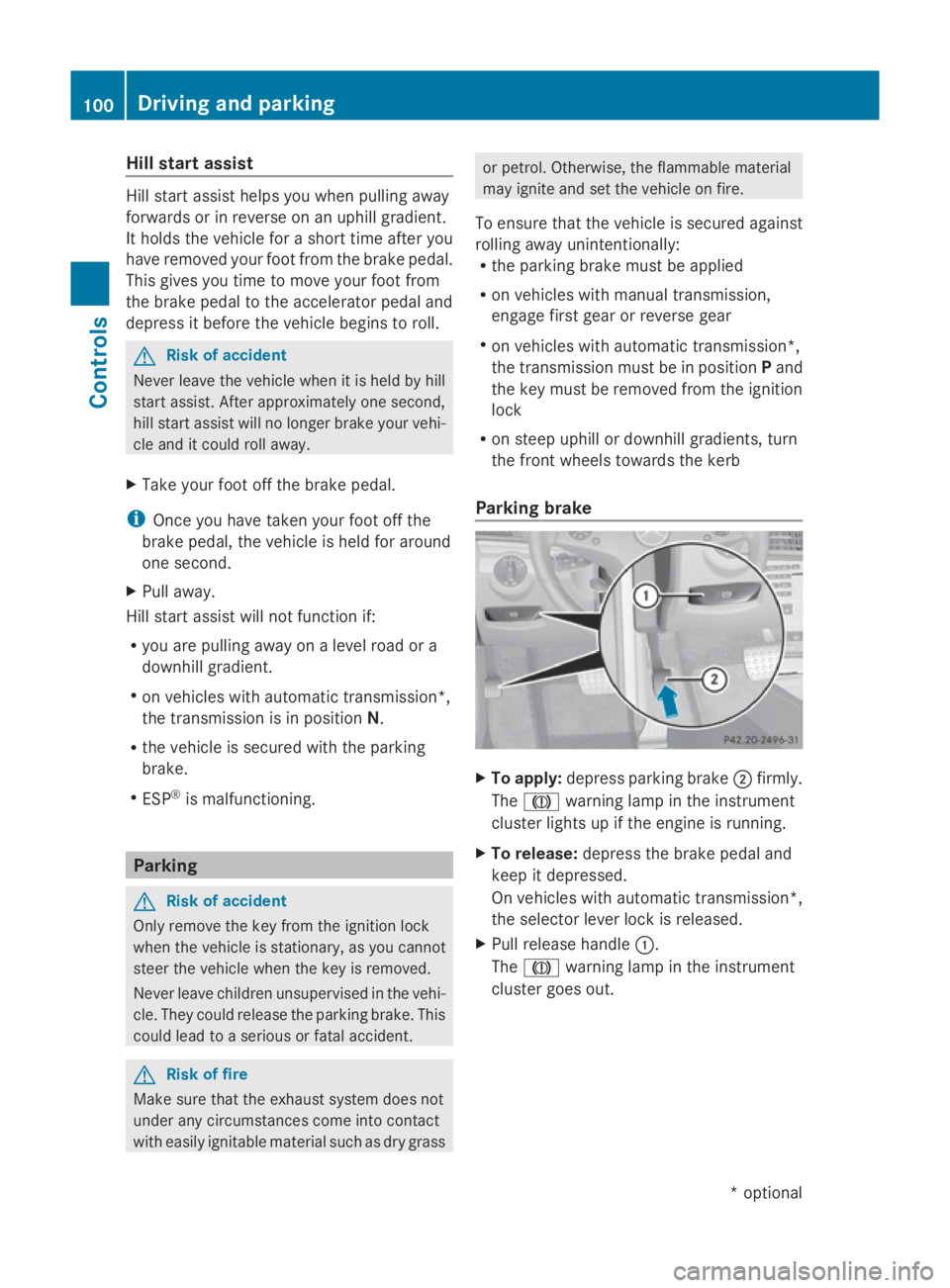
To apply: depress parking brake 0047firmly.
The 004D warning lampint he instrument
cluster lights up if the engine is running.
X To release: depress the brake peda land
keep it depressed.
On vehicles with automatic transmission*,
the selector leve rlock is released.
X Pullr elease handle 0046.
The 004D warning lampint he instrument
cluster goes out. 100
Driving and parkingControls
*o
ptional
207_AKB; 2; 3, en-GB
mkalafa,
Version: 2.11.8.1 2009-07-23T10:23:49+02:00-Seite 100
Page 113 of 313

Function
0046
Trip
menu(Ypage 110) 0047
Navi*m
enu( navigation details)
(Y page 111) 008A
Audio
menu(Ypage 113) 0088
Tel
men u(telephone) ( Ypage 114) 0086
Assist
menu(Assistance)
(Y page 115) 0087
Service
(Ypage 117) menu
R calls up display messages
(Y page 208)
R Tyre pressur eloss warning
(Y page 187)
R ASSYS TPLUSs ervic einterval dis-
play (Y page 197) 006E
Settings
menu(Ypage 117) The number of menus shown depends on the
optional equipmen tinthevehicle.
The Audio, Navi*a ndTel menus are dis-
played slightly differently in vehicle swithan
audio system and vehicle swithC OMAND
APS* .The example sgivenint hisO wner's
Manual apply to vehicle sequipped with
COMAND APS*. Trip menu
i Reset th etripm eter or trip computer
(Y page 111).
Standar ddisplay X
Press and hold the 0041buttonont he
steering wheel until the Tripmenuwith
trip meter 0046and total distance
recorder 0047is shown.
Trip computer "From start" or "From
reset" The values in the
Froms tart submen uare
calculate dfromt hestart of ajou rney whilst
th ev alues in the Fromr eset submen uare
calculate dfromt helast tim ethe submenu
was reset.
X Press 0040or003E on thesteering wheel
to select the Tripmenu.
X Press 003Cor003D to select Froms tart
or Fro mr eset. Trip computer "From start
"(example)
0046 Distance
0047 Time
008A Averag espeed
0088 Averag efuel consumption
The trip computer function Froms tart is
automaticall yreset when:
R thei gnition has been switched off for more
than 4hours.
R 99 9h our shave been exceeded.
R 9,999 kilometres/mile shave been excee-
ded.
The Fromr eset message is shown and the
trip computer is automaticall yreset if the
value exceeds 9,999 hour sor99,99 9k ilome-
tres/miles. 110
On-boar
dcomputerControls
*optional
207_AKB
;2;3,en-GB
mkalafa ,V ersion: 2.11.8.1
2009-07-23T10:23:49+02:00
-Seite 110