2009 MERCEDES-BENZ E-CLASS COUPE warning light
[x] Cancel search: warning lightPage 120 of 313
Service menu
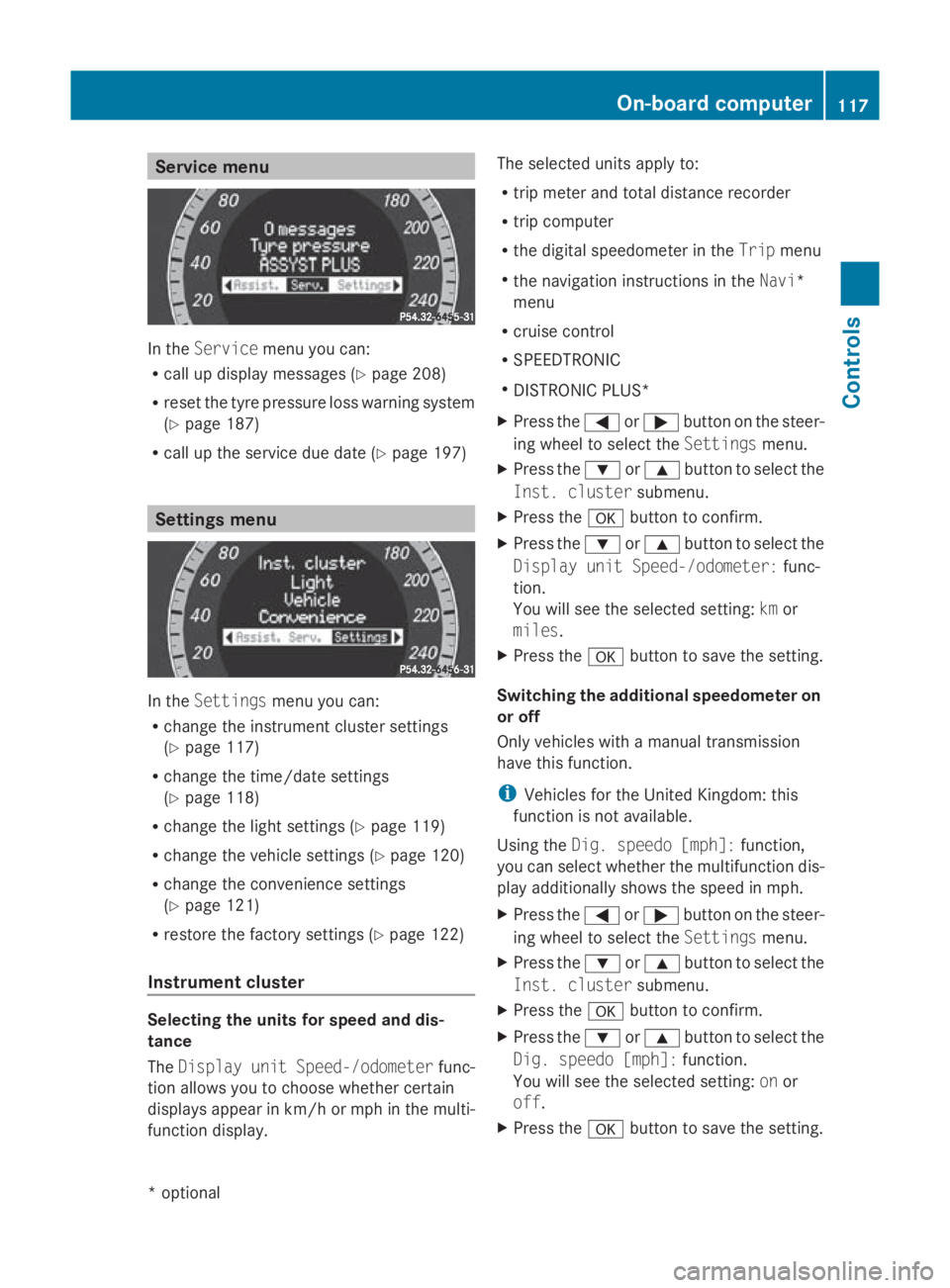
In the
Service menu you can:
R call up display messages (Y page 208)
R reset the tyre pressure loss warning system
(Y page 187)
R call up the service due date (Y page 197)Settings menu
In the
Settings menu you can:
R change the instrumen tcluster settings
(Y page 117)
R change the time/date settings
(Y page 118)
R change the light settings (Y page 119)
R change the vehicle settings (Y page 120)
R change the convenience settings
(Y page 121)
R restore the factory settings (Y page 122)
Instrument cluster Selecting the units for speed and dis-
tance
The Display unit Speed-/odometer func-
tion allowsy ou to choose whether certain
displaysa ppearinkm/ horm ph in the multi-
function display. The selected units apply to:
R
trip meter and total distance recorder
R trip computer
R the digital speedometer in the Tripmenu
R the navigation instructions in the Navi*
menu
R cruise control
R SPEEDTRONIC
R DISTRONIC PLUS*
X Press the 0040or003E button on the steer-
ing wheel to select the Settingsmenu.
X Press the 003Dor003C button to select the
Inst. cluster submenu.
X Press the 0064button to confirm.
X Press the 003Dor003C button to select the
Display unit Speed-/odometer: func-
tion.
You will see the selected setting: kmor
miles.
X Press the 0064button to save the setting.
Switching the additional speedometer on
or off
Only vehicles with amanual transmission
have this function.
i Vehicles for the United Kingdom: this
function is not available.
Using the Dig. speedo [mph]: function,
you can select whether the multifunction dis-
play additionally shows the speed in mph.
X Press the 0040or003E button on the steer-
ing wheel to select the Settingsmenu.
X Press the 003Dor003C button to select the
Inst. cluster submenu.
X Press the 0064button to confirm.
X Press the 003Dor003C button to select the
Dig. speedo [mph]: function.
You will see the selected setting: onor
off.
X Press the 0064button to save the setting. On-board computer
117Controls
*optional
207_AKB; 2; 3, en-GB
mkalafa,
Version: 2.11.8.1 2009-07-23T10:23:49+02:00-Seite 117 Z
Page 129 of 313
R
when changing to alane with faster moving
traffic
R in complex driving situation sorwhere the
lanes are diverted ,e.g.atm otorway/road-
way construction sites
Otherwise, DISTRONIC PLUS maintain sthe
current speed or accelerates up to th eset
speed.
DISTRONIC PLUS cannot tak eaccount of
weather conditions .Deactivate, or do not
activate, DISTRONIC PLUS if:
R ther oads are slippery, snow-covered or icy.
The wheels could lose grip when braking or
accelerating. The vehicle could start to
skid.
R thes ensors are dirt yorthere is poor visi-
bility, e.g .due to snow, rain or fog. Distance
control may be impaired.
Always pay attention to traffic conditions
even when DISTRONIC PLUS is activated.
Otherwise, you may fail to recognise dangers
in time, cause an acciden tand injure yourself
and others.
The radar sensor system is automatically
deactivated near radio telescope facilities
(Y page 304).
If you want Distronic Plus to assist you, the
radar sensor system must be activated and
operational.
If no car is driving in front of you, Distronic
Plus work slike cruise control in th espeed
range between 30 km/h and 20 0km/ h. If a
vehicle is driving in front of you, Distronic Plus
work sint hespeed range between 0km/h
and 20 0km/ h.
Do not use Distronic Plus while driving on
roads with steep gradients. G
Risk of accident
DISTRONIC PLUS brakes your vehicle at a
maximum of 4m/s2
depending on its speed.
This correspond stoapproximately 40 %of
your vehicle's maximum brak eforce. You must also apply th
ebrakes yoursel fifthis
braking power is not sufficient.
If DISTRONIC PLUS detect sarisk of collision
with avehicle in front ,anintermittent warning
ton esounds. In addition, the 00BAdistance
warning lamp in th einstrumen tcluster lights
up. Brake to avoid acollision.
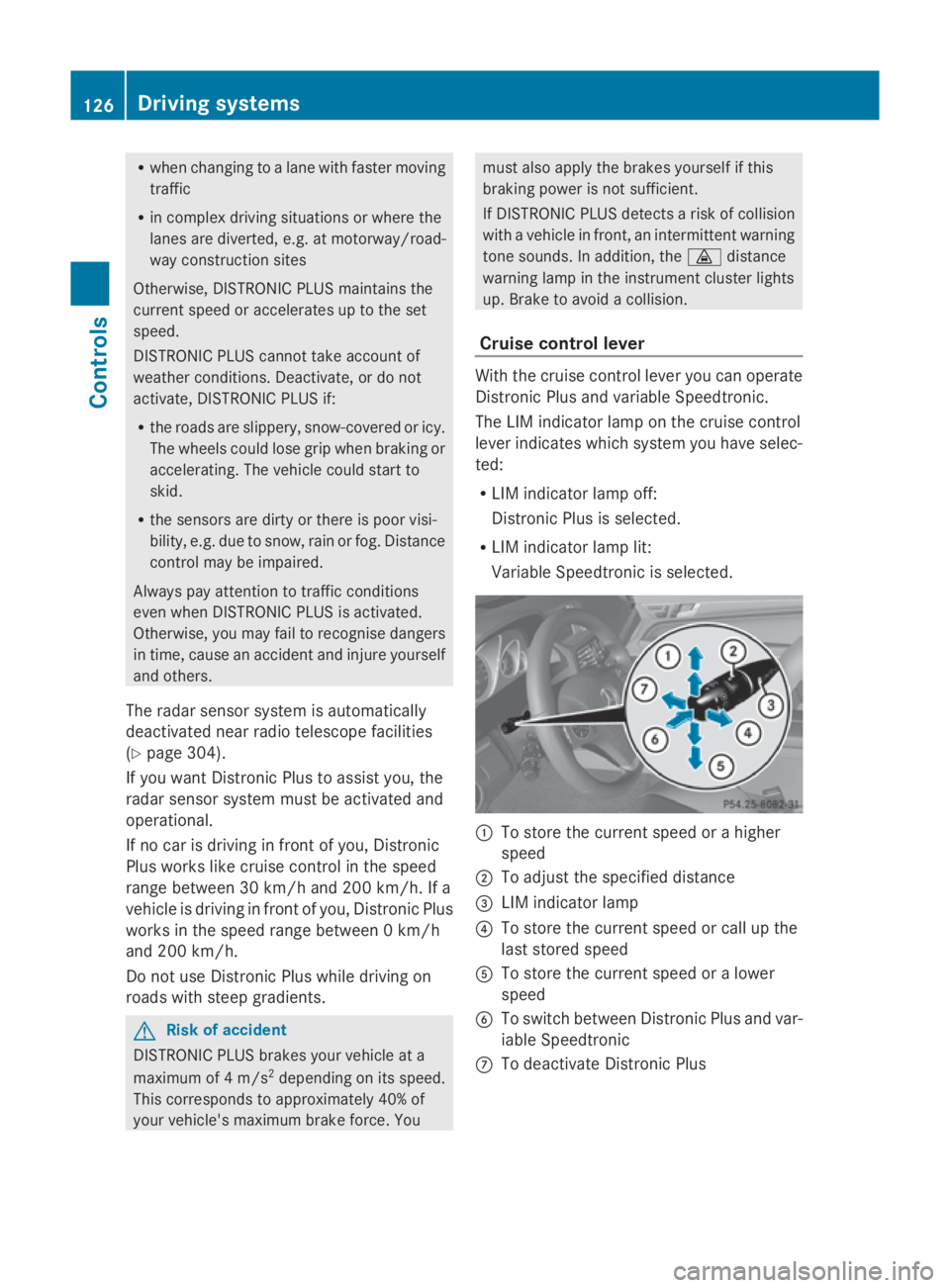
Cruise control lever With th
ecruise control lever you can operate
Distronic Plus and variable Speedtronic.
The LIM indicator lamp on th ecruise control
lever indicates which system you have selec-
ted:
R LIM indicator lamp off:
Distronic Plus is selected.
R LIM indicator lamp lit:
Variable Speedtronic is selected. 0046
To store th ecurrent speed or ahigher
speed
0047 To adjus tthe specified distance
008A LIM indicator lamp
0088 To store th ecurrent speed or call up the
last stored speed
0086 To store th ecurrent speed or alower
speed
0087 To switch between Distronic Plus and var-
iable Speedtronic
006E To deactivat eDistronic Plus 126
Drivin
gsystemsControls
207_AKB; 2; 3, en-GB
mkalafa, Version: 2.11.8.1 2009-07-23T10:23:49+02:00-Seite1 26
Page 138 of 313
X
Briefly press the cruise control lever in the
direction of arrow 0086.
LIM indicator lamp 0047in the cruise control
lever goe sout.V ariabl eSpeedtroni cis
deactivated.
Cruise control or Distronic Plus* is selec-
ted.
Variabl eSpeedtroni cisautomaticall ydeacti-
vated:
R whe nyou depress the accelerato rpedal
beyond the pressure point (kickdown) but
only if your current speed doe snot differ by
more than 20 km/h from the store dspeed.
You will hea rawarning tone if this is the
case.
R on vehicle swithm anual transmission, if
yo us hift to ahigher gea rand as aresult the
engine speed is too low. G
Risk of accident
It is not possible to deactivate variabl eSpeed-
tronic by braking.
i The last speed store disclearedwheny ou
switch off the engine.
Permanen tSpeedtronic i
Permanent Speedtroni cisonly available
in certain countries.
You can us ethe on-board compute rtolimit
the speed permanently to avalue between
160 km/h (e.g .for driving with winter tyres)
and the maximum speed.
Just before the store dspeed is reached ,it
appears in the multi-function display.
Permanent Speedtroni cremains active, even
if variabl eSpeedtroni cisdeactivated.
You cannot excee dthe store dlim it speed,
eve nify oudepress the accelerato rpedal
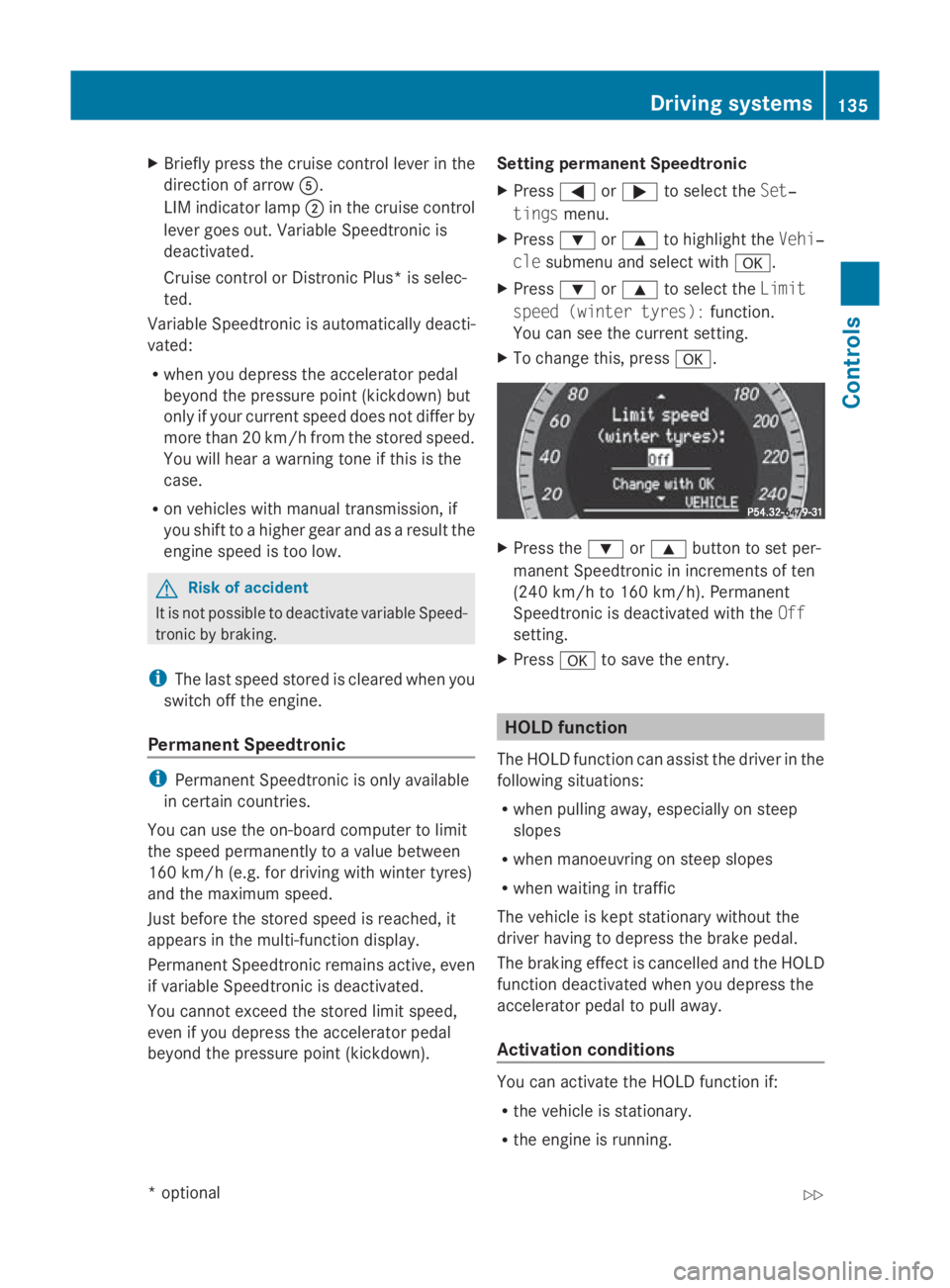
beyond the pressure point (kickdown). Setting permanent Speedtronic
X Press 0040or003E to select the Set‐
tings menu.
X Press 003Dor003C to highlight the Vehi‐
cle submenu and select with 0064.
X Press 003Dor003C to select the Limit
spee d(winter tyres): function.
You can see the current setting.
X To change this ,press 0064. X
Press the 003Dor003C button to set per-
manent Speedtroni cinincrements of ten
(240 km/h to 160 km/h). Permanent
Speedtroni cisdeactivated with the Off
setting.
X Press 0064to save the entry. HOL
Dfunction
The HOLD function can assis tthe driver in the
following situations:
R whe npulling away ,especially on steep
slopes
R whe nmanoeuvring on stee pslopes
R whe nwaiting in traffic
The vehicle is kept stationar ywithou tthe
driver having to depress the brake pedal.
The braking effect is cancelled and the HOLD
function deactivated whe nyou depress the
accelerato rpedal to pull away.
Activation conditions You can activate the HOLD function if:
R
the vehicle is stationary.
R the engine is running. Drivin
gsystems
135Controls
*optional
207_AKB; 2; 3, en-GB
mkalafa
,V ersion: 2.11.8.1
2009-07-23T10:23:49+02:00
-Seite 135 Z
Page 140 of 313
You will see
awarnin gmessage in the multi-
function display if the HOL Dfunction is acti-
vated and:
R the driver's door is opened and you release
the seat belt.
R the engin eisswitched off.
R the bonnet is opened.
Vehicles with manual transmission:
Brak eimmediately
X Immediately depres sthe brak epedal firmly
until the warnin gmessage in the multi-
function display goes out. This deactivates
the HOL Dfunction.
On vehicles with automatic transmission*:
Select Park (P)
X Move the selector lever to Pto prevent the
vehicle fro mrollin gaway.
The HOL Dfunction is deactivated. The
warnin gmessage in the multi-function dis-
play disappears.
Ah orn will also sound at regular intervals if
the HOL Dfunction is activate dand you:
R switc hoff the engine, open the driver's
door and remove your seat belt.
R open the bonnet.
The sounding of the horn alert syou to the fact
that the vehicle has been parked while the
HOL Dfunction is still activated. The tone
becomes louder if you attempt to lock the
vehicle. The vehicle is not locked until the
HOL Dfunction is deactivated.
i If the ignition has been switched off ,the
engin ecannot be started again until the
HOL Dfunction has been deactivated.
If there is afault in the system or power supply
while the HOL Dfunction is activated, the
Brak eimmediately message is shown in
the multi-function display. Immediately
depres sthe brak efirmly until the warning
message in the multi-function display goes
out. On vehicles with automatic transmis-
sion*, you can also select P.This deactivates
the HOL Dfunction. Dynamic handling package with
sports mode*
The most importan tpart of the dynamic han-
dling package with sport smode is the adjust-
able suspension system. This automatically
controls and adapts the suspension to the
respectiv edrivin gsituation.
The calibration of the suspension depends
on:
R your drivin gstyle
R the road surfac econditions
R your individual selection ;see also the fol-
lowing description.
If your vehicle is equipped with automatic
transmission*, the dynamic handlin gpack-
age with sport smode also includes steering
wheel gearshift paddles* with amanual gear-
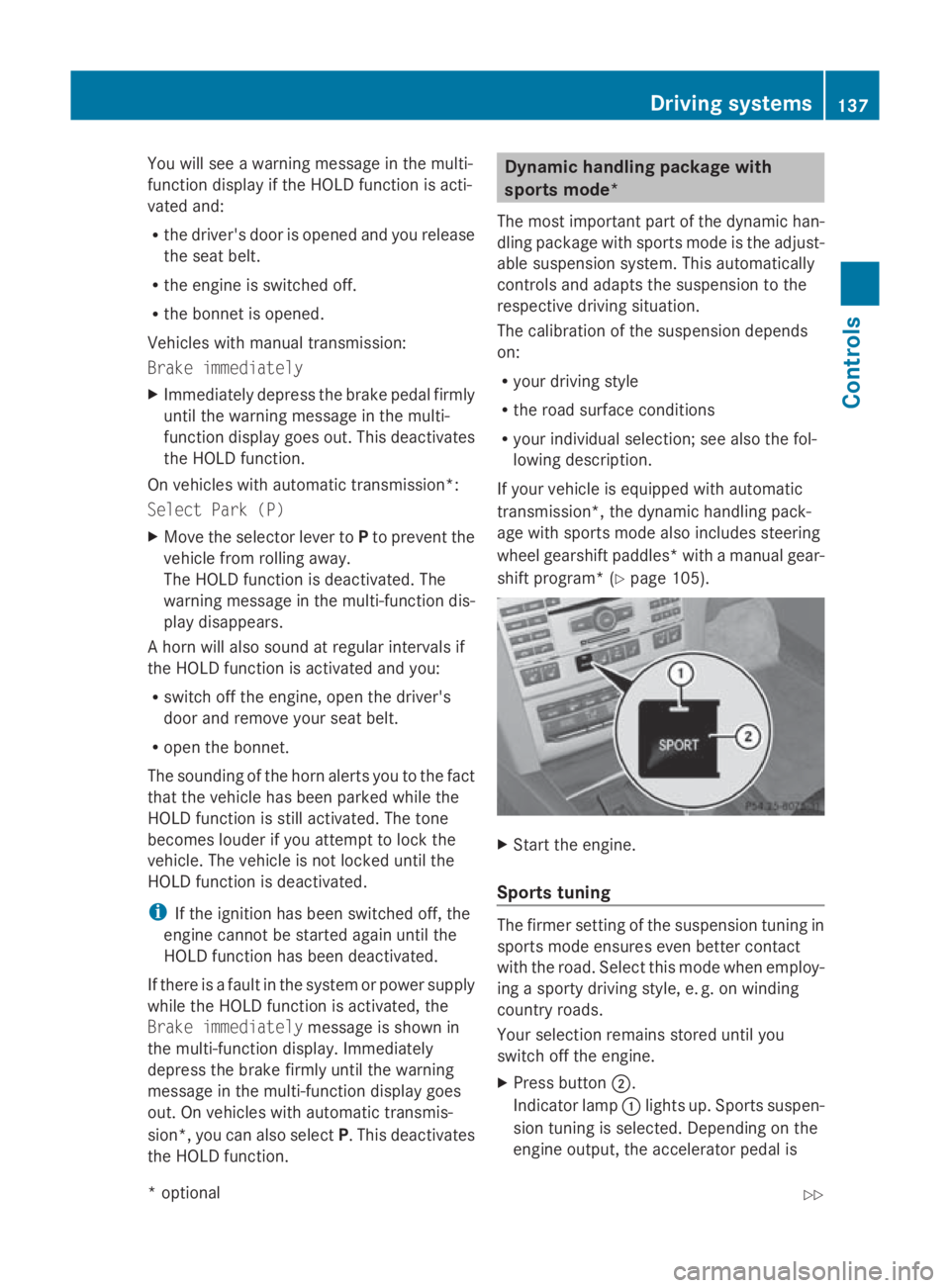
shift program* (Y page 105). X
Start the engine.
Sports tuning The firmer settin
gofthe suspension tuning in
sport smode ensures even better contact
with the road. Selec tthis mode when employ-
ing asport ydrivin gstyle, e. g. on winding
countr yroads.
Your selection remain sstored until you
switc hoff the engine.
X Press button 0047.
Indicator lamp 0046light sup. Sports suspen-
sion tuning is selected. Dependin gonthe
engin eoutput ,the accelerator pedal is Driving systems
137Controls
*optional
207_AKB; 2; 3, en-GB
mkalafa,
Version: 2.11.8.1 2009-07-23T10:23:49+02:00-Seite1 37 Z
Page 142 of 313

Fron
tsensors Centre Approximately 10
0cm Corners Approximately 60 cm
Rea
rsensors Centre Approximately 12
0cm Corners Approximately 80 cm
!
When parking ,pay particular attentio nto
object sabov eorb elow th esensors, such
as flower pot sortrailer towbars .PAR K-
TRONIC does no tdetect suc hobject swhen
they are in th eimmediat evicinity of the
vehicle .You could damag ethe vehicle or
th eo bjects.
Ultrasonic sources suc hasanautomatic
car wash, alorry's compressed-air brakes
or ap neumatic dril lcou ld caus ePARK-
TRONIC to malfunction.
Minimu mdistance Centre Approximately 20 cm
Corners Approximately 15 cm
If there is an obstacle within this range, all
warning displays light up and
atones ounds.
If th edistanc efalls below th eminimum clear-
ance, it may no longer be shown.
Warning displays The warning displays sho
wthe distance
between th esensor sand th eobstacle .The
warning display for th efront area is located
on th edashboard abov ethe centr eair vents.
The warning display for th erear area in the
Coupé is locate dontheroo flining in th erear
compartment; in th eCabriolet ,itisbetween
th er ear seats. Warning display for fron
tarea
0046 Left-han dside of th evehicle
0047 Right-hand side of th evehicle
008A Indicato rsegments
The warning display for each side of th evehi-
cle is divided int ofivey ellow and two red seg-
ments .PAR KTRONIC is operational if yellow
indicator segments 008Alight up.
The gear leve rpositio nor, in th ecaseofa uto-
matic transmission*, th eselector leve rposi-
tio nd etermine swhichw arning display is
active when th eengineisr unning:
Manual transmission: Selector lever
position Warning display
Forward
sgear
or
Neutral Fron
tarea activated Revers
egear Rear and fron
tareas
activated Automatic transmission*:
Selector lever
position Warning display
D
Fron
tarea activated R
or N Rear and fron
tareas
activated P
No areas activatedDriving systems
139Controls
*optional
207_AKB
;2;3,en-GB
mkalafa ,V ersion: 2.11.8.1
2009-07-23T10:23:49+02:00
-Seite 139 Z
Page 143 of 313
One or more segments light up as the vehicle
approaches an obstacle, depending on the
vehicle's distance to the obstacle.
From the:
R
sixth segment onwards, you will hear an
intermittent warning tone for approx-
imately two seconds.
R seventh segment onwards, you will hear a
warning tone for approximately two sec-
onds. You have reached the minimum dis-
tance.
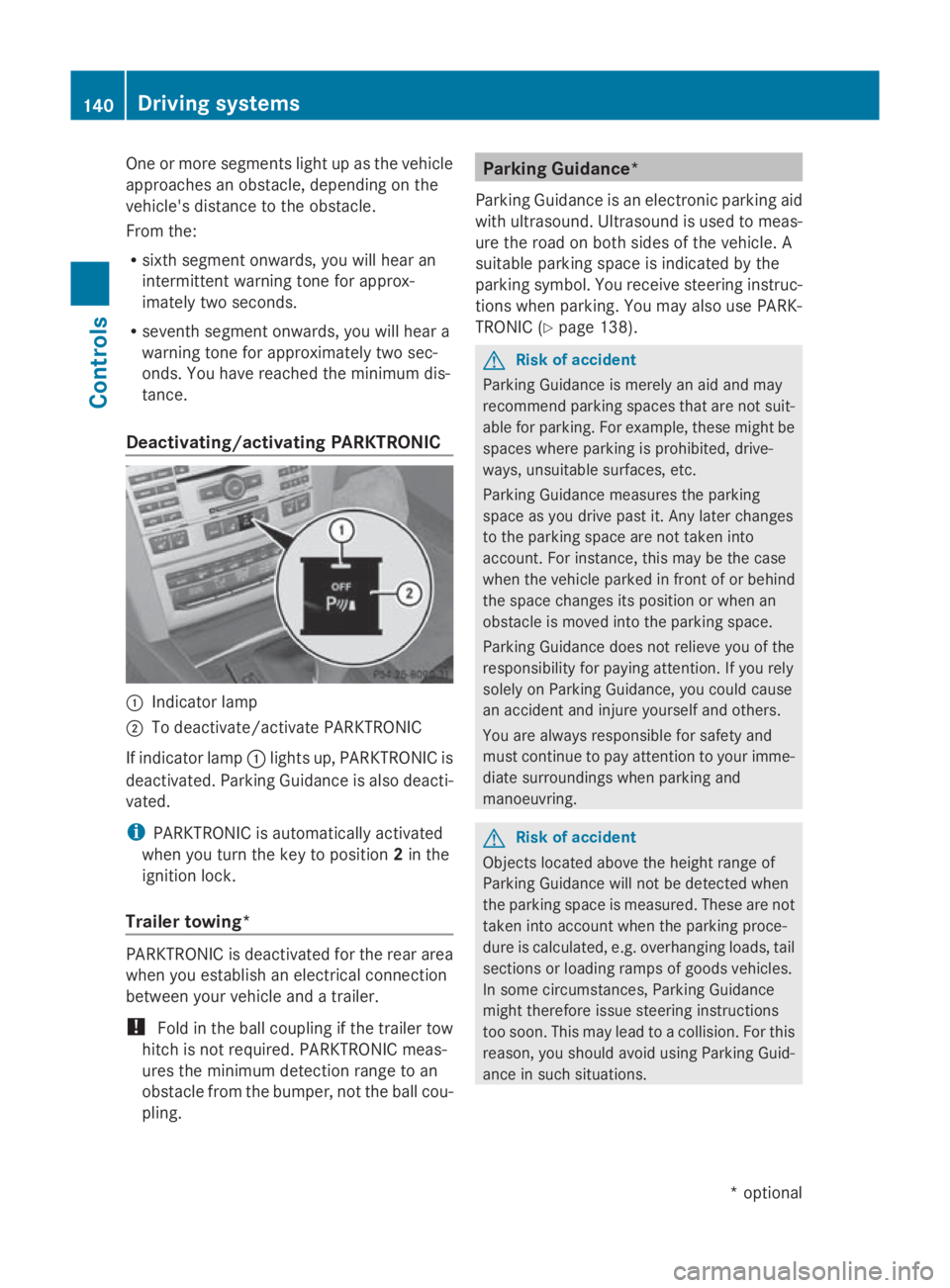
Deactivating/activating PARKTRONIC 0046
Indicator lamp
0047 To deactivate/activate PARKTRONIC
If indicator lamp 0046lights up, PARKTRONIC is
deactivated. Parking Guidance is also deacti-
vated.
i PARKTRONIC is automaticallya ctivated
when you turn the key to position 2in the
ignition lock.
Trailer towing* PARKTRONIC is deactivated for the rear area
when you establish an electrical connection
between your vehicle and atrailer.
! Fold in the ball coupling if the trailer tow
hitch is not required.P ARKTRONIC meas-
ures the minimum detection range to an
obstacle from the bumper, not the ball cou-
pling. Parking Guidance*
Parking Guidance is an electronic parking aid
with ultrasound. Ultrasound is used to meas-
ure the road on both sides of the vehicle. A
suitablep arking space is indicated by the
parking symbol. You receive steering instruc-
tions when parking. You may also use PARK-
TRONIC (Y page 138). G
Risk of accident
Parking Guidance is merely an aid and may
recommend parking spaces that are not suit-
able for parking. For example, these might be
spaces where parking is prohibited, drive-
ways, unsuitables urfaces, etc.
Parking Guidance measures the parking
space as you drive past it. Any later changes
to the parking space are not taken into
account. For instance, this may be the case
when the vehicle parked in front of or behind
the space changes its position or when an
obstacle is moved into the parking space.
Parking Guidance does not relieve you of the
responsibility for paying attention. If you rely
solely on Parking Guidance, you could cause
an accident and injure yourselfa nd others.
You are always responsible for safety and
must continue to pay attention to your imme-
diate surroundings when parking and
manoeuvring. G
Risk of accident
Objects located above the height range of
Parking Guidance will not be detected when
the parking space is measured. These are not
taken into account when the parking proce-
dure is calculated, e.g. overhanging loads, tail
sections or loading ramps of goods vehicles.
In some circumstances, Parking Guidance
might therefore issue steering instructions
too soon. This may lead to acollision. For this
reason, you should avoid using Parking Guid-
ance in such situations. 140
Driving systemsControls
*o
ptional
207_AKB;2;3,e
n-GB
mkalafa, Version: 2.11.8.1 2009-07-23T10:23:49+02:00-Seite 140
Page 147 of 313
R
at night or in ver ydark places
R if th ecamera is exposed to ver ybright light
R if th earea is lit by fluorescent light (th edis-
play may flicker)
R if there is asudden chang eintemperature,
e.g .when driving int oaheated garag ein
winter
R if th ecamera len sisdirtyoro bstructed
R if th erear of your vehicle is damaged. In this
even thave th ecamera position and setting
checked at aqualified specialist workshop.
Mercedes-Ben zrecommend sthaty ou use
aM ercedes-Ben zServic eCentre for this
purpose.
Do no tuse th ereversing camera in these
type sofs ituation. You could, otherwise,
injure other sordamage object sand your
vehicle while you are parking.
Activating th ereversing camera X
Mak esure that th ekeyis in position 2in
th ei gnition lock.
X Mak esure that th e"Reversin gcamera"
function is selecte dinCOMAND AP S(see
th es eparate operatin ginstruction sfor
COMAND APS).
X Engage revers egear.
The area behin dthe vehicle is show ninthe
COMAND AP Sdisplay.
You can selec tnotto show th earea behind
th ev ehicle in th eCOMAND AP Sdisplay (see
th es eparate operatin ginstruction sfor
COMAND APS). ATTENTION ASSIST
ATTENTION ASSIST helps you on long, monot-
onous journeys suc hasonmotorways and
trunk roads .Itisactive at speed sbetween 80
and 18 0km/ h. If ATTENTION ASSIST detects
tiredness or increasing lapses in concentra-
tio nont hepart of th edriver, it suggest sa
break. G
Ris
kofa ccident
ATTENTION ASSIST is only an aid and may
detect your tiredness or lapses in concentra-
tio nt oo late or no tatall. It is no tasubstitute
for aw ell reste dand attentive driver.
Fatigue may caus eyou to recognise hazard-
ous situations to olate ,misjudge asituation
or reac tslower. For this reason ,makes ure
you feel reste dbefore you begin driving and
durin gyour journey. Always tak ebreak sin
good tim eand regularly, especially during
lon gjou rneys. Otherwise, you may fail to rec-
ognise dangers in time, caus eanacciden tand
injure yourself and others.
ATTENTION ASSIST assesses your leve lof
fatigue or increasing inattentiveness taking
int oc onsideratio nthe followin gcriteria:
R personal driving style, e.g .steering charac-
teristics
R driving conditions, e. g. time, driving time
ATTENTION ASSIST' sfunctionality is restric-
te da nd warning sare delayed or do not
appear at all:
R if th eroad condition is poor ,e.g.large
bumps or potholes
R there is astron gs ide wind
R you have adopted averys porty driving style
with high cornering speed sordriving with
ah igh rat eofacceleration
R if you are predominantly driving slower
than 80 km/h or faster than 18 0km/h
R if you are currently operatin gormaking a
call usin gCOMAND APS*
R in active driving situations ,for example, if
you are changing lane sorchanging the
vehicle speed 144
Driving systemsControls
*o
ptional
207_AKB
;2;3,en-GB
mkalafa, Version:2.11.8.1
2009-07-23T10:23:49+02:00
-Seite 144
Page 228 of 313
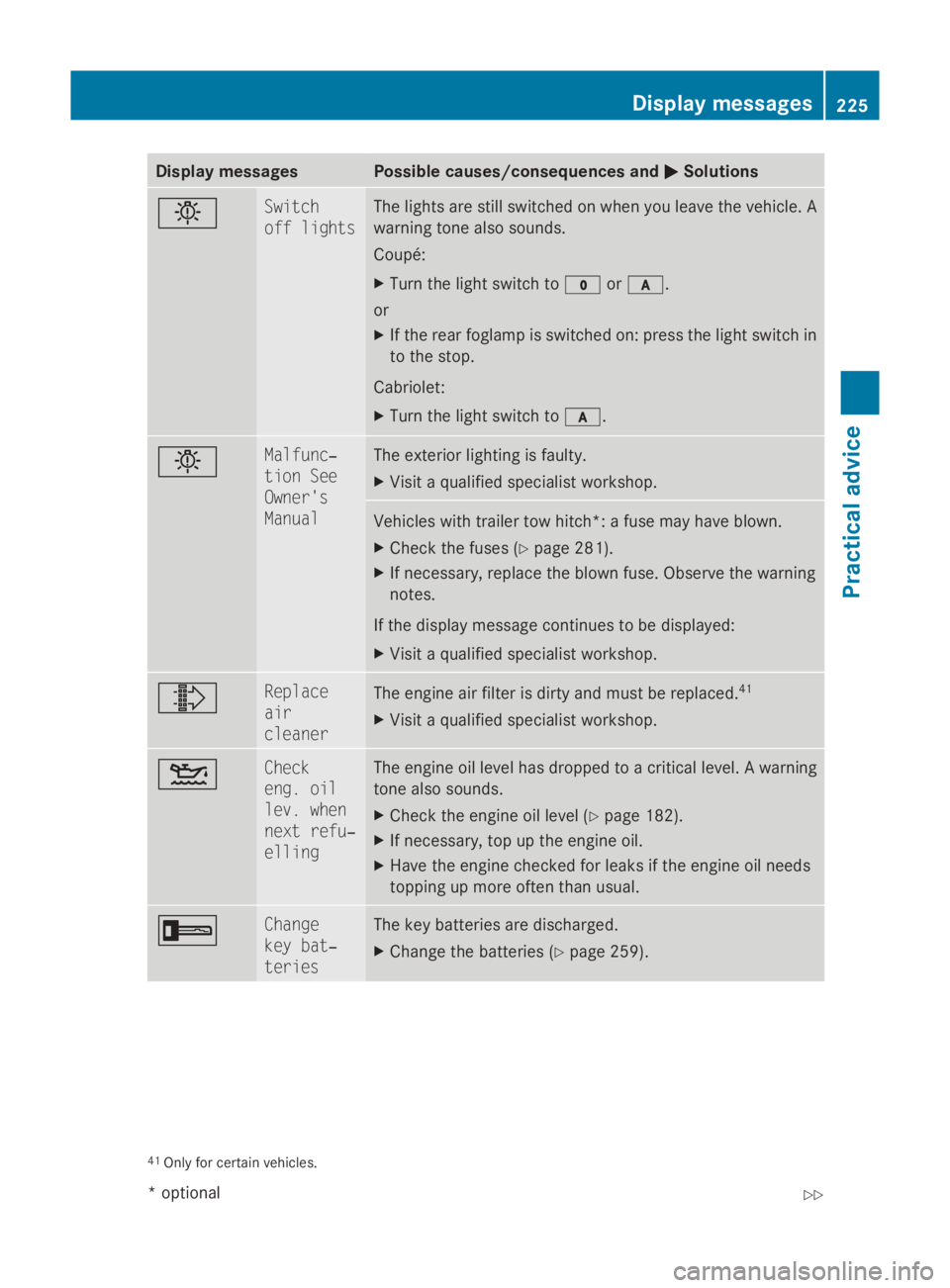
Display messages Possible causes/consequences and
0050
0050 Solutions 0055 Switch
off lights The lights are still switched on when you leav
ethe vehicle. A
warnin gtonea lso sounds.
Coupé:
X Tur nthe ligh tswitch to 0027or0066.
or
X If th erear foglam pisswitched on :press th eligh tswitch in
to th estop.
Cabriolet:
X Tur nthe ligh tswitch to 0066. 0055 Malfunc‐
tio
nS ee
Owner's
Manual The exterio
rlighting is faulty.
X Visit aqualified specialist workshop. Vehicles wit
htrailer to whitch*: afusem ay hav eblown.
X Chec kthe fuses (Y page 281).
X If necessary, replac ethe blown fuse. Observ ethe warning
notes.
If th edisplay message continues to be displayed:
X Visit aqualified specialist workshop. 00A0 Replace
air
cleaner
The engin
eair filte risdirty and mus tbereplaced. 41
X Visit aqualified specialist workshop. 00B4 Check
eng
.o il
lev .w hen
nex tr efu‐
elling The engin
eoil level has dropped to acriticallevel. Awarning
tone also sounds.
X Chec kthe engin eoil level ( Ypage 182).
X If necessary, to puptheengin eoil.
X Hav ethe engin echecked forl eak sift heengin eoil needs
toppin gupm oreo ften than usual. 0039 Change
key bat‐
teries The ke
ybatterie sare discharged.
X Change th ebatterie s(Ypage 259). 41
Only fo rcertai nvehicles. Display
messages
225Practical advice
*optional
207_AKB; 2; 3, en-GB
mkalafa
,V ersion: 2.11.8.1
2009-07-23T10:23:49+02:00
-Seite 225 Z