2009 MERCEDES-BENZ E-CLASS COUPE key
[x] Cancel search: keyPage 68 of 313

X
To close: pull the boot li ddownfirmly using
recess 0047or008A.
X Lock the vehicle, if necessary ,with
the 0037 button on the key or with KEY-
LESS-GO* (Y page 62).
i If yo uleave aKEYLESS-GO key *inthe
boot, the boot li dwilln ot lock.
Lockin gthe boot separately Yo
uc an lock the boot separately 17
.Ify outhen
unlock the vehicl ecentrally, the boot remains
locked and canno tbeo pened.
X Close the boot lid.
X Remov ethe emergency key element from
the key (Y page 249). X
Insert the emergency key element into the
boot li dlocka sfar as the stop.
X Turn the emergency key element clockwise
from position 004Ato position 004B.
X Remov ethe emergency key element. Opening automaticall
yfrom outside
Yo uc an unlock and open the boot li dsimul-
taneousl ywitht he key.
X To unloc kand open: press and hold
the 0054 button on the key unti lthe boot
li do pens. Opening automaticall
yfrom inside
Yo uc an open the tailgate from the driver's
sea twhent he vehicl eisstationary. X
To open: pull remote operating switch for
boot lid 0046unti lthe boot li dopens. Ke
yp ositions Key
005D
To remove the key
004A Power supply for som econsumers, such
as the windscree nwipers
17 Not availabl einallcountries. Ke
yp ositions
65Controls
*optional
207_AKB; 2; 3, en-GB
mkalafa,
Version: 2.11.8.1 2009-07-23T10:23:49+02:00-Seite 65 Z
Page 69 of 313
004B
Ignition (power supply for all consumers)
and drive position
004C To start the engine
i Even if the key is not for the vehicle in
question, it wills till turn in the ignition lock.
The ignition is not switched on. The engine
cannot be started. KEYLESS-GO*
Pressing the Start/Stop button repeatedly
corresponds to the different key positions in
the ignition lock. This requires that you do not
depres sthe brake pedal.
If you depres sthe brake pedala nd press the
Start/Stop button, the engine starts immedi-
ately. X
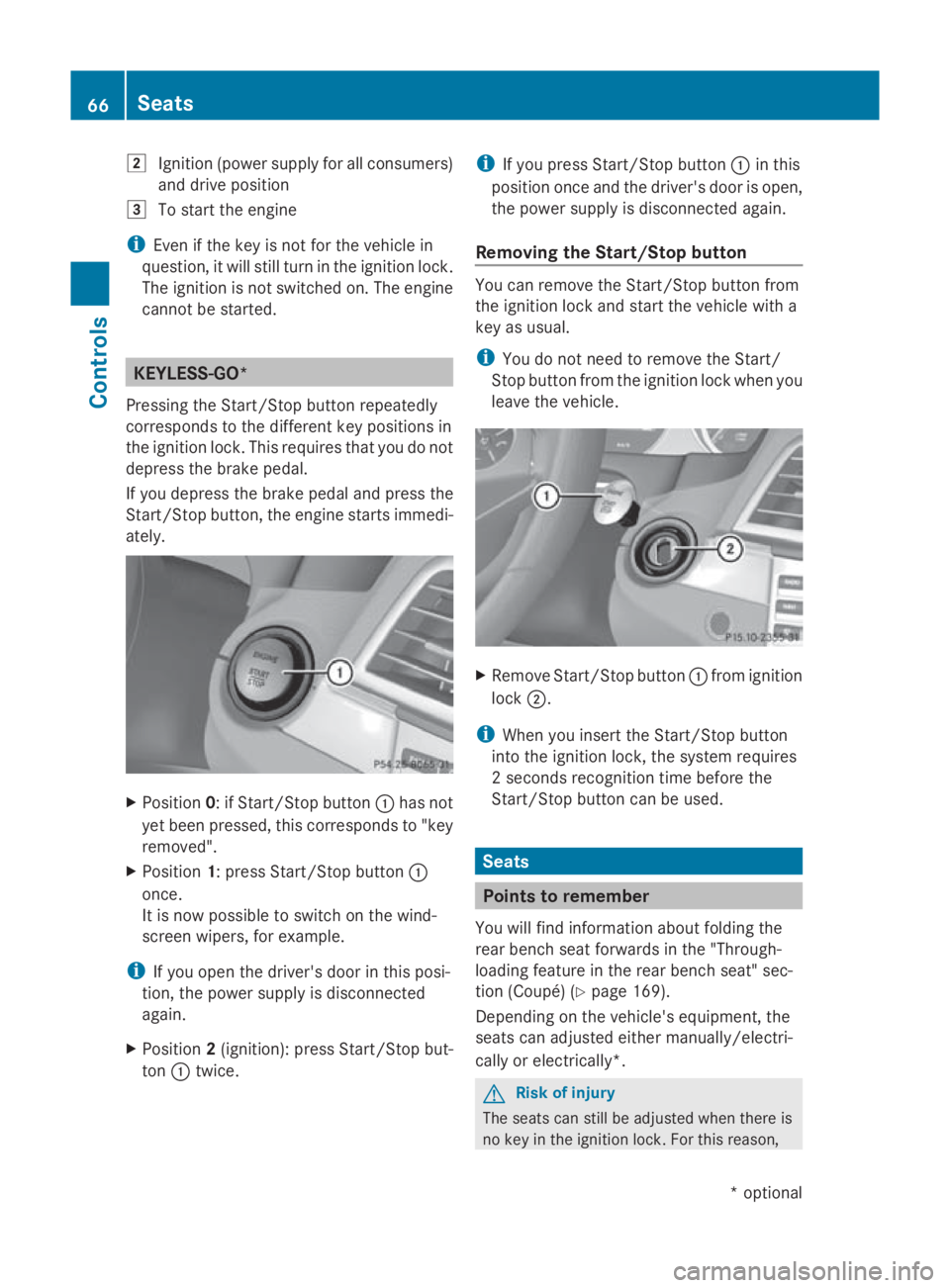
Position 0:ifStart/Stop button 0046has not
yet been pressed ,this corresponds to "key
removed".
X Position 1:press Start/Stop button 0046
once.
It is now possible to switch on the wind-
screen wipers, for example.
i If you open the driver's door in this posi-
tion, the powers upply is disconnected
again.
X Position 2(ignition): press Start/Stop but-
ton 0046twice. i
If you press Start/Stop button 0046in this
positio nonce and the driver's door is open,
the powers upply is disconnected again.
Removing the Start/Stop button You can remove the Start/Stop button from
the ignition lock and start the vehicle with a
key as usual.
i
You do not need to remove the Start/
Stop button from the ignition lock when you
leave the vehicle. X
Remove Start/Stop button 0046from ignition
lock 0047.
i When you insert the Start/Stop button
into the ignition lock, the system requires
2s econds recognition time before the
Start/Stop button can be used. Seats
Points to remember
You willf ind information aboutf olding the
rear bench seat forward sinthe "Through-
loading feature in the rear bench seat" sec-
tion (Coupé) (Y page 169).
Depending on the vehicle's equipment, the
seats can adjusted either manually/electri-
cally or electrically*. G
Risk of injury
The seats can still be adjusted when there is
no key in the ignition lock. For this reason, 66
SeatsControls
*o
ptional
207_AKB; 2; 3, en-GB
mkalafa
,V ersion: 2.11.8.1
2009-07-23T10:23:49+02:00
-Seite 66
Page 72 of 313
someone becoming trapped, press the seat
adjustment switch on the door.
Folding the backrest forwards X
Vehicles without the memory func-
tion*: if necessary, release the head
restraint and push it down.
X Pull seat release handle 0046forwards and
fold the backrest forwards, until the seat
backrest engages.
X Push the seat as far forwards as it will go.
X Vehicles with the memory function*:
pull seat release handle 0046forwards and
fold the backrest forwards as far as it will
go.
The seat moves automaticallytot he fore-
most position.
Folding back the backrest X
Vehicles without the memory func-
tion*: push the seat backrest back hori-
zontally until the seat reaches the position
that was previouslys et.
X Swing back the seat backrest evenly below
release handle 0046until it engages, doing so
in as mooth manner.
X If the head restraint has been moved, check
the position of the head restraint and set it
to the correct position after the seat back-
rest has been folded back.
X Vehicles with the memory function*:
swing back the seat backrest.
The seat moves automaticallytot he stored
position. G
Risk of injury
Make sure that the backrest engages fully.If
the seat backrest is not engaged, the mes-
sage Front right seat backrest not
locked orFront left seat backrest
not locked appears in the multi-function dis-
play.S top the vehicle as soon as road and
traffic conditions permit and remove any
objects that are blocking the backrest. Rear head restraint (Cabriolet)
Lowering and extending the head
restraints from the front X
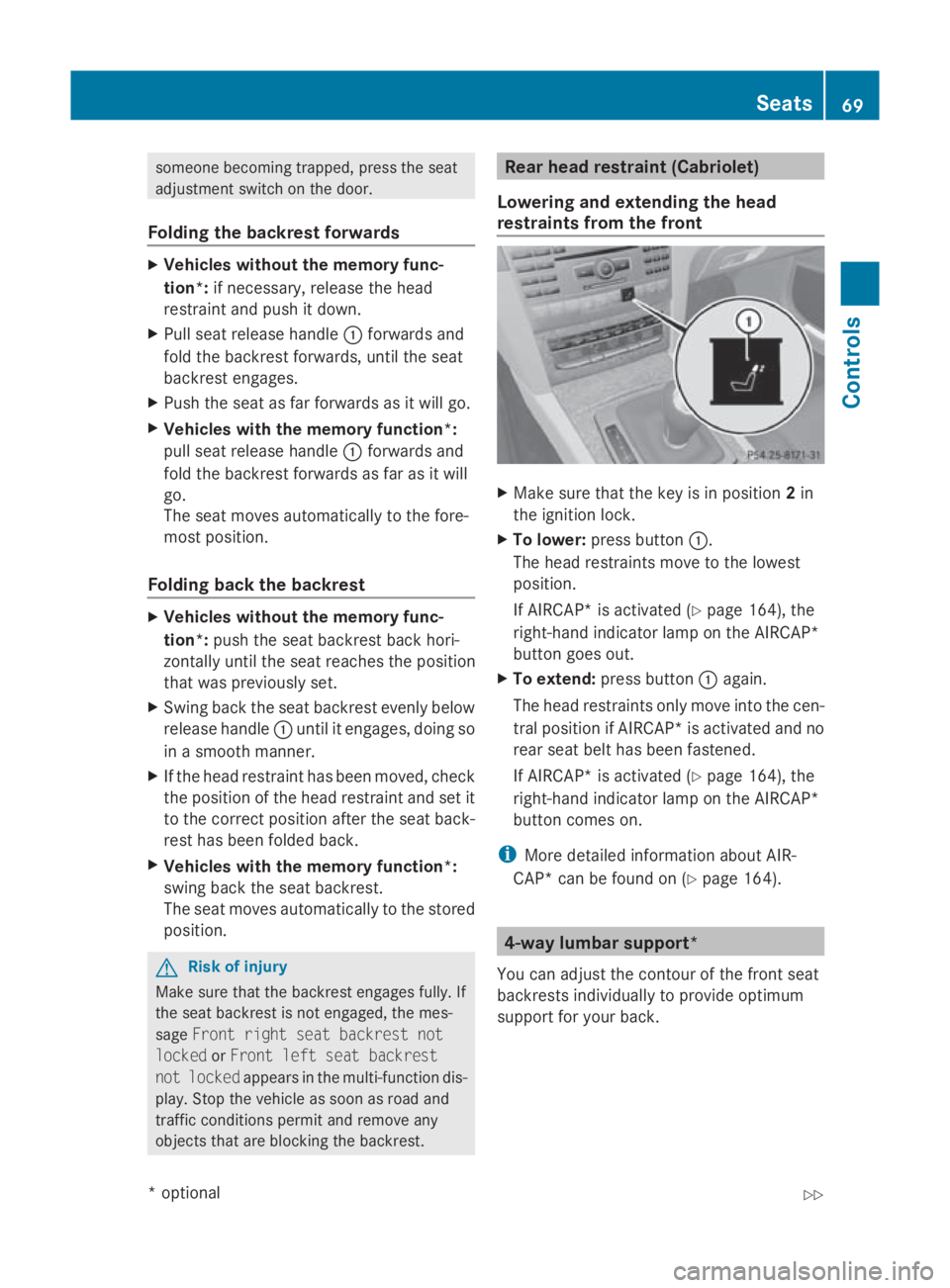
Make sure that the key is in position 2in
the ignition lock.
X To lower: press button 0046.
The head restraints move to the lowest
position.
If AIRCAP* is activated (Y page 164), the
right-hand indicator lamp on the AIRCAP*
button goes out.
X To extend: press button 0046again.
The head restraints only move into the cen-
tral position if AIRCAP* is activated and no
rear seat belt has been fastened.
If AIRCAP* is activated (Y page 164), the
right-hand indicator lamp on the AIRCAP*
button comes on.
i More detailed information aboutA IR-
CAP* can be found on (Y page 164). 4-way lumbar support*
You can adjust the contour of the front seat
backrests individually to provide optimum
support for your back. Seats
69Controls
*optional
207_AKB;2;3,e
n-GB
mkalafa, Version: 2.11.8.1 2009-07-23T10:23:49+02:00-Seite 69 Z
Page 73 of 313

0046
To raise the backrest contour
0047 To soften the backrest contour
008A To lower the backrest contour
0088 To harden the backrest contour
i When the door is unlocked, opened or the
key is in position 1in the ignition lock, the
setting of the lumbar support is automati-
cally checked and, if necessary, the indi-
vidual setting is restored. Multicontour seat*
You can adjust the contour of the fronts eat
backrest sindividually to provide optimum
support for your back. 0046
To adjust the thigh cushion
0047 To adjust the backrest contour in the lum-
bar region
008A To adjust the backrest contour in the
upper back region
0088 To adjust the backrest side cushions X
Make sure the key is in position 2in the
ignition lock. AIRSCARF* (Cabriolet)
The AIRSCARF neck-level heating function
blows warm air around the heads of car occu-
pants. The warm air flows out of the holes in
the head restraints. G
Risk of injury
Very hot air can flow out of the ventsint he
head restraints when AIRSCARF is in opera-
tion. This can cause burns on unprotected
skin near the vents. Lower the heating output
in good time, when necessary.
The three red indicator lamps in the button
indicate the heating level you have selected. X
Make sure that the key is in position 2in
the ignition lock.
X To activate: press button 0046.
Three red indicator lamps in the button light
up. The blower start supafterapreheating
phase of seven seconds.
X Press button 0046repeatedly until the
desired heating level is set.
X To switch off: press button0046repeatedly
until all indicator lamps go out.
You can use the adjustable fins on the head
restraint to adjust the height of the curren tof
air blown out accordin gtoyour height.
Make sure that there are no object scovering
the intak egrille on the back of the driver's
seat backrest. 70
SeatsControls
*o
ptional
207_AKB; 2; 3, en-GB
mkalafa,
Version: 2.11.8.1 2009-07-23T10:23:49+02:00-Seite 70
Page 74 of 313

i
The blower continues runnin gfor seven
seconds to cool down the heating ele-
ments.
i If the battery voltage is too low, the AIR-
SCARF neck-level heating may switch off. Seat ventilation*
The three blue indicator lamps in the button
indicate the ventilation level you have selec-
ted. X
Make sure that the key is in position 1or
2 in the ignition lock.
X To switch on: press button0046repeatedly
until the required ventilation level is set.
i If you open the side windows and the pan-
orama sliding sunroof* using the key
(Y page 96), the driver's seat ventilation
automatically switches to the highest level.
X To switch off: press button0046repeatedly
until all indicator lamps go out.
i If the battery voltage is too low, the seat
ventilation may switch off. Seat heating*
The three red indicator lamps in the button
indicate the heating level you have selected. i
The system automatically switches down
from level 3to level 2after approximately
eight minutes.
The system automatically switches down
from level 2to level 1after approximately
ten minutes.
The system automatically switches off
approximately 20 minutes after it is set to
level 1.
X Make sure that the key is in position 1or
2 in the ignition lock.
X To switch on: press button0046repeatedly
until the desired heating level is set.
X To switch off: press button0046repeatedly
until all indicator lamps go out.
i If the battery voltage is too low, the seat
heating may switch off. Steering wheel
Points to remember
Dependin gonthe vehicle equipment, you can
adjust the steerin gwheel either manually or
electrically*. G
Ri
sk of injury
The electrically adjustable steerin gwheel*
can be adjusted when the key is removed
from the ignition lock. Therefore, do not leave
children unsupervised in the vehicle as they
could become trapped as the steerin gwheel
is adjusted. Steering wheel
71Controls
*optional
207_AKB; 2; 3, en-GB
mkalafa,
Version: 2.11.8.1 2009-07-23T10:23:49+02:00-Seite 71 Z
Page 75 of 313

G
Risk of accident
Only adjust the steering wheel whe nthe vehi-
cle is stationar yand do not pull away unti lthe
steering wheel adjustment mechanism is
locke dinposition. Otherwise, yo umight drive
withou tthe steering wheel adjustment mech-
anism being locke dinposition and be distrac-
ted from roa dand traffi cconditions by an
unexpecte dmovement of the steering wheel
and cause an accident.
However, the steerability of the vehicle is not
affected.
Whe nyou adjust the steering wheel ,make
sure that:
R the steering wheel can be reached with
your arm sslightl ybent
R yo uc an move your legs freely
R yo uc an see al lthe display sinthe instru-
ment cluster clearly Adjusting the steering wheel man-
ually 0046
Releas elever
0047 Height adjustment
008A Fore-and-aft adjustment
X Push release catch 0046dow ncompletely.
The steering column is unlocked.
X Adjus tthe steering wheel to the desired
position.
X Push release lever 0046up completely.
The steering wheel is locke dinposition. Adjusting the steering wheel electri-
cally*
0046
Height adjustment
0047 Fore-and-aft adjustment
You can find more information under:
R EASY-ENTRY/EXIT feature (Y page 72)
R storing settings (Y page 75) EASY-ENTRY/EXI
Tfeature*
The EASY-ENTRY/EXIT feature make sgetting
in and ou tofyourv ehicle easier.
The steering wheel swings upwards when
you:
R remove the key from the ignition lock
R ope nthe driver' sdoorw hent he key is in
position 0or 1in the ignition lock
Whe nthe key is inserted into the ignition lock
with the driver' sdoorc losed, the steering
wheel is automaticall ymovedtot he previ-
ously set position. G
Risk of injury
Make sure that nobody can become trapped
whe nyou activate the EASY-ENTRY/EXIT fea-
ture.
If there is ariskofs omeone becoming trap-
ped ,stop the adjustment procedure. To halt
the procedure: 72
Steering wheelControls
*o
ptional
207_AKB
;2;3,en-GB
mkalafa ,V ersion: 2.11.8.1
2009-07-23T10:23:49+02:00
-Seite 72
Page 76 of 313

R
move the steering column adjustment
switch in the opposite directio ntothat in
which the steering whee lismoving
R press one of the memory function position
buttons
Never leave children unsupervise dinthe vehi-
cle. They could open the driver' sdoor and,
thereby ,unintentionally activate the EASY-
ENTRY feature and become trapped.
The lastp osition of the steering whee lis
stored after you manually adjust it or when
you store amemory position (Y page75).
You can activate and deactivate the EASY-
ENTRY/EXIT feature via the on-board com-
puter (Y page121).
i The crash-responsive EASY-EXIT fea-
ture* can only be activated after an acci-
dent if the EASY-ENTRY/EXIT feature is
activated in the on-board computer.
If the crash-responsive EASY-EXIT feature
is triggere dinanaccident, the steering
whee lcolumn willm ove upwards when the
driver' sdoor is opened ,irrespective of the
position of the key in the ignitio nlock. This
makes it easier to exit the vehicl eand res-
cue the occupants. Mirrors
Rear-view mirror
X Adjust the rear-vie wmirror by hand so you
have agood overvie wofthe traffic condi-
tions. Rear-view mirror (manual anti-dazzle) X
Anti-dazzle mode: flick anti-dazzle
switch 0046forwards or back. Exterio
rmirrors G
Risk of accident
The exterior mirrors reduce the size of the
image. Objects are actually closer than they
appear. You could misjudge the distance from
vehicles driving behind and cause an acci-
dent, e.g. when changing lane. For this rea-
son, make sure of the actua ldistance from the
vehicl edriving behind by glancing over your
shoulder.
The convex exterior mirrors provid ealarger
fiel dofv ision.
The exterior mirrors are automatically heated
if the rear windo wheating is switched on and
the outsid etemperature is low.
Adjusting the exterio rmirrors Mirrors
73Controls
*optional
207_AKB; 2; 3, en-GB
mkalafa
,V ersion: 2.11.8.1
2009-07-23T10:23:49+02:00
-Seite 73 Z
Page 77 of 313

X
Make sure that the key is in position 1or
2 in the ignition lock.
X Press button 0046for the left-hand exterior
mirror or button 0047for the right-hand exte-
rior mirror.
The indicator lamp in the corresponding
button lights up in red.
The indicator lamp goes out again after
some time. You can adjust the selected
mirror using adjustment button 008Aas long
as the indicator lamp is lit.
X Press adjustment button 008Aup, down, to
the right or to the left until the exterior mir-
ror is set to aposition which provides you
with agood overview of traffic conditions.
Folding the exterior mirrors in or out
electrically* X
Make sure that the key is in position 1or
2 in the ignition lock.
X Briefly press button 0046.
Both exterior mirrors fold in or out.
i Make sure that the exterior mirrors are
always folded out fully while the vehicle is
in motion; otherwise, they may vibrate.
Resetting the exterior mirrors If the battery has been disconnected or has
become discharged, the exterior mirrors
must be reset. Otherwise, the exterior mirrors
will not fold in when you select the "Fold in
mirrors when locking" function in the on-
board computer (Y
page 122). X
Make sure that the key is in position 1in
the ignition lock.
X Briefly press button 0046.
Automatically folding exterior mirrors
in or out* If the "Fold in mirrors when locking" function
is activated in the on-board computer
(Y
page 122):
R the exterior mirrors fold in automatically as
soon as you lock the vehicle from the out-
side.
R the exterior mirrors fold out again automat-
ically as soon as you unlock the vehicle and
then open the driver's or front-passenger
door.
i If you have activated this function and fold
in the exterior mirrors using button 0046,they
will not be folded out automatically .You
can only fold out the exterior mirrors again
using button 0046. Automatic anti-dazzle mirrors*
The rear-view mirror and the exterior mirror
on the driver's side automatically go into anti-
dazzle mode if the ignition is switched on and
incident light from headlamps strikes the sen-
sor in the rear-view mirror.
The mirrors do not go into anti-dazzle mode if
reverse gear is engaged or the interior lighting
is switched on. G
Risk of accident
If the incident light from headlamps cannot
strike the sensor in the rear-view mirror, for
instance, when the rear window roller sun-
blind* is extended, the mirror's automatic
anti-dazzle function will not operate.
Incident light could then dazzle you. This may
prevent you from observing the traffic condi-
tions, thereby causing an accident. In this
case, adjust the rear-view mirror manually. 74
MirrorsControls
*o
ptional
207_AKB; 2; 3, en-GB
mkalafa,
Version: 2.11.8.1 2009-07-23T10:23:49+02:00-Seite 74