Page 80 of 391

Lighting
80
INTERIOR LAMPS
1.Sun visor lamps. Switch on automatically
when the vanity mirror is opened.
2. Front map reading lamps. Move your
finger close to (or touch) the relevant
proximity switch to switch on/off.
3. Front interior courtesy lamp. Illuminates
when the doors are unlocked and
extinguish 20 seconds after all doors are
closed or when the vehicle is locked. The
lamps are operated by proximity sensors.
Move your finger close to (or touch) the
appropriate lens to switch on or off
manually. Touch the lens for 2 seconds to
deactivate/activate automatic illumination. 4.
Glove box lamp. Automatically illuminates
when the glove box is opened.
5. Footwell lamps. Automatically illuminate
when the front doors are opened.
6. Rear map reading/interior lamps. Switch
on automatically when the doors are
opened. Press the appropriate switch to
activate an interior lamp manually (e.g. as
a map reading lamp). Press the
appropriate switch again to extinguish the
lamp. Touch the front c ourtesy lamp lens
for approximatel y 2 seconds to
deactivate/activate automatic illumination
of the rear interior lamps.
E94712
4
5
1
5
223
1
6
6
Page 84 of 391
Lighting
84
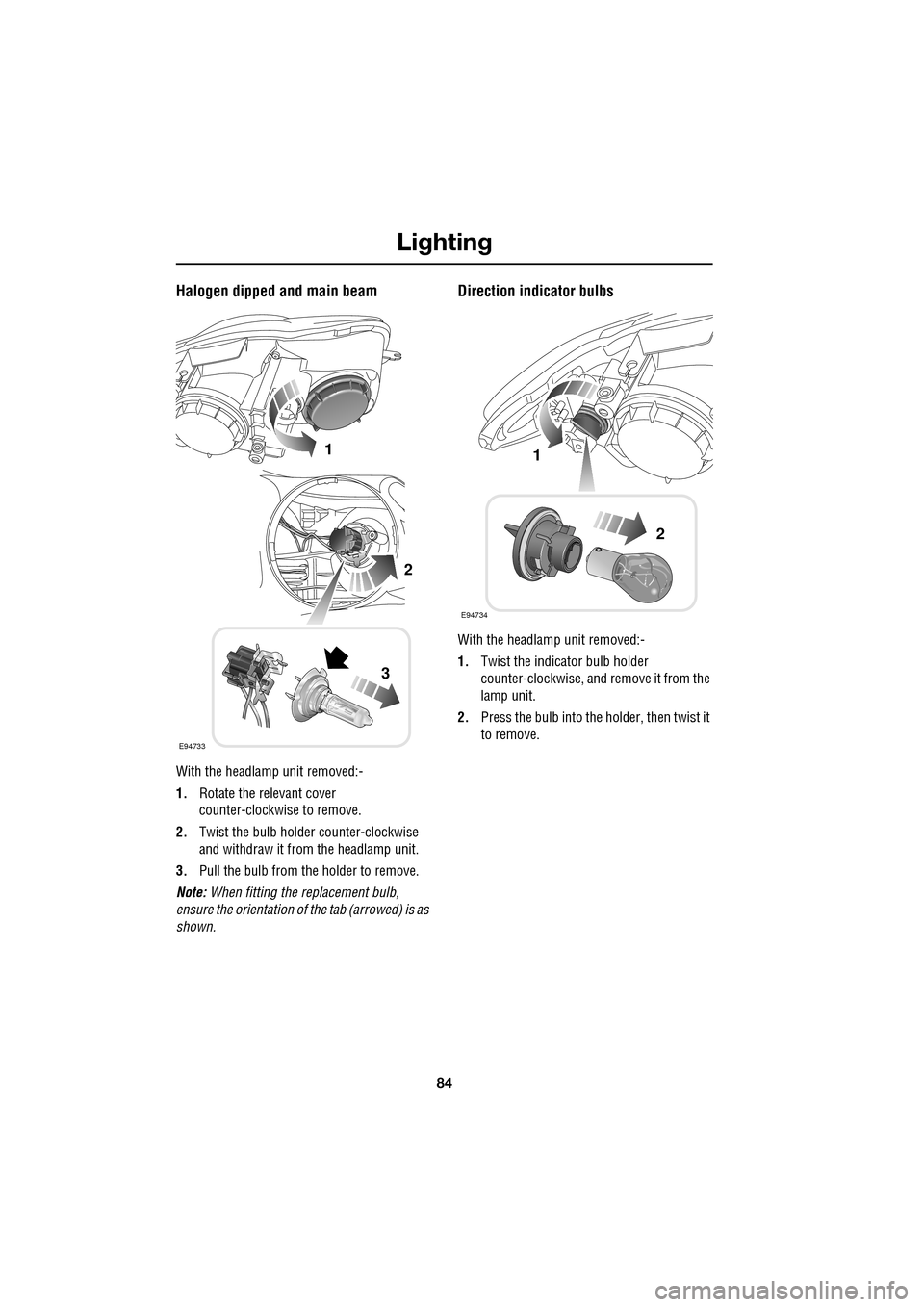
Halogen dipped and main beam
With the headlamp unit removed:-
1.Rotate the relevant cover
counter-clockwise to remove.
2. Twist the bulb holder counter-clockwise
and withdraw it from the headlamp unit.
3. Pull the bulb from the holder to remove.
Note: When fitting the replacement bulb,
ensure the orientation of the tab (arrowed) is as
shown.
Direction indicator bulbs
With the headlamp unit removed:-
1. Twist the indicator bulb holder
counter-clockwise, and remove it from the
lamp unit.
2. Press the bulb into the holder, then twist it
to remove.
E94733
1
2
3
E94734
1
2
Page 85 of 391
85
Lighting
Side lamp bulbs
1.Rotate the cover counter-clockwise and
remove.
2. Pull the bulb holder tab to remove from the
lamp unit.
3. Pull the bulb to remove.
When replacing, push the bulb holder into its
socket in the lamp unit until it clicks in place.
SIDE REPEATER LAMP
REAR LAMP BULBS
Rear direction indicator and reverse
lamp bulbs
With the rear lamp unit removed:-
1.Squeeze the two tabs together, then pull to
remove the relevant bulb holder.
2. Press and release the tab on the electrical
connector and pull to remove the bulb unit.
E94735
1
2
3
CAUTION
These lamps are LED units and should
only be replaced by a Dealer/Authorised
Repairer.
E94736
1
2
Page 88 of 391

Wipers and washers
88
WINDSCREEN WIPERS
Note: If the wiper blades become stuck or
jammed, an electronic cut-out may temporarily
halt wiper operation. If this happens, switch off
the wipers and the ignition. Clear any
obstructions and free th e wiper blades, before
attempting to switch on the ignition.
Wiper operation
1. Windscreen wipers off and parked.
2. Rain sensor activated wipe.
3. Low speed wipe.
4. High speed wipe.
5. Rain sensor sensitivity control.
Rain sensor variable delay
1.Maximum sensitivity.
2. Rotate control to adjust sensitivity.
3. Minimum sensitivity.
With the rain sensor acti vated, the sensitivity of
the rain sensor can be adjusted. Rotate the
control upwards to reduce the sensitivity of the
rain sensor.
Single wipe
Pull the stalk towards the steering wheel for a
single wipe. Holding the sw itch in this position,
operates the wipers at normal speed until the
switch is released.
CAUTIONS
Do not operate the windscreen wipers
on a dry screen. The drag on the wiper
mechanism may cause damage.
In freezing or very hot conditions,
ensure that the wipers have not stuck to
the windscreen before operating. The drag on
the wiper mechanism may cause damage.
Remove any snow, ice or frost from the
windscreen, around the wiper arms and
blades, and the screen scuttle, before
operating the wipers. S now and ice can cause
damage to the wiper mechanism, if left
uncleared.
JAG1620
5
1
2
3
4
1
2
3
JAG1622
JAG1621
Page 89 of 391

89
Wipers and washers
Speed-dependent mode
If vehicle speed drops below 2 km/h (1.2 mph)
with the wipers operating, the wiper frequency
automatically reduces. The wipers will switch
to the next lowest speed. When the vehicle’s
speed increases to over 8 km/h (5 mph), the
original wiper speed settings are restored
automatically.
RAIN SENSOR
The rain sensor is able to detect the presence
and amount of rain, dirt or snow on the
windscreen and automatically activates the
windscreen wipers accordingly.
To activate the rain sensitive wipers, move the
wiper stalk to the rain sensor/intermittent delay
position and adjust the ra in sensor sensitivity
control as required. See WINDSCREEN
WIPERS (page 88).
WINDSCREEN WASHERS
To operate the windscreen washers press and
release the button on the e nd of the wiper stalk.
The wipers will perform 5 normal speed wipes,
followed by a drip wipe (if configured). The
washers will operate during the first two wipes.
If the washers are operated with the wipers
operating at normal or fast speed, the washer
jets will operate for tw o wipes and operation of
the wipers will not be affected.
Note: If the button is pressed and held, the
wipers and washers w ill operate at normal
speed until the button is released (or for a
maximum of 10 seconds). After the button is
released, the wipers will operate for a further
three wipes, followed by a drip wipe (if
configured). If the wipe rs are already operating
at normal or fast speed, operating the washers
will not affect wiper operation.
CAUTION
Ensure that the wipers are switched off
before entering a car wash. If the rain
sensitive wipers operate during the car
washing process damage may occur to the
wiper mechanism.
MAX
JAG1623
WARNING
Some screenwash products are
flammable, do not allow screenwash
to come into contact with sources of
ignition.
CAUTION
Only screenwash products which are
approved for automotive use should be
used, and then only in accordance with the
manufacturer's instructions.
JAG1624
Page 91 of 391
91
Wipers and washers
CHANGING THE WIPER BLADES
Service position
The windscreen wiper service position allows
the wipers to be parked in a more accessible
position. This makes it easier to change wiper
blades.
Setting the service position
1.With the ignition switched off, pull the
wiper stalk towards the steering wheel to
the single wipe position. Hold the stalk in
this position.
2. Make sure the brake pedal is not applied
and, while still holding the wiper stalk in
the single wipe positi on, press the ignition
START/STOP button to switch on the
ignition.
The wipers will move to the vertical (service)
position. Release the wiper stalk.
To return the wiper blades to the operating
position, turn the ignition off.
CAUTIONS
When checking or changing the wiper
blades, they can be set to the service
position or parked normally.
E94746
JAG1625
1
2
Page 93 of 391

93
Windows and mirrors
ELECTRIC WINDOWS
With the ignition on or engine running, press a
switch down to lower the window, pull it up to
raise the window. Release the switch at any
point to stop window movement.
The windows will operate for five minutes after
the engine is switched off, as long as none of
the doors are opened.
One-shot operation
All four windows have one-shot operation.
Briefly pull the switch up and release, the
window will continue to raise until fully closed.
Briefly press the switch down and release, the
window will continue to lower until fully open.
Pressing or pulling the switch again will stop
the window.
Overriding anti-trap protection
Anti-trap protection will stop window
movement if an obstruction or resistance is
detected. Check the window and its aperture
and remove any obstructions, ice, etc. If it is
still necessary to raise the window, the override
procedure is as follows:-
1. Attempt to close the window. Anti-trap will
prevent closure and lower the window.
2. Within ten seconds, attempt to raise the
window again. Anti-t rap will prevent
closure and lower the window.
3. Attempt to close the window for a third
time, this time holding the switch in the
close position. The window will raise
whilst the switch is held. Hold until closed.
Note: If this procedure fails to remove the
blockage, the window operation may need to
be reset.
Window reset
The windows will need to be reset if the battery
is disconnected, becomes discharged or power
supply is interrupted.
Reset as follows:-
1. Close the window fully.
2. Release the switch, then lift it to the close
position and hold for two seconds.
3. Open the window fully.
4. Release the switch, then push it to the
open position and hold for two seconds.
5. Lift and release the switch to operate the
one-shot function.
6. Repeat the procedure on each window.
WARNING
All of the windows have an anti-trap
protection system. However, before
closing a window care must be taken
to ensure that none of the occupants have any
part of their body in a position where it could
be trapped. Even with an anti-trap system
serious injury or death can occur.
E94755
Page 98 of 391

Windows and mirrors
98
BSM is designed to work most effectively when
driving on multi-lane highways.
If an object is identified by the system as being
an overtaking vehicle/object, an amber
warning icon ( 1) illuminates in the relevant
exterior mirror, to alert the driver that there is a
potential hazard in the vehicle's blind spot and
therefore, that a lane change might be
dangerous.
Note: If an overtaking vehicle is detected on
both sides of the vehicle simultaneously, the
warning icons in both mirrors will illuminate.
Note: BSM is automatically turned off when
reverse ( R) gear is selected, when the vehicle is
in park ( P), the vehicle is travelling below
16 km/h (10 mph) and also when the electrical
connector for the trailer socket is plugged in on
vehicles with a factory-fitted towing bracket.
When in these conditions, an amber warning
indicator within the exterior mirror is
displayed.Sensor blockage
The BSM system will automatically disable if
either of the sensors become completely
obscured, an amber wa rning indicator dot (2)
is displayed in the exterior mirror and the
message BSM sensor blocked appears in the
message centre.
Note: Blockage testing is only initiated when
vehicle speed is above 32 km/h (20 mph) and
will take at least two minutes of accumulated
time travelling above th is speed, to determine
that the sensor is blocked.
If the sensors become blocked, then please
check that there is nothing obscuring the rear
bumper and that it is cl ear from ice, frost and
dirt.
System fault
If a fault with one of the radar sensors is
detected, an amber warn ing indicator dot is
displayed in the exterior mirror and the
message BSM not available is displayed in the
message centre.
Note: Even if the detected fault only affects the
radar sensor on one side of the vehicle, the
whole system is disabled. If the fault is
temporary, the system will operate correctly
once the engine has been switched off and then
on again.
If a fault in the system occurs, consult your
Dealer/Authorised Repairer.
E96411
12