2009 JAGUAR XF Rele
[x] Cancel search: RelePage 330 of 391

Television
330
Steering wheel controls
1.Rotate up or down to increase or decrease
volume.
2. Rotate up or down and release repeatedly
to scroll through preset TV channel. Rotate
up and hold for two seconds to select next
strong TV channel.
3. Press repeatedly to scroll through all
sources.
4. This button can be used to mute the TV
sound at any time.
USING THE TELEVISION
On/off control
To operate the TV, the ignition system must be
on (press the engine START/STOP button).
Press the audio on/off and volume control on
the audio console. On the touch-screen
Home menu, select
Audio/TV , then select TV. The buttons on the
left of the screen will slide away and be
replaced by the TV preview picture. To
redisplay the buttons for five sec onds, select
the Source button under the TV preview
picture. See TELEVISION CONTROLS
(page 329).
Volume control
The volume of the TV output can be adjusted in
one of two ways:
Rotate the audio on/off and volume control on
the audio console, or;
Rotate the volume control on the steering
wheel.
E94043
12
43
E94044
Audio/TV
DAB radio
CD
AM/FM
12 : 26 pm
Portable audio
TV
UK TV ITV1
Ch 4 Sky News E4 CBBCBBC1
Settings
Channel list
TA PTY DPLIIDTV BBC1
Style
UK TV People
SkySports NTP
Analogue Digital
E94680
E94085
E94086
Page 332 of 391
Television
332
Channel list
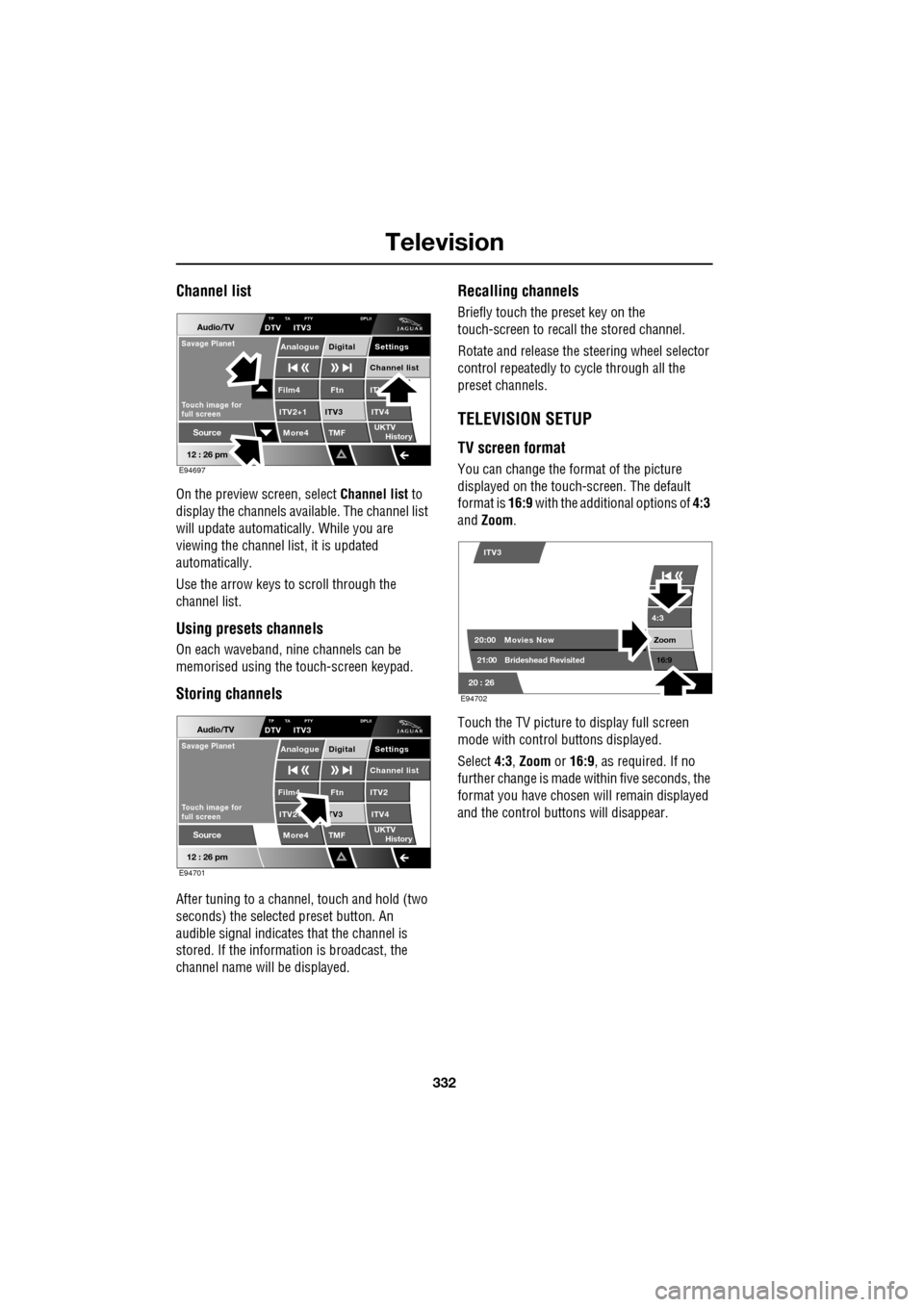
On the preview screen, select Channel list to
display the channels available. The channel list
will update automatically. While you are
viewing the channel list, it is updated
automatically.
Use the arrow keys to scroll through the
channel list.
Using presets channels
On each waveband, ni ne channels can be
memorised using the touch-screen keypad.
Storing channels
After tuning to a channe l, touch and hold (two
seconds) the selected preset button. An
audible signal i ndicates that the channel is
stored. If the informat ion is broadcast, the
channel name wi ll be displayed.
Recalling channels
Briefly touch the preset key on the
touch-screen to recall the stored channel.
Rotate and release the steering wheel selector
control repeatedly to cycle through all the
preset channels.
TELEVISION SETUP
TV screen format
You can change the format of the picture
displayed on the touch-screen. The default
format is 16:9 with the additional options of 4:3
and Zoom .
Touch the TV picture to display full screen
mode with control buttons displayed.
Select 4:3, Zoom or 16:9 , as required. If no
further change is made within five seconds, the
format you have chosen will remain displayed
and the control butt ons will disappear.
Audio/TV
12 : 26 pm
More4 TMF
TP TA PTY DPLIIDTV ITV3
UKTV
HistorySource
ITV
ITV2+1 ITV4Film4
Settings
Channel listAnalogue Digital
Ftn
ITV3
Touch image for
full screen
Savage Planet
E94697
Audio/TV
12 : 26 pm
More4 TMF
TP TA PTY DPLIIDTV ITV3
UKTV
HistorySource
ITV2
ITV2+ ITV4Film4
Settings
Channel listAnalogue Digital
Ftn
TV3
Touch image for
full screen
Savage Planet
E94701
4:3
Zoom 16:9
ITV3
20:0021:00 Movies Now
Brideshead Revisited
20 : 26 E94702
Page 366 of 391

Navigation system
366
OTHER SELECTION METHODS
Town centres
The POI database holds town centre locations.
To select a town centre, proceed as follows:
•From the Input POI Na me screen, enter the
town name required in the Name text area
(do not select the Town button).
• Touch List to display the list of matches.
• For the town centre, select the entry
showing the town name only.
Note: In some cases, more than one town
centre location may be listed.
CATEGORIES AND SUB-CATEGORIES
The POI database is divided into a number of
categories. Each main category is further
divided into a number of sub-categories.
The first entry in the list of Restaurant
sub-categories, is ALL. This selects all of the
Restaurant sub-categories.
To narrow the search, touch the Town button.
This will display the alpha keyboard, to allow
the desired town na me to be entered.
Search area
When searching the database, only points of
interest in the current search area are included,
except for the sub-categories marked All
search areas in the POI category list.
List button
The List button becomes active, when the
characters entered reduce the possible entries
to a small enough number (the list is displayed
automatically when the number of entries
reduces to four or less).
You can also select List (when active) without
entering a POI name. All the relevant points of
interest will be displayed, e.g. in a selected
town or category.
All button
The All button returns to searching all
categories after sele cting one category.
POI ENTRY MESSAGES
While searching for point s of interest, you may
encounter one of the following messages:
1. There are no POIs in this Category.
2. No POIs Found in this Town.
QUICK POI SELECTION
A total of five POIs can be stored.
Quick POI Selection
DefaultOK
AllPark Petrol
Golf ShopHotel
Car
Q-POI Selection
Community
Hotel
Leisure
Others
12 : 26 pm
12 : 26 pm
More
FORD
FORD T
LUTON
M 4 0
12 : 26 pm
4
N
Set
Destination
Menu
POI
mi
JOL4508ENG
Page 380 of 391

Navigation system
380
THE DISCLAIMER OF WARRANTY AND
LIMITATION OF LIABILITY, SET FORTH IN
THIS AGREEMENT, DO NOT AFFECT OR
PREJUDICE YOUR STATUTORY RIGHTS
WHERE YOU HAVE ACQUIRED THE
DATABASE OTHERWISE THAN IN THE
COURSE OF A BUSINESS. Some states and
laws do not allow the exclusion of implied
warranties, so the abov e disclaimer may not
apply to you.
Government end users
If the DATABASE is for a region of North
America and is being acqui red by or on behalf
of the United States government or any other
entity seeking or applyi ng rights similar to
those customarily claimed by the United States
government, the DATABASE is licensed with
‘limited rights’. Utilization of the DATA
BASE is subject to the
restrictions specified in the ‘Rights in Technical
Data and Computer Database’ clause at DFARS
252.227–7013, or the equivalent clause for
non-defence agencies. Manufacturer of the
DATABASE of North America is NAVTEQ
Corporation, 10400 W. Higgins Road, Suite
400, Rosemont, Illinois 60018, USA.
EUROPEAN DECLARATION OF
CONFORMITY
Hereby, DENSO CORPORATION
declares that this DN-NS-019 is in
compliance with the essential
requirements and other relevant
provisions of Directive 1999/5/EC.WARNING
The DATABASE reflects reality as
existing before you received the
DATABASE and it comprises data and
information from government and other
sources, which may contain errors and
omissions. Accordingly, the DATABASE may
contain inaccurate or incomplete information
due to the passage of time, changing
circumstances, and due to the nature of the
sources used. The DATABASE does not
include or reflect inform ation on - inter alia -
neighbourhood safety; law enforcement;
emergency assistance; construction work;
road or lane closures; vehicle or speed
restrictions; road slope or grade; bridge
height, weight or other limits; road or traffic
conditions; special even ts; traffic congestion;
or travel time.
Page 384 of 391

Index
384
Essential towing checks . . . . . . . . . . . . . 185
Event data recording . . . . . . . . . . . . . . . . . 11
Exterior mirrors . . . . . . . . . . . . . . . . . . . . . 95adjusting and folding . . . . . . . . . . . . . . 95
mirror dip when reversing. . . . . . . . . . . 96
F
Fascia - controls overview . . . . . . . . . . . . . 12
Fastening the seat belts . . . . . . . . . . . . . . . 51releasing the seat belts . . . . . . . . . . . . . 51
Ferry disarming the tilt alarm sensor . . . . . . . 22
Fire extinguisher . . . . . . . . . . . . . . . . . . . 250
First aid kit . . . . . . . . . . . . . . . . . . . . . . . . 250
Forward alert function . . . . . . . . . . . . . . . 164
Fuel
octane rating . . . . . . . . . . . . . . . . . . . . 175
petrol fuel guard . . . . . . . . . . . . . . . . . 180
refuelling . . . . . . . . . . . . . . . . . . . . . . . 179
Fuel cut-off . . . . . . . . . . . . . . . . . . . . . . . 177 resetting the fuel cut-off . . . . . . . . . . . 178
Fuel filler flap . . . . . . . . . . . . . . . . . . . . . . 178
Fuel guard . . . . . . . . . . . . . . . . . . . . . . . . 180
Fuel quality . . . . . . . . . . . . . . . . . . . . . . . 174 alternative fuels for pe trol engines . . . 175
diesel engined vehicles . . . . . . . . . . . . 176
petrol engined vehicles . . . . . . . . . . . . 174
unleaded fuel. . . . . . . . . . . . . . . . . . . . 175
Fuse box locations . . . . . . . . . . . . . . . . . . 242 engine compartment fuse box. . . . . . . 242
fuse and relay positions . . . . . . . . . . . 244
luggage compartment fuse box. . . . . . 243
passenger compartment fuse box . . . . 243
Fuse specification chart . . . . . . . . . . . . . . 245
G
Garage door transceiver . . . . . . . . . . . . . 128 before programming . . . . . . . . . . . . . . 128
entry gate programming . . . . . . . . . . . 130
information and assistance . . . . . . . . . 130
programming . . . . . . . . . . . . . . . . . . . 129
reprogramming a single garage door opener
button . . . . . . . . . . . . . . . . . . . . . . . 130
rolling code device equipment
programming . . . . . . . . . . . . . . . . . 130
to erase all programming . . . . . . . . . . 129 General information on
radio frequencies . . 16
Global opening and closing. . . . . . . . . . . . . 35 cancelling global opening/closing . . . . . 36
window global closing (not Japan). . . . . 36
window global opening . . . . . . . . . . . . . 35
Glove box . . . . . . . . . . . . . . . . . . . . . . . . . 125
H
Hazard warning flashers . . . . . . . . . . . 77, 250
Head restraints . . . . . . . . . . . . . . . . . . . . . . 44
head restraint removal . . . . . . . . . . . . . . 45
manual head restraints . . . . . . . . . . . . . . 45
tilt adjustment . . . . . . . . . . . . . . . . . . . . 44
whiplash protection . . . . . . . . . . . . . . . . 44
Headlamp adjustment . . . . . . . . . . . . . . . . . 78
Headlamp levelling . . . . . . . . . . . . . . . . . . . 79
halogen headlamps . . . . . . . . . . . . . . . . 79
xenon headlamps . . . . . . . . . . . . . . . . . . 79
Headlamp removal . . . . . . . . . . . . . . . . . . . 81
Headlamp washers . . . . . . . . . . . . . . . . . . . 90
Heated seats . . . . . . . . . . . . . . . . . . . . . . . . 47
Heated steering wheel. . . . . . . . . . . . . . . . . 68
Hints on driving with ABS . . . . . . . . . . . . . 144 ABS braking techniques . . . . . . . . . . . . 145
ABS warning indicator . . . . . . . . . . . . . 144
brake vacuum assist (V6 petrol models
only) . . . . . . . . . . . . . . . . . . . . . . . . 146
Electronic Brakeforce Distribution (EBD) . .
145
Emergency Brake Assist (EBA) . . . . . . . 146
Horn . . . . . . . . . . . . . . . . . . . . . . . . . . . . . . 68
I
Information displays general information . . . . . . . . . . . . . . . 105
Information messages . . . . . . . . . . . . . . . 106
Inspecting safety syst em components . . . 252
Instrument lighting dimmer . . . . . . . . . . . 123
Instrument panel overview . . . . . . . . . . . . . 99 instrument panel . . . . . . . . . . . . . . . . . . 99
Interior lamps . . . . . . . . . . . . . . . . . . . . . . . 80
rear interior lighting . . . . . . . . . . . . . . . . 80
Interior mirror . . . . . . . . . . . . . . . . . . . . . . . 94 auto dimming . . . . . . . . . . . . . . . . . . . . . 94
manual dimming . . . . . . . . . . . . . . . . . . 94
Isofix child restraints . . . . . . . . . . . . . . . . . 62
Page 388 of 391

Index
388
Station preset buttons . . . . . . . . . . . . . . . 275storing stations as pres ets . . . . . . . . . 275
tuning stations . . . . . . . . . . . . . . . . . . 275
Steering wheel . . . . . . . . . . . . . . . . . . . . . . 67
heated . . . . . . . . . . . . . . . . . . . . . . . . . . 68
Storage compartments . . . . . . . . . . . . . . 127
Stored locations home. . . . . . . . . . . . . . . . . . . . . . . . . . 355
memory . . . . . . . . . . . . . . . . . . . . . . . 353
setting avoid points. . . . . . . . . . . . . . . 355
store a memory point . . . . . . . . . . . . . 354
Sun blinds . . . . . . . . . . . . . . . . . . . . . . . . 123
Sun visors . . . . . . . . . . . . . . . . . . . . . . . . 123 vanity mirror . . . . . . . . . . . . . . . . . . . . 123
Sunroof . . . . . . . . . . . . . . . . . . . . . . . . . . 121
Supplementary re straints system
principle of operation . . . . . . . . . . . . . . 53
Switching off the engine . . . . . . . . . . . . . 134
T
Technical specifications accessory wheels and tyres . . . . . . . . 240
capacities . . . . . . . . . . . . . . . . . . . . . . 211
lubricants and fluids . . . . . . . . . . . . . . 210
Telephone . . . . . . . . . . . . . . . . . . . . . . . . 309
general information . . . . . . . . . . . . . . . 307
Television general information . . . . . . . . . . . . . . . 328
Television controls . . . . . . . . . . . . . . . . . 329 TV controls . . . . . . . . . . . . . . . . . . . . . 329
Television setup. . . . . . . . . . . . . . . . . . . . 332
TV screen format . . . . . . . . . . . . . . . . 332
TV settings . . . . . . . . . . . . . . . . . . . . . 333
Tilt alarm sensor override . . . . . . . . . . . . . 22
Tilt sensor . . . . . . . . . . . . . . . . . . . . . . . . . 39
Tool kit . . . . . . . . . . . . . . . . . . . . . . . . . . 224 tool kit contents . . . . . . . . . . . . . . . . . 224
Touch-screen . . . . . . . . . . . . . . . . . . . . . 109 system facilities . . . . . . . . . . . . . . . . . 109
touch-screen care . . . . . . . . . . . . . . . . 111
touch-screen display icons . . . . . . . . . 110
touch-screen use . . . . . . . . . . . . . . . . 110
Tow bar . . . . . . . . . . . . . . . . . . . . . . . . . . 186
tow bar dimensions and mounting points . . 186 Towing . . . . . . . . . . . . . . . . . . . . . . . . . . . 183
diesel engines. . . . . . . . . . . . . . . . . . . . 184
Towing a trailer . . . . . . . . . . . . . . . . . . . . . 183 trailer electrical connection . . . . . . . . . 184
Towing points . . . . . . . . . . . . . . . . . . . . . . 253 front and rear towing eyes and lashing
points. . . . . . . . . . . . . . . . . . . . . . . . 253
Towing the vehicle on four wheels . . . . . . 256 towing procedure . . . . . . . . . . . . . . . . . 256
Track selection . . . . . . . . . . . . . . . . . . . . . 295
Traffic information control . . . . . . . . . . . . 276 skipping traffic announcements . . . . . . 276
Transmission number . . . . . . . . . . . . . . . . 257
Transmitters . . . . . . . . . . . . . . . . . . . . . . . . 32
Transporting the vehicle . . . . . . . . . . . . . . 254 Emergency Park Releas e (EPR) . . . . . . 254
Trip computer . . . . . . . . . . . . . . . . . . . . . . 107 average fuel consumptio n (A, B and Auto) .
108
average speed (A, B and Auto) . . . . . . . 107
changing the display . . . . . . . . . . . . . . 107
display language. . . . . . . . . . . . . . . . . . 108
information display. . . . . . . . . . . . . . . . 107
ML-km (also Miles-litre). . . . . . . . . . . . 108
odometer . . . . . . . . . . . . . . . . . . . . . . . 107
range . . . . . . . . . . . . . . . . . . . . . . . . . . 108
reset . . . . . . . . . . . . . . . . . . . . . . . . . . . 108
service interval indicator (Diesel vehicles) . 108
trip distance (A, B and Auto) . . . . . . . . 107
Turn-by-turn navigation . . . . . . . . . . . . . . 339
Type approvals . . . . . . . . . . . . . . . . . . . . . 262 declarations of conformity . . . . . . . . . . 262