2009 JAGUAR XF Rele
[x] Cancel search: RelePage 26 of 391

Locks
26
LOCKING AND UNLOCKING
Locking and unlocking from outside the
vehicle
Locking and unlocking the vehicle using the
Jaguar Smart Key, is explained earlier in this
handbook. See USING THE REMOTE
CONTROL (page 17). Locking and unlocking
the vehicle using the Keyless Entry system is
explained later in this handbook. See KEYLESS
ENTRY (page 33).
Note: To help prevent locking the Jaguar Smart
Key inside the vehicle, it has been made
difficult to slam lock a door using the interior
door locking lever. The door will not lock.
Luggage compartment
Note: If the Jaguar Smart Key is placed within
a metal box, it will not be detected by the
vehicle security system.
The luggage compartment can be opened at
any time, using the appropriate button on the
Jaguar Smart Key or via keyless entry. It can
also be opened using th e exterior release,
provided the doors are unlocked.
Provided the vehicle is not locked or alarmed,
the luggage compartment can also be opened
using the interior release button.
The luggage compartment can also be
unlocked and opened usi ng the emergency key
blade, as described la ter in this section.
Drive-away locking
This feature locks all unsecured locks when the
vehicle reaches a designated forward speed.
This designated speed and whether or not
drive-away locking is en abled, can be set using
the vehicle touch-screen. See PROGRAMMING
THE REMOTE CONTROL (page 21).
WARNING
Never double lock the vehicle with
people, children or pets inside. In the
event of an emergency they would be
unable to escape, and the emergency services
would be unable to release them quickly.
When the vehicle is double-locked the doors
cannot be opened, either from inside or
outside the vehicle.
Breaking a window will not allow a door to be
opened.CAUTION
If the luggage comp artment is opened
after the driver an d passenger doors are
locked, ensure that the Jaguar Smart Key
remains outside the vehicle when it is closed
again. If the Jaguar Smart Key is inadvertently
left inside the luggage compartment, an
audible warning will sound and the luggage
compartment will re-ope n after three seconds.
Page 27 of 391
27
Locks
Locking and unlocking from inside the
vehicle
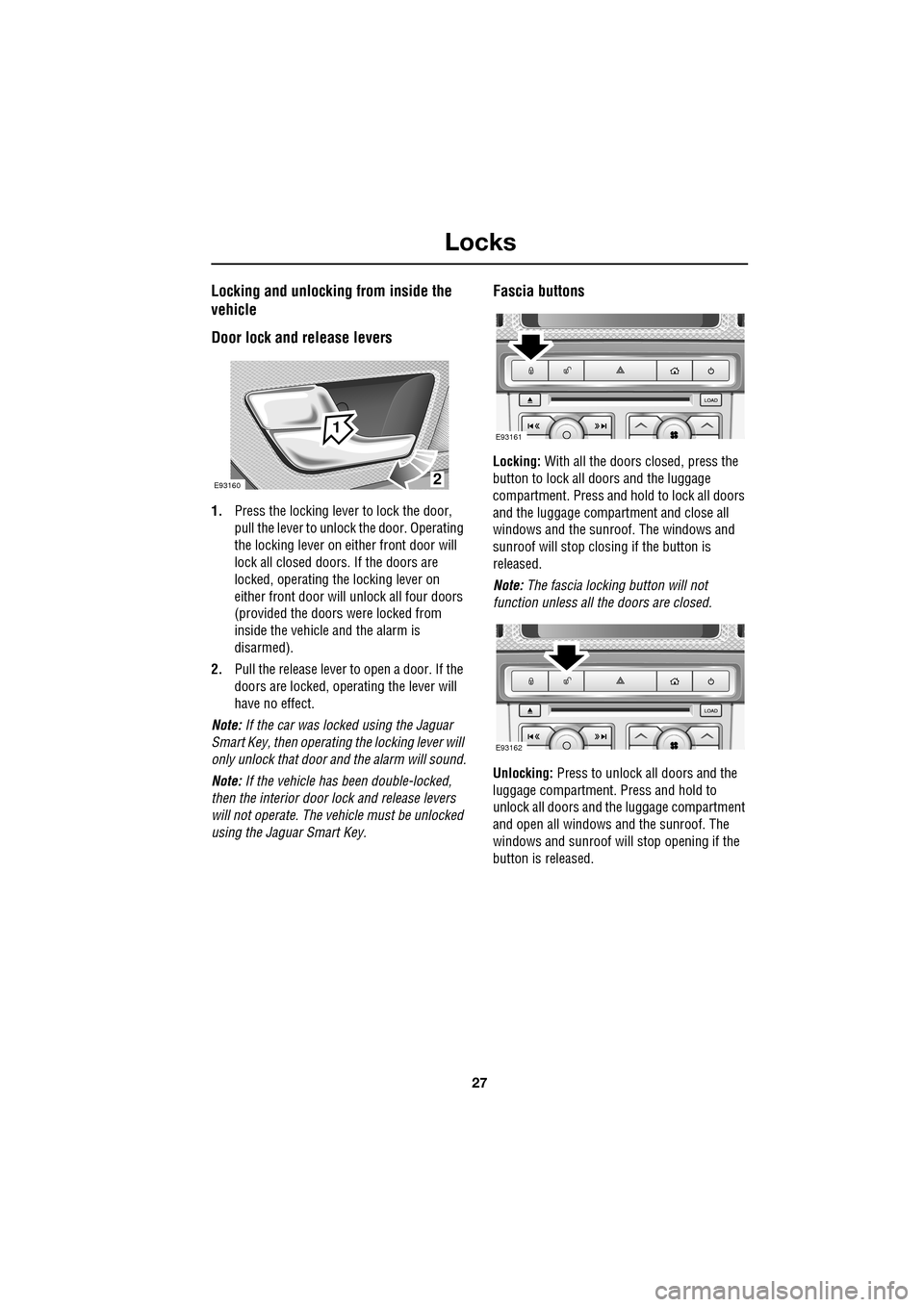
Door lock and release levers
1.Press the locking lever to lock the door,
pull the lever to unlock the door. Operating
the locking lever on ei ther front door will
lock all closed doors. If the doors are
locked, operating the locking lever on
either front door will unlock all four doors
(provided the doors were locked from
inside the vehicle and the alarm is
disarmed).
2. Pull the release lever to open a door. If the
doors are locked, operating the lever will
have no effect.
Note: If the car was locked using the Jaguar
Smart Key, then operating the locking lever will
only unlock that door and the alarm will sound.
Note: If the vehicle has been double-locked,
then the interior door lock and release levers
will not operate. The vehicle must be unlocked
using the Jaguar Smart Key.
Fascia buttons
Locking: With all the doors closed, press the
button to lock all doo rs and the luggage
compartment. Press and hold to lock all doors
and the luggage compartment and close all
windows and the sunroof. The windows and
sunroof will stop closing if the button is
released.
Note: The fascia locking button will not
function unless all the doors are closed.
Unlocking: Press to unlock all doors and the
luggage compartment. Press and hold to
unlock all doors and the luggage compartment
and open all windows and the sunroof. The
windows and sunroof will stop opening if the
button is released.
2
1
E93160
E93161
E93162
Page 29 of 391

29
Locks
To lock: Ensure all the doors are closed, then
turn the key blade towards the front of the
vehicle and release. Thi s will lock all doors but
will not arm the alarm.
To unlock: Turn the key blade towards the rear
of the vehicle and release. If the security
system is disarmed, al l doors and the luggage
compartment will be unloc ked. If the security
system is armed, only the front left-hand door
will unlock. The interior lighting will be turned
on at reduced level for two minutes.
If the vehicle is unloc ked using the emergency
key blade with the security system armed, the
alarm will sound when a door is opened. To
deactivate the alarm, press the unlock button
on the Jaguar Smart Key or press the engine
START/STOP button with the Smart Key inside
the vehicle. If the Jaguar Smart Key is
inoperable, the alarm ca n be deactivated by
docking the Smart Key into the starter control
unit. See DOCKING/UNDOCKING THE JAGUAR
SMART KEY (page 20).
Unlocking the luggage compartment
If Valet mode is selected, or if the vehicle
battery is discharged, it will be necessary to
use the emergency key blade to unlock and
open the luggage compartment.
Note: If the security system is in Valet mode,
the touch-screen can be used to cancel Valet
mode, in which case the luggage compartment
can then be opened in the normal manner.
Note: If the alarm is armed when the
emergency key blade is used to unlock the
luggage compartment, the alarm will sound
when the luggage compartment is opened.
Press the unlock button on the Jaguar Smart
Key to disarm/deactivate the alarm. •
Use the emergency key blade to prise away
the black lock cover.
• Insert the emergency key blade, then turn
the key clockwise to unlock and open the
luggage compartment.
Note: Unlocking the luggage compartment
using the emergency key blade will cancel Valet
mode.
E93157
Page 34 of 391

Locks
34
Keyless locking
The vehicle will not lock automatically.
The vehicle will only lock if all doors, luggage
compartment and bonnet are closed. If a lock
attempt is made with an open aperture, the
vehicle will not lock and two audible error
warnings will sound.
• To single-lock the vehicle, press the button
on the door handle once. The hazard
warning lamps will flash once as
confirmation (in some markets, an audible
warning will sound).
• To double-lock the ve hicle, press the
button twice within three seconds. The
hazard warning lamps will flash twice (with
a long second flash). In some markets, a
double audible warning will sound.
Note: Keyless locking will only activate if the
Jaguar Smart Key is outside the vehicle. If no
Smart Key is present, two audible error
warnings will sound.
Window global closing
Press and hold the button on the door handle
for three seconds, to lock the vehicle, arm the
alarm and also close all open windows and the
sunroof. The windows and sunroof will stop
closing when the button is released.
Convenience mode
When the door is opened using either the
Jaguar Smart Key or keyless entry, the
vehicle's electrical system initiates the
convenience mode. The following systems
become functional:
• Memory.
• Seat and steering column adjustment.
• Interior and exterior lighting.
• Message centre.
• Auxiliary power socket.
WARNING
Never double-lock the vehicle with
people, children or pets inside. In the
event of an emergency they would be
unable to escape and the emergency services
would be unable to release them quickly.
E93154
Page 35 of 391
35
Locks
Steering column lock
Your vehicle is fitted with an electronic steering
column lock. The column unlocks when it
detects a Jaguar Smart Key inside the vehicle.
The steering column automatically locks when
the starter switch is turned off and the driver's
door is opened.
Any malfunction of the steering column lock
will be indicated by the message STEERING
COLUMN LOCKED displaying in the message
centre. If this occurs:
1. Press the starter button to return to the
convenience mode.
2. Try again to unlock the steering column
lock, by turning the steering wheel gently
to the left and right.
3. If the malfunction st ill persists, seek
qualified assistance as soon as possible.
GLOBAL OPENING AND CLOSING
Global opening and closi ng is enabled/disabled
via the touch-screen.See PROGRAMMING THE
REMOTE CONTROL (page 21).
Window global opening
Press and hold the unlock button
on the Jaguar Smart Key for at least
three seconds. The alarm will
disarm, all doors and the luggage
compartment will unlock and all the windows
and sunroof will open.
Note: The windows and sunroof will continue
to open when the unlock button is released.
Press and hold the inte rior unlock button on
the fascia. After three seconds, all the windows
and the sunroof will open.
Note: The windows and sunroof will stop
opening when the unlock button is released.
CAUTION
During vehicle recovery, the Jaguar
Smart Key must remain inside the
vehicle (or be stowed in the starter control unit
in the centre console), so that the steering
column remains unlocked.WARNING
Accidental closing of an electrically
operated window or sunroof on
fingers, hands or any vulnerable part
of the body, can result in serious injury.
Always observe the following precautions:
Ensure that you have a clear view of all open
apertures on the vehicle and that all apertures
are unobstructed before activating global
closing.
Page 36 of 391
Locks
36
Window global closing (not Japan)
Press and hold the lock button on
the Jaguar Smart Key. The alarm
will arm, all doors and the luggage
compartment will lock and, after three
seconds, all open windows and sunroof will
close.
Note: The windows and sunroof will continue
to close when the lock button is released.
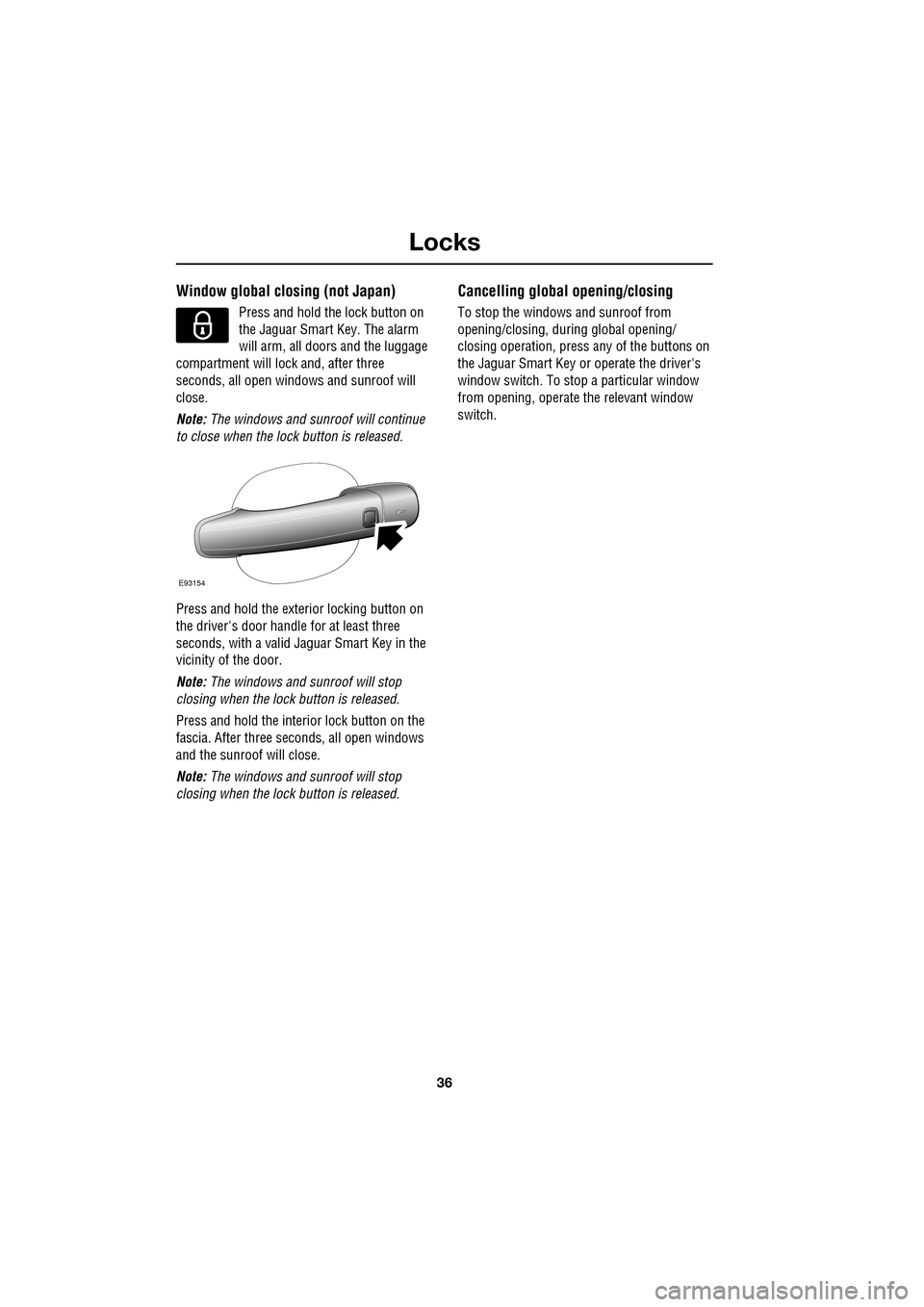
Press and hold the exterior locking button on
the driver's door handle for at least three
seconds, with a valid Jaguar Smart Key in the
vicinity of the door.
Note: The windows and sunroof will stop
closing when the lock button is released.
Press and hold the interior lock button on the
fascia. After th ree seconds, all open windows
and the sunroof will close.
Note: The windows and sunroof will stop
closing when the lock button is released.
Cancelling global opening/closing
To stop the windows and sunroof from
opening/closing, during global opening/
closing operation, press any of the buttons on
the Jaguar Smart Key or operate the driver's
window switch. To stop a particular window
from opening, operate the relevant window
switch.
E93154
Page 37 of 391

37
Alarm
ARMING THE ALARM
The engine is automatically
immobilised when the Jaguar
Smart Key is removed from the
vehicle. The alarm system is armed when the
lock button on the Jaguar Smart Key is pressed
or the button on the ex terior door handle is
pressed with a valid Jaguar Smart Key in close
proximity. The hazard lamps will flash to
indicate that the alarm is armed (in certain
markets, an audible tone will sound). The alarm
can also arm automatically (known as passive
arming), 30 seconds afte r all doors, luggage
compartment and bonnet apertures are closed,
and the Jaguar Smart Key is removed from the
vehicle. Passive arming does not lock the
vehicle.
This feature can be enab led/disabled using the
vehicle touch-screen. See PROGRAMMING
THE REMOTE CONTROL (page 21).
Full alarm
To set full alarm protection, ensure that all the
windows and the sunroof are closed. Then, on
vehicles fitted with doubl e-locking, press the
lock button twice within three seconds. The
hazard warning lights will flash twice to
confirm the alarm state and, in some markets,
an audible tone will sound.
Once fully armed the alarm will sound if:-
• The bonnet, luggage compartment, or a
door are opened.
• If a front door is unlocked using the
emergency key blade or the interior door
lock release levers and then opened.
• Movement is detected within the vehicle
interior.
• A window, front or rear windscreen, or
sunroof glass are broken.
• The vehicle is raised or tilted.
• The vehicle battery is disconnected. •
An attempt is made to disconnect the
alarm siren.
• An attempt is made to start the vehicle,
without a valid Jaguar Smart Key present.
Note: If the alarm is armed and a window or the
sunroof are left open, the alarm may sound due
to movement of air currents.
Note: Some of the above conditions are market
or option dependent a nd therefore may not
apply to your vehicle.
Perimeter alarm
To set perimeter alarm pr otection, briefly press
the lock button once. The hazard warning lights
will flash once to confirm the alarm state.
Once armed the perimeter alarm will sound if:-
• The bonnet, luggage compartment, or a
door are opened.
• If a front door is unlocked using the
emergency key blade or the interior door
lock release levers and then opened.
• The vehicle battery is disconnected.
• An attempt is made to disconnect the
alarm siren.
• An attempt is made to start the vehicle,
without a valid Jaguar Smart Key present.
Note: This setting should be used in
circumstances such as travelling on a ferry,
when pets are to be left in the vehicle, when a
window must be left open etc.
Note: Some of the above conditions are market
or option dependent a nd therefore may not
apply to your vehicle.
Page 40 of 391

Alarm
40
Passive arming
This vehicle is fitted with a passive arming
feature which can, if enabled, automatically
arm the anti-theft system. Passive arming will
automatically arm the perimeter alarm system
30 seconds after the driver's door is closed,
provided all doors, bonnet and luggage
compartment are closed, the ignition is
switched off and there are no valid Jaguar
Smart Keys inside the vehicle.
It will also automatically arm the perimeter
alarm system 30 seconds after the vehicle is
unlocked, if none of the doors or the luggage
compartment are opened.
Passive arming will not lock the vehicle,
although access to the luggage compartment
via the interior or exterior release buttons will
be inhibited and the fuel filler flap will be
locked.
Passive arming can be di sabled/enabled using
the touch-screen. See PROGRAMMING THE
REMOTE CONTROL (page 21).
Automatic relocking and re-arming of the
alarm
Automatic relock and re-a rm is a feature which,
if enabled, automatically relocks the vehicle
and arms the anti-theft system.
If the vehicle is in a locked and armed state and
the remote unlock button is pressed, but none
of the doors or the luggage compartment are
opened within 45 seconds, the vehicle will
automatically relock all the doors and the
luggage compartment a nd will re-arm the
alarm system.
Note: Automatic relocking and arming will only
relock to a centrally lo cked state and will only
arm to a perimeter alarm condition.
Automatic relocking an d re-arming can be
disabled/enabled using the touch-screen.
See PROGRAMMING THE REMOTE CONTROL
(page 21).
Sensor faults
If the security systems detect a fault with one
of the security sensors, two error tones will
sound from the alarm sire n after the vehicle is
unlocked and disarmed. If this condition
occurs, please visit your Dealer/Authorised
Repairer for rectification.