2009 JAGUAR XF 5 tan
[x] Cancel search: 5 tanPage 111 of 391

111
Information displays
Touch-screen care
Do not use any abrasive cleaners to clean your
touch-screen. For approved screen cleaners,
you should contact your Dealer/Authorised
Repairer.
The touch-screen inner bezel must be kept
clean to maintain optimum performance.
Finger marks and attracted dust should be
regularly removed usi ng a soft cloth and a
Jaguar approved cleaning agent.
Where possible, avoid exposing the
touch-screen to dire ct sunlight for long
periods.
PERSONALISED SETTINGS
General Information
The touch-screen provides touch-control of the
vehicle Audio, Climate, Phone, Navigation and
Vehicle systems, as fitted.
Note: When the engine is stopped, the
touch-screen reverts to the stand-by mode. To
activate the touch-screen press the engine
Start/Stop button again.
Home menu display
When initially activated, the touch-screen will
display the main Home menu. The Home menu
may also be displayed at any time by pressing
the Home button on the screen surround.
Screen settings: The touch-screen brightness
and contrast can be set to individual
requirements, including dimming for night
driving. This is accessed via the Vehicle menu.
Select Cont./Bright .
Auto dimming: Select Auto dimming On.
Brightness and contra st are automatically
adjusted by the ambient light level. As the light
level decreases, the t ouch-screen brightness
will decrease, until the fu ll night screen level of
brightness is initiated.
CAUTION
Care must be taken to avoid spilling or
splashing fluids onto the touch-screen.Home
Audio/TV
Climate
Phone
Navigation
Vehicle
Valet12:26 pm
External15C
Left Right
20 17CC.5 .5DAB radio DAB1BBC 5Live Xtra
BBC National DAB
TA FM DAB i Subch.
JAG1517
Vehicle
Off On
Auto
Trip computer
Clock adjust
Cont./Bright.
Syst. settings
Veh. settings Contrast
12:26 pm
dimming
Brightness
JAG1416
Page 113 of 391

113
Information displays
Vehicle system
The following system functions are set using
the touch-screen:
•Trip computer
• Clock adjust
• Brightness and contrast
• System settings
• Vehicle settings
Languages and distance units
The screen text and distance units are available
in various languages and either Imperial or
Metric units.
The required languages a nd units are accessed
by selecting Vehicle from the Home menu,
then selecting:
• Trip computer
• Unit change
• Preferences and then selecting from the
menu.
To change the units: Touch the button
corresponding to the desired unit display
(metric or imperial).
Note: The choice of units displayed is market
dependent. The illustrati on above represents a
typical screen.
Temperature display is selected by touching
either °C or °F.
Note: Celsius or Fahrenheit may be selected
independently of metric or Imperial units. To change the language:
The language
choices are displayed as a list. Scroll up or
down through the list using the up or down
arrows. Touch to select the chosen language.
Note: The navigation sy stem is not affected by
the language change. To change the navigation
system language display, refer to the
navigation system instru ctions later in this
handbook. See Navigation system (page 334).
Vehicle
12 : 26 pm
Display set.
Preferences
Button audio
Miles, MPH, MPG km, km/h, 1/100kmF
C
0
0
Display language English UKVol. presetsChange
E95073
Vehicle
12 : 26 pm
Display set.
Preferences
Button audio
Miles, MPH, MPG km, km/h, 1/100kmF
C
0
0
Display language English UKVol. presetsChange
Vehicle
12 : 26 pm
Dutch
Danish
Finnish
French Norwegian
E95074
Page 114 of 391

Information displays
114
Timeout to home menu
The time period before the touch-screen
display reverts to the Home menu, after the last
user input, can be adjusted to suit personal
preference.
From the Home menu, select Vehicle.
1. Select Syst. settings .
2. Select Display set , then touch the + or -
buttons to increase or decrease the
timeout delay. The time out can be adjusted
from ten seconds to five minutes.
Note: An initial defa ult setting of one minute is
set if no time adjustment is made.
3. To prevent the display from reverting to
the Home menu, select Timeout to home
screen Off .
Vehicle
Trip B
Trip
auto eset
Units Distance
Av. speed
Av. fuel 532 Km
42 Km/h
12.3 L/100km
353 Km
RangeClock adjust
Cont./Bright. Trip computer
Syst. settings Veh. settings
Trip A
12 : 26 pm
E95075
1
Vehicle
Display set.
Pr
But io
Vol. presets
12 : 26 PM
50 seconds
OnOff
Screensaver
Timeout to home
setting
screen
W
E95076
32
Page 116 of 391

Climate control
116
AUTOMATIC CLIMATE CONTROL
Automatic climate control provides efficient
regulation of the vehicle environment, without
constant adjustments from the occupant.
Sensors inside the vehicle monitor
temperature, humidity an d direct sunlight. The
electronic control system automatically adjusts
the heat input, blower speed, air intake and
airflow distribution, to maintain the selected
temperature(s) and re duce misting. The air
conditioning system al so incorporates a
pollen/odour filter, to further increase the
comfort of the vehicle environment.
Automatic operation provides optimum
comfort under most driving conditions. It is recommended that automatic control
(AUTO) is selected as the normal operating
mode.
Automatic control can be overridden at any
time.
Controls
1.
Touch-screen display.
2. Left-hand temperature control.
3. Right-hand temperature control.
4. Blower speed, rotate to change blower
speed. Press to turn the climate control
system on/off.
5. AUTO mode, press to select fully
automatic operation. 6.
Recirculation, press to switch on/off.
7. Heated rear screen, press to switch on/off.
8. Heated front screen, press to switch
on/off.
9. Defrost program, press to switch on/off.
Settings
Temp sync External12CAuto19 21C5 CAuto
A/C5
Climate
12 26 pmAutoOFF
Auto
E95086
1
4
65789
23
Page 120 of 391

Climate control
120
Note: If the air vents are programmed to rotate,
they will rotate into th e fascia when climate
control is turned off.
External temperature
The external temperature is displayed at the top
of the Climate menu.
Smog/pollution filter
The smog filter operates in conjunction with
the air recirculation feature, to reduce
pollutants entering the vehicle.
When pollution is detected by the smog
sensor, air recirculation is selected
automatically, to help prevent pollution
entering the vehicle.
The sensitivity of the smog sensor can be
adjusted for personal preference or the sensor
can be switched off entirely, as follows:
1. Select Settings from the Climate menu.
2. Touch the + or - buttons to increase or
decrease the sensitivity of the smog
sensor.
There are five sensitivit y settings, indicated by
the five bars between the + and - buttons. To
switch the smog filter off, touch the - button
until none of the five bars are illuminated.
This icon appears at the top of the
touch-screen when the smog filter
is on. When the smog sensor is
switched off, this icon will not be displayed.
Air conditioning
on/off. When the air
conditioning is
switched off, Economy
mode is selected automatically. Economy
mode turns off the air conditioning
compressor and redu ces power consumed
by the climate control system. This will
reduce air conditioning performance.
Prolonged use of Econom y mode, may cause
the windows to mist.
Climate control on/off
button.
Aut o
12:26 pm
Aut oClimate
Vent RotationExternal
Sensitivity
Change unitsAlways
open
Auto
15C
JAG1519
Aut o
Page 121 of 391
121
Climate control
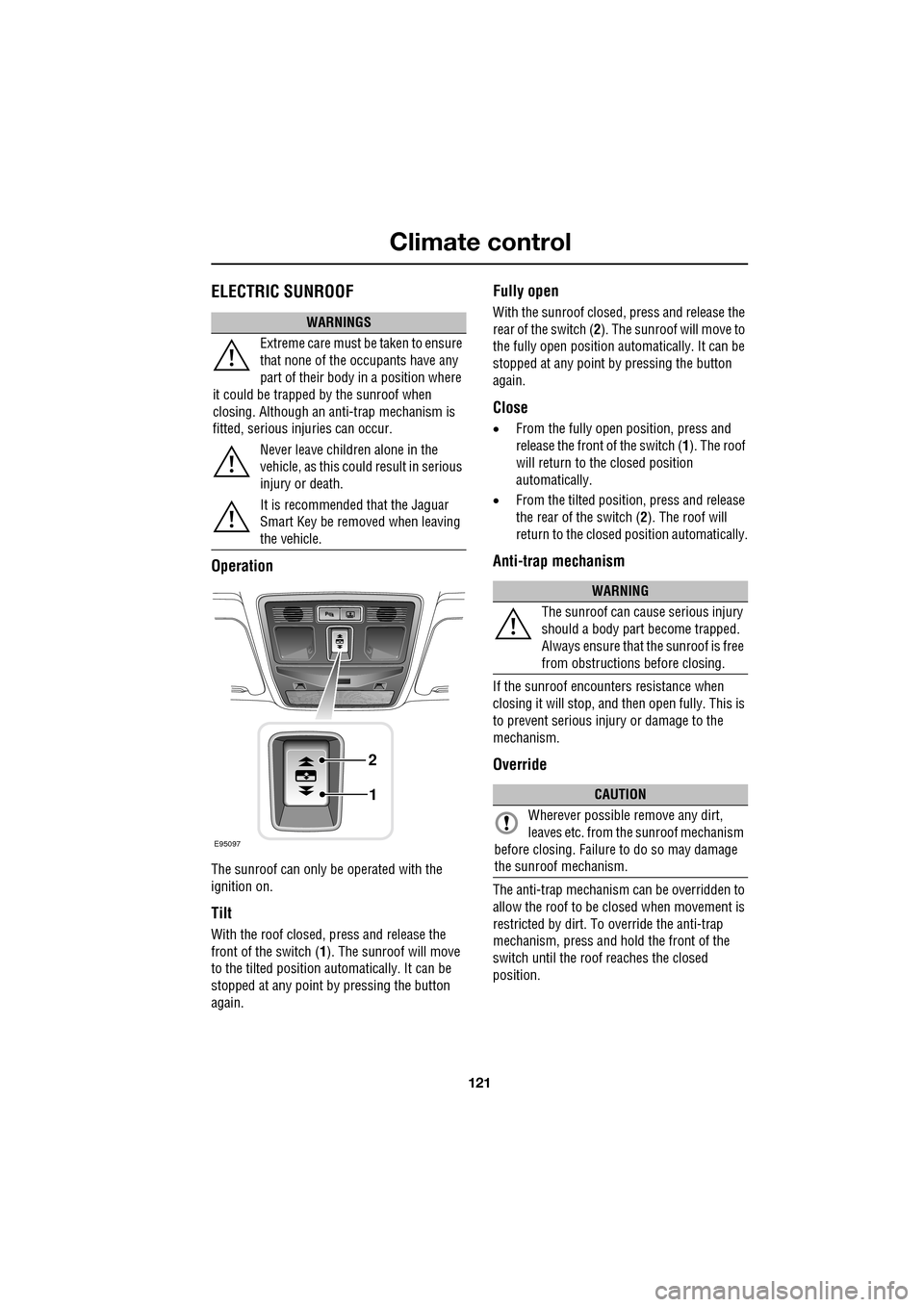
ELECTRIC SUNROOF
Operation
The sunroof can only be operated with the
ignition on.
Tilt
With the roof closed, press and release the
front of the switch (1). The sunroof will move
to the tilted position automatically. It can be
stopped at any point by pressing the button
again.
Fully open
With the sunroof closed, press and release the
rear of the switch ( 2). The sunroof will move to
the fully open position auto matically. It can be
stopped at any point by pressing the button
again.
Close
• From the fully open position, press and
release the front of the switch ( 1). The roof
will return to the closed position
automatically.
• From the tilted position, press and release
the rear of the switch ( 2). The roof will
return to the closed position automatically.
Anti-trap mechanism
If the sunroof encounters resistance when
closing it will stop, and then open fully. This is
to prevent serious injury or damage to the
mechanism.
Override
The anti-trap mechanism can be overridden to
allow the roof to be closed when movement is
restricted by dirt. To override the anti-trap
mechanism, press and hold the front of the
switch until the roof reaches the closed
position.
WARNINGS
Extreme care must be taken to ensure
that none of the oc cupants have any
part of their body in a position where
it could be trapped by the sunroof when
closing. Although an anti-trap mechanism is
fitted, serious injuries can occur.
Never leave children alone in the
vehicle, as this could result in serious
injury or death.
It is recommended that the Jaguar
Smart Key be removed when leaving
the vehicle.
E95097
1
2
WARNING
The sunroof can cause serious injury
should a body part become trapped.
Always ensure that the sunroof is free
from obstructions before closing.
CAUTION
Wherever possible remove any dirt,
leaves etc. from the sunroof mechanism
before closing. Failure to do so may damage
the sunroof mechanism.
Page 124 of 391

Convenience features
124
CLOCK
The clock is set using the touch-screen. Select
Vehicle from the Home menu.
1. From the Vehicl e menu, select Clock
adjust .
2. Touch the up or down arrow icons to
adjust the hours.
3. Touch the up or down arrow icons to
adjust the minutes.
4. Touch to switch between 12 and 24 hour
clock display.
5. Touch to set the new time. The time
display in the bottom left corner of the
screen will now change to reflect any
adjustments made.
Note: Any adjustments made will be lost,
unless Set is selected before exiting the Clock
adjust menu.
Setting the clock as the screensaver
From the Home menu on the touch-screen,
select Vehicle.
From the Vehicle menu, select Syst. settings
(1) .
Select Display set. (2) , then touch the clock
symbol (3). The clock will now appear as the
screensaver.
Note: To select an alternative screensaver from
the four available, click on the appropriate icon.
Vehicle
Clock adjust
Cont./Bright. Tr uter
Syst. settings Veh. settings Set
12:26 pm
JAG1521
Home
Audio/TV
Climate
Phone
Navigation
Vehicle
DAB radio DAB1BBC 5Live XtraBBC National DAB
TA FM DAB i Subch.
Va l e t12:26 pm
External15C
Left Right
20 17CC.5 .5
Vehicle
Trip B
Trip
auto eset
Units Distance
Av. speed
Av. fuel 532 Km
42 Km/h
12.3 L/100km
353 Km
RangeClock adjust
Cont./Bright. Trip computer
Syst. settings Veh. settings
Trip A
12 : 26 pm
E95075
1
Vehicle
Display set.
Pr
But io
Vol. presets
12:26 PM
50 seconds
OnO
Screensaver
Timeout to
setting
home screen
JAG1522
23
Page 128 of 391

Convenience features
128
GARAGE DOOR TRANSCEIVERThe door transceiver is located in the rear-view
mirror. It can be programmed to transmit the
radio frequencies of up to three different
transmitters, which can be used to activate
garage doors, entry ga tes, home lighting,
security systems or other radio frequency
operated devices.
Although this section mainly describes the
procedures for a garage door opener, it also
equally applies to the previously mentioned
applications.
In some countries, this feature is also known
as the HomeLink® Universal Transceiver.
For further information, see Information and
Assistance later in this section.
Before programming
For best results, fit a new battery to the
hand-held transmitter of the garage door
opener (or other device ) before programming.
If your garage door opener receiver (located in
the garage) is equippe d with an antenna,
ensure that the antenna is hanging straight
down.
WARNINGS
Do not use the transceiver with any
garage door opener that lacks the
safety stop and reverse feature as
required by safety standards. Using a garage
door opener without these features increases
risk of serious injury or death.
When programming the transceiver
to a garage door opener or entry gate,
ensure the area is clear. This will
prevent potential harm or damage as the gate
or garage door will activate during the
programme.
CAUTION
This device may suffer from interference
if operated in the vici nity of a mobile or
fixed station transmitter. This interference is
likely to affect the hand-held transmitter as
well as the in-car transceiver.
E95122
CAUTION
When programming a device that may
require you to press and re-press the
hand-held transmitte r (cycle), unplug the
device during the cycling process to prevent
possible motor failure.