2009 JAGUAR XF 5 tan
[x] Cancel search: 5 tanPage 64 of 391

Child safety
64
Tether anchorage points (Australia only)
Note: A tether anchorage is provided for the
centre seat position. Do not use this anchor
position with an ISOFIX child seat.
Attaching tether straps
1. Install the child restrain t securely in one of
the rear seating positions.
2. Pass the tether strap over the seat back
and beneath the head restraint.
3. Attach the tether strap hook to the tether
anchor point on the back of the seat.
Ensure that the tether strap hook is facing
the correct way. See illustration.
4. Tighten the tether strap according to the
manufacturer's instructions.
WARNING
Child restraint anchorages are
designed to withstand only those
loads imposed by correctly fitted
child restraints. Under no circumstances are
they to be used for adult seat belts, harnesses
or for attaching other items or equipment to
the vehicle.
If a child seat or restraint system is to
be fitted to the centre seating
position, the centre armrest must be
in the stowed position (folded into the seat).
E94105
Page 76 of 391
Lighting
76
Daylight running lamps
In certain countries it is a legal requirement for
the lamps to be on during the hours of daylight.
With the rotary collar in the OFF position, low
beam headlamps, side lamps, tail, number
plate lamps and, where fitted, side marker
lamps will switch on automatically with the
following conditions:
• The ignition is on (market dependent).
• The vehicle gear selector out of park.
• The park brake is not applied (is released).
Condensation
In certain circumstances, misting may occur
on the inside of a lamp lens. This is caused by
natural changes in environmental conditions.
This misting is not detrimental to lamp
performance and will clear during normal
usage.
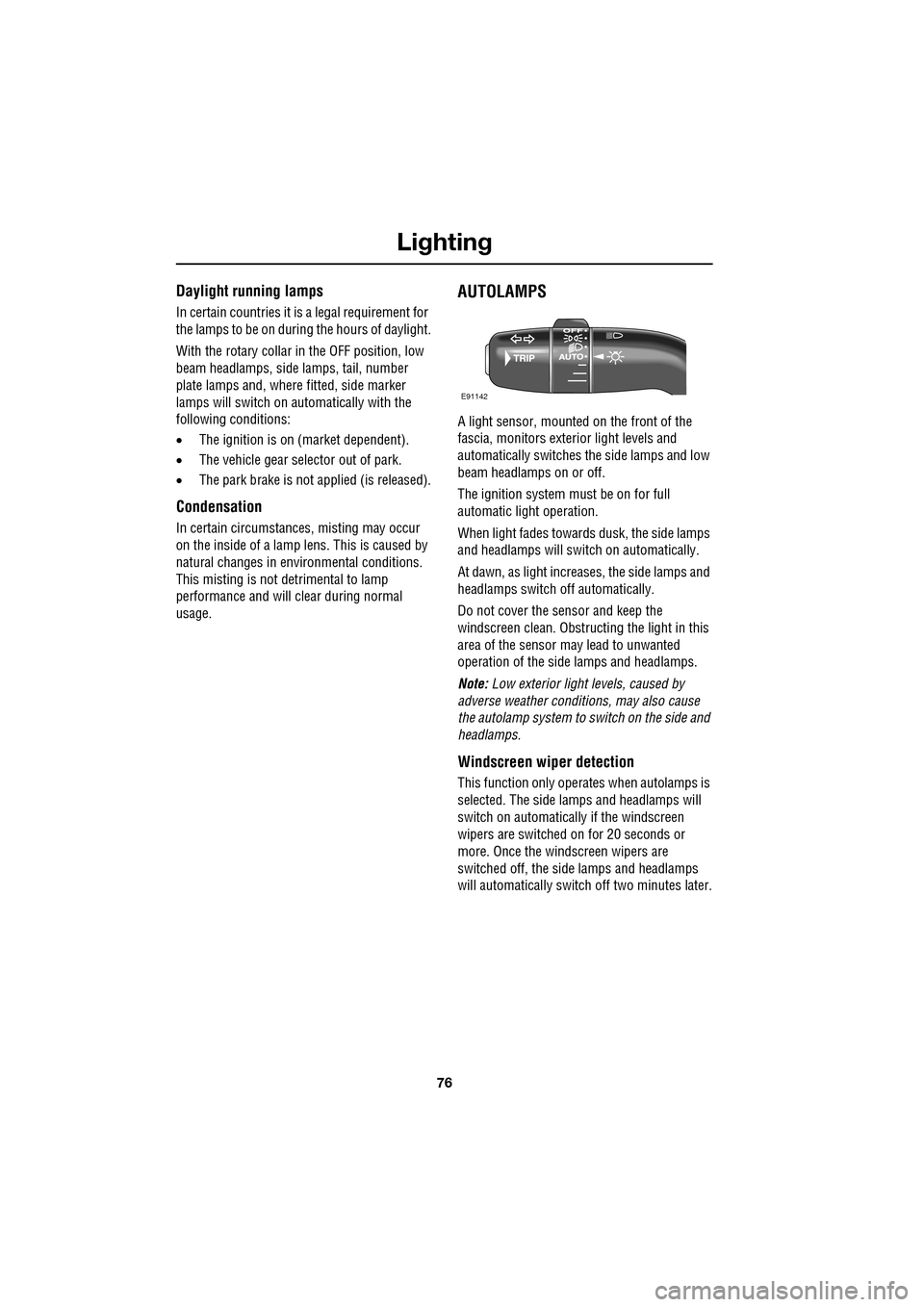
AUTOLAMPS
A light sensor, mounted on the front of the
fascia, monitors exteri or light levels and
automatically switches the side lamps and low
beam headlamps on or off.
The ignition system must be on for full
automatic light operation.
When light fades towards dusk, the side lamps
and headlamps will sw itch on automatically.
At dawn, as light increases, the side lamps and
headlamps switch off automatically.
Do not cover the sensor and keep the
windscreen clean. Obstruct ing the light in this
area of the sensor may lead to unwanted
operation of the side lamps and headlamps.
Note: Low exterior light levels, caused by
adverse weather conditi ons, may also cause
the autolamp system to switch on the side and
headlamps.
Windscreen wiper detection
This function only operat es when autolamps is
selected. The side lamps and headlamps will
switch on automatically if the windscreen
wipers are switched on for 20 seconds or
more. Once the windscreen wipers are
switched off, the side lamps and headlamps
will automatically switch off two minutes later.
E91142
Page 93 of 391

93
Windows and mirrors
ELECTRIC WINDOWS
With the ignition on or engine running, press a
switch down to lower the window, pull it up to
raise the window. Release the switch at any
point to stop window movement.
The windows will operate for five minutes after
the engine is switched off, as long as none of
the doors are opened.
One-shot operation
All four windows have one-shot operation.
Briefly pull the switch up and release, the
window will continue to raise until fully closed.
Briefly press the switch down and release, the
window will continue to lower until fully open.
Pressing or pulling the switch again will stop
the window.
Overriding anti-trap protection
Anti-trap protection will stop window
movement if an obstruction or resistance is
detected. Check the window and its aperture
and remove any obstructions, ice, etc. If it is
still necessary to raise the window, the override
procedure is as follows:-
1. Attempt to close the window. Anti-trap will
prevent closure and lower the window.
2. Within ten seconds, attempt to raise the
window again. Anti-t rap will prevent
closure and lower the window.
3. Attempt to close the window for a third
time, this time holding the switch in the
close position. The window will raise
whilst the switch is held. Hold until closed.
Note: If this procedure fails to remove the
blockage, the window operation may need to
be reset.
Window reset
The windows will need to be reset if the battery
is disconnected, becomes discharged or power
supply is interrupted.
Reset as follows:-
1. Close the window fully.
2. Release the switch, then lift it to the close
position and hold for two seconds.
3. Open the window fully.
4. Release the switch, then push it to the
open position and hold for two seconds.
5. Lift and release the switch to operate the
one-shot function.
6. Repeat the procedure on each window.
WARNING
All of the windows have an anti-trap
protection system. However, before
closing a window care must be taken
to ensure that none of the occupants have any
part of their body in a position where it could
be trapped. Even with an anti-trap system
serious injury or death can occur.
E94755
Page 95 of 391
95
Windows and mirrors
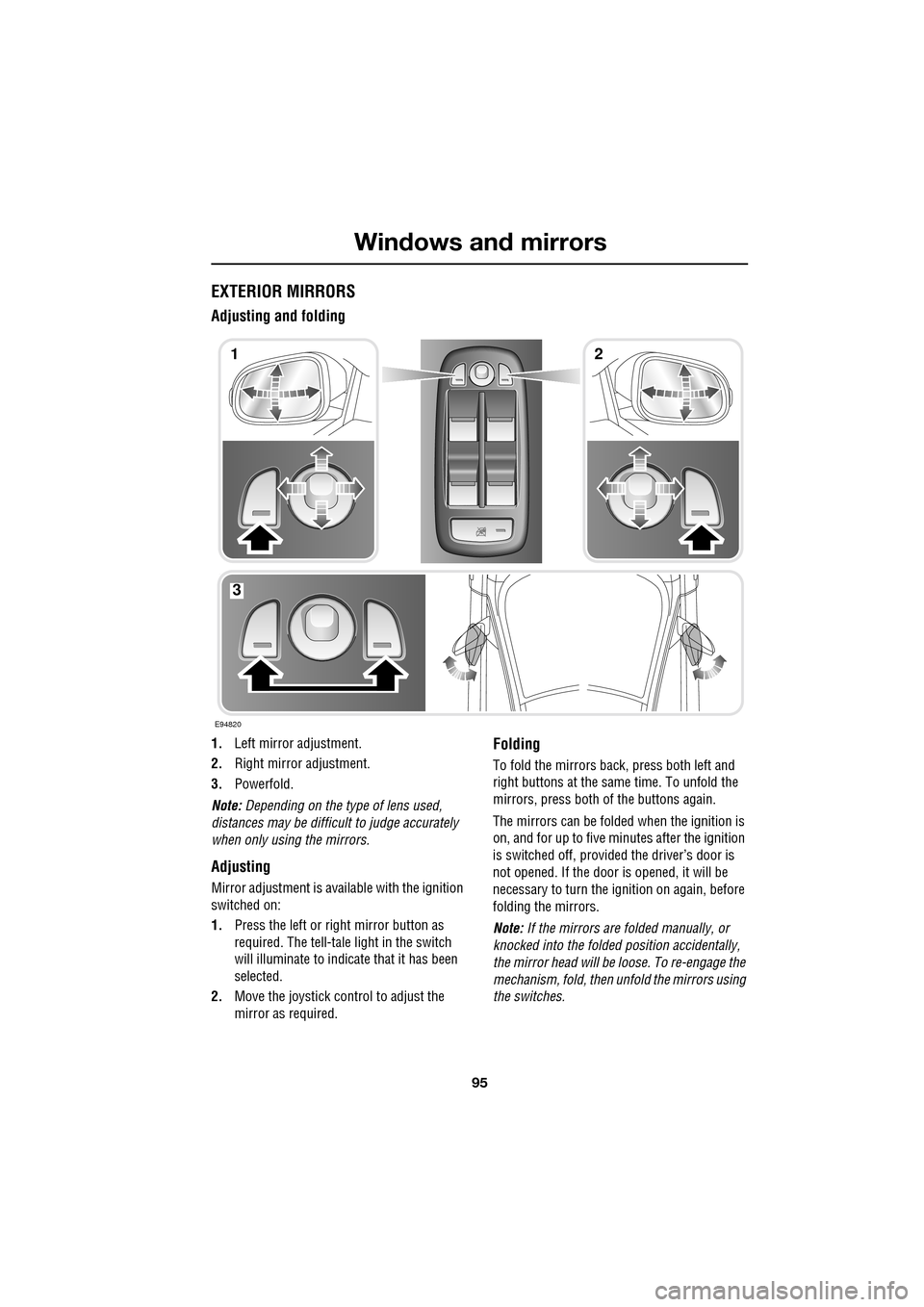
EXTERIOR MIRRORS
Adjusting and folding
1.Left mirror adjustment.
2. Right mirror adjustment.
3. Powerfold.
Note: Depending on the type of lens used,
distances may be difficult to judge accurately
when only using the mirrors.
Adjusting
Mirror adjustment is avai lable with the ignition
switched on:
1. Press the left or right mirror button as
required. The tell-tale light in the switch
will illuminate to indica te that it has been
selected.
2. Move the joystick control to adjust the
mirror as required.
Folding
To fold the mirrors back, press both left and
right buttons at the sa me time. To unfold the
mirrors, press both of the buttons again.
The mirrors can be folded when the ignition is
on, and for up to five minutes after the ignition
is switched off, provid ed the driver’s door is
not opened. If the door is opened, it will be
necessary to turn the ignition on again, before
folding the mirrors.
Note: If the mirrors are folded manually, or
knocked into the folded position accidentally,
the mirror head will be loose. To re-engage the
mechanism, fold, then unfold the mirrors using
the switches.
E94820
12
3
Page 97 of 391

97
Windows and mirrors
BLIND SPOT MONITOR
The Blind Spot Monitor (BSM) system
monitors a zone that covers the area adjacent
to the vehicle, that is not easily visible by the
driver and is designed to identify any object
overtaking the vehicle. Th e system uses a radar
on each side of the vehicle to identify any
overtaking vehicl e/object within the blind spot
area of the vehicle, while disregarding other
objects which may be stati onary or travelling in
the opposite direction, etc.
The radar monitors the ar ea extending from the
exterior mirror rearwards, to approximately 7
metres (23 feet) behind the rear wheels, and up
to 2.5 metres (8.2 feet) from the side of the
vehicle (the wi dth of a typical carriageway
lane).
Note: This radar sensor is approved in all RTTE
countries.
Note: The system covers an area of a fixed lane
width. If the lanes are narrower than a typical
carriageway lane, objects travelling in
non-adjacent lanes may be detected.
BSM automatically switches on and becomes
active when the vehicle is travelling at greater
than 16 km/h (10 mph) in a forward drive gear.
When the system initiates, it performs a
self-check, during which the warning icons in
the mirrors illuminate alternately for a short
period of time.
WARNINGS
The Blind Spot Monitor (BSM)
system is a supplement to, not a
replacement for, a safe driving style
and use of the exterior and rear-view mirrors.
It remains the driver's re sponsibility to detect
other vehicles, and their relative distance and
speed, when deciding whet her or not it is safe
to change lanes.
Please note that BSM may not be able
to give adequate wa rning of vehicles
approaching very quickly from behind
or vehicles that are be ing overtaken rapidly.
The radar sensors may be impaired
by rain, snow or road spray. This may
affect the sy stem's ability to reliably
detect a vehicle/object wi thin the blind spot. In
such conditions, take extra care when
changing lanes.
BSM may not be able to detect all
vehicles and may also detect objects,
such as roadside barriers, etc.
CAUTIONS
Ensure that the warning indicators in the
exterior mirrors are not obscured by
stickers or other objects.
Do not attach stickers or objects to the
rear bumpers, that may interfere with
the radar sensors.
E96410
Page 98 of 391

Windows and mirrors
98
BSM is designed to work most effectively when
driving on multi-lane highways.
If an object is identified by the system as being
an overtaking vehicle/object, an amber
warning icon ( 1) illuminates in the relevant
exterior mirror, to alert the driver that there is a
potential hazard in the vehicle's blind spot and
therefore, that a lane change might be
dangerous.
Note: If an overtaking vehicle is detected on
both sides of the vehicle simultaneously, the
warning icons in both mirrors will illuminate.
Note: BSM is automatically turned off when
reverse ( R) gear is selected, when the vehicle is
in park ( P), the vehicle is travelling below
16 km/h (10 mph) and also when the electrical
connector for the trailer socket is plugged in on
vehicles with a factory-fitted towing bracket.
When in these conditions, an amber warning
indicator within the exterior mirror is
displayed.Sensor blockage
The BSM system will automatically disable if
either of the sensors become completely
obscured, an amber wa rning indicator dot (2)
is displayed in the exterior mirror and the
message BSM sensor blocked appears in the
message centre.
Note: Blockage testing is only initiated when
vehicle speed is above 32 km/h (20 mph) and
will take at least two minutes of accumulated
time travelling above th is speed, to determine
that the sensor is blocked.
If the sensors become blocked, then please
check that there is nothing obscuring the rear
bumper and that it is cl ear from ice, frost and
dirt.
System fault
If a fault with one of the radar sensors is
detected, an amber warn ing indicator dot is
displayed in the exterior mirror and the
message BSM not available is displayed in the
message centre.
Note: Even if the detected fault only affects the
radar sensor on one side of the vehicle, the
whole system is disabled. If the fault is
temporary, the system will operate correctly
once the engine has been switched off and then
on again.
If a fault in the system occurs, consult your
Dealer/Authorised Repairer.
E96411
12
Page 99 of 391

99
Instruments
INSTRUMENT PANEL OVERVIEW
Instrument panel
1.Speedometer.
2. Message centre.
3. Tachometer.
4. Fuel gauge.
The instruments will not show correct
information until the i gnition system is on.
Speedometer
Indicates road speed.
Message centre
Displays warning and information messages
and gear selector mode and position
information. See WARNING AND
INFORMATION MESSAGES (page 106).
See AUTOMATIC TRANSMISSION (page 137).
Tachometer
Indicates engine speed in revolutions per
minute (RPM) x 1000.
Fuel gauge
The message centre will display FUEL LEVEL
LOW , when the fuel level is approximately 1/16
of tank capacity. This gives an approximate
range of 50 to 65 km (30 to 40 miles).
As a reminder for the location of the fuel filler,
there is an arrow above the fuel pump symbol,
which points to the releva nt side of the vehicle.
Akm
l/100km
JAG1630
123
4
CAUTION
Never allow the vehicle to run out of fuel.
The resulting misfire may cause serious
damage to the catalytic convertor.
Page 100 of 391

Instruments
100
WARNING LAMPS AND INDICATORS
1.Anti-lock Braking System (ABS)/
Electronic Parking Brake (EPB).
2. Adaptive Cruise Control (ACC).
3. Glow plugs (diesel only).
4. Adaptive front lighting system (AFL).
5. Engine malfunction.
6. Tyre Pressure M onitoring System
(TPMS).
7. Airbag.
8. Right-hand direct ion indicator.
9. Rear fog lamp.
10. Dynamic Stability Control (DSC).
11. High beam.
12. Side lamps.
13. Seat belt.
14. Message centre.
15. Automatic Speed Limiter (ASL).
16. Forward alert.
17. Brakes - Electric Parking Brake (EPB)
On/Brake fluid low/El ectronic Brakeforce
Distribution (EBD)
18. Left-hand direction indicator. RED
warning indicators are for primary
warnings. A primary warning must be
investigated immediately by the driver or seek
qualified assistance as soon as possible.
AMBER warning indicators are for secondary
warnings, to indicate that a vehicle system is in
operation or that the driver must take action
and then seek qualified assistance.
Other indicators within the instrument panel
indicate system status (e .g. blue for main beam
or green for direction indicators, when in use).
Indicator check
An indicator bulb check is initiated when the
ignition system is switched on and lasts for
three seconds (excepting the airbag warning
indicator which will remain on for six seconds).
If any warning indicator remains on after this
period, investigate the cause before driving.
Some warning indicators have associated
messages displayed on the message centre.
Note: Not all warning indicators are included in
the check (e.g. main beam headlamps and
direction indicators).
Akm
l/100km
JAG1631
123456
789101817161514131211