2009 Hyundai Santa Fe light
[x] Cancel search: lightPage 122 of 269
1
FEATURES OF YOUR HYUNDAI
111
OCM052109L
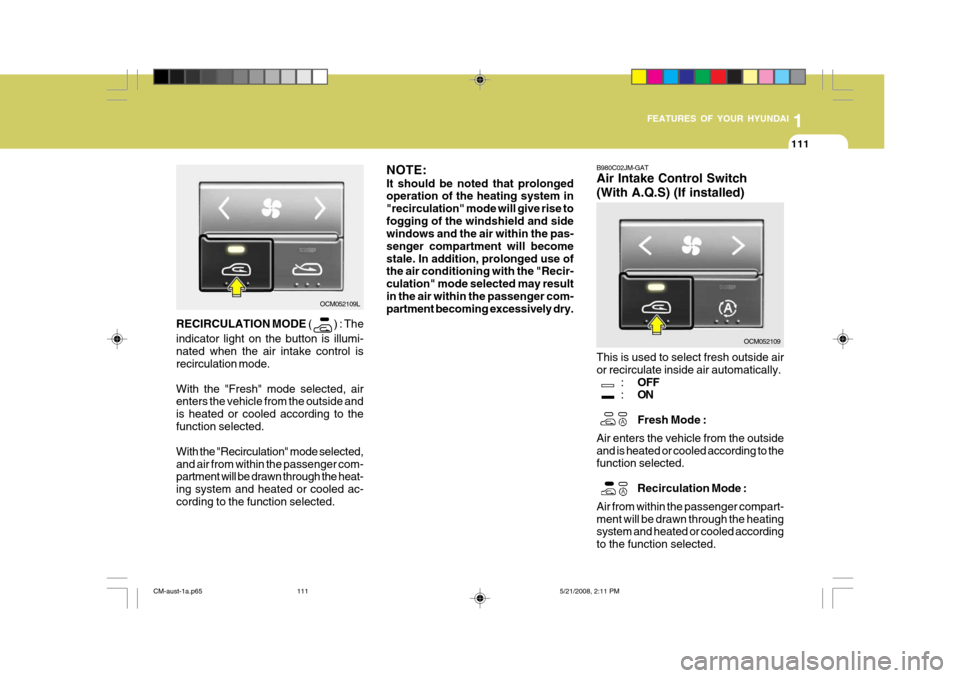
RECIRCULATION MODE (
) : The
indicator light on the button is illumi- nated when the air intake control is recirculation mode. With the "Fresh" mode selected, air enters the vehicle from the outside and is heated or cooled according to thefunction selected. With the "Recirculation" mode selected, and air from within the passenger com- partment will be drawn through the heat- ing system and heated or cooled ac-cording to the function selected. NOTE: It should be noted that prolonged operation of the heating system in "recirculation" mode will give rise tofogging of the windshield and side windows and the air within the pas- senger compartment will becomestale. In addition, prolonged use of the air conditioning with the "Recir- culation" mode selected may resultin the air within the passenger com- partment becoming excessively dry.
B980C02JM-GAT Air Intake Control Switch (With A.Q.S) (If installed) This is used to select fresh outside air or recirculate inside air automatically.
:OFF
: ON Fresh Mode :
Air enters the vehicle from the outside and is heated or cooled according to the function selected.
Recirculation Mode :
Air from within the passenger compart- ment will be drawn through the heating system and heated or cooled according to the function selected.
OCM052109
CM-aust-1a.p65 5/21/2008, 2:11 PM
111
Page 124 of 269
1
FEATURES OF YOUR HYUNDAI
113
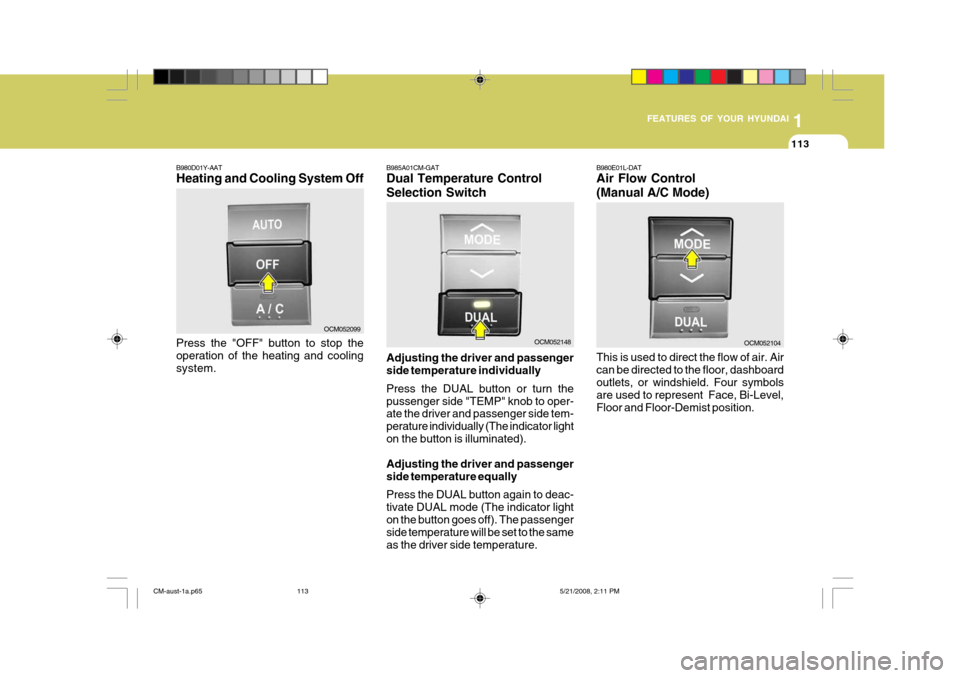
B980D01Y-AAT Heating and Cooling System Off B980E01L-DATAir Flow Control (Manual A/C Mode) This is used to direct the flow of air. Air can be directed to the floor, dashboardoutlets, or windshield. Four symbols are used to represent Face, Bi-Level, Floor and Floor-Demist position.
Press the "OFF" button to stop theoperation of the heating and coolingsystem.
OCM052099
OCM052104
B985A01CM-GAT Dual Temperature Control Selection Switch Adjusting the driver and passenger side temperature individually Press the DUAL button or turn the pussenger side "TEMP" knob to oper- ate the driver and passenger side tem- perature individually (The indicator lighton the button is illuminated). Adjusting the driver and passenger side temperature equally Press the DUAL button again to deac- tivate DUAL mode (The indicator light on the button goes off). The passenger side temperature will be set to the sameas the driver side temperature. OCM052148
CM-aust-1a.p65
5/21/2008, 2:11 PM
113
Page 125 of 269
1FEATURES OF YOUR HYUNDAI
114
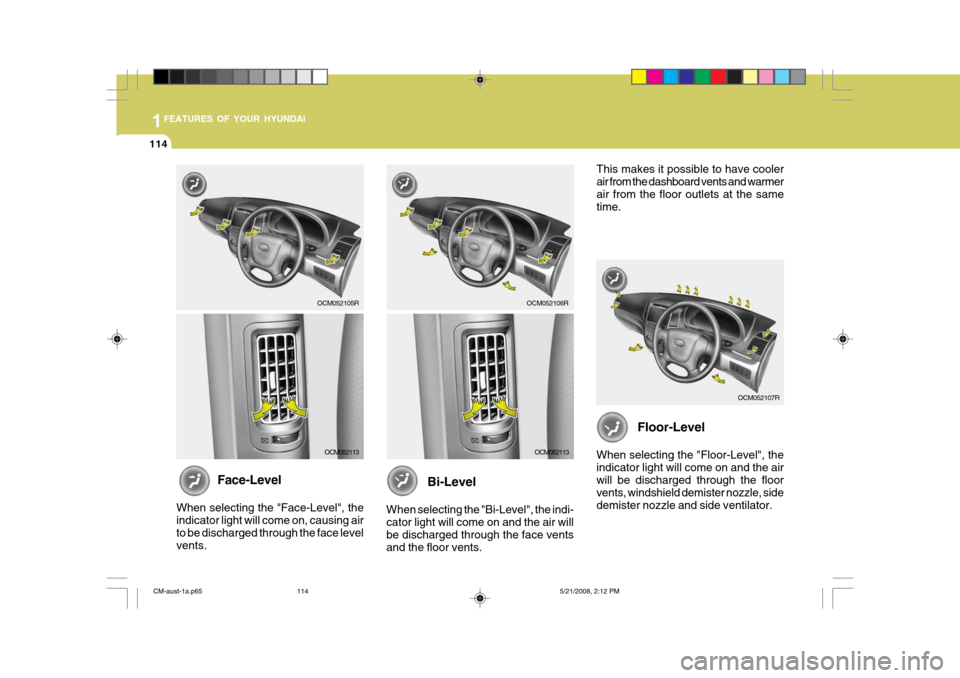
Floor-Level
When selecting the "Floor-Level", the indicator light will come on and the airwill be discharged through the floor vents, windshield demister nozzle, side demister nozzle and side ventilator.
OCM052107R
Bi-Level
When selecting the "Bi-Level", the indi- cator light will come on and the air will be discharged through the face vents and the floor vents.
Face-Level
When selecting the "Face-Level", theindicator light will come on, causing airto be discharged through the face level vents.
OCM052106ROCM052105R
OCM052113OCM052113 This makes it possible to have cooler air from the dashboard vents and warmerair from the floor outlets at the same time.
CM-aust-1a.p65
5/21/2008, 2:12 PM
114
Page 126 of 269
1
FEATURES OF YOUR HYUNDAI
115
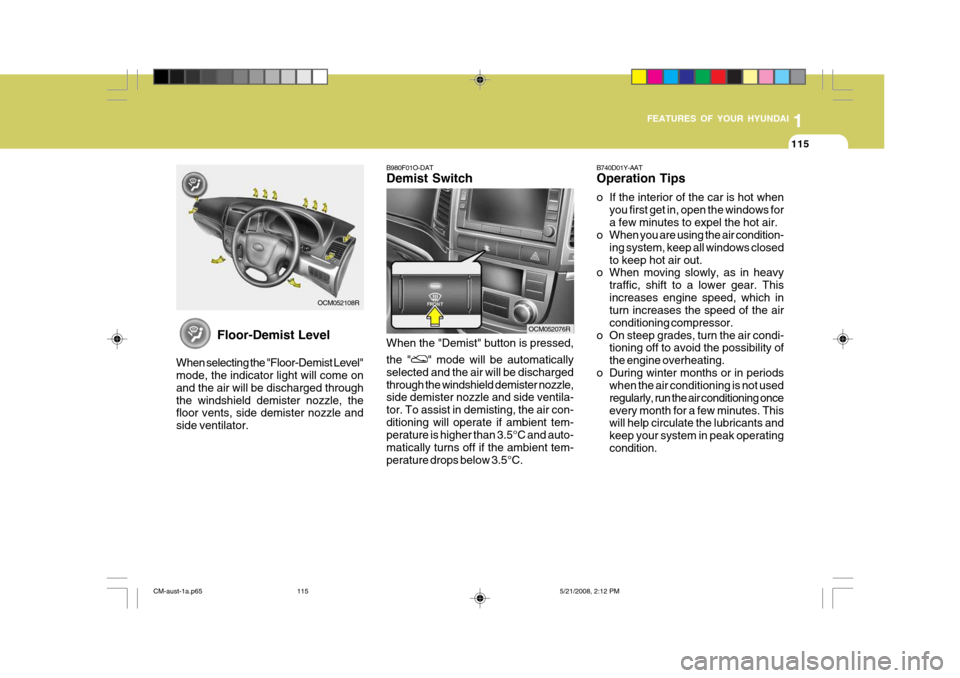
B980F01O-DAT Demist Switch When the "Demist" button is pressed, the "
" mode will be automatically
selected and the air will be discharged through the windshield demister nozzle, side demister nozzle and side ventila- tor. To assist in demisting, the air con-ditioning will operate if ambient tem- perature is higher than 3.5°C and auto- matically turns off if the ambient tem-perature drops below 3.5°C.
Floor-Demist Level
When selecting the "Floor-Demist Level" mode, the indicator light will come on and the air will be discharged throughthe windshield demister nozzle, the floor vents, side demister nozzle and side ventilator.
OCM052108R
OCM052076R B740D01Y-AAT Operation Tips
o If the interior of the car is hot when
you first get in, open the windows for a few minutes to expel the hot air.
o When you are using the air condition-
ing system, keep all windows closedto keep hot air out.
o When moving slowly, as in heavy
traffic, shift to a lower gear. Thisincreases engine speed, which in turn increases the speed of the air conditioning compressor.
o On steep grades, turn the air condi- tioning off to avoid the possibility ofthe engine overheating.
o During winter months or in periods when the air conditioning is not usedregularly, run the air conditioning onceevery month for a few minutes. This will help circulate the lubricants and keep your system in peak operatingcondition.
CM-aust-1a.p65 5/21/2008, 2:12 PM
115
Page 127 of 269
1FEATURES OF YOUR HYUNDAI
116REAR AIR CONDITIONING SYSTEM
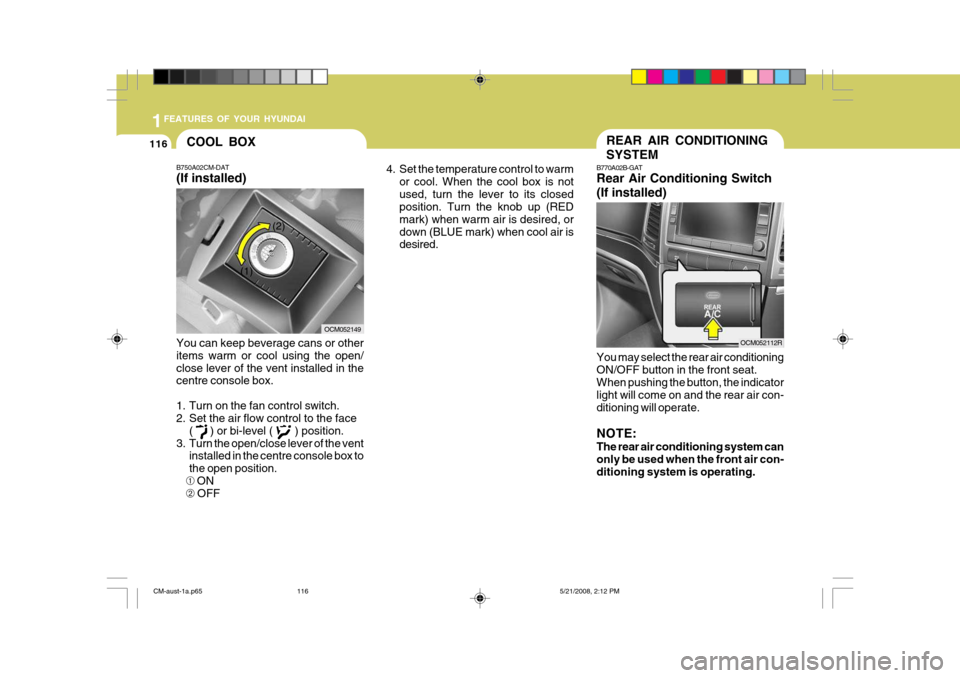
B770A02B-GAT Rear Air Conditioning Switch (If installed)
OCM052112R
You may select the rear air conditioning ON/OFF button in the front seat.When pushing the button, the indicator light will come on and the rear air con- ditioning will operate. NOTE: The rear air conditioning system can only be used when the front air con-ditioning system is operating.
4. Set the temperature control to warm
or cool. When the cool box is notused, turn the lever to its closed position. Turn the knob up (RED mark) when warm air is desired, ordown (BLUE mark) when cool air is desired.
B750A02CM-DAT (If installed) You can keep beverage cans or other items warm or cool using the open/close lever of the vent installed in the centre console box.
1. Turn on the fan control switch.
2. Set the air flow control to the face
(
) or bi-level ( ) position.
3. Turn the open/close lever of the vent installed in the centre console box to the open position.
➀ ON
➁ OFF
COOL BOX
(1)(2)
OCM052149
CM-aust-1a.p65
5/21/2008, 2:12 PM
116
Page 138 of 269
1
FEATURES OF YOUR HYUNDAI
127
1
FEATURES OF YOUR HYUNDAI
127
1
FEATURES OF YOUR HYUNDAI
127
1
FEATURES OF YOUR HYUNDAI
127
1
FEATURES OF YOUR HYUNDAI
127
7. CD or CD/AUX Selection But- ton
CD Selection Button If the CD is loaded, turns to CD mode. If no CD, it displays "NO Disc" for 3seconds and returns to th previous mode. CD/AUX Selection Button If the auxiliary device is connected, it switches to the AUX mode from theother mode to play the sound from the auxiliary player. If the CD is loaded, turns to CD mode, and if a device isconnected to AUX then it toggles. CD ➟AUX ➟CD... when the button is
pressed each time.(It will not turn to AUX if the auxiliary device is not con- nected) If no CD and auxiliary device is not connected, it displays "NO Media"for 3 seconds and returns to the previ- ous mode. 8. CD Indicator(CDP Only) When car ignition switch is ACC or ON and if the CD is loaded, this indicator is lighted. If the CD is ejected the light is turned off. 9. Folder Moving Button
o Moves [FOLDER
] button child
folder of the current folder and dis- plays the first song in the folder.Press TUNE/ ENTER knob to move to the folder displayed. It will play the first song in the folder.
o Moves [CAT
], [PTY ],
[FOLDER
] button parent folder
and displays the first song in the folder. Press TUNE/ENTER knob to move to the folder displayed.
10. Search/ENTER Button Turn this button clockwise to display the songs next to the currently played song. Turn the button counterclock-wise to display the songs before the currently played song. Press the button to skip and play the selected song. 11. SCAN Play Button Plays first 10 seconds of each song in the DISC. To cancel the mode, pressthe button once again. 12. AUX or DISC Selection But-
ton
AUX selection button If the auxiliary device is connected, it turns to AUX mode from the other modeto play the sound from the auxiliary player. If no auxiliary device is con- nected, it displays "NO Media" for 3seconds and returns to the previous mode. DISC selection button
o [DISC
] Change Button Changes
disc to the previous disc.
o [DISC
] Change Button Changes
disc to the next disc.
13. CD LOAD Button Push [LOAD] button to load CDs to available CDC deck (from 1~6). Push [LOAD] button for more than 2 seconds to load into all available decks.The last CD will play. 10 seconds idle status will disable loading process.
CM-aust-1b.p65 5/19/2008, 6:33 PM
127
Page 148 of 269
2
DRIVING YOUR HYUNDAI
3
!
BEFORE STARTING THE ENGINE
C020A01CM-DAT Before you start the engine, you should always:
1. Look around the vehicle to be sure
there are no flat tyres, puddles of oil, water or other indications of possible trouble.
2. After entering the car, check to be sure the hand brake is engaged.
3. Check that all windows, and lights are clean.
4. Check that the interior and exterior
mirrors are clean and in position.
5. Check your seat, seatback and head- rest to be sure they are in their properpositions.
6. Lock all the doors.
7. Fasten your seat belt and be sure
that all other occupants have fas- tened theirs.
8. Turn off all lights and accessories
that are not needed.
9. When you turn the ignition switch to "ON", check that all appropriate warn-ing lights are operating and that youhave sufficient fuel.
10. Check the operation of warning lights
and all bulbs when key is in the "ON"position.
C020A01HP-DAT
o In a collision crash, an unbelted
person is significantly more likelyto die than a person wearing aseatbelt.
RISK OF ROLLOVER
WARNING:
o Utility vehicle has a significantly higher collision rate than othertype of vehicles.
o Utility vehicle have higher ground clearance and a narrower trackto make them capable of perform-ing in a wide variety of off-road applications. Specific design characteristics give them a highercentre of gravity than ordinary cars. An advantage of the higher ground clearance is a better viewof the road allowing you to antici- pate problem. They are not de- signed for cornering at the samespeeds as conventional 2-wheel drive vehicles any more than low- slung sports cars are designed toperform satisfactorily under off- road conditions. If at all possible, avoid sharp turns or abrupt ma-neuvers. As with other vehicles of this type, failure to operate this vehicle correctly may result inloss of control or vehicle rollover.
CM-aust-2.p65 5/19/2008, 6:34 PM
3
Page 151 of 269
2DRIVING YOUR HYUNDAI
6
!
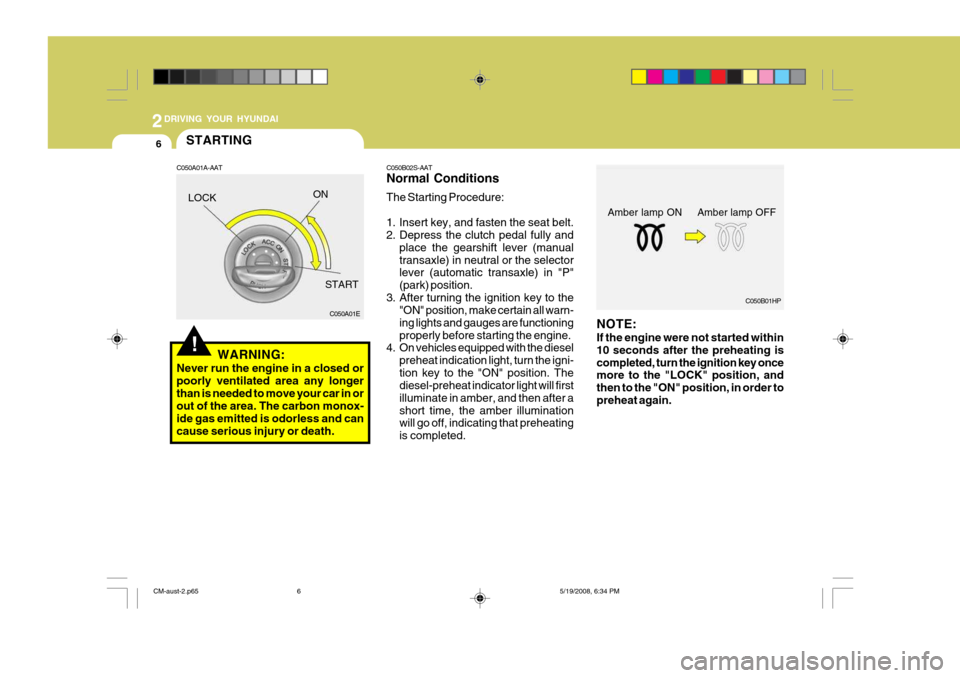
C050B02S-AAT Normal Conditions The Starting Procedure:
1. Insert key, and fasten the seat belt.
2. Depress the clutch pedal fully and
place the gearshift lever (manual transaxle) in neutral or the selector lever (automatic transaxle) in "P" (park) position.
3. After turning the ignition key to the "ON" position, make certain all warn-ing lights and gauges are functioningproperly before starting the engine.
4. On vehicles equipped with the diesel
preheat indication light, turn the igni-tion key to the "ON" position. The diesel-preheat indicator light will first illuminate in amber, and then after ashort time, the amber illumination will go off, indicating that preheating is completed.
STARTING
C050A01A-AAT
WARNING:
Never run the engine in a closed or poorly ventilated area any longerthan is needed to move your car in or out of the area. The carbon monox- ide gas emitted is odorless and cancause serious injury or death. C050A01E
LOCK
ON
START
C050B01HP
Amber lamp ON Amber lamp OFF
NOTE: If the engine were not started within 10 seconds after the preheating iscompleted, turn the ignition key once more to the "LOCK" position, and then to the "ON" position, in order topreheat again.
CM-aust-2.p65 5/19/2008, 6:34 PM
6