Page 332 of 534

When parking on a flat surface, place the shift lever in the
PARK position first, and then apply the parking brake.
When parking on a hill, it is important to set the parking
brake before placing the shift lever in PARK, otherwise
the load on the transaxle locking mechanism may make it
difficult to move the shift lever out of PARK. As an added
precaution, turn the front wheels toward the curb on a
downhill grade, and away from the curb on an uphill
grade.
WARNING!
•Never use the PARK position on an automatic
transaxle as a substitute for the parking brake.
Always apply the parking brake fully when
parked to guard against vehicle movement and
possible injury or damage.
(Continued)
WARNING! (Continued)
•Unintended movement of a vehicle could injure
those in and near the vehicle. As with all vehicles,
you should never exit a vehicle while the engine is
running. Before exiting a vehicle, you should
always move the shift lever into PARK, remove the
key from the ignition, and apply the parking
brake. Once the key is removed from the ignition,
the shift lever is locked in the PARK position,
securing the vehicle against unwanted movement.
Furthermore, you should never leave unattended
children or pets inside a vehicle.
The following indicators should be used to ensure that
you have placed the shift lever into the PARK position:
•When moving the shift lever into PARK, depress the
button on the shift lever and firmly move the lever all
the way forward until it stops.
330 STARTING AND OPERATING
ProCarManuals.com
Page 333 of 534

•Look at the shift indicator window on the console to
ensure the shift lever is in the PARK position.
•When engaged in PARK, you will not be able to move
the shift lever rearward without depressing the shift
lever button.
CAUTION!
Before moving the shift lever out of PARK, you must
turn the ignition from LOCK/OFF to ON so the
steering wheel and shift lever are released. Other-
wise, damage to the steering column or shift lever
could result.
REVERSE
Use REVERSE for moving the vehicle rearward. Shift into
REVERSE only after the vehicle has come to a complete
stop.
NEUTRAL
Place the shift lever into this gear only after the vehicle
has come to a complete stop. The engine may be started
in this range.
WARNING!
Do not coast in NEUTRAL and never turn off the
ignition to coast down a hill. These are unsafe
practices that limit your response to changing traffic
or road conditions. You might lose control of the
vehicle and have an accident.
DRIVE — Six-Speed Transaxle
This range should be used for most city and highway
driving. It provides the smoothest upshifts, downshifts,
and best fuel economy. However, use the Electronic
Range Select (ERS) mode by moving the lever—/+and
select the “5” range when frequent transaxle shifting
occurs while using the DRIVE range, such as when
STARTING AND OPERATING 331
5
ProCarManuals.com
Page 335 of 534
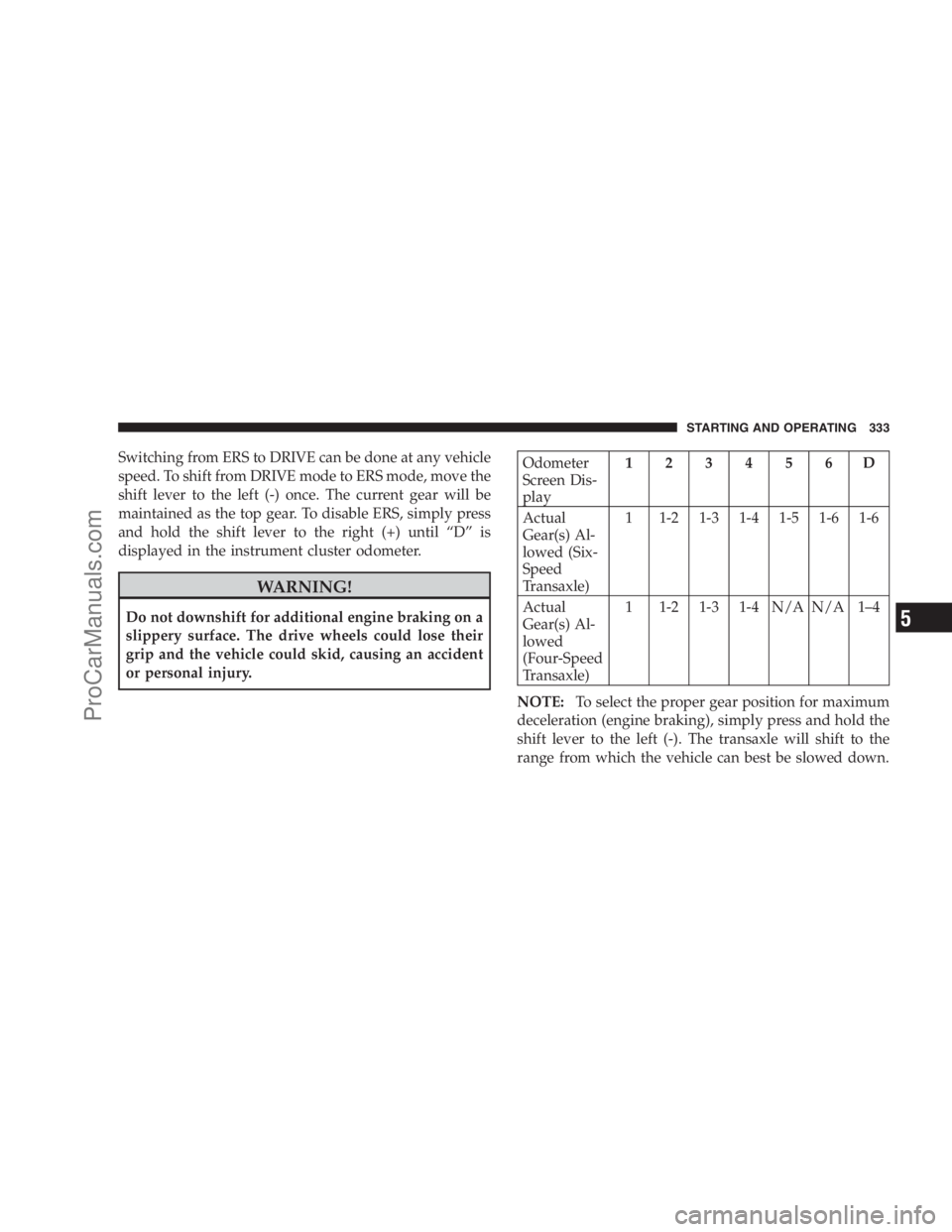
Switching from ERS to DRIVE can be done at any vehicle
speed. To shift from DRIVE mode to ERS mode, move the
shift lever to the left (-) once. The current gear will be
maintained as the top gear. To disable ERS, simply press
and hold the shift lever to the right (+) until “D” is
displayed in the instrument cluster odometer.
WARNING!
Do not downshift for additional engine braking on a
slippery surface. The drive wheels could lose their
grip and the vehicle could skid, causing an accident
or personal injury.
Odometer
Screen Dis-
play123456D
Actual
Gear(s) Al-
lowed (Six-
Speed
Transaxle)1 1-2 1-3 1-4 1-5 1-6 1-6
Actual
Gear(s) Al-
lowed
(Four-Speed
Transaxle)1 1-2 1-3 1-4 N/A N/A 1–4
NOTE:To select the proper gear position for maximum
deceleration (engine braking), simply press and hold the
shift lever to the left (-). The transaxle will shift to the
range from which the vehicle can best be slowed down.
STARTING AND OPERATING 333
5
ProCarManuals.com
Page 336 of 534

Reset Mode - Electronic Transaxle
The transaxle is monitored electronically for abnormal
conditions. If a condition is detected that could cause
damage, the transaxle automatically shifts into 2nd gear
(3rd gear for six-speed). The transaxle remains in 2nd
gear (3rd gear for six-speed) despite the forward gear
selected. PARK, REVERSE, and NEUTRAL will continue
to operate. This Reset feature allows the vehicle to be
driven to an authorized dealer for service without dam-
aging the transaxle.
In the event of a momentary problem, the transaxle can
be reset to regain all forward gears by performing the
following steps:
1. Stop the vehicle.
2. Shift into PARK.
3. Turn the ignition switch to the LOCK position.
4. Restart the engine.5. Shift into the desired gear range and resume driving.
NOTE:Even if the transaxle can be reset, it is recom-
mended that you visit an authorized dealer at your
earliest possible convenience. Your authorized dealer has
diagnostic equipment to determine if the problem could
recur.
If the transaxle cannot be reset, authorized dealer service
is required.
DRIVING ON SLIPPERY SURFACES
Acceleration
Rapid acceleration on snow covered, wet, or other slip-
pery surfaces may cause the front wheels to pull errati-
cally to the right or left. This phenomenon occurs when
there is a difference in the surface traction under the front
(driving) wheels.
334 STARTING AND OPERATING
ProCarManuals.com
Page 339 of 534

CAUTION! (Continued)
•Driving through standing water may cause dam-
age to your vehicle’s drivetrain components. Al-
ways inspect your vehicle’s fluids (i.e., engine oil,
transmission/transaxle, axle, etc.) for signs of con-
tamination (i.e., fluid that is milky or foamy in
appearance) after driving through standing water.
Do not continue to operate the vehicle if any fluid
appears contaminated, as this may result in further
damage. Such damage is not covered by the New
Vehicle Limited Warranty.
•Getting water inside your vehicle’s engine can
cause it to lock up and stall out, and cause serious
internal damage to the engine. Such damage is not
covered by the New Vehicle Limited Warranty.
WARNING!
•Driving through standing water limits your vehi-
cle’s traction capabilities. Do not exceed 5 mph
(8 km/h) when driving through standing water.
•Driving through standing water limits your vehi-
cle’s braking capabilities, which increases stop-
ping distances. Therefore, after driving through
standing water, drive slowly and lightly press on
the brake pedal several times to dry the brakes.
•Getting water inside your vehicle’s engine can
cause it to lock up and stall out, and leave you
stranded.
•Failure to follow these warnings may result in
injuries that are serious or fatal to you, your
passengers, and others around you.
STARTING AND OPERATING 337
5
ProCarManuals.com
Page 341 of 534

apparent, and/or the system is not functioning as antici-
pated. Coordinate inspection efforts through an autho-
rized dealer.
WARNING!
Fluid level should be checked on a level surface and
with the engine off to prevent injury from moving
parts and to ensure accurate fluid level reading. Do
not overfill. Use only manufacturers recommended
power steering fluid.
If necessary, add fluid to restore to the proper indicated
level. With a clean cloth, wipe any spilled fluid from all
surfaces. For correct fluid type, refer to ”Power Steering
Reservoir” under “Fluids, Lubricants, and Genuine
Parts” in this section.
PARKING BRAKE
When the parking brake is applied with the ignition
switch ON, the brake light in the instrument cluster will
turn on.
NOTE:This light only shows that the parking brake is
applied. It does not show the degree of brake application.
Before leaving the vehicle, make sure that the parking
brake is fully applied and place the gear selector lever in
the PARK position. To release the parking brake, depress
the emergency break pedal a second time and let your
foot up as you feel the brake disengage.
STARTING AND OPERATING 339
5
ProCarManuals.com
Page 346 of 534

In the event power assist is lost for any reason (for
example, repeated brake applications with the engine
off), the brakes will still function. The effort required to
brake the vehicle will be much greater than that required
with the power system operating.
WARNING!
•Riding the brakes can lead to brake failure and
possibly an accident. Driving with your foot rest-
ing or riding on the brake pedal can result in
abnormally high brake temperatures, excessive
lining wear, and possible brake damage. You
would not have your full braking capacity in an
emergency.
(Continued)
WARNING! (Continued)
•Driving a vehicle with the brake light on is dan-
gerous. A significant decrease in braking perfor-
mance or vehicle stability during braking may
occur. It will take you longer to stop the vehicle or
will make your vehicle harder to control. You
could have an accident. Have the vehicle checked
immediately.
ELECTRONIC BRAKE CONTROL SYSTEM
Your vehicle is equipped with an advanced electronic
brake control system that includes TCS (Traction Control
System), BAS (Brake Assist System) and ESP (Electronic
Stability Program). These systems complement the ABS
(Anti-Lock Brake System) by optimizing the vehicle
braking capability during emergency braking maneu-
vers.
344 STARTING AND OPERATING
ProCarManuals.com
Page 347 of 534
Traction Control System (TCS)
This system monitors the amount of wheel spin of each of
the driven wheels. If wheel spin is detected, brake
pressure is applied to the slipping wheel(s) and engine
power is reduced, to provide enhanced acceleration and
stability. A feature of the TCS functions similarly to a
limited-slip differential, and controls the wheel spin
across a driven axle. If one wheel on a driven axle is
spinning faster than the other, the system will apply the
brake of the spinning wheel. This will allow more engine
torque to be applied to the wheel that is not spinning.
This feature remains active even if the ESP is in the
“Partial Off” mode.
The TCS Indicator Light, located in the instru-
ment cluster, starts to flash as soon as the tires
lose traction and the wheels begin to spin. This
indicates that the TCS is active. If the indicatorlight flashes during acceleration, ease up on the accelera-
tor and apply as little throttle as possible. Be sure to adapt
your speed and driving to the prevailing road conditions,
and do not switch off the ESP or TCS.
WARNING!
•The TCS cannot prevent the natural laws of phys-
ics from acting on the vehicle, nor can it increase
the traction afforded.
•The TCS cannot prevent accidents, including those
resulting from excessive speed in turns, or hydro-
planing. Only a safe, attentive, and skillful driver
can prevent accidents.
•The capabilities of a TCS-equipped vehicle must
never be exploited in a reckless or dangerous
manner, which could jeopardize the user’s safety
or the safety of others.
STARTING AND OPERATING 345
5
ProCarManuals.com