Page 199 of 534
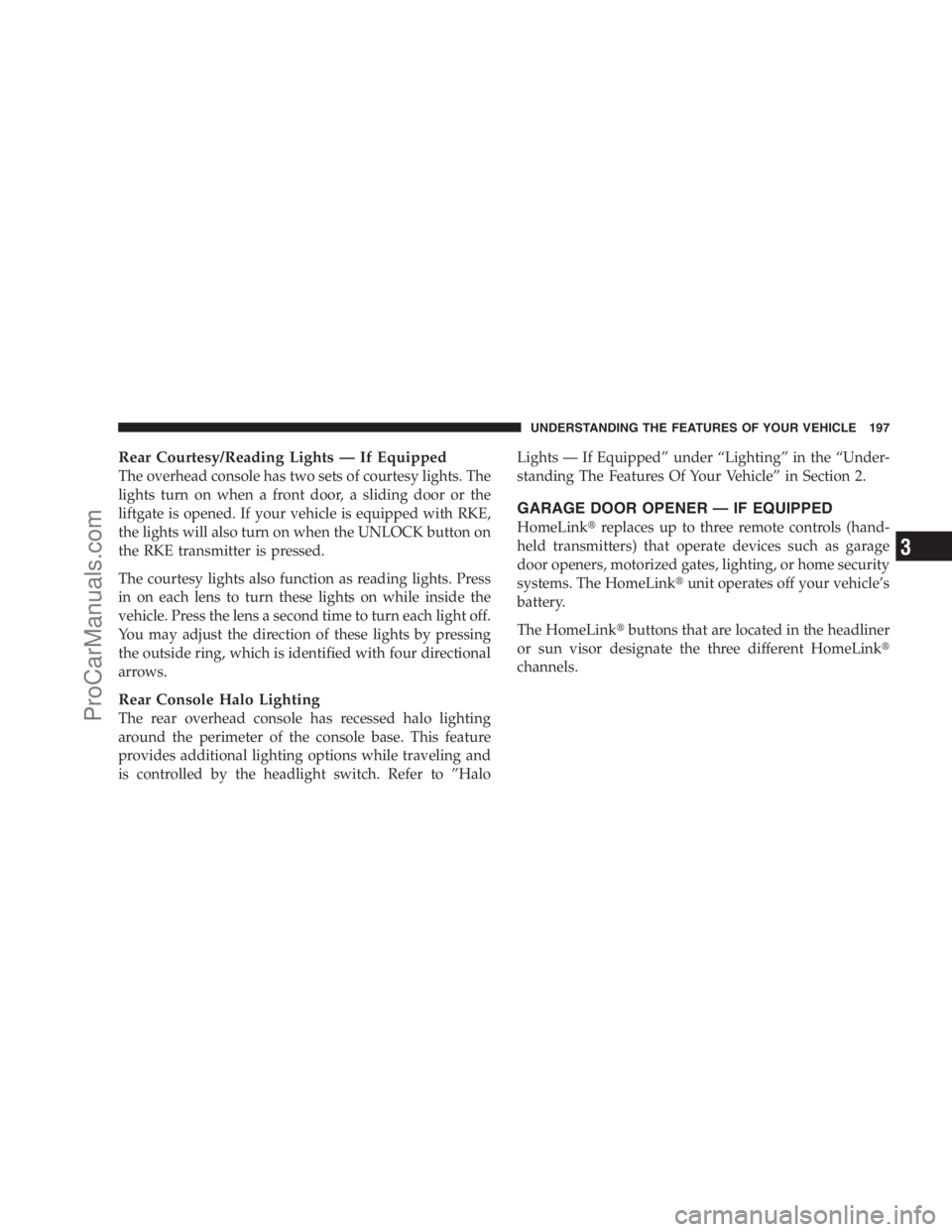
Rear Courtesy/Reading Lights — If Equipped
The overhead console has two sets of courtesy lights. The
lights turn on when a front door, a sliding door or the
liftgate is opened. If your vehicle is equipped with RKE,
the lights will also turn on when the UNLOCK button on
the RKE transmitter is pressed.
The courtesy lights also function as reading lights. Press
in on each lens to turn these lights on while inside the
vehicle. Press the lens a second time to turn each light off.
You may adjust the direction of these lights by pressing
the outside ring, which is identified with four directional
arrows.
Rear Console Halo Lighting
The rear overhead console has recessed halo lighting
around the perimeter of the console base. This feature
provides additional lighting options while traveling and
is controlled by the headlight switch. Refer to ”HaloLights — If Equipped” under “Lighting” in the “Under-
standing The Features Of Your Vehicle” in Section 2.
GARAGE DOOR OPENER — IF EQUIPPED
HomeLink�replaces up to three remote controls (hand-
held transmitters) that operate devices such as garage
door openers, motorized gates, lighting, or home security
systems. The HomeLink�unit operates off your vehicle’s
battery.
The HomeLink�buttons that are located in the headliner
or sun visor designate the three different HomeLink�
channels.
UNDERSTANDING THE FEATURES OF YOUR VEHICLE 197
3
ProCarManuals.com
Page 203 of 534
6. Firmly press and release the “Learn” or “Training”
button. The name and color of the button may vary by
manufacturer.
NOTE:There are 30 seconds in which to initiate the next
step after the “Learn” button has been pressed.
7. Return to the vehicle and press the programmed
HomeLink�button twice (holding the button for two
seconds each time). If the device is plugged in and
activates, programming is complete.
If the device does not activate, press the button a third
time (for two seconds) to complete the training.
If you have any problems, or require assistance, please
call toll-free 1–800–355–3515 or, on the Internet at
www.HomeLink.com for information or assistance.
To program the remaining two HomeLink�buttons,
repeat each step for each remaining button. DO NOT
erase the channels.Using HomeLink�
To operate, simply press and release the programmed
HomeLink�button. Activation will now occur for the
trained device (i.e., garage door opener, gate operator,
security system, entry door lock, home/office lighting,
etc. The handheld transmitter of the device may also be
used at any time.
Reprogramming a Single Homelink�Button
To reprogram a channel that has been previously trained,
follow these steps:
1. Turn the ignition switch to the ON/RUN position.
2. Press and hold the desired HomeLink�button until
the indicator light begins to flash after 20 seconds.Do not
release the button.
3.Without releasing the button,proceed with Program-
ming Homelink�Step 2 and follow all remaining steps.
UNDERSTANDING THE FEATURES OF YOUR VEHICLE 201
3
ProCarManuals.com
Page 213 of 534
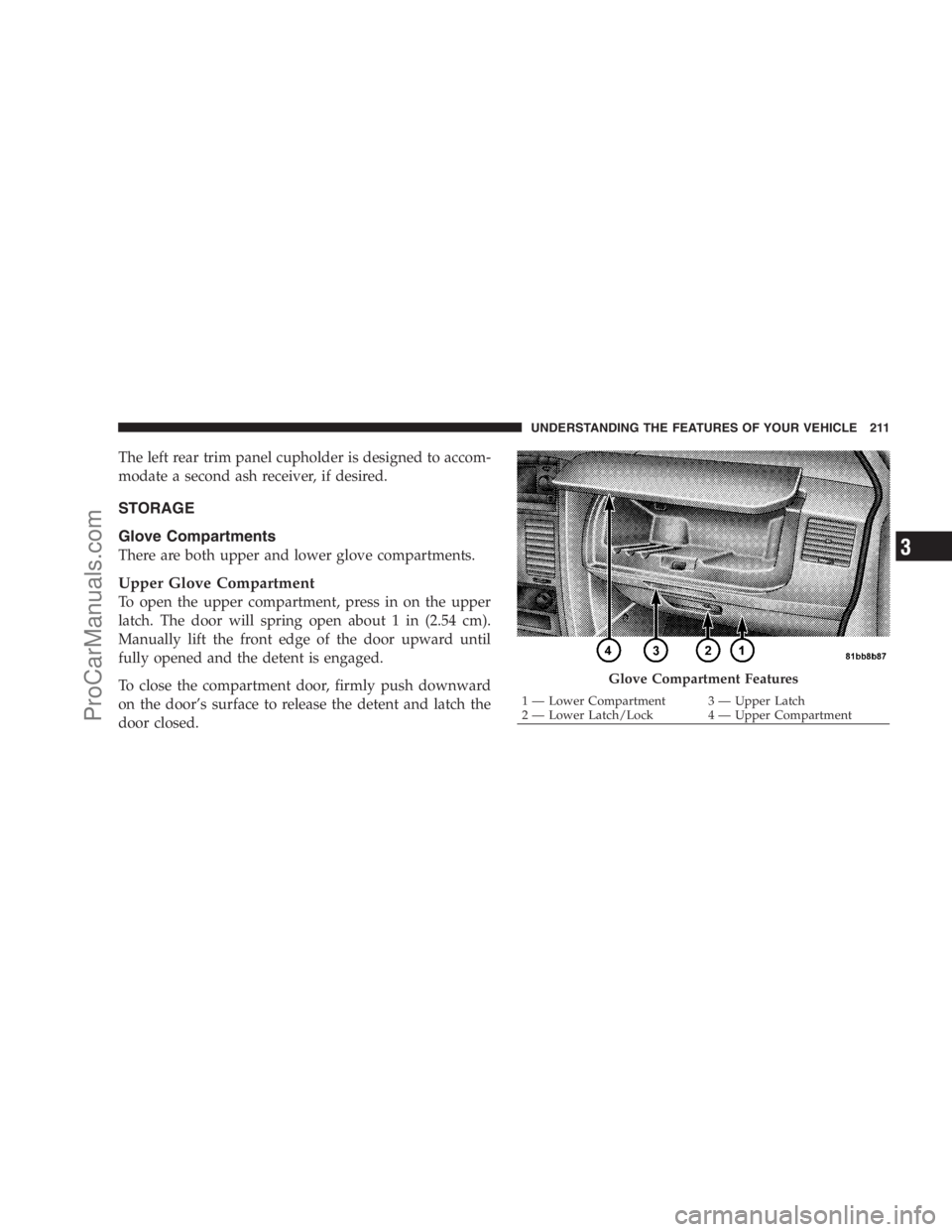
The left rear trim panel cupholder is designed to accom-
modate a second ash receiver, if desired.
STORAGE
Glove Compartments
There are both upper and lower glove compartments.
Upper Glove Compartment
To open the upper compartment, press in on the upper
latch. The door will spring open about 1 in (2.54 cm).
Manually lift the front edge of the door upward until
fully opened and the detent is engaged.
To close the compartment door, firmly push downward
on the door’s surface to release the detent and latch the
door closed.
Glove Compartment Features
1 — Lower Compartment 3 — Upper Latch
2 — Lower Latch/Lock 4 — Upper CompartmentUNDERSTANDING THE FEATURES OF YOUR VEHICLE 211
3
ProCarManuals.com
Page 214 of 534
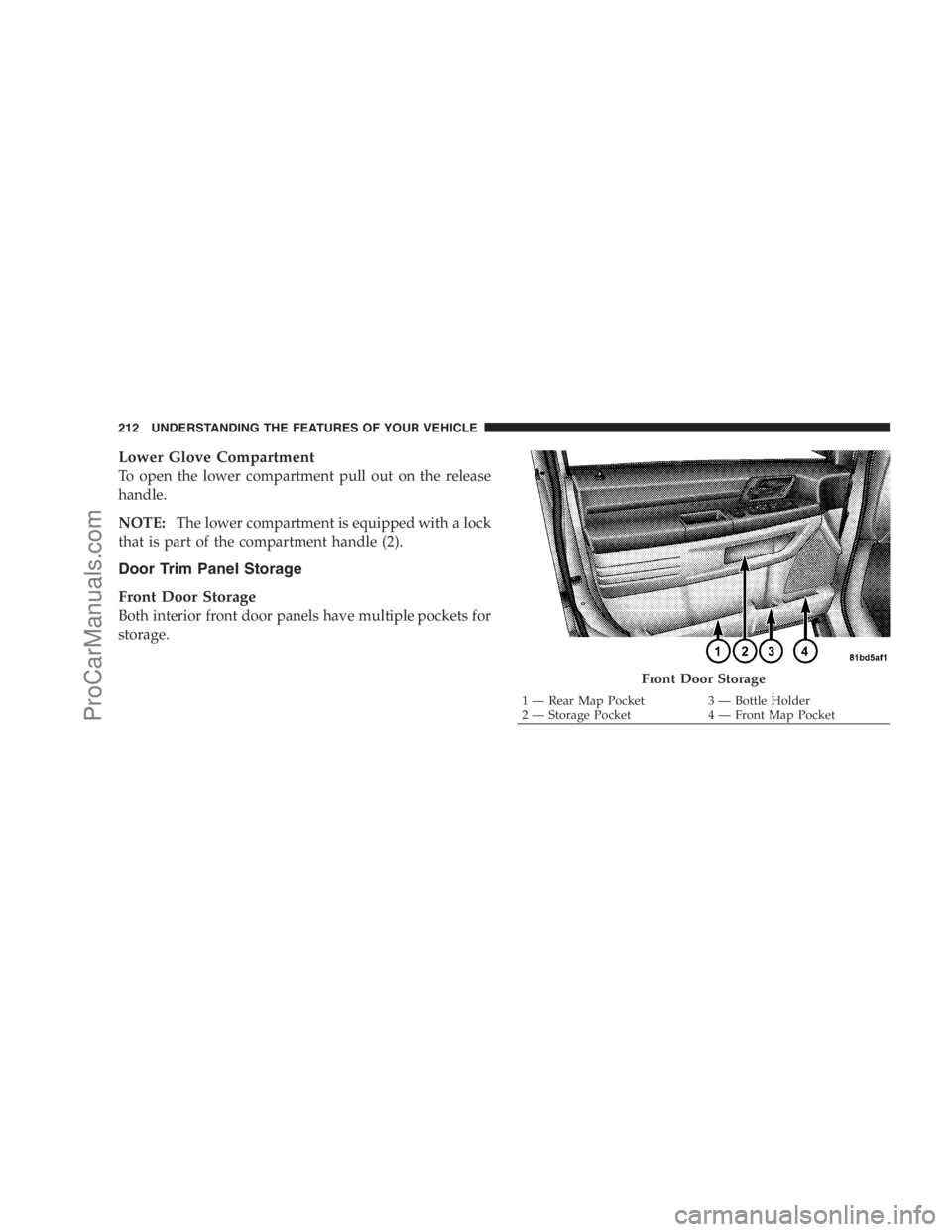
Lower Glove Compartment
To open the lower compartment pull out on the release
handle.
NOTE:The lower compartment is equipped with a lock
that is part of the compartment handle (2).
Door Trim Panel Storage
Front Door Storage
Both interior front door panels have multiple pockets for
storage.
Front Door Storage
1 — Rear Map Pocket 3 — Bottle Holder
2 — Storage Pocket 4 — Front Map Pocket 212 UNDERSTANDING THE FEATURES OF YOUR VEHICLE
ProCarManuals.com
Page 216 of 534
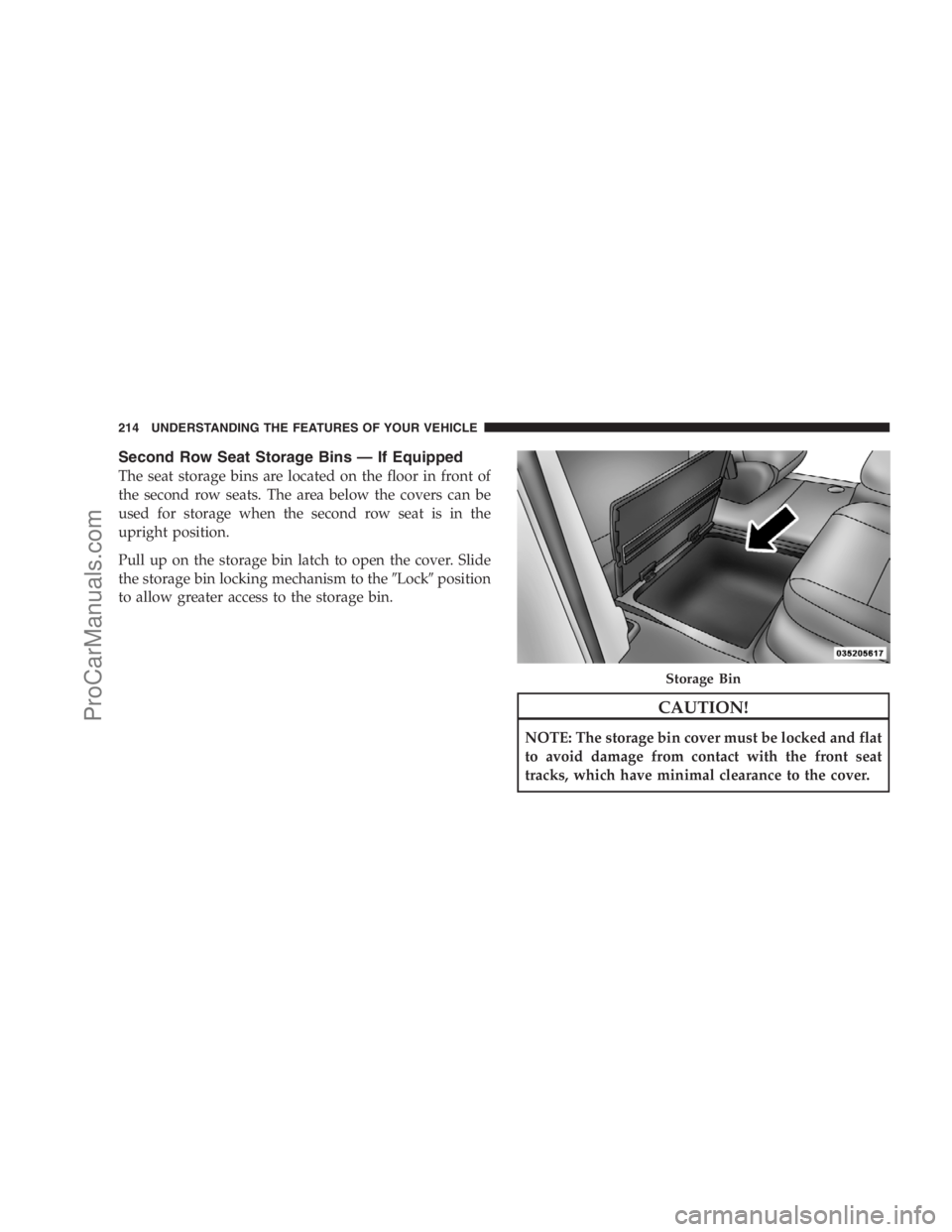
Second Row Seat Storage Bins — If Equipped
The seat storage bins are located on the floor in front of
the second row seats. The area below the covers can be
used for storage when the second row seat is in the
upright position.
Pull up on the storage bin latch to open the cover. Slide
the storage bin locking mechanism to the�Lock�position
to allow greater access to the storage bin.
CAUTION!
NOTE: The storage bin cover must be locked and flat
to avoid damage from contact with the front seat
tracks, which have minimal clearance to the cover.
Storage Bin
214 UNDERSTANDING THE FEATURES OF YOUR VEHICLE
ProCarManuals.com
Page 227 of 534
WARNING!
Do not install the load-leveling system on vehicles
that are not equipped with Anti-Lock Brakes. Ve-
hicles without Anti-Lock Brakes (ABS) have a height-
sensing proportioning valve. Installing a leveling
system will render this system ineffective, inappro-
priately reducing rear brake pressure, resulting in
increased stopping distances. You could have a seri-
ous accident.
ROOF LUGGAGE RACK — IF EQUIPPED
The crossbars and side rails are designed to carry the
weight on vehicles equipped with a luggage rack. The
load must not exceed 150 lbs (68 kg), and should be
uniformly distributed over the luggage rack crossbars.
Distribute cargo weight evenly on the roof rack crossbars.
The roof rack does not increase the total load carrying
capacity of the vehicle. Be sure the total load of cargoinside the vehicle plus that on the external rack does not
exceed the maximum vehicle load capacity.
To move the crossbars, loosen the thumb screws located
at the upper edge of each crossbar approximately six
turns, then move the crossbar to the desired position,
keeping the crossbars parallel to the rack frame. Once the
crossbar is in place, retighten the thumb screws to lock
the crossbar into position.
Attempt to move the crossbar again to ensure that it has
properly locked into position.
NOTE:To help control wind noise when installing the
crossbars make sure the arrows marked on the underside
of the crossbars are facing the front of the vehicle. When
the crossbars are not in use, the front crossbar should be
fastened just forward of the middle support and the rear
crossbar should be fastened at the rearmost position of
the side rails. This will help reduce the amount of wind
noise when the crossbars are not in use.
UNDERSTANDING THE FEATURES OF YOUR VEHICLE 225
3
ProCarManuals.com
Page 232 of 534

�AM/FM/CD/DVD Multimedia System Radio
(RER/REN) – If Equipped................ 263
▫Operating Instructions — Voice Recognition
System (VR) — If Equipped............. 263
▫Operating Instructions — Hands-Free
Communication (UConnect�)—
If Equipped......................... 263
▫Clock Setting Procedure................ 263
�Sales Code RES — AM/FM Stereo Radio With
CD Player (MP3 AUX Jack)................ 266
▫Operating Instructions — Radio Mode...... 266
▫Operation Instructions — CD Mode For CD
And MP3 Audio Play.................. 269
▫Notes On Playing MP3 Files............. 271
▫Operation Instructions - Auxiliary Mode.... 274�Sales Code RES/RSC — AM/FM Stereo Radio
With CD Player (MP3 AUX Jack) And Sirius
Radio............................... 274
▫Operating Instructions — Radio Mode...... 275
▫Operation Instructions — CD Mode For CD
And MP3 Audio Play.................. 280
▫Notes On Playing MP3 Files............. 282
▫List Button (CD Mode For MP3 Play)...... 285
▫Info Button (CD Mode For MP3 Play)...... 285
�Universal Consumer Interface (UCI) — If
Equipped............................ 286
▫Connecting The iPod�................. 287
▫Using This Feature................... 287
▫Controlling The iPod�Using Radio
Buttons............................ 288
230 UNDERSTANDING YOUR INSTRUMENT PANEL
ProCarManuals.com
Page 239 of 534

WARNING!
A hot engine cooling system is dangerous. You or
others could be badly burned by steam or boiling
coolant. You may want to call an authorized dealer if
your vehicle overheats. If you decide to look under
the hood yourself, see Section 7 of this manual.
Follow the warnings under the Cooling System Pres-
sure Cap paragraph.
4. Speedometer
Indicates vehicle speed.
5. Turn Signal Indicators
The arrow will flash with the exterior turn signal
when the turn signal lever is operated.
If the vehicle electronics sense that the vehicle has
traveled about one mile with the turn signals on, acontinuous chime will sound to alert you to turn the
signals off. If either indicator flashes at a rapid rate, check
for a defective outside light bulb.
6. High Beam Indicator
This indicator shows that the headlights are on
high beam. Push the multifunction lever forward
to switch the headlights to high beam and pull toward
yourself (normal position) to return to low beam.
7. Anti-Lock Brake System (ABS) Light
This light monitors the Anti-Lock Brake System
(ABS). The light will turn on when the ignition
switch is turned to the ON position and may
stay on for as long as four seconds.
If the ABS light remains on or turns on while driving, it
indicates that the Anti-Lock portion of the brake system
is not functioning and that service is required. However,
the conventional brake system will continue to operate
normally if the BRAKE warning light is not on.
UNDERSTANDING YOUR INSTRUMENT PANEL 237
4
ProCarManuals.com