Page 132 of 493
2. Press and release the SET (S) button on the Memory
switch, then press the side of the rocker switch labeled (2)
within five seconds. The EVIC will display which
memory position is being set.
NOTE:
•Memory profiles can be set without the vehicle in
PARK, but the vehicle must be in PARK to recall a
memory profile.
•The Recall Memory with Remote Key Unlock feature
can be enabled or disabled. Refer to “Recall Memory
with Remote Key Unlock,” under “Personal Settings
(Customer-Programmable Features)” under “Elec-
tronic Vehicle Information Center (EVIC)” in Section 4.
Linking and Unlinking the Remote Keyless Entry
(RKE) Transmitter to the Memory Feature
Your Remote Keyless Entry (RKE) transmitters can be
programmed to recall one of two pre-programmed
memory profiles by pressing the UNLOCK button on the
RKE transmitter.
To program your RKE transmitters, perform the follow-
ing:
1. Remove the key from the ignition.
2. Select the desired memory profile 1 or 2.
3. Press and release the SET (S) button on the Memory
switch, then press and release the side of the rocker
switch labeled 1 or 2 accordingly.�Memory Profile Set” (1
or 2) will display in the EVIC.
4. Press and release the LOCK button on the RKE
transmitter within 10 seconds.
130 UNDERSTANDING THE FEATURES OF YOUR VEHICLE
Page 133 of 493
NOTE:Your RKE transmitters can be unlinked to your
memory settings by pressing the SET (S) button followed
by the UNLOCK button on the RKE transmitter in Step 4
above.
Memory Position Recall
NOTE:The vehicle must be in PARK to recall memory
positions. If a recall is attempted when the vehicle is not
in PARK, a message will display in the EVIC.
To recall the memory settings for driver one, press
Memory button number 1 on the driver’s door or the
UNLOCK button on the RKE transmitter linked to
memory position 1.
To recall the memory setting for driver two, press
Memory button number 2 on the driver’s door or the
UNLOCK button on the RKE transmitter linked to
memory position 2.A recall can be cancelled by pressing any of the Memory
buttons (S, 1, or 2) on the driver’s door during a recall.
When a recall is cancelled, the driver seat, side mirror,
adjustable pedals, and power tilt and telescopic steering
column stop moving. A delay of one second will occur
before another recall can be selected.Easy Entry/Exit Seat (Available with Memory Seat
Only)
This feature provides automatic driver seat positioning to
enhance driver mobility when entering and exiting the
vehicle.
The distance the driver seat moves depends on where
you have the driver seat positioned when you remove the
key from the ignition switch.
•When you remove the key from the ignition switch,
the driver seat will move about 2.4 in (60 mm)
rearward if the driver seat position is greater than or
equal to 2.7 in (67.7 mm) forward of the rear stop. The
UNDERSTANDING THE FEATURES OF YOUR VEHICLE 131
3
Page 134 of 493
seat will return to its previously set position when you
insert the key into the ignition switch and turn it out of
the LOCK position.
•When you remove the key from the ignition switch,
the driver seat will move to a position 0.3 in (7.7 mm)
forward of the rear stop if the driver seat position is
between 0.9 in and 2.7 in (22.7 mm and 67.7 mm)
forward of the rear stop. The seat will return to its
previously set position when you insert the key into
the ignition switch and turn it out of the LOCK
position.
•The Easy Entry/Easy Exit feature is disabled when the
driver seat position is less than 0.9 in (22.7 mm)
forward of the rear stop. At this position, there is no
benefit to the driver by moving the seat for Easy Exit
or Easy Entry.
Each stored memory setting will have an associated Easy
Entry and Easy Exit position.NOTE:The Easy Entry/Easy Exit feature can be en-
abled or disabled. Refer to “Automatically Move Seat
Back on Exit,” under “Personal Settings (Customer-
Programmable Features)” under “Electronic Vehicle In-
formation Center (EVIC)” in Section 4.
TO OPEN AND CLOSE THE HOOD
Two latches must be released to open the hood.
1. Pull the hood release lever located under the left side
of the instrument panel.
132 UNDERSTANDING THE FEATURES OF YOUR VEHICLE
Page 136 of 493
To prevent possible damage, do not slam the hood to
close it. Lower the hood, until it is open approximately
6 in (15 cm), and then drop it. This should secure both
latches. Never drive your vehicle unless the hood is fully
closed, with both latches engaged.
WARNING!
If the hood is not fully latched, it could fly up when
the vehicle is moving and block your forward vision.
You could have a collision. Be sure all hood latches
are fully latched before driving.
LIGHTS
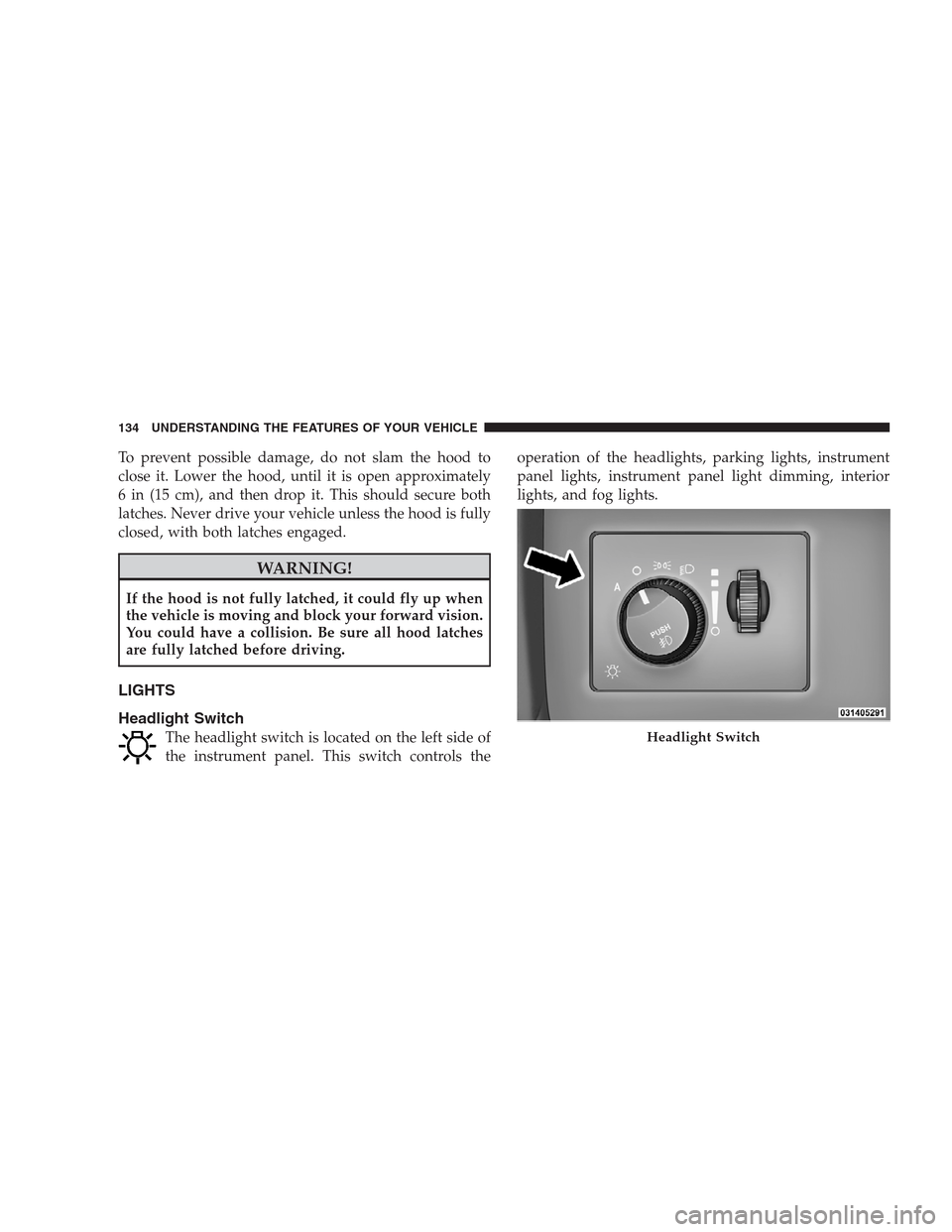
Headlight Switch
The headlight switch is located on the left side of
the instrument panel. This switch controls theoperation of the headlights, parking lights, instrument
panel lights, instrument panel light dimming, interior
lights, and fog lights.Headlight Switch
134 UNDERSTANDING THE FEATURES OF YOUR VEHICLE
Page 137 of 493

Rotate the headlight switch clockwise to the first detent
for parking light and instrument panel light operation.
Turn it to the second detent for headlight, parking light,
and instrument panel light operation.
Automatic Headlights
This system automatically turns the headlights on or off
according to ambient light levels. To turn the system on,
rotate the headlight switch counterclockwise to the
AUTO (A) position. When the system is on, the headlight
time delay feature is also on. This means the headlights
will stay on for up to 90 seconds after you turn the
ignition switch OFF. To turn the automatic system off,
move the headlight switch out of the AUTO (A) position.
NOTE:The engine must be running before the head-
lights will come on in the automatic mode.
Headlights On with Wipers
When this feature is active, the headlights will turn on
approximately 10 seconds after the wipers are turned on
if the headlight switch is placed in the AUTO position. In
addition, the headlights will turn off when the wipers are
turned off if they were turned on by this feature.
The Headlights On with Wipers feature can be enabled or
disabled. Refer to ”Headlights On with Wipers,” under
“Personal Settings (Customer-Programmable Features)”
under “Electronic Vehicle Information Center (EVIC)” in
Section 4.
SmartBeams — If Equipped
The SmartBeam system provides increased forward light-
ing at night by automating high beam control through
the use of a digital camera mounted on the inside
rearview mirror. This camera detects vehicle specific light
and automatically switches from high beams to low
beams until the approaching vehicle is out of view.
UNDERSTANDING THE FEATURES OF YOUR VEHICLE 135
3
Page 138 of 493

To Activate
1. Select “Automatic High Beams — ON” through the
Electronic Vehicle Information Center (EVIC). Refer to
“Automatic High Beams,” under “Personal Settings
(Customer-Programmable Features)” under “Electronic
Vehicle Information Center (EVIC)” in Section 4.
2. Rotate the headlight switch counterclockwise to the
AUTO (A) position.
3. Push the multifunction lever away from you to switch
the headlights to the high beam position.
NOTE:This system will not activate until the vehicle is
at or above 25 mph (40 km/h).
To Deactivate
Perform either of the following steps to deactivate the
SmartBeam system.
1. Pull the multifunction lever toward you to switch the
headlights from the high beam to the low beam position.
2. Rotate the headlight switch clockwise from the AUTO
(A) to the on position.
NOTE:Broken, muddy, or obstructed headlights and
taillights of vehicles in the field of view will cause
headlights to remain on longer (closer to the vehicle).
Also, dirt, film, and other obstructions on the windshield
or camera lens will cause the system to function
improperly.
136 UNDERSTANDING THE FEATURES OF YOUR VEHICLE
Page 142 of 493
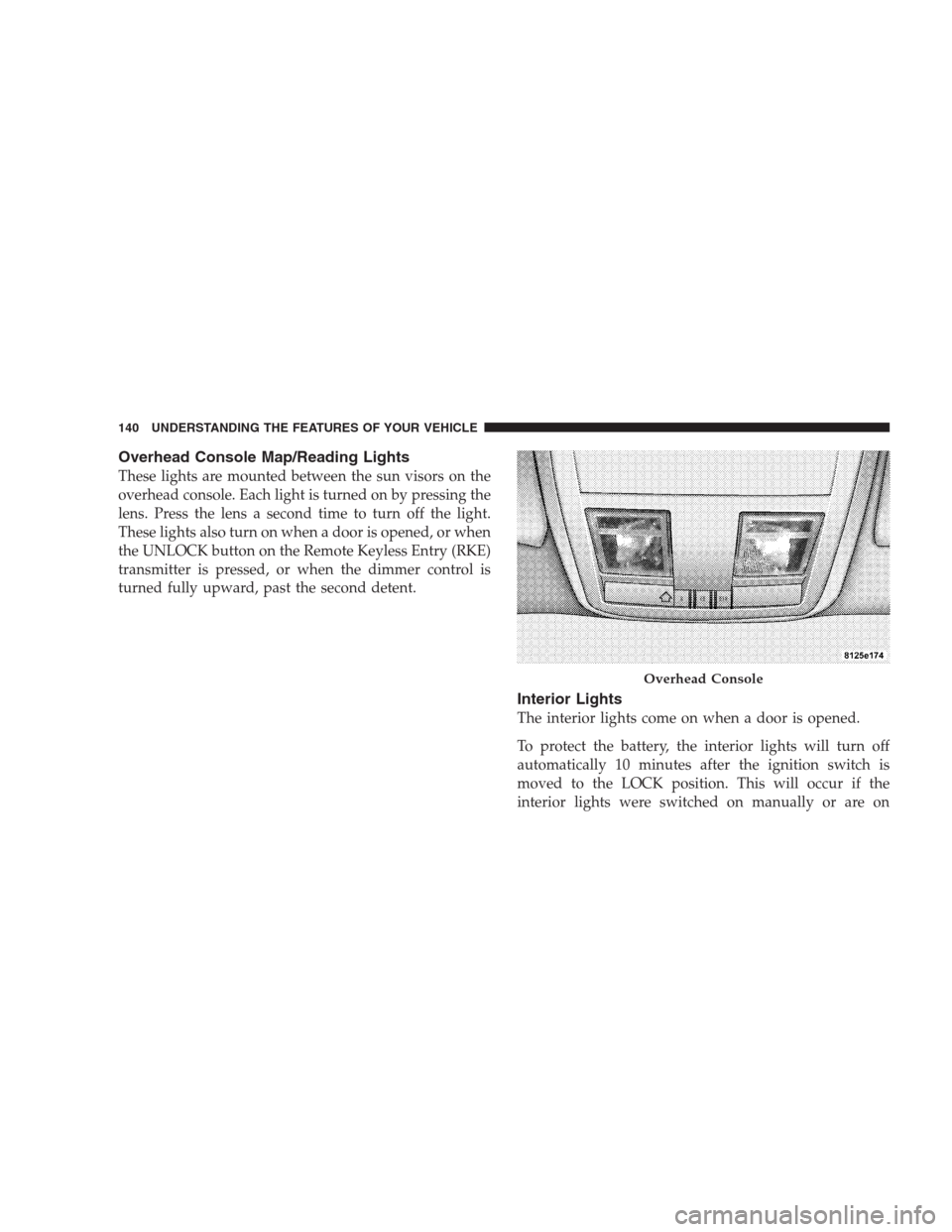
Overhead Console Map/Reading Lights
These lights are mounted between the sun visors on the
overhead console. Each light is turned on by pressing the
lens. Press the lens a second time to turn off the light.
These lights also turn on when a door is opened, or when
the UNLOCK button on the Remote Keyless Entry (RKE)
transmitter is pressed, or when the dimmer control is
turned fully upward, past the second detent.
Interior Lights
The interior lights come on when a door is opened.
To protect the battery, the interior lights will turn off
automatically 10 minutes after the ignition switch is
moved to the LOCK position. This will occur if the
interior lights were switched on manually or are on
Overhead Console
140 UNDERSTANDING THE FEATURES OF YOUR VEHICLE
Page 150 of 493
Press the switch rearward to move the pedals rearward
(toward the driver).
•The pedals can be adjusted with the ignition OFF.
•The pedals can be adjusted while driving.
•The pedalscannotbe adjusted when the vehicle is in
REVERSE or when the Electronic Speed Control is on.
One of the following messages will display in the
Electronic Vehicle Information Center (EVIC) if a pedal
adjustment is attempted when the system is locked
out: “Adjustable Pedal Disabled — Cruise Control
Engaged” or “Adjustable Pedal Disabled — Vehicle In
Reverse.”
NOTE:For vehicles equipped with Driver Memory
Seat, you can use your Remote Keyless Entry (RKE)
transmitter or the memory switch on the driver’s door
trim panel to return the adjustable pedals to pre-
programmed positions. Refer to “Driver Memory Seat”
in this section.
CAUTION!
Do not place any article under the adjustable pedals
or impede its ability to move as it may cause damage
to the pedal controls. Pedal travel may become lim-
ited if movement is stopped by an obstruction in the
adjustable pedal’s path.
ELECTRONIC SPEED CONTROL
When engaged, Electronic Speed Control takes over the
accelerator operation at speeds greater than 25 mph
(40 km/h).
The Electronic Speed Control lever located on the right
side of the steering wheel operates the system.
148 UNDERSTANDING THE FEATURES OF YOUR VEHICLE