Page 170 of 493
NOTE:Installing a vehicle front-end protector or an
aftermarket grille or modifying the grille is not recom-
mended. Doing so may block the sensor and inhibit ACC
operation.
ACC Unavailable Warning
If the system turns off, and the EVIC displays�ACC
UNAVAILABLE,�there may be a temporary malfunction
that limits ACC functionality. Although the vehicle is still
drivable under normal conditions, ACC will be tempo-
rarily unavailable. If this occurs, try activating ACC again
later, following a key cycle. If the problem persists, see
your authorized dealer.
Service ACC Warning
If the system turns off, and the EVIC displays “SERVICE
ACC,” it indicates there is an internal system fault.
Although the vehicle is still drivable under normal
conditions, have the system checked by an authorized
dealer.
168 UNDERSTANDING THE FEATURES OF YOUR VEHICLE
Page 182 of 493
OVERHEAD CONSOLE
The overhead console contains courtesy/reading lights,
an optional universal garage door opener (HomeLink�),
storage for sunglasses, and an optional power sunroof
switch.
Courtesy/Reading Lights
At the forward end of the console are two courtesy/
reading lights.
Press the lens to turn on the light. Press it a second time
to turn off the light.
These lights also turn on when a door is opened, or when
the UNLOCK button on the Remote Keyless Entry (RKE)
transmitter is pressed, or when the dimmer control is
turned fully upward, past the second detent.
Sunglasses Storage
At the rear of the console, a compartment is provided for
the storage of a pair of sunglasses.
The storage compartment access is a�push/push�design.
Push on the raised bar on the compartment door to open.
Push on the raised bar to close.
Overhead Console
180 UNDERSTANDING THE FEATURES OF YOUR VEHICLE
Page 187 of 493
Gate Operator/Canadian Programming
Canadian radio-frequency laws require transmitter sig-
nals to “time-out” (or quit) after several seconds of
transmission – which may not be long enough for
HomeLink�to pick up the signal during programming.
Similar to this Canadian law, some U.S. gate operators are
designed to “time-out” in the same manner.
It may be helpful to unplug the device during the cycling
process to prevent possible overheating of the garage
door or gate motor.
If you are having difficulties programming a garage door
opener or a gate operator, replace “Programming
HomeLink” Step 3 with the following:
3. Continue to press and hold the HomeLink�button
while you press and release - every two seconds
(“cycle”) your hand-held transmitter until HomeLink�has successfully accepted the frequency signal. The
EVIC display will change from “CHANNEL # TRAIN-
ING” to “CHANNEL # TRAINED.”
If you unplugged the device for training, plug it back in
at this time.
Then proceed with Step 4 under “Programming
HomeLink�” earlier in this section.
Using HomeLink�
To operate, simply press and release the programmed
HomeLink�button. Activation will now occur for the
trained device (i.e., garage door opener, gate operator,
security system, entry door lock, home/office lighting,
etc.) The hand-held transmitter of the device may also be
used at any time.
UNDERSTANDING THE FEATURES OF YOUR VEHICLE 185
3
Page 193 of 493
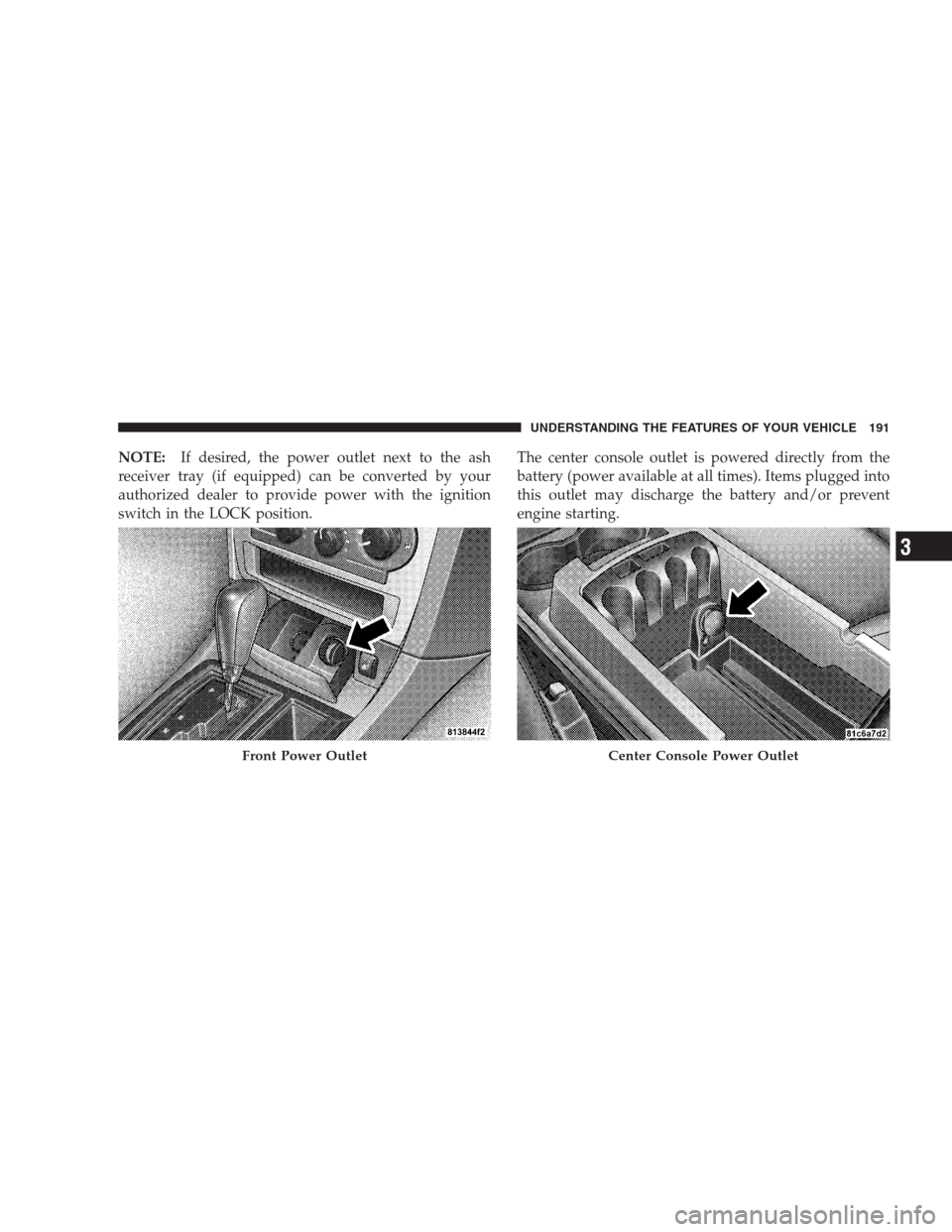
NOTE:If desired, the power outlet next to the ash
receiver tray (if equipped) can be converted by your
authorized dealer to provide power with the ignition
switch in the LOCK position.The center console outlet is powered directly from the
battery (power available at all times). Items plugged into
this outlet may discharge the battery and/or prevent
engine starting.
Front Power OutletCenter Console Power Outlet
UNDERSTANDING THE FEATURES OF YOUR VEHICLE 191
3
Page 198 of 493
WARNING!
The weight and position of cargo and passengers can
change the vehicle center of gravity and vehicle
handling. To avoid loss of control resulting in per-
sonal injury, follow these guidelines for loading your
vehicle:
•Always place cargo evenly on the cargo floor. Put
heavier objects as low and as far forward as
possible.
•Place as much cargo as possible in front of the rear
axle. Too much weight or improperly placed
weight over or behind the rear axle can cause the
rear of the vehicle to sway.
•Do not pile luggage or cargo higher than the top of
the seatback. This could impair visibility or be-
come a dangerous projectile in a sudden stop or
collision.When the seatback is folded to the upright position, make
sure it is latched by strongly pulling on the top of the
seatback above the seat strap.
WARNING!
•Be certain that the seatback is securely locked into
position. If the seatback in not securely locked
into position, the seat will not provide the proper
stability for child seats and/or passengers. An
improperly latched seat could cause serious injury.
•The cargo area in the rear of the vehicle (with the
rear seatbacks in the locked-up or folded down
position) should not be used as a play area by
children when the vehicle is in motion. They could
be seriously injured in an accident. Children
should be seated and using the proper restraint
system.
(Continued)
196 UNDERSTANDING THE FEATURES OF YOUR VEHICLE
Page 201 of 493
UNDERSTANDING YOUR INSTRUMENT PANEL
CONTENTS
�Instrument Panel Features............... 203
�Premium Instrument Cluster............. 204
�Instrument Cluster Descriptions........... 205
�Electronic Vehicle Information Center (EVIC) . . 214
▫Electronic Vehicle Information Center (EVIC)
Displays........................... 216
▫Trip Functions...................... 220
▫Performance Pages — If Equipped........ 222
▫Keyless Go Display — If Equipped........ 226▫Compass Display.................... 226
▫Navigation — If Equipped.............. 228
▫Driver-Selectable Surround Sound (DSS) –
If Equipped........................ 229
▫System Warnings (Customer Information
Features).......................... 230
▫Personal Settings (Customer-Programmable
Features).......................... 230
�Setting The Analog Clock................ 2354
Page 202 of 493

�Sales Code REQ — AM/FM Stereo Radio And
6–Disc CD/DVD Changer (MP3/WMA AUX
Jack)............................... 236
▫Operating Instructions - Radio Mode...... 236
▫Operation Instructions - (Disc Mode For CD
And MP3/WMA Audio Play, DVD-Video) . . . 244
▫Notes On Playing MP3/WMA Files....... 246
▫List Button (Disc Mode For MP3/WMA
Play)............................. 249
▫Info Button (Disc Mode For MP3/WMA
Play)............................. 249
�AM/FM/CD/DVD Multimedia System Radio
(RER/REN) – If Equipped................ 252
▫Operating Instructions — Voice Recognition
System (VR) — If Equipped............. 252▫Operating Instructions — Hands-Free
Communication (UConnect�)—
If Equipped........................ 252
▫Clock Setting Procedure............... 252
�Sales Code RES — AM/FM Stereo Radio With
CD Player (MP3 AUX Jack)............... 255
▫Operating Instructions — Radio Mode..... 255
▫Operation Instructions — CD Mode For CD
And MP3 Audio Play................. 258
▫Notes On Playing MP3 Files............ 260
▫Operation Instructions - Auxiliary Mode.... 263
�Sales Code RES/RSC — AM/FM Stereo Radio
With CD Player (MP3 AUX Jack) And Sirius
Radio............................... 263
▫Operating Instructions — Radio Mode..... 264
200 UNDERSTANDING YOUR INSTRUMENT PANEL
Page 205 of 493
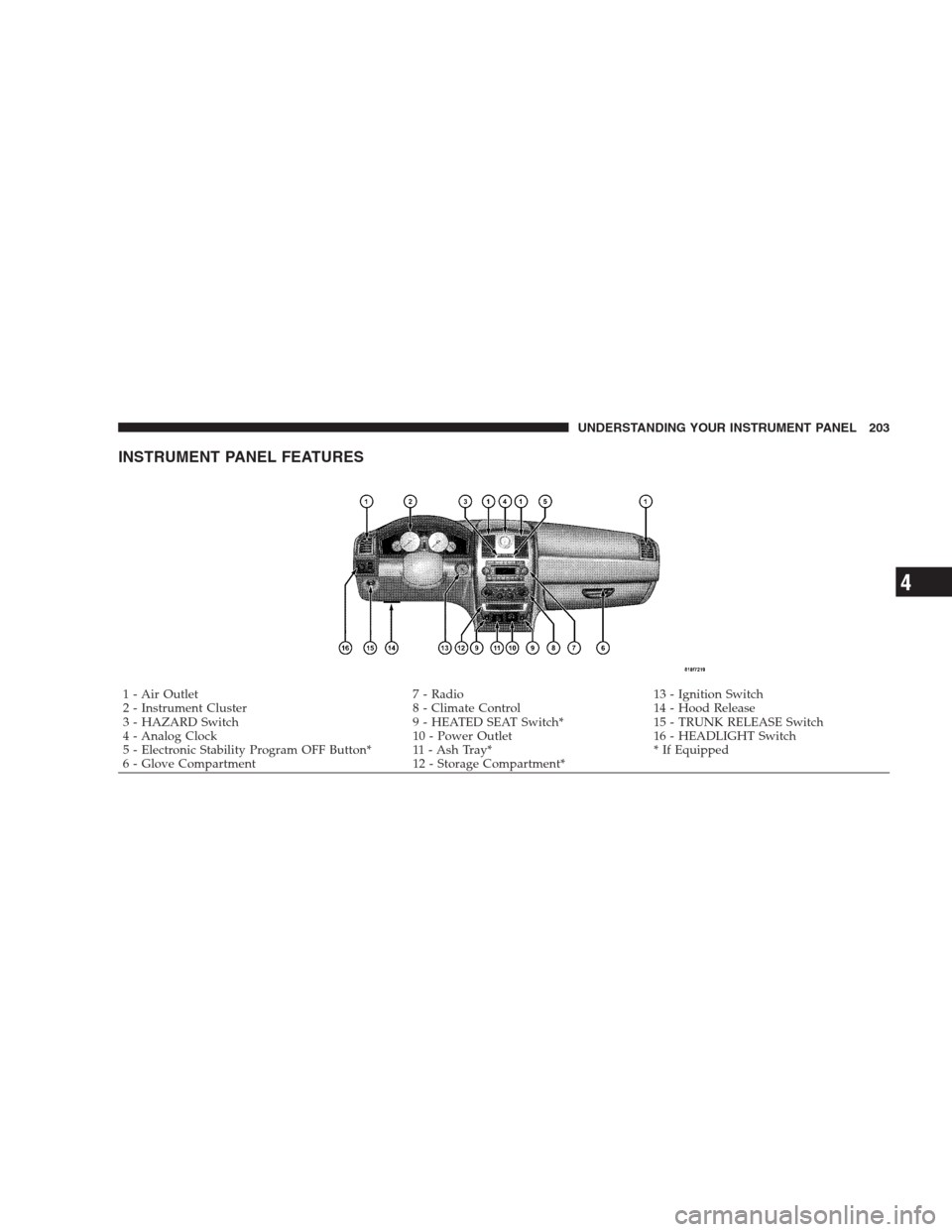
INSTRUMENT PANEL FEATURES
1 - Air Outlet 7 - Radio 13 - Ignition Switch
2 - Instrument Cluster 8 - Climate Control 14 - Hood Release
3 - HAZARD Switch 9 - HEATED SEAT Switch* 15 - TRUNK RELEASE Switch
4 - Analog Clock 10 - Power Outlet 16 - HEADLIGHT Switch
5 - Electronic Stability Program OFF Button* 11 - Ash Tray* * If Equipped
6 - Glove Compartment 12 - Storage Compartment*UNDERSTANDING YOUR INSTRUMENT PANEL 203
4