2009 CHEVROLET MALIBU key
[x] Cancel search: keyPage 203 of 420
Playing a CD-R or CD-RW MP3
f
(Tune):Turn to select MP3 les on the CD currently
playing.
©SEEK:Press to go to the start of the track, if more
than ten seconds have played. Press and hold or
press multiple times to continue moving backward
through tracks.
¨SEEK:Press to go to the next track. Press and hold
or press multiple times to continue moving forward
through tracks.
sREV (Reverse):Press and hold to reverse playback
quickly. Sound is heard at a reduced volume and the
elapsed time of the le displays. Release
sREV to
resume playing.
\FWD (Fast Forward):Press and hold to advance
playback quickly. Sound is heard at a reduced
volume and the elapsed time of the le displays.
Release
\FWD to resume playing. The elapsed
time of the le displays.
Sc(Previous Folder):Press the softkey below
Scto go to the rst track in the previous folder.
cT(Next Folder):Press the softkey belowcTto
go to the rst track in the next folder.
RDM (Random):MP3 les can be listened to on a CD
in random, rather than sequential order, on one CD
or all discs in the Six-Disc CD player. To use random:
1. Press the softkey under the RDM tab until Random
Current Disc displays to play songs from the current
CD in random order. Press the same softkey
again to turn off random play.
2. Press the softkey under the RDM tab until
Randomize All Discs displays to play songs from
all CDs loaded in the Six-Disc CD player in random
order. Press the same softkey again to turn off
random play.
h(Music Navigator):Press the softkey belowh
to have the les played in order by artist or album.
The player scans the disc to sort the les by artist and
album ID3 tag information. It can take several minutes
to scan the disc depending on the number of les on the
disc. The radio may begin playing while it is scanning
in the background.
When the scan is nished, the disc begins playing les
in order by artist. The current artist playing is shown on
the second line of the display. Once all songs by that
artist are played, the player moves to the next artist in
alphabetical order and begins playing les by that artist.
3-73
Page 204 of 420
To listen to les by another artist, press the softkey
located below either arrow tab. The disc goes to the next
or previous artist in alphabetical order. Continue pressing
either softkey below the arrow tab until the desired artist
displays.
To change from playback by artist to playback by album:
1. Press the softkey located below the Sort By tab.
2. Press one of the softkeys below the album tab from
the sort screen.
3. Press the softkey below the back tab to return to
the main music navigator screen.
The album name displays on the second line between the
arrows and songs from the current album begins to play.
Once all songs from that album have played, the player
moves to the next album in alphabetical order on the CD
and begins playing MP3 les from that album.
To exit music navigator mode, press the softkey below
the Back tab to return to normal MP3 playback.Connecting a USB Storage Device
or iPod®
The USB Port can be used to control an iPod or a USB
storage device.
To connect a USB storage device, connect the device
to the USB port located on the front of the radio.
To connect an iPod, connect one end of the USB cable
that came with the iPod to the iPod’s dock connector and
connect the other end to the USB port located on the front
of the radio. If the vehicle is on and the USB connection
works, “OK to disconnect” and a GM logo may appear on
the iPod and iPod appears on the radio’s display. The
iPod music appears on the radio’s display and begins
playing.
The iPod charges while it is connected to the vehicle
if the vehicle is in the ACC/ACCESSORY or ON/RUN
position. When the vehicle is turned off, the iPod
automatically powers off and will not charge or draw
power from the vehicle’s battery.
If you have an older iPod model that is not supported, it
can still be used by connecting it to the Auxiliary Input
Jack using a standard 3.5 mm (1/8 inch) stereo cable.
See “Using the Auxiliary Input Jack” earlier for more
information.
3-74
Page 205 of 420
Using the Radio to Control a USB
Storage Device or iPod
The radio can control a USB storage device or an iPod
using the radio buttons and knobs and display song
information on the radio’s display.
f(Tune):Turn to select les.
©SEEK:Press to go to the start of the track, if more
than ten seconds have played. Press and hold or press
multiple times to continue moving backward through
tracks.
¨SEEK:Press to go to the next track. Press and
hold or press multiple times to continue moving forward
through tracks.
sREV (Reverse):Press and hold to reverse playback
quickly. Sound is heard at a reduced volume. Release
sREV to resume playing. The elapsed time of the le
displays.
\FWD (Fast Forward):Press and hold to advance
playback quickly. Sound is heard at a reduced volume.
Release
\FWD to resume playing. The elapsed time of
the le displays.
4(Information):Press to display additional information
about the selected track.
Using Softkeys to Control a USB
Storage Device or iPod
The ve softkeys below the radio display are used to
control the functions listed below.
To use the softkeys:
1. Press the rst or fth softkey below the radio display
to display the functions listed below, or press the
softkey below the function if it is currently displayed.
2. Press the softkey below the tab with the function on
it to use that function.
j(Pause):Press the softkey belowjto pause the
track. The tab appears raised when pause is being used.
Press the softkey below
jagain to resume playback.
Back:Press the softkey below the back tab to go back to
the main display screen on an iPod, or the root directory
on a USB storage device.
c(Folder View):Press the softkey belowcto view
the contents of the current folder on the USB drive.
To browse and select les:
1. Press the softkey below
c.
2. Turn
fto scroll through the list of folders.
3-75
Page 206 of 420
3. Pressfto select the desired folder. If there is
more then one folder, repeat Steps 1 and 2 until
the desired folder is reached.
4. Turn
fto scroll through the les in the selected
folder.
5. Press
fto select the desired le to be played.
To skip through large lists, the ve softkeys can be used
to navigate in the following order:
First softkey, rst item in the list.
Second softkey, 1% through the list each time the
softkey is pressed.
Third softkey, 5% through the list each time the
softkey is pressed.
Fourth softkey, 10% through the list each time the
softkey is pressed.
Fifth softkey, end of the list.
h(Music Navigator):Press the softkey belowh
to view and select a le on an iPod, using the iPod’s
menu system. Files are sorted by:
Playlists
Artists
Albums
Genres
Songs
Composers
To select les:
1. Press the softkey below
h.
2. Turn
fto scroll through the list of menus.
3. Press
fto select the desired menu.
4. Turn
fto scroll through the folders or les in the
selected menu.
5. Press
fto select the desired le to be played.
To skip through large lists, the ve softkeys can be used
to navigate in the following order:
First softkey, rst item in the list.
Second softkey, 1% through the list each time the
softkey is pressed.
Third softkey, 5% through the list each time the
softkey is pressed.
Fourth softkey, 10% through the list each time the
softkey is pressed.
Fifth softkey, end of the list.
3-76
Page 207 of 420
Repeat Functionality
To use Repeat:
Press the softkey below
"or'to select between
Repeat All and Repeat Track.
"(Repeat All):Press the softkey below"to repeat
all tracks. The tab appears lowered when Repeat All
is being used. This is the default mode when a
USB storage device or iPod is rst connected.
'(Repeat Track):Press the softkey below'to
repeat one track. The tab appears raised when Repeat
Track is being used.
Shuffle Functionality
To use Shuffle:
Press the softkey below
>,2,
Shuffle Album, or Shuffle Folder.
>(Shuffle Off):Press the softkey below2to turn
shuffle off. This is the default mode when a USB storage
device or iPod is rst connected.
2(Shuffle All Songs / Shuffle Songs):Press the
softkey below
=or
<(Shuffle Album):Press the softkey below>to
shuffle all songs in the current album on an iPod.
=(Shuffle Folder):Press the softkey below>to
shuffle all songs in the current folder on a USB storage
device.
XM Radio Messages
XL (Explicit Language Channels):These channels, or
any others, can be blocked at a customer’s request,
by calling 1-800-852-XMXM (9696).
XM Updating:The encryption code in the receiver is
being updated, and no action is required. This process
should take no longer than 30 seconds.
No XM Signal:The system is functioning correctly, but
the vehicle is in a location that is blocking the XM™
signal. When the vehicle is moved into an open area,
the signal should return.
Loading XM:The audio system is acquiring and
processing audio and text data. No action is needed.
This message should disappear shortly.
Channel Off Air:This channel is not currently in
service. Tune in to another channel.
Channel Unauth:This channel is blocked or cannot be
received with your XM Subscription package.
3-77
Page 208 of 420
Channel Unavail:This previously assigned channel
is no longer assigned. Tune to another station. If this
station was one of the presets, choose another station
for that preset button.
No Artist Info:No artist information is available at this
time on this channel. The system is working properly.
No Title Info:No song title information is available
at this time on this channel. The system is working
properly.
No CAT Info:No category information is available at
this time on this channel. The system is working properly.
No Information:No text or informational messages are
available at this time on this channel. The system is
working properly.
CAT Not Found:There are no channels available for
the selected category. The system is working properly.
XM Theftlocked:The XM receiver in the vehicle
could have previously been in another vehicle. For
security purposes, XM receivers cannot be swapped
between vehicles. If this message is received after
having the vehicle serviced, check with your
dealer/retailer.XM Radio ID:If tuned to channel 0, this message
alternates with the XM™ Radio 8 digit radio ID label.
This label is needed to activate the service.
Unknown:If this message is received when tuned to
channel 0, there could be a receiver fault. Consult
with your dealer/retailer.
Check XM Receivr:If this message does not clear
within a short period of time, the receiver could have a
fault. Consult with your dealer/retailer.
XM Not Available:If this message does not clear within
a short period of time, the receiver could have a fault.
Consult with your dealer/retailer.
Bluetooth®
Vehicles with a Bluetooth system can use a Bluetooth
capable cell phone with a Hands Free Prole to make and
receive phone calls. The system can be used while the
key is in ON/RUN or ACC/ACCESSORY position. The
range of the Bluetooth system can be up to 30 ft. (9.1 m).
Not all phones support all functions, and not all phones
are guaranteed to work with the in-vehicle Bluetooth
system. See gm.com/bluetooth for more information on
compatible phones.
3-78
Page 217 of 420
To Transfer Audio to the Cell Phone
During a call with the audio in the vehicle:
1. Press
bg. The system responds with “Ready”
followed by a tone.
2. Say “Transfer Call.” The system responds with
“Transferring call” and the audio will switch from
the vehicle to the cell phone.
To Transfer Audio to the In-Vehicle
Bluetooth System
The cellular phone must be paired and connected with
the Bluetooth system before a call can be transferred.
The connection process can take up to two minutes after
the key is turned to the ON/RUN or ACC/ACCESSORY
position.
During a call with the audio on the cell phone,
press
bgfor more than two seconds. The audio
switches from the cell phone to the vehicle.
Voice Pass-Thru
Voice Pass-Thru allows access to the voice recognition
commands on the cell phone. See the cell phone
manufacturers user guide to see if the cell phone
supports this feature. This feature can be used to
verbally access contacts stored in the cell phone.
1. Press and hold
bgfor two seconds. The system
responds with “Ready” followed by a tone.
2. Say “Bluetooth”. The system responds with
“Bluetooth ready” followed by a tone.
3. Say “Voice”. The system responds with
“OK, accessing
The cell phone’s normal prompt messages will
go through its cycle according to the phone’s
operating instructions.
Dual Tone Multi-Frequency (DTMF)
Tones
The in-vehicle Bluetooth system can send numbers and
numbers stored as name tags during a call. This is used
when calling a menu driven phone system. Account
numbers can be programmed into the phonebook for
retrieval during menu driven calls.
3-87
Page 250 of 420
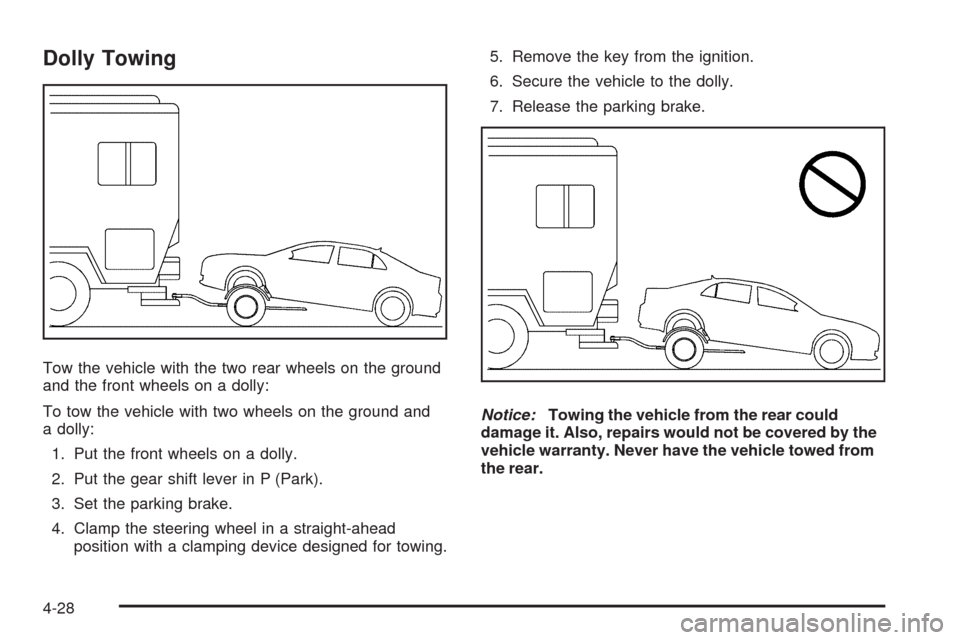
Dolly Towing
Tow the vehicle with the two rear wheels on the ground
and the front wheels on a dolly:
To tow the vehicle with two wheels on the ground and
a dolly:
1. Put the front wheels on a dolly.
2. Put the gear shift lever in P (Park).
3. Set the parking brake.
4. Clamp the steering wheel in a straight-ahead
position with a clamping device designed for towing.5. Remove the key from the ignition.
6. Secure the vehicle to the dolly.
7. Release the parking brake.
Notice:Towing the vehicle from the rear could
damage it. Also, repairs would not be covered by the
vehicle warranty. Never have the vehicle towed from
the rear.
4-28