2009 CADILLAC CTS instrument panel
[x] Cancel search: instrument panelPage 79 of 490

Adding Equipment to Your
Airbag-Equipped Vehicle
Q:Is there anything I might add to or change
about the vehicle that could keep the airbags
from working properly?
A:Yes. If you add things that change the vehicle’s
frame, bumper system, height, front end or side
sheet metal, they may keep the airbag system from
working properly. Changing or moving any parts
of the front seats, safety belts, the airbag sensing
and diagnostic module, steering wheel, instrument
panel, roof-rail airbag modules, ceiling headliner
or pillar garnish trim, front sensors, or airbag wiring
can affect the operation of the airbag system.
In addition, the vehicle has a passenger sensing
system for the right front passenger position, which
includes sensors that are part of the passenger’s
seat. The passenger sensing system may not
operate properly if the original seat trim is replaced
with non-GM covers, upholstery or trim, or with
GM covers, upholstery or trim designed for a
different vehicle. Any object, such as an aftermarket
seat heater or a comfort enhancing pad or device,
installed under or on top of the seat fabric, could alsointerfere with the operation of the passenger sensing
system. This could either prevent proper deployment
of the passenger airbag(s) or prevent the passenger
sensing system from properly turning off the
passenger airbag(s). SeePassenger Sensing
System on page 1-67.
If you have any questions, call Customer
Assistance. The phone numbers and addresses
for Customer Assistance are in Step Two of
the Customer Satisfaction Procedure in this manual.
SeeCustomer Satisfaction Procedure on page 7-2.
Q:Because I have a disability, I have to get
my vehicle modied. How can I nd out whether
this will affect my airbag system?
A:If you have questions, call Customer Assistance.
The phone numbers and addresses for Customer
Assistance are in Step Two of the Customer
Satisfaction Procedure in this manual. See
Customer Satisfaction Procedure on page 7-2.
In addition, your dealer/retailer and the service
manual have information about the location of the
airbag sensors, sensing and diagnostic module and
airbag wiring.
1-73
Page 84 of 490

Object Detection Systems...............................2-54
Ultrasonic Rear Parking Assist (URPA)............2-54
OnStar
®System.............................................2-56
Universal Home Remote System......................2-60
Universal Home Remote System Operation
(With One Triangular LED)...........................2-60Storage Areas................................................2-64
Glove Box...................................................2-64
Cupholders..................................................2-64
Instrument Panel Storage...............................2-65
Center Console Storage.................................2-65
Convenience Net..........................................2-65
Sunroof.........................................................2-65
Section 2 Features and Controls
2-2
Page 101 of 490

Lockout Protection
If the power door lock switch is pressed when the key is
in the ignition and a door is open, all the doors will
lock and only the driver door will unlock. If the doors are
closed, they can be locked by using the Remote
Keyless Entry (RKE) transmitter. Be sure to remove the
key from the ignition when locking the vehicle.
This feature can be overridden by pressing the lock
button on the RKE transmitter or by pressing the power
lock switch a second time.
On vehicles with a Keyless Access System, the system
can be programmed to alert you when all the doors
are closed and a transmitter has been left inside of the
vehicle. SeeDIC Vehicle Customization on page 3-72
for more information.
Trunk
{CAUTION:
Exhaust gases may enter the vehicle if it is driven
with the liftgate, trunk/hatch open, or with any
objects that pass through the seal between the
body and the trunk/hatch or liftgate. Engine exhaust
contains Carbon Monoxide (CO) which cannot be
seen or smelled. It can cause unconsciousness and
even death.
If the vehicle must be driven with the liftgate, or
trunk/hatch open:
Close all of the windows
Fully open the air outlets on or under the
instrument panel
Adjust the Climate Control system to a setting
that brings in only outside air and set the fan
speed to the highest setting. See Climate
Control System in the Index.
If the vehicle is equipped with a power liftgate,
disable the power liftgate function.
For more information about carbon monoxide, see
Engine ExhaustEngine Exhaust on page 2-50.
2-19
Page 108 of 490

Theft-Deterrent Systems
Vehicle theft is big business, especially in some cities.
This vehicle has theft-deterrent features, however,
they do not make it impossible to steal.
Theft-Deterrent System
If your vehicle has this
feature, the security light is
located on the instrument
panel cluster.
To activate the theft-deterrent system:
1. Open the door.
2. Lock the door with the transmitter. The security light
should come on and stay on.
3. Close all doors. The security light should go off
after about 30 seconds. The alarm is not armed
until the security light goes off.If a locked door or trunk is opened without using the
key in the driver’s door key cylinder or the transmitter, a
ten second pre-alarm will occur. The horn will chirp and
the lights will ash. If the key is not placed in the ignition
and turned to START or the door is not unlocked by
pressing the unlock button on the transmitter during the
ten second pre-alarm, the alarm will go off. Your vehicle’s
headlamps will ash and the horn will sound for about
30 seconds, then will turn off to save the battery power.
The theft-deterrent system will not activate if the doors
are locked with the vehicle’s key or the manual door lock.
It activates only if the power door lock switch is used
while the door is open or with the transmitter. You should
also remember that you can start your vehicle with the
correct ignition key if the alarm has been set off.
To avoid setting off the alarm by accident:
Lock the vehicle with the door key after the doors
are closed.
Always unlock a door with the transmitter. Unlocking
a door any other way will set off the alarm.
If you set off the alarm by accident, turn off the alarm by
pressing the unlock button on the transmitter. The alarm
will not stop if you try to unlock a door any other way.
2-26
Page 120 of 490

M (Manual Mode):This position allows the driver to
select the range of gears appropriate for current driving
conditions. If the vehicle has this feature, see Driver
Shift Control (DSC) later in this section.
Notice:Spinning the tires or holding the vehicle in
one place on a hill using only the accelerator pedal
may damage the transmission. If you are stuck, do
not spin the tires. When stopping on a hill, use the
brakes to hold the vehicle in place.
Driver Shift Control (DSC)
Notice:If you drive the vehicle at high RPMs without
upshifting while using Driver Shift Control (DSC), you
could damage the vehicle. Always upshift when
necessary while using DSC.
Driver Shift Control (DSC) allows you to shift an
automatic transmission similar to a manual transmission.
To use the DSC feature:
1. Move the shift lever to the right from D (Drive) to
M (Manual Mode).
Once in M (Manual Mode), if you do not move the
shift lever forward or rearward, the vehicle will be in
sport mode. When you are in sport mode the vehicle
will still shift automatically. The transmission may
remain in a gear longer than it would in the normal
driving mode based on braking, throttle input, and
vehicle lateral acceleration.SPORT MODE will be displayed in the DIC
momentarily. The vehicle will remain in sport mode
if the shift lever is not moved. Sport mode will
shift automatically but remain in a gear longer then
it would in normal driving mode based on braking
and acceleration.
2. Press the shift lever forward to upshift or rearward
to downshift.
The tachometer display on the instrument panel cluster
will show which gear the vehicle is in. The number
indicates the requested gear range when moving the
shift lever forward or rearward. SeeSpeedometer and
Odometer on page 3-33for more information on the
odometer.
2-38
Page 121 of 490

CTS-V vehicles use tracer lights around the outside of the
tachometer as a performance up-shift light. These tracers
ash to indicate when to shift to the next higher gear to
avoid the engine speed limit. SeeTachometer on
page 3-34for more information.
While using the DSC feature, the vehicle will have rmer,
quicker shifting. You can use this for sport driving or when
climbing or descending hills, to stay in gear longer, or to
down shift for more power or engine braking.
The transmission will only allow you to shift into
gears appropriate for the vehicle speed and engine
Revolutions Per Minute (RPM). The transmission will
not automatically shift to the next lower gear if the
engine RPM is too high.
If shifting is prevented for any reason, the currently
selected gear will ash multiple times, indicating that
the transmission has not shifted gears.
While in the DSC mode, the CTS automatic transmission
will automatically downshift when the vehicle comes
to a stop. This will allow for more power during take-off.
The CTS-V automatic transmission will not automatically
downshift on hard acceleration when in DSC mode.
When accelerating your vehicle from a stop in snowy and
icy conditions, you may want to shift into second gear.
A higher gear ratio allows you to gain more traction on
slippery surfaces.Tap Shift
To use Tap Shift, the shift lever must be in Manual
Mode. Vehicles with this feature have switches on the
back of the steering wheel. Tap the left switch to
downshift, and the right switch to upshift.
The tachometer display on the instrument panel cluster
will show which gear the vehicle is in and a number
indicating the requested gear range when moving the
shift lever forward or rearward. SeeSpeedometer and
Odometer on page 3-33for more information on the
odometer.
2-39
Page 124 of 490

Up-Shift Light
CTS vehicles with a manual
transmission have an
economy up-shift light on
the instrument panel. This
light shows when to shift to
the next higher gear for the
best fuel economy.
When this light comes on, you can shift to the next
higher gear if weather, road, and traffic conditions allow.
For the best fuel economy, accelerate slowly and
shift when the light comes on.
While you accelerate, it is normal for the light to go on
and off if you quickly change the position of the
accelerator. Ignore the light when you downshift.
CTS-V vehicles use tracer lights around the outside of
the tachometer as a performance up-shift light.
These tracers ash to indicate when to shift to the next
higher gear to avoid the engine speed limit. See
Tachometer on page 3-34for more information.
Skip Shift (CTS-V)
Under light acceleration, the transmission will only
allow you to shift from 1 (First) to 4 (Fourth). Shifts from
1 (First) to 2 (Second) or 3 (Third) are not allowed.
This helps improve fuel mileage.
Under harder acceleration, Skip Shift is disabled, and
the driver has all gears available.
Parking Brake
The parking brake pedal is
located on the lower portion
of the instrument panel to
the left of the steering
wheel.
To set the parking brake, hold the brake pedal down,
then push the parking brake pedal down.
2-42
Page 125 of 490
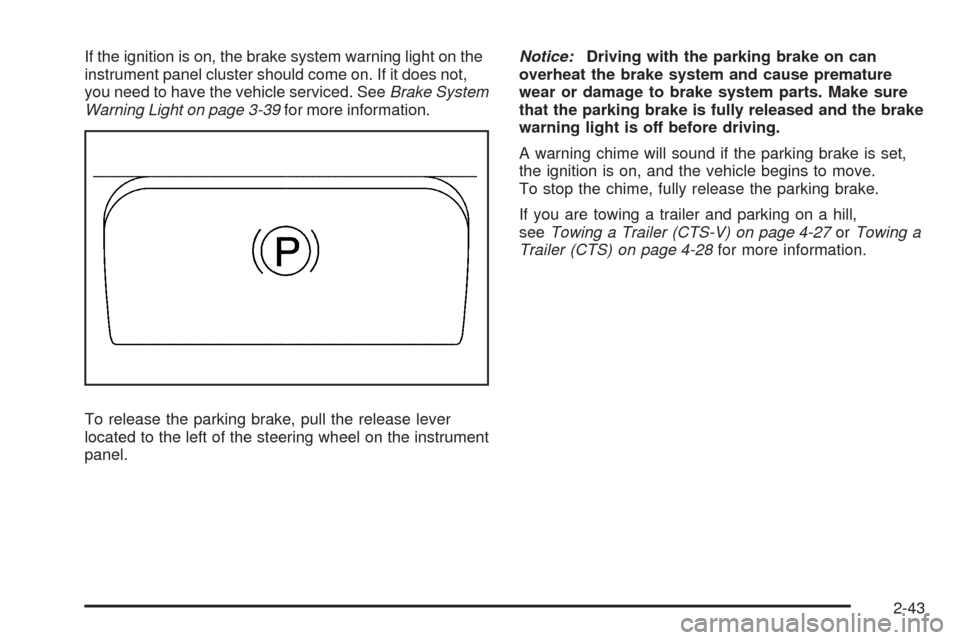
If the ignition is on, the brake system warning light on the
instrument panel cluster should come on. If it does not,
you need to have the vehicle serviced. SeeBrake System
Warning Light on page 3-39for more information.
To release the parking brake, pull the release lever
located to the left of the steering wheel on the instrument
panel.Notice:Driving with the parking brake on can
overheat the brake system and cause premature
wear or damage to brake system parts. Make sure
that the parking brake is fully released and the brake
warning light is off before driving.
A warning chime will sound if the parking brake is set,
the ignition is on, and the vehicle begins to move.
To stop the chime, fully release the parking brake.
If you are towing a trailer and parking on a hill,
seeTowing a Trailer (CTS-V) on page 4-27orTowing a
Trailer (CTS) on page 4-28for more information.
2-43