2009 CADILLAC CTS instrument panel
[x] Cancel search: instrument panelPage 179 of 490

Instrument Panel Cluster
The instrument panel cluster is designed to indicate how the vehicle is running. It shows how fast the vehicle is
going, how much fuel the vehicle has used and many of the other things needed to drive safely and economically.
United States Automatic Transmission Cluster shown, Manual and Canada similar
3-31
Page 183 of 490

Safety Belt Reminders
Safety Belt Reminder Light
When the engine is started, a chime sounds for
several seconds to remind people to fasten their safety
belts, unless the driver’s safety belt is already buckled.
The safety belt light comes
on and stays on for
several seconds, then
ashes for several more.
This chime and light are repeated if the driver remains
unbuckled and the vehicle is in motion. If the driver’s
safety belt is already buckled, neither the chime nor the
light comes on.
Passenger Safety Belt Reminder Light
Several seconds after the engine is started, a
chime sounds for several seconds to remind the front
passenger to buckle their safety belt. This only occurs
if the passenger airbag is enabled. SeePassenger
Sensing System on page 1-67for more information.
The passenger safety belt light, located on the instrument
panel, comes on and stays on for several seconds and
then ashes for several more.
This chime and light are
repeated if the passenger
remains unbuckled and
the vehicle is in motion.
If the passenger safety belt is buckled, neither the
chime nor the light comes on.
The front passenger safety belt warning light and chime
may turn on if an object is put on the seat such as a
briefcase, handbag, or grocery bag. To turn off the
warning light and/or chime, remove the object from the
seat or buckle the safety belt.
3-35
Page 185 of 490
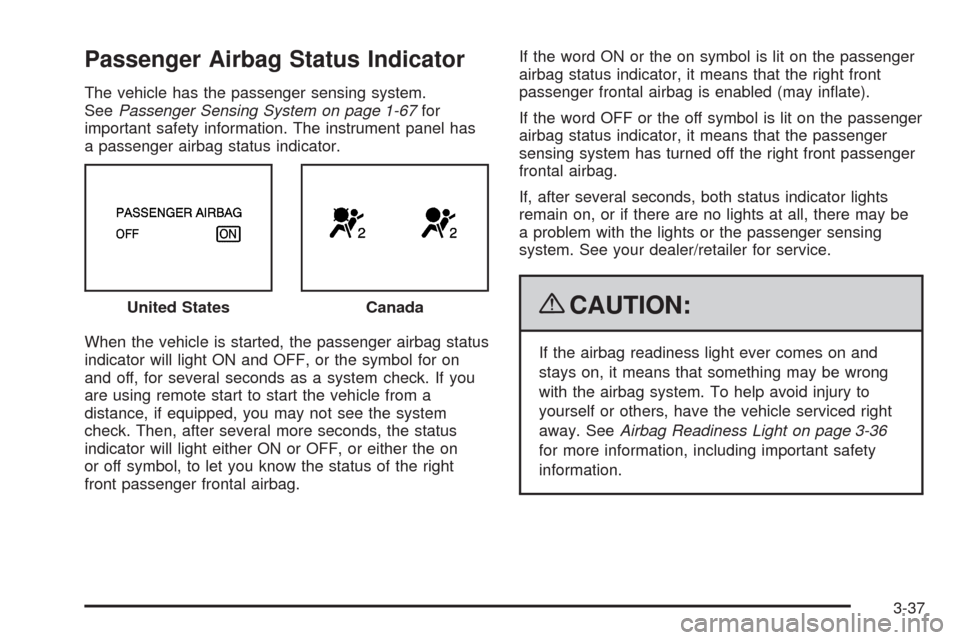
Passenger Airbag Status Indicator
The vehicle has the passenger sensing system.
SeePassenger Sensing System on page 1-67for
important safety information. The instrument panel has
a passenger airbag status indicator.
When the vehicle is started, the passenger airbag status
indicator will light ON and OFF, or the symbol for on
and off, for several seconds as a system check. If you
are using remote start to start the vehicle from a
distance, if equipped, you may not see the system
check. Then, after several more seconds, the status
indicator will light either ON or OFF, or either the on
or off symbol, to let you know the status of the right
front passenger frontal airbag.If the word ON or the on symbol is lit on the passenger
airbag status indicator, it means that the right front
passenger frontal airbag is enabled (may inate).
If the word OFF or the off symbol is lit on the passenger
airbag status indicator, it means that the passenger
sensing system has turned off the right front passenger
frontal airbag.
If, after several seconds, both status indicator lights
remain on, or if there are no lights at all, there may be
a problem with the lights or the passenger sensing
system. See your dealer/retailer for service.
{CAUTION:
If the airbag readiness light ever comes on and
stays on, it means that something may be wrong
with the airbag system. To help avoid injury to
yourself or others, have the vehicle serviced right
away. SeeAirbag Readiness Light on page 3-36
for more information, including important safety
information. United States
Canada
3-37
Page 198 of 490

Boost Gage
For the CTS-V, this gage is located in the instrument
panel cluster.
This gage indicates positive manifold pressure which is
the induction air pressure level in the intake manifold
before it enters the combustion chamber. This gage
reads zero under light throttle before boost is generated.
This gage automatically resets to zero every time the
engine is started.
Driver Information Center (DIC)
The Driver Information Center (DIC) gives you the
status of many of your vehicle’s systems. The DIC is
also used to display warning/status messages. All
messages appear in the DIC display located at the
bottom of the instrument panel cluster. The DIC buttons
are located on the instrument panel, next to the
steering wheel.
The DIC comes on when the ignition is on. After a short
delay, the DIC displays the information that was last
displayed before the engine was turned off.
The top line of the DIC display shows the DIC
information. The bottom line of the DIC display shows
the compass. The compass displays in the trip/fuel
menus and in some vehicle information menus.
If a problem is detected, a warning message appears
on the display. Take any message that appears on
the display seriously and remember that clearing
the message only makes the message disappear,
and does not correct the problem. United States
Canada
3-50
Page 199 of 490

DIC Operation and Displays
The Driver Information
Center (DIC) has different
displays which can be
accessed by pressing the
DIC buttons located on
the instrument panel, next
to the steering wheel.
3Trip/Fuel:Press this button to scroll through the
trip and fuel displays. See “Trip/Fuel Display Menu
Items” following for more information on these displays.
TVehicle Information:Press this button to scroll
through the vehicle information displays. See “Vehicle
Information Display Menu Items” following for more
information on these displays.
UCustomization:Press this button to scroll through
each of the customization features. SeeDIC Vehicle
Customization on page 3-72for more information on the
customization features.
VSet/Reset:Press this button to reset certain DIC
features and to acknowledge DIC warning messages
and clear them from the DIC display.
yzMenu Up/Down:Press this button to scroll up
and down the menu items.
Trip/Fuel Display Menu Items
3
(Trip/Fuel):The following display menu items can
be displayed by pressing the trip/fuel button:
Odometer
This display shows the distance the vehicle has been
driven in either miles (mi) or kilometers (km).
Trip A or Trip B
These displays show the current distance traveled since
the last reset for each trip odometer in either miles (mi)
or kilometers (km). Both odometers can be used at
the same time. Each trip odometer can be reset to zero
separately by pressing and holding the set/reset button
for a few seconds while the desired trip odometer is
displayed.
3-51
Page 211 of 490

Engine Oil Low Add Oil
If the vehicle has an oil level sensor, this message
displays if the oil level in the vehicle is low. Check the
oil level and correct it as necessary. You may need to let
the vehicle cool or warm up and cycle the ignition to
be sure this message clears.
This message clears itself after 10 seconds, until the
next ignition cycle. SeeEngine Oil on page 5-18
for additional information.
Engine Overheated Idle Engine
Notice:If you drive your vehicle while the engine
is overheating, severe engine damage may occur.
If an overheat warning appears on the instrument
panel cluster and/or DIC, stop the vehicle as soon as
possible. Do not increase the engine speed above
normal idling speed. SeeEngine Overheating
on page 5-37for more information.
This message displays when the engine coolant
temperature is too hot. Stop and allow the vehicle to
idle until it cools down. SeeEngine Coolant
Temperature Warning Light on page 3-41.
SeeOverheated Engine Protection Operating Mode on
page 5-39for information on driving to a safe place
in an emergency.
Engine Power Is Reduced
This message displays when the engine power is
being reduced to protect the engine from damage.
There could be several malfunctions that might cause
this message. Reduced engine power can affect
the vehicle’s ability to accelerate. If this message is on,
but there is no reduction in performance, proceed to
your destination. The performance may be reduced the
next time the vehicle is driven. The vehicle may be
driven at a reduced speed while this message is on, but
acceleration and speed may be reduced. Anytime this
message stays on, the vehicle should be taken to
your dealer/retailer for service as soon as possible.
Fuel Level Low
This message displays when the vehicle is low on fuel.
Rell the fuel tank as soon as possible. A chime may
sound when this message displays. SeeFilling the Tank
on page 5-8.
Heated Washer Fluid Wash (Washer)
Wipes Pending
If the vehicle has this feature, this message displays
when you turn on the heated windshield washer
uid system. See “Heated Windshield Washer” under
Windshield Washer on page 3-12for more information.
3-63
Page 212 of 490

Heated Washer Fluid System Off
If the vehicle has this feature, this message displays
when you manually turn off the heated windshield
washer uid system or when the system automatically
turns off. See “Heated Windshield Washer” under
Windshield Washer on page 3-12for more information.
This message clears itself after 10 seconds.
Hood Open
This message displays when the hood is not closed
completely. Make sure that the hood is closed
completely.
Ice Possible Drive With Care
This message displays when the outside temperature is
cold enough to create icy road conditions. Adjust your
driving accordingly.
Learn Delay Active Wait XX Min
(Minutes)
If the vehicle has the keyless access system, this
message displays when matching new transmitters to
the vehicle. SeeKeyless Access System Operation
on page 2-8for more information.
Left Rear Door Open
This message displays when the driver side rear door is
not closed completely. Make sure that the door is
closed completely.
Maximum # Electronic Keys Learned
If the vehicle has the keyless access system, this
message displays when the maximum number of
transmitters have been learned. SeeKeyless Access
System Operation on page 2-8for more information.
Oil Pressure Low Stop Engine
Notice:If you drive your vehicle while the engine
oil pressure is low, severe engine damage may
occur. If a low oil pressure warning appears on the
instrument panel cluster and/or DIC, stop the
vehicle as soon as possible. Do not drive the vehicle
until the cause of the low oil pressure is corrected.
SeeEngine Oil on page 5-18for more information.
This message displays when the vehicle’s engine
oil pressure is low. The oil pressure light may also
appear on the instrument panel cluster. SeeOil
Pressure Light on page 3-46. SeeEngine Oil on
page 5-18for more information.
3-64
Page 215 of 490

Service A/C System
This message displays when the electronic sensors that
control the air conditioning and heating systems are
no longer working. Have the climate control system
serviced by your dealer/retailer if you notice a drop in
heating and air conditioning efficiency.
Service All Wheel Drive
This message displays if a problem occurs with the
All-Wheel Drive (AWD) system. The vehicle will run in
2WD. This could be caused by:
An electronics problem
An AWD system oil overheat
Worn out or overheated clutch plates
Various electrical issues
If this message appears, stop as soon as possible
and turn off the ignition for 30 seconds. Restart
the vehicle and check for the message on the DIC
display. If the message is still displayed or appears
again when you begin driving, the system needs service.
See your dealer/retailer right away.
Service Battery Charging System
This message displays when there is a problem with the
generator and battery charging systems. Driving with this
problem could drain the battery. Turn off all unnecessary
accessories. Stop and turn off the vehicle as soon as it is
safe to do so. Have the electrical system checked by your
dealer/retailer. Under certain conditions, the charging
system light may also turn on in the instrument panel
cluster. SeeCharging System Light on page 3-38for
more information.
Service Brake Assist
This message displays if there is a problem with the
brake system. The brake system warning light and the
antilock brake system (ABS) warning light may also
display on the instrument panel cluster. SeeBrake
System Warning Light on page 3-39andAntilock Brake
System (ABS) Warning Light on page 3-40for more
information. Stop as soon as possible and turn off the
vehicle. Restart the vehicle and check for the message
on the DIC display. If the message displays immediately
or again after you begin driving, the brake system
needs service. See your dealer/retailer as soon as
possible. SeeBrakes on page 5-42for more information.
3-67