2009 AUDI S6 airbag off
[x] Cancel search: airbag offPage 13 of 398

Instruments and controls
General illustration
G)
0
©
©
©
©
0
©
Power window switches ...... .... ..... .. ....... .
Door handle
Memory buttons (driver's seat)
Power locking switch .......................... .
Adjuster control for outside mirrors .. .... .... .... .
Air outlets ........ ... ...... .... ...... .... ... .. .
Light switch .... .... ........... .... .... .... ... .
Control lever for :
- Turn signal and high beam
- Lane assist .... .... ... .... .... .... .......... .
Control lever for:
- Cruise control
- Adaptive Cruise Contro l .......... ...... .... .. .
@ Multifunction steering wheel with:
- Horn
55
84
49
76
108
63
67
143
124
127
- Driver's airbag . . . . . . . . . . . . . . . . . . . . . . . . . . . . . . . 219
- Shift buttons ................................ 160, 167
@
@
@
@
-Button for steering wheel heating
Instrument cluster ... .... ... .... ...... ......... .
Switches for
- Windshield wiper/washer ..... ...... ..... .. ... .
- Trip computer ..... .. ..... ... .... ...... ... .. .
Steering lock/ignition/starter switch
Buttons for
- Reset button for trip odometer ... .. .... .... ... .
!CHECK] .. .... ....... .... .... ....... .... ... .
Instrument lighting .... ... .... .... ... ..... ... .
Controls and equip
ment
1 1 1
12
71
38
116
14
15
16
Instruments and controls
@ MMI Display, see separate manual
@ Depending on equipment, switches for:
- Electronic Stabilization Program (ESP)
- Side assist .. ... ..... .. .. .. .... .... .... ... ... .
- Emergency flashers .......................... .
- Power sunshade .... .... .... .... ... .... ..... . .
- Valet key function .... ....... ...... .... ...... .
@ Buttons for
- Switching MMI display on/off
- Unlocking glove compartment
@ Glove compartment ........... .... .... ......... .
@ Front passenger's airbag .. .... .... ... .. ...... .. .
@) Climate controls ......... .. .. .... .... .... .. . .. . .
@ Ashtray ..... .... .... ....... .... .... .... ... ... .
@ Shift lever for automatic transmission
- 6-speed automatic transmission .. .. .... .... ... .
I . .
® -
mu t1tron1c ... .... .... .... .... .... ... ...... .
@ MMI Terminal, see separate manual
@ Storage with cupholder . ........ ... .. .... .... ... .
@ Electromechanical parking brake ... .... .... .... .. .
@ ISTART ]-~STOP ] button .. ... ..... ... .... .... ... .
@ Adjustable steering wheel, depending on equipment:
- mechanica l .. .. .... .... ..... .. .... ..... ... .. .
- electrica l ... ...... .... ... .. .... .... ...... ... .
@) Data Link Connector for On Board Diagnostics (OBD II)
@ Hood release . .... .... ...... ... .. .... .... ... ... .
@) Switch for
unlocking the fuel filler door ..... ...... .... ... .
- unlocking the trunk lid . .... .... .... .... ... ... .
I • •
262
146 67
70
44
99
99
219
104
96
155
163
95
121
118
114
114
27
300
297
50 •
Page 18 of 398
Inst rum ent s a nd warning /indi cato r li ghts
Instrument cluster illumination
The basic brightness of the illumination for the instru
ments, the center console and the display can be
adjusted .
Fig. 6 Instrume nt
c lu ster illu minat io n
Press the"+" button to increase the brightness during the
hours of darkness.
- Press the" -" button to decrease the brightness during the
hours of darkness.
A light sensor in the instrument cluster controls the illumination for
the instrument cluster, the center console and the displays. In a
bright environment, using the buttons to change the brightness has
no effect.
[ i J Tip s
The illumination for the instrument cluster lights up whenever you
switch on the ignition with the vehicle headlights off . As the
daylight fades, the instrument cluster illumination likewise dims
automatically and will go out completely when the ou ts ide light is
very low. This feature is meant to remind you to switch on the head
lights when outside light conditions become poor .•
Warning/indicator lights
Overview
The warning/indicator lights indicate different functi ons
or a possible malfunction.
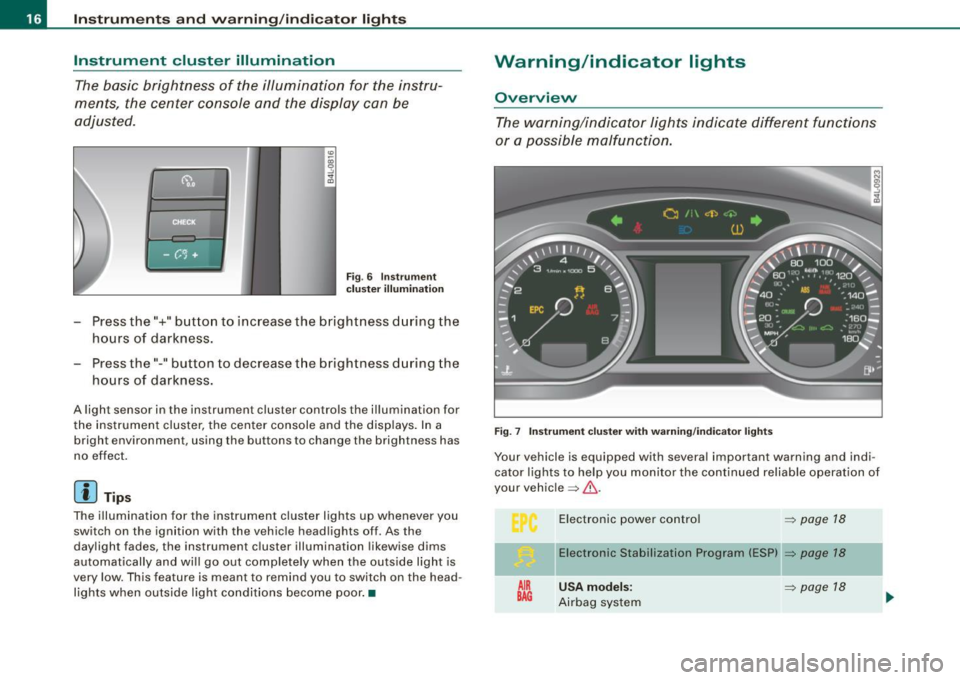
F ig. 7 Instr um ent clu ste r wi th w arnin g/indica tor lights
Your vehicle is equipped with several important warning and indi
cator lights to he lp you monitor the continued reliab le operation of
your vehic le => & .
AIR
BAG
E lectronic power contro l
=> page 18
Electronic Stabili zation Program (ES P) => page 18
U SA model s: => page 18
Airbag system
Page 19 of 398

.o. Canada models: ,;:;..{/
Airbag system
Tire pressure monitoring system
-
¢ Left turn signal
Malfunction Indicator Lamp (MIU
/: Lane assist (system is ready)
Lane assist (system is not ready)
~
Safety belt
Adaptive Air Suspension*
-
~ Adaptive Air Suspension*
D High beam
--
Q Right turn signal
CRUISE
USA models:
Cruise control activated
A~ Canada models:
Cruise control activated
USA models:
Anti-lock brake system (ABS) defec -
tive
Canada models:
Anti- lock brake system (ABS) defec-
tive
Controls and equip
ment
=> page 18
=> page 19
=> page 19
=> page 19
=> page 19
=> page 19
=> page 19
=> page20
=> page20
=> page20
=> page 19
=> page20
=> page 20
=> page 21
=> page 21
-
-
-
Instruments and warning/indicator lights
PARX USA models : => page 21
BRAKE Electromechanical parking brake
(® ) Canada models: => page 21
Electromechanical parking brake
BRAKE
USA models: => page 22
Brake malfunction
((D ) Canada models: => page22
Brake malfunction
Vehicles with the Adaptive Cruise Control* have the following addi
tional check lamps:
11,,C::, Open road
C::, 1111 C::, Driving in traffic
c::, 111 1 c::, Request for driver to
assume control
& WARNING
=> page 135
=> page 135
~ page 135
• Failure to heed warning lights and other important vehicle
information may result in serious personal injury or vehicle
damage .
• Whenever stalled or stopped for repair, move the vehicle a safe
distance off the road, stop the engine, and turn on the emergency
flasher
=> page 67.
• The engine compartment of any motor vehicle is a potentially
hazardous area. Before you check anything in the engine compart
ment, stop the engine and let it cool down . Always exercise
extreme caution when working under the hood
=> page 293,
uEngine compartment". .,,
I • •
Page 20 of 398
![AUDI S6 2009 Owners Manual Inst rum ents and w arnin g/indi cat or li ghts
[ i ] Tip s
Many functions are mon itored by the Auto -Check system
=> page 28. Malfunctions or faults wil l be identified either wit](/manual-img/6/57595/w960_57595-19.png "AUDI S6 2009 Owners Manual Inst rum ents and w arnin g/indi cat or li ghts
[ i ] Tip s
Many functions are mon itored by the Auto -Check system
=> page 28. Malfunctions or faults wil l be identified either wit")
Inst rum ents and w arnin g/indi cat or li ghts
[ i ] Tip s
Many functions are mon itored by the Auto -Check system
=> page 28. Malfunctions or faults wil l be identified either with a red
symbol (priority 1 - Danger!) o r w ith a yel low sy mbol (priority 2 -
Warning). •
Electronic power control I'
This warning/indicator light monitors the electronic
power control.
The warning/indicator light (Electronic Power Control) i llumi -
nates when you turn on the ignition as a function check.
[ i ] Tip s
If this warning/indicator light illuminates whi le you are driv ing, then
there is a malfunction in the engine electronics . Have the malfunc
tion corrected as soon as possible by your authorized Audi dea ler or
qualified repair facility. •
Electronic stabilization program (ESP) at.
This warning/indicator light monitors the electronic stabi
lization program .
The warning/indicator light has the following functions:
• It blinks while you are dr iving when the ESP is working.
• It illuminates when you sw itch on the ignition for approximately
2 seconds as a function check.
• It illuminates when there is a malfunction in the ESP .
• It illuminates when ESP or ASR (Anti -Slip Regu lation) is deacti
vated. • I
t illuminates if there is a malfunction in the ABS, since the ESP
is part of the ABS sys tem.
If the battery terminals were disconnected and re-connected , the
vehic le was jump started or the battery is very weak, the ESP sensor
system goes through a learning process for the first few yards. The
warning/indicator light illuminates. The warning/indicator light
goes out as soon as the learning process is complete .
I f the ESP warning/indicator light illuminates and stays on after you
have started the engine, this may mean that the control system has
temporarily switched off the ESP . If this is case, you can reactivate
the ESP by turning the ignition off and then on again . The
warning/indicator light should go out to show that the system is
fully functional again.
For more information about the ESP=>
page 262. •
Airbag system
~ (USA models) / !lr (Canada models)
This warning/indicator light monitors the airbag and the
pretensioner systems.
The ~ (USA models) IJ.!r (Canada mode ls) warning light illuminates
for a few seconds each time you switch on the ignition .
If the ~ (USA mode ls)
tJ.! r (Canada models) warning light does not
go out, or if it i lluminates whi le you are driving, or if it starts to b link,
t hen there is a malfunction somewhere in the system. If the light
does not il luminate when you switch on the ignition, this a lso
means there is a malfunction .
& WARNING
If you have a m alfuncti on in the airb ag sy ste m, cont act your autho
ri zed A udi dealer imm ed ia te ly. Othe rwise the airb ag or the belt
preten sioner may not work p roperly in an accident. •
Page 48 of 398
Opening and closing
Unlo cking and lo cking w ith Convenie nce key *
On vehic les which a re equ ipped with the
C onveni enc e key* authori
zation system, the doors are un locked
without a key by means of a
proximity sensor in the doo r handle. The doors are simi larly locked
without a key using the locking button. Each door has a proximity
senso r and a locking button.
Powe r side do or clo ser*
The vehicle is equipped with a power side door closer. When closing a door, you simp ly need to gent ly push on the door. The door will
then automatica lly close by itse lf =>
page 48 .
Autom atic locking
The automatic locking feature locks a ll the vehic le doors an d the
rear lid when you drive faster than 9 mph (15 km/hl. This function
can be turned on and off in the MMI
Central locking Menu
=>
page 48.
You can unlock the vehicle from the inside by :
• removing the key from the ignition swi tch (the veh icle will auto
matically un lock itself) or
• pressing the unlock par t of the power lock switch
(l::!l or
pu lling the door handle (twice to open the rear doors).
& WARNING
• When you lock you r vehi cle from out side , nobody -espe cially
c hildren -should remain in side the veh icle . Remember , when you
lock the vehi cle from the outside the window s cannot be opened
from the inside .
• When you leave the vehi cle , alwa ys remove the ignition k ey and
t a ke it with you . Thi s will prevent pa ssenger s {children , for
e x ample ) from a ccidentally bei ng locked in the vehi cle should they
accidentally pre ss the p ower locking switch in the front doo rs.
& WARNING (continu ed )
• Do not leave children in side the vehicle un supervised . In an
emerg ency it would be impos sible to open th e door s from the
outside witho ut the key.
[ i ] Tips
• I n the event of a crash with airbag deployment all locked doors
wi ll be automat ically un locked to give access to the vehic le occu
pants from the outside.
• If the power locking system shou ld ma lfunction, you can lock
each door individually using the vehicle key=>
page 50.
• If the power locking system shou ld fail, you can still open the
fuel tank flap in an emergency=>
page 299.
• You are well advised not to keep valuables inside an unattended
vehic le, visib le or not . Even a p roperly locked vehi cle cannot p rovide
the secur ity of a safe. •
Unlocking and locking the vehicle with the
remote control
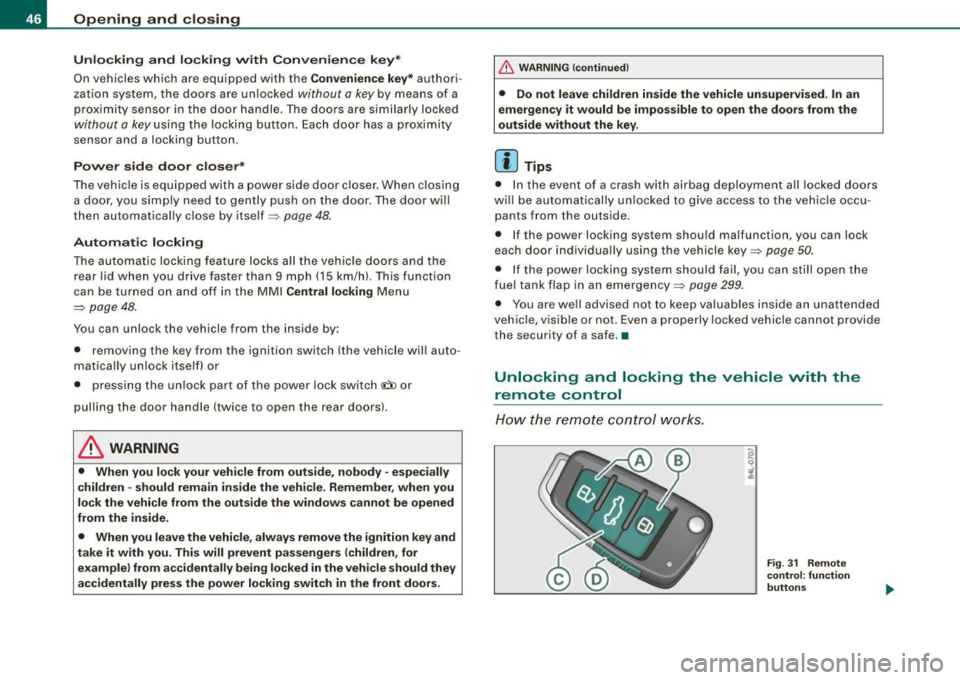
How the remo te control works.
Fig . 31 Rem ote
control : fun ctio n
butt on s
Page 69 of 398

Emergency flasher ~
The emergency flasher makes other motorists aware that
you or your vehicle are in an emergency situation.
~ -.:.i.t'
Fig . 56 Cente r
conso le: emergency
f lashe r swi tc h
- Press the switch ~~fig . 56 to turn the emergency
flashers on or off.
When the emergency flasher is on, all four turn signals blink at the same time. The turn signal indicator lights¢¢ in the instrument
cluster, as well as the light in the emergency flasher switch~ blink
likewise.
The emergency flashers will turn on automatica lly if you are in an
accident where the airbag has deployed.
[ i ] Tip s
You should turn on the emergency flashers when:
• you are the last vehicle standing in a traffic jam so that any other
vehicles coming can see you, or when
• your vehicle has broken down or you are in an emergency situa
tion, or when
• your vehicle is being towed by a tow truck or if you are towing
another vehicle behind you .•
Con tro ls and eq uip
ment
C lea r v is ion
Turn signal ¢ ¢ and high beam ~D lever
The lever on the left side of the steering column is used to
operate the turn signals and the high beam as well as the
headlight flasher.
-"' M
-w
"' a,
Fig . 57 T urn s igna l and
high beam lever
The turn signal and high beam lever has the follow ing func
tions:
Turn si gnals ¢ ¢
- Lift the lever up all the way~ fig. 57 G) to use the right
turn signals, or push the lever down al l the way @to use
the left turn signals.
Aut o-blink
- Move the lever (up or down) just to t he point of resis
tance to use the turn signals for as long as you need
them, for example when changing lanes.
- Move the lever (up or down) just to t he point of resis
ta nce and then release it right away to make the turn
signals blink
three times. You can use this feature f or
example when changing lanes on highways.
Vehicle care I ' irechnical data
Page 82 of 398
Seats and storage
Seats and storage
General recommendations
Why is your seat adjustment so important?
The safety belts and the airbag system can only provide
maximum protection if the front seats are correctly
adjusted.
There are various ways of adjusting the front seats to provide safe
and comfortable support for the driver and the front passenger.
Adjust your seat properly so that :
• you can easily and quickly reach all the switches and controls in
the instrument panel
• your body is properly supported thus reducing physical stress
and fatigue
• the safety belts and airbag system can offer maximum protec
tion=>
page 215.
In the following sections , you will see exactly how you can best
adjust your seats.
There are special regulations and instructions for installing a child safety seat on the front passenger's seat. Always follow the informa
tion regarding child safety provided in=>
page 238, "Child Safety".
L1}. WARNING
Incorrect seating position of the driver and all other passengers
can result in serious personal injury.
• Always keep your feet on the floor when the vehicle is in motion
- never put your feet on top of the instrument panel, out of the
window or on top of the seat cushion. This applies especially to
the passengers. If your seating position is incorrect, you increase
the risk of injury in the case of sudden braking or an accident. If
& WARNING (continued)
the airbag inflates and the seating position is incorrect, this could
result in personal injury or even death.
• It is important for both the driver and front passenger to keep
a distance of at least 10 inches (25 cm) between themselves and
the steering wheel and/or instrument panel. If you're sitting any closer than this, the airbag system cannot protect you properly. In
addition, the front seats and head restraints must be adjusted to
your body height so that they can give you maximum protection.
• Always try to keep as much distance as possible between your
self and the steering wheel or instrument panel.
• Do not adjust the driver's or front passenger's seat while the
vehicle is moving. Your seat may move unexpectedly, causing
sudden loss of vehicle control and personal injury.
If you adjust
your seat while the vehicle is moving, you are out of position. •
Driver's seat
The correct seat position is important for safe and relaxed
driving.
We recommend that you adjust the driver's seat in the
following manner:
- Adjust the seat in fore and aft direction so that you can
easily push the pedals to the floor while keeping your
knees slightly bent=>&, in "Why is your seat adjustment
so important?".
Adjust the seatback so that when you sit with your back
against the seatback, you can still grasp the top of the
steering wheel. _..
Page 85 of 398
& WARNING
• Never adjust the seatback while the vehicle is moving . If you
adjust your seat while the vehicle is moving, you are out of posi
tion. Never adjust the seatback when the vehicle is moving.
• To reduce the risk of injury in the case of sudden braking or
accident, front passengers must never ride in a moving vehicle
with the seatback reclined. Safety belts and the airbag system
only offer maximum protection when the seatback is upright and
the safety belts are properly positioned on the body. The more the
seatback is reclined, the greater the risk of personal injury from an
incorrect seating position and improperly positioned safety
belts. •
Lumbar support
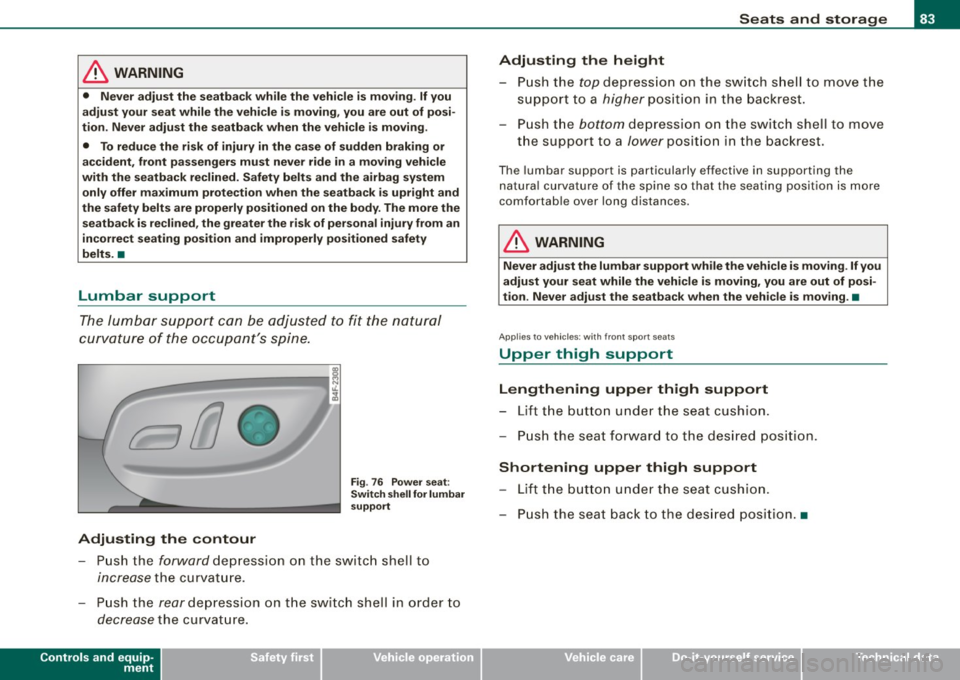
The lumbar support can be adjusted to fit the natural
curvature of the occupant's spine.
Adjusting the contour
Fig. 76 Power seat;
Switch shell for lumbar
support
- Push the forward depression on the switch shell to
increase the curvature.
- Push the
rear depression on the switch shell in order to
decrease the curvature.
Controls and equip
ment
Seats and storage
Adjusting the height
- Push the top depression on the switch shell to move the
support to a
higher position in the backrest.
- Push the
bottom depression on the switch shell to move
the support to a
lower position in the backrest.
The lumbar support is part icularly effective in supporting the
natural curvature of the spine so that the seating position is more
comfortabl e over long distances .
& WARNING
Never adjust the lumbar support while the vehicle is moving. If you
adjust your seat while the vehicle is moving, you are out of posi
tion. Never adjust the seatback when the vehicle is moving .•
Ap plies to vehi cles; with front s po rt sea ts
Upper thigh support
Lengthening upper thigh support
- Lift the button under the seat cushion.
- Push the seat forward to the desired position .
Shortening upper thigh support
-Lift the button under the seat cushion.
- Push the seat back to the desired position. •
I • •