2009 AUDI S6 ignition
[x] Cancel search: ignitionPage 44 of 398

Opening and closing
• For security reasons, replacement keys are only available from
Audi dealers. •
Master key with remote control
The remote control allows you to lock or unlock the
vehicle electronically .
Fig. 27 Fo ld -up m aste r
k ey with r emot e
c ontr ol
To fold the key out and back in place, press the release
button=> fig. 27.
The transmitter and battery are located in the head of the remote
control. The receiver is located inside the vehicle. The maximum
effective range depends on several things . Remember , if the battery
is weak, the effective range decreases .
If you need to replace the remote contro l, or if you need to have it
repaired, you must see your authorized Audi dealer . On ly then can
you use the key again.
Personalizing the master ke y
When the ignition is turned off or when the vehicle is locked , various
convenience settings are stored automatically and assigned to the
key that was used. The settings tha t ar e ass igned to the master key
are recal led automatically when the vehicle is unlocked, when the
door is opened or when the ignition is switched on . Settings are saved for the fo
llowing systems :
• Climate control
• Central locking
• Ambient lig hting
• Windows
• Acoustic Parking System*
• Seat memory *
T he
Remote control key function must be activated in the MM I
=:> page 85, so that the settings for the driver's seat (including the
settings for the steering column and exte rior mirrors) are saved on
the master key through the seat memory when the vehicle is locked,
and are set automatically when the vehicle is un locked .
[ i ] Tips
• I f the ignition is switched on, the remote c ontr ol system is deac
tivated.
• T he remote control system can be af fected by other systems
operating in the same frequency range close to the vehicle, such as
mobile telephones, television broadcasting stations, etc .
• For Declarat ion of Compliance to United States FCC and Industry
Canada regulations=:>
page 375. •
Page 46 of 398

Openin g a nd clo sin g
- Place the cover w ith the new battery on the key base and
press both parts together.
c£> For the sake of the environment
Dispose of dead batteries properly so as not to pollute the environ
men t.
[ i J Tip s
The replacement battery mus t be the same specification as the
original. •
Electronic immobilizer
The immobilizer helps to prevent unauthorized use of
your vehicle.
A computer chip inside your key automatically deactivates the e lec
tronic immobilizer when you inser t the key in the igni tion lock, or on
vehic les with Convenience key *, when the key is inside th e vehicle.
When you remove the key from the ignition lock , or on vehic les with
Conv enience key, when you r emove the key from the vehicl e, the
e lectronic immobil izer is automatically activated once again .
If an unau thorized key was used, SAFE is displayed continuous ly in
the odometer disp lay field .
& WARNING
Always take the key with you when you leave the vehicle . The key
ca n dis arm the el ectronic eng ine immobili zer and pe rm it an u nau
thori zed per son to start the engine and enable op era tion of the
v ehi cle sys tem s such as po wer w ind ow or p ower s unroof* lead ing
to seriou s per son al injur y.
[ i J T ip s
• Your engine can only be started using the factory -equipped key .
• You may not be able to start your vehicle if an ignition key of a
differen t vehicle make is also located on your set of keys.
• For Declaration of Compliance to United States FCC and Industry
Canada regulations~
page 375. •
Valet key function
The valet key function prevents unauthorized persons
from opening the glove compartment or rear lid.
Fig . 3 0 Center
cons ole: butto n fo r
val et key fu nct ion
A ctiv ating and de activating the fun ction
- Insert the master key in to the ignition loc k and switch on
the ignition .
- Press the
[VALE T) button => fig. 30 to activate/ deact ivate
the funct ion as desired. The ind icator light in the button
illuminates when the funct ion is active.
- Remove the master key from the ignition lock.
- Hand over on ly the
valet key=> page 41 , fig. 26 to the
person who will take c harge of the ve hicle.
Page 47 of 398

When the function is switched on, the buttons for opening the rear lid and glove compartment have no function. However, please note
the following exceptions :
Exceptions
If the ignition has been switched on using the master key, you can
still open the glove compartment .
As long as the ignition is switched off, you can still open the rear lid
using the rear lid button on the
master key ,c::::s. The same holds true
for using the rear lid release handle in conjunction with the Conve nience key*.
For this reason, be sure to only hand over the
valet key to the person
who will take charge of your vehicle.
[ i] Tips
Be sure to activate the function before handing over the valet key to
someone else. The valet key only fits the lock in the driver's door and
the ignition lock. •
Power locking system
General description
The power locking system locks or unlocks all doors and
the rear lid simultaneously .
The power locking system in your vehicle incorporates the following
functions:
• Central locking function
• Selective unlock feature=>
page 48
• Remote control feature=> page 42
• Convenience key*=> page 52
• Anti-theft alarm system=> page 54
Controls and equip
ment
Opening and closing
All the doors and the rear lid are locked by the central locking
system when you lock the vehicle. You can set whether generally
only the driver's door or all doors and the rear lid should be
unlocked when you open the vehicle in the MMI menu
Central
locking
to suit your individual desires=> page 48.
Unlocking the vehicle
You can unlock the vehicle from outside either by using the remote
control
or by inserting and turning the key in the driver's door lock.
When you
unlock your vehicle:
• The anti -theft alarm system is deactivated briefly .
• The vehicle interior lights illuminate for approximately 30
seconds.
• All turn signal lights will flash twice when the car is unlocked .
• After unlocking the vehicle, you have 60 seconds to open a door
or the rear lid. Aft er 60 seconds, the vehicle automatically locks and
the anti-theft alarm system activates again.
The rear lid can be locked or unlocked either by using the remote
control
or by inserting and turning the key in the driver's door lock.
Unlocking the vehicle with the remote control will only
unlock the
rear lid, to
open it. the lid handle needs to be pressed.
Locking the vehicle
You can lock the vehicle from outside either by using the remote
control
or by inserting and turning the key in the drivers's door lock.
When you
lock the vehicle :
• All doors and the rear lid are locked .
• All turn signal lights will flash once when the car is locked .
• The anti-theft alarm system is activated . The horn of the anti
theft alarm system will sound and the anti -theft alarm system readi
ness light, located in the upper part of the driver's door panel, will
start to blink .
• The vehicle interior lights turn off.
I • •
Page 48 of 398
Opening and closing
Unlo cking and lo cking w ith Convenie nce key *
On vehic les which a re equ ipped with the
C onveni enc e key* authori
zation system, the doors are un locked
without a key by means of a
proximity sensor in the doo r handle. The doors are simi larly locked
without a key using the locking button. Each door has a proximity
senso r and a locking button.
Powe r side do or clo ser*
The vehicle is equipped with a power side door closer. When closing a door, you simp ly need to gent ly push on the door. The door will
then automatica lly close by itse lf =>
page 48 .
Autom atic locking
The automatic locking feature locks a ll the vehic le doors an d the
rear lid when you drive faster than 9 mph (15 km/hl. This function
can be turned on and off in the MMI
Central locking Menu
=>
page 48.
You can unlock the vehicle from the inside by :
• removing the key from the ignition swi tch (the veh icle will auto
matically un lock itself) or
• pressing the unlock par t of the power lock switch
(l::!l or
pu lling the door handle (twice to open the rear doors).
& WARNING
• When you lock you r vehi cle from out side , nobody -espe cially
c hildren -should remain in side the veh icle . Remember , when you
lock the vehi cle from the outside the window s cannot be opened
from the inside .
• When you leave the vehi cle , alwa ys remove the ignition k ey and
t a ke it with you . Thi s will prevent pa ssenger s {children , for
e x ample ) from a ccidentally bei ng locked in the vehi cle should they
accidentally pre ss the p ower locking switch in the front doo rs.
& WARNING (continu ed )
• Do not leave children in side the vehicle un supervised . In an
emerg ency it would be impos sible to open th e door s from the
outside witho ut the key.
[ i ] Tips
• I n the event of a crash with airbag deployment all locked doors
wi ll be automat ically un locked to give access to the vehic le occu
pants from the outside.
• If the power locking system shou ld ma lfunction, you can lock
each door individually using the vehicle key=>
page 50.
• If the power locking system shou ld fail, you can still open the
fuel tank flap in an emergency=>
page 299.
• You are well advised not to keep valuables inside an unattended
vehic le, visib le or not . Even a p roperly locked vehi cle cannot p rovide
the secur ity of a safe. •
Unlocking and locking the vehicle with the
remote control
How the remo te control works.
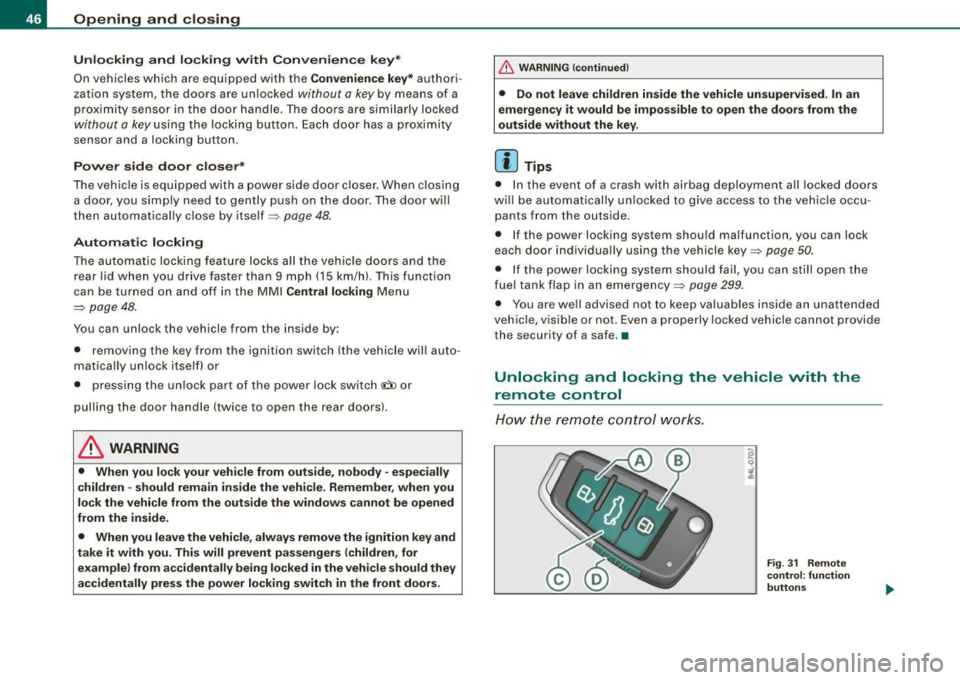
Fig . 31 Rem ote
control : fun ctio n
butt on s
Page 52 of 398
Opening and closing
& WARNING
• If you use the power locking switch with the doors closed,
remember that all the vehicle doors will lock.
• Locking doors from the inside can help prevent inadvertent
door opening during an accident and can also prevent unwanted
entry from the outside. Locked doors can, however, delay assis
tance to vehicle occupants and hold up rescue efforts from the outside in an accident or other emergency . •
Emergency locking
If the central locking system fails (power supply), each
door has to be locked separately.
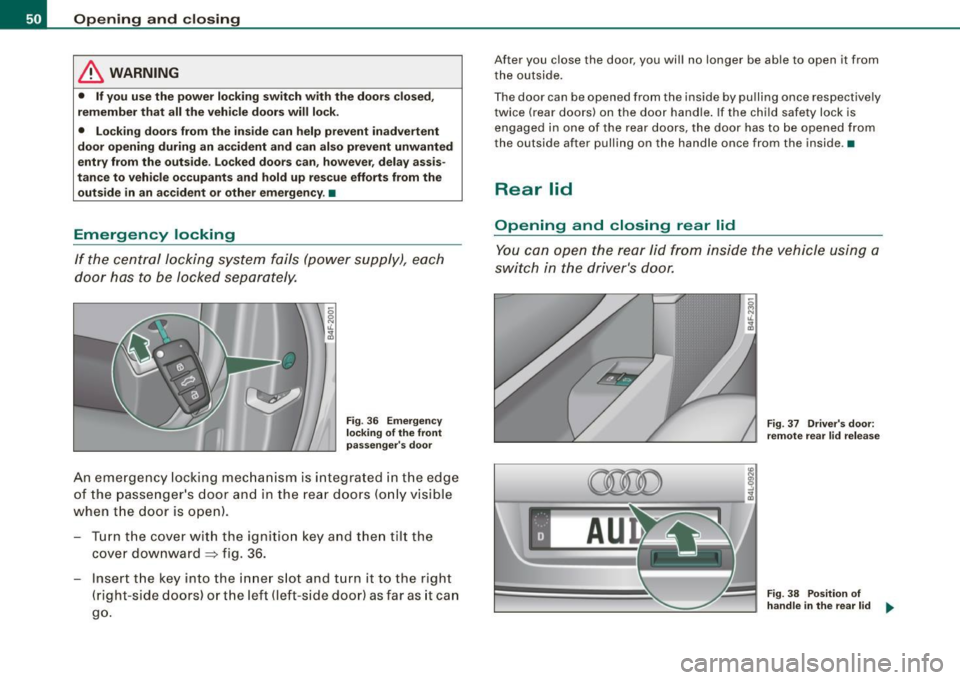
Fig. 36 Emergency
locking of the front
passenger's door
An emergency locking mechanism is integrated in the edge
of the passenger's door and in the rear doors (only visible
when the door is open) .
- Turn the cover with the ignition key and then tilt the
cover downward
~ fig. 36.
Insert the key into the inner slot and turn it to the right
(right-side doors) or the left (left-side door) as far as it can
go.
After you close the door, you will no longer be able to open it from
the outside.
The door can be opened from the inside by pulling once respectively
twice (rear doors) on the door handle. If the child safety lock is
engaged in one of the rear doors, the door has to be opened from
the outside after pulling on the handle once from the inside .•
Rear lid
Opening and closing rear lid
You can open the rear lid from inside the vehicle using a
switch in the driver's door.
Fig . 37 Driver's door:
remote rear lid release
Fig. 38 Position of
handle in the rear lid -.,,
Page 53 of 398

Opening the rear lid
- Press the center button c::5 on the master key or pull the
release button
c::5 in the driver's door=> page 50, fig. 37.
The rear lid is unlocked and opens.
Closing the rear lid
- Pull the rear lid down and allow it to drop gently into the
latch ~& -
& WARNING
• After closing the rear lid, always pull up on it to make sure that
it is properly closed. Otherwise it could open suddenly when the
vehicle is moving.
• To help prevent poisonous exhaust gas from being drawn into
the vehicle, always keep the rear lid closed while driving. Never
transport objects larger than those which fit completely into the luggage area, because then the rear lid cannot be fully closed.
• Never leave your vehicle unattended especially with the rear lid
left open. A child could crawl into the car through the luggage
compartment and pull the lid shut, becoming trapped and unable
to get out. To reduce the risk of personal injury, never let children
play in or around your vehicle. Always keep the rear lid as well as
the vehicle doors closed when not in use.
• Always ensure that no one is within range of the rear lid when
it is moving, in particular close to the hinges -fingers or hands can
be pinched.
[ i] Tips
• If the rear lid is open or not properly closed when the ignition is
turned on, the door and rear lid warning~
page 25 appears in the
instrument cluster display.
• Should you not be able to open the rear lid as described, make
sure the valet key function is not activated~
page 44.
Contro ls and eq uip
ment
Opening and closing
• If the central locking system fails (power supply), you can also
open the rear lid using the trunk escape handle from the inside
~ page 342. •
Child safety lock
Power child safety lock for the rear doors t
The power child safety lock prevents the rear doors from
being opened from the inside.
Fig. 39 Section from
driver's door: controls
The rear doors are equipped with a power child safety lock.
It is operated with the two safety buttons(!) in the driver's
door ~ fig. 39.
- Press the left and/or right safety button to disable the
rear power window(sl and prevent the respective rear
door from being opened from the inside. The LED in the
button will light up when the child safety lock is turned
on.
- Press the illuminated button again to turn the child
safety features
off.
Vehicle care I I irechnical data
Page 54 of 398

Openin g a nd clo sin g
When the chi ld safety lock is activated, the interior door opening
lever is inoperative; the door can only be opened from the outside .
In addition, the window regulator for that door is a lso inoperative
when the child safety lock is activated.
[ i ] Tips
• In order to activate the child safety lock on the left and the right
side, you have to press the two safety buttons in succession .
• Make certain that the chec k light comes on in the corresponding
safety switch when the child safe ty lock is activated .•
Convenience key
A pplies to vehicles : wi th Con venien ce key
Description
Access and vehicle operation based on: Master key
remains in driver's pocket.
The Convenience key vehicle au thorization system allows k e yless
unlocking, locking and starting of the vehicle. You on ly have to carry
the master key on your p erson .
It makes no difference whether the master key is in your jacket
pocket or in your brief case. As soon as you approach your vehicle,
the Convenience key recognizes the request fo r access, checks fo r
authori zation and enab les the fo llowing functions:
• Unlocking the vehicle:::::,
page 53.
• Locking the vehicle:::::, page 53.
• Switching on ignition and starting the engine by pressing the
[ S TA RT] button; the master key does not have to be in the ignition
switch :::::,
page 118.
& WARNING
• When you lock your vehi cle fr om o uts ide , nobod y -espe ciall y
children -should remain in side the vehicle. Remember , when you
l o ck th e ve hicle from the out side the windo ws ca nnot be opened
from the in side .
• When you lea ve the vehi cle , al ways re m ov e the ign ition key and
take it with you. Thi s will prevent pa ss enger s (children , for
e xample ) from a ccidentally being l ocked in the vehi cle s hould the y
ac cidentall y pre ss the pow er lockin g switch in the front doors .
• Do not l eave childr en in side the vehi cle un sup erv is ed . In an
emerg ency it wo uld be impo ssible to open the door s from the
out side witho ut th e key.
[ i ] Tips
• In order for Convenience key to function, you must always carry
the master key with you.
• In order to be able to un lock or lock the vehicle, the authorized
master key must be within a range of about 1.5 meters from the
door or the rear lid.
• Of course, you can still un lock and lock your vehicle using the
buttons on the master key . The selector lever must be in the P posi
tion .
• For Declaration of Compliance to United States FCC and Industry
Canada regulations :::::,
page 375. •
Page 56 of 398

Opening and closing
& WARNING
• When you lock your vehicle from outside, nobody -especially
children - should remain inside the vehicle. Remember, when you
lock the vehicle from the outside the windows cannot be opened
from the inside.
• When you leave the vehicle, always remove the ignition key and
take it with you. This will prevent passengers (children, for example) from accidentally being locked in the vehicle should they
accidentally press the power locking switch in the front doors .
• Do not leave children inside the vehicle unsupervised. In an
emergency it would be impossible to open the doors from the
outside without the key.
[ i] Tips
It is not possible to re-open the door for a brief period directly after
closing it. This allows you to ensure that the doors are properly
locked .•
Anti -theft alarm system
Description
The anti-theft alarm triggers an alarm if anyone attempts
to break into the vehicle.
The anti-theft alarm system triggers an audible alarm and turns on
the emergency flasher if an unauthorized interference with the
vehicle is sensed by the system.
How is the anti-theft alarm system switched on?
The anti-theft alarm system is switched on when you lock the
vehicle. The system is activated approximately 30 seconds after the
vehicle is locked. The indicator light on top of the door trim start
flashing rapidly for 30 seconds and then blink slowly.
How is the anti-theft alarm system switched off?
The anti-theft alarm system is switched off only when you unlock
your vehicle. If you do not open a door within 60 seconds after you have unlocked with the remote control, the vehicle will lock itself
again automatically.
When will the anti-theft alarm system be triggered?
When the vehicle is locked, the alarm system monitors and protects
the following parts of the vehicle:
• engine compartment
• luggage compartment
• doors
• vehicle incline
• ignition
When the system is activated, the alarm will be triggered if one of
the doors, the engine hood or the rear lid are opened, or if the igni
tion is turned on or if the vehicle incline has been changed. The anti
theft alarm system will also go off when the battery is disconnected.
You can also trigger the alarm by pressing the PANIC button on your
remote control. This will alert other people in case of emergency .
Press the
PANIC button again to turn off the alarm .
How is the anti-theft alarm switched off when
triggered?
The alarm system is switched off when you unlock the vehicle or
when the ignition is switched on . The alarm will also switch itself off
when it comes to the end of its cycle.
Emergency flasher and horn
The emergency flasher will blink briefly and the horn sounds when
the doors, engine hood and rear lid are properly closed.
If the emergency flashers do not blink, or the horn does not sound,
check the doors, engine hood and rear lid to make sure they are
properly closed. If you close a door, the hood or the rear lid with the
~