2009 AUDI S6 key battery
[x] Cancel search: key batteryPage 104 of 398

• .___w_ a_ rm __ a_ n_ d_ c_o _l_d ________________________________________________ _
Warm and cold
Climate control
Description
The air conditioner is fully automatic and is designed to
maintain a comfortable and uniform climate inside the
vehicle.
We recommend the follow ing settings:
- Set the temperature to 75 °F (+23 °C).
- Press the !AUTO
I button.
With this setting, you attain maximum comfort in the least amount
of time. Change this setting, as desired, to meet your personal needs.
The climate controls are a combination of heating, ventilation and cooling systems, which automatically reduce humidity and cool the
air inside your vehicle.
The air temperature, air flow and air distribution are automatically
regulated to achieve and maintain the desired passenger compart
ment temperature as quickly as possible.
The system automatically compensates for changes in outside
temperature and for the intensity of the sunlight entering the
vehicle. We recommend you use the
Automatic mode=> page 105
for year-round comfort.
Please note the following:
Turn on the air conditioner to reduce humidity in the vehicle. This also prevents the windows from fogging up.
When the outside temperature is high and the air is very humid,
condensation from the evaporator may drip under the vehicle. This
is normal and does not indicate a leak. If the outside temperature is low,
the fan normally only switches to
a higher speed once the engine coolant has warmed up sufficiently.
The air conditioner temporarily switches off when you drive off from
a standstill using full throttle to save engine power.
The compressor also switches off if the coolant temperature is too
high, so that the engine can be adequately cooled under extreme
loads.
Air pollutants filter
The air pollutants filter (a combined particle filter and activated
charcoal filter) reduces or prevents outside air pollution (dust, or
pollen) from entering the vehicle.
The air pollutants filter must be changed at the intervals specified
in your Warranty
& Maintenance booklet, so that the air conditioner
can properly work.
If you drive your vehicle in an area with high air pollution, the filter
may need to be changed more frequently than specified in your
Audi Warranty
& Maintenance booklet. If in doubt, ask your autho
rized Audi Service Advisor for advice.
Key coded settings
The air conditioner settings selected are automatically stored and
assigned to the key being used. When the vehicle is started, the air
conditioner automatically selects the settings assigned to that key.
This way every driver will maintain his/her own personal settings
and does not have to reset them manually.
If a different driver uses your key and changes the air conditioner
settings, the latest adjustments will erase and replace the settings
you have stored.
Energy management
To prevent the battery from being discharged and to restore the
balance of energy, components which require large amounts of
Page 163 of 398

_________________________________________________ A_ u_t_ o_ m_ a_t _i _ c _ t _ra_ n_s_ m __ is_ s_ io_ n _ __._
Ap plies to vehicle s: with 6-speed auto m ati c transmi ssio n
Emergency release for selector lever
If the vehicle's power supply fails, the selector lever can
be released in an emergency.
Fig . 163 Remove the
as htray i nsert
Fig . 164 Eme rge ncy
r elease fo r se lecto r
l ever
The emergency release is located under the insert for the
ashtray.
- Slide open the cover for the ashtray .
- Grasp the ashtray insert~
page 161, fig. 163 by the
recesses on both sides and pull it upward and out.
- Now you can see a sma ll cover in th e as htray holder.
- Release and remove this cover from the ashtray holder.
Contro ls and eq uip
ment
Using a screwdriver or a similar tool, press down on the
screw in the m iddle of the ashtray holder, which is now
accessib le, and hold it down
~ fig. 164 .
Now press the interlock and move the selector lever to
the
N position.
The selector lever can only be moved from the P position if the igni
tion key is in the lock and the ignition is turned on. If the vehicle has
to be pushed or towed if the power supply fails (e.g. battery is
discharged), the selector lever must be moved to the N position
using the emergency locking device .•
multitronic ®
Applies to v ehicl es: wi th mul titroni c® Con tinuou sly Variab le Transm issi on (C VTl
General information
Your vehicle is equipped with a electronically controlled continu
ously variable transmission (multitronic®l. Inside the multitronic ®
system, the gear ratios are not shi fted in finite steps as in a conven
tional automatic transmission, but rather
contin uously. As a result,
engine power is applied smoothly and comfortably, and better fuel
economy is achieved.
The transmission selects the appropriate gear ratio (upshifts and
downshifts) automatically based on set driving programs
=> page 165, "Dynamic shift program (DSP)".
You can also manually select a shift program (tiptronic®)
=> page 166.
You should note, that the multitronic transmission differs from a
conventiona l Automatic Transmission . In the multitronic transmis
sion the engine power is transferred via a link -plate chain, rather
than by a conventional torque converter. The multitronic transmis
sion greatly reduces vehicle "creep" when at a standstill and the
transmission is in
D Sor R. •
Vehicle care I I Technical data
Page 170 of 398
•L---=A....::...: u:;.. t:..: o:..::....: m.....;::. a..;:t :;..ic ~ t:..: r..;: a ..:..; n.....;::. s..:.m ;.;..:. is::.. s .::....:. io::....:. n;__ ____________________________________________ _
Applies to vehic les: with mul tit roni c® Cont inuous ly Variab le Transmission (CVTl
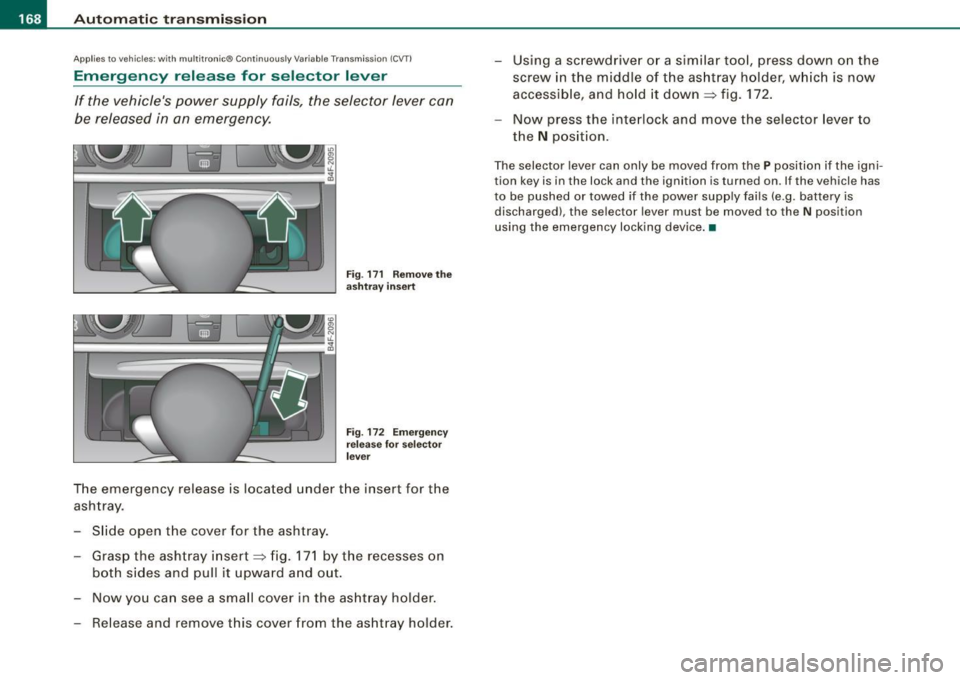
Emergency release for selector lever
If the vehicle's power supply fails, the selector lever can
be released in an emergency.
Fig . 171 Remove the
ashtray insert
Fig . 172 Emergency
release for selector
lever
The emergency release is located under the insert for the
ashtray.
- Slide open the cover for the ashtray.
- Grasp the ashtray insert~ fig. 171 by the recesses on
both sides and pull it upward and out.
- Now you can see a small cover in the ashtray holder.
- Release and remove this cover from the ashtray holder. -
Using a screwdriver or a similar tool, press down on the
screw in the middle of the ashtray holder, which is now
accessible, and hold it down ~ fig. 172.
- Now press the interlock and move the selector lever to
the
N position.
The selector lever can only be moved from the P position if the igni
tion key is in the lock and the ignition is turned on. If the vehicle has
to be pushed or towed if the power supply fails (e .g. battery is
discharged), the selector lever must be moved to the N position
using the emergency locking device. •
Page 271 of 398

Energy management
Starting ability is optimized
Energy management controls the distribution of electrical
energy and thus optimizes the availability of electrical
energy for starting the engine.
If a vehicle with a conventional energy system is not driven for a
long period of time, the battery is discharged by idling current
consumers (e.g. immobilizer). In certain circumstances it can resu lt
in there being insufficient energy available to start the engine .
Intelligent energy management in your vehicle handles the distribu
tion of electrical energy . Starting ability is markedly improved and
the life of the battery is extended.
Basical ly, energy management consists of
battery di agn osis, idling
current mana gement
and dynami c en ergy management .
Batter y diagn osis
Battery diagnosis continuously deter min es the state of the battery.
Sensors determine battery vo ltage, battery current and battery
temperature . This determines the cu rrent state of charge and the
power of the battery .
Idling c urrent man ag em en t
Idling current management reduces energy consumption while the
vehicle is standing. With the ign it ion switched off, it controls the
energy supply to the various electrical components. Data from
battery diagnos is is considered .
Depending on the battery's state of charge, individual consumers
are gradually turned off to prevent excessive discharge of the
battery and thus maintain starting capability.
Dynamic energ y managem ent
While the vehic le is being driven, dynamic energy management
distributes the energy gene rated acco rding to the needs of the indi -
Controls and equip
ment Safety first Vehicle operation
In
te llig ent tec hn olo gy
vidual components . It regulates consumption, so that more e lec
trical energy is not being used than is being ge nerated and ensures
an optimal state of charge for the battery.
[ i ] Tips
• But even energy management cannot negate the limits of
physics. Consider that the power and life of a battery are limited .
• I f starting ability is threatened, you are informed by a warning
=> page 270, "Drive r notifica tion i n the instrument cluster
display" .•
What you should know
The highes t pri ority is given to main tain ing starting capa
bility.
The battery is severe ly taxed in short-distance driving, in city traffic
and during the co ld time of year. Abundant electrical energy is
required, but only a little is generated. It is also critical if the engine
is not running and elect rica l components are turned on. In this
instance energy is being consumed but none is being generated .
I t is in precisely these situations that you will notice energy manage
ment active ly regula ting the distr ibut ion of energy.
Vehicle stands fo r an extended period
If you do not drive your vehicle over a period of several days or
weeks, electrical components are gradually cut back or switched off.
This reduces energy consumption and maintains starting capability
over a longer period.
Take into considerat ion that when you un lock your veh icle, some
convenience functions, such as the remote key or power seat
adjustment, may not be availab le . T he conven ience functions will be
available again when you turn on the ignition and start the engine.
Vehicle care Do-it-yourself service Technical data
Page 303 of 398

_____________________________________________ C_ h_ e .=....= c..:..k :..:.in :....:..:= g:.....= a..:..n .:....:d::......:. f.:..:il .:..:li ..:..n ::.:g:!....-_IJIII
•
Closing the engine hood
- Pull the hood down until the pressure from the struts is
reduced .
- Let the hood
drop down and latch in place. Do not try to
push it shut;
it may fail to engage => &.
& WARNING
A hood that is not completely latched could fly up and block your
view while driving.
• When you close the engine hood, check it to make sure the
safety catch has properly engaged. The hood should be flush with
the surrounding vehicle body parts.
• If you notice while driving that the hood is not secured prop
erly, stop at once and close it. •
Working in the engine compartment
Be especially careful whenever you work in the engine
compartment.
Whenever you must perform any work in the engine compartment,
for example checking and filling different fluids, there is a risk of injury, burns and accidents. To prevent personal injury always
observe the following WARNINGS. The engine compartment of any
vehicle is a hazardous area
~ & .
& WARNING
To help avoid injury, before you check anything under the hood :
• Turn off the engine.
• Remove the ignition key.
• Apply the parking brake .
& WARNING (continued)
• Move selector lever to "P" (Park).
• Always let the engine cool down. Hot components will burn
skin on contact.
• To reduce the risk of being burned, never open the hood if you
see or hear steam or coolant escaping from the engine compart
ment. Wait until no steam or coolant can be seen or heard before
carefully opening the hood.
• Keep children away from the engine compartment .
• Never spill fluids on hot engine components. They can cause a
fire.
• Never touch the radiator fan. The auxiliary electric fan is
temperature controlled and can switch on suddenly.
• Never open the coolant reservoir cap when the engine is still
warm . The coolant system is pressurized and hot coolant could
spray out.
• Protect your face, hands and arm from steam or hot engine
coolant by placing a thick rag over the cap when you open the
coolant reservoir.
• If work on the fuel system or the electrical system is necessary :
- Always disconnect the battery.
- Never smoke or work near heaters or open flames . Fluids in
the engine compartment could start a fire.
- Keep an approved fire extinguisher immediately available.
• To avoid electrical shock and personal injury while the engine
is running or being started, never touch:
- Ignition cables
- Other components of the high voltage electronic ignition system.
• If you must perform a check or repair with the engine running: -First, fully apply the parking brake, move selector lever to "P"
(Park). .,
Vehicle care
I t •
Page 314 of 398

-Checking
and filling
---=---------------
checked by a service facility . The electrolyte level should also be
checked each time the battery is charged
~ page 314.
Have the battery checked when you take your vehicle in for service.
You are well advised to replace a battery that is older than 5 years.
With certain types of airbag deployment, the battery is discon nected from the vehicle electrical system for safety reasons~
& in
"Repair, care and disposal of the airbags" on
page 229.
Disconnecting the battery terminals
Some vehicle functions (power window regulators, for example) are
lost if the battery terminals are disconnected . These functions have
to be relearned after the battery terminals are connected again . To
prevent this, the battery should only be disconnected from the
vehicle electrical system when absolutely necessary for repairs.
Vehicles not driven for long periods
If you do not drive your vehicle over a period of several days or
weeks, electrical components are gradually cut back or switched off.
This reduces energy consumption and maintains starting capability
over a longer period
~ page 269.
Take into consideration that when you unlock your vehicle, some
convenience functions , such as the master key remote function or
power seat adjustment, may not be available. The convenience
functions will be available again when you turn on the ignition and
start the engine.
Winter operation
During the winter months, battery capacity tends to decrease as
temperatures drop . This is because more power is also consumed
while starting, and the headlights, rear window defogger, etc., are
used more often.
Avoid unnecessary power consumption, particularly in city traffic or
when traveling only short distances. Let your authorized Audi dealer
check the capacity of the vehicle battery before winter sets in
~ page 314. A well charged battery will not only prevent starting
problems when the weather is cold , but will also last longer .
[ i] Tips
If your vehicle is left standing for several weeks at extremely low
temperatures, the vehicle battery should be removed and stored
where it will not freeze. This will prevent it from being damaged and
having to be replaced. •
Working on the battery
Be especially careful when working on or near the battery.
Fig. 244 Luggage
compartment : Battery
The battery is located in the luggage compartment under
the floor. Before you check anything in the luggage
compartment,
read and heed all WARNINGS=>& .
Lift the floor by the plastic handle.
Hook the handle into the luggage compartment weather
strip.
Always heed the safety warnings, when working on the vehicle
battery or the vehicle electrical system to prevent injury.
Page 368 of 398

111!1....__G_ e_ n_ e_r_a _ l_ i _n_ f_ o_ rm_ a _t_io _ n _______________________________________________ _
General information
Explanation of technical data
Some of the technical data listed in this manual requires
further explanation.
The technical data for your vehicle is listed in the charts starting on
~ page 369 . This section provides general information, notes and
restrictions which app ly to this data. •
Vehicle identification
The key data is given on the vehicle identification number
(VIN) pla te and the vehicle data st icker.
F ig. 278 Ve hicl e Id enti
fi ca tion Number (V IN)
pl ate : lo cation on
d riv er 's s ide das h
pan el F
ig . 2 79 The vehi cle
i d e ntifi cat ion la be l -
i nside the lug gag e
com partm ent
The Vehicle Id enti fication Numb er (V IN)
is located on the driver's side so that it is visible from the outside
through the windshield ~ fig . 278.
Th e veh icle i de ntifi cat ion lab el
is located in the luggage compar tment near the battery.
The label~ fig. 279 shows the following vehic le data :
0 Production control No.
0 Vehicle identification No.
G) Type code number
© Type designation/engine output in Ki lowatts
@ Engine and transmission code letter
© Paint No./lnterior
0 Optiona l equipment No.'s
Vehicle data 2 to 7 are also found in your Warranty
& Maintenance
booklet.
Th e s afet y co mpli ance sti cker
is your assurance that your new vehicle complies with a ll app licable
Federa l Motor Vehicle Safety Standards which were in effect at the
time the vehicle was manu factured. You can find this sticker on the
left door jamb . It shows the month and year of production and the .._
Page 383 of 398

Alphab eti ca l ind ex 111111
-------------------------------------=--------
Ashtray
Fron t . ..... ... .. .... .... ..... .. .. 96
Rear . ...... .. ..... ... ... .... ... .. 97
ASR How th e Anti -Slip Regulation Syst em
works ... .. ... .... .... ... .... .. 264
Ast erisk
What does it mean when something is marked with an asterisk? ... .. ...... 6
Audi Parking System Acoustic parking system tips .. .... . 181
Adjusting the chimes -option 1 ..... 180
Adjusting the chimes -option 2 . ... . 181
General Information . ..... .. .... .. 169
Notes on distance information ..... 179
Parking next to obstacles .... . ... .. 178
rear ..... .. .... .... .... .... .... . 169
rear , with rear -vi ew camera ... .... . 171
Rear -vi ew camera -parking mode 1 175
Rear-view camera -parking mode 2 . 177
Rear-view camera (Rear View) ...... 173
Rear-view camera coverage area .... 175
Rear-view camera tips .......... ... 182
Specia l parking situations . ... .... . 178
Audi Parking Syst em (rear)
Adjusting the chimes .... .... .... . 170
Audi Service Repair Manuals and Literature 372
AUTO mode AC climate controls ... .... ... .... . 105
Auto Safety Hotline ... .. .... .... .... . 203
Auto -Ch eck Control . ...... .. .... .... .. 28
Automatic belt retractor .... .... .... .. 209
Controls and equip ment Safety first Automatic car wash
See Washing ..
... .... ...... ...... 283
Automatic Shift Lock (ASU ...... .. 157, 164
Automatic transmission 6-speed automatic transmission .... 155
Automatic Shift Lock (ASU .. .. . 157, 164
Driving ....... .. ... .. ... .... .... . 155
Dynamic shift program ...... ...... 158
Emergency release for selector lever 161
Emergency release for selector lever (multitronic®) .. .... .... .... .... 168
Fail-safe mode ... .... .... .... 160,167
Ignition key safety lock .. .... ..... . 117
Kick -down .... ....... .... ... . .... 158
Manual shift program ... .... .... .. 159
multitronic® .... .... ...... .. ... .. 161
Selector lever .. .. .. . ... ... .. . 156, 163
Sh ift buttons . ... ..... ... .... 160 , 167
Steering wh eel with t iptronic® . 160, 167
Average speed .. ....... .... .... .... .. 38
Avoid damaging the vehicle ... ..... ... 273
B
Battery . .... .... ..... .. ... ... .. ... . 311
Battery location inside the luggage compartment .. . .. .. .... .... .... 312
Charging . ...... ........ ..... .... 314
Important warnings when working on the battery ..... ...... .. ...... .... . 312
Jump star ting ... ... ... ..... .. .... 357
Low ... .. .... .. . .. .. .... .. .... .. 269
Replacing the battery ...... .. ... .. 315
State of charge . .... .. ...... .. .... 269 Voltage
.... ... .. .. .. .... .... .. . .. 35
Winter opera tion . .... .... .... .... 311
Working on the battery .... ... ... .. 312
Before driving ... .... .... .. . ... .... . 195
Blended gasoline . ...... ...... .... ... 295
Body cavity sealing ... .. ... ..... ... .. 288
Booster seats ... .. .. .... .... ...... .. 246
How do I properly install a booster seat in my veh icle? . .... .... ... ... ... .. 246
Safety instructions .... .... .... ... . 246
Brake assistant .. .. ... ... .... ...... . 267
Brake booster .. .. ... ... .... . ... ..... 266
Brake fluid Changing the brake fluid ... .... .... 311
Checking the brake fluid level .. ... . 310
Reservoir .. .... .... ... .... .... ... 310
What is the correct brake fluid level? 310
What should I do if the brake fluid warning
light comes on? . .... .... .... ... . 310
Brake light Defective ... .. .... .... .... ... .. .. . 25
Brake system .... ... ..... ... .... .... 310
Anti-lock brake system . .. . .. .. ... .. 21
Brake fluid . ... .. .. .... .. . ... ... .. 310
Brake f luid specifications for refill and
replacement . .... .... ...... .... . 311
Brake pads ..... .. .... ...... ..... 272
Electromechanical parking brake .... 121
General information .. .... .... ... . 265
How does moisture or road salt affect the brak es? . ........ ........ ...... . 265
Malfunction . .... .... .... .... ..... 30
Vehicle operation Vehicle care Do-it-yourself service Technical data