2008 SAAB 9-3 light
[x] Cancel search: lightPage 86 of 320

86 Instruments and controlsThis light comes on when there is less than
about 2.5 gallons (10 litre) of fuel left in the
tank.
This light indicates that the headlights or
parking lights are on.
This light comes on when the system is
engaged.This symbol lights up when the system is
operative.
Operation of the ESP
® indicates reduced
cohesion between the tires and the road,
and that extra care should be taken by the
driver.This symbol lights up when the system is
disengaged, see page 178.
If there is a malfunction, the symbol cannot
be turned off by pressing the ESP
® button.
The following message is shown on the
Saab Information Display (SID):
If so, have the system checked at a Saab
dealer.
See also Electronic Stability Program ESP
®
on page 177.
Indicator, fuel
NOTE
If the car runs out of fuel, air can be drawn
in with the fuel, which, in turn, can cause
the catalytic converter to be damaged by
overheating.
Headlight and parking
light indicator
Cruise control indicator
light
ESP
® indicator
ESP® OFF indicatorWARNING
The system improves stability and
maneuverability under slippery road and
extreme driving conditions. It must how-
ever not be regarded as a system
to enable the driver to maintain higher
speeds. The same precautions as
normal for safe cornering and driving
on slippery roads must be adopted (see
pages 175/ 177).
Stability control failure.
Contact service.
93_US_M08.book Page 86 Friday, May 11, 2007 11:37 AM
ProCarManuals.com
Page 87 of 320

87 Instruments and controls
Autochecking of lights, main
instrument panelThe warning and indicator lights shown
above should come on when the ignition
switch is turned to ON. They should go out
after about 4 seconds once the engine has
started or after the fault-free self-diagnosis
of each system or function.
InstrumentsTachometerThe tachometer displays the engine speed
in thousands of revolutions per minute.
A protective function (interruption of the fuel
supply) limits the engine speed within the
red zone.
Speedometer (U.S. speedometer shown)
Cars sold in U.S.: The speedometer dis-
plays the speed of the car in miles per hour
(mph).
Cars sold in Canada: The speedometer
displays the speed of the car in kilometres
per hour (km/h).
It receives information about vehicle speed
from the ABS’s wheel sensors.
93_US_M08.book Page 87 Friday, May 11, 2007 11:37 AM
ProCarManuals.com
Page 89 of 320

89 Instruments and controls
If the needle repeatedly enters the red zone
and the engine at the same time loses
power, because the monitoring system is
limiting the boost pressure, you should
contact a Saab dealer as soon as possible.
If the speed of the car exceeds 143 mph
(230 km/h), acceleration is limited by reduc-
ing the boost pressure. The pressure gauge
then moves towards the middle of the white
field, indicating a drop in engine power and
consequently the car’s speed.
Fuel gaugeWhen less than about 2.5 gallons (10 litre)
of fuel is left in the tank, a warning light on
the main instrument panel comes on.
Refueling, see page 159.
Saab Information
Display (SID)Various types of information are shown on
the SID: warnings, indications, trip
computer information and information
from the car’s Infotainment System.
Selected gear is shown on the left-hand
side of the display. When gears are
selected manually, the letter M (manual)
and the selected gear are displayed (see
page 170) (cars with automatic transmis-
sion).
In the first row trip computer information is
displayed and in the second row odome-
ter and tripmeter is displayed.
When a message is displayed
The odometer and tripmeter is temporarily
turned off when a two row message is dis-
played. The icon is displayed in the left part
of the display.
The warnings and indications that can be
shown on the SID are listed on page 300.
If there is more than one message on the
SID, a plus sign will be displayed to the left
of the first message. Each message will be
displayed for 10 seconds.
93_US_M08.book Page 89 Friday, May 11, 2007 11:37 AM
ProCarManuals.com
Page 90 of 320

90 Instruments and controlsPress the CLR button to acknowledge a SID
message. If you acknowledge a message
but do nothing about it, the message will be
displayed again the next time you start the
car.
When the engine is switched off the warn-
ing/indicator lights still active are displayed,
this is to remind the driver. At this point the
warning/indicator lights previously acknowl-
edged with the CLR button are also dis-
played.
You can adjust the settings of several of the
car’s systems, such as the alarm3, rain
sensor3 and climate control system. These
are known as Settings se page 94.Odometer and trip meterThe odometer records the distance trav-
elled in miles on U.S. vehicles and on Cana-
dian vehicles the distance indicated is in
kilometres, and the trip meter in miles and
tenths (kilometres and tenths of kilometres
on Canadian vehicles).
Reset buttonThe reset button is positioned immediately
to the left of the speedometer.
Press once to resets the trip meter, the igni-
tion shall be in position ON.
Trip computer function of the SID
WARNING
It is strongly recommended that the SID
settings be changed only when the car is
stationary. The driver’s attention can oth-
erwise easily be distracted from the road.
SID contains the following functions:
TempOutdoor temperature
D.T.E.Estimated range (distance to
empty fuel tank).
When the possible range is
less than 18 miles (30 km)
then the text Refill fuel now
is displayed.
FuelØAverage fuel consumption
since function last reset
DistDistance to destinations.
Function can also be used as
a trip meter
SpeedØAverage speed since function
last reset
Speed WSpeed warning (chime)
SettingsSettings of features such as
alarm clock, language and
rain sensor3
SID, control unit and display
93_US_M08.book Page 90 Friday, May 11, 2007 11:37 AM
ProCarManuals.com
Page 93 of 320

93 Instruments and controls
You can check the distance left by selecting
Dist. At the same time you can check the
calculated time of arrival.
After the distance to destination has
decreased to zero, Dist will function as a trip
meter (see Using DIST as a trip meter). The
starting value for the trip meter will be the
last distance set for the Dist function.
Example: The Dist function is set to
100 miles. After the count-down has
reached 0 miles, Dist will act as a trip meter
beginning at 100 miles.Calculating the arrival time if a specified
average speed is maintained
(When will I arrive if I know how far I have to
drive and know what my average speed will
be?)
This function should be used before starting
out a journey.
First, set the distance under Dist.
1 Then select SpeedØ function.
2 Press and hold the SET button until
given audible confirmation.
3 Set the estimated average speed using
the steering wheel controls.
4 Confirm the setting by pressing the SET
button.
The distance and the calculated time of
arrival is now displayed.
The time of arrival is updated during the
journey based on the average speed since
Dist was set. The speed of the car must
exceed 12 mph (20 km/h).
By selecting Dist during the journey, you
can see how much distance is left to travel.
When Dist reaches zero it acts as a trip
meter. The trip meter starts from the dis-
tance that was set previously.
NIGHTPANELTo improve night-driving conditions inside
the car, the Night Panel mode can be
selected. In this mode, the amount of infor-
mation displayed is reduced, and only the
most important instruments and displays
will be illuminated.
When the NIGHTPANEL button is pressed,
only the speedometer will be illuminated.
All other instrument lighting will be switched
off and the needles drop to zero.
Note: All indicator and warning lights and
messages will operate normally if required.
Temp (when the outside temperature falls
or rises to between 26 and 38°F (–3 and
+3°C)) and D.T.E. (when the remaining fuel
is only sufficient for approx. 80 miles
(50 km) of driving) are even shown in Night
Panel model.
93_US_M08.book Page 93 Friday, May 11, 2007 11:37 AM
ProCarManuals.com
Page 97 of 320

97 Instruments and controls
SwitchesWhen the switch is in the AUTO position,
there is an automatic switch between low-
beam and Daytime Running Lights (DRL)
based on the amount of daylight. Two sen-
sors located at the top of the windshield
detect upward and forward light intensity.
This makes it possible for the system to
automatically perform functions such as
activating low beam when you drive into a
tunnel on a sunny day.
Parking lights are turned off.
Cars with xenon lights: The bulbs for DRL
are in the inner of the two bulb holders in the
bulb housing. The bulb is visible from the
outside.
Cars with halogen lights: These cars do
not have a separate DRL bulb. Low beam
instead shines with reduced output.
A fault in the system will produce the follow-
ing message on the Saab Information Dis-
play (SID):When the engine is started and the
switch is in the AUTO position
Cars with automatic transmission: DRL
or low beam (which depends on the amount
of daylight) comes on when the gear selec-
tor is moved out of the P position. The light
goes out when the ignition switch is turned
to the OFF position (engine is turned off).
Cars with manual transmission: If the
parking brake is applied when the engine is
started, DRL or low beam (which depends
on the amount of daylight) comes on when
the parking brake is released. Otherwise,
the light comes on when the ignition switch
is turned to the ON position. The light goes
out when the ignition switch is turned to the
OFF position (engine is turned off).
High beam cannot be activated in the DRL
mode but headlight flasher can.
Daytime Running Lights
(DRL)
Automatic light control
malfunction.
In cold and damp weather, the inside of
the headlamp lens may temporarily mist
up. This misting does not affect the func-
tion or service life of the light fitting.
When the lamps are on, the mist will
eventually disappear.
Light switch
93_US_M08.book Page 97 Friday, May 11, 2007 11:37 AM
ProCarManuals.com
Page 98 of 320
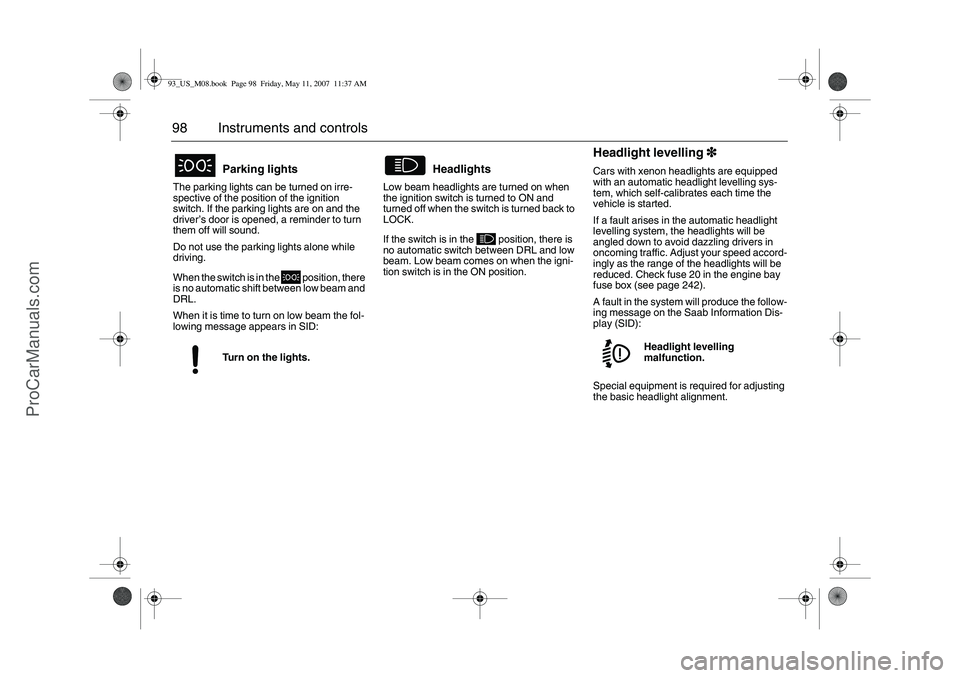
98 Instruments and controlsThe parking lights can be turned on irre-
spective of the position of the ignition
switch. If the parking lights are on and the
driver’s door is opened, a reminder to turn
them off will sound.
Do not use the parking lights alone while
driving.
When the switch is in the position, there
is no automatic shift between low beam and
DRL.
When it is time to turn on low beam the fol-
lowing message appears in SID:Low beam headlights are turned on when
the ignition switch is turned to ON and
turned off when the switch is turned back to
LOCK.
If the switch is in the position, there is
no automatic switch between DRL and low
beam. Low beam comes on when the igni-
tion switch is in the ON position.
Headlight levelling3
33 3Cars with xenon headlights are equipped
with an automatic headlight levelling sys-
tem, which self-calibrates each time the
vehicle is started.
If a fault arises in the automatic headlight
levelling system, the headlights will be
angled down to avoid dazzling drivers in
oncoming traffic. Adjust your speed accord-
ingly as the range of the headlights will be
reduced. Check fuse 20 in the engine bay
fuse box (see page 242).
A fault in the system will produce the follow-
ing message on the Saab Information Dis-
play (SID):
Special equipment is required for adjusting
the basic headlight alignment.
Parking lightsTurn on the lights.
Headlights
Headlight levelling
malfunction.
93_US_M08.book Page 98 Friday, May 11, 2007 11:37 AM
ProCarManuals.com
Page 99 of 320

99 Instruments and controls
Xenon cornering headlights3
33 3When the car speed exceeds approx.
6 mph (10 km/h), the main headlight will be
angled slightly when the steering wheel is
turned. The beam can be angled maximum
15° to the right or left compared to a car
without cornering headlights.
If a fault occurs in the cornering headlights,
there is no angling when the steering wheel
is turned. The beam continues to shine
straight ahead and the following message
appears in SID:
High/low beamTo switch between high and low beam, pull
the control stalk all the way towards the
steering wheel. (Headlight switch must be
ON.)
The symbol on the main instrument
panel shows when the high beam is on.Headlight flasherTo flash your headlights, pull the control
stalk half-way towards the steering wheel.
The high beam will remain on until you
release the stalk.
Courtesy Headlamp FeatureA delay function allows the low beam head-
lights and back-up lights to remain on for
about 30 seconds after the driver’s door has
been closed.
To activate this function:
1 After turning off the engine, remove the
remote control.
2 Open the driver’s door.
3 Pull the control stalk all the way towards
the steering wheel.
The low beam headlights and reversing
lights will come on and remain on for
30 seconds when the door is closed.
Cornering headlights
malfunction
Dimmer switch1 Headlight flasher
2 High/low beam
93_US_M08.book Page 99 Friday, May 11, 2007 11:37 AM
ProCarManuals.com