Page 804 of 2771
PREPARATION
CL-3
< SERVICE INFORMATION >
D
E
F
G
H
I
J
K
L
MA
B
CL
N
O
P
PREPARATION
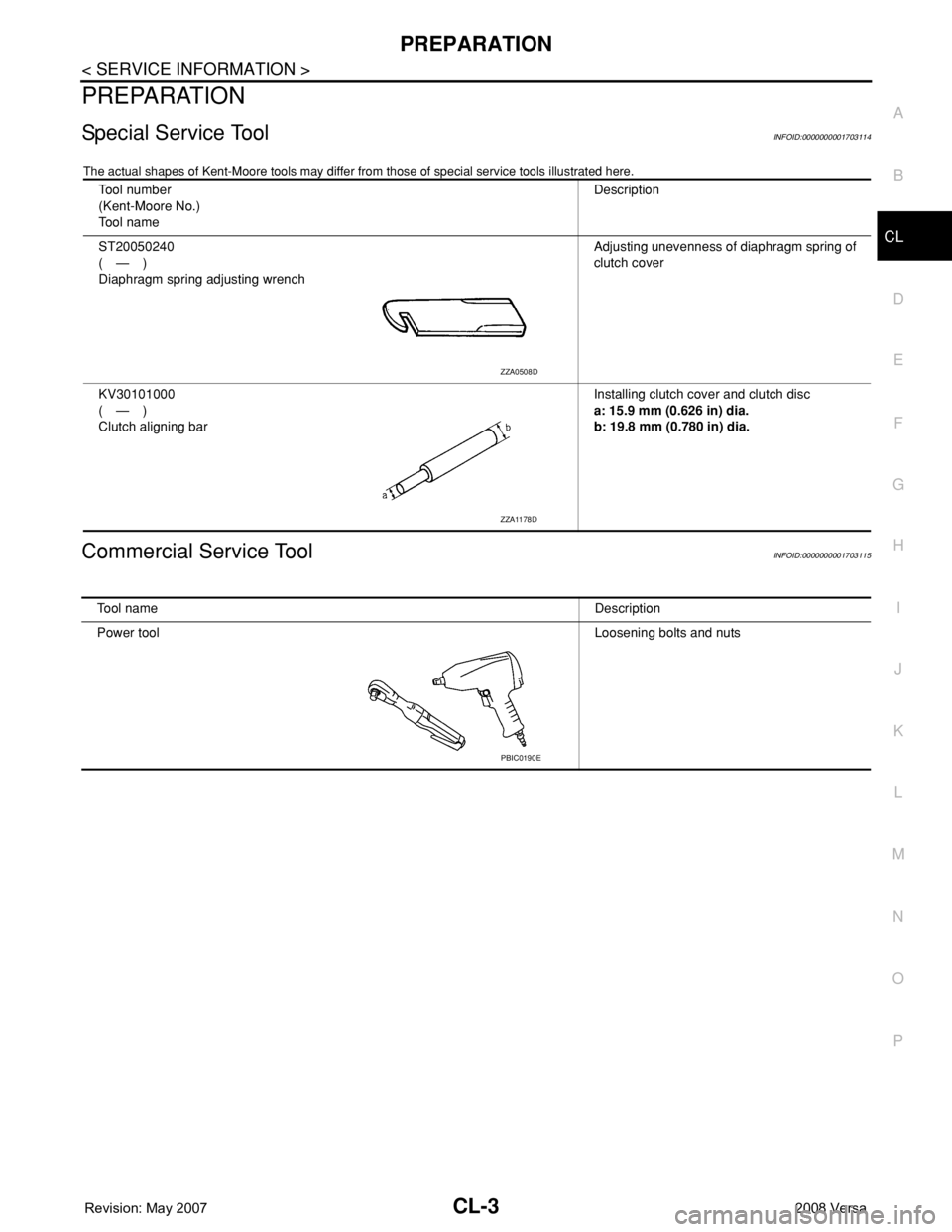
Special Service ToolINFOID:0000000001703114
The actual shapes of Kent-Moore tools may differ from those of special service tools illustrated here.
Commercial Service ToolINFOID:0000000001703115
Tool number
(Kent-Moore No.)
Tool nameDescription
ST20050240
(—)
Diaphragm spring adjusting wrenchAdjusting unevenness of diaphragm spring of
clutch cover
KV30101000
(—)
Clutch aligning barInstalling clutch cover and clutch disc
a: 15.9 mm (0.626 in) dia.
b: 19.8 mm (0.780 in) dia.
ZZA0508D
ZZA1178D
Tool nameDescription
Power toolLoosening bolts and nuts
PBIC0190E
Page 821 of 2771
CO-4
< SERVICE INFORMATION >
PREPARATION
PREPARATION
Special Service ToolINFOID:0000000001702525
The actual shapes of Kent-Moore tools may from those of special service tools illustrated here.
Commercial Service ToolINFOID:0000000001702526
Tool number
(Kent-Moore No.)
Tool nameDescription
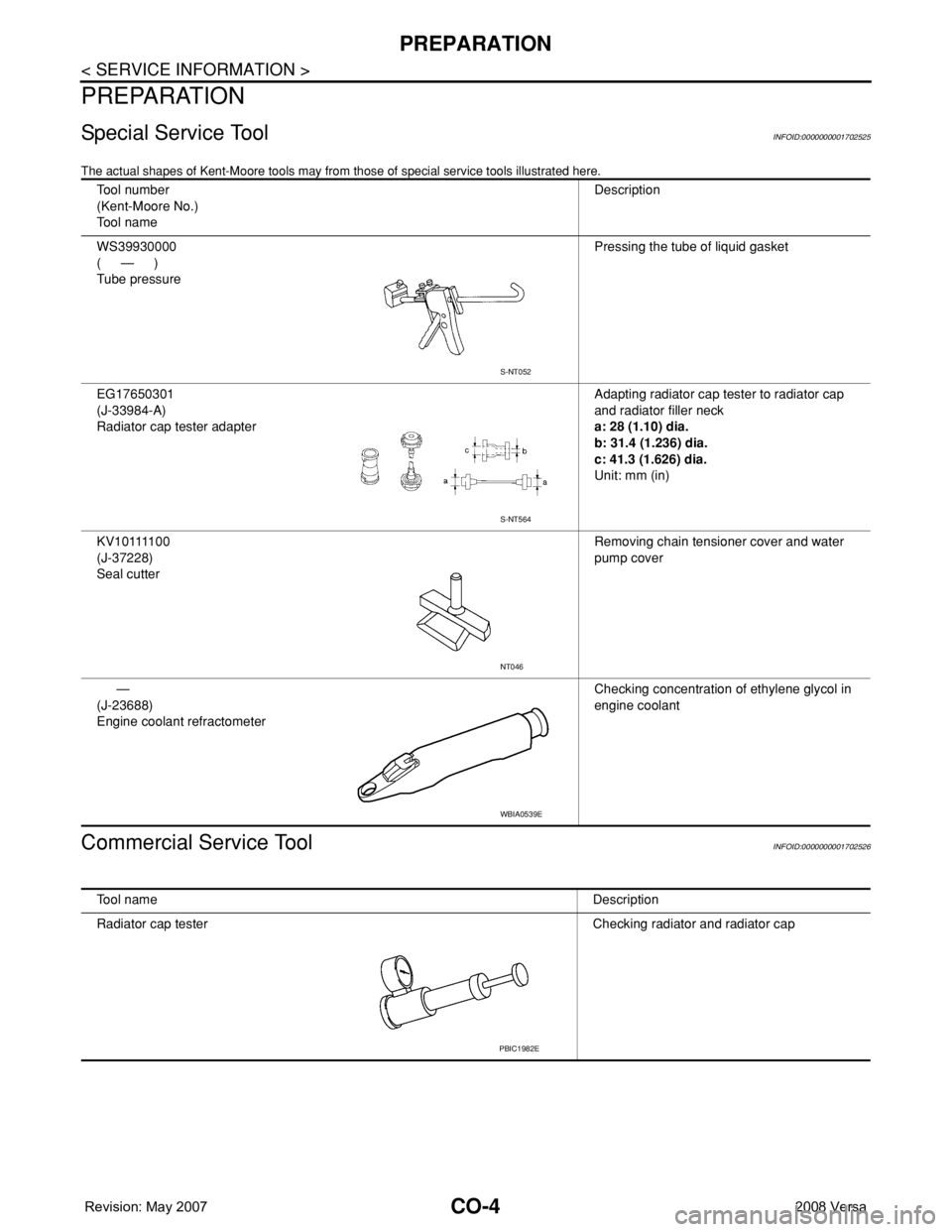
WS39930000
(—)
Tube pressurePressing the tube of liquid gasket
EG17650301
(J-33984-A)
Radiator cap tester adapterAdapting radiator cap tester to radiator cap
and radiator filler neck
a: 28 (1.10) dia.
b: 31.4 (1.236) dia.
c: 41.3 (1.626) dia.
Unit: mm (in)
K V 1 0 1111 0 0
(J-37228)
Seal cutterRemoving chain tensioner cover and water
pump cover
—
(J-23688)
Engine coolant refractometerChecking concentration of ethylene glycol in
engine coolant
S-NT052
S-NT564
NT046
WBIA0539E
Tool nameDescription
Radiator cap tester Checking radiator and radiator cap
PBIC1982E
Page 851 of 2771
CVT-12
< SERVICE INFORMATION >
PREPARATION
PREPARATION
Special Service ToolINFOID:0000000001703431
The actual shapes of Kent-Moore tools may differ from those of special service tools illustrated here.
Commercial Service ToolINFOID:0000000001703432
Tool number
(Kent-Moore No.)
Tool nameDescription
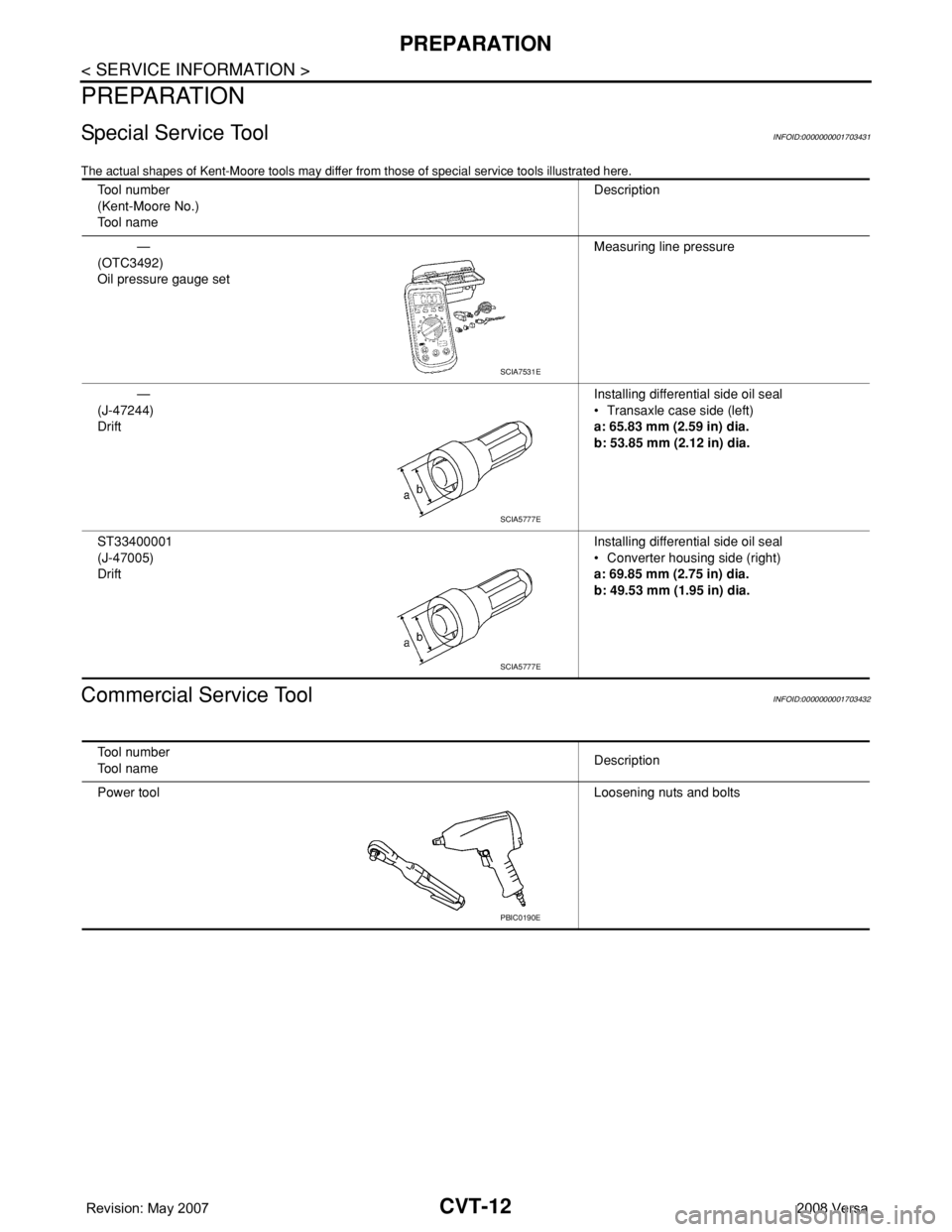
—
(OTC3492)
Oil pressure gauge setMeasuring line pressure
—
(J-47244)
DriftInstalling differential side oil seal
• Transaxle case side (left)
a: 65.83 mm (2.59 in) dia.
b: 53.85 mm (2.12 in) dia.
ST33400001
(J-47005)
DriftInstalling differential side oil seal
• Converter housing side (right)
a: 69.85 mm (2.75 in) dia.
b: 49.53 mm (1.95 in) dia.
SCIA7531E
SCIA5777E
SCIA5777E
Tool number
Tool nameDescription
Power toolLoosening nuts and bolts
PBIC0190E
Page 1094 of 2771
EC-20
< SERVICE INFORMATION >
PREPARATION
PREPARATION
Special Service ToolINFOID:0000000001702552
The actual shapes of Kent-Moore tools may differ from those of special service tools illustrated here.
Tool number
(Kent-Moore No.)
Tool nameDescription
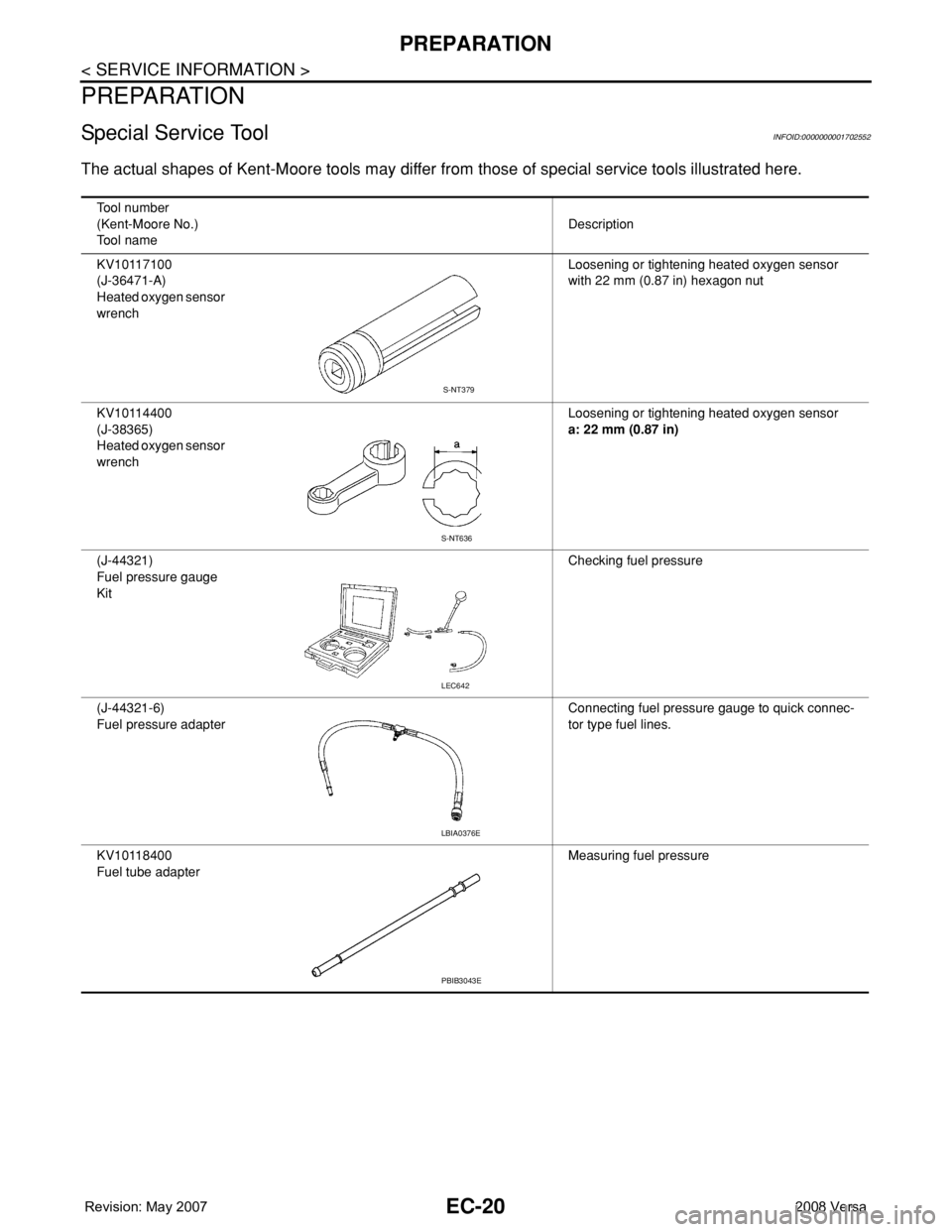
KV10117100
(J-36471-A)
Heated oxygen sensor
wrenchLoosening or tightening heated oxygen sensor
with 22 mm (0.87 in) hexagon nut
KV10114400
(J-38365)
Heated oxygen sensor
wrenchLoosening or tightening heated oxygen sensor
a: 22 mm (0.87 in)
(J-44321)
Fuel pressure gauge
KitChecking fuel pressure
(J-44321-6)
Fuel pressure adapterConnecting fuel pressure gauge to quick connec-
tor type fuel lines.
KV10118400
Fuel tube adapterMeasuring fuel pressure
S-NT379
S-NT636
LEC642
LBIA0376E
PBIB3043E
Page 1124 of 2771
EC-50
< SERVICE INFORMATION >
ON BOARD DIAGNOSTIC (OBD) SYSTEM
*1: 1st trip DTC No. is the same as DTC No.
*2: This number is prescribed by SAE J2012.
*3: In Diagnostic Test Mode II (Self-diagnostic results), this number is controlled by NISSAN.
*4: The troubleshooting for this DTC needs CONSULT-II.
*5: When the ECM in the mode of displaying SRT status, MIL may flash. For the details, refer to "How to Display SRT Status".
*6: SRT code will not be set if the self-diagnostic result is NG.
*7: When the fail-safe operations for both self-diagnoses occur, the MIL illuminates.
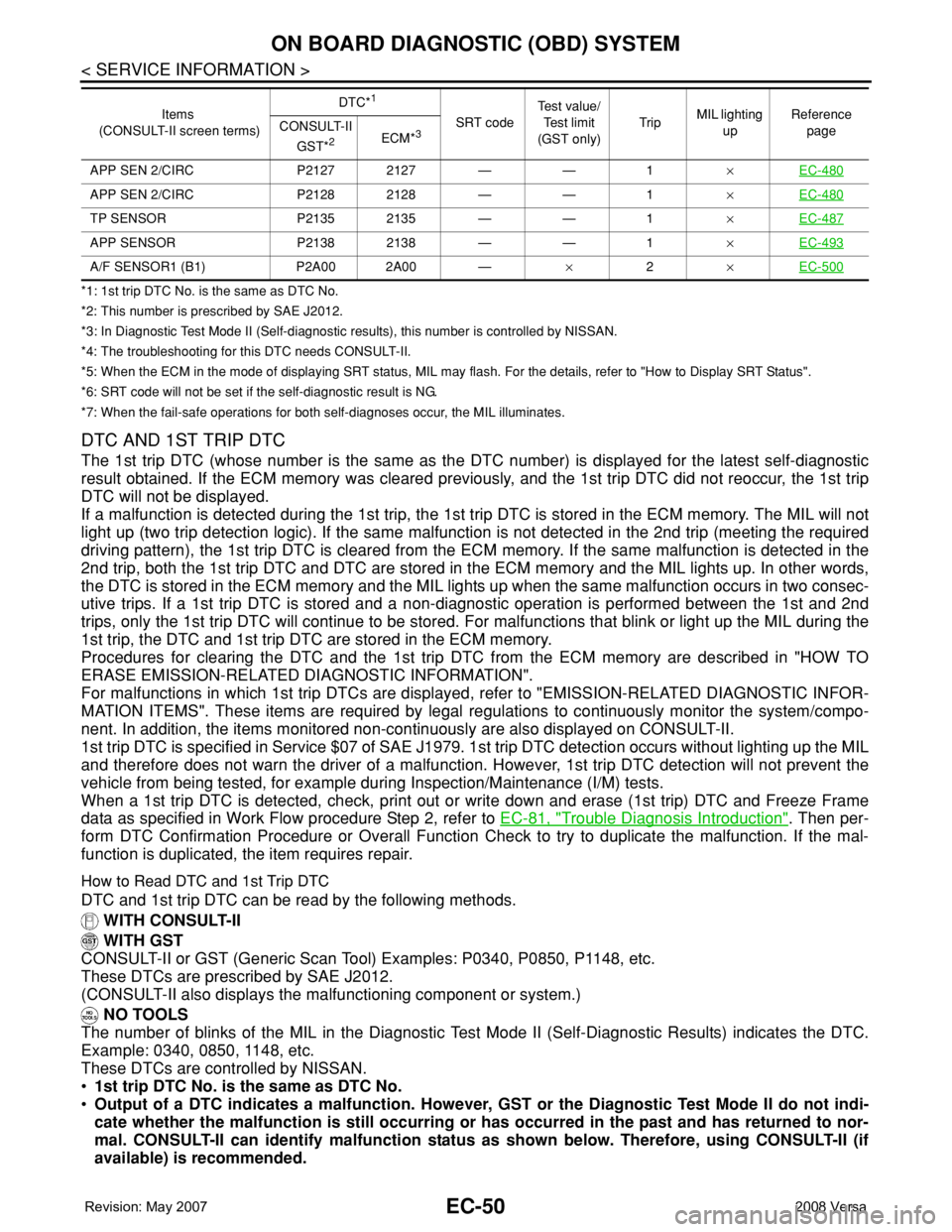
DTC AND 1ST TRIP DTC
The 1st trip DTC (whose number is the same as the DTC number) is displayed for the latest self-diagnostic
result obtained. If the ECM memory was cleared previously, and the 1st trip DTC did not reoccur, the 1st trip
DTC will not be displayed.
If a malfunction is detected during the 1st trip, the 1st trip DTC is stored in the ECM memory. The MIL will not
light up (two trip detection logic). If the same malfunction is not detected in the 2nd trip (meeting the required
driving pattern), the 1st trip DTC is cleared from the ECM memory. If the same malfunction is detected in the
2nd trip, both the 1st trip DTC and DTC are stored in the ECM memory and the MIL lights up. In other words,
the DTC is stored in the ECM memory and the MIL lights up when the same malfunction occurs in two consec-
utive trips. If a 1st trip DTC is stored and a non-diagnostic operation is performed between the 1st and 2nd
trips, only the 1st trip DTC will continue to be stored. For malfunctions that blink or light up the MIL during the
1st trip, the DTC and 1st trip DTC are stored in the ECM memory.
Procedures for clearing the DTC and the 1st trip DTC from the ECM memory are described in "HOW TO
ERASE EMISSION-RELATED DIAGNOSTIC INFORMATION".
For malfunctions in which 1st trip DTCs are displayed, refer to "EMISSION-RELATED DIAGNOSTIC INFOR-
MATION ITEMS". These items are required by legal regulations to continuously monitor the system/compo-
nent. In addition, the items monitored non-continuously are also displayed on CONSULT-II.
1st trip DTC is specified in Service $07 of SAE J1979. 1st trip DTC detection occurs without lighting up the MIL
and therefore does not warn the driver of a malfunction. However, 1st trip DTC detection will not prevent the
vehicle from being tested, for example during Inspection/Maintenance (I/M) tests.
When a 1st trip DTC is detected, check, print out or write down and erase (1st trip) DTC and Freeze Frame
data as specified in Work Flow procedure Step 2, refer to EC-81, "
Trouble Diagnosis Introduction". Then per-
form DTC Confirmation Procedure or Overall Function Check to try to duplicate the malfunction. If the mal-
function is duplicated, the item requires repair.
How to Read DTC and 1st Trip DTC
DTC and 1st trip DTC can be read by the following methods.
WITH CONSULT-II
WITH GST
CONSULT-II or GST (Generic Scan Tool) Examples: P0340, P0850, P1148, etc.
These DTCs are prescribed by SAE J2012.
(CONSULT-II also displays the malfunctioning component or system.)
NO TOOLS
The number of blinks of the MIL in the Diagnostic Test Mode II (Self-Diagnostic Results) indicates the DTC.
Example: 0340, 0850, 1148, etc.
These DTCs are controlled by NISSAN.
•1st trip DTC No. is the same as DTC No.
•Output of a DTC indicates a malfunction. However, GST or the Diagnostic Test Mode II do not indi-
cate whether the malfunction is still occurring or has occurred in the past and has returned to nor-
mal. CONSULT-II can identify malfunction status as shown below. Therefore, using CONSULT-II (if
available) is recommended.
APP SEN 2/CIRC P2127 2127 — — 1×EC-480
APP SEN 2/CIRC P2128 2128 — — 1×EC-480
TP SENSOR P2135 2135 — — 1×EC-487
APP SENSOR P2138 2138 — — 1×EC-493
A/F SENSOR1 (B1) P2A00 2A00 —×2×EC-500
Items
(CONSULT-II screen terms)DTC*
1
SRT codeTest value/
Test limit
(GST only)TripMIL lighting
upReference
page CONSULT-II
GST*
2ECM*3
Page 1128 of 2771
EC-54
< SERVICE INFORMATION >
ON BOARD DIAGNOSTIC (OBD) SYSTEM
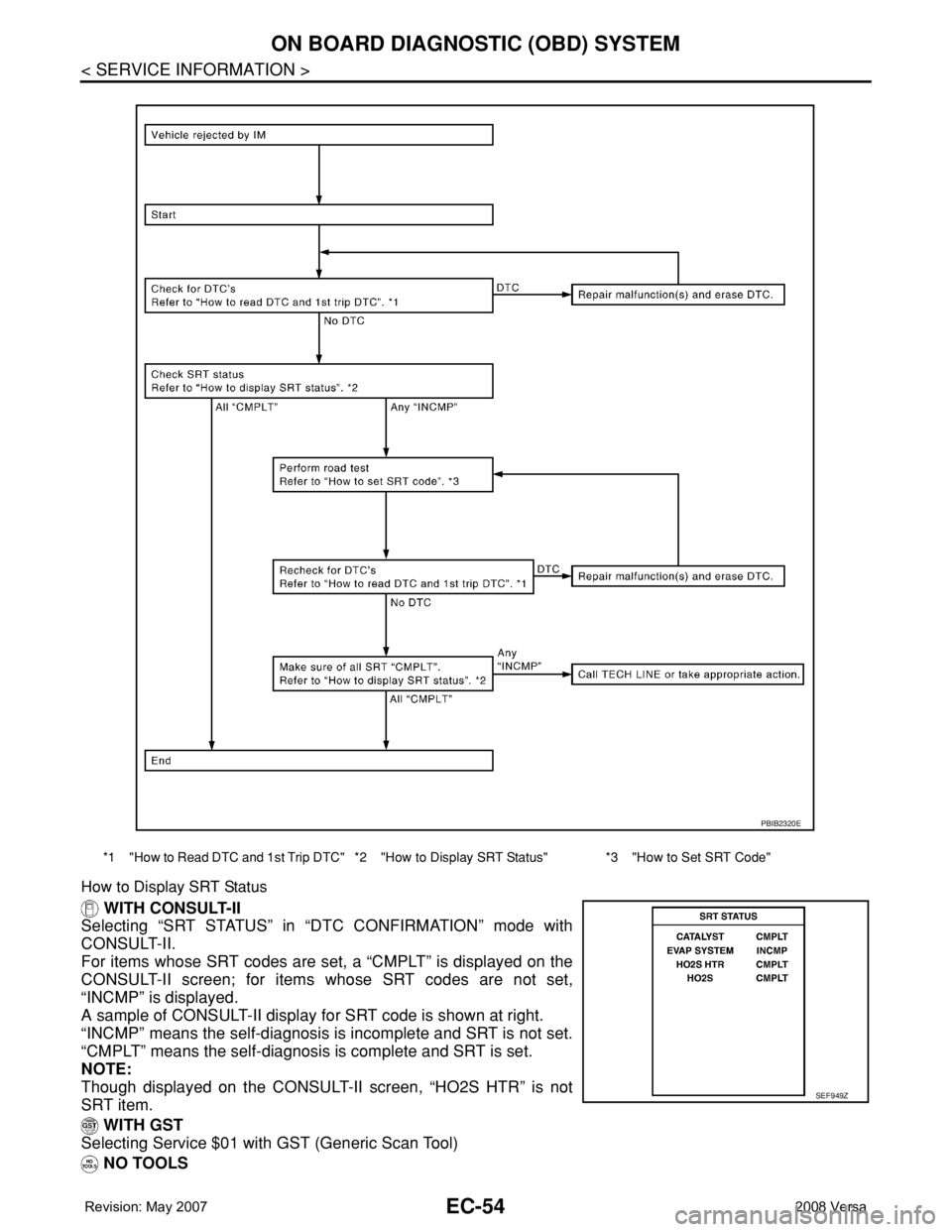
How to Display SRT Status
WITH CONSULT-II
Selecting “SRT STATUS” in “DTC CONFIRMATION” mode with
CONSULT-II.
For items whose SRT codes are set, a “CMPLT” is displayed on the
CONSULT-II screen; for items whose SRT codes are not set,
“INCMP” is displayed.
A sample of CONSULT-II display for SRT code is shown at right.
“INCMP” means the self-diagnosis is incomplete and SRT is not set.
“CMPLT” means the self-diagnosis is complete and SRT is set.
NOTE:
Though displayed on the CONSULT-II screen, “HO2S HTR” is not
SRT item.
WITH GST
Selecting Service $01 with GST (Generic Scan Tool)
NO TOOLS
*1 "How to Read DTC and 1st Trip DTC" *2 "How to Display SRT Status" *3 "How to Set SRT Code"
PBIB2320E
SEF949Z
Page 1133 of 2771
ON BOARD DIAGNOSTIC (OBD) SYSTEM
EC-59
< SERVICE INFORMATION >
C
D
E
F
G
H
I
J
K
L
MA
EC
N
P O
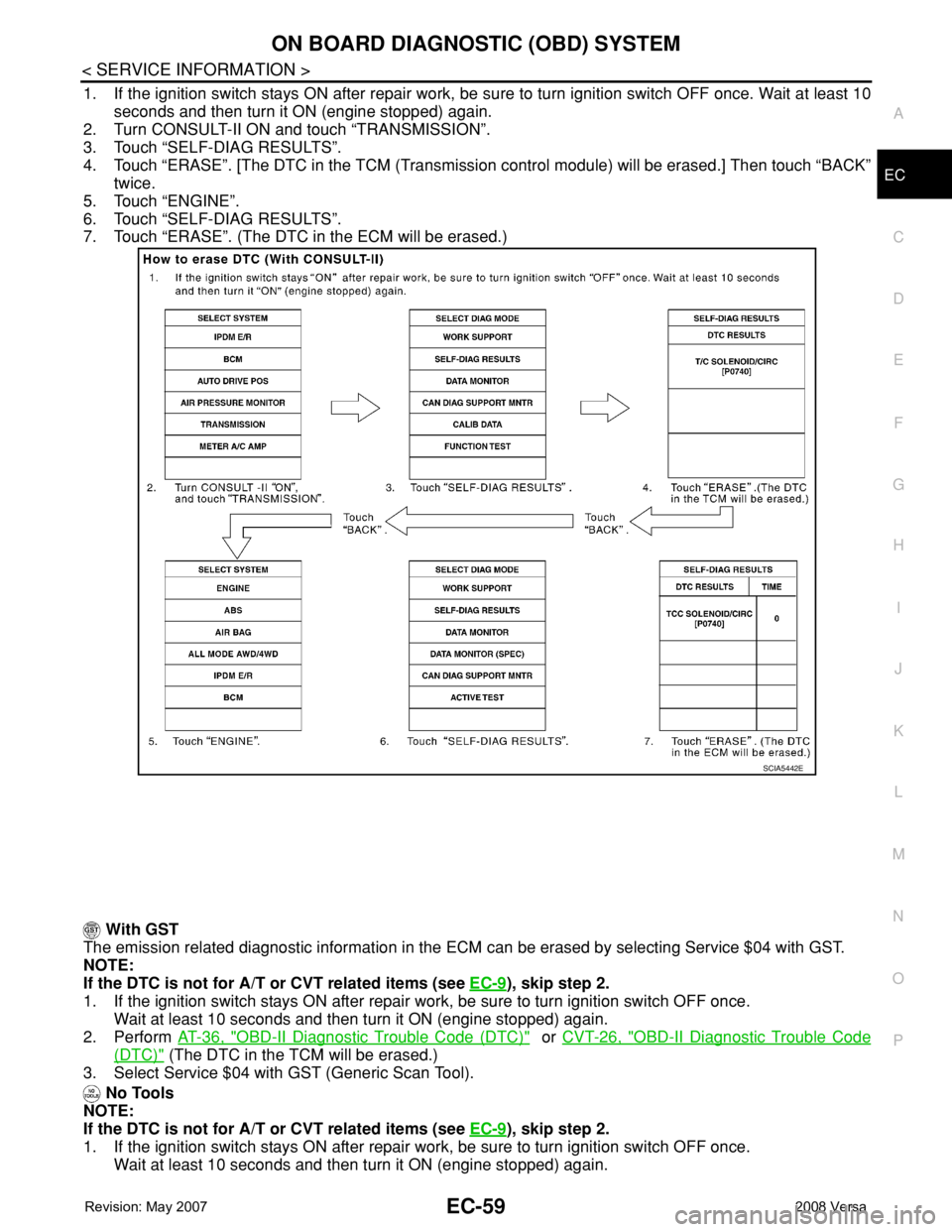
1. If the ignition switch stays ON after repair work, be sure to turn ignition switch OFF once. Wait at least 10
seconds and then turn it ON (engine stopped) again.
2. Turn CONSULT-II ON and touch “TRANSMISSION”.
3. Touch “SELF-DIAG RESULTS”.
4. Touch “ERASE”. [The DTC in the TCM (Transmission control module) will be erased.] Then touch “BACK”
twice.
5. Touch “ENGINE”.
6. Touch “SELF-DIAG RESULTS”.
7. Touch “ERASE”. (The DTC in the ECM will be erased.)
With GST
The emission related diagnostic information in the ECM can be erased by selecting Service $04 with GST.
NOTE:
If the DTC is not for A/T or CVT related items (see EC-9
), skip step 2.
1. If the ignition switch stays ON after repair work, be sure to turn ignition switch OFF once.
Wait at least 10 seconds and then turn it ON (engine stopped) again.
2. Perform AT-36, "
OBD-II Diagnostic Trouble Code (DTC)" or CVT-26, "OBD-II Diagnostic Trouble Code
(DTC)" (The DTC in the TCM will be erased.)
3. Select Service $04 with GST (Generic Scan Tool).
No Tools
NOTE:
If the DTC is not for A/T or CVT related items (see EC-9
), skip step 2.
1. If the ignition switch stays ON after repair work, be sure to turn ignition switch OFF once.
Wait at least 10 seconds and then turn it ON (engine stopped) again.
SCIA5442E
Page 1627 of 2771
EI-4
< PREPARATION >
PREPARATION
PREPARATION
PREPARATION
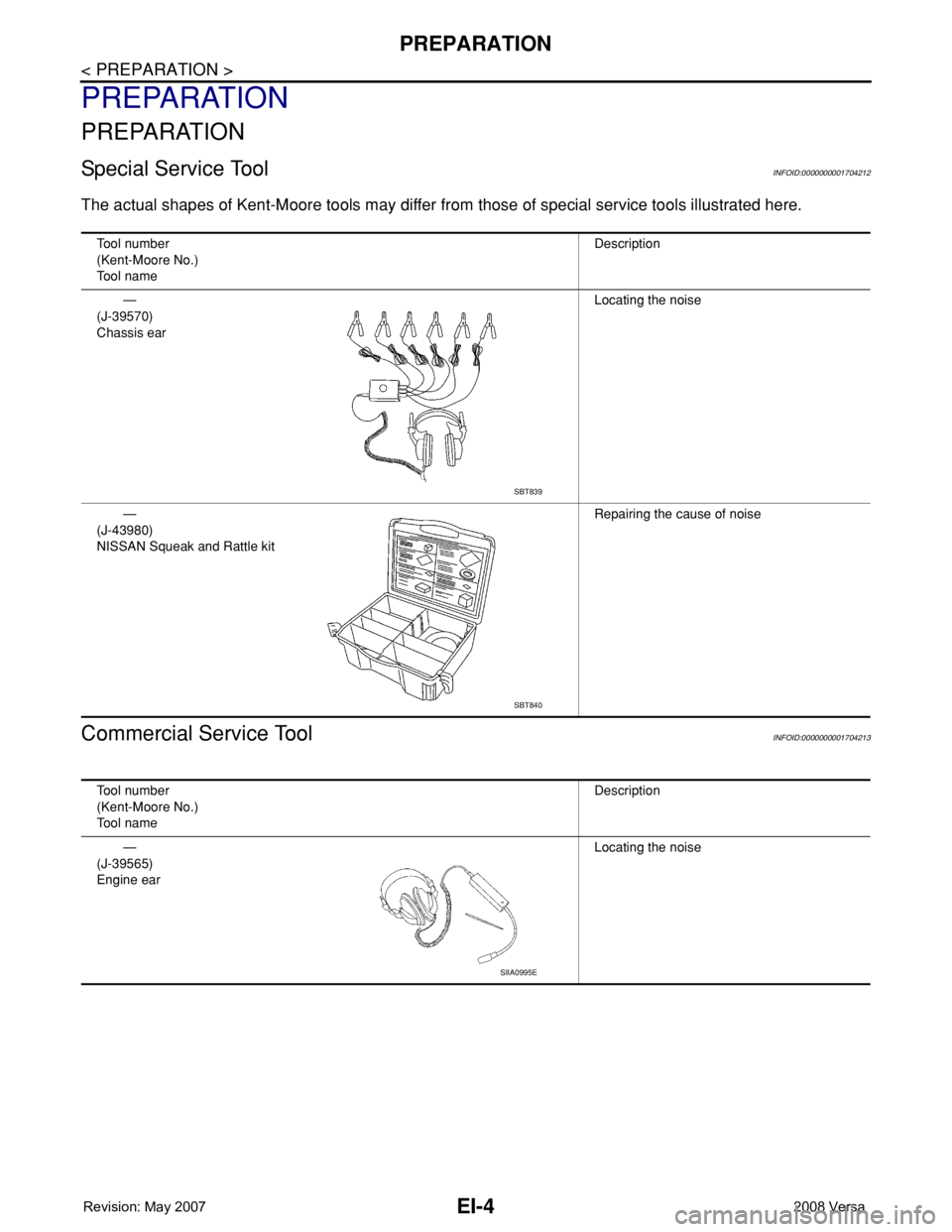
Special Service ToolINFOID:0000000001704212
The actual shapes of Kent-Moore tools may differ from those of special service tools illustrated here.
Commercial Service ToolINFOID:0000000001704213
Tool number
(Kent-Moore No.)
Tool nameDescription
—
(J-39570)
Chassis earLocating the noise
—
(J-43980)
NISSAN Squeak and Rattle kitRepairing the cause of noise
SBT839
SBT840
Tool number
(Kent-Moore No.)
Tool nameDescription
—
(J-39565)
Engine earLocating the noise
SIIA0995E