2008 MERCEDES-BENZ CLS COUPE wheel
[x] Cancel search: wheelPage 60 of 329
Driving safety systems
571
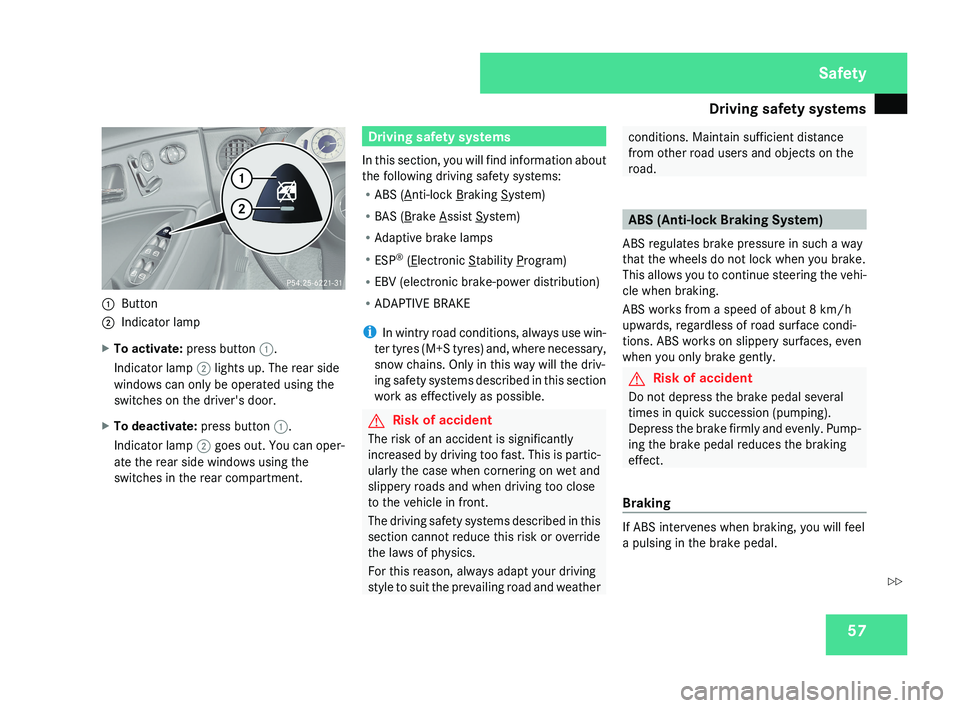
Button
2 Indicator lamp
X To activate: press button 1.
Indicator lamp 2 lights up. The rear side
windows can only be operated using the
switches on the driver's door.
X To deactivate: press button 1.
Indicator lamp 2 goes out. You can oper-
ate the rear side windows using the
switches in the rear compartment.
Driving safety systems
In this section, you will find information about
the following driving safety systems:
R ABS (
Anti-lock Braking System)
R BAS (
Brake Assist System)
R Adaptive brake lamps
R ESP ®
(
Electronic Stability Program)
R EBV (electronic brake-power distribution)
R ADAPTIVE BRAKE
i In wintry road conditions, always use win-
ter tyres (M+S tyres) and, where necessary,
snow chains. Only in this way will the driv-
ing safety systems described in this section
work as effectively as possible.
G Risk of accident
The risk of an accident is significantly
increased by driving too fast. This is partic-
ularly the case when cornering on wet and
slippery roads and when driving too close
to the vehicle in front.
The driving safety systems described in this
section cannot reduce this risk or override
the laws of physics.
For this reason, always adapt your driving
style to suit the prevailing road and weather
conditions. Maintain sufficient distance
from other road users and objects on the
road.
ABS (Anti-lock Braking System)
ABS regulates brake pressure in such a way
that the wheels do not lock when you brake.
This allows you to continue steering the vehi-
cle when braking.
ABS works from a speed of about 8 km/h
upwards, regardless of road surface condi-
tions. ABS works on slippery surfaces, even
when you only brake gently.
G Risk of accident
Do not depress the brake pedal several
times in quick succession (pumping).
Depress the brake firmly and evenly. Pump-
ing the brake pedal reduces the braking
effect.
Braking
If ABS intervenes when braking, you will feel
a pulsing in the brake pedal.
Safety
219_AKB; 2; 4, en-GB
mkalafa,
2007-11-13T09:28:36+01:00 - Seite 57
Z
Page 61 of 329
Driving safety systems
58
If ABS intervenes:
X
Continue to depress the brake pedal with
force until the braking situation is over.
For full braking application:
X Depress the brake pedal with maximum
force. G
Risk of accident
If ABS is faulty, the wheels could lock when
braking. This limits the steerability of the
vehicle when braking and the braking dis-
tance may increase.
If ABS is deactivated due to a malfunction,
then
BAS and ESP are also deactivated. The
risk of your vehicle skidding is then
increased in certain situations.
You should therefore always adapt your
driving style to suit the prevailing road and
weather conditions. BAS (Brake Assist)
BAS operates in emergency braking situa-
tions.
If you depress the brake pedal quickly,
BAS automatically boosts the braking force,
thus shortening the stopping distance.
X Keep the brake pedal firmly depressed until
the emergency braking situation is over.
ABS prevents the wheels from locking.
The brakes will function as usual once you
release the brake pedal. BAS is deactivated. G
Risk of accident
If BAS has malfunctioned, the braking sys-
tem
remains available with full brake boost-
ing effect. However, braking force is not
automatically increased in emergency
braking situations and the stopping dis-
tance may increase. Adaptive brake lamps
i Adaptive
brake lamps are only available in
certain countries.
If you brake sharply from a speed of more
than 50 km/h or if braking is assisted by BAS,
the brake lamps flash rapidly. In this way,
traffic travelling behind you is warned in an
even more noticeable manner.
If you brake from a speed of more than
70 km/h and bring the vehicle to a halt, the
hazard warning lamps switch on automati-
cally once the vehicle is stationary and the
brake lamps light up constantly if you depress
the brake pedal again. The hazard warning
lamps switch off automatically if you travel
faster than 10 km/h again. Safety
219_AKB; 2; 4, en-GB
mkalafa,
2007-11-13T09:28:36+01:00 - Seite 58
Page 62 of 329
Driving safety systems
59ESP
®
(Electronic Stability Program)
ESP ®
monitors driving stability and traction,
i.e. power transmission between the tyres
and the road surface.
If ESP ®
detects that the vehicle is deviating
from the direction desired by the driver, one
or more wheels are braked to stabilise the
vehicle.
The engine output is also modified, if
necessary, to keep the vehicle on the desired
course within the scope of the laws of phys-
ics. ESP ®
assists the driver when pulling away
on wet or slippery roads. ESP ®
can also sta-
bilise the vehicle during braking.
When ESP ®
intervenes, the v warning
lamp flashes in the instrument cluster. G
Risk of accident
If the v
warning lamp in the instrument
cluster flashes, proceed as follows:
R
Do not deactivate ESP ®
under any cir-
cumstances.
R Only depress the accelerator pedal as far
as necessary when pulling away.
R Adapt your driving style to suit the pre-
vailing road and weather conditions.
The vehicle could otherwise go into a skid. ESP
®
cannot reduce the risk of an accident
if you drive too fast. ESP ®
cannot override
the laws of physics.
! If the vehicle is to be towed with the front
or rear axle raised, the ignition must be
switched off (key in position 0 or 1 in the
ignition lock). Application of the brakes by
ESP ®
could otherwise destroy the brake
system on the front or rear axle.
i Only use wheels with the recommended
tyre sizes. Only then will ESP ®
function
properly.
To deactivate/activate ESP ® ESP
®
is activated automatically when the
engine is running.
It may be best to deactivate ESP ®
in the fol-
lowing situations:
R when using snow chains
R in deep snow
R on sand or gravel G
Risk of accident
Activate ESP ®
as soon as the situations
described
above no longer apply. ESP ®
will
otherwise not be able to stabilise the vehi-
cle if the vehicle starts to skid or a wheel
starts to spin.
If you deactivate ESP ®
:
R ESP ®
no longer improves driving stability
R Engine torque is not limited and the drive
wheels are able to spin. The spinning
wheels produce a cutting effect for better
traction.
R traction control is still activated.
R ESP ®
still provides support when you
brake.
i If ESP ®
is deactivated and one or more
wheels start to spin, the v warning lamp
in the instrument cluster flashes. ESP ®
does not, stabilise the vehicle. Safety
219_AKB; 2; 4, en-GB
mkalafa,
2007-11-13T09:28:36+01:00 - Seite 59
Page 63 of 329
Driving safety systems
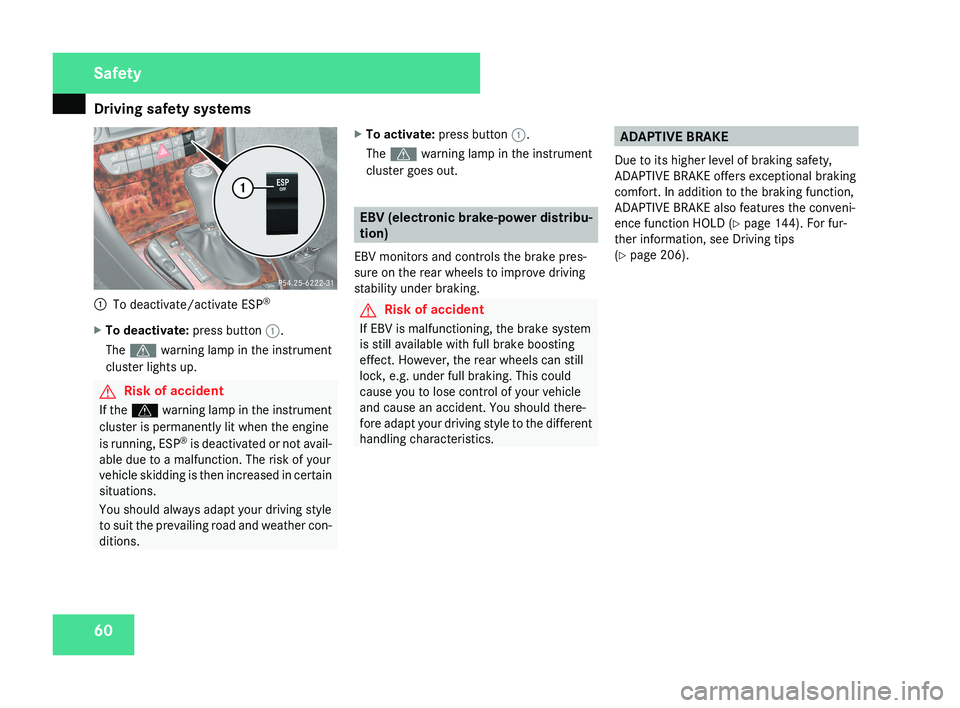
601
To deactivate/activate ESP ®
X To deactivate: press button 1.
The v warning lamp in the instrument
cluster lights up.
G Risk of accident
If the v warning lamp in the instrument
cluster is permanently lit when the engine
is running, ESP ®
is deactivated or not avail-
able due to a malfunction. The risk of your
vehicle skidding is then increased in certain
situations.
You should always adapt your driving style
to suit the prevailing road and weather con-
ditions. X
To activate: press button 1.
The v warning lamp in the instrument
cluster goes out.
EBV (electronic brake-power distribu-
tion)
EBV monitors and controls the brake pres-
sure on the rear wheels to improve driving
stability under braking.
G Risk of accident
If EBV is malfunctioning, the brake system
is still available with full brake boosting
effect. However, the rear wheels can still
lock, e.g. under full braking. This could
cause you to lose control of your vehicle
and cause an accident. You should there-
fore adapt your driving style to the different
handling characteristics.
ADAPTIVE BRAKE
Due to its higher level of braking safety,
ADAPTIVE BRAKE offers exceptional braking
comfort. In addition to the braking function,
ADAPTIVE BRAKE also features the conveni-
ence function HOLD (Y page 144). For fur-
ther information, see Driving tips
(Y page 206).
Safety
219_AKB; 2; 4, en-GB
mkalafa,
2007-11-13T09:28:36+01:00 - Seite 60
Page 68 of 329

65
Opening and closing
...........................66
Key positions ....................................... 74
Seats .................................................... 75
Steering wheel .................................... 81
Mirrors ................................................. 83
Memory functions* ............................. 86
Seat belts ............................................. 88
Lights ................................................... 91
Windscreen wipers .............................97
Side windows ...................................... 98Driving and parking ..........................
101
Transmission ..................................... 104
Instrument cluster ............................109
On-board computer ..........................111
Driving systems ................................ 132
Air conditioning ................................. 151
Sliding sunroof .................................. 169
Loading and stowing ........................172
Features ............................................. 180 Controls
219_AKB; 2; 4, en-GB
mkalafa,
2007-11-13T09:28:36+01:00 - Seite 65
Page 72 of 329
Opening and closing
69
approximately six seconds until the battery
check lamp flashes twice.
The KEYLESS GO key will now function as fol-
lows:
X To unlock the driver's door: pull the door
handle on the driver's door.
X To unlock centrally: pull the door handle
on the front-passenger door or on the rear
doors.
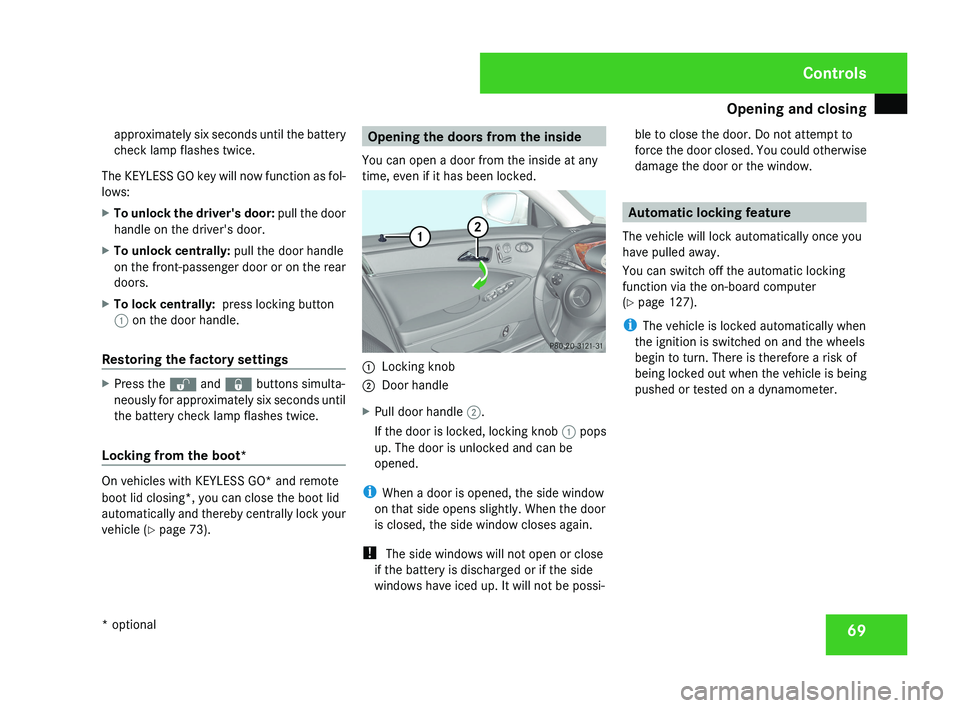
X To lock centrally: press locking button
1 on the door handle.
Restoring the factory settings X
Press the k and j buttons simulta-
neously for approximately six seconds until
the battery check lamp flashes twice.
Locking from the boot* On vehicles with KEYLESS GO* and remote
boot lid closing*, you can close the boot lid
automatically and thereby centrally lock your
vehicle (
Y page 73). Opening the doors from the inside
You can open a door from the inside at any
time, even if it has been locked. 1
Locking knob
2 Door handle
X Pull door handle 2.
If the door is locked, locking knob 1 pops
up. The door is unlocked and can be
opened.
i When a door is opened, the side window
on that side opens slightly. When the door
is closed, the side window closes again.
! The side windows will not open or close
if the battery is discharged or if the side
windows have iced up. It will not be possi- ble to close the door. Do not attempt to
force the door closed. You could otherwise
damage the door or the window. Automatic locking feature
The vehicle will lock automatically once you
have pulled away.
You can switch off the automatic locking
function via the on-board computer
(Y page 127).
i The vehicle is locked automatically when
the ignition is switched on and the wheels
begin to turn. There is therefore a risk of
being locked out when the vehicle is being
pushed or tested on a dynamometer. Controls
* optional
219_AKB; 2; 4, en-GB
mkalafa,
2007-11-13T09:28:36+01:00 - Seite 69
Page 84 of 329
Steering wheel
811
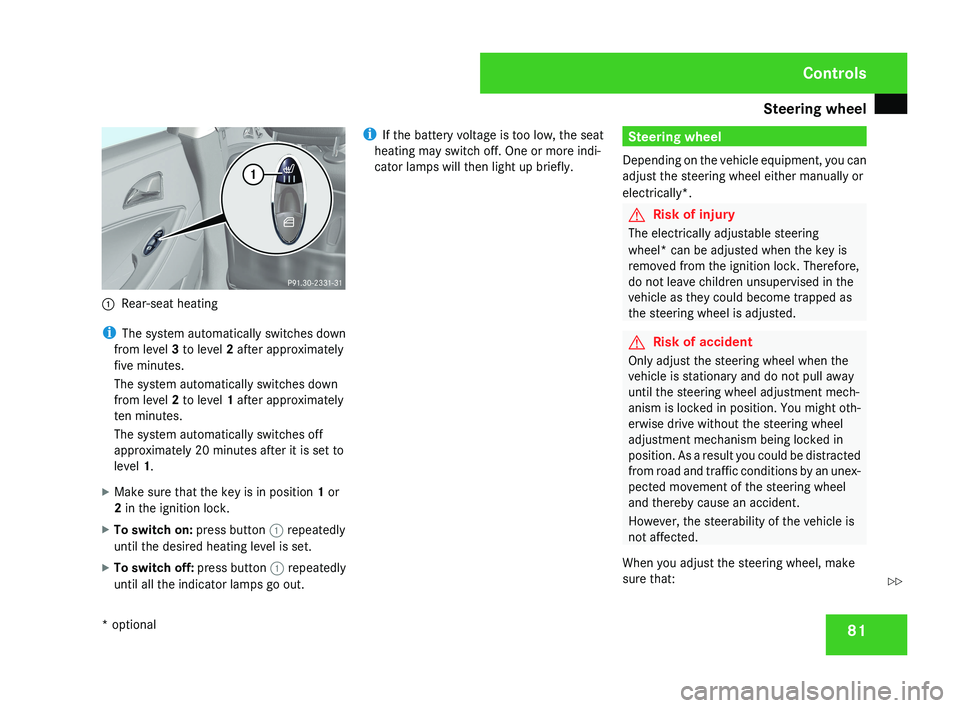
Rear-seat heating
i The system automatically switches down
from level 3 to level 2 after approximately
five minutes.
The system automatically switches down
from level 2 to level 1 after approximately
ten minutes.
The system automatically switches off
approximately 20 minutes after it is set to
level 1.
X Make sure that the key is in position 1 or
2 in the ignition lock.
X To switch on: press button 1 repeatedly
until the desired heating level is set.
X To switch off: press button 1 repeatedly
until all the indicator lamps go out. i
If the battery voltage is too low, the seat
heating may switch off. One or more indi-
cator lamps will then light up briefly.
Steering wheel
Depending on the vehicle equipment, you can
adjust the steering wheel either manually or
electrically*.
G Risk of injury
The electrically adjustable steering
wheel* can be adjusted when the key is
removed from the ignition lock. Therefore,
do not leave children unsupervised in the
vehicle as they could become trapped as
the steering wheel is adjusted.
G Risk of accident
Only adjust the steering wheel when the
vehicle is stationary and do not pull away
until the steering wheel adjustment mech-
anism is locked in position. You might oth-
erwise drive without the steering wheel
adjustment mechanism being locked in
position. As a result you could be distracted
from road and traffic conditions by an unex-
pected movement of the steering wheel
and thereby cause an accident.
However, the steerability of the vehicle is
not affected.
When you adjust the steering wheel, make
sure that:
Controls
* optional
219_AKB; 2; 4, en-GB
mkalafa,
2007-11-13T09:28:36+01:00 - Seite 81
Z
Page 85 of 329
Steering wheel
82
R
the steering wheel can be reached with
your arms slightly bent
R you can move your legs freely
R you can see all the displays in the instru-
ment cluster clearly Adjusting the steering wheel man-
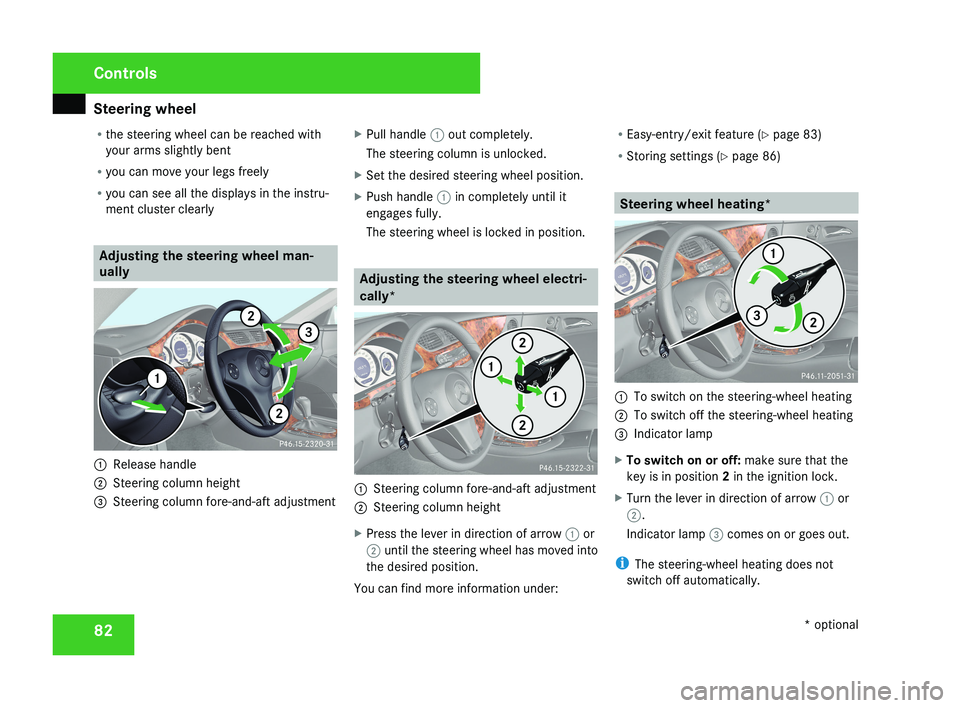
ually1
Release handle
2 Steering column height
3 Steering column fore-and-aft adjustment X
Pull handle 1 out completely.
The steering column is unlocked.
X Set the desired steering wheel position.
X Push handle 1 in completely until it
engages fully.
The steering wheel is locked in position.
Adjusting the steering wheel electri-
cally*
1 Steering column fore-and-aft adjustment
2 Steering column height
X Press the lever in direction of arrow 1 or
2 until the steering wheel has moved into
the desired position.
You can find more information under: R
Easy-entry/exit feature ( Y page 83)
R Storing settings ( Y page 86)
Steering wheel heating*
1
To switch on the steering-wheel heating
2 To switch off the steering-wheel heating
3 Indicator lamp
X To switch on or off: make sure that the
key is in position 2 in the ignition lock.
X Turn the lever in direction of arrow 1 or
2.
Indicator lamp 3 comes on or goes out.
i The steering-wheel heating does not
switch off automatically.
Controls
* optional
219_AKB; 2; 4, en-GB
mkalafa,
2007-11-13T09:28:36+01:00 - Seite 82