2008 MERCEDES-BENZ CLS COUPE driver seat adjustment
[x] Cancel search: driver seat adjustmentPage 9 of 329
6
Door
Automatic locking . . . . . . . . . . . . . . 69
Display message . . . . . . . . . . . . . . 229
Emergency locking . . . . . . . . . . . . . 267
Emergency unlocking . . . . . . . . . . . 266
Opening (from the inside) . . . . . . . . 69
Door control panel
Overview . . . . . . . . . . . . . . . . . . . . . 37
Drinks holder
see Cup holder
Driver's airbag . . . . . . . . . . . . . . . . . . . 46
Driver's door Unlocking (KEYLESS GO) . . . . . . . . . 69
Driver's seat position . . . . . . . . . . . . . 90
Driving abroad . . . . . . . . . . . . . . . . . . 208
Driving safety system . . . . . . . . . . . . . 57 ABS . . . . . . . . . . . . . . . . . . . . . . . . . 57
ADAPTIVE BRAKE . . . . . . . . . . . . . . . 60
Adaptive brake lamps . . . . . . . . . . . 58
BAS . . . . . . . . . . . . . . . . . . . . . . . . . 58
EBV . . . . . . . . . . . . . . . . . . . . . . . . . 60
ESP ®
. . . . . . . . . . . . . . . . . . . . . . . . 59
Driving system . . . . . . . . . . . . . . . . . . 132
Airmatic DC . . . . . . . . . . . . . . . . . . 146
Cruise control . . . . . . . . . . . . . . . . 132
Distronic . . . . . . . . . . . . . . . . . . . . 135
HOLD . . . . . . . . . . . . . . . . . . . . . . . 144
Parktronic . . . . . . . . . . . . . . . . . . . 148
Speedtronic . . . . . . . . . . . . . . . . . . 142 Driving tip
Braking . . . . . . . . . . . . . . . . . . . . . . 206
Distronic . . . . . . . . . . . . . . . . . . . . 141
Driving abroad . . . . . . . . . . . . . . . . 208
Driving on flooded roads . . . . . . . . 208
Driving on wet roads . . . . . . . . . . . 208
Winter . . . . . . . . . . . . . . . . . . . . . . 205
DVD audio
Operation (on-board computer) . . . 119
DVD video
Operation (on-board computer) . . . 120
Dynamic driving seat . . . . . . . . . . . . . 79
Select Seat adjustment (on-board
computer) . . . . . . . . . . . . . . . . . . . 129 E
Easy-entry/exit feature Activating/deactivating (on-
board computer)
. . . . . . . . . . . . . . 128
Easy-entry feature . . . . . . . . . . . . . . . . 83
Easy-exit feature . . . . . . . . . . . . . . . . . 83
EBV (electronic brake-power distri-
bution) . . . . . . . . . . . . . . . . . . . . . . . . . 60
Display message . . . . . . . . . . . . . . 231
Electrical/electronic equipment
Retrofitting . . . . . . . . . . . . . . . . . . . 299
Electronic brake-power distribution
see EBV Electronic Stability Program
see ESP ®
e mark . . . . . . . . . . . . . . . . . . . . . . . . . 299
Emergency key element Lost . . . . . . . . . . . . . . . . . . . . . . . . 261
Emergency locking
Vehicle . . . . . . . . . . . . . . . . . . . . . . 267
Emergency running mode
Automatic transmission . . . . . . . . . 257
Emergency unlocking
Boot . . . . . . . . . . . . . . . . . . . . . . . . 267
Vehicle . . . . . . . . . . . . . . . . . . . . . . 266
Engine
Display message . . . . . . . . . . . . . . 237
Running irregularly . . . . . . . . . . . . . 256
Starting problems . . . . . . . . . . . . . 255
Starting with KEYLESS GO . . . . . . . 102
Starting with the key . . . . . . . . . . . 101
Technical data . . . . . . . . . . . . . . . . 302
Engine diagnostic warning lamp . . . 247
Engine electronics . . . . . . . . . . . . . . . 299
Malfunction . . . . . . . . . . . . . . . . . . 255
Engine number . . . . . . . . . . . . . . . . . . 301
Engine oil . . . . . . . . . . . . . . . . . . . . . . 314
Checking the oil level (dipstick) . . . 195
Consumption . . . . . . . . . . . . . . . . . 195
Display message . . . . . . . . . . . . . . 237
Filler neck . . . . . . . . . . . . . . . . . . . 195 Index
219_AKB; 2; 4, en-GB
mkalafa,
2007-11-13T09:28:36+01:00 - Seite 6
Page 78 of 329
Seats
75Seats
Depending on the vehicle's equipment, seat
adjustments can be made either manually/
electrically or electrically*. G
Risk of injury
The seats can still be adjusted when there
is no key in the ignition lock. For this rea-
son, children should never be left unsuper-
vised in the vehicle. They could become
trapped by a seat adjustment movement. G
Risk of accident
Only adjust the driver's seat when the vehi-
cle is stationary. You will otherwise be dis-
tracted from the road and traffic conditions
and you could lose control of the vehicle as
a result of the seat moving. This could
cause an accident. G
Risk of injury
Make sure that nobody can become trap-
ped as you adjust the seat.
Observe the notes concerning the airbag
system.
Secure children as recommended; see the
"Children in the vehicle" section. !
When you move the seats, make sure that
there are no objects in the footwell or
behind the seats. Otherwise, you could
damage the seats and the objects.
i The head restraints in the front seats are
fitted with the NECK-PRO system
(Y page 49). For this reason, it is not pos-
sible to remove the head restraints from
the front seats.
For design reasons, the rear-compartment
head restraints cannot be removed.
Please contact a Mercedes-Benz Service
Centre for more information. Adjusting the seats manually and
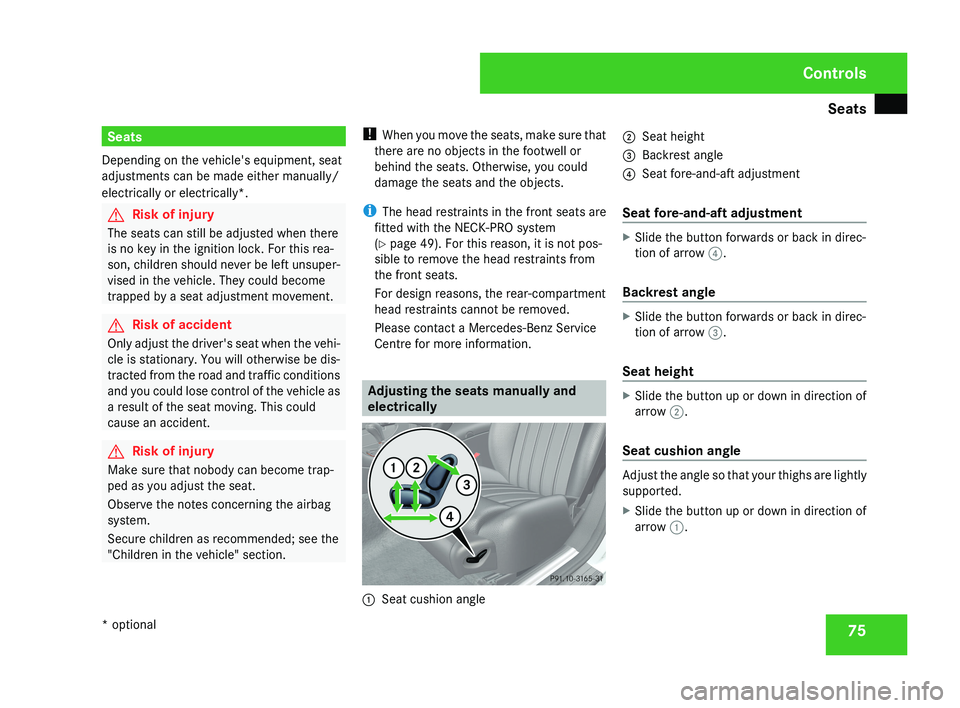
electrically1
Seat cushion angle 2
Seat height
3 Backrest angle
4 Seat fore-and-aft adjustment
Seat fore-and-aft adjustment
X Slide the button forwards or back in direc-
tion of arrow 4.
Backrest angle
X Slide the button forwards or back in direc-
tion of arrow 3.
Seat height
X Slide the button up or down in direction of
arrow 2.
Seat cushion angle
Adjust the angle so that your thighs are lightly
supported.
X Slide the button up or down in direction of
arrow 1.
Controls
* optional
219_AKB; 2; 4, en-GB
mkalafa,
2007-11-13T09:28:36+01:00 - Seite 75
Page 81 of 329
Seats
781
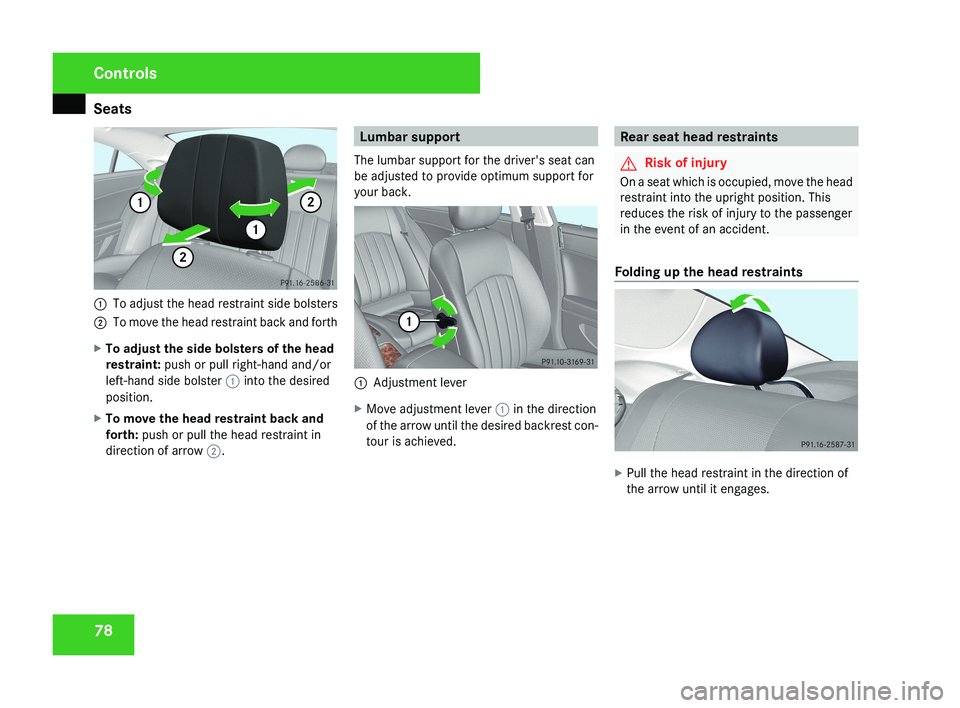
To adjust the head restraint side bolsters
2 To move the head restraint back and forth
X To adjust the side bolsters of the head
restraint: push or pull right-hand and/or
left-hand side bolster 1 into the desired
position.
X To move the head restraint back and
forth: push or pull the head restraint in
direction of arrow 2.
Lumbar support
The lumbar support for the driver's seat can
be adjusted to provide optimum support for
your back.
1 Adjustment lever
X Move adjustment lever 1 in the direction
of the arrow until the desired backrest con-
tour is achieved.
Rear seat head restraints
G Risk of injury
On a seat which is occupied, move the head
restraint into the upright position. This
reduces the risk of injury to the passenger
in the event of an accident.
Folding up the head restraints
X Pull the head restraint in the direction of
the arrow until it engages.
Controls
219_AKB; 2; 4, en-GB
mkalafa,
2007-11-13T09:28:36+01:00 - Seite 78
Page 83 of 329
Seats
80
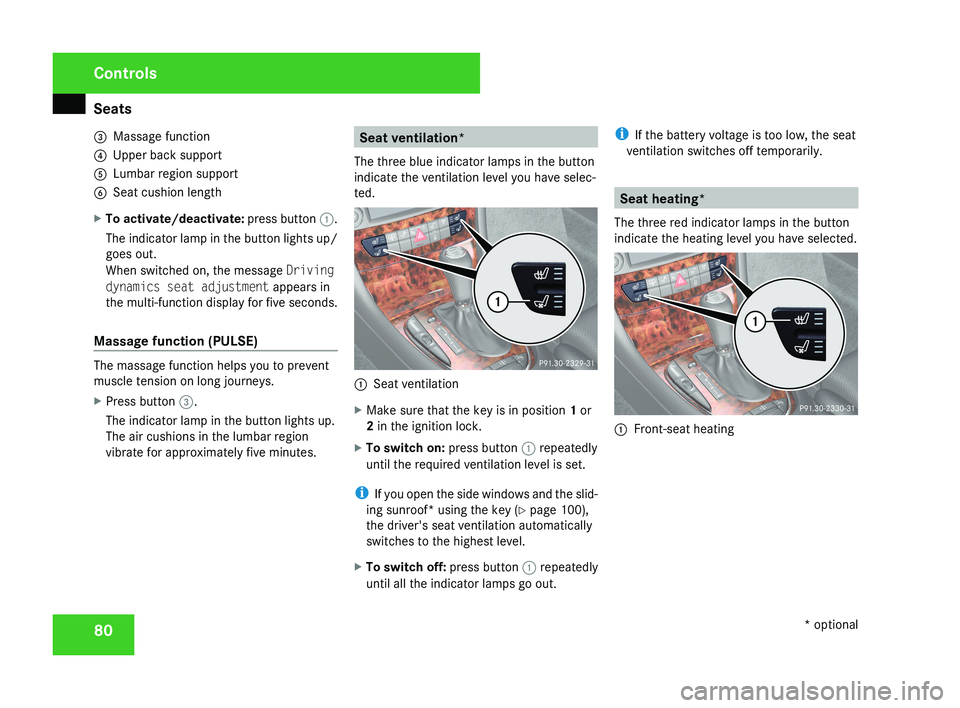
3
Massage function
4 Upper back support
5 Lumbar region support
6 Seat cushion length
X To activate/deactivate: press button 1.
The indicator lamp in the button lights up/
goes out.
When switched on, the message Driving
dynamics seat adjustment appears in
the multi-function display for five seconds.
Massage function (PULSE) The massage function helps you to prevent
muscle tension on long journeys.
X
Press button 3.
The indicator lamp in the button lights up.
The air cushions in the lumbar region
vibrate for approximately five minutes. Seat ventilation*
The three blue indicator lamps in the button
indicate the ventilation level you have selec-
ted. 1
Seat ventilation
X Make sure that the key is in position 1 or
2 in the ignition lock.
X To switch on: press button 1 repeatedly
until the required ventilation level is set.
i If you open the side windows and the slid-
ing sunroof* using the key ( Y page 100),
the driver's seat ventilation automatically
switches to the highest level.
X To switch off: press button 1 repeatedly
until all the indicator lamps go out. i
If the battery voltage is too low, the seat
ventilation switches off temporarily. Seat heating*
The three red indicator lamps in the button
indicate the heating level you have selected. 1
Front-seat heating Controls
* optional
219_AKB; 2; 4, en-GB
mkalafa,
2007-11-13T09:28:36+01:00 - Seite 80
Page 90 of 329
Memory functions*
87
X
Press the M memory button.
X Press one of storage position switches 1,
2 or 3 within three seconds.
The settings are stored in the selected pre-
set position. A tone sounds when the set-
tings have been completed. Calling up a stored setting
G
Risk of accident
Only activate the memory function on the
driver’s side when the vehicle is stationary.
You could otherwise be distracted from the
traffic conditions by the steering wheel and
seat moving of their own accord, and as a
result cause an accident.
X Press and hold the relevant storage posi-
tion switch 1, 2 or 3 until the seat, steering
wheel and mirrors are in the stored posi-
tion.
i The setting procedure is interrupted as
soon as you release the storage position
switch. Storing a parking position
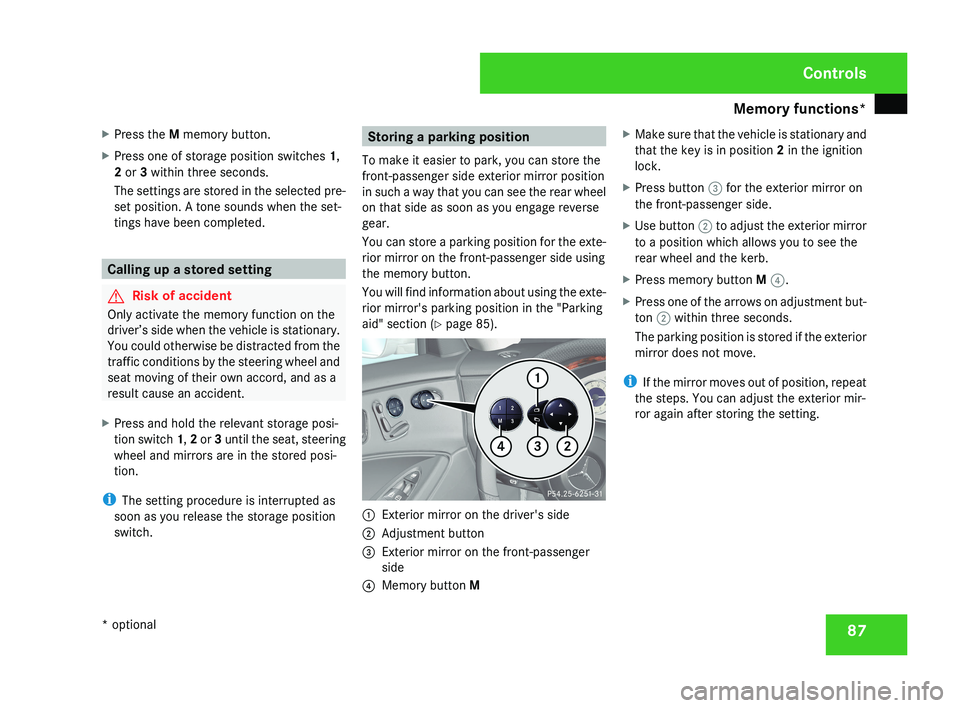
To make it easier to park, you can store the
front-passenger side exterior mirror position
in such a way that you can see the rear wheel
on that side as soon as you engage reverse
gear.
You can store a parking position for the exte-
rior mirror on the front-passenger side using
the memory button.
You will find information about using the exte-
rior mirror's parking position in the "Parking
aid" section ( Y page 85).1
Exterior mirror on the driver's side
2 Adjustment button
3 Exterior mirror on the front-passenger
side
4 Memory button M X
Make sure that the vehicle is stationary and
that the key is in position 2 in the ignition
lock.
X Press button 3 for the exterior mirror on
the front-passenger side.
X Use button 2 to adjust the exterior mirror
to a position which allows you to see the
rear wheel and the kerb.
X Press memory button M 4.
X Press one of the arrows on adjustment but-
ton 2 within three seconds.
The parking position is stored if the exterior
mirror does not move.
i If the mirror moves out of position, repeat
the steps. You can adjust the exterior mir-
ror again after storing the setting.
Controls
* optional
219_AKB; 2; 4, en-GB
mkalafa,
2007-11-13T09:28:36+01:00 - Seite 87
Page 93 of 329
Seat belts
90
already secured, the
< seat belt warning
lamp lights up for six seconds after the engine
has been started. The < seat belt warning
lamp then goes out if both the driver and the
front passenger have fastened their seat belt.
i Further information about the < seat
belt warning lamp (Y page 249). Belt height adjustment
You can adjust the seat belt height on the
driver's seat and front-passenger seat.
Adjust the belt to a height that allows it to be
routed across the middle of your shoulder.1 Release catch X
To raise: slide the belt sash guide upwards.
The belt sash guide engages in various posi-
tions.
X To lower: press and hold release button
1.
X Slide the belt sash guide downwards.
X Let go of release button 1 and make sure
that the belt sash guide has engaged.
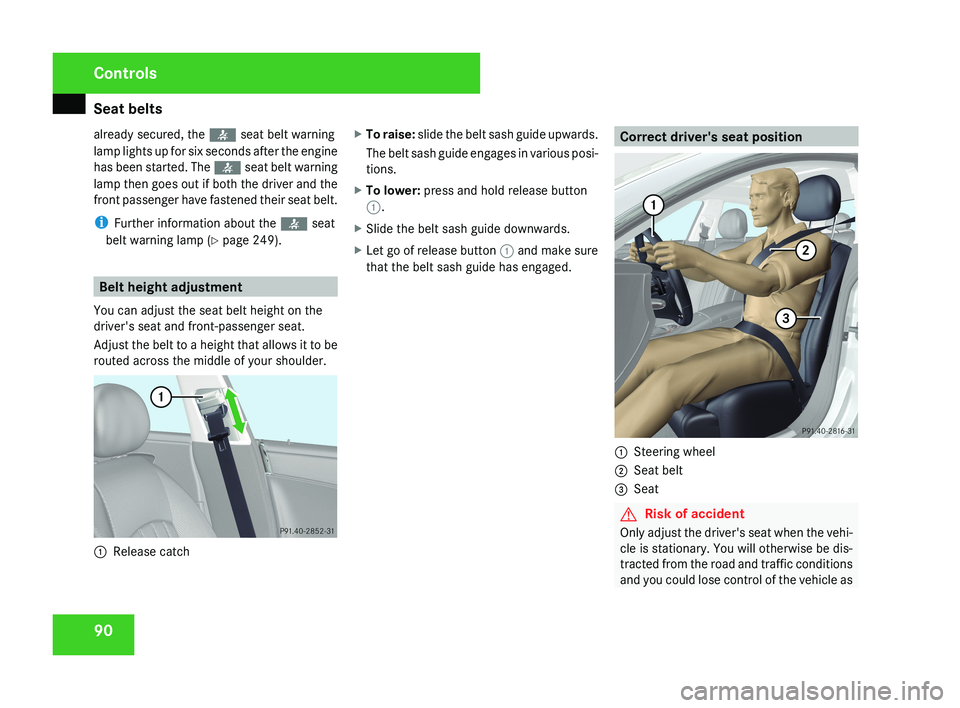
Correct driver's seat position
1 Steering wheel
2 Seat belt
3 Seat
G Risk of accident
Only adjust the driver's seat when the vehi-
cle is stationary. You will otherwise be dis-
tracted from the road and traffic conditions
and you could lose control of the vehicle as
Controls
219_AKB; 2; 4, en-GB
mkalafa,
2007-11-13T09:28:36+01:00 - Seite 90
Page 94 of 329
Lights
91a result of the seat moving. This could
cause an accident.
G
Risk of accident
Only adjust the steering wheel when the
vehicle is stationary and do not pull away
until the steering wheel adjustment mech-
anism is locked in position. You might oth-
erwise drive without the steering wheel
adjustment mechanism being locked in
position.
As a result you could be distracted
from road and traffic conditions by an unex-
pected movement of the steering wheel
and thereby cause an accident.
However, the steerability of the vehicle is
not affected.
X Check whether seat 3 and the head
restraint are adjusted properly
(Y page 75).
Make sure that:
R
you
are as far away from the driver's front
airbag as possible
R you are sitting in a normal upright posi-
tion
R you can fasten the seat belt properly
R you have moved the backrest to an
almost vertical position R
you have set the seat angle so that your
thighs are gently supported
R you can depress the pedals properly
R you have adjusted the head restraint so
that the back of your head is supported
at eye level by the central area of the
head restraint
X Check whether steering wheel 1
is adjus-
ted properly (Y page 81).
Make sure that:
R you can hold the steering wheel with your
arms slightly bent
R you can move your legs freely
R you can see all the displays in the instru-
ment cluster clearly
X Check whether you have fastened seat belt
2 properly
(Y page 88).
It should:
R fit snugly across your body
R be routed across the middle of your
shoulder
R routed in your pelvic area across the hip
joints Lights
Light switch
For
reasons of safety, Mercedes-Benz recom-
mends that you drive with the lights switched
on even during the daytime. In some coun-
tries, daytime use of headlamps varies due to
legal requirements and self-imposed obliga-
tions. In these countries, dipped-beam head-
lamps are switched on when the ignition is
switched on.
i If you drive in countries in which traffic
drives on the opposite side of the road to
the country where the vehicle is registered,
oncoming traffic may be dazzled by the
asymmetrical dipped-beam headlamps.
Have the headlamps changed to symmet-
rical dipped beam when driving in these
countries. You can obtain information
about this from any Mercedes-Benz Service
Centre. Controls
219_AKB; 2; 4, en-GB
mkalafa,
2007-11-13T09:28:36+01:00 - Seite 91
Page 132 of 329
On-board computer
129
If you have switched the function on and you
fold in the exterior mirrors using the button
on the door (Y page 85), they will not fold out
automatically. The exterior mirrors can then
only be folded out using the button on the
door.
X Press the è or · button to select the
Settings... menu.
X Press the j button to call up the selec-
tion of submenus.
X Press the æ or ç button to select the
Convenience submenu.
X Press the j button to select Fold in
mirrors when locking.
X Press the æ or ç button to activate
or deactivate the Fold in mirrors when
locking feature.
X Press the j, è or ÿ button to
select a different display.
Selecting a setting for the dynamic driv-
ing seat* i
For more information on the dynamic driv-
ing seat, see ( Y page 79). X
Press the è or · button to select the
Settings... menu.
X Press the j button to call up the selec-
tion of submenus.
X Press the æ or ç button to select the
Driving dynamics seat adjustment
submenu.
X Press the j button to select Driving
dyn. seat adjust., driver or Driving
dyn. seat adjust., front-pass..
X Press the æ or ç button to select the
desired seat setting: Gentle for a soft seat
setting or Vigorous for a hard seat setting.
X Press the j, è or ÿ button to
select a different display. Trip computer menu
You can use the Trip computer menu to call
up or reset statistical data for your vehicle.
i You can select km or miles as the unit of
measurement for distance (Y page 123).
i Menu overview: see ( Y page 114).
Use the buttons on the multi-function steer-
ing wheel.
X Press the è or · button to select
From start.
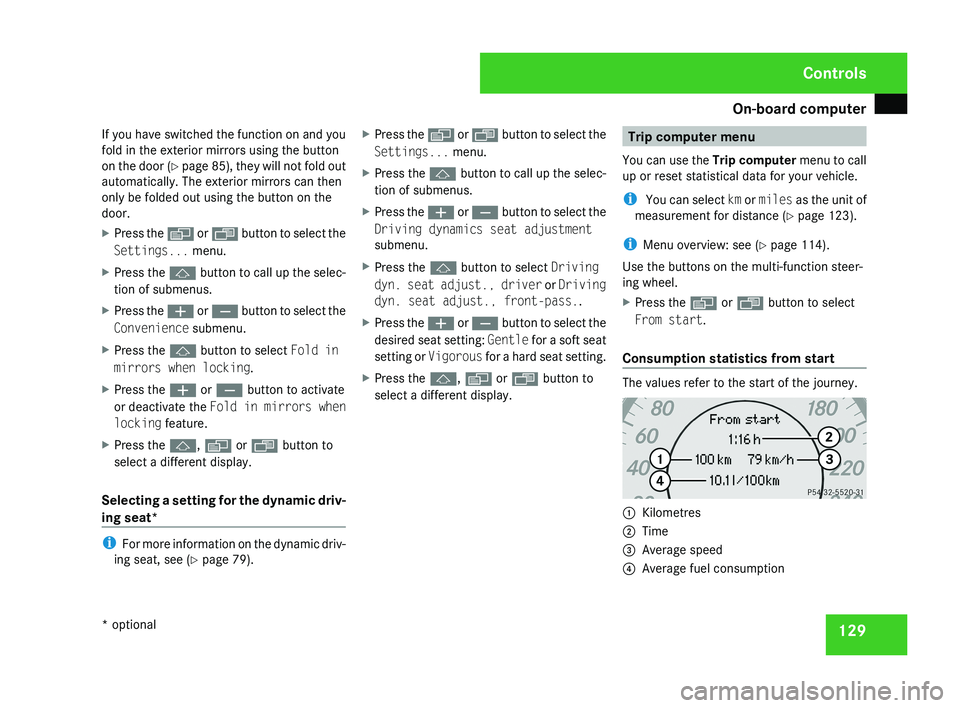
Consumption statistics from start The values refer to the start of the journey.
1
Kilometres
2 Time
3 Average speed
4 Average fuel consumption Controls
* optional
219_AKB; 2; 4, en-GB
mkalafa,
2007-11-13T09:28:36+01:00 - Seite 129