Page 124 of 3924
TROUBLE DIAGNOSISAT-51
< SERVICE INFORMATION >
DE
F
G H
I
J
K L
M A
B
AT
N
O P
9. Repeat steps 5 through 8 with selector lever in “R” position.
Judgement of Stall Test
O: Stall speed within standard value position
H: Stall speed higher than standard value
L: Stall speed lower than standard value
Stall test standard value position
LINE PRESSURE TEST
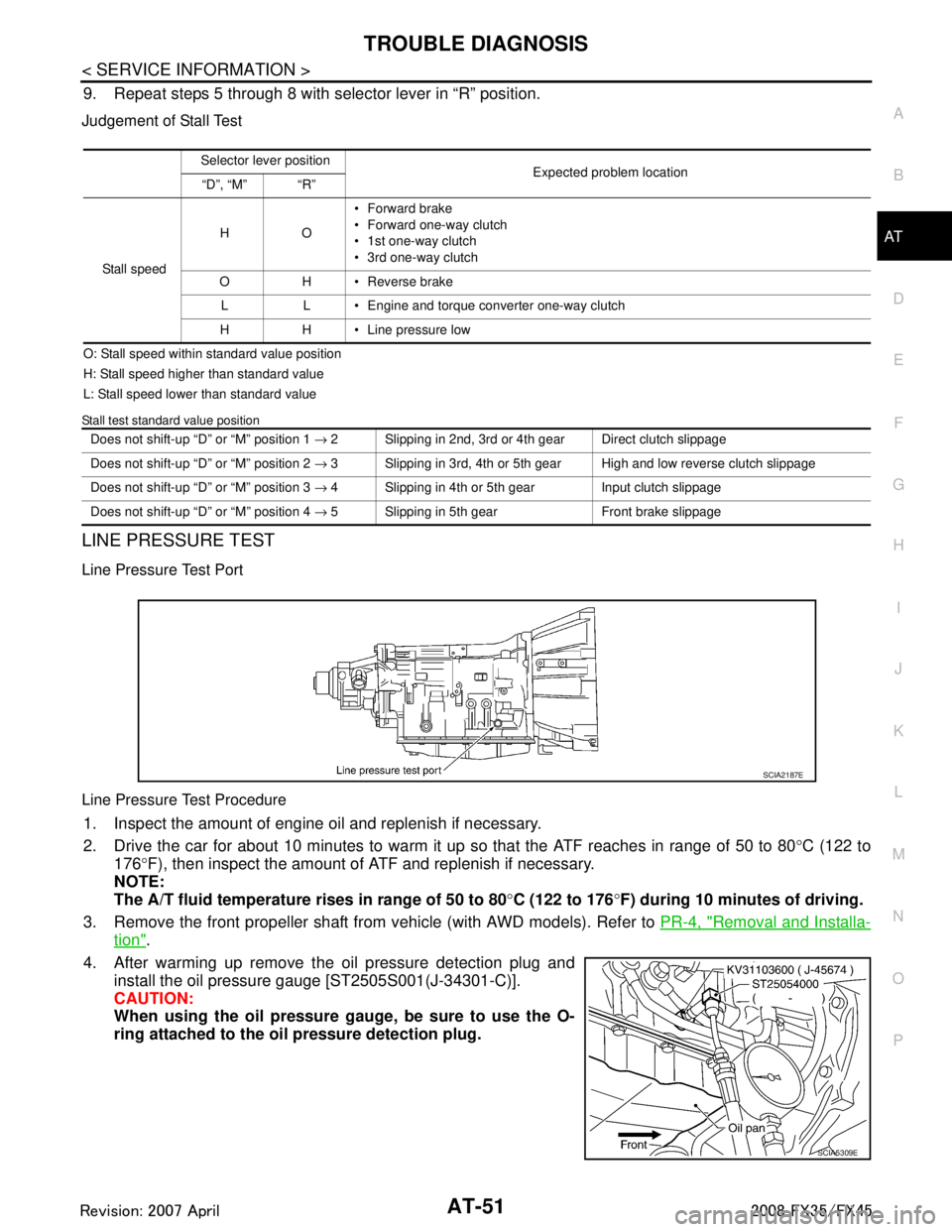
Line Pressure Test Port
Line Pressure Test Procedure
1. Inspect the amount of engine oil and replenish if necessary.
2. Drive the car for about 10 minutes to warm it up so that the ATF reaches in range of 50 to 80°C (122 to
176 °F), then inspect the amount of ATF and replenish if necessary.
NOTE:
The A/T fluid temperature rises in range of 50 to 80°C (122 to 176 °F) during 10 minutes of driving.
3. Remove the front propeller shaft from vehicle (with AWD models). Refer to PR-4, "
Removal and Installa-
tion".
4. After warming up remove the oil pressure detection plug and install the oil pressure gauge [ST2505S001(J-34301-C)].
CAUTION:
When using the oil pressure ga uge, be sure to use the O-
ring attached to the oil pressure detection plug.
Selector lever position Expected problem location
“D”, “M” “R”
Stall speed HO
Forward brake
Forward one-way clutch
1st one-way clutch
3rd one-way clutch
O H Reverse brake L L Engine and torque converter one-way clutch
H H Line pressure low
Does not shift-up “D ” or “M” position 1 → 2 Slipping in 2nd, 3rd or 4th gear Direct clutch slippage
Does not shift-up “D ” or “M” position 2 → 3 Slipping in 3rd, 4th or 5th gear High and low reverse clutch slippage
Does not shift-up “D ” or “M” position 3 → 4 Slipping in 4th or 5th gear Input clutch slippage
Does not shift-up “D ” or “M” position 4 → 5 Slipping in 5th gear Front brake slippage
SCIA2187E
SCIA5309E
3AA93ABC3ACD3AC03ACA3AC03AC63AC53A913A773A893A873A873A8E3A773A983AC73AC93AC03AC3
3A893A873A873A8F3A773A9D3AAF3A8A3A8C3A863A9D3AAF3A8B3A8C
Page 162 of 3924

TROUBLE DIAGNOSISAT-89
< SERVICE INFORMATION >
DE
F
G H
I
J
K L
M A
B
AT
N
O P
1 POSITION SW (ON/OFF) X —
SLCT LVR POSI — X Selector lever position is recognized by the TCM.
For fail-safe operation, the specific value used
for control is displayed.
OD CONT SW (ON/OFF) X —
Not mounted but displayed.
POWERSHIFT SW (ON/OFF) X —
HOLD SW (ON/OFF) X —
MANU MODE SW (ON/OFF) X —
NON M-MODE SW (ON/OFF) X —
UP SW LEVER (ON/OFF) X —
DOWN SW LEVER (ON/OFF) X —
SFT UP ST SW (ON/OFF) — —
Not mounted but displayed.
SFT DWN ST SW (ON/OFF) — —
ASCD-OD CUT (ON/OFF) — —
ASCD-CRUISE (ON/OFF) — —
ABS SIGNAL (ON/OFF) — —
ACC-OD CUT (ON/OFF) — — ICC (intelligent cruise control)
ACC-SIGNAL (ON/OFF) — —
TCS GR/P KEEP (ON/OFF) — —
TCS SIGNAL 2 (ON/OFF) — —
TCS SIGNAL 1 (ON/OFF) — —
TCC SOLENOID (A) — X
LINE PRES SOL (A) — X
I/C SOLENOID (A) — X
FR/B SOLENOID (A) — X
D/C SOLENOID (A) — X
HLR/C SOL (A) — X
ON OFF SOL (ON/OFF) — — LC/B solenoid
TCC SOL MON (A) — —
L/P SOL MON (A) — —
I/C SL MON (A) — —
FR/B SOL MON (A) — —
D/C SOL MON (A) — —
HLR/C SOL MON (A) — —
ON OFF SOL MON (ON/OFF) — — LC/B solenoid
P POSI IND (ON/OFF) — — Monitored item (Unit)
Select Monitor Item
Remarks
ECU IN-
PUT SIG- NALS MAIN SIG-
NALS SELEC-
TION
FROM
MENU
3AA93ABC3ACD3AC03ACA3AC03AC63AC53A913A773A893A873A873A8E3A773A983AC73AC93AC03AC3
3A893A873A873A8F3A773A9D3AAF3A8A3A8C3A863A9D3AAF3A8B3A8C
Page 163 of 3924

AT-90
< SERVICE INFORMATION >
TROUBLE DIAGNOSIS
R POSI IND (ON/OFF) — —
N POSI IND (ON/OFF) — —
D POSI IND (ON/OFF) — —
4TH POSI IND (ON/OFF) — —
3RD POSI IND (ON/OFF) — —
2ND POSI IND (ON/OFF) — —
1ST POSI IND (ON/OFF) — —
MANU MODE IND (ON/OFF) — —
POWER M LAMP (ON/OFF) — —
F-SAFE IND/L (ON/OFF) — —
ATF WARN LAMP (ON/OFF) — — Not mounted but displayed
BACK-UP LAMP (ON/OFF) — —
STARTER RELAY (ON/OFF) — —
PNP SW3 MON (ON/OFF) — —
C/V CLB ID1 — —
C/V CLB ID2 — —
C/V CLB ID3 — —
UNIT CLB ID1 — —
UNIT CLB ID2 — —
UNIT CLB ID3 — —
TRGT GR RATIO — —
TRGT PRES TCC (kPa) — —
TRGT PRES L/P (kPa) — —
TRGT PRES I/C (kPa) — —
TRGT PRE FR/B (kPa) — —
TRGT PRES D/C (kPa) — —
TRG PRE HLR/C (kPa) — —
SHIFT PATTERN — —
DRV CST JUDGE — —
START RLY MON — —
NEXT GR POSI — —
SHIFT MODE — —
MANU GR POSI — —
VEHICLE SPEED (km/h) — X Vehicle sp eed recognized by the TCM.
Monitored item (Unit)
Select Monitor Item
Remarks
ECU IN-
PUT SIG- NALS MAIN SIG-
NALS SELEC-
TION
FROM
MENU
3AA93ABC3ACD3AC03ACA3AC03AC63AC53A913A773A893A873A873A8E3A773A983AC73AC93AC03AC3
3A893A873A873A8F3A773A9D3AAF3A8A3A8C3A863A9D3AAF3A8B3A8C
Page 288 of 3924

ON-VEHICLE SERVICEAT-215
< SERVICE INFORMATION >
DE
F
G H
I
J
K L
M A
B
AT
N
O P
ON-VEHICLE SERVICE
Control Valve with TCM and A/T Fluid Temperature Sensor 2INFOID:0000000001327393
COMPONENTS
CONTROL VALVE WITH TCM ASSEMB LY REMOVAL AND INSTALLATION
Removal
1. Disconnect the battery cable from the negative terminal.
2. Drain ATF through drain plug.
3. Remove front cross bar. Refer to FSU-6, "
Removal and Installation".
4. Disconnect heated oxygen sensor 2 harness connector.
5. Disconnect A/T assembly harness connector.
1. A/T 2. Snap ring 3. Sub-harness
4. Control valve with TCM 5. Bracket 6. A/T fluid temperature sensor 2
7. Oil pan gasket 8. Clip 9. Bracket (VK45DE)
10. Bracket (VK45DE) 11. Oil pan mounting bolt 12. Oil pan
13. Magnet 14. Drain plug 15. Drain plug gasket
16. Terminal cord assembly 17. O-ring
Refer to GI section to make sure icons (symbol marks) in the figure. Refer to GI-8, "
Component".
SCIA8045E
3AA93ABC3ACD3AC03ACA3AC03AC63AC53A913A773A893A873A873A8E3A773A983AC73AC93AC03AC3
3A893A873A873A8F3A773A9D3AAF3A8A3A8C3A863A9D3AAF3A8B3A8C
Page 293 of 3924

AT-220
< SERVICE INFORMATION >
ON-VEHICLE SERVICE
3. Connect TCM connectors.
4. Install O-ring in A/T assembly harness connector.CAUTION:
Do not reuse O-ring.
Apply ATF to O-ring.
5. Install A/T fluid temperature sensor 2 to bracket.
6. Install A/T fluid temperature sensor 2 (with bracket) in control valve with TCM, and then tighten A/T fluid temperature sensor 2
mounting bolt to the specified torque. Refer to "COMPO-
NENTS".
CAUTION:
Adjust bolt hole of bracket to bolt hole of control valve with
TCM.
7. Install control valve with TCM in transmission case. CAUTION:
Make sure that turbine revolu tion sensor securely installs
turbine revolution sensor hole.
Hang down revolution senso r harness toward outside so
as not to disturb installation of control valve with TCM.
Adjust A/T assembly harness co nnector of control valve
with TCM to terminal hole of transmission case.
SCIA5447E
SCIA5155E
SCIA5264E
SCIA5301E
SCIA5034E
3AA93ABC3ACD3AC03ACA3AC03AC63AC53A913A773A893A873A873A8E3A773A983AC73AC93AC03AC3
3A893A873A873A8F3A773A9D3AAF3A8A3A8C3A863A9D3AAF3A8B3A8C
Page 295 of 3924

AT-222
< SERVICE INFORMATION >
ON-VEHICLE SERVICE
12. Connect revolution sensor connector.
13. Securely fasten revolution sensor harness with terminal clip.
14. Install magnets in oil pan.
15. Install oil pan to transmission case.
a. Install oil pan gasket to oil pan.CAUTION:
Do not reuse oil pan gasket.
Install it in the direction to align hole positions.
Completely remove all moisture , oil and old gasket, etc. from oil pan gasket mounting surface.
b. Install oil pan (3) (with oil pan gasket), clips (2) and brackets (1) (VK45DE) to transmission case.
: Vehicle front
: Bolt (22)
CAUTION:
Install it so that drain plug (4) comes to the position as
shown in the figure.
Be careful not to pinch harnesses.
Completely remove all moisture, oil and old gasket, etc. from oil pan mounting surface.
SCIA7524E
SCIA7525E
SCIA5200E
SCIA8128E
3AA93ABC3ACD3AC03ACA3AC03AC63AC53A913A773A893A873A873A8E3A773A983AC73AC93AC03AC3
3A893A873A873A8F3A773A9D3AAF3A8A3A8C3A863A9D3AAF3A8B3A8C
Page 296 of 3924

ON-VEHICLE SERVICEAT-223
< SERVICE INFORMATION >
DE
F
G H
I
J
K L
M A
B
AT
N
O P
c. Tighten oil pan mounting bolts to the specified torque in numeri- cal order shown in the figure after temporarily tightening them.
Refer to "COMPONENTS".
CAUTION:
Do not reuse oil pan mounting bolts.
16. Install drain plug to oil pan, and then tighten drain plug to the specified torque. Refer to "COMPONENTS".
CAUTION:
Do not reuse drain plug gasket.
17. Pull up A/T assembly harness connector. CAUTION:
Be careful not to damage connector.
18. Install snap ring to A/T assembly harness connector.
19. Connect A/T assembly harness connector.
20. Connect heated oxygen sensor 2 harness connector.
21. Install front cross bar. Refer to FSU-6, "
Removal and Installa-
tion".
22. Pour ATF into A/T assembly. Refer to AT- 11 , "
Changing A/T
Fluid".
23. Connect the battery cable to the negative terminal.
A/T FLUID TEMPERATURE SENSOR 2 REMOVAL AND INSTALLATION
Removal
1. Disconnect the battery cabl e from the negative terminal.
2. Remove front cross bar. Refer to FSU-6, "
Removal and Installation".
3. Disconnect heated oxygen sensor 2 harness connector.
4. Drain ATF through drain plug.
5. Remove bracket (1) (VK45DE), clips (2), oil pan (3) and oil pan gasket.
: Vehicle front
: Bolt (22)
Drain plug (4)
SCIA4113E
SCIA5038E
SCIA5039E
SCIA8128E
3AA93ABC3ACD3AC03ACA3AC03AC63AC53A913A773A893A873A873A8E3A773A983AC73AC93AC03AC3
3A893A873A873A8F3A773A9D3AAF3A8A3A8C3A863A9D3AAF3A8B3A8C
Page 298 of 3924

ON-VEHICLE SERVICEAT-225
< SERVICE INFORMATION >
DE
F
G H
I
J
K L
M A
B
AT
N
O P
1. Install A/T fluid temperature sensor 2 to bracket.
2. Install A/T fluid temperature sens or 2 (with bracket) in control
valve with TCM, and then tighten A/T fluid temperature sensor 2
mounting bolt to the specified torque. Refer to "COMPO-
NENTS".
3. Connect A/T fluid temperature sensor 2 connector (1).
4. Securely fasten A/T fluid temperature sensor 2 harness with ter- minal clip ( ).
5. Install oil pan to transmission case.
a. Install oil pan gasket to oil pan. CAUTION:
Do not reuse oil pan gasket.
Install it in the direction to align hole positions.
Completely remove all moisture , oil and old gasket, etc. from oil pan mounting surface.
b. Install oil pan (3) (with oil pan gasket), clips (2) and brackets (1) (VK45DE) to transmission case.
: Vehicle front
: Bolt (22)
CAUTION:
Install it so that drain plug (4) comes to the position as
shown in the figure.
Be careful not to pinch harnesses.
Completely remove all moistu re, oil and old gasket, etc.
from oil pan mounting surface.
SCIA5264E
SCIA5302E
SCIA8076E
SCIA8128E
3AA93ABC3ACD3AC03ACA3AC03AC63AC53A913A773A893A873A873A8E3A773A983AC73AC93AC03AC3
3A893A873A873A8F3A773A9D3AAF3A8A3A8C3A863A9D3AAF3A8B3A8C