Page 223 of 457
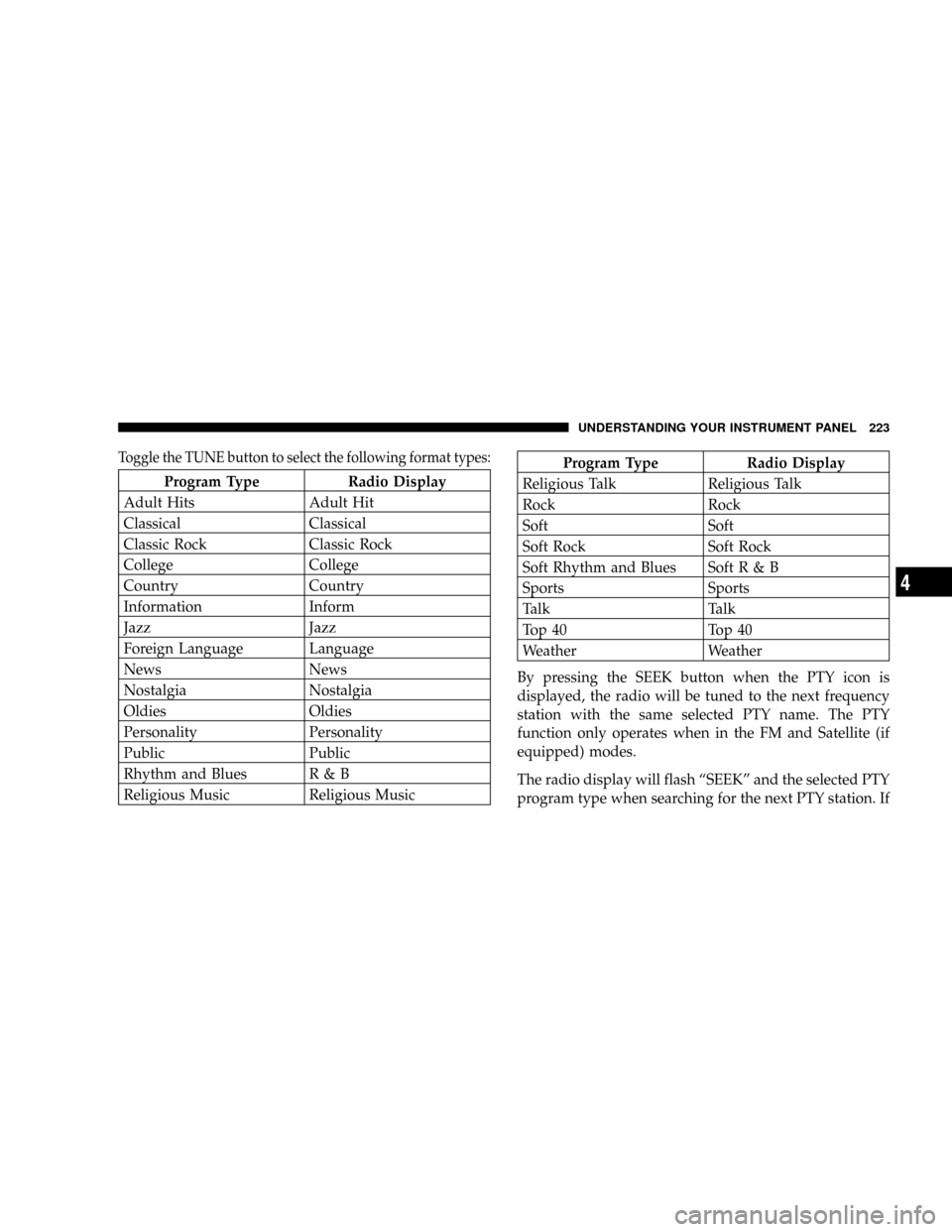
Toggle the TUNE button to select the following format types:
Program Type Radio Display
Adult Hits Adult Hit
Classical Classical
Classic Rock Classic Rock
College College
Country Country
Information Inform
Jazz Jazz
Foreign Language Language
News News
Nostalgia Nostalgia
Oldies Oldies
Personality Personality
Public Public
Rhythm and Blues R & B
Religious Music Religious Music
Program Type Radio Display
Religious Talk Religious Talk
Rock Rock
Soft Soft
Soft Rock Soft Rock
Soft Rhythm and Blues SoftR&B
Sports Sports
Talk Talk
Top 40 Top 40
Weather Weather
By pressing the SEEK button when the PTY icon is
displayed, the radio will be tuned to the next frequency
station with the same selected PTY name. The PTY
function only operates when in the FM and Satellite (if
equipped) modes.
The radio display will flash ªSEEKº and the selected PTY
program type when searching for the next PTY station. If
UNDERSTANDING YOUR INSTRUMENT PANEL 223
4
Page 237 of 457

RTN Button (4)
This button only functions in CD/DVD mode. Press this
button to return to the previous menu when in the disc
menu mode.
SETUP Button (5)
This button only functions in CD/DVD mode. Press the
button after pressing the STOP button to access the set up
menu. Use the right and left arrows to move between
tabs for language, rating, mark, audio and aspect. Use the
up and down arrows to move between options within
each tab.
To change an item highlighted in blue, press ENTER. This
should cause the highlight to turn yellow. Again, using
the up and down arrows will cause the arrow to move up
or down. Once the arrow is on the desired selection, press
ENTER. When finished, press setup or play to return to
playing the CD/DVD or Menu to return to the disc
menu.
PAUSE/PLAY Button (6)
This button only functions in DVD video mode. Press this
button once to pause the video, press a second time to
play the video.
MUTE Button (7)
This button mutes audio playing through the DVD
player.
DISP Button (8)
This button only functions in DVD video mode. When a
DVD video is playing, press this button to display the
play menu options.
MODE Button (9)
²
With DVD Radio (REV) and DVD changer, this button
changes between radio DVD, Radio AUX Jacks and
DVD changer input.
²All other radios: No Function.
UNDERSTANDING YOUR INSTRUMENT PANEL 237
4
Page 252 of 457
Dual Zone Temperature Control Ð If Equipped
With the Dual Zone Temperature Control System, each
front seat occupant can independently control the tem-
perature of air coming from the outlets on their side of
the vehicle.
This is accomplished by having a separate temperature
control lever for both the driver and front seat passenger.
The blue area of the scale indicates cooler temperatures
while the red area indicates warmer temperatures.
Mode Control
The mode control allows you to
choose from several patterns of air
distribution.
NOTE:To improve your selection choices, the system
allows you to operate at intermediate positions between
the major modes. These intermediate positions are iden-
tified by the small dots.
Dual Zone Temperature Control
252 UNDERSTANDING YOUR INSTRUMENT PANEL
Page 408 of 457
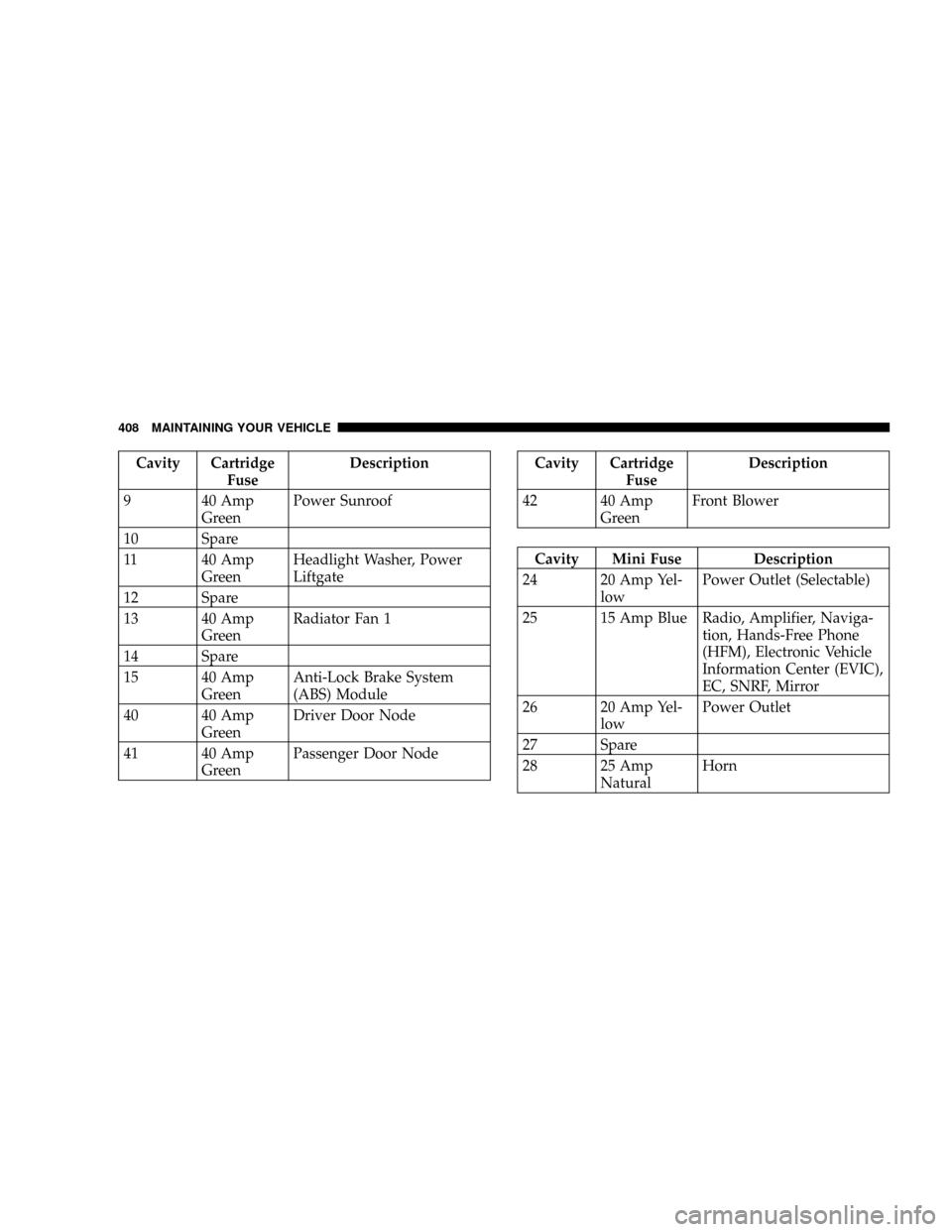
Cavity Cartridge
FuseDescription
9 40 Amp
GreenPower Sunroof
10 Spare
11 40 Amp
GreenHeadlight Washer, Power
Liftgate
12 Spare
13 40 Amp
GreenRadiator Fan 1
14 Spare
15 40 Amp
GreenAnti-Lock Brake System
(ABS) Module
40 40 Amp
GreenDriver Door Node
41 40 Amp
GreenPassenger Door NodeCavity Cartridge
FuseDescription
42 40 Amp
GreenFront Blower
Cavity Mini Fuse Description
24 20 Amp Yel-
lowPower Outlet (Selectable)
25 15 Amp Blue Radio, Amplifier, Naviga-
tion, Hands-Free Phone
(HFM), Electronic Vehicle
Information Center (EVIC),
EC, SNRF, Mirror
26 20 Amp Yel-
lowPower Outlet
27 Spare
28 25 Amp
NaturalHorn
408 MAINTAINING YOUR VEHICLE
Page 409 of 457
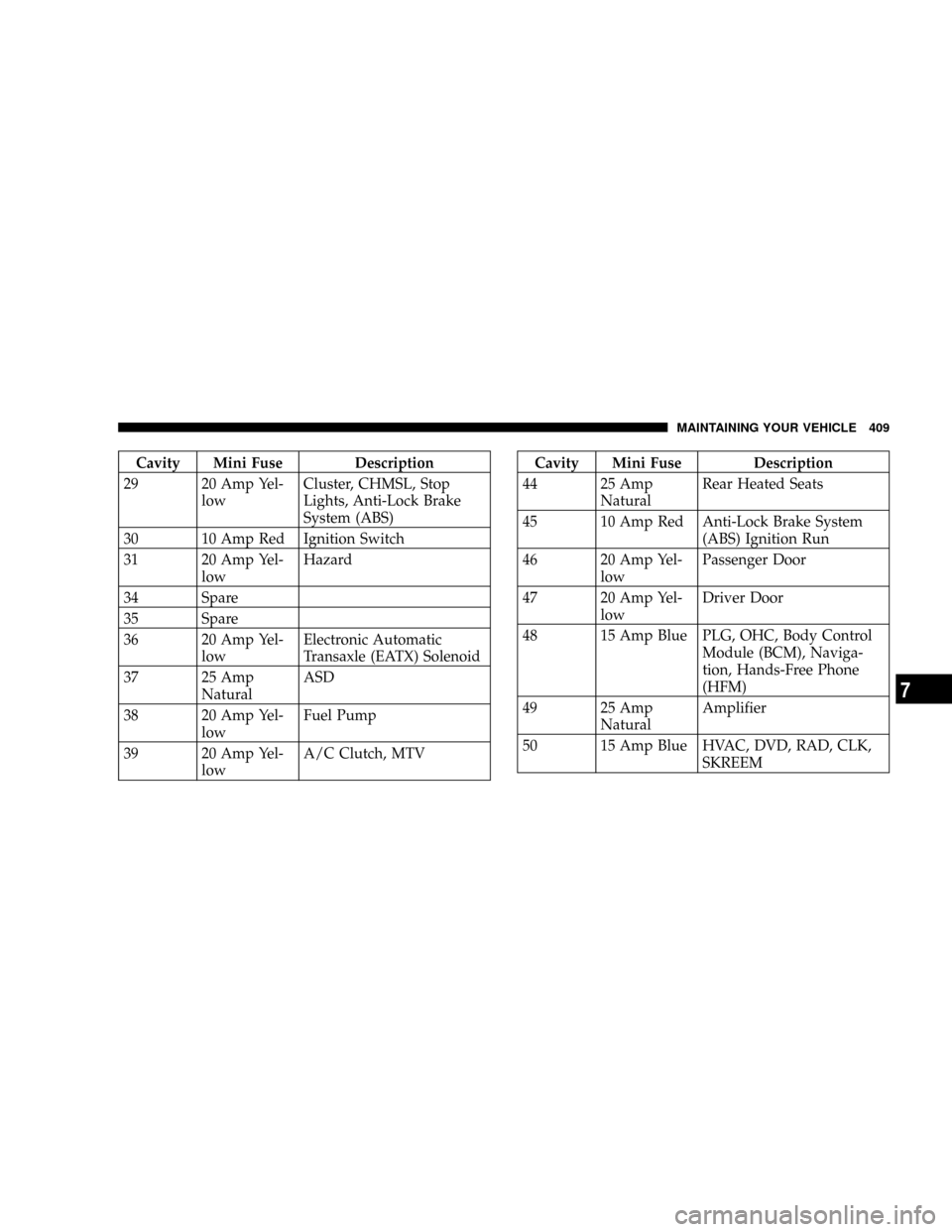
Cavity Mini Fuse Description
29 20 Amp Yel-
lowCluster, CHMSL, Stop
Lights, Anti-Lock Brake
System (ABS)
30 10 Amp Red Ignition Switch
31 20 Amp Yel-
lowHazard
34 Spare
35 Spare
36 20 Amp Yel-
lowElectronic Automatic
Transaxle (EATX) Solenoid
37 25 Amp
NaturalASD
38 20 Amp Yel-
lowFuel Pump
39 20 Amp Yel-
lowA/C Clutch, MTVCavity Mini Fuse Description
44 25 Amp
NaturalRear Heated Seats
45 10 Amp Red Anti-Lock Brake System
(ABS) Ignition Run
46 20 Amp Yel-
lowPassenger Door
47 20 Amp Yel-
lowDriver Door
48 15 Amp Blue PLG, OHC, Body Control
Module (BCM), Naviga-
tion, Hands-Free Phone
(HFM)
49 25 Amp
NaturalAmplifier
50 15 Amp Blue HVAC, DVD, RAD, CLK,
SKREEM
MAINTAINING YOUR VEHICLE 409
7
Page 413 of 457
High Intensity Discharge Headlights (HID) Ð If
Equipped
The headlights are a type of high voltage discharge tube.
High voltage can remain in the circuit even with the
headlight switch off and the key removed.Because of
this, you should not attempt to service a headlight bulb
yourself. If a headlight bulb fails, take your vehicle to
an authorized dealer for service.
WARNING!
A transient high tension occurs at the bulb sockets of
High Intensity Discharge (HID) headlights when the
headlight switch is turned ON. It may cause serious
electrical shock or electrocution if not serviced prop-
erly. See your authorized dealer for service.
NOTE:On vehicles equipped with High Intensity Dis-
charge Headlights (HID), when the headlights are turnedon there is a blue hue to the lights. This diminishes and
becomes more white after approximately 10 seconds, as
the system charges.
Front Park/Turn Signal and Sidemarker Lights
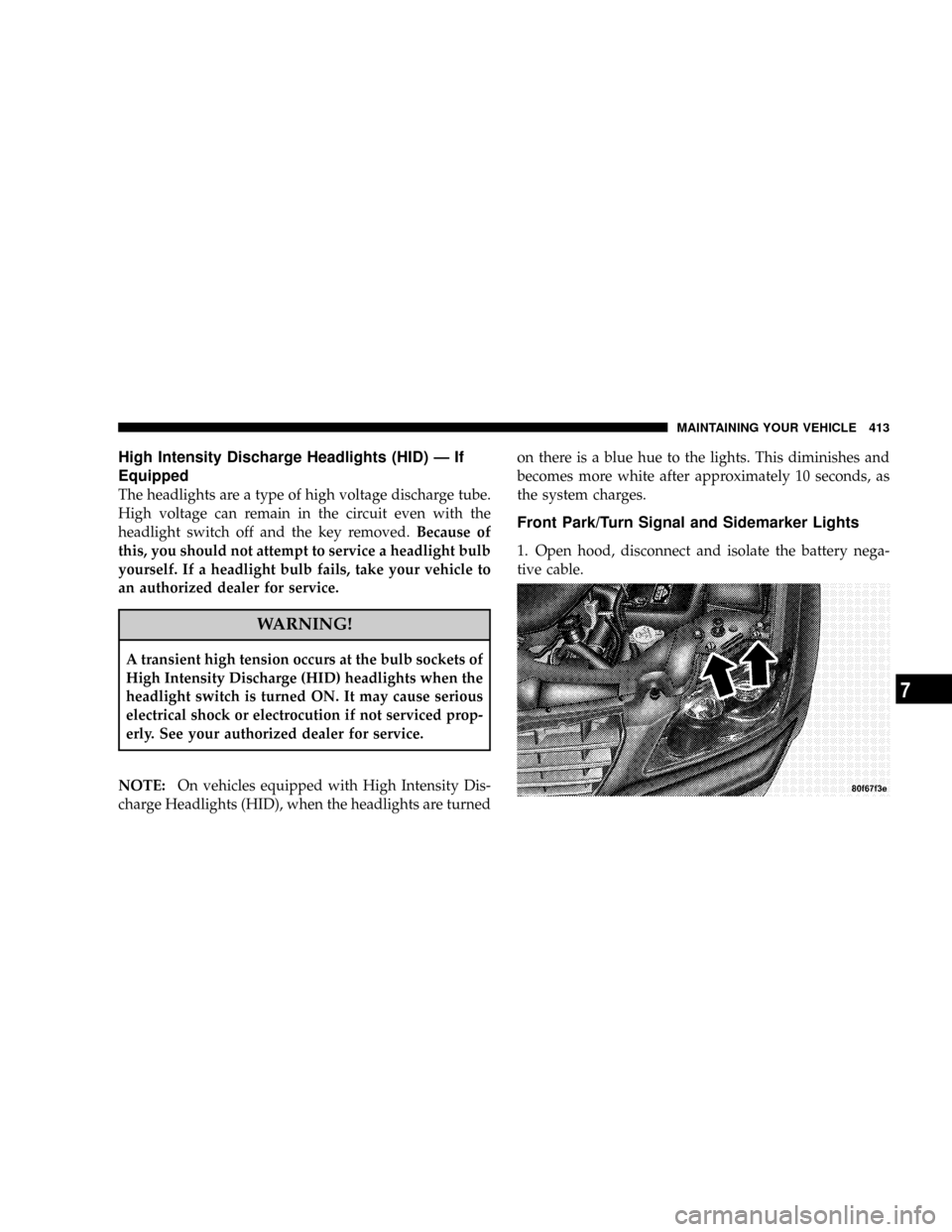
1. Open hood, disconnect and isolate the battery nega-
tive cable.
MAINTAINING YOUR VEHICLE 413
7