2008 CHEVROLET SILVERADO tow
[x] Cancel search: towPage 153 of 596
Temperature Display
The temperature can be displayed by pressing
the compass/temperature button. Pressing the
compass/temperature button once briey, will toggle the
display reading on and off. To alternate the temperature
reading between Fahrenheit and Celsius, press and
hold the compass/temperature button for approximately
three seconds until the display blinks F and C. After
approximately ve seconds of inactivity, the display
will stop blinking and display the last selection made.
If an abnormal temperature reading is displayed
for an extended period of time, see your dealer.
Under certain circumstances, a delay in updating
the temperature is normal.
Automatic Dimming Mirror Operation
O
On/Off:Press this button to turn the automatic
dimming feature on or off. The indicator light to the left
of the button will turn on to indicate when the feature
is on. Once the mirror is turned off, it will remain off until
it is turned back on, or until the vehicle is restarted.
Compass Operation
Press the compass/temperature button once briey to
turn the display on or off.
Compass Calibration
See “Compass Calibration” underAutomatic
Dimming Rearview Mirror with OnStar®, Compass and
Temperature Display on page 2-56for more information.
Compass Variance
See “Compass Variance” underAutomatic
Dimming Rearview Mirror with OnStar®, Compass and
Temperature Display on page 2-56for more information.
Cleaning the Mirror
Use a paper towel or similar material dampened with
glass cleaner. Do not spray glass cleaner directly on
the mirror as that may cause the liquid cleaner to enter
the mirror housing.
Outside Manual Mirrors
Adjust the outside mirrors to see the side of the vehicle
and have a clear view of objects behind you.
Manually fold the mirrors inward to prevent damage
when going through an automatic car wash. To fold, push
the mirror toward the vehicle. Push the mirror outward, to
return to its original position.
Using hood-mounted air deectors and add-on convex
mirror attachments could decrease mirror performance.
2-59
Page 154 of 596
Outside Towing Mirrors
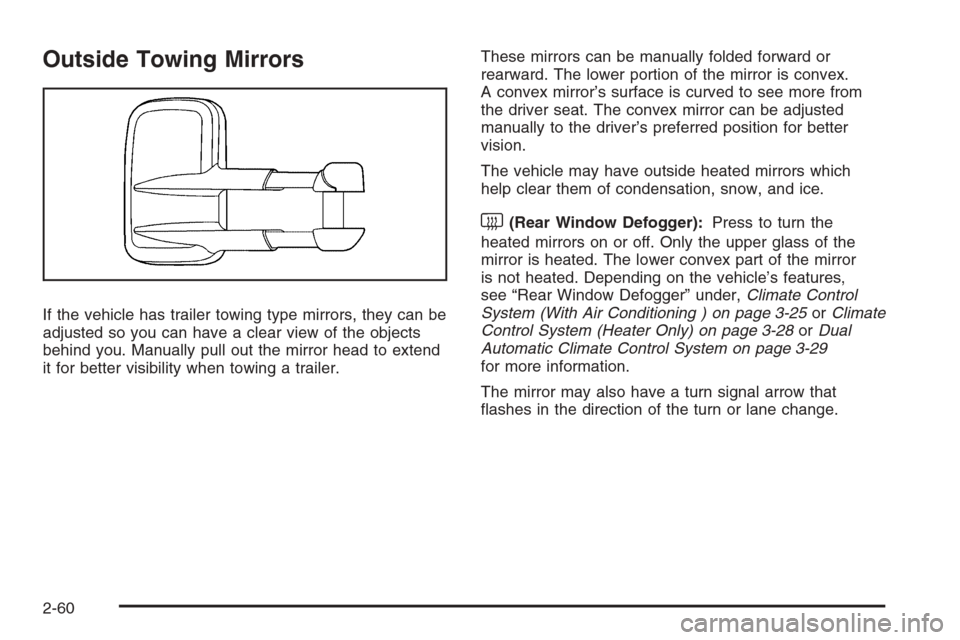
If the vehicle has trailer towing type mirrors, they can be
adjusted so you can have a clear view of the objects
behind you. Manually pull out the mirror head to extend
it for better visibility when towing a trailer.These mirrors can be manually folded forward or
rearward. The lower portion of the mirror is convex.
A convex mirror’s surface is curved to see more from
the driver seat. The convex mirror can be adjusted
manually to the driver’s preferred position for better
vision.
The vehicle may have outside heated mirrors which
help clear them of condensation, snow, and ice.
<(Rear Window Defogger):Press to turn the
heated mirrors on or off. Only the upper glass of the
mirror is heated. The lower convex part of the mirror
is not heated. Depending on the vehicle’s features,
see “Rear Window Defogger” under,Climate Control
System (With Air Conditioning ) on page 3-25orClimate
Control System (Heater Only) on page 3-28orDual
Automatic Climate Control System on page 3-29
for more information.
The mirror may also have a turn signal arrow that
ashes in the direction of the turn or lane change.
2-60
Page 155 of 596
Outside Power Mirrors
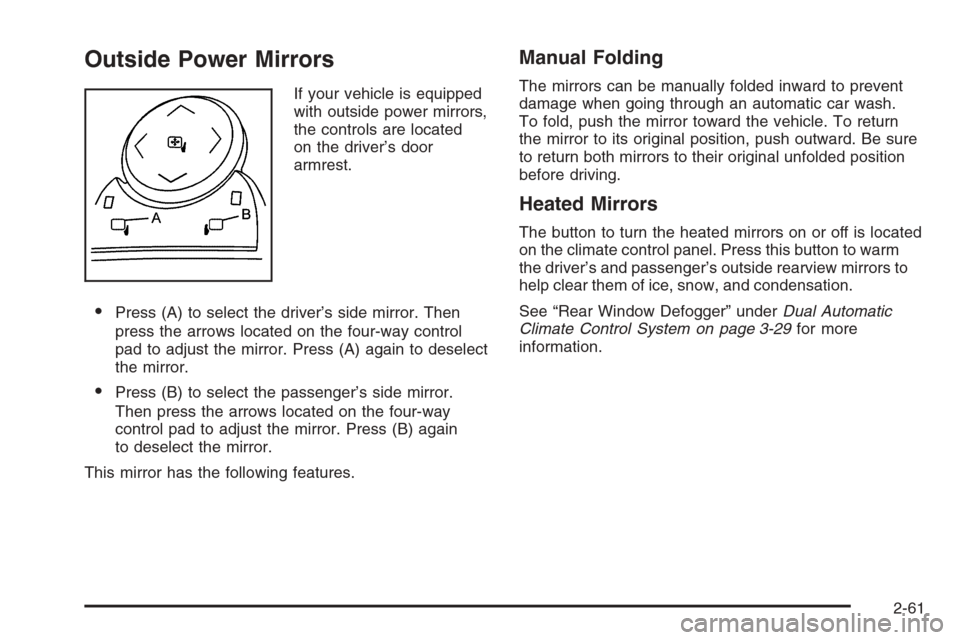
If your vehicle is equipped
with outside power mirrors,
the controls are located
on the driver’s door
armrest.
Press (A) to select the driver’s side mirror. Then
press the arrows located on the four-way control
pad to adjust the mirror. Press (A) again to deselect
the mirror.
Press (B) to select the passenger’s side mirror.
Then press the arrows located on the four-way
control pad to adjust the mirror. Press (B) again
to deselect the mirror.
This mirror has the following features.
Manual Folding
The mirrors can be manually folded inward to prevent
damage when going through an automatic car wash.
To fold, push the mirror toward the vehicle. To return
the mirror to its original position, push outward. Be sure
to return both mirrors to their original unfolded position
before driving.
Heated Mirrors
The button to turn the heated mirrors on or off is located
on the climate control panel. Press this button to warm
the driver’s and passenger’s outside rearview mirrors to
help clear them of ice, snow, and condensation.
See “Rear Window Defogger” underDual Automatic
Climate Control System on page 3-29for more
information.
2-61
Page 161 of 596

When the System Does Not Seem to
Work Properly
If the URPA system will not activate due to a temporary
condition, the message PARKING ASSIST OFF will be
displayed on the DIC and a red light will be shown on the
rear URPA display when the shift lever is moved into
R (Reverse). This occurs under the following conditions:
The driver disables the system.
The parking brake pedal is depressed.
The ultrasonic sensors are not clean. Keep the
vehicle’s rear bumper free of mud, dirt, snow, ice and
slush. For cleaning instructions, seeWashing Your
Vehicle on page 5-118.
A trailer was attached to the vehicle, or a bicycle or
an object was hanging out of the tailgate during the
last drive cycle, the red light may illuminate in the
rear display. Once the attached object is removed,
URPA will return to normal operation.
A tow bar is attached to the vehicle.
The vehicle’s bumper is damaged. Take the vehicle
to your dealer/retailer to repair the system.
Other conditions may affect system performance,
such as vibrations from a jackhammer or the
compression of air brakes on a very large truck.
If the system is still disabled, after driving forward at
least 15 mph (25 km/h), take the vehicle to your
dealer/retailer.
OnStar®System
OnStar uses several innovative technologies and live
advisors to provide you with a wide range of safety,
security, information, and convenience services. If your
airbags deploy, the system is designed to make an
automatic call to OnStar Emergency advisors who can
request emergency services be sent to your location.
If you lock your keys in the vehicle, call OnStar at
1-888-4-ONSTAR and they can send a signal to unlock
your doors. If you need roadside assistance, press
the OnStar button and they can contact Roadside
Service for you.
OnStar service is provided to you subject to the
OnStar Terms and Conditions. You may cancel your
OnStar service at any time by contacting OnStar.
2-67
Page 175 of 596
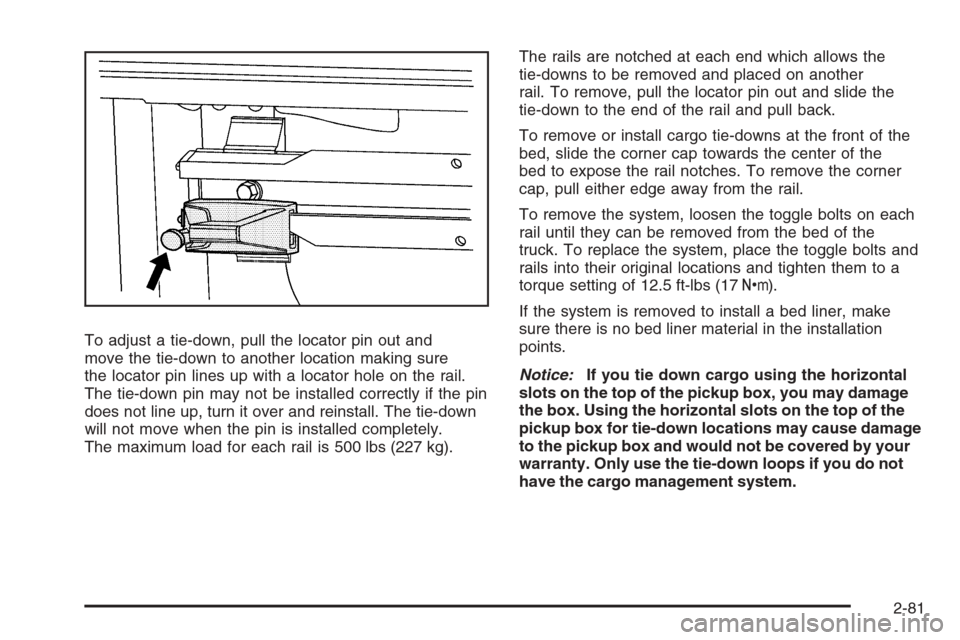
To adjust a tie-down, pull the locator pin out and
move the tie-down to another location making sure
the locator pin lines up with a locator hole on the rail.
The tie-down pin may not be installed correctly if the pin
does not line up, turn it over and reinstall. The tie-down
will not move when the pin is installed completely.
The maximum load for each rail is 500 lbs (227 kg).The rails are notched at each end which allows the
tie-downs to be removed and placed on another
rail. To remove, pull the locator pin out and slide the
tie-down to the end of the rail and pull back.
To remove or install cargo tie-downs at the front of the
bed, slide the corner cap towards the center of the
bed to expose the rail notches. To remove the corner
cap, pull either edge away from the rail.
To remove the system, loosen the toggle bolts on each
rail until they can be removed from the bed of the
truck. To replace the system, place the toggle bolts and
rails into their original locations and tighten them to a
torque setting of 12.5 ft-lbs (17Y).
If the system is removed to install a bed liner, make
sure there is no bed liner material in the installation
points.
Notice:If you tie down cargo using the horizontal
slots on the top of the pickup box, you may damage
the box. Using the horizontal slots on the top of the
pickup box for tie-down locations may cause damage
to the pickup box and would not be covered by your
warranty. Only use the tie-down loops if you do not
have the cargo management system.
2-81
Page 180 of 596

StabiliTrak®Indicator Light.............................3-48
Engine Coolant Temperature Gage..................3-48
Tire Pressure Light.......................................3-49
Malfunction Indicator Lamp.............................3-49
Oil Pressure Gage........................................3-52
Oil Pressure Light.........................................3-53
Security Light...............................................3-53
Fog Lamp Light............................................3-53
Cruise Control Light......................................3-54
Highbeam On Light.......................................3-54
Four-Wheel-Drive Light..................................3-54
Tow/Haul Mode Light....................................3-54
Fuel Gage...................................................3-55
Low Fuel Warning Light.................................3-56
Driver Information Center (DIC).......................3-56
DIC Operation and Displays
(With DIC Buttons)....................................3-57
DIC Operation and Displays
(Without DIC Buttons)................................3-63DIC Warnings and Messages.........................3-66
DIC Vehicle Customization (With DIC Buttons) . . .3-76
Audio System(s).............................................3-84
Setting the Clock..........................................3-86
Radio(s)......................................................3-88
Using an MP3 (Radio with CD or
Six-Disc CD Player).................................3-108
Using an MP3 (Radio with CD and
DVD Player)...........................................3-114
XM Radio Messages...................................3-119
Navigation/Radio System..............................3-120
Rear Seat Entertainment (RSE) System.........3-121
Rear Seat Audio (RSA)................................3-130
Theft-Deterrent Feature................................3-132
Audio Steering Wheel Controls......................3-132
Radio Reception.........................................3-133
Fixed Mast Antenna....................................3-134
XM™ Satellite Radio Antenna System............3-134
Section 3 Instrument Panel
3-2
Page 183 of 596
C. Driver Information Center (DIC) Buttons. SeeDriver
Information Center (DIC) on page 3-56.
D. Hazard Warning Flasher Button. SeeHazard
Warning Flashers on page 3-8.
E. Instrument Panel Cluster. SeeInstrument Panel
Cluster on page 3-37.
F. Shift Lever. SeeAutomatic Transmission Operation on
page 2-28. Tow/Haul Selector Button (If Equipped).
SeeTow/Haul Mode on page 2-34. Range Selection
Mode (Allison Transmission and Hydra-Matic
®
6-Speed Button (If Equipped). SeeAutomatic
Transmission Operation on page 2-28.
G. Audio System. SeeAudio System(s) on page 3-84.
H. Instrument Panel Storage Area. SeeInstrument
Panel Storage on page 2-78.
I. Integrated Trailer Brake Controller (If Equipped).
SeeTowing a Trailer on page 4-55.
J. Exterior Lamp Controls. SeeExterior Lamps on
page 3-17.
K. Hood Release. SeeHood Release on page 5-13.
L. Parking Brake. SeeParking Brake on page 2-50.
M. Dome Lamp Override Button. SeeDome Lamp
Override on page 3-21. Dome Lamp Knob.
SeeDome Lamps on page 3-21. Fog Lamp Button
(If Equipped). SeeFog Lamps on page 3-20.
N. Cruise Control Buttons. SeeCruise Control on
page 3-13.O. Tilt Wheel Lever. SeeTilt Wheel on page 3-8.
P. Horn. SeeHorn on page 3-8.
Q. Audio Steering Wheel Controls (If Equipped).
SeeAudio Steering Wheel Controls on page 3-132.
R. Automatic Transfer Case Control (If Equipped).
SeeFour-Wheel Drive on page 2-36.
S. Ashtray (If Equipped). SeeAshtray(s) and Cigarette
Lighter on page 3-24.
T. StabiliTrak
®Button (If Equipped). SeeStabiliTrak®
System on page 4-6. Ultrasonic Rear Park Assist
Disable Button (If Equipped). SeeUltrasonic
Rear Parking Assist (URPA) on page 2-64. Pedal
Adjust Button (If Equipped). SeeAdjustable Throttle
and Brake Pedal on page 2-26. Heated Windshield
Washer Fluid Button (If Equipped).Windshield
Washer on page 3-12.
U. Accessory Power Outlet. SeeAccessory Power
Outlet(s) on page 3-23.
V. Climate Control System. SeeClimate Control System
(With Air Conditioning ) on page 3-25orClimate
Control System (Heater Only) on page 3-28andDual
Automatic Climate Control System on page 3-29.
W. Power Take Off (PTO) Control (If Equipped).
See Power Take Off (PTO) in the Duramax Diesel
Supplement Index.
X. Passenger Airbag Off Control (If Equipped).
SeeAirbag Off Switch on page 1-78.
Y. Glove Box. SeeGlove Box on page 2-78.
3-5
Page 185 of 596
E. Shift Lever. SeeAutomatic Transmission Operation
on page 2-28.
F. Tow/Haul Selector Button (If Equipped).
SeeTow/Haul Mode on page 2-34.
G. Driver Information Center (DIC) Controls. SeeDriver
Information Center (DIC) on page 3-56.
H. Audio System. SeeAudio System(s) on page 3-84.
I. Exterior Lamps Control. SeeExterior Lamps on
page 3-17.
J. Integrated Trailer Brake Controller (If Equipped).
SeeTowing a Trailer on page 4-55.
K. Dome Lamp Override Button. SeeDome Lamp
Override on page 3-21. Dome Lamp Knob.
SeeDome Lamps on page 3-21.
L. Automatic Transfer Case Control. (If Equipped).
SeeFour-Wheel Drive on page 2-36.
M. Hood Release. SeeHood Release on page 5-13.
N. Parking Brake. SeeParking Brake on page 2-50.
O. Cruise Control Buttons. SeeCruise Control on
page 3-13.
P. Tilt Wheel Lever. SeeTilt Wheel on page 3-8.
Q. Horn. SeeHorn on page 3-8.R. Audio Steering Wheel Controls. SeeAudio Steering
Wheel Controls on page 3-132.
S. Climate Controls. SeeClimate Control System
(With Air Conditioning ) on page 3-25orClimate
Control System (Heater Only) on page 3-28or
Dual Automatic Climate Controls (If Equipped).
SeeDual Automatic Climate Control System
on page 3-29.
T. Accessory Power Outlets. SeeAccessory Power
Outlet(s) on page 3-23. Cigarette Lighter
(If Equipped). SeeAshtray(s) and Cigarette Lighter
on page 3-24.
U. StabiliTrak
®Button (If Equipped). SeeStabiliTrak®
System on page 4-6. Pedal Adjust Button
(If Equipped). SeeAdjustable Throttle and Brake
Pedal on page 2-26. Rear Park Assist Disable Button
(If Equipped). SeeUltrasonic Rear Parking Assist
(URPA) on page 2-64. Heated Windshield Washer
Fluid Button (If Equipped). SeeWindshield Washer
on page 3-12.
V. Passenger Airbag Off Control (If Equipped).
SeeAirbag Off Switch on page 1-78.
W. Glove Box. SeeGlove Box on page 2-78.
3-7