Page 135 of 596
Shifting In or Out of NEUTRAL
1. With the vehicle running and the engine at an idle
set the parking brake.
2. Place the transmission into NEUTRAL (N).
Shift the transfer case in one continuous motion into or
out of the NEUTRAL position.
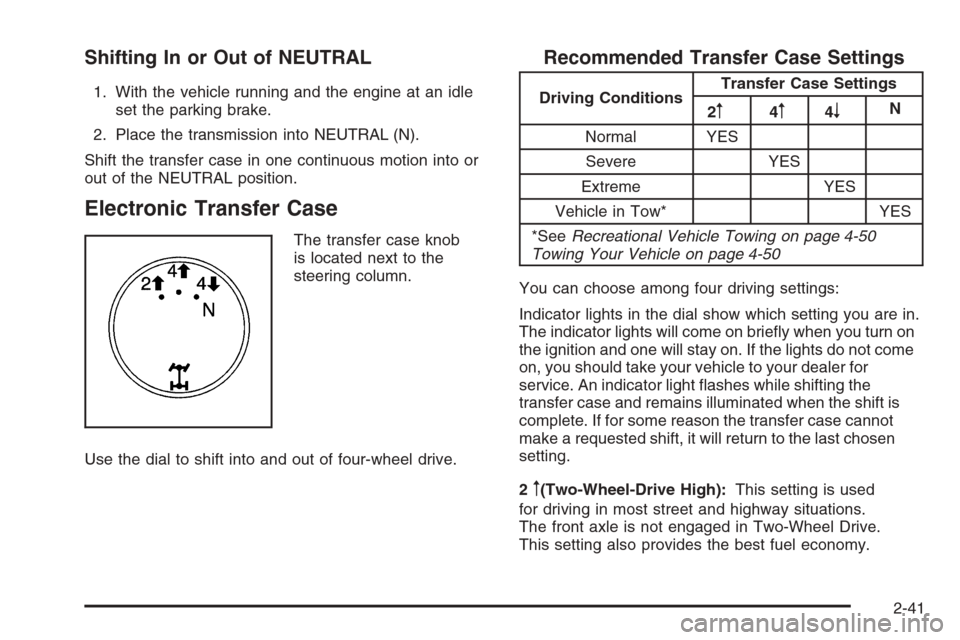
Electronic Transfer Case
The transfer case knob
is located next to the
steering column.
Use the dial to shift into and out of four-wheel drive.
Recommended Transfer Case Settings
Driving ConditionsTransfer Case Settings
2m4m4nN
Normal YES
Severe YES
Extreme YES
Vehicle in Tow* YES
*SeeRecreational Vehicle Towing on page 4-50
Towing Your Vehicle on page 4-50
You can choose among four driving settings:
Indicator lights in the dial show which setting you are in.
The indicator lights will come on briey when you turn on
the ignition and one will stay on. If the lights do not come
on, you should take your vehicle to your dealer for
service. An indicator light ashes while shifting the
transfer case and remains illuminated when the shift is
complete. If for some reason the transfer case cannot
make a requested shift, it will return to the last chosen
setting.
2
m(Two-Wheel-Drive High):This setting is used
for driving in most street and highway situations.
The front axle is not engaged in Two-Wheel Drive.
This setting also provides the best fuel economy.
2-41
Page 136 of 596
4m(Four-Wheel-Drive High):Use the
Four-Wheel-Drive High position when extra traction is
needed, such as on snowy or icy roads or in most off-road
situations. This setting also engages the front axle to help
drive your vehicle. This is the best setting to use when
plowing snow.
4
n(Four-Wheel-Drive Low):This setting also
engages the front axle and delivers extra torque. You
may never need this setting. It sends maximum power
to all four wheels. You might choose Four-Wheel-Drive
Low while driving off-road in deep sand, deep mud, deep
snow, and while climbing or descending steep hills.
StabiliTrak
®will not engage in this mode.
{CAUTION:
Shifting the transfer case to NEUTRAL
can cause your vehicle to roll even if the
transmission is in PARK (P). You or someone
else could be seriously injured. Be sure to set
the parking brake before placing the transfer
case in NEUTRAL. SeeParking Brake on
page 2-50.N (NEUTRAL):Shift the vehicle’s transfer case
to NEUTRAL only when towing your vehicle. See
Recreational Vehicle Towing on page 4-50orTowing
Your Vehicle on page 4-50for more information.
If the SERVICE 4–Wheel Drive message stays on, you
should take your vehicle to your dealer for service.
See “Service 4–Wheel Drive message” underDIC
Warnings and Messages on page 3-66.
Shifting Into Two-Wheel-Drive High
Turn the knob to the Two-Wheel-Drive High position.
This can be done at any speed, except when shifting
from Four-Wheel-Drive Low. See Shifting Out of
Four-Wheel-Drive Low for more information.
2-42
Page 140 of 596
for driving in most street and highway situations. The
front axle is not engaged in Two-Wheel Drive.
This setting also provides the best fuel economy.
AUTO (Automatic Four-Wheel Drive):This setting is
ideal for use when road surface traction conditions are
variable. When driving your vehicle in AUTO, the front
axle is engaged, but the vehicle’s power is sent only to
the front and rear wheels automatically based on driving
conditions. Driving in this mode results in slightly lower
fuel economy than Two-Wheel-Drive High.
4
m(Four-Wheel-Drive High):Use the
Four-Wheel-Drive High position when extra traction is
needed, such as on snowy or icy roads or in most off-road
situations. This setting also engages the front axle to help
drive your vehicle. This is the best setting to use when
plowing snow.
4
n(Four-Wheel-Drive Low):This setting also
engages the front axle and delivers extra torque.
You may never need this setting. It sends maximum
power to all four wheels. You might choose
Four-Wheel-Drive Low if you are driving off-road in
deep sand, deep mud, deep snow, and while climbing
or descending steep hills. StabiliTrak
®will not engage
in this mode. SeeStabiliTrak®System on page 4-6for
more information.
{CAUTION:
Shifting the transfer case to NEUTRAL
can cause your vehicle to roll even if the
transmission is in PARK (P). You or someone
else could be seriously injured. Be sure to set
the parking brake before placing the transfer
case in NEUTRAL. SeeParking Brake on
page 2-50.
N (NEUTRAL):Shift the vehicle’s transfer case
to NEUTRAL only when towing your vehicle. See
Recreational Vehicle Towing on page 4-50orTowing
Your Vehicle on page 4-50for more information.
If the SERVICE 4–Wheel Drive message stays on, you
should take your vehicle to your dealer for service.
See “Service 4–Wheel Drive message” underDIC
Warnings and Messages on page 3-66.
2-46
Page 144 of 596
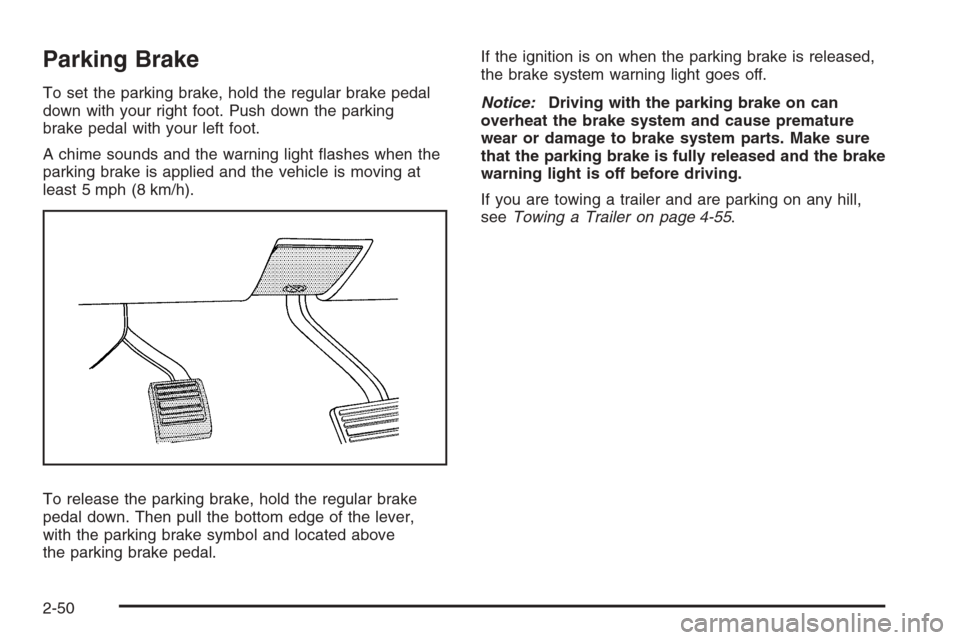
Parking Brake
To set the parking brake, hold the regular brake pedal
down with your right foot. Push down the parking
brake pedal with your left foot.
A chime sounds and the warning light ashes when the
parking brake is applied and the vehicle is moving at
least 5 mph (8 km/h).
To release the parking brake, hold the regular brake
pedal down. Then pull the bottom edge of the lever,
with the parking brake symbol and located above
the parking brake pedal.If the ignition is on when the parking brake is released,
the brake system warning light goes off.
Notice:Driving with the parking brake on can
overheat the brake system and cause premature
wear or damage to brake system parts. Make sure
that the parking brake is fully released and the brake
warning light is off before driving.
If you are towing a trailer and are parking on any hill,
seeTowing a Trailer on page 4-55.
2-50
Page 145 of 596
Shifting Into Park
{CAUTION:
It can be dangerous to get out of your vehicle
if the shift lever is not fully in PARK (P) with
the parking brake rmly set. Your vehicle can
roll. If you have left the engine running, the
vehicle can move suddenly. You or others
could be injured. To be sure your vehicle will
not move, even when you are on fairly level
ground, use the steps that follow. With
four-wheel drive, if your transfer case is in
NEUTRAL, your vehicle will be free to roll,
even if your shift lever is in PARK (P).
CAUTION: (Continued)
CAUTION: (Continued)
So, be sure the transfer case is in a drive
gear — not in NEUTRAL. If you are pulling a
trailer, seeTowing a Trailer on page 4-55.
1. Hold the brake pedal down with your right foot and
set the parking brake.
SeeParking Brake on page 2-50for more
information.
2. Move the shift lever into the PARK (P) position by
pulling the shift lever toward you and moving it up
as far as it will go.
3. Be sure the transfer case is in a drive gear — not
in NEUTRAL (N).
4. Turn the ignition key to LOCK/OFF.
5. Remove the key and take it with you. If you can
leave your vehicle with the ignition key in your
hand, your vehicle is in PARK (P).
2-51
Page 146 of 596
Leaving Your Vehicle With the Engine
Running
{CAUTION:
It can be dangerous to leave your vehicle with
the engine running. Your vehicle could move
suddenly if the shift lever is not fully in PARK
(P) with the parking brake rmly set.
If you have four-wheel drive and your transfer
case is in NEUTRAL, your vehicle will be free
to roll, even if your shift lever is in PARK (P).
So be sure the transfer case is in a drive
gear — not in NEUTRAL.
And, if you leave the vehicle with the engine
running, it could overheat and even catch re.
You or others could be injured. Do not leave
your vehicle with the engine running unless
you have to.If you have to leave your vehicle with the engine
running, be sure your vehicle is in PARK (P) and the
parking brake is rmly set before you leave it. After you
move the shift lever into PARK (P), hold the regular
brake pedal down. Then, see if you can move the
shift lever away from PARK (P) without rst pulling
it toward you. If you can, it means that the shift lever
was not fully locked into PARK (P).
Torque Lock
If you are parking on a hill and you do not shift your
transmission into PARK (P) properly, the weight of the
vehicle may put too much force on the parking pawl
in the transmission. You may nd it difficult to pull the
shift lever out of PARK (P). This is called torque lock.
To prevent torque lock, set the parking brake and
then shift into PARK (P) properly before you leave
the driver’s seat. To nd out how, seeShifting Into
Park on page 2-51.
When you are ready to drive, move the shift lever out of
PARK (P) before you release the parking brake.
If torque lock does occur, you may need to have another
vehicle push yours a little uphill to take some of the
pressure from the parking pawl in the transmission, then
you will be able to pull the shift lever out of PARK (P).
2-52
Page 149 of 596
{CAUTION:
It can be dangerous to get out of your vehicle
if the shift lever is not fully in PARK (P) with
the parking brake rmly set. Your vehicle can
roll. Do not leave your vehicle when the engine
is running unless you have to. If you have left
the engine running, the vehicle can move
suddenly. You or others could be injured.
To be sure your vehicle will not move, even
when you are on fairly level ground, always
set the parking brake and move the shift lever
to PARK (P).
{CAUTION:
Four-wheel drive vehicles with the transfer
case in NEUTRAL will allow the vehicle to roll,
even if the shift lever is in PARK (P). So, be
sure the transfer case is in a drive gear — not
in NEUTRAL. Always set the parking brake.
Follow the proper steps to be sure your vehicle will not
move. SeeShifting Into Park on page 2-51.
If you are pulling a trailer, seeTowing a Trailer on
page 4-55.
2-55
Page 152 of 596
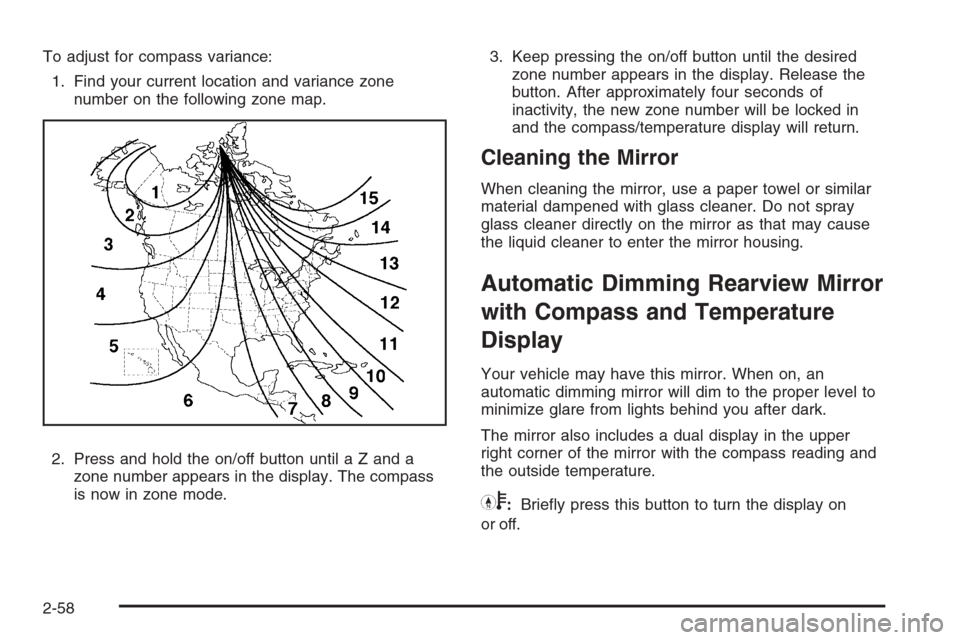
To adjust for compass variance:
1. Find your current location and variance zone
number on the following zone map.
2. Press and hold the on/off button until a Z and a
zone number appears in the display. The compass
is now in zone mode.3. Keep pressing the on/off button until the desired
zone number appears in the display. Release the
button. After approximately four seconds of
inactivity, the new zone number will be locked in
and the compass/temperature display will return.
Cleaning the Mirror
When cleaning the mirror, use a paper towel or similar
material dampened with glass cleaner. Do not spray
glass cleaner directly on the mirror as that may cause
the liquid cleaner to enter the mirror housing.
Automatic Dimming Rearview Mirror
with Compass and Temperature
Display
Your vehicle may have this mirror. When on, an
automatic dimming mirror will dim to the proper level to
minimize glare from lights behind you after dark.
The mirror also includes a dual display in the upper
right corner of the mirror with the compass reading and
the outside temperature.
Yb:Briey press this button to turn the display on
or off.
2-58