2008 AUDI A4 AVANT key
[x] Cancel search: keyPage 71 of 368

-To tilt the roof down to any intermediate position pull and
hold
the switch until the roof reaches the desired posi
tion.
& WARNING
Improper use of the power sunroof can cause serious personal
injury.
• Be careful when closing the power sunroof. Not paying atten
tion could cause you or others to be caught and injured as the roof
closes.
• Always take the key with you whenever you leave the vehicle to
safeguard against injuries caused by closing the roof.
• Never leave children or persons depending on assistance alone
in the vehicle, especially when they could access the vehicle keys.
Unsupervised use of the keys can result in starting of the engine
or in the use of vehicle systems such as the power sunroof, etc.
which could result in serious injury . The doors could be locked
with the remote key, delaying help in an emergency.
• The power sunroof will continue to operate until the ignition
key has been removed and one of the front doors has been
opened. •
Applies to vehic les: w ith powe r sunroof
Convenience closing feature
The power sunroof can be closed from outside with a
vehicle key.
-Insert the key into the driver's door lock.
-Turn and hold the key in the lock pos ition => & in
"Closing the power sunroof" on
page 68.
Controls and equip
ment
Opening and closing
[ i] Tips
The convenience feature cannot be activated by pressing a button
on the remote key uni t. •
Ap plies to vehic les: wit h p ower sunroof
Power emergency closing
The sunroof can still be closed electrically if for some
reason the overload protection function becomes acti
vated.
The power sunroof is equipped with an overload protection
feature. If, under normal conditions, the power sunroof will
not close , you can close it using this feature.
-Turn the rotary switch to position@=> page 68, fig. 65.
-Now pull the switch and hold it in this position until the
power sunroof closes completely.
& WARNING
Improper use of the power sunroof can cause serious personal
injury.
• Be careful when closing the power sunroof. Not paying atten
tion could cause you or others to be trapped and injured as the
roof closes.
• Always take the key with you when you leave the vehicle to
prevent injuries caused by the roof closing
• Never leave children or persons requiring assistance alone in
the vehicle, especially when they could access the vehicle keys.
Unsupervised use of the keys can result in the engine being
started or use of vehicle systems such as the power windows, etc.
which could result in serious injury. The doors could be locked
with the remote key, delaying help in an emergency .
...
Page 72 of 368

Opening and closing
& WARNING (continued)
• The power sunroof will continue to operate until the ignition
key has been removed and one of the front doors has been
opened .•
App lies to vehic les : wit h power sunroof
Emergency closing by hand
The sunroof can be closed by hand in case of a power
failure.
IIIIIIIIIIIIIIIIIIIIIIIIIIIIIIII
- ~ ~
Fig . 66 Dome light:
insertion points for
screwdriver
IIIIIIIIIIIIIIIIIIIIIIIIIIIIIIII
Removing the cover
Fig . 67 Dome light
interior: inserting the
crank for closing the
sunroof manually
-Insert the flat side of the screwdriver (found in the
vehicle tool kit) at the rear edge of the lens as indicated by the
- arrows- => fig. 66.
- Carefully pry the clear lens cover open and remove it.
Retrieving the crank for emergency closing
-Use the ignition key or a screwdriver to carefully pry the
cover off the instrument panel's left end
=> page 326,
fig. 232. The crank is stored next to the fuse carrier.
Closing the roof
-Push the crank (D => fig. 67 into the hex socket @ until
you can feel the crank engage. Start turning, maintaining
a steady pressure on the crank to keep it from slipping
off.
- After you have closed the sunroof, remove the crank and
fit the dome light lens back in place .
~
Page 100 of 368

Seats and storage
! w
--------..Jgj
Fig. 98 Seat cushion
adjustment: switch
motions
Push or pull the switch in the same direction you like the
seat cushion to
move => fig. 98.
Moving the seat forward and backward
G)
- Press the switch forward or backward horizontally =>& .
Adjusting the seat height 0 and @ together
Pull the sw itch evenly at both ends to raise the
seat=>& .
-Push the lever evenly at both ends to lower the seat=>& .
Angling the seat cushion up and down 0 or @
- To angle the seat cushion up, pull the switch at the front
only=>& .
Alternatively, push the switch at the rear only=> &.
-To angle the seat cushion down, push the switch at the
front
only => &.
- Alternatively , pull the switch at the rear only=>& .
For an i ntui tive operation , the sw itches~ page 97, fig . 97@ and ®
are distinctly shaped and positioned to reflect their adjustment
f u nctions.
Push or pull ei ther switch in exactly the same direct ion you l ik e t he
corresponding part of the seat to move .
@ Moving the seat forward or backward
® Adjusting the angle of the seatback and head restraints
© Adjusting the lumbar s uppor t
& WARNING
• Never adjust the driver's or front passenger seat while the
vehicle is moving.
If you do this while the vehicle is moving , you
will be out of position. Always adjust the driver's or front
passenger seat when the vehicle is not moving.
• Be careful when adjusting the seat height . Check to see that no
one is in the way, or serious injury could result!
• Because the seats can be electrically adjusted with the ignition
key removed, never leave children unattended in the vehicle. Unsu
pervised use of the electric seat adjustments may cause serious
injury. •
Page 103 of 368

________________________________________________ S_ e_ a
_ t_
s _a_ n_d _ s_t _o _ r_ a_ g~ e __ ffllll
Memory buttons
On each memory button (On each memory button G) ,@ , G) and ©
=> page 100, fig. 102 , you can sto re a sea t and outside mirror posi
tion . Up to 4 different drivers can store their
settings .=> page 100,
fig. 102 , you can sto re a seat and outside mirro r position . Up to 4
d iffer ent driv ers can stor e their s ettings .
ST OP b utton
Press the STOP button to switch off the seat memory.
The word
OFF next to the STOP button wi ll illuminate. The 4 different
sea t adjust ments remain stored in th e memory . When the s eat
memory is switched off, then you can only adjust the seat and
outsid e mirrors in th e usual way .
It is recommended to use the STOP feature if your vehicle is going
to be used by another driver temporarily .
[ i ] Ti ps
• The vehicle must be turned on to p rogram the memory button
settings .
• You can recall a seat posi tion using either the memory bu ttons
or using the remote contro l
=> page 102.
• Seat position settings cannot be re ca lled if the s eat back is folded
forward. •
Applies t o vehi cle s: w ith po wer seats and driver's seat memory
Storing a seat position
Before you can store your seat position, the S TOP button
must be engaged (down) .
-Adjust the driver 's seat => page 97 .
Adjust both outside mirrors=> page 91.
Controls and equip
ment
-Press the MEMO button and hold it down. A t th e same time,
press one of the memory buttons for at least one seco nd.
-Re lease the buttons . The seat and outside mirror pos i-
t ions are now stored on that memory button.
Each time to assign a sea t position to a key , you ca ncel the seat posi
t ion, wh ich had be en assigned to that key befor e.
Whenever you store a new pos it ion on a memory button, the former
position is erased. W e recommend you assign m emory buttons
starting with button 1.
When you
l ock your vehicle using the remote control, the las t seat
and mirror position wil l be stored.
When you
unl ock your vehic le the next t ime, the mirrors and the
seat wi ll adjust automat ica lly to the last pos ition stor ed in your k ey .
This wil l not erase the seat posi tion a lready stored on memory
buttons (1) th rough (4).
•
App lies to veh ic les: w ith power seats and d river 's se at memory
Recalling a seat position
You can recall a seat position using either the memory
buttons or using the remote control in your key.
Usin g th e memory buttons
-Driver's door open -press the desired memo ry button.
-Driver's door c losed -press and hold the respective
memory button unt il the seat and the m irrors move into
t h eir store posi tion .
U sing th e remote control
-Un lock the vehicle using the remote contro l. Then open
the driver's door w ithin ten minutes . .,._
Page 104 of 368
___ S_ e
_ a_t_s _ a_n_ d
__ s _t _o _r_a ...::g==---- e ________________________________________________ _
If you do not open the door within ten minutes after unlocking it,
then you have to use the memory button to recall a seat position.
& WARNING
In an emergency, the recall operation can be stopped by pressing
the STOP button or by briefly pressing any given store button . •
App lies to vehicles: with power seats and driver's seat memory
Assigning the keys
Each remote key can be assigned to a memory button.
After you have stored your seat adjustments on a memory
button~ page 101 you can assign the remote key to the
memory button
Assigning a seat position to a key
- Press the memory button of the seat position you wish to
assign to your key.
- Hold down the memory button and within
ten seconds
press the unlock button on your remote control key.
- Release both buttons after
two seconds . Now that seat
position has been assigned to that remote key.
Canceling a seat position assigned to a key
-Hold the MEMO button depressed and within ten seconds,
press the unlock button on the remote control key.
- Release the
MEMO button after two seconds.
Each time to assign a seat position to a key, you cancel the seat posi
tion, which had been assigned to that key before. We recommend you assign
memory buttons (1) and (2) to the two
remote control keys you received with your vehicle. You can obtain
additional remote control keys from your authorized Audi dealer. •
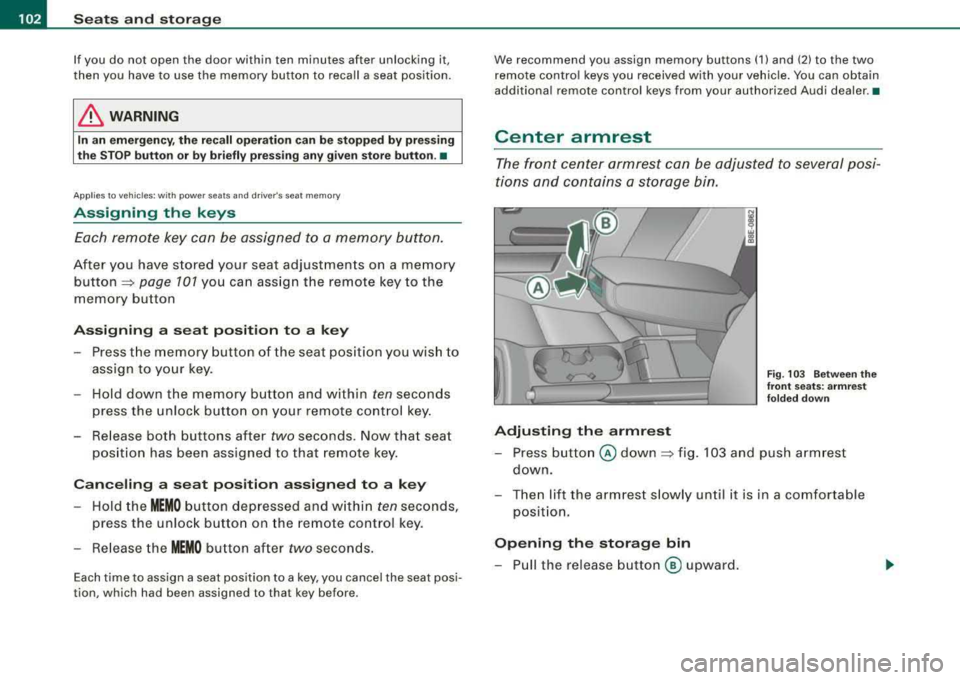
Center armrest
The front center armrest can be adjusted to several posi
tions and contains a storage bin.
Adjusting the armrest
Fig. 103 Between the
front seats: armrest
folded down
- Press button @ down ~ fig. 103 and push armrest
down.
- Then lift the armrest slowly until it is in a comfortable
position.
Opening the storage bin
- Pull the release button ® upward.
Page 122 of 368

___ S_ e
_ a_t_s _ a_n_ d
__ s _t _o _r_a ...::g==---- e ________________________________________________ _
To empty ashtray
Hold the ashtray housing => page 119, fig. 128 and lift
out.
To reinstall ashtray
- Open the ashtray cover , insert the ashtray and press
down.
& WARNING
Never put waste paper in the ashtray. Hot ashes or other hot
objects in the ashtray could set waste paper on fire. •
Cigarette lighter /socket
Cig are tt e light er
The socket of the cigarette lighter may be used for 12-volt
appliances.
•
Fig . 129 Center
console : cigarette
lighter
The cigarette lighter, or the socket, only works when the
ignition is switched on.
Using the cigarette lighter
- Tap the edge of the ashtray @=> page 119, fig. 127.
Push the knob in
=> fig. 129.
- Wait until the cigarette lighter knob pops out.
- Remove the cigarette lighter immediately and use it.
- Reinsert cigarette lighter into the socket after use .
Connecting an appliance
- Remove cigarette lighter.
- Plug in appliance to be used .
The socket of the cigarette lighte r may be used for 12-volt appli
ances with maximum consumption of up to 100 watts, such as a
flash light, small vacuum cleaner, etc .
Before you purchase any accessories, always read and follow the
information
in ~ page 348, "Additional accessories and parts
replacement" .
& WARNING
Improper use of the cigarette lighter can cause serious injury or
start a fire.
• Be careful when using the cigarette lighter. If you do not pay
attention to what you are doing when you are using the cigarette
lighter you can burn yourself .
• The cigarette lighter and socket remain functional even if the
ignition is switched off or the ignition key is removed. Never leave
children inside the vehicle without supervision.
.,,
Page 123 of 368
![AUDI A4 AVANT 2008 Owners Manual Sea ts and stor ag e -______________ __,:_____.
0 Note
To avoid damaging the socket, on ly use plugs that fit properly.
[ i ] Tip s
When the engine is off and accessories are s](/manual-img/6/57552/w960_57552-122.png "AUDI A4 AVANT 2008 Owners Manual Sea ts and stor ag e -______________ __,:_____.
0 Note
To avoid damaging the socket, on ly use plugs that fit properly.
[ i ] Tip s
When the engine is off and accessories are s")
Sea ts and stor ag e -______________ __,:_____.
0 Note
To avoid damaging the socket, on ly use plugs that fit properly.
[ i ] Tip s
When the engine is off and accessories are s till plugged in and are
on, the vehic le batt ery can stil l be drained. •
Outlets
The outlet in the front center console and in the luggage
compartment* may be used for 12 -volt appliances.
Controls and equip
ment
0
~ w CD
"'
F ig . 130 Ce nter
co nsol e, fr ont : 12 -vol t
out let
Outlet in the front center console
Fig . 1 3 1 Lugg age
co mp artm ent : 12- volt
o utlet
Fo ld the cover for t he out let down :::::, fig. 130.
-P lu g in applia nce to be used .
Outlet in the luggage comp artment *
-Tap cover :::::, fig. 13 1.
-Plu g in ap plian ce to be used.
The outlet may be used for 12 -volt appliances w ith maximum
c onsumption of up to 100 watts, such as a flash light, small vacuum
cleaner, etc .
Before you purchase any accessories, always read and follow the
information
in ::::, page 348, "Additiona l accessories and parts
replacement" .
& WARNING
The outlet plu s any applian ces plugged into it remain fun ctional
e ven if the ign ition is swit ch ed off or the ignition key i s removed.
Never leave children in side the vehicle without supervi sion. .,_
irechnical data
Page 134 of 368

-
Warm and cold
----------------
The rear window defogger works only when the ignition is switched
on. The light in the switch will illuminate when the defogger is on .
When the outside temperature is warmer than 32 °F (O °Cl , the rear
window defogger switches off automatically after about ten minutes.
'£> F o r the sake of the environment
Switch off the defogger when the rear window is clear . When you
save e lectricity, you save fuel. •
Using the climate controls economically
Using the climate controls prudently can help save fuel .
When you use the air conditioner, engine power is reduced
and fuel consumption increases . To save fuel, you should
use the air conditioner only when necessary . Also please
note the following points:
-If you want to save fuel, activate ECON.
-If you are goi ng to drive w ith the windows open, use
ECON.
'£> For th e sake of the environment
By reducing the amount of fue l you use , you also reduce the amount
of pollutants emitted into the air. •
Key coded settings
When the ignition is switched on, the air conditioner
settings are automatically assigned to the key being used.
The air conditioner settings selected are automatically stored and
assigned to the key being used. When the vehicle is started, the air
conditioner automatically selects the settings assigned to that key.
This way every dr iver will ma intain his/her own personal settings
and does not have to reset them manually .
[ i ] Tip s
If a different driver uses your key and changes the air conditioner
set tings, the latest adjustments will erase and replace the settings
you have stored. •
App lies to ve hicles: w ith e lec tric ally heat ed front seats
Electrically heated front seats
With the ignition on, the seat cushion and backrest of the
front seats can be heated.
Fig . 140 Cente r
cons ole: thumb whe els
fo r fr ont seat heati ng
....