2007 KIA CARNIVAL battery
[x] Cancel search: batteryPage 1207 of 1575
2007 > 2.7L V6 GASOLINE >
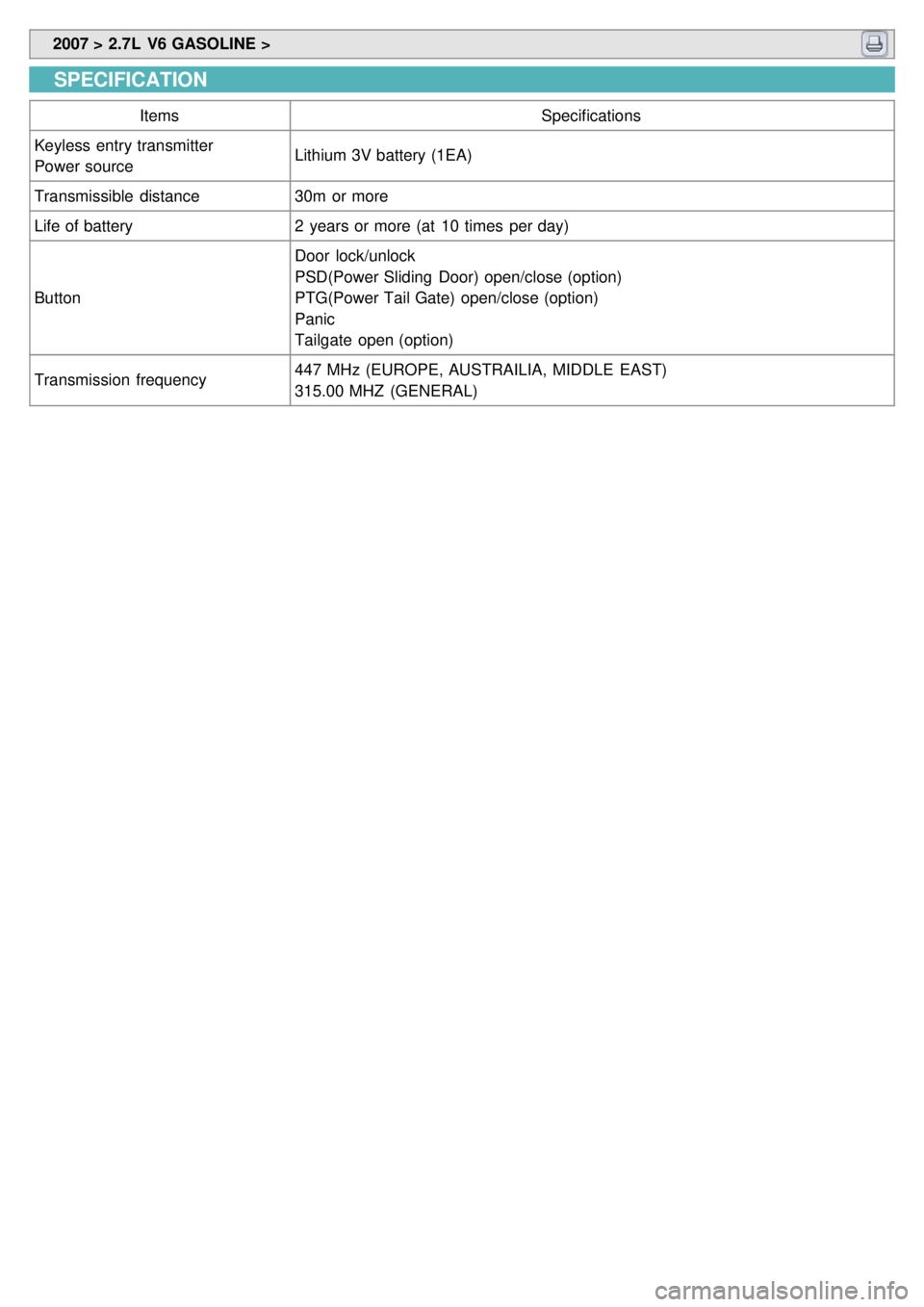
SPECIFICATION
Items Specifications
Keyless entry transmitter
Power source Lithium 3V battery (1EA)
Transmissible distance 30m or more
Life of battery 2 years or more (at 10 times per day)
Button Door lock/unlock
PSD(Power Sliding Door) open/close (option)
PTG(Power Tail Gate) open/close (option)
Panic
Tailgate open (option)
Transmission frequency 447 MHz (EUROPE, AUSTRAILIA, MIDDLE EAST)
315.00 MHZ (GENERAL)
Page 1209 of 1575
2007 > 2.7L V6 GASOLINE >
INSPECTION
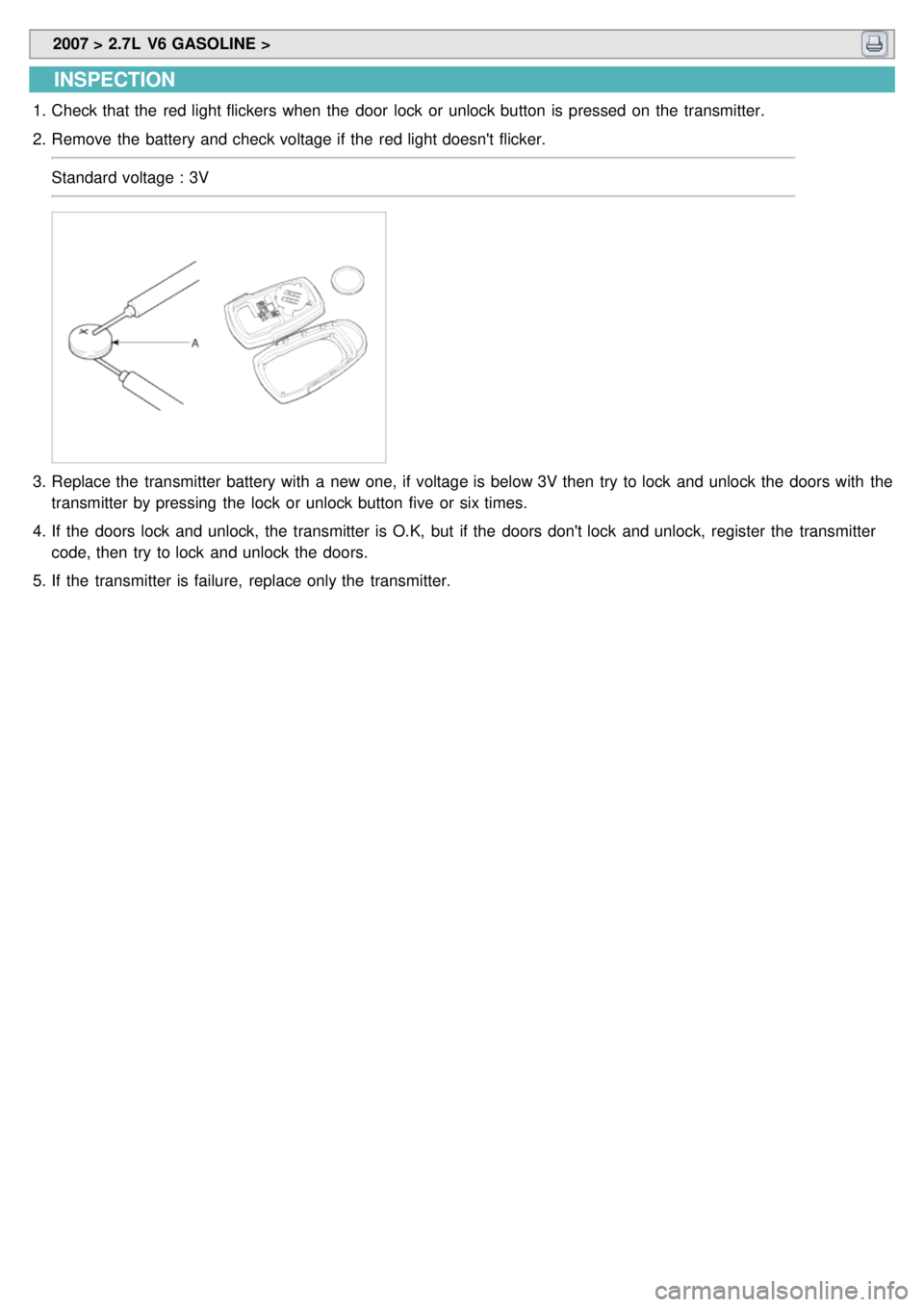
1.Check that the red light flickers when the door lock or unlock button is pressed on the transmitter.
2. Remove the battery and check voltage if the red light doesn't flicker.
Standard voltage : 3V
3.Replace the transmitter battery with a new one, if voltage is below 3V then try to lock and unlock the doors with the
transmitter by pressing the lock or unlock button five or six times.
4. If the doors lock and unlock, the transmitter is O.K, but if the doors don't lock and unlock, register the transmitter
code, then try to lock and unlock the doors.
5. If the transmitter is failure, replace only the transmitter.
Page 1212 of 1575
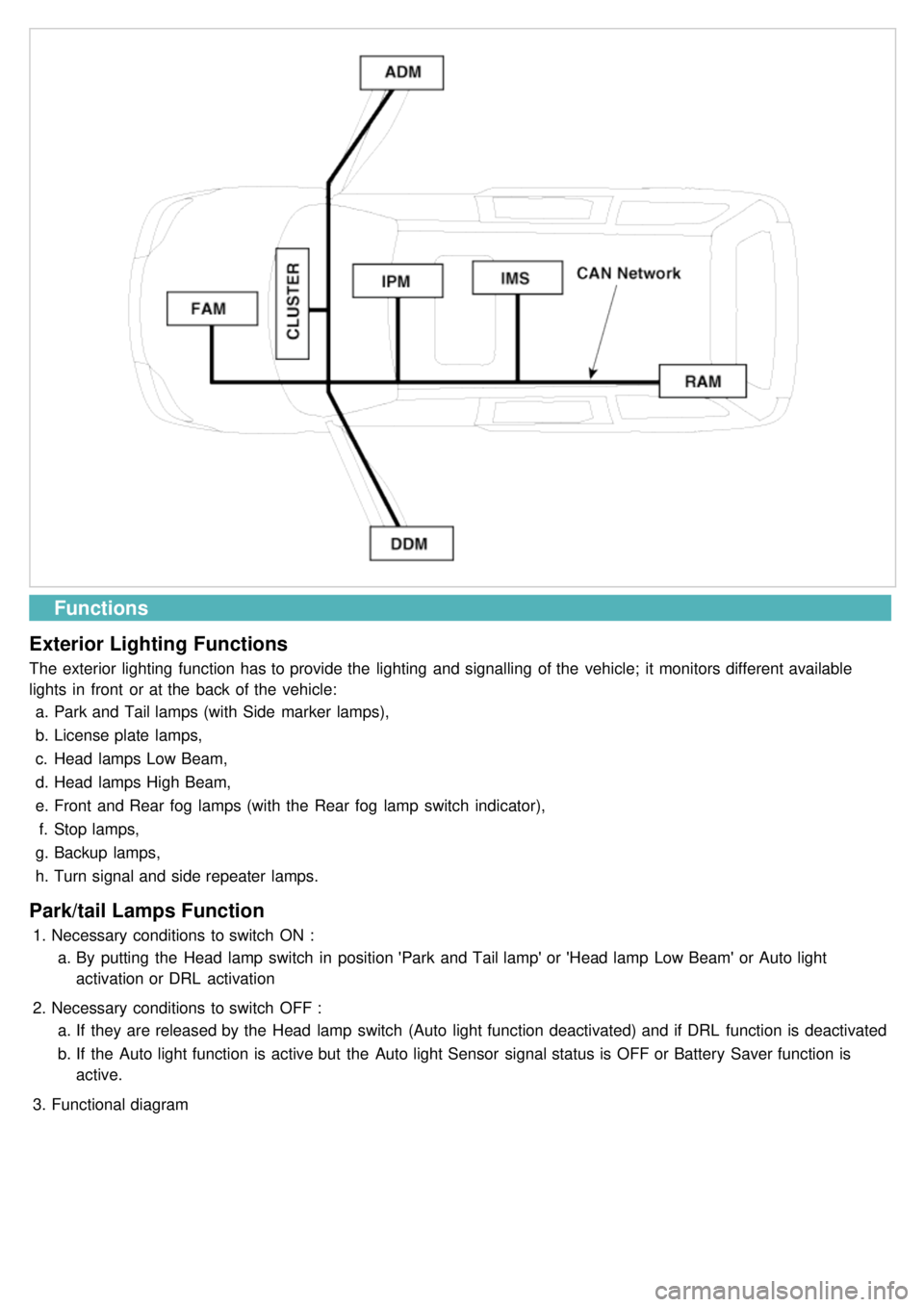
Functions
Exterior Lighting Functions
The exterior lighting function has to provide the lighting and signalling of the vehicle; it monitors different available
lights in front or at the back of the vehicle: a. Park and Tail lamps (with Side marker lamps),
b. License plate lamps,
c. Head lamps Low Beam,
d. Head lamps High Beam,
e. Front and Rear fog lamps (with the Rear fog lamp switch indicator),
f. Stop lamps,
g. Backup lamps,
h. Turn signal and side repeater lamps.
Park/tail Lamps Function
1.Necessary conditions to switch ON :
a. By putting the Head lamp switch in position 'Park and Tail lamp' or 'Head lamp Low Beam' or Auto light
activation or DRL activation
2. Necessary conditions to switch OFF :
a. If they are released by the Head lamp switch (Auto light function deactivated) and if DRL function is deactivated
b. If the Auto light function is active but the Auto light Sensor signal status is OFF or Battery Saver function is
active.
3. Functional diagram
Page 1217 of 1575
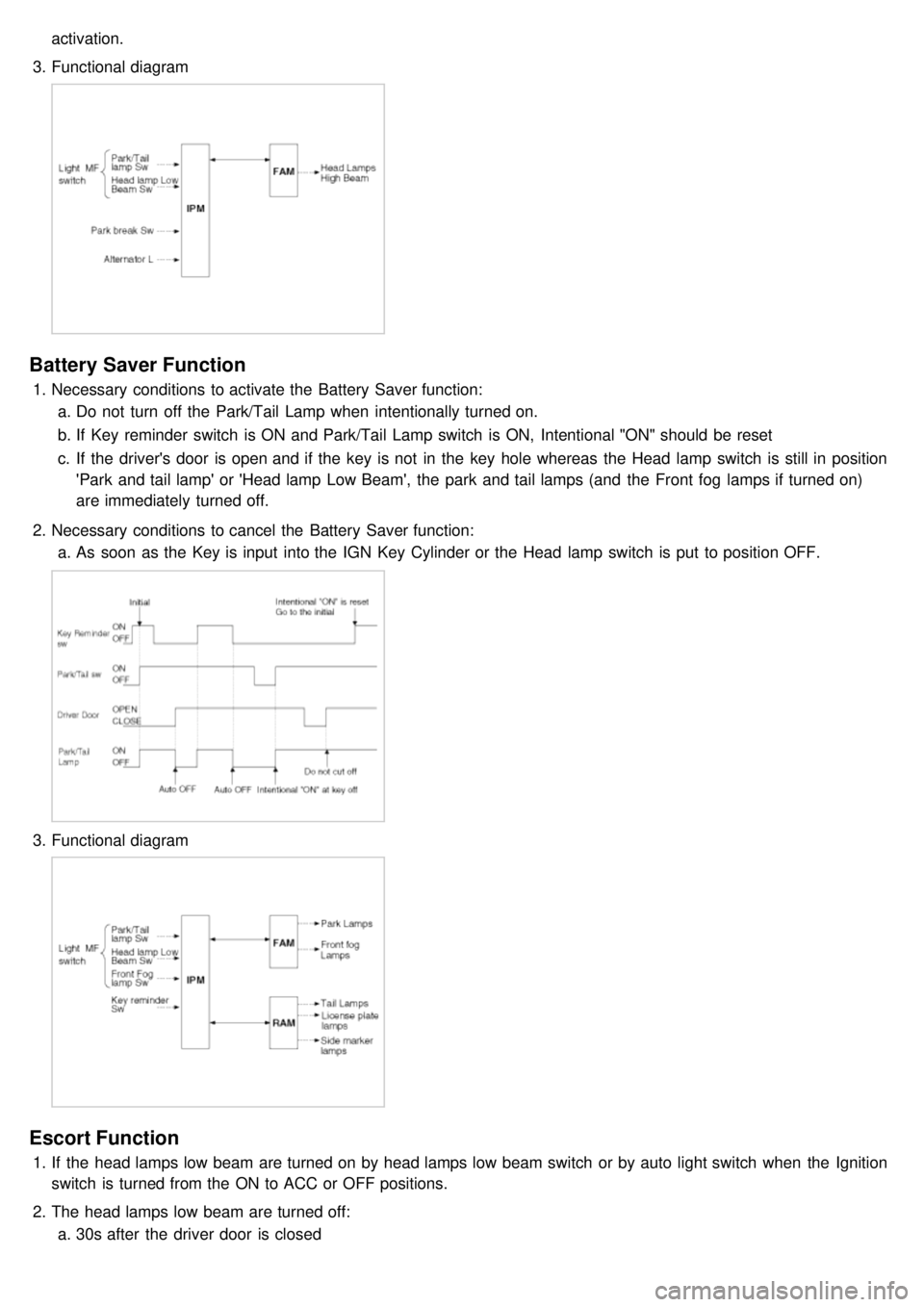
activation.
3. Functional diagram
Battery Saver Function
1.Necessary conditions to activate the Battery Saver function:
a. Do not turn off the Park/Tail Lamp when intentionally turned on.
b. If Key reminder switch is ON and Park/Tail Lamp switch is ON, Intentional "ON" should be reset
c. If the driver's door is open and if the key is not in the key hole whereas the Head lamp switch is still in position
'Park and tail lamp' or 'Head lamp Low Beam', the park and tail lamps (and the Front fog lamps if turned on)
are immediately turned off.
2. Necessary conditions to cancel the Battery Saver function:
a. As soon as the Key is input into the IGN Key Cylinder or the Head lamp switch is put to position OFF.
3.Functional diagram
Escort Function
1.If the head lamps low beam are turned on by head lamps low beam switch or by auto light switch when the Ignition
switch is turned from the ON to ACC or OFF positions.
2. The head lamps low beam are turned off:
a. 30s after the driver door is closed
Page 1218 of 1575
b.When the multifunction switch is not in postion headlamps turned on or autolight
c. 20 mn after the driver door is open
d. 20mn after IGN leaves the positions RUN to ACC or OFF
e. If IPM receives RKE "LOCK" command two times
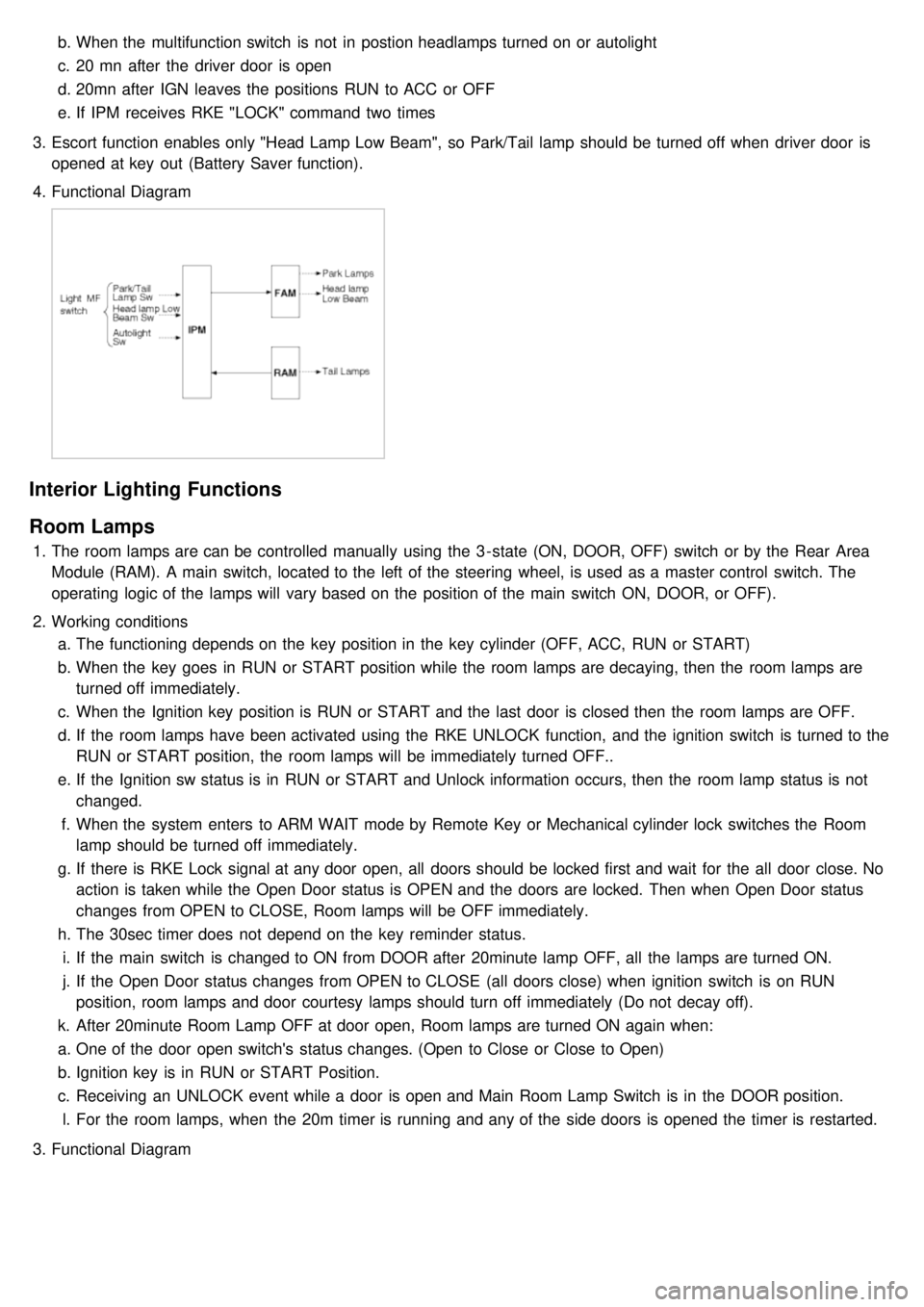
3. Escort function enables only "Head Lamp Low Beam", so Park/Tail lamp should be turned off when driver door is
opened at key out (Battery Saver function).
4. Functional Diagram
Interior Lighting Functions
Room Lamps
1.The room lamps are can be controlled manually using the 3 - state (ON, DOOR, OFF) switch or by the Rear Area
Module (RAM). A main switch, located to the left of the steering wheel, is used as a master control switch. The
operating logic of the lamps will vary based on the position of the main switch ON, DOOR, or OFF).
2. Working conditions
a. The functioning depends on the key position in the key cylinder (OFF, ACC, RUN or START)
b. When the key goes in RUN or START position while the room lamps are decaying, then the room lamps are
turned off immediately.
c. When the Ignition key position is RUN or START and the last door is closed then the room lamps are OFF.
d. If the room lamps have been activated using the RKE UNLOCK function, and the ignition switch is turned to the
RUN or START position, the room lamps will be immediately turned OFF..
e. If the Ignition sw status is in RUN or START and Unlock information occurs, then the room lamp status is not
changed.
f. When the system enters to ARM WAIT mode by Remote Key or Mechanical cylinder lock switches the Room
lamp should be turned off immediately.
g. If there is RKE Lock signal at any door open, all doors should be locked first and wait for the all door close. No
action is taken while the Open Door status is OPEN and the doors are locked. Then when Open Door status
changes from OPEN to CLOSE, Room lamps will be OFF immediately.
h. The 30sec timer does not depend on the key reminder status.
i. If the main switch is changed to ON from DOOR after 20minute lamp OFF, all the lamps are turned ON.
j. If the Open Door status changes from OPEN to CLOSE (all doors close) when ignition switch is on RUN
position, room lamps and door courtesy lamps should turn off immediately (Do not decay off).
k. After 20minute Room Lamp OFF at door open, Room lamps are turned ON again when:
a. One of the door open switch's status changes. (Open to Close or Close to Open)
b. Ignition key is in RUN or START Position.
c. Receiving an UNLOCK event while a door is open and Main Room Lamp Switch is in the DOOR position.
l. For the room lamps, when the 20m timer is running and any of the side doors is opened the timer is restarted.
3. Functional Diagram
Page 1236 of 1575
Battery Removal
a.If the battery is removed with the system in the ARM state, the system will be placed into the ARM state upon
battery reconnect.
b. The ALARM state will be re- activated if the battery is disconnected, then reconnected, with the system in an
ALARM state.
c. If the battery is disconnected and reconnected with the system in AFTER ALARM state, the alarm will be re-
activated.
d. The system will enter DISARM mode if the battery is disconnected during the ALARM WAIT state.
Panic
a.If RKE PANIC signal is received, Siren output and hazard lamp operate for 27 seconds and the system return to
the previous state as soon as the PANIC function finishes.
b. The PANIC function will be stopped if any RKE signal is received during PANIC activation..
c. If Key reminder switch is ON during PANIC function is operating, PANIC is stopped immediately.
d. If the system goes to ALARM mode during PANIC function is operating, PANIC is stopped immediately and then
ALARM function should be activated.
e. During ALARM state;
If RKE PANIC signal is received, ALARM mode is maintained and PANIC function should be ignored. ALARM has
higher priority than PANIC function.
f. During AFTER_ALARM state;
If RKE PANIC signal is received, AFTR_ALARM mode is maintained and PANIC function should be activated.
Safe & Rescue Mode
The goal of those modes is to be able to cope with failures that may happen on some of the most critical
functionalities (for the driver security) of the system.
Safe Mode
The safe mode is entered in case of system problems such as:
a. Incoherent inputs on monitored signals. In this case, safe mode is the debouncing time before the inputs are
considered INVALID. Note that today, we have no way to detect if the rain/light sensor is in working operation or
not. It means that a driver action will be required in case of failure of this sensor;
b. Loss of the CAN frame containing the monitored signal:
c. Loss of the CAN network: CAN goes to BUS OFF state, safe mode is the time necessary for detecting the BUS
OFF state.
In all cases, the action in safe mode is to maintain the previous state of the system (for lighting and wiping). The list of
monitored signals is the same as in rescue mode
Exiting Safe Mode
The software safe mode is exited and the module goes back to the normal mode when: a. On IPM, hardware inputs return to a coherent state;
b. The lost CAN signal comes back while timeout has not elapsed;
c. The CAN network returns to a normal state without reaching BUS OFF state.
Software safe mode is also exited when the software rescue mode is entered (problem does not disappear).
Hardware safe mode is exited and the module goes back to normal mode if the internal problem disappears (watchdog
is properly triggered again). If the problem stays, hardware safe mode is exited to enter hardware rescue mode.
Rescue Modes
The rescue mode consists in activating some safety functions when IGN2 = ON: a. Switch on the low beams (FAM), park lamps (FAM), tail lamps (RAM) and cluster backlighting (IPM);
b. Unlock of all the doors when the rescue mode is entered with IGN2 = ON
c. Front wipers do not need to be turned on by software in rescue mode because wipers can be turned on by
manually setting the MF switch to low speed. The FAM software must keep the same state as before entering the
rescue mode.
d. When IGN2 = OFF, low beams, park/tail lamps and cluster backlighting are turned off.
Entering Rescue Modes
Page 1244 of 1575
6IGN2 Switch ON/OFF
7 Front Right Window Up Switch ON/OFF
8 Front Right Window Down Switch ON/OFF
IMS Module No. Input switch Unit
1 IGN2 Switch ON/OFF
2 Slide front manual switch ON/OFF
3 Slide rear manual switch ON/OFF
4 Slide front limit switch ON/OFF
5 Slide rear limit switch ON/OFF
6 Recline front manual switch ON/OFF
7 Recline rear manual switch ON/OFF
8 "P" position switch ON/OFF
Self-diagnosis
IPM DTC List
No. DTC Code DTC Passiblecause
1 B1102 BATTERY VOLTAGE LOW Vbat < 9V
2 B1588 FR WIPER/WASHER MF
SW
MF switch status is not coherent for more than 2s
3 B1589 RR WIPER/WASHER MF
SW
4 B1590 LIGHT MF SW ERROR
MF switch status is not coherent for more than 2s
5 B1591 TURN SIGNAL MF SW
ERROR
6 B1602 CAN BUS PHYSICAL BUS
FAILURE Physical error indicated by network management
7 B1605 DDM COMM. LOST& BUS
FAILURE DDM is missing in system configuration information reported from
network management.
8 B1606 ADM COMM. LOST& BUS
FAILURE ADM is missing in system configuration information reported from
network management.
9 B1607 IMS COMM. LOST& BUS
FAILURE IMS is missing in system configuration information reported from
network management.
10 B1611 FAM COMM. LOST& BUS
FAILURE FAM is missing in system configuration information reported from
network management.
11 B1612 RAM COMM. LOST& BUS
FAILURE RAM is missing in system configuration information reported from
network management.
12 B1613 CLU COMM. LOST& BUS
FAILURE CLU is missing in system configuration information reported from
network management.
13 B1624 EEPROM FAILURE Failed attempt to read or write EEPROM
14 B1627 EEPROM CORRUPTION Data in EEPROM is not coherent
15 B1628 MODULE CONF.
CONFLICT Hardware and software configuration are not coherent
Page 1251 of 1575
No.Description ValueControl
1 Power Seat Slide Forward Motor ON/OFFContinuously ON
2 Power Seat Slide Backward Motor ON/OFFContinuously ON
3 Power Seat FR Height Up Motor ON/OFFContinuously ON
4 Power Seat FR Height Down Motor ON/OFFContinuously ON
5 Power Seat RR Height Up Motor ON/OFFContinuously ON
6 Power Seat RR Height Down Motor ON/OFFContinuously ON
7 Power Seat Recline Forward Motor ON/OFFContinuously ON
8 Power Seat Recline Backward Motor ON/OFFContinuously ON
9 Pedal Forward Motor ON/OFFContinuously ON
10 Pedal Backward Motor ON/OFFContinuously ON
REPLACEMENT
IPM (In-Panel Module)
1. Disconnect the negative ( - ) battery terminal.
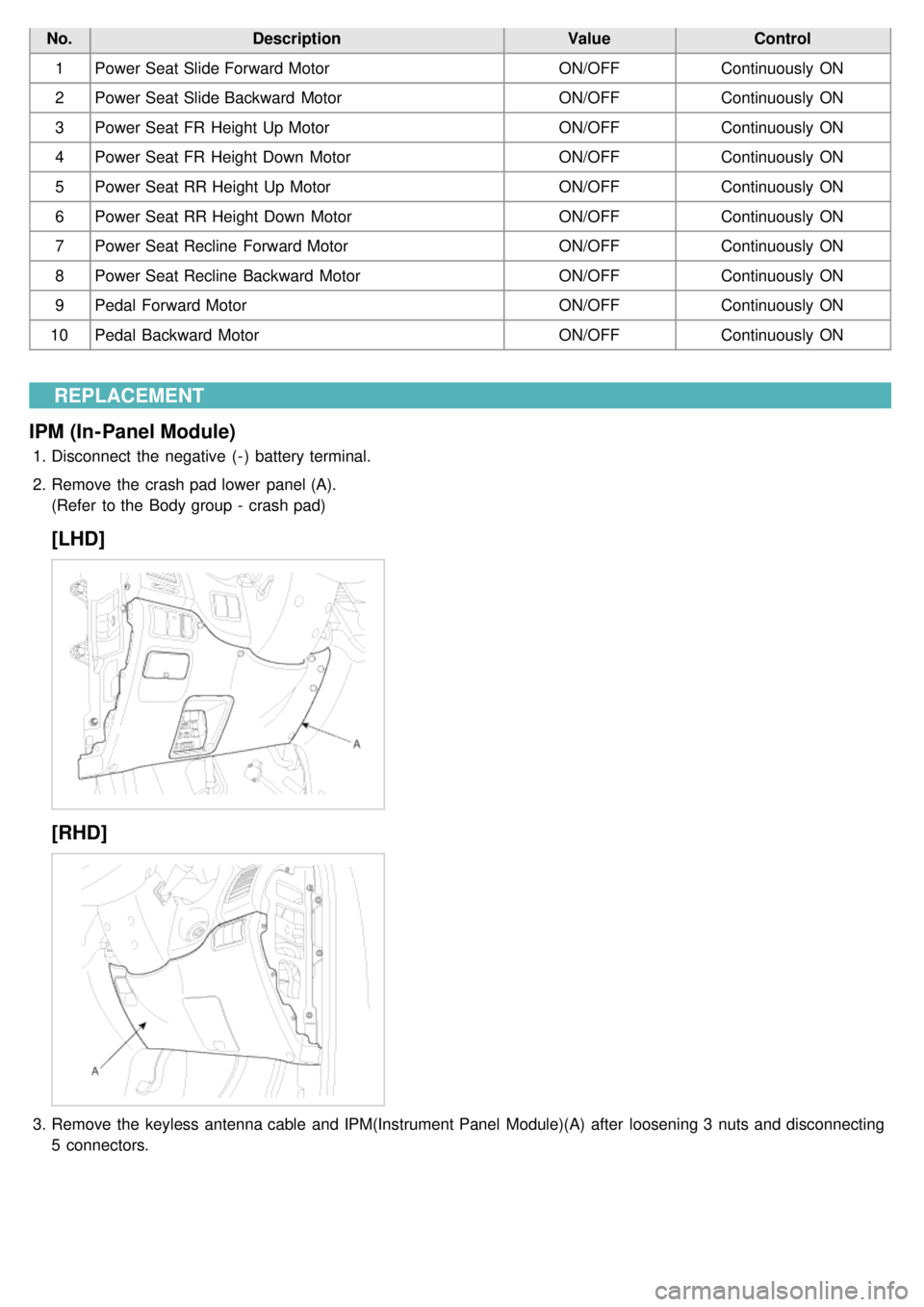
2. Remove the crash pad lower panel (A).
(Refer to the Body group - crash pad)
[LHD]
[RHD]
3.Remove the keyless antenna cable and IPM(Instrument Panel Module)(A) after loosening 3 nuts and disconnecting
5 connectors.