Page 3101 of 4366
![INFINITI FX35 2007 Service Manual FRONT DRIVE SHAFT FAX-15
[AWD]
C E F
G H
I
J
K L
M A
B
FA X
Revision: 2006 July 2007 FX35/FX45
Removal and Installation (Left Side)NDS000C6
COMPONENTS
REMOVAL
1. Remove tires from vehicle](/manual-img/42/57018/w960_57018-3100.png "INFINITI FX35 2007 Service Manual FRONT DRIVE SHAFT FAX-15
[AWD]
C E F
G H
I
J
K L
M A
B
FA X
Revision: 2006 July 2007 FX35/FX45
Removal and Installation (Left Side)NDS000C6
COMPONENTS
REMOVAL
1. Remove tires from vehicle")
FRONT DRIVE SHAFT FAX-15
[AWD]
C E F
G H
I
J
K L
M A
B
FA X
Revision: 2006 July 2007 FX35/FX45
Removal and Installation (Left Side)NDS000C6
COMPONENTS
REMOVAL
1. Remove tires from vehicle with power tool.
2. Remove undercover with power tool.
3. Remove cotter pin. Then remove lock nut from drive shaft with power tool.
4. Remove wheel sensor harness from strut assembly. Refer to BRC-57, "
WHEEL SENSORS" .
CAUTION:
Do not pull on wheel sensor harness.
5. Remove brake hose lock plate. Then remove brake hose from strut assembly. Refer to BR-11, "
BRAKE
TUBE AND HOSE" .
6. Remove fixing bolts and nuts between strut assembly and steering knuckle with power tool.
7. Using a puller (suitable tool), remove drive shaft from steering knuckle.
CAUTION:
When removing drive shaft, do not apply an excessive
angle to drive shaft joint. Also be careful not to excessively
extend slide joint.
8. Remove fixing bolt of front final drive side assembly drive shaft with power tool, then remove drive shaft from vehicle.
INSPECTION AFTER REMOVAL
�Move joint up/down, left /right, and in the axial direction. Check for any rough movement or significant
looseness.
�Check boot for cracks or other damage, and also for grease
leakage.
�If a trouble is found, disassemble drive shaft, and then replace
with new one.
INSTALLATION
�Refer to FAX-15, "Removal and Installation (Left Side)" for tightening torque. Install in the reverse order of
removal.
1. Cotter pin 2. Washer 3. Drive shaft
Refer to GI-11, "
Components" , for the symbols in the figure.
PDIA1218E
SDIA0972J
SDIA1046J
Page 3115 of 4366
PREPARATION FFD-3
C E F
G H
I
J
K L
M A
B
FFD
Revision: 2006 July 2007 FX35/FX45
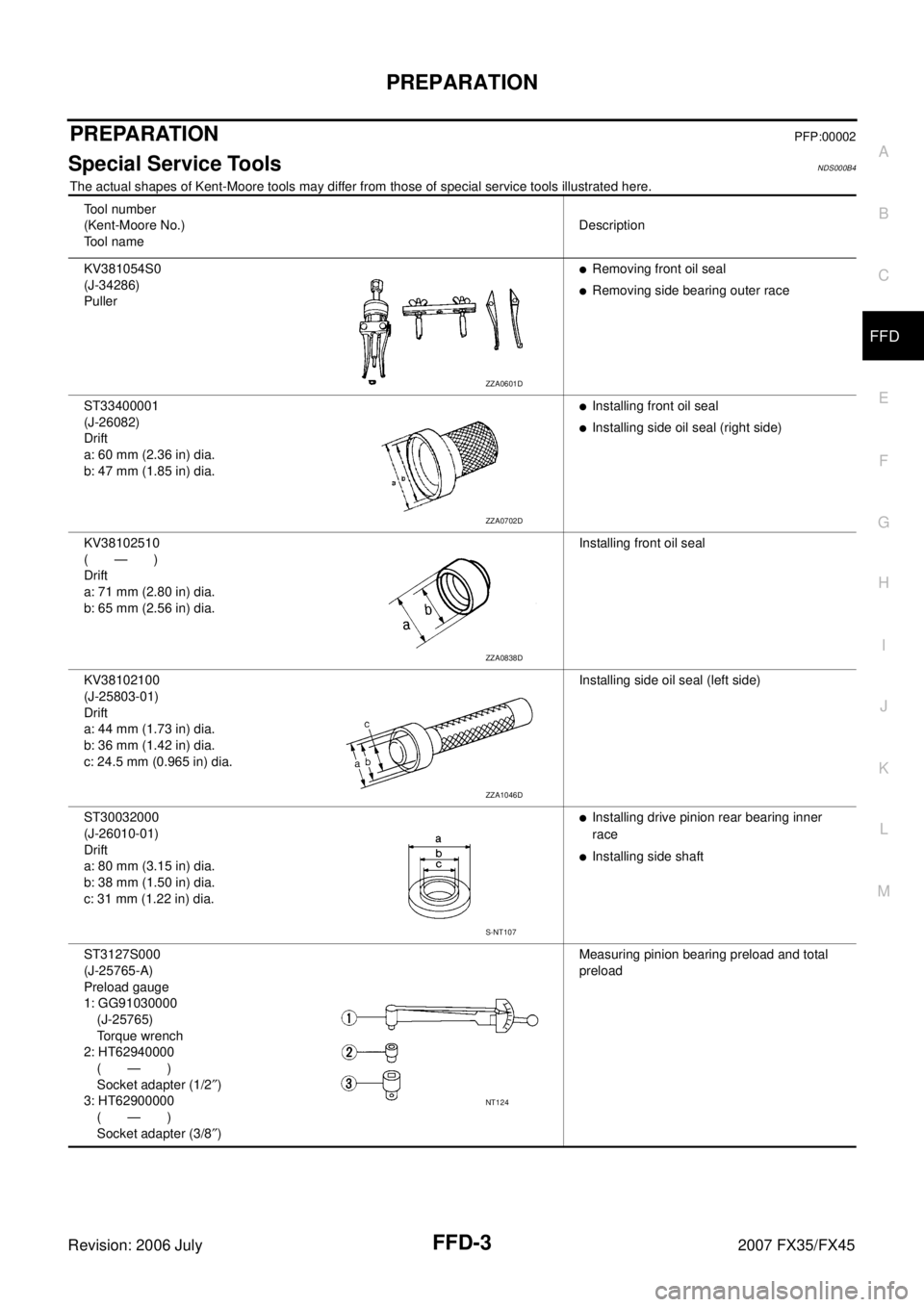
PREPARATIONPFP:00002
Special Service ToolsNDS000B4
The actual shapes of Kent-Moore tools may differ from those of special service tools illustrated here.
Tool number
(Kent-Moore No.)
Tool name Description
KV381054S0
(J-34286)
Puller
�Removing front oil seal
�Removing side bearing outer race
ST33400001
(J-26082)
Drift
a: 60 mm (2.36 in) dia.
b: 47 mm (1.85 in) dia.
�Installing front oil seal
�Installing side oil seal (right side)
KV38102510
(—)
Drift
a: 71 mm (2.80 in) dia.
b: 65 mm (2.56 in) dia. Installing front oil seal
KV38102100
(J-25803-01)
Drift
a: 44 mm (1.73 in) dia.
b: 36 mm (1.42 in) dia.
c: 24.5 mm (0.965 in) dia. Installing side oil seal (left side)
ST30032000
(J-26010-01)
Drift
a: 80 mm (3.15 in) dia.
b: 38 mm (1.50 in) dia.
c: 31 mm (1.22 in) dia.
�Installing drive pinion rear bearing inner
race
�Installing side shaft
ST3127S000
(J-25765-A)
Preload gauge
1: GG91030000
(J-25765)
Torque wrench
2: HT62940000
(—)
Socket adapter (1/2 ″)
3: HT62900000
(—)
Socket adapter (3/8 ″) Measuring pinion bearing preload and total
preload
ZZA0601D
ZZA0702D
ZZA0838D
ZZA1046D
S-NT107
NT124
Page 3116 of 4366
FFD-4
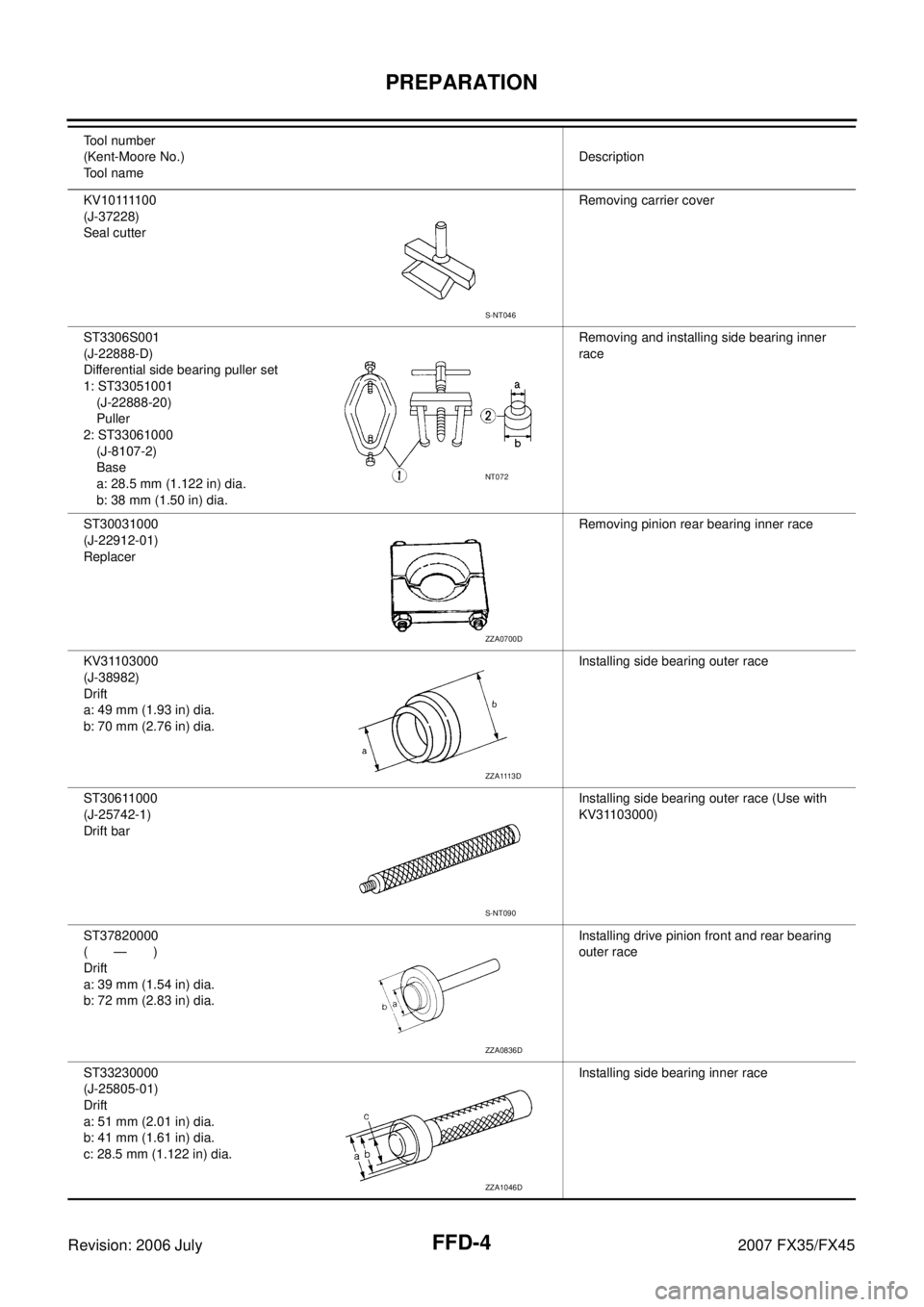
PREPARATION
Revision: 2006 July 2007 FX35/FX45
K V 1 0 1111 0 0
(J-37228)
Seal cutter Removing carrier cover
ST3306S001
(J-22888-D)
Differential side bearing puller set
1: ST33051001 (J-22888-20)
Puller
2: ST33061000 (J-8107-2)
Base
a: 28.5 mm (1.122 in) dia.
b: 38 mm (1.50 in) dia. Removing and installing side bearing inner
race
ST30031000
(J-22912-01)
Replacer Removing pinion rear bearing inner race
KV31103000
(J-38982)
Drift
a: 49 mm (1.93 in) dia.
b: 70 mm (2.76 in) dia. Installing side bearing outer race
ST30611000
(J-25742-1)
Drift bar Installing side bearing outer race (Use with
KV31103000)
ST37820000
(—)
Drift
a: 39 mm (1.54 in) dia.
b: 72 mm (2.83 in) dia. Installing drive pinion front and rear bearing
outer race
ST33230000
(J-25805-01)
Drift
a: 51 mm (2.01 in) dia.
b: 41 mm (1.61 in) dia.
c: 28.5 mm (1.122 in) dia. Installing side bearing inner race
Tool number
(Kent-Moore No.)
Tool name Description
S-NT046
NT072
ZZA0700D
ZZA1113D
S-NT090
ZZA0836D
ZZA1046D
Page 3157 of 4366
FUEL LEVEL SENSOR UNIT, FUEL FILTER AND FUEL PUMP ASSEMBLY FL-5
C
D E
F
G H
I
J
K L
M A
FL
Revision: 2006 July 2007 FX35/FX45
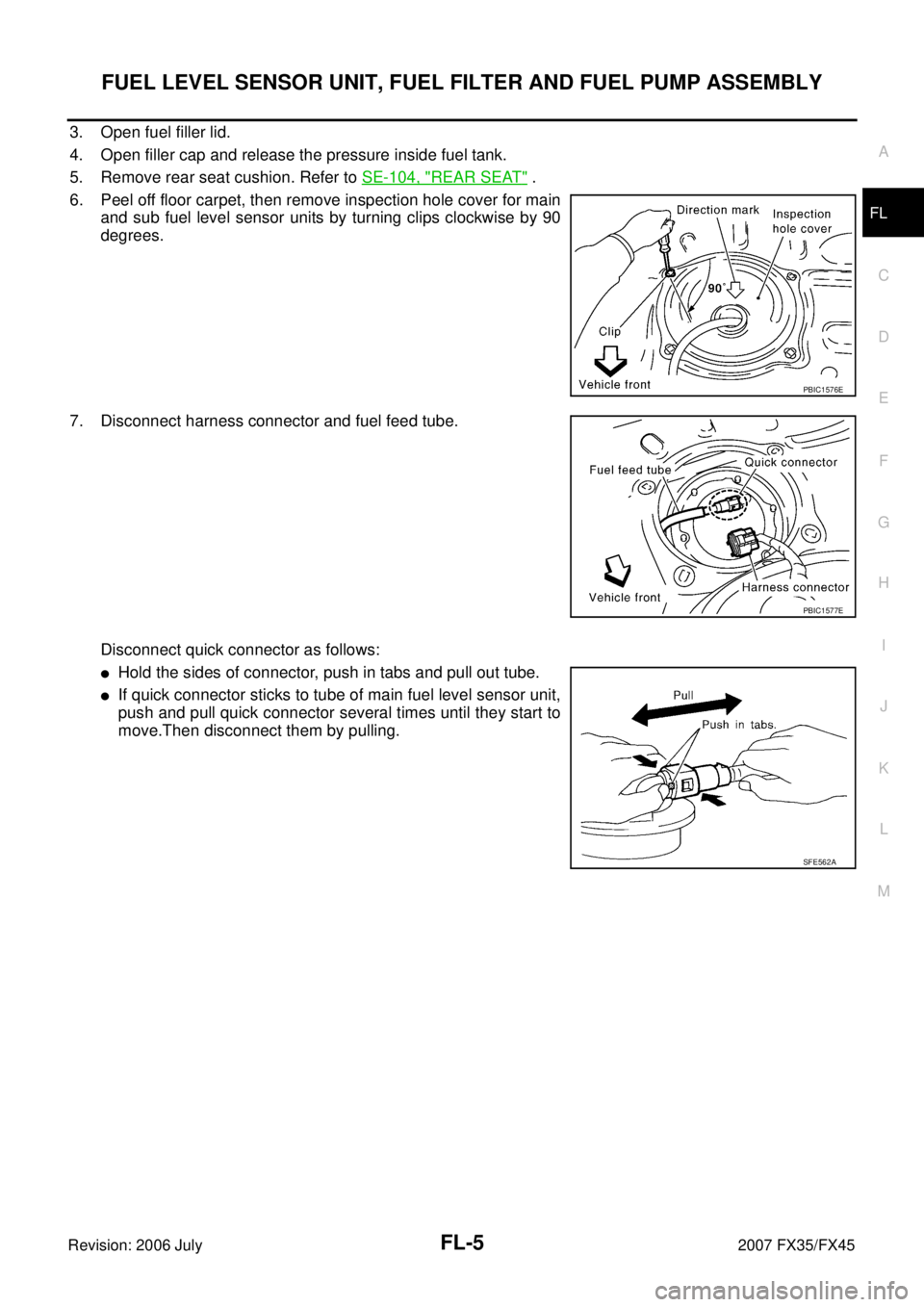
3. Open fuel filler lid.
4. Open filler cap and release the pressure inside fuel tank.
5. Remove rear seat cushion. Refer to SE-104, "
REAR SEAT" .
6. Peel off floor carpet, then remove inspection hole cover for main and sub fuel level sensor units by turning clips clockwise by 90
degrees.
7. Disconnect harness connector and fuel feed tube.
Disconnect quick connector as follows:
�Hold the sides of connector, push in tabs and pull out tube.
�If quick connector sticks to tube of main fuel level sensor unit,
push and pull quick connector several times until they start to
move.Then disconnect them by pulling.
PBIC1576E
PBIC1577E
SFE562A
Page 3167 of 4366
PREPARATION FSU-3
C
D
F
G H
I
J
K L
M A
B
FSU
Revision: 2006 July 2007 FX35/FX45
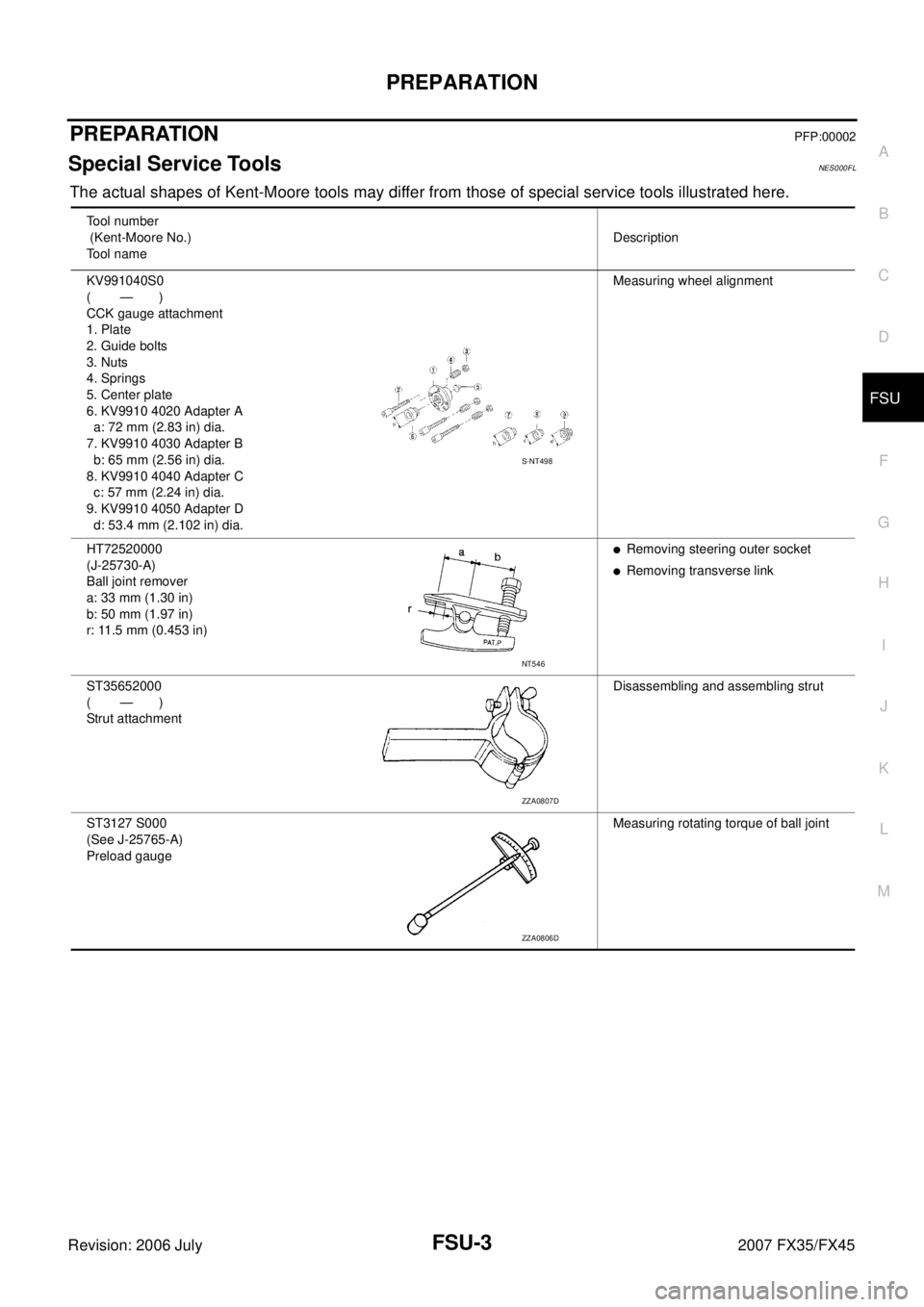
PREPARATIONPFP:00002
Special Service ToolsNES000FL
The actual shapes of Kent-Moore tools may differ from those of special service tools illustrated here.
Tool number
(Kent-Moore No.)
Tool name Description
KV991040S0
( — )
CCK gauge attachment
1. Plate
2. Guide bolts
3. Nuts
4. Springs
5. Center plate
6. KV9910 4020 Adapter A
a: 72 mm (2.83 in) dia.
7. KV9910 4030 Adapter B
b: 65 mm (2.56 in) dia.
8. KV9910 4040 Adapter C
c: 57 mm (2.24 in) dia.
9. KV9910 4050 Adapter D
d: 53.4 mm (2.102 in) dia. Measuring wheel alignment
HT72520000
(J-25730-A)
Ball joint remover
a: 33 mm (1.30 in)
b: 50 mm (1.97 in)
r: 11.5 mm (0.453 in)
�Removing steering outer socket
�Removing transverse link
ST35652000
( — )
Strut attachment Disassembling and assembling strut
ST3127 S000
(See J-25765-A)
Preload gauge Measuring rotating torque of ball joint
S-NT498
NT546
ZZA0807D
ZZA0806D
Page 3171 of 4366
FRONT SUSPENSION ASSEMBLY FSU-7
C
D
F
G H
I
J
K L
M A
B
FSU
Revision: 2006 July 2007 FX35/FX45
THE ALIGNMENT PROCESS
IMPORTANT:
Use only the alignment specifications listed in this Service Manual.
�When displaying the alignment settings, many alignment machines use “indicators”: (Green/red, plus or
minus, Go/No Go). Do NOT use these indicators.
–The alignment specifications programmed into your machine that operate these indicators may not be cor-
rect.
–This may result in an ERROR.
�Some newer alignment machines are equipped with an optional “Rolling Compensation” method to “com-
pensate” the sensors (alignment targets or head units). DO NOT use this “Rolling Compensation”
method.
–Use the “Jacking Compensation Method”. After installing the alignment targets or head units, raise the
vehicle and rotate the wheels 1/2 turn both ways.
–See Instructions in the alignment machine you're using for more information on this.
INSPECTION OF CAMBER, CASTER AND KINGPIN INCLINATION ANGLES
�Camber, caster, kingpin inclination angles cannot be adjusted.
�Before inspection, mount front wheels onto turning radius gauge. Mount rear wheels onto a stand that has
same height so vehicle will remain horizontal.
Using a CCK Gauge
Install CCK gauge attachment [SST: KV991040S0 ( – )] as following procedure in wheel, then measure
wheel alignment.
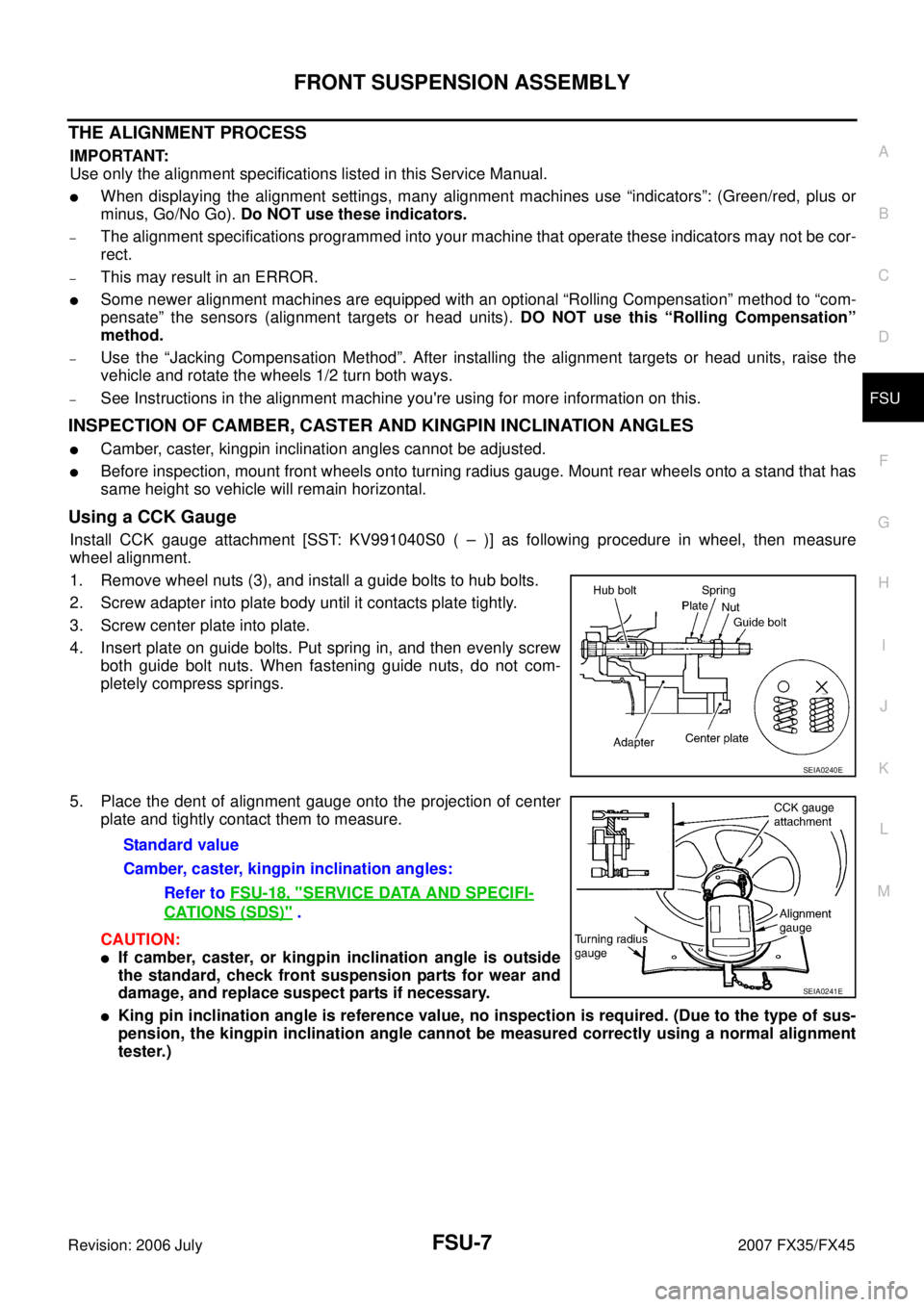
1. Remove wheel nuts (3), and install a guide bolts to hub bolts.
2. Screw adapter into plate body until it contacts plate tightly.
3. Screw center plate into plate.
4. Insert plate on guide bolts. Put spring in, and then evenly screw both guide bolt nuts. When fastening guide nuts, do not com-
pletely compress springs.
5. Place the dent of alignment gauge onto the projection of center plate and tightly contact them to measure.
CAUTION:
�If camber, caster, or kingpin inclination angle is outside
the standard, check front suspension parts for wear and
damage, and replace suspect parts if necessary.
�King pin inclination angle is reference value, no inspection is required. (Due to the type of sus-
pension, the kingpin inclination angle cannot be measured correctly using a normal alignment
tester.)
SEIA0240E
Standard value
Camber, caster, kingpin inclination angles: Refer to FSU-18, "
SERVICE DATA AND SPECIFI-
CATIONS (SDS)" .
SEIA0241E
Page 3305 of 4366
REAR WINDOW DEFOGGER GW-67
C
D E
F
G H
J
K L
M A
B
GW
Revision: 2006 July 2007 FX35/FX45
REAR WINDOW DEFOGGERPFP:25350
Component Parts and Harness Connector LocationNIS001S0
System DescriptionNIS001S1
The rear window defogger system is controlled by BCM (Body Control Module) and IPDM E/R (Intelligent
Power Distribution Module Engine Room).
The rear window defogger operates only for approximately 15 minutes.
Power is at all times supplied
�through 20A fuse [No. 75, located in the IPDM E/R]
�to rear window defogger relay terminals 3,
�through 20A fuse [No. 80, located in the IPDM E/R]
�to rear window defogger relay terminals 6,
�through 15A fuse [No. 32, located in the fuse block (J/B)]
�to A/C and AV switch terminal 1,
�through 50A fusible link (letter M , located in the fuse and fusible link box)
�to BCM terminal 55,
�through 15A fuse [No. 22, located in the fuse block (J/B)]
�to BCM terminal 42.
With the ignition switch turned to ON or START position,
Power is supplied
�through 15A fuse [No. 1, located in the fuse block (J/B)]
�to BCM terminal 38.
�through 10A fuse [No. 12, located in the fuse block]
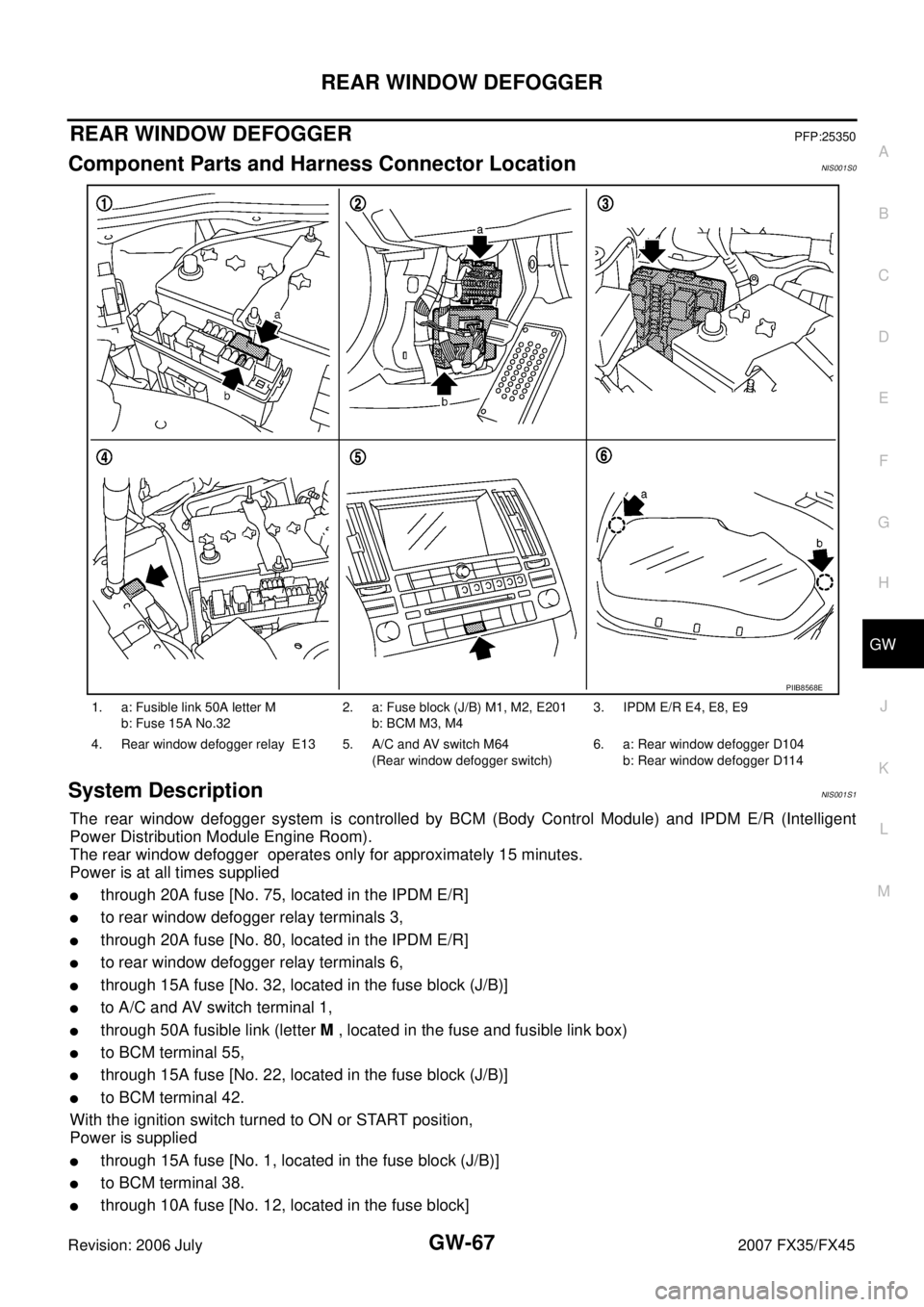
1. a: Fusible link 50A letter M
b: Fuse 15A No.32 2. a: Fuse block (J/B) M1, M2, E201
b: BCM M3, M4 3. IPDM E/R E4, E8, E9
4. Rear window defogger relay E13 5. A/C and AV switch M64 (Rear window defogger switch) 6. a: Rear window defogger D104
b: Rear window defogger D114
PIIB8568E
Page 3319 of 4366
REAR WINDOW DEFOGGER GW-81
C
D E
F
G H
J
K L
M A
B
GW
Revision: 2006 July 2007 FX35/FX45
6. CHECK REAR WINDOW DEFOGGER RELAY OUTPUT SIGNAL
1. Connect IPDM E/R connector and rear window defogger relay.
2. Turn ignition switch ON.
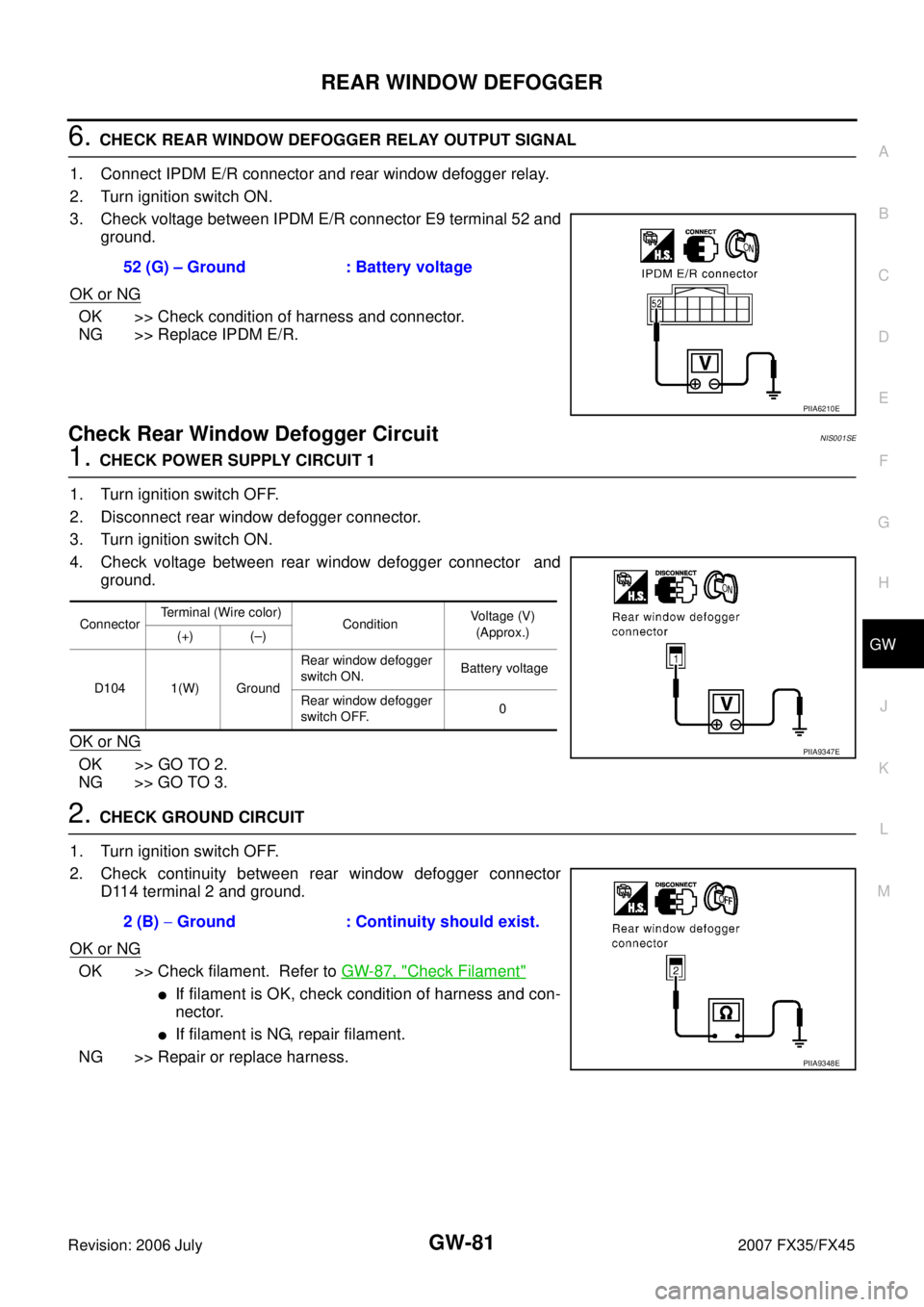
3. Check voltage between IPDM E/R connector E9 terminal 52 and ground.
OK or NG
OK >> Check condition of harness and connector.
NG >> Replace IPDM E/R.
Check Rear Window Defogger Circuit NIS001SE
1. CHECK POWER SUPPLY CIRCUIT 1
1. Turn ignition switch OFF.
2. Disconnect rear window defogger connector.
3. Turn ignition switch ON.
4. Check voltage between rear window defogger connector and ground.
OK or NG
OK >> GO TO 2.
NG >> GO TO 3.
2. CHECK GROUND CIRCUIT
1. Turn ignition switch OFF.
2. Check continuity between rear window defogger connector D114 terminal 2 and ground.
OK or NG
OK >> Check filament. Refer to GW-87, "Check Filament"
�If filament is OK, check condition of harness and con-
nector.
�If filament is NG, repair filament.
NG >> Repair or replace harness. 52 (G) – Ground : Battery voltage
PIIA6210E
Connector
Terminal (Wire color)
Condition Voltage (V)
(Approx.)
(+) (–)
D104 1(W) Ground Rear window defogger
switch ON. Battery voltage
Rear window defogger
switch OFF. 0
PIIA9347E
2 (B)
− Ground : Continuity should exist.
PIIA9348E