Page 128 of 331

The outside air intakes f or the
heating and cooling system are at
the base of the windshield. Keep this
area clear of leaves and other debris.
Thesystemshouldbeleftinfresh
air mode under almost all conditions.
Keeping the system in recirculation
mode, particularly with the A/C of f ,
can cause the windows to fog up.
Switch to recirculation mode when
driving through dusty or smoky
conditions, then return to fresh air
mode.Use the mode control buttons to
select the vents air flows from. Some
air will f low f rom the dashboard
corner vents in all modes.
When the recirculation indicator is
on, air f rom the vehicle’s interior is
sent throughout the system again.
When the indicator is off, air is
brought in f rom the outside of the
vehicle (fresh air mode).
Press the A/C button to turn the air
conditioningonandoff.Youwillsee
A/C ON or A/C OFF in the display.
When you turn the A/C of f , the
system cannot regulate the inside
temperature if you set the
temperature control below the
outside temperature.
Each time you press the MODE
button (On RTS, RTL, and Canadian
EXL models) or either mode button
(On RT, RTX, and Canadian LX
models), the display shows the mode
selected.
Air f lows f rom the f loor
vents. Airf low is divided between
the vents in the dashboard, rear and
the f loor vents. Air flows from the center,
corner, and rear vents in the
dashboard.
Recirculation Button
Mode Control
Air Conditioning (A/C) Button
Vents, Heating, and A/C
124
Page 130 of 331

The heater uses engine coolant to
warm the air. If the engine is cold, it
will be several minutes before you
feel warm air coming from the
system. Air
conditioning places an extra load
on the engine. Watch the engine
coolant temperature gauge (see page ). If it moves near the red zone,
turn of f the A/C until the gauge
reading returns to normal.
Turn on the A/C by pressing the
button. The display shows A/C
ON on when a f an speed is
selected.
Make sure the temperature is set
to maximum cool.
Select .
If the outside air is humid, select
recirculation mode. If the outside
air is dry, select f resh air mode.
Set the f an to the desired speed. you can
cool it down more rapidly by partially
opening the windows, turning on the
A/C, and setting the fan to
maximum speed in f resh air mode.
To cool the interior with MAX A/C:
Select .
When you select , the system
automatically switches to the fresh
air mode.
Set the f an to the desired speed.
Adjust the warmth of the air with
the temperature control dial. Set the f an to the desired speed.
Select MAX A/C mode.
The system automatically turns on
the A/C, selects , and
switches to recirculation mode.
Make sure the temperature is set
to maximum cool.
1.
2.
3.
1.
2.
3.
1.
2.
3.
4.
5. 72
If the interior is very warm,
On RT, RTX, and Canadian LX modelsUsing the Heater Using the A /C
Vents, Heating, and A/C
126
Page 131 of 331

Air conditioning, as it cools, removes
moisture from the air. When used in
combination with the heater, it
makes the interior warm and dry.
This setting is suitable f or all driving
conditions whenever the outside
temperature is above 32°F (0°C).To remove f og f rom the inside of the
windows:
Turn the fan on.
Press the A/C button.
Select and fresh air mode.
Adjust the temperature to your
pref erence.
When you switch to another mode
f rom , the A/C stays on.
Press the A/C button to turn it of f .Set the f an to the desired speed or
high f or f aster def rosting.
Select . When you select
, the system automatically
switches to f resh air mode and
turns on the A/C. The A/C
indicator will not be displayed if it
was off to start with.
Adjust the temperature so the
airflow feels warm.
To increase airf low to the
windshield, close the side vents. Your vehicle has heating wires at the
bottom of the windshield to help
heat the wiper blades and the
windshield. If the outside
temperature is near f reezing, the
heater turns on automatically when
you turn the ignition switch to the
ON (II) position. The heater turns
of f automatically when the outside
temperature is above f reezing.
This f unction helps to increase wiper
perf ormance when the wiper arms
sit in the parked position in snowy or
icy conditions.
1.
2.
3.
4.
1.
2.
3.
4.
Dehumidif y the Interior
T o Def og and Def rost A utomatic Heated Wiper Zone
Vents, Heating, and A/C
Features
127
Page 132 of 331

�µ
Select
. The system
au tomatically switches to fresh air
mode and turns on the A/C. The
A/C indicator does not come on if
it was off to start with.
Select .
Set the fan and temperature
controls to maximum level.
To clear the windows faster, you can
close the dashboard corner vents by
rotating the wheel next to
(passenger’s side) or below it
(driver’s side). This will send more
warm air to the windshield defroster
vents. Once the windshield is clear,
select fresh air mode to avoid
fogging the windows. The
system automatically selects the
proper mix of conditioned and/or
heated air that will, as quickly as
possible, raise or lower the interior
temperature to your preference.
When you set the temperature to its
lower limit ( ) or its upper limit
( ), the system runs at full
cooling or heating only. It does not
regulate the interior temperature.
In cold weather, the fan will not
come on automatically until the
heater starts to develop warm air.
When
the indicator in the DUAL button is
on, the driver’s side and passenger’s
side temperature can be controlled
independently (see page ).
For your saf ety, make sure you have
a clear view through all the windows
bef ore driving. Set the desired temperature by
turning the temperature control
dial. You will see AUTO in the
system’s display. Press the AUTO button.
The automatic climate control
system adjusts the f an speed and
airflow levels to maintain the interior
temperature you select.
1.
2.
3.
130Dual Temperature Control
On RTS, RTL, and Canadian EXL
models
Vents, Heating, and A/C
T o Remove Exterior Frost or Ice
From the Windows Using A utomatic Climate Control
128
Page 133 of 331
�µ
�µ Turning the f an speed control dial all
the way to the left shuts the system
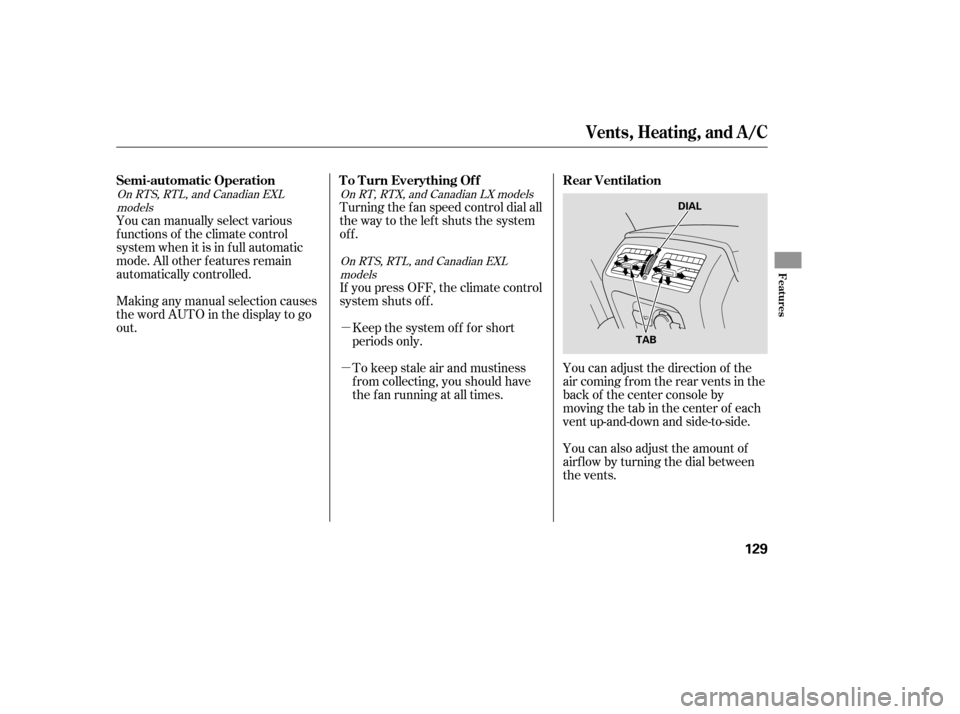
off.You can adjust the direction of the
air coming from the rear vents in the
back of the center console by
moving the tab in the center of each
vent up-and-down and side-to-side.
You can also adjust the amount of
airf low by turning the dial between
the vents.
Making any manual selection causes
thewordAUTOinthedisplaytogo
out. You can manually select various
f unctions of the climate control
system when it is in f ull automatic
mode. All other f eatures remain
automatically controlled.
To keep stale air and mustiness
f rom collecting, you should have
the f an running at all times. Keep the system of f f or short
periods only.
If youpressOFF,theclimatecontrol
system shuts of f .
On RTS, RTL, and Canadian EXL
models
On RTS, RTL, and Canadian EXLmodels
On RT, RTX, and Canadian LX models
Vents, Heating, and A/C
Semi-automatic Operation
T o T urn Everything Of f Rear Ventilation
Features
129
DIAL
TAB
Page 134 of 331
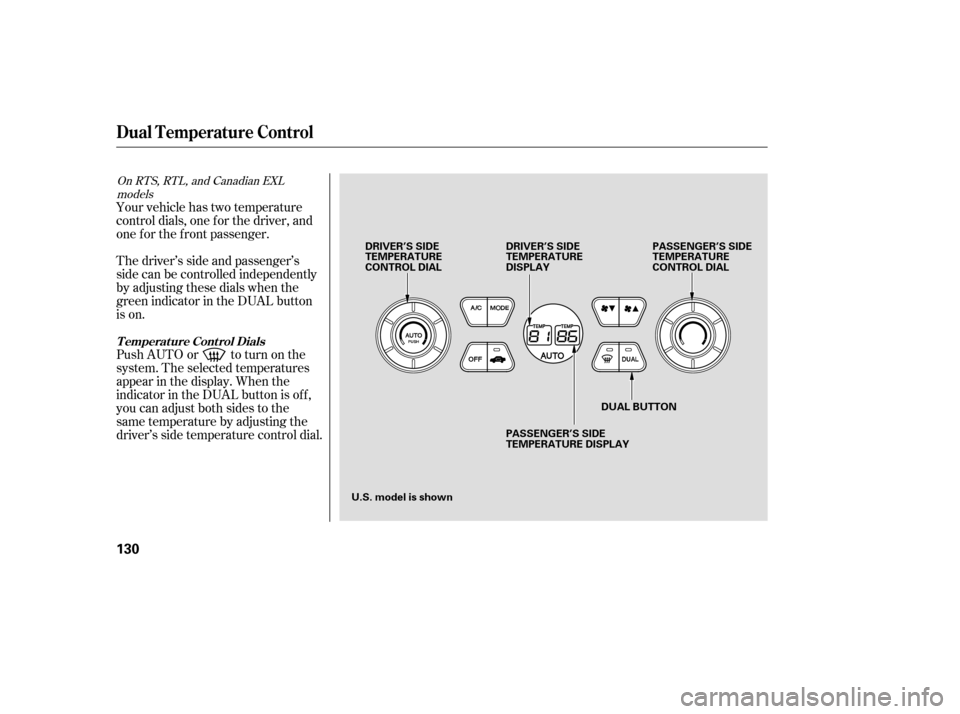
The driver’s side and passenger’s
side can be controlled independently
by adjusting these dials when the
green indicator in the DUAL button
is on. Your vehicle has two temperature
control dials, one f or the driver, and
one f or the f ront passenger.
Push AUTO or to turn on the
system. The selected temperatures
appear in the display. When the
indicator in the DUAL button is of f ,
you can adjust both sides to the
same temperature by adjusting the
driver’s side temperature control dial.
On RTS, RTL, and Canadian EXLmodels
Dual Temperature Control
T emperat ure Cont rol Dials
130
DUAL BUTTON PASSENGER’S SIDE
TEMPERATURE
CONTROL DIAL
DRIVER’S SIDE
TEMPERATURE
CONTROL DIAL DRIVER’S SIDE
TEMPERATURE
DISPLAY
PASSENGER’S SIDE
TEMPERATURE DISPLAY
U.S. model is shown
Page 135 of 331
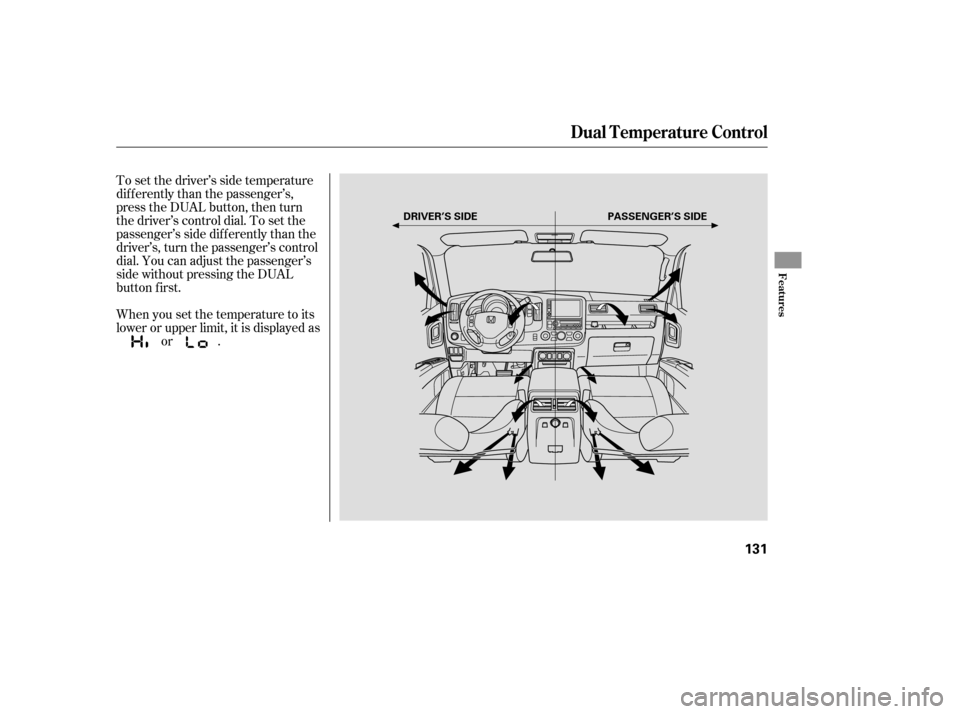
To set the driver’s side temperature
dif f erently than the passenger’s,
press the DUAL button, then turn
the driver’s control dial. To set the
passenger’s side dif f erently than the
driver’s, turn the passenger’s control
dial. You can adjust the passenger’s
side without pressing the DUAL
button first.
When you set the temperature to its
lower or upper limit, it is displayed asor .
Dual Temperature Control
Features
131
PASSENGER’S SIDE
DRIVER’S SIDE
Page 140 of 331

�µ
�µ �µ�µ �µ
�µ
The
ignition switch must be in the
ACCESSORY (I) or ON (II) position.
Turn the system on by pushing the
PWR button or the AM/FM button
(AMorFMbuttononCanadian
models). Adjust the volume by
turning the volume knob. You
can use any of five methods to
find radio stations on the selected
band: TUNE, SEEK, SCAN, the
preset bars, and AUTO SELECT.
Pushing the AUDIO button will also
turn on the system (see page ).
The band and f requency that the
radio was last tuned to is displayed.
To change bands, press the AM/FM
button (AM or FM button). On the
FM band, ST will be displayed if the
stationisbroadcastinginstereo.
Stereo reproduction in AM is not
available. Use the TUNE bar to tune
the radio to a desired f requency.
Press the side of the bar to tune
to a higher f requency, and press the side to tune to a lower
f requency.
The SEEK f unction
searches up and down from the
current f requency to f ind a station
with a strong signal. To activate it,
press the or side of the
bar, then release it.
The scan f unction samples
all stations with strong signals on the
selected band. To activate it, press
the SCAN button, then release it.
You will see SCAN in the display.
The system will scan f or a station with a strong signal. When it f inds
one, it will stop and play that station
f or about 10 seconds.
If you do nothing, the system will
scan f or the next strong station and
play it f or 10 seconds. When it plays
a station that you want to listen to,
press the SCAN button again.
Repeat steps 1 through 3 to store a
total of six stations on AM and
twelve stations on FM. Pick a preset number (1 6), and
hold it until you hear a beep. Usethetune,seek,orscan
function to tune the radio to a
desired station. Select the desired band, AM or
FM. FM1 and FM2 let you store
twelve stations. Each side of the bars
(1 6) can store one station on AM,
and two stations on FM.
1.
2.
3.
4.
138
On vehicles with navigation system
T o Play the A M/FM Radio
T o Select a Station
TUNE
SEEK
SCAN PRESET
Playing the AM/FM Radio
136