Page 164 of 331
MessageSolution
CauseIf you see an error message in the
display while playing a CD, f ind the
cause in the chart to the right. If you
cannot clear the error message, take
the vehicle to your dealer.
Press the disc eject button, and remove the
disc(s). Check for an error indication. Insert
the disc(s) again. If the code does not disappear
orthedisc(s)cannotberemoved,consultyour
dealer.
Press the disc eject button, and remove the
disc(s). Check for an error indication. Insert
the disc(s) again. If the code does not disappear
orthedisc(s)cannotberemoved,consultyour
dealer.
Will disappear when the temperature returns to
normal.
Focus Error
Mechanical Error
High Temperature
CD Player/Changer Error Messages
160
Page 165 of 331

�Û�Ý�Û
�Ý
�Û �Ý
The VOL button adjusts the volume
up ( ) or down ( ). Press the top
or bottom of the button, hold it until
the desired volume is reached, then
release it. Three controls f or the audio system
are mounted in the steering wheel
hub. They let you control basic
f unctions without removing your
hand f rom the steering wheel. The MODE button changes the
mode. Pressing the button
repeatedly selects FM1, FM2, AM,
XM Radio (U.S. models), CD (if a
disc is loaded) or a tape (if the
optional tape player is installed and a
tape is loaded).
If you are listening to the radio, use
the CH button to change stations.
Each time you press the top ( ) of
the button, the system goes to the
next preset station on the band you
are listening to. Press the bottom
( ) to go back to the previous
station.
If youareplayingaCD,thesystem
skips to the beginning of the next
track each time you press the top
( ) of the CH button. Press the
bottom ( ) to return to the
beginning of the current track. Press
it again to return to the previous
track. You will see the disc and track
numbers in the display.
When the appropriate audio unit is
connected to the auxiliary input jack,
press the CD/AUX or AUX button to
select the unit. The auxiliary input jack is on the tray
above the glove box. The system will
accept auxiliary input f rom standard
audio accessories.
On RTS, RTL, and Canadian EXL
models On vehicles with navigation system
Auxiliary Input Jack
Remote A udio Controls, Playing an Optional A udio Unit
Features
161
MODE BUTTON
VOL BUTTON
CH BUTTON AUXILIARY
INPUT JACK
Page 166 of 331

Your vehicle’s audio system will
disable itself if it is disconnected
f rom electrical power f or any reason.
To make it work again, you must
enter a specific code with the preset
bars. Because there are hundreds of
number combinations possible f rom
the f ive digits, making the system
work without knowing the exact
code is nearly impossible.
Youshouldhavereceivedacardthat
lists your audio system’s code and
serial numbers. It is best to store this
card in a saf e place at home. In
addition, you should write the audio
system’s serial number in this owner’s
manual.
If you lose the card, you must obtain
the code number f rom your dealer.
To do this, you will need the audio
system’s serial number.If your vehicle’s battery is
disconnected or goes dead, or the
radio f use is removed, the audio
system will disable itself . If this
happens, you will see ‘‘CODE’’ in the
frequencydisplaythenexttimeyou
turn on the system. Use the preset
bars to enter the code. The code is
locatedontheradiocodecard
included in your owner’s manual kit.
When it is entered correctly, the
radio will start playing.
If you make a mistake entering the
code, do not start over; complete the
sequence, then enter the correct
code. You have ten tries to enter the
correct code. If you are unsuccessf ul
in ten attempts, you must then leave
the system on f or 1 hour bef ore
trying again.
Radio T hef t Protection
162
Page 167 of 331

Press and hold the H (Preset 1) side
of the bar until the hour advances to
the desired time. Press and hold the
M (Preset 2) side of the bar until the
minutes advance to the desired time. To set the time, press the clock set
button until you hear a beep. The
displayed time begins to blink. If your vehicle’s battery is
disconnected or goes dead, you will
need to set the clock. You can quickly set the time to thenearest hour. If the displayed time is
bef ore the half hour, pressing the
clock set button until you hear a
beep, then pressing the R (Preset 3)
side of the bar sets the clock back to
the previous hour.
If the displayed time is after the half
hour, the clock sets f orward to the
beginning of the next hour. Press the clock set button again to
enter the set time.For example:
The navigation system receives
signals f rom the global positioning
system (GPS), and the displayed
time is updated automatically by the
GPS. Ref er to the navigation system
manual f or how to adjust the time.1:06 will reset to 1:00
1:52 will reset to 2:00
On models with Navigation System
On vehicles without Navigation System
Setting the Clock
Features
163
CLOCK SET
BUTTON
CLOCK SET
BUTTON
U.S. models are shown. PRESET BARS PRESET BARS
RTS, RTL, and
Canadian EXLmodels
RT,RTX,and
Canadian LXmodels
Page 168 of 331

The security system automatically
sets 15 seconds after you lock the
doors, hood, and the In-Bed Trunk.
For the system to activate, you must
lock the doors from the outside with
the key, driver’s lock tab, door lock
switch, or remote transmitter. The
security system indicator above the
driver’s door lock tab starts blinking
imme diately to show you the system
is setting itself. Once
the security system is set,
opening any door (without using the
key or the remote transmitter), the
hood, or the In-Bed Trunk, will cause
it to alarm. It also alarms if the radio
and navigation components are
removed from the dashboard or the
wiring is cut.
The
security system helps to protect
your vehicle and valuables from theft.
The horn sounds and a combination
of headlights, parking lights, license
plate lights, and taillights flash if
someone attempts to break into your
vehicleorremovetheradio.This
al arm continues for 2 minutes, then
the system resets. To reset an
alarming system before the 2
minutes have elapsed, unlock the
driver’s door with the key or the
remote transmitter. The
security system will not set if
the hood, In-Bed Trunk, or any door
is not f ully closed. If the system will
not set, check the door and tailgate
open monitor and In-Bed Trunk open
indicator on the instrument panel
(see pages and ) to see if the
doors and In-Bed Trunk are f ully
closed. Since it is not part of the
monitor display, manually check the
hood.
Use the remote transmitter
to quickly check that the hood,
In-Bed Trunk, and all doors are
closed. Push the lock button twice
within 5 seconds. There should be an
audible conf irmation beep.
Do not attempt to alter this system
or add other devices to it. 64 69
If equipped
Security System
164
NOTE:
SECURITY SYSTEM INDICATOR
Page 173 of 331

The compass may need to be
manually calibrated after exposure to
a strong magnetic field. If the
compassseemstocontinuallyshow
the wrong direction, do this. Drivethevehicleslowlyincircles
at
less than 5 mph (8 km/h) until
the center icon turns blue. This
icon also turns blue by continuing
to drive the vehicle under normal
driving conditions. When you see
an actual heading on the compass,
calibration is completed.
In most areas, there is a varia tion
between magnetic north and true
north. Zone selection is required so
the compass can compensate for this
varia tion. To check and select the
zone, do this:
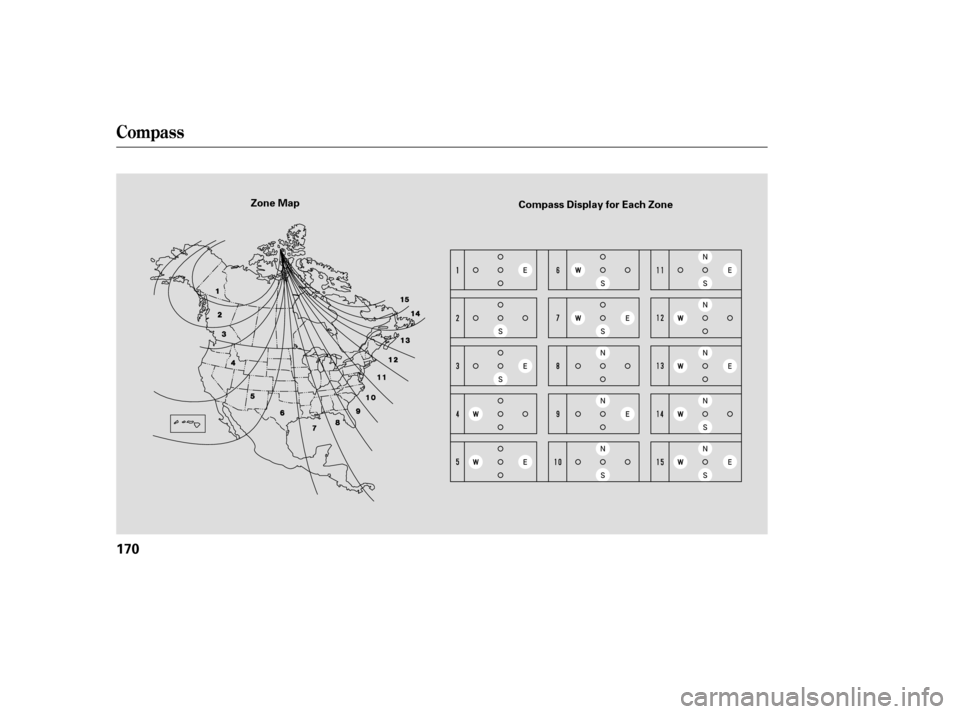
Find the zone for your area on the
zone map (see page ). Each
zone number (1 through 15)
co rresponds to a compass zone on
the table (see page ). Press and hold the compass
button f or about 3 seconds. When
all of the direction icons begin to
blink, release the button.
The blue direction icon(s) blink
and show the current zone.
If the zone is incorrect, press and
release the compass button
repeatedly to get to the correct
number.
The compass will return to the
normal display about 4 seconds
af ter you stop adjusting a zone
number.
Do this procedure in an open
area, away f rom buildings, power
lines, and other vehicles.
With the blue center icon
displayed, press and hold the
compass button for about 6
seconds. When the center icon
turns red, release the button. 2.
1. 2.
3.
4.
1. 5.
170
170
CONT INUED
Compass Calibration
Compass Zone Selection
Compass
Features
169
NOTE:
Page 174 of 331
Compass
170
Zone MapCompass Display for Each Zone
Page 180 of 331
�µ
Always check the TPMS malf unction
telltale af ter replacing one or more
tires or wheels on your vehicle to
ensure that the replacement or
alternate tires and wheels allow the
TPMS to continue to f unction
properly.
Your vehicle has also been equipped
with a TPMS malf unction indicator
to indicate when the system is not
operating properly. The TPMS
malf unction indicator is provided by
a separate telltale, which displays the
symbol ‘‘TPMS’’ when illuminated.
When the malf unction indicator is
illuminated,
the system may not be able to detect
or signal low tire pressure as
intended.
TPMS malf unctions may occur f or a
variety of reasons, including the
installation of replacement or
alternate tires or wheels on the
vehicle that prevent the TPMS f rom
f unctioning properly.
Tire Pressure Monitoring System (TPMS) Required Federal Explanation
176