Page 184 of 331

Whenever filling a fuel container,
use an approved fuel container, and
place it on the ground. Do not fill the
fuel container in the vehicl e,
including the pickup bed and the
In-Bed Trunk. Make sure to put the
fuel pump nozzle in the fuel filler of
the container securely and to handle
it properly.
Your vehicle has a warning label for
filling a portable fuel container on
the left rear side of the pickup bed.
Before
placing the fuel container in
the vehicle, wipe up any spill
completely. Gasoline or fuel vapors are
extremely flammable and explosive.
Improperly handling fuel can cause
anexplosioninwhich youcanbe
seriously injured.
Screw
the fuel fill cap back on
until it clicks at least once. If you
do not properly tighten the cap,
the malf unction indicator lamp
maycomeon(seepage ).You
will also see a ‘‘TIGHTEN FUEL
CAP’’ message on the inf ormation
display.
Push the f uel f ill door closed until
it latches.
5.
6.
289
Service Station Procedures
Filling a Port able Fuel Cont ainer
180
Do not fill a portable fuel
container in the pickup bed.
Static electricity can ignite gas
vapors and you can be burned.
Page 187 of 331
For example, an underinflated tire
causes more ‘‘rolling resistance,’’
which uses more fuel.
The build-up of snow or mud on
your vehicl e’s underside or on the
truck bed adds weight and rolling
resistan ce. Frequent cleaning
helps your fuel mileage and
reduces the chance of corrosion.
Drive moderately. Rapid
acceleration, abrupt cornering,
and hard braking use more fuel.
Always drive in the highest gear
possible. Try
to maintain a constant speed.
Everytimeyouslowdownand
speed up, your vehic le uses extra
fuel. Use cruise control when
appropriate.
Combine several short trips into
one.
The air conditioning puts an extra
load on the engine which makes it
usemorefuel.Usethefresh-air
ventilation when possible.
Always
maintain your vehicle
according to the maintenance
messages displayed on the
inf ormation display. See on page
.
241
Improving Fuel Economy
Owner’s
Maintenance Checks
Fuel Economy
Bef ore Driving
183
Page 237 of 331

This section explains why it is
important to keep your vehicle well
maintained and how to follow basic
maintenance safety precautions.
If you have the skills and tools to
perform more complex maintenance
tasks on your vehicle, you may want
to purchase the service manual. See
page f or inf ormation on how to
obtain a copy, or see your dealer. This section also includes
instructions on how to read the
maintenance minder messages on
the information display, a
maintenance record, and instructions
for simple maintenance tasks you
may want to take care of yourself. ......................
Maintenance Saf ety .234
....................
Maintenance Minder .235
....................
Maintenance Record .243
..............................
Fluid Locations .245
........................
Adding Engine Oil .246
Changing the Engine Oil and
...........................................
Filter .247
..............................
Engine Coolant .249
....................
Windshield Washers .250
....
Automatic Transmission Fluid .251
.................
Rear Dif f erential Fluid .252
.............
Transf er Assembly Fluid .253
....................................
Brake Fluid .253
....................
Power Steering Fluid .254
....................................
Timing Belt .254
.............................................
Lights .255
................
Cleaning the Seat Belts .261
.....................................
Floor Mats .261
..................
Dust and Pollen Filter .262
.................................
Wiper Blades .262
...........................................
Wheels .264
...............................................
Tires .265
...................
Checking the Battery .270
.............................
Vehicle Storage .272
315
Maintenance
Maint enance
233
Page 239 of 331

�µ
�µ
�µ
�µ
�µ
�µ
�µ
�µ
�µ
�µ �µ
�µ
CONTINUED
Calculated Engine
Oil Life (%)
100 % 91 %
90 % 81 %
80 % 71 %
70 % 61 %
60 % 51 %
50 % 41 %
40 % 31 %
30 % 21 %
20 % 16 %
15 % 11 %
10 % 6 %
5% 1%
0% Displayed
Engine Oil Life (%)
100 %
90 %
80 %
70 %
60 %
50 %
40 %
30 %
20 %
15 %
10 %
5%
0%
The remaining engine oil life is
displayed on the engine oil life
display according to the table shown
below.
Based on the engine operating
conditions and accumulated engine
revolutions, the onboard computer in
your vehicle calculates the remaining
engine oil life and displays it as a
percentage. Your vehicle displays engine oil life
and maintenance service items on
the information display to show you
when you should have your dealer do
engine oil replacement and indicated
maintenance service.
To see the current engine oil life,
turn the ignition switch to the ON
(II) position, and press the SELECT
button repeatedly until the engine oil
life display appears (see page ). 70
Maintenance Minder
Engine Oil L if e Display
Maint enance
235
MAINTENANCE MINDER
INDICATOR
ENGINE OIL LIFE
DISPLAY
Page 240 of 331
The maintenance item code(s)
indicate the main and sub items
required at the time of the oil change
(see page ).
If the engine oil lif e is 15 percent or
less, you will see ‘‘SERVICE dUE
SOON’’ message in the inf ormation
display every time you turn the
ignition switch to the ON (II)
position. The maintenance minder
indicator will also come on, and the
maintenance item code(s) for other
scheduled maintenance items
needing service will be displayed
below the message. When the remaining engine oil lif e is
less than 5 percent, you will see a
‘‘SERVICE dUE NOW’’ message
along with the same maintenance
item code(s), every time you turn the
ignition switch to the ON (II)
position.
The message changes between
SERVICE and dUE SOON
repeatedly.
The message changes between
SERVICE and dUE NOW repeatedly.
242
Maintenance Minder
236
MAINTENANCE ITEM CODES MAINTENANCE MAIN ITEM
MAINTENANCE SUB ITEMS MAINTENANCE ITEM CODES
MESSAGE
MESSAGE
Page 241 of 331
Maintenance Minder
Maintena nce
237
When you see this message, have
the indicated maintenance
performed by your dealer as soon as
possible.
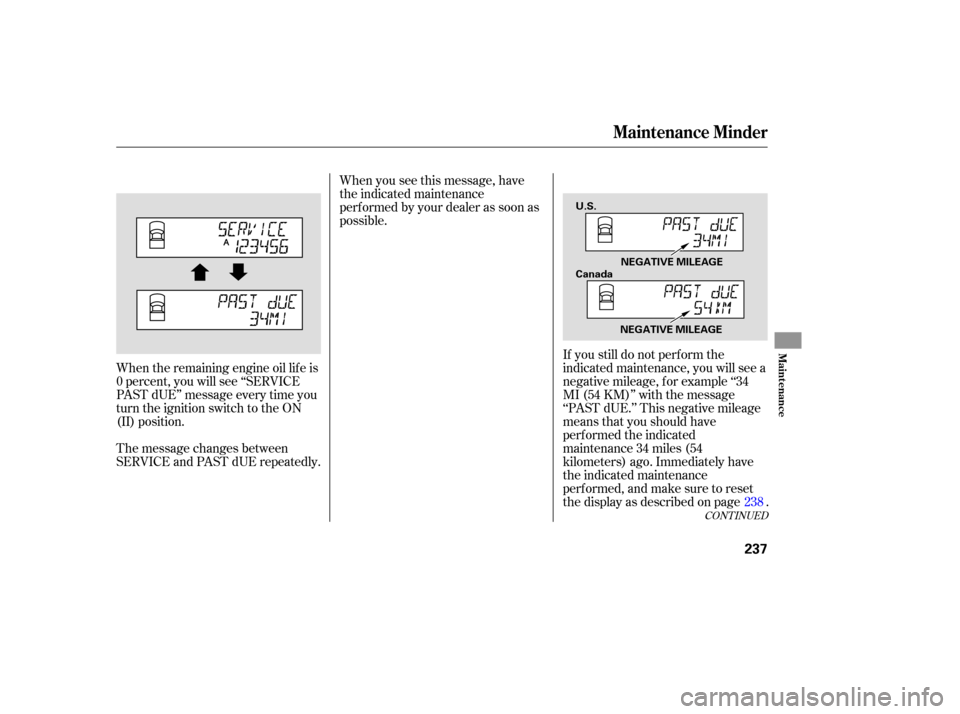
When the remaining engine oil life is
0 percent, you will see ‘‘SERVICE
PAST dUE’’ message every time you
turn the ignition switch to the ON
(II) position.
The message changes between
SERVICE and PAST dUE repeatedly. If
you still do not perform the
indicated maintenance, you will see a
negative mileage, for example ‘‘34
MI (54 KM)’’ with the message
‘‘PAST dUE.’’ This negative mileage
means that you should have
performed the indicated
maintenance 34 miles (54
kilometers) ago. Immediately have
the indicated maintenance
perf ormed, and make sure to reset
the display as described on page . 238
CONT INUED
NEGATIVE MILEAGE
U.S.
Canada
NEGATIVE MILEAGE
Page 242 of 331
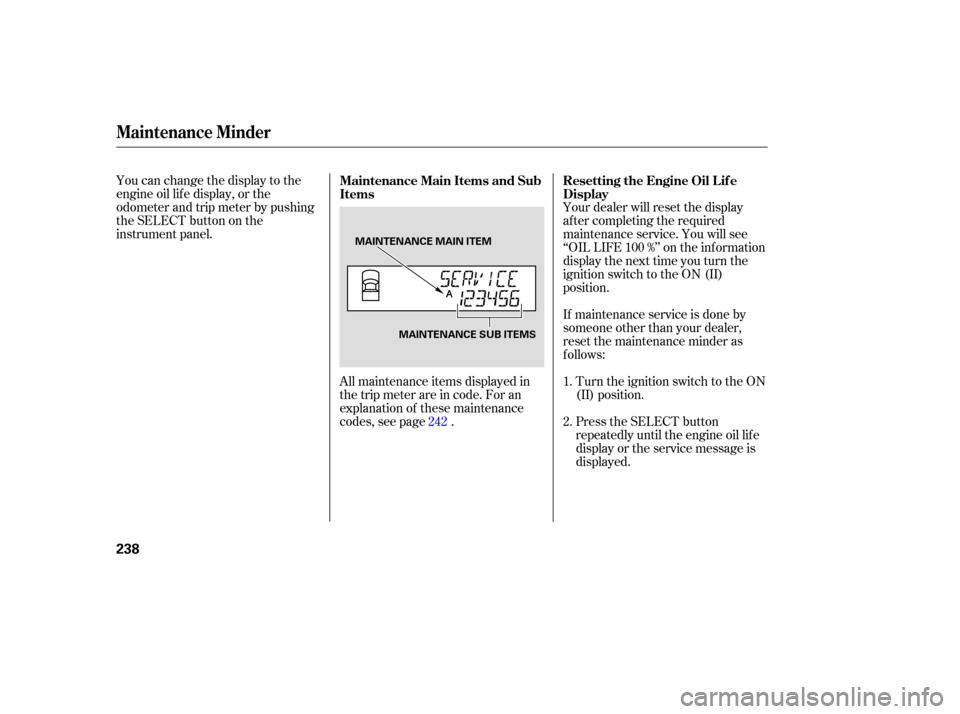
You can change the display to the
engine oil life display, or the
odometer and trip meter by pushing
the SELECT button on the
instrument panel.
All maintenance items displayed in
the trip meter are in code. For an
explanation of these maintenance
codes, see page . Your dealer will reset the display
af ter completing the required
maintenance service. You will see
‘‘OIL LIFE 100 %’’ on the inf ormation
display the next time you turn the
ignition switch to the ON (II)
position.
If maintenance service is done by
someone other than your dealer,
reset the maintenance minder as
f ollows:
Press the SELECT button
repeatedly until the engine oil lif e
display or the service message is
displayed. Turn the ignition switch to the ON
(II) position.
1.
2.
242
Maintenance Main Items and Sub
Items
Resetting the Engine Oil Lif e
Display
Maintenance Minder
238
MAINTENANCE MAIN ITEM
MAINTENANCE SUB ITEMS
Page 243 of 331
�¼
�¼
�¼�¼ �¼
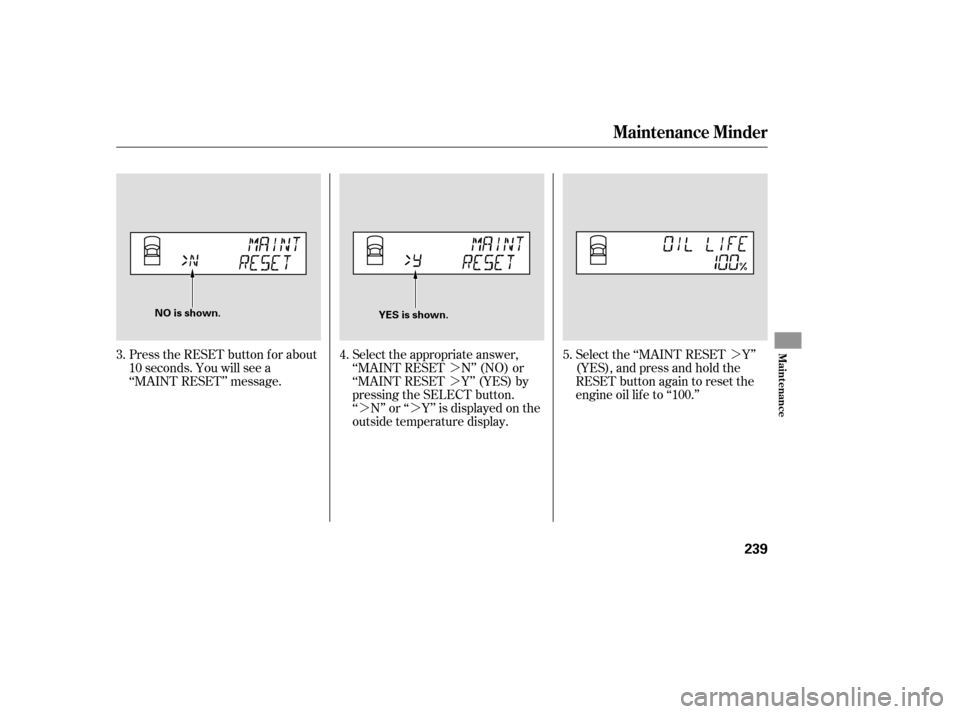
Press the RESET button f or about
10 seconds. You will see a
‘‘MAINT RESET’’ message. Select the appropriate answer,
‘‘MAINT RESET N’’ (NO) or
‘‘MAINT RESET Y’’ (YES) by
pressing the SELECT button.
‘‘ N’’ or ‘‘ Y’’ is displayed on the
outside temperature display.Select the ‘‘MAINT RESET Y’’
(YES),andpressandholdthe
RESET button again to reset the
engine oil lif e to ‘‘100.’’
3. 4. 5.
Maintenance Minder
Maint enance
239
YES is shown.
NO is shown.