2007 GMC ACADIA remote
[x] Cancel search: remotePage 426 of 554

Notice:If you leave your radio or other
accessories on during the jump starting
procedure, they could be damaged. The repairs
would not be covered by your warranty.
Always turn off your radio and other
accessories when jump starting your vehicle.
3. Turn off the ignition on both vehicles.
Unplug unnecessary accessories plugged into
the cigarette lighter or the accessory power
outlets. Turn off the radio and all lamps
that are not needed. This will avoid sparks
and help save both batteries. And it could
save the radio!
4. Open the hoods and locate the positive (+)
and negative (−) terminal locations on the
other vehicle. Your vehicle has a remote
positive (+) and a remote negative (−) jump
starting terminal. SeeEngine Compartment
Overview on page 396for more information on
the terminal locations.
{CAUTION:
Using a match near a battery can cause
battery gas to explode. People have been
hurt doing this, and some have been
blinded. Use a ashlight if you need
more light.
Be sure the batteries have enough water.
You do not need to add water to the
ACDelco
®battery (or batteries) installed in
your new vehicle. But if a battery has ller
caps, be sure the right amount of uid is
there. If it is low, add water to take care of
that rst. If you do not, explosive gas could
be present.
Battery uid contains acid that can
burn you. Do not get it on you. If you
accidentally get it in your eyes or on your
skin, ush the place with water and get
medical help immediately.
426
Page 427 of 554
{CAUTION:
Fans or other moving engine parts can
injure you badly. Keep your hands away
from moving parts once the engine is
running.
5. Check that the jumper cables do not have
loose or missing insulation. If they do, you
could get a shock. The vehicles could
be damaged too.
Before you connect the cables, here are some
basic things you should know. Positive (+)
will go to positive (+) or to a remote
positive (+) terminal if the vehicle has one.
Negative (−) will go to a heavy, unpainted
metal engine part or to a remote negative (−)
terminal if the vehicle has one.
Do not connect positive (+) to negative (−)or
you will get a short that would damage
the battery and maybe other parts too. And do
not connect the negative (−) cable to the
negative (−) terminal on the dead battery
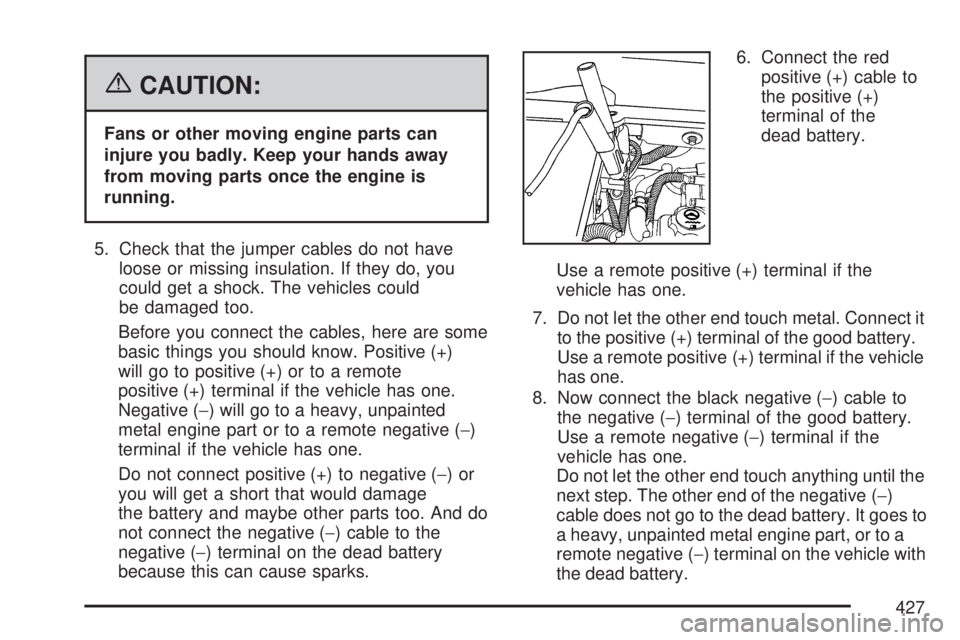
because this can cause sparks.6. Connect the red
positive (+) cable to
the positive (+)
terminal of the
dead battery.
Use a remote positive (+) terminal if the
vehicle has one.
7. Do not let the other end touch metal. Connect it
to the positive (+) terminal of the good battery.
Use a remote positive (+) terminal if the vehicle
has one.
8. Now connect the black negative (−) cable to
the negative (−) terminal of the good battery.
Use a remote negative (−) terminal if the
vehicle has one.
Do not let the other end touch anything until the
next step. The other end of the negative (−)
cable does not go to the dead battery. It goes to
a heavy, unpainted metal engine part, or to a
remote negative (−) terminal on the vehicle with
the dead battery.
427
Page 428 of 554

9. Connect the other
end of the
negative (−) cable at
least 18 inches
(45 cm) away from
the dead battery,
but not near engine
parts that move.
The electrical connection is just as good
there, and the chance of sparks getting back
to the battery is much less.
Your vehicle has a remote negative (−)
terminal for this purpose.10. Now start the vehicle with the good battery
and run the engine for a while.
11. Try to start the vehicle that had the dead
battery. If it will not start after a few tries,
it probably needs service.
Notice:If the jumper cables are connected or
removed in the wrong order, electrical
shorting may occur and damage the vehicle.
The repairs would not be covered by your
warranty. Always connect and remove
the jumper cables in the correct order, making
sure that the cables do not touch each other
or other metal.
428
Page 429 of 554
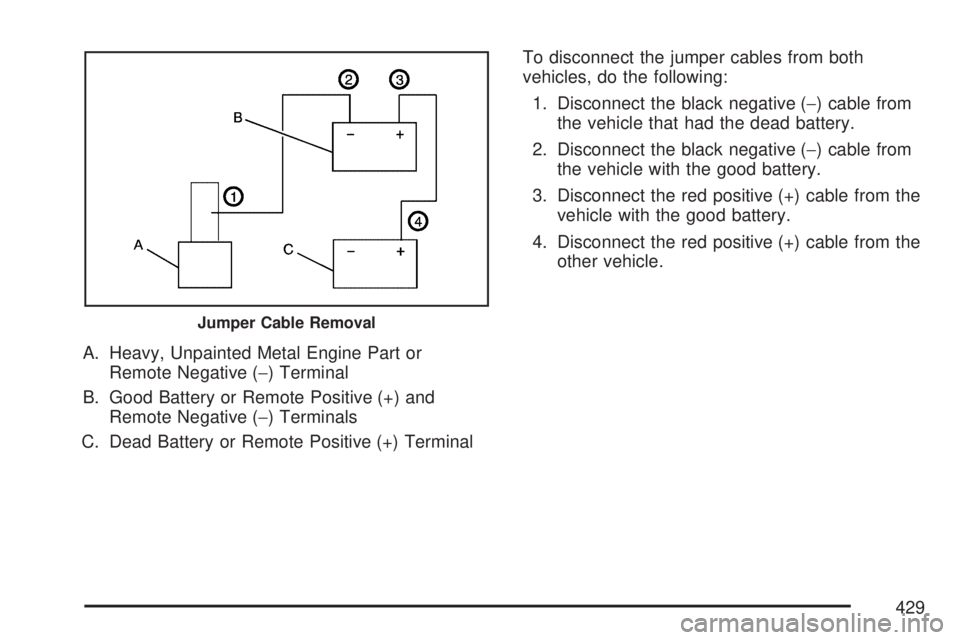
A. Heavy, Unpainted Metal Engine Part or
Remote Negative (−) Terminal
B. Good Battery or Remote Positive (+) and
Remote Negative (−) Terminals
C. Dead Battery or Remote Positive (+) TerminalTo disconnect the jumper cables from both
vehicles, do the following:
1. Disconnect the black negative (−) cable from
the vehicle that had the dead battery.
2. Disconnect the black negative (−) cable from
the vehicle with the good battery.
3. Disconnect the red positive (+) cable from the
vehicle with the good battery.
4. Disconnect the red positive (+) cable from the
other vehicle.
Jumper Cable Removal
429
Page 538 of 554

OnStar
If your vehicle has OnStar®and you subscribe
to the OnStar®services, please refer to the
OnStar®Terms and Conditions for information
on data collection and use. See alsoOnStar®
System on page 145for more information.
Navigation System
If your vehicle has anavigation system,
use of the system may result in the storage of
destinations, addresses, telephone numbers,
and other trip information.Please refer to
the navigation system operating manual for
information on stored data and for deletion
instructions.
Radio Frequency
Identication (RFID)
RFIDtechnology is used in some vehicles for
functions such as tire pressure monitoring
and ignition system security, as well as in
connection with conveniences such as key fobs
for remote door locking/unlocking and starting, and
in-vehicle transmitters for garage door openers.
RFID technology in GM vehicles does not
use or record personal information or link with any
other GM system containing personal information.
538
Page 548 of 554

Maintenance Schedule (cont.)
Maintenance Record................................ 514
Maintenance Requirements...................... 500
Normal Maintenance Replacement Parts ... 512
Owner Checks and Services.................... 507
Recommended Fluids and Lubricants....... 511
Scheduled Maintenance........................... 502
Using....................................................... 501
Your Vehicle and the Environment............ 500
Malfunction Indicator Light........................... 226
Manual Lumbar Controls............................... 11
Manual Seats.................................................. 9
Memory Seat and Mirrors.............................. 13
Message
DIC Warnings and Messages................... 244
Mirrors
Automatic Dimming Rearview with
OnStar
®and Compass......................... 140
Manual Rearview Mirror with OnStar®...... 140
Outside Convex Mirror............................. 144
Outside Heated Mirrors............................ 145
Outside Power Foldaway Mirrors.............. 143
Outside Power Mirrors............................. 142
MP3 ...................................................295, 301
MyGMLink.com............................................ 521
N
Navigation System, Privacy ......................... 538
Navigation/Radio System,
see Navigation Manual............................. 311
New Vehicle Break-In.................................. 123
Normal Maintenance Replacement Parts..... 512
O
Odometer.................................................... 216
Off-Road Recovery...................................... 342
Oil
Engine..................................................... 397
Pressure Light.......................................... 229
Oil, Engine Oil Life System ......................... 400
Older Children, Restraints............................. 48
Online Owner Center................................... 521
OnStar, Privacy........................................... 538
OnStar
®System, see OnStar®Manual........ 145
Operation, Universal Home
Remote System..............................150, 154
Orange Covered Wiring............................... 489
Other Warning Devices................................ 173
Outlet Adjustment........................................ 210
548
Page 550 of 554

Q
Questions and Answers About Safety Belts.... 28
R
Radiator Pressure Cap................................ 410
Radio Frequency Identication (RFID),
Privacy..................................................... 538
Radios........................................................ 264
Care of Your CD and DVD Player............ 328
Care of Your CDs and DVDs................... 328
Navigation/Radio System,
see Navigation Manual......................... 311
Radio with CD......................................... 268
Radio with CD and DVD.......................... 278
Rear Audio Controller (RAC).................... 324
Rear Seat Audio...................................... 322
Setting the Time...................................... 266
Theft-Deterrent......................................... 325
Understanding Reception......................... 326
Reading Lamps........................................... 188
Rear Air Conditioning and Heating System ... 211
Rear Air Conditioning and Heating System
and Electronic Climate Controls............... 212
Rear Audio Controller (RAC)....................... 324Rear Door Security Locks........................... 108
Rear Safety Belt Comfort Guides.................. 43
Rear Seat Armrest...................................... 163
Rear Seat Audio (RSA)............................... 322
Rear Seat Entertainment System................. 311
Rear Seat Operation..................................... 18
Rear Seat Passengers, Safety Belts.............. 40
Rear Windshield Washer/Wiper.................... 179
Rearview Mirror, Automatic Dimming
with OnStar
®and Compass..................... 140
Rearview Mirror with OnStar®...................... 140
Reclining Seatbacks...................................... 15
Recommended Fluids and Lubricants.......... 511
Recreational Vehicle Towing........................ 367
Remote Keyless Entry (RKE) System............ 98
Remote Keyless Entry (RKE) System,
Operation................................................. 100
Removing the Flat Tire and
Installing the Spare Tire........................... 463
Removing the Spare Tire and Tools............ 459
Replacement Bulbs..................................... 433
Reporting Safety Defects
Canadian Government............................. 534
General Motors........................................ 534
United States Government....................... 533
550
Page 552 of 554

Service........................................................ 385
Accessories and Modications.................. 385
Adding Equipment to the Outside of
Your Vehicle......................................... 387
California Proposition 65 Warning............. 386
Doing Your Own Work............................. 386
Engine Soon Light................................... 226
Publications Ordering Information............. 535
Servicing Your Airbag-Equipped Vehicle......... 90
Sheet Metal Damage................................... 486
Shifting Into Park (P)................................... 135
Shifting Out of Park (P)............................... 137
Shoulder Belt Height Adjuster........................ 38
Signals, Turn and Lane-Change.................. 175
Spare Tire
Compact.................................................. 477
Installing.................................................. 463
Removing................................................ 459
Storing..................................................... 472
Specications, Capacities............................ 497
Speedometer............................................... 216
StabiliTrak
®System..................................... 337
StabiliTrak®Indicator Light........................... 224
Starting Your Engine................................... 126
Steering...................................................... 340
Steering Wheel Controls, Audio................... 325
Steering Wheel, Power Tilt Wheel and
Telescopic Steering Column..................... 174Storage Areas
Cargo Management System..................... 164
Center Console Storage Area................... 161
Convenience Net..................................... 163
Cupholder(s)............................................ 161
Glove Box................................................ 161
Instrument Panel Storage Area................. 161
Luggage Carrier....................................... 162
Rear Seat Armrest................................... 163
Stuck in Sand, Mud, Ice, or Snow............... 360
Sun Visors.................................................. 117
Sunroof....................................................... 164
System Identication, Universal Home
Remote System....................................... 149
T
Tachometer................................................. 216
Telescopic Steering Column,
Power Tilt Wheel...................................... 174
Theft-Deterrent, Radio................................. 325
Theft-Deterrent Systems.............................. 118
Content Theft-Deterrent............................ 118
PASS-Key
®III+........................................ 120
PASS-Key®III+ Operation........................ 121
Time, Setting............................................... 266
552