2007 FIAT PANDA time
[x] Cancel search: timePage 5 of 166

4
Voice Memo function .................................................................................... 82
Other menus function .................................................................................... 84
Messages function ........................................................................................... 84
Options function ............................................................................................. 88
Settings function .............................................................................................. 91
NAVIGATOR.............................................................................................. 92
GENERAL INFORMATION ........................................................................ 92
SCREEN OPTIONS AND FUNCTIONS ................................................ 93
GRAPHIC INSTRUCTIONS ....................................................................... 94
VOICE INSTRUCTIONS ............................................................................. 94
NAVIGATION CD-ROM PLAYER ........................................................... 95
MAIN SCREEN ............................................................................................... 96
OTHER MENUS ............................................................................................. 99
SELECT ADDRESS ......................................................................................... 99
Address ............................................................................................................. 100
Points of interest ............................................................................................ 103
Last destinations ............................................................................................. 105
Directory .......................................................................................................... 105
RDS-TMC ......................................................................................................... 106
Home 1 – Home 2 ......................................................................................... 108
SET ROUTE ..................................................................................................... 109
CHANGE DISPLAY ....................................................................................... 110
DELETE DESTINATION .............................................................................. 111
MAP OPTIONS ............................................................................................. 112
VOICE DIRECTORY ..................................................................................... 113
ON-BOARD COMPUTER (TRIP).................................................... 116
GENERAL INFORMATION ........................................................................ 116
GENERAL TRIP and TRIP B function ........................................................ 116
ETA (Estimated Time of Arrival) ................................................................ 117
Distance to destination ................................................................................. 117
Speed limit ........................................................................................................ 117
Km/miles to empty ......................................................................................... 117
Instant consumption ...................................................................................... 118Trip time ........................................................................................................... 118
Distance traveled ............................................................................................ 118
Average speed ................................................................................................. 118
Average consumption .................................................................................... 118
Trip: speed ....................................................................................................... 118
Trip: MY CAR ................................................................................................. 119
Trip: info ........................................................................................................... 121
Trip: reset ......................................................................................................... 123
MY CAR......................................................................................................... 124
LANGUAGE .................................................................................................... 125
DATE & TIME ................................................................................................. 126
VEHICLE ........................................................................................................... 128
CONNECT (settings) ................................................................................... 131
Instrument panel ............................................................................................. 131
Video .................................................................................................................. 132
Power OFF ....................................................................................................... 133
VOICE RECOGNITION........................................................................ 135
GENERAL INFORMATION ........................................................................ 135
VOICE COMMANDS ................................................................................... 136
Keywords ......................................................................................................... 137
Examples (voice commands) ....................................................................... 143
INFORMATION AND ASSISTANCE SERVICES (SOS)..... 152
Medical advice function ................................................................................. 152
Roadside assist. function ............................................................................... 153
Personal number function ............................................................................ 153
Emergency 112 function ............................................................................... 153
Phone settings function ................................................................................. 154
Calls for medical advice or roadside assistance ...................................... 155
bCONNECT Infomobility services ............................................................ 156
FAULTS......................................................................................................... 159
Internal faults ................................................................................................... 159
Overtemperature faults ................................................................................ 159
Page 7 of 166

6
CONNECT NAV+
IMPORTANT NOTES
– In the event of a fault the CON-
NECT Nav+ should be checked and
repaired only at Fiat Dealership.
– In case of particularly low temper-
atures the display might take a certain
time to reach the optimum brightness.
– In the case of prolonged parking
with high outside temperature, the au-
tomatic thermal protection of the sys-
tem may come into action suspend-
ing operation until the passenger com-
partment temperature falls to accept-
able levels.COMPACT DISC
If a Compact Disc is used on the
sound system, remember that the
presence of dirt or marks on Compact
Discs may cause skipping when playing
and poor sound quality. The same hap-
pens if Compact Discs are bent by ac-
cident.
IMPORTANTNever use 8 cm au-
dio or MP3 CDs, even with the spe-
cial adapter, since this format damages
the system.
To obtain optimum playing condi-
tions we give the following advice:
– Only use Audio Compact Discs
with the brand:
– Carefully clean all Compact Discs
of any fingerprints and dust using a soft
cloth. Support Compact Discs on the
edges and clean from the centre out-
wards. Be careful not to knock the
display with pointed or
hard objects and avoid
touching with the hands. Do not
press on the display when cleaning.
Page 8 of 166

7
CONNECT NAV+
No
– Never use chemical products for
cleaning (e.g. spray cans, antistatics or
thinners) as they might damage the
surface of Compact Discs.
– After listening to them put Com-
pact Discs back in their boxes to avoid
marking or scoring which could cause
skipping when playing.
– Do not expose Compact Discs to
direct sunlight, high temperatures or
damp for prolonged lengths of time to
prevent them from bending.
– Do not stick labels or write on the
recorded surface of Compact Discs.
To remove a Compact Disc from its
container, press on the centre and
raise the disc holding carefully from
the edges.Always hold a Compact Disc by the
edge. Never touch the surface.
To remove fingerprints and dust, use
a soft cloth starting from the centre of
the Compact Disc towards the cir-
cumference.
Proper way to hold
the compact discRemoving the disc
New discs may be rough around the
edges. When using these discs the
player might not work or the sound
might skip. To remove roughness
from the edge of a disc use a ball-point
pen, etc.
Ball-point pen
Roughness
IMPORTANTDo not use the pro-
tective sheets for CDs in commerce
or discs with stabilisers, etc. as they
might get stuck in the internal mech-
anism and damage the disc.
Page 19 of 166

18
CONNECT NAV+
MAIN MODE
The MAIN mode is activated by
pushing the “MAIN” button 21-fig. 1
on the front panel. This mode allows
to display the four main system mod-
ules fig. 3 - 4:
– AUDIO
– TELEPHONE
– NAVIGATOR
– TRIP.
The top status bar shows current
time, GPS and GSM field strength, date
(format dd, mm, yyyy), external tem-
perature and current active mode.IMPORTANTWith ignition key at
OFF, information concerning time,
date, external temperature and Trip
data is not available since in this con-
dition the car data transmission de-
vices are not operating.
The different panels on the left side
of the screen are dedicated to tele-
phone, audio and trip modes.The panel dedicated to the phone in-
cludes:
– network administrator GMS (if no
administrator is found, manual search
can be carried out; if the telephone is
turned off, the “TEL OFF” string will
appear, and no call can be made);
– Unread SMS message envelope-
shaped icon;
– Active call forward arrow-shaped
icon.
The panel dedicated to the current
audio source includes:
– In Radio mode: tuned band and fre-
quency, RDS string.
– In CD/CDC/MP3 mode: active
source CD or CD1 ÷ 5 or MP3, num-
ber of the track or MP3 file being
played and length.
fig. 3
F0G3000g
fig. 4
F0G3001g
Page 20 of 166

19
CONNECT NAV+
The panel dedicated to Trip provides
the following info:
– average speed and km/miles to
empty or (turning knob 15-fig. 1) trip
time and average fuel consumption.
Panel with map drawing, with the
same scale used in navigator screens.
At the bottom of the screen are dis-
played the icon keys that can be acti-
vated through the multifunction but-
tons 16-fig. 1below:
– FM, AM, CD, CDC: the user can
directly select a radio band (pushing
on FM will select FM1/2/3/FMAST;
pushing on AM will select LW/MW/
AMAST/MW/…) or CD/CD Changer
audio source.Audio source can be changed also by
pushing on source button “SRC” 2-
fig. 1, through the following loop:
FM1, FM2, FM3, FMAST, LW, MW,
AMAST, CD, CDC.
– 1 to 6 icon keys: have functions re-
lated to the currently active source.PROTECTION AGAINST
THEFT
Power-on authentication
procedure
CONNECT Nav+ is protected
against theft and unauthorised instal-
lation by means of an “authentication
procedure”.
This kind of verification involves
Body Computer Node (by means of
messages exchanged on car network)
and is performed at every power-on.
The process will not be actuated if
the radio navigation system is turned
on by means of key 17-fig. 1. In this
case, the radio navigation system will
operate normally, without carrying out
the authentication procedure.
Page 26 of 166

25
CONNECT NAV+
TA - TRAFFIC INFORMATION
Certain stations in the FM band
(FM1, FM2, FM3 and FMAST) are al-
so enabled to broadcast information
about the conditions of the traffic. In
this case the displays shows the ab-
breviation “TP”.
To turn on/off the TA function (Traf-
fic Announcement) for traffic bulletins,
press briefly one of the keypad keys
16-fig. 1set near the icon key TA.
When the TA function is on, the dis-
play shows “TA” and the wording on
the icon key is darkened.
The listening conditions and infor-
mation shown on the display may be
the following:
– TA and TP: you are tuned to a sta-
tion that broadcasts traffic information
and the traffic information function is
on– TP: you are tuned to a station that
broadcasts traffic information but the
traffic information function is off
– TA: the traffic information function
is on but you are tuned to a station
that does not broadcast traffic infor-
mation
– TA and TP not shown on the dis-
play: you are tuned to a station that
does not broadcast traffic information
and the traffic information function is
off.
With the TA function on it is possi-
ble:
1) to receive traffic information al-
so if the CD/CDC/MP3 player is
working;
2) to receive traffic information at a
preset minimum level also with the ra-
dio volume down completely.The operations to be carried out for
each of the above two conditions are
listed below.
1) If you wish to receive traffic in-
formation while listening to a CD, be-
fore inserting the CD, tune to a sta-
tion enabled to broadcast traffic in-
formation (TP) and turn the TA func-
tion on. If, while playing the CD, this
station broadcasts traffic information,
CD playing will be temporarily
stopped and resumed automatically at
the end of the message.
If the CD player is already operat-
ing and, at the same time, you wish to
receive traffic information, actuating
the TA function will cause the radio to
tune to the latest station listened to
on the FM band (if the station controls
the “TP”); otherwise, automatic
search will be started to find a station
that controls the “TP”.
Page 38 of 166
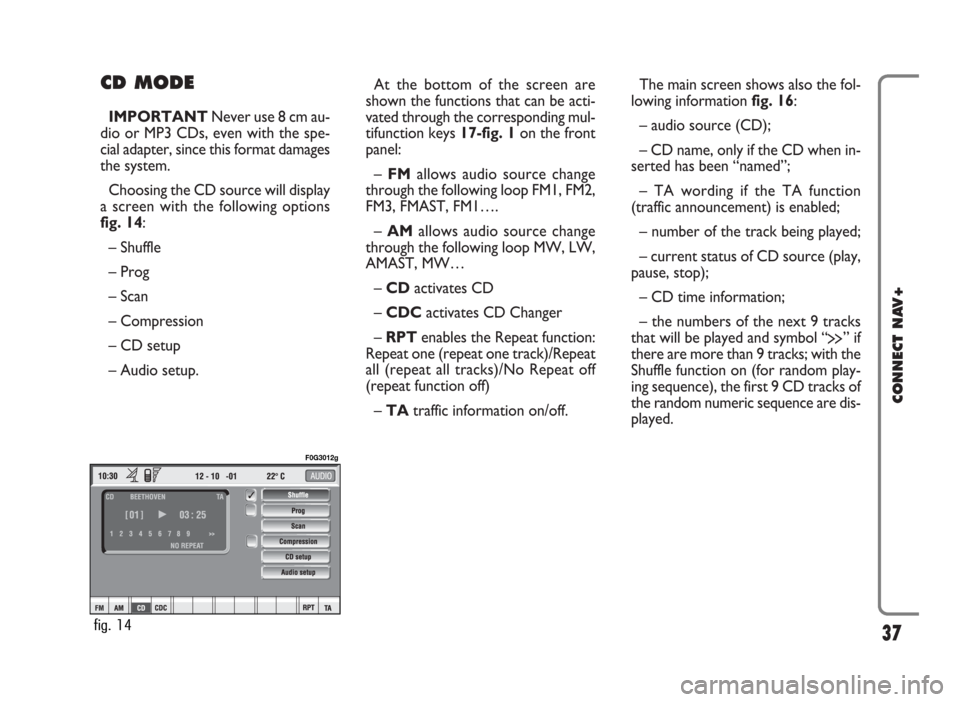
CD MODE
IMPORTANTNever use 8 cm au-
dio or MP3 CDs, even with the spe-
cial adapter, since this format damages
the system.
Choosing the CD source will display
a screen with the following options
fig. 14:
– Shuffle
– Prog
– Scan
– Compression
– CD setup
– Audio setup.At the bottom of the screen are
shown the functions that can be acti-
vated through the corresponding mul-
tifunction keys 17-fig. 1on the front
panel:
– FMallows audio source change
through the following loop FM1, FM2,
FM3, FMAST, FM1….
– AMallows audio source change
through the following loop MW, LW,
AMAST, MW…
– CDactivates CD
– CDCactivates CD Changer
– RPTenables the Repeat function:
Repeat one (repeat one track)/Repeat
all (repeat all tracks)/No Repeat off
(repeat function off)
– TAtraffic information on/off.The main screen shows also the fol-
lowing information fig. 16:
– audio source (CD);
– CD name, only if the CD when in-
serted has been “named”;
– TA wording if the TA function
(traffic announcement) is enabled;
– number of the track being played;
– current status of CD source (play,
pause, stop);
– CD time information;
– the numbers of the next 9 tracks
that will be played and symbol “
§” if
there are more than 9 tracks; with the
Shuffle function on (for random play-
ing sequence), the first 9 CD tracks of
the random numeric sequence are dis-
played.
37
CONNECT NAV+
fig. 14
F0G3012g
Page 40 of 166
39
CONNECT NAV+
This function enables or disables
playback of the previously user pro-
grammed track list (see “CD setup”
functions).
“Prog” icon key is disabled if no pro-
grammed list has been entered.
When list has been programmed and
programmed list playing has been cho-
sen, symbol “✓” is shown near the
corresponding icon.
“Scan” FUNCTION
(BRIEF PLAYBACK)
The “Scan” function is turned on/off
selecting the relevant icon key with
the knob 15-fig. 1and pressing it.
When this function is on, all the CD
tracks are played for about 10 seconds
in the actual sequence on the CD.
Press the knob 15-fig. 1again to
turn the function off. “Compression” FUNCTION
This function activates dynamic
sound compression when playing a
CD in the car.
To turn this function on/off, select
the “Compression” icon with the
knob 15-fig. 1and press it.
When the “Compression” function
is on, symbol “✓” is shown near the
corresponding icon.
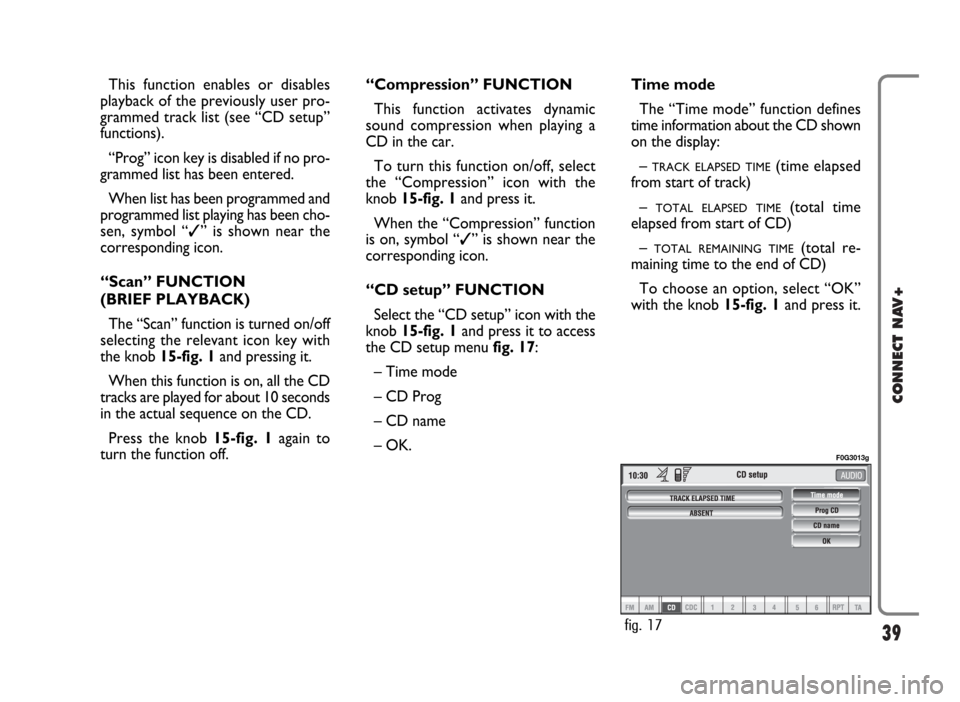
“CD setup” FUNCTION
Select the “CD setup” icon with the
knob 15-fig. 1and press it to access
the CD setup menu fig. 17:
– Time mode
– CD Prog
– CD name
– OK.Time mode
The “Time mode” function defines
time information about the CD shown
on the display:
–
TRACK ELAPSED TIME(time elapsed
from start of track)
–
TOTAL ELAPSED TIME(total time
elapsed from start of CD)
–
TOTAL REMAINING TIME(total re-
maining time to the end of CD)
To choose an option, select “OK”
with the knob 15-fig. 1and press it.
fig. 17
F0G3013g